


你的方法有一些小缺陷,下面的代码将有所帮助。
代码:import numpy as np
import cv2
image = cv2.imread('C:/Users/Jackson/Desktop/score.jpg')
#--- Resized the image to half its dimension maintaining the aspect ratio ---
image = cv2.resize(image, (0, 0), fx = 0.5, fy = 0.5)
draw = np.zeros_like(image)
gray = cv2.cvtColor(image, cv2.COLOR_BGR2GRAY)
#--- I found the inverse binary image, because contours are found for objects in white. Since the border of the page is in black you have to invert the binary image. This is where it went wrong.
ret, thresh = cv2.threshold(gray, 0, 255, cv2.THRESH_BINARY_INV|cv2.THRESH_OTSU)
#--- I did not perform any morphological operation ---
im, cnts, hier = cv2.findContours(thresh, cv2.RETR_EXTERNAL, cv2.CHAIN_APPROX_SIMPLE)
max_area = -1
max_c = 0
for i in range(len(cnts)):
contour = cnts[i]
area = cv2.contourArea(contour)
if (area > max_area):
max_area = area
max_c = i
contour = cnts[max_c]
rect = cv2.minAreaRect(contour)
box = cv2.boxPoints(rect)
box = np.int0(box)
cv2.drawContours(image, [box],-1, (0, 255, 0), 2)
cv2.imshow('Sheet', image)
cv2.waitKey(0)
cv2.destroyAllWindows()
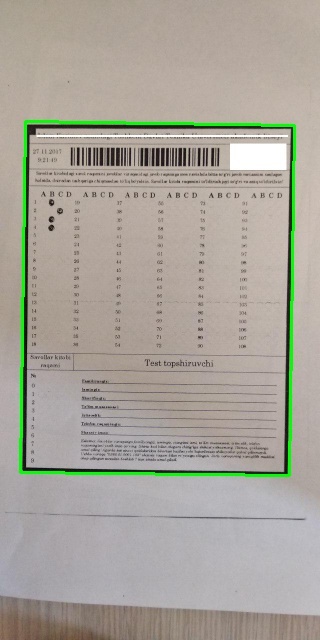
结果:
 1266


 扫一扫


 被折叠的 条评论
为什么被折叠?
 到【灌水乐园】发言


