


 本文档介绍了如何使用SpringBoot结合OpenOffice将doc等文档转换为PDF,并利用pdf.js进行在线预览。在实现过程中,详细阐述了前端pdf.js的集成、后端接口设计以及转换代码的编写。同时,文章还记录了解决因项目目录包含中文导致启动失败的问题。
项目的需求其实很简单,就是需要把doc这些文档转换成pdf,然后提供在线预览。
我这边的思路是:使用pdf.js做为预览控件,后台转换后直接传给控件。
具体如下:
1、下载pdf.js,然后直接丢到自己的项目里

2、前端搞一个object,用来做为内嵌显示,当然嫌麻烦的也可以直接打开个新窗口,想怎么玩都可以:

我这里的data用的是Vue动态绑定,点击不同文件时,就预览对应的文件,
src后面解晰出来是这样的:

【?file=】之前这段就是pdf.js的viewer.html地址,后面是一个接口,用于返回pdf文件,接口里面是这样的:
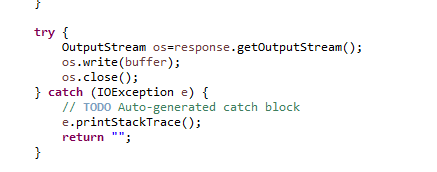
其实就是把转换后的pdf文件写入到response的outputStream里。
3、然后就是后台的转换过程了,首先先下载一个openOffice,去官网下载安装即可。
4、配置yml文件:
先引入pom.xml依赖,这里需要3个包
<!--jodconverter 核心包-->
<!-- https://mvnrepository.com/artifact/org.jodconverter/jodconverter-core -->
<dependency>
    <groupId>org.jodconverter</groupId>
    <artifactId>jodconverter-core</artifactId>
    <version>4.2.2</version>
</dependency>


<!--springboot支持包,里面包括了自动配置类-->
<!-- https://mvnrepository.com/artifact/org.jodconverter/jodconverter-spring-boot-starter -->
<dependency>
    <groupId>org.jodconverter</groupId>
    <artifactId>jodconverter-spring-boot-starter</artifactId>
    <version>4.2.2</version>
</dependency>


<!--jodconverter 本地支持包  -->
<!-- https://mvnrepository.com/artifact/org.jodconverter/jodconverter-local -->
<dependency>
    <groupId>org.jodconverter</groupId>
    <artifactId>jodconverter-local</artifactId>
    <version>4.2.2</version>
</dependency>
然后配置yml
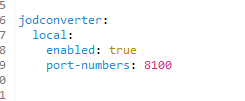
5、直接编写转换类,我是极简主义者,其它的配置全部不需要,只要两步:
//第一步:转换器直接注入
@Autowired
DocumentConverter converter;
//第二步:转换
//sourceFile是源文件,pdfFile是转换后的文件
converter.convert(sourceFile).to(pdfFile).execute();
到这里,文档转换成pdf的功能就全部完成了。
但是启动时出现了一个问题,导致项目启动不来:
: Profile dir 'C:\Users\CarlChen\AppData\Local\Temp\.jodconverter_socket_host-127.0.0.1_port-8100_tcpNoDelay-1' already exists; deleting
: Could not delete profileDir: Unable to delete file: C:\Users\CarlChen\AppData\Local\Temp\.jodconverter_socket_host-127.0.0.1_port-8100_tcpNoDelay-1\user\uno_packages\cache\log.txt
: soffice info (from exec path): Product: OpenOffice - Version: ??? - useLongOptionNameGnuStyle: false
: Starting process with acceptString 'socket,host=127.0.0.1,port=8100,tcpNoDelay=1;urp;StarOffice.ServiceManager' and profileDir 'C:\Users\CarlChen\AppData\Local\Temp\.jodconverter_socket_host-127.0.0.1_port-8100_tcpNoDelay-1'
: Started process; pid = -2 //这里注意这个PID

pid为-2,所以是不可能启动起来的,后面报了这样一个错误
Caused by: org.jodconverter.office.OfficeException: A process with acceptString 'socket,host=127.0.0.1,port=8100,tcpNoDelay=1;urp;StarOffice.ServiceManager' started but its pid could not be found
排错的过程就不细说了,就是跟着源码一步步往上查,最后查到原因,真是欲哭无泪:
报错的原因是因为项目目录出现中文!!!
把目录换成英文目录后错误排除





 扫一扫
扫一扫


 1219
1219


 到【灌水乐园】发言



