


前言
接下来我们要分析:namenode是如何管理元数据。我们看源码,还是要进行场景驱动的方式。
Hadoop fs -mkdir /user/soft
创建了一个目录,HDFS的元数据是不是就要发生变化?这个流程重要,因为我们二次开发就是要去修改这个流程。
对hadoop bug 修复,很多人都在Apache上提交了patch。很多patch其实很水:
1)发生某个单词写错,提交了一个patch
2)某个地方忘记打日志了。
3)忘记判断控制异常 if( xx != null)
在本分栏里修改的是核心流程里面的核心代码。
Demo:
public class FileTest {
	public static void main(String[] args) throws IOException {
		//如何创建一个目录
		Configuration configuration=new Configuration();
		//namenode
		FileSystem fileSystem=FileSystem.newInstance(configuration);
		//TODO 创建目录(分析的是元数据的管理流程)
		fileSystem.mkdirs(new Path(""));
		/**
		 * TODO 接下来分析HDFS上传文件的流程
		 * TODO 做一些重要的初始化工作
		 */
		FSDataOutputStream fsous=fileSystem.create(new Path("/user.txt"));
		//TODO 完成上传文件的流程
		fsous.write("fdsafdsafdsafs".getBytes());
		//MR
		/**
		 * master:
		 *     启动
		 * worker:
		 *     启动
		 *
		 *往上面提交任务:
		 *   wordcount
		 */
		//Spark
	}

}
其中mkdir实际上是调用了Distributefilesystem的mkdir再调用了mkdirsInternal(),最终调用的是namdenode的mkdir
	public boolean primitiveMkdir(String src, FsPermission absPermission, boolean createParent) throws IOException {
		checkOpen();
		if (absPermission == null) {
			absPermission = FsPermission.getDefault().applyUMask(dfsClientConf.uMask);
		}

		if (LOG.isDebugEnabled()) {
			LOG.debug(src + ": masked=" + absPermission);
		}
		TraceScope scope = Trace.startSpan("mkdir", traceSampler);
		try {      //TODO 走的Hadoop的RPC,调用服务端的代码
			return namenode.mkdirs(src, absPermission, createParent);
		} catch (RemoteException re) {
			throw re.unwrapRemoteException(AccessControlException.class, InvalidPathException.class,
					FileAlreadyExistsException.class, FileNotFoundException.class, ParentNotDirectoryException.class,
					SafeModeException.class, NSQuotaExceededException.class, DSQuotaExceededException.class,
					UnresolvedPathException.class, SnapshotAccessControlException.class);
		} finally {
			scope.close();
		}
	}
  public boolean mkdirs(String src, FsPermission masked, boolean createParent)
      throws IOException {
    checkNNStartup();
    if(stateChangeLog.isDebugEnabled()) {
      stateChangeLog.debug("*DIR* NameNode.mkdirs: " + src);
    }
    if (!checkPathLength(src)) {
      throw new IOException("mkdirs: Pathname too long.  Limit "
                            + MAX_PATH_LENGTH + " characters, " + MAX_PATH_DEPTH + " levels.");
    }
           //TODO 调用FSNameSystem创建目录的方法
    return namesystem.mkdirs(src,
        new PermissionStatus(getRemoteUser().getShortUserName(),
            null, masked), createParent);
  }
boolean mkdirs(String src, PermissionStatus permissions,
      boolean createParent) throws IOException {
    HdfsFileStatus auditStat = null;
    checkOperation(OperationCategory.WRITE);
    writeLock();
    try {
      checkOperation(OperationCategory.WRITE);
      //如果是安全模式,我们是创建不了目录的
      checkNameNodeSafeMode("Cannot create directory " + src);
      //TODO 创建目录
      auditStat = FSDirMkdirOp.mkdirs(this, src, permissions, createParent);
    } catch (AccessControlException e) {
      logAuditEvent(false, "mkdirs", src);
      throw e;
    } finally {
      writeUnlock();
    }
    //TODO  元数据日志持久化
    getEditLog().logSync();
    logAuditEvent(true, "mkdirs", src, null, auditStat);
    return true;
  }
 static HdfsFileStatus mkdirs(FSNamesystem fsn, String src,
      PermissionStatus permissions, boolean createParent) throws IOException {
	  //hadoop fs -ls /
	  //hadoop2.6.5
    FSDirectory fsd = fsn.getFSDirectory();
    if(NameNode.stateChangeLog.isDebugEnabled()) {
      NameNode.stateChangeLog.debug("DIR* NameSystem.mkdirs: " + src);
    }
    if (!DFSUtil.isValidName(src)) {
      throw new InvalidPathException(src);
    }
    FSPermissionChecker pc = fsd.getPermissionChecker();
    byte[][] pathComponents = FSDirectory.getPathComponentsForReservedPath(src);
    fsd.writeLock();
    try {
    	//TODO 解析要创建目录的路径
      src = fsd.resolvePath(pc, src, pathComponents);
      INodesInPath iip = fsd.getINodesInPath4Write(src);
      if (fsd.isPermissionEnabled()) {
        fsd.checkTraverse(pc, iip);
      }
      //  /user/hive/warehouse
      //  /user/hive/warehouse/data/mytable
      //找到最后一个node
      /**
       * 比如我们现在已经存在的目录是 /user/hive/warehouse
       * 我们需要创建的目录是:/user/hive/warehouse/data/mytable
       * 首先找到最后一个INode,其实就是warehouse 这个INode
       */
      final INode lastINode = iip.getLastINode();
      if (lastINode != null && lastINode.isFile()) {
        throw new FileAlreadyExistsException("Path is not a directory: " + src);
      }

      INodesInPath existing = lastINode != null ? iip : iip.getExistingINodes();
      if (lastINode == null) {
        if (fsd.isPermissionEnabled()) {
          fsd.checkAncestorAccess(pc, iip, FsAction.WRITE);
        }

        if (!createParent) {
          fsd.verifyParentDir(iip, src);
        }

        // validate that we have enough inodes. This is, at best, a
        // heuristic because the mkdirs() operation might need to
        // create multiple inodes.
        fsn.checkFsObjectLimit();
        /**
         * 已存在: /user/hive/warehouse
         * 要创建: /user/hive/warehouse/data/mytable
         * 需要创建的目录 /data/mytable
         *
         */
        List<String> nonExisting = iip.getPath(existing.length(),
            iip.length() - existing.length());
        int length = nonExisting.size();
        //TODO 需要创建多级目录走这儿
        if (length > 1) {
          List<String> ancestors = nonExisting.subList(0, length - 1);
          // Ensure that the user can traversal the path by adding implicit
          // u+wx permission to all ancestor directories
          existing = createChildrenDirectories(fsd, existing, ancestors,
              addImplicitUwx(permissions, permissions));
          if (existing == null) {
            throw new IOException("Failed to create directory: " + src);
          }
        }
        //TODO 如果只需要创建一个目录就走这儿
        if ((existing = createChildrenDirectories(fsd, existing,
            nonExisting.subList(length - 1, length), permissions)) == null) {
          throw new IOException("Failed to create directory: " + src);
        }
      }
      return fsd.getAuditFileInfo(existing);
    } finally {
      fsd.writeUnlock();
    }
  }
注意:FSDirectory:这个就是管理的元数据的目录树(FSImage),这个元数据是在Namenode的内存里面。

启动的时候:1)Editlog + faimage  ->  FSImage(内存里面,由FSDirectory来管理的) 不断变化
            2)Fsimage+editlog(不断变化,磁盘上面,FSNameSystem)
 * FSDirectory 和FSNamesytem 都是管理命名空间的状态(管理元数据的)
 *
 * 1)FSDirectory是一个直接在内存里面的数据结构,其实就是内存目录树
 *
 * 2)FSNamesystem是把我们的元数据记录信息是持久化到磁盘上面的(先写到内存,再写到磁盘)
  //这个就是跟目录 /
 FSDirectory里面有属性: INodeDirectory rootDir;//""
 INodeDirectory里面有属性:
  //这是一个主要的属性
  //往这个里面存子节点
  private List<INode> children = null;

 * Inode这个设计理念,其实是HDFS模仿 Linux
 *
 * HDFS里面无论是目录还是文件,其实都是一个Inode.
 * 不错,如果你是一个目录,那么你的类型就是INodeDirectory
 * 如果你是一个文件你的目录就是一个InodeFile
 * 在HDFS里面Inode是一个抽象类,这个抽象类有两个重要的实现类:
 * 1)INodeDirectory()
 * 2) INodeFile
 */
创建目录
  private static INodesInPath createChildrenDirectories(FSDirectory fsd,
      INodesInPath existing, List<String> children, PermissionStatus perm)
      throws IOException {
    assert fsd.hasWriteLock();

    for (String component : children) {
    	//TODO 一个目录一个目录去创建
       //如果我们只创建的目录只有一个那么这个循环就只运行一次。
      existing = createSingleDirectory(fsd, existing, component, perm);
      if (existing == null) {
        return null;
      }
    }
    return existing;
  }
private static INodesInPath createSingleDirectory(FSDirectory fsd,
      INodesInPath existing, String localName, PermissionStatus perm)
      throws IOException {
    assert fsd.hasWriteLock();
    //TODO  更新文件目录树,这棵目录树是存在于内存中的,有FSNameSystem管理的
    existing = unprotectedMkdir(fsd, fsd.allocateNewInodeId(), existing,
        localName.getBytes(Charsets.UTF_8), perm, null, now());
    if (existing == null) {
      return null;
    }

    final INode newNode = existing.getLastINode();
    // Directory creation also count towards FilesCreated
    // to match count of FilesDeleted metric.
    NameNode.getNameNodeMetrics().incrFilesCreated();

    String cur = existing.getPath();
    //TODO 把元数据信息记录到磁盘上(但是一开始先写到内存)
    fsd.getEditLog().logMkDir(cur, newNode);
    if (NameNode.stateChangeLog.isDebugEnabled()) {
      NameNode.stateChangeLog.debug("mkdirs: created directory " + cur);
    }
    return existing;
  }
private static INodesInPath unprotectedMkdir(FSDirectory fsd, long inodeId,
      INodesInPath parent, byte[] name, PermissionStatus permission,
      List<AclEntry> aclEntries, long timestamp)
      throws QuotaExceededException, AclException, FileAlreadyExistsException {
    assert fsd.hasWriteLock();
    assert parent.getLastINode() != null;
    if (!parent.getLastINode().isDirectory()) {
      throw new FileAlreadyExistsException("Parent path is not a directory: " +
          parent.getPath() + " " + DFSUtil.bytes2String(name));
    }
    /**
     * FSDirectory 文件目录树  /  是根目录
     * INodeDirectory代表目录
     * INodeFile代表文件
     *
     *
     */
    //TODO 封装成一个目录
    final INodeDirectory dir = new INodeDirectory(inodeId, name, permission,
        timestamp);
    // /user/hive/warehouse/
    //  /user/hive/warehouse/data
    //TODO 往文件目录树 该添加目录的地方添加节点
    INodesInPath iip = fsd.addLastINode(parent, dir, true);
    if (iip != null && aclEntries != null) {
      AclStorage.updateINodeAcl(dir, aclEntries, Snapshot.CURRENT_STATE_ID);
    }
    return iip;
  }
  public INodesInPath addLastINode(INodesInPath existing, INode inode,
      boolean checkQuota) throws QuotaExceededException {
    assert existing.getLastINode() != null &&
        existing.getLastINode().isDirectory();

    final int pos = existing.length();
    // Disallow creation of /.reserved. This may be created when loading
    // editlog/fsimage during upgrade since /.reserved was a valid name in older
    // release. This may also be called when a user tries to create a file
    // or directory /.reserved.
    if (pos == 1 && existing.getINode(0) == rootDir && isReservedName(inode)) {
      throw new HadoopIllegalArgumentException(
          "File name \"" + inode.getLocalName() + "\" is reserved and cannot "
              + "be created. If this is during upgrade change the name of the "
              + "existing file or directory to another name before upgrading "
              + "to the new release.");
    }
    //TODO 获取父目录
    final INodeDirectory parent = existing.getINode(pos - 1).asDirectory();
    // The filesystem limits are not really quotas, so this check may appear
    // odd. It's because a rename operation deletes the src, tries to add
    // to the dest, if that fails, re-adds the src from whence it came.
    // The rename code disables the quota when it's restoring to the
    // original location because a quota violation would cause the the item
    // to go "poof".  The fs limits must be bypassed for the same reason.
    if (checkQuota) {
      final String parentPath = existing.getPath(pos - 1);
      verifyMaxComponentLength(inode.getLocalNameBytes(), parentPath);
      verifyMaxDirItems(parent, parentPath);
    }
    // always verify inode name
    verifyINodeName(inode.getLocalNameBytes());

    final QuotaCounts counts = inode.computeQuotaUsage(getBlockStoragePolicySuite());
    updateCount(existing, pos, counts, checkQuota);

    boolean isRename = (inode.getParent() != null);
    boolean added;
    try {
      //TODO 在父目录下面添加一个子节点
      added = parent.addChild(inode, true, existing.getLatestSnapshotId());
    } catch (QuotaExceededException e) {
      updateCountNoQuotaCheck(existing, pos, counts.negation());
      throw e;
    }
    if (!added) {
      updateCountNoQuotaCheck(existing, pos, counts.negation());
      return null;
    } else {
      if (!isRename) {
        AclStorage.copyINodeDefaultAcl(inode);
      }
      addToInodeMap(inode);
    }
    return INodesInPath.append(existing, inode, inode.getLocalNameBytes());
  }

  INodesInPath addLastINodeNoQuotaCheck(INodesInPath existing, INode i) {
    try {
      return addLastINode(existing, i, false);
    } catch (QuotaExceededException e) {
      NameNode.LOG.warn("FSDirectory.addChildNoQuotaCheck - unexpected", e);
    }
    return null;
  }
  public boolean addChild(INode node, final boolean setModTime,
      final int latestSnapshotId) throws QuotaExceededException {
    final int low = searchChildren(node.getLocalNameBytes());
    if (low >= 0) {
      return false;
    }

    if (isInLatestSnapshot(latestSnapshotId)) {
      // create snapshot feature if necessary
      DirectoryWithSnapshotFeature sf = this.getDirectoryWithSnapshotFeature();
      if (sf == null) {
        sf = this.addSnapshotFeature(null);
      }
      return sf.addChild(this, node, setModTime, latestSnapshotId);
    }
    //TODO 添加子节点
    addChild(node, low);
    if (setModTime) {
      // update modification time of the parent directory
      updateModificationTime(node.getModificationTime(), latestSnapshotId);
    }
    return true;
  }
继续之前的操作:把元数据信息记录到磁盘上
 //TODO 把元数据信息记录到磁盘上(但是一开始先写到内存)
    fsd.getEditLog().logMkDir(cur, newNode);
    if (NameNode.stateChangeLog.isDebugEnabled()) {
      NameNode.stateChangeLog.debug("mkdirs: created directory " + cur);
    }
public void logMkDir(String path, INode newNode) {
    PermissionStatus permissions = newNode.getPermissionStatus();

    //TODO 创建日志对象  【构建者模式】 注意积累
    MkdirOp op = MkdirOp.getInstance(cache.get())
      .setInodeId(newNode.getId())
      .setPath(path)
      .setTimestamp(newNode.getModificationTime())
      .setPermissionStatus(permissions);

    AclFeature f = newNode.getAclFeature();
    if (f != null) {
      op.setAclEntries(AclStorage.readINodeLogicalAcl(newNode));
    }

    XAttrFeature x = newNode.getXAttrFeature();
    if (x != null) {
      op.setXAttrs(x.getXAttrs());
    }
    //TODO 记录日志
    logEdit(op);
  }
void logEdit(final FSEditLogOp op) {

    synchronized (this) {
      assert isOpenForWrite() :
        "bad state: " + state;

      // wait if an automatic sync is scheduled
      //一开始不需要等待
      waitIfAutoSyncScheduled();
      //最重要的就是生成了全局唯一的事务ID(日志)

      // name    editlog_0000000000_0000000012.log
      //         editlog_0000000013_0000000022.log
      //TODO 步骤一:获取当前的独一无二的事务ID
      long start = beginTransaction();
      op.setTransactionId(txid);

      try {
    	  /**
    	   * 1) namenode editlog 文件缓冲里面
    	   * 2) journalnode的内存缓冲
    	   */
    	  //TODO 步骤二:把元数据写入到内存缓冲
        editLogStream.write(op);
      } catch (IOException ex) {
        // All journals failed, it is handled in logSync.
      } finally {
        op.reset();
      }

      endTransaction(start);

      // check if it is time to schedule an automatic sync
      // > 512 true  !true=false
      if (!shouldForceSync()) {
        return;
      }
     //TODO 如果到这儿就说明 缓冲区存满了
      isAutoSyncScheduled = true;
    }
    //TODO 把数据持久化到磁盘
    logSync();
  }
生成独一无二的id号
private long beginTransaction() {
    assert Thread.holdsLock(this);
    // get a new transactionId
    //保证全局唯一,有序


    //
    // record the transactionId when new data was written to the edits log
    //
    //每一个线程进来,每个线程自己都有的一个副本。
    TransactionId id = myTransactionId.get();
    //每个线程都会有自己的关于日志的事务ID。
    txid++;
    id.txid = txid;
    return monotonicNow();
  }
public void logSync() {
    long syncStart = 0;

    // Fetch the transactionId of this thread.
    long mytxid = myTransactionId.get().txid;

    boolean sync = false;
    try {
      EditLogOutputStream logStream = null;
      synchronized (this) {
        try {
          printStatistics(false);
          //TODO 如果有人已经在刷磁盘了,当前线程就不用刷写磁盘了
          while (mytxid > synctxid && isSyncRunning) {
            try {
              //释放锁
              wait(1000);
            } catch (InterruptedException ie) {
            }
          }

          //
          // If this transaction was already flushed, then nothing to do
          //
          if (mytxid <= synctxid) {
            numTransactionsBatchedInSync++;
            if (metrics != null) {
              // Metrics is non-null only when used inside name node
              metrics.incrTransactionsBatchedInSync();
            }
            return;
          }

          // now, this thread will do the sync
          syncStart = txid;
          isSyncRunning = true;
          sync = true;

          // swap buffers
          try {
            if (journalSet.isEmpty()) {
              throw new IOException("No journals available to flush");
            }
            //TODO 交换内存缓冲
            editLogStream.setReadyToFlush();
          } catch (IOException e) {
            final String msg =
                "Could not sync enough journals to persistent storage " +
                "due to " + e.getMessage() + ". " +
                "Unsynced transactions: " + (txid - synctxid);
            LOG.fatal(msg, new Exception());
            synchronized(journalSetLock) {
              IOUtils.cleanup(LOG, journalSet);
            }
            terminate(1, msg);
          }
        } finally {
          // Prevent RuntimeException from blocking other log edit write
          //TODO  恢复标志位 和 唤醒等待的线程
          doneWithAutoSyncScheduling();
        }
        //editLogStream may become null,
        //so store a local variable for flush.
        logStream = editLogStream;
      }//TODO 释放锁

      // do the sync
      long start = monotonicNow();
      try {
        if (logStream != null) {
        	//把数据写到磁盘
        	//默默的在刷写磁盘就可以。
        	//因为这个是比较耗费时间的操作,有可能耗费几十毫秒。
        	/**
        	 * 內存一: 服務于namenode的内存
        	 * 內存二: 服務于journalnode的内存
        	 */
        	//TODO 把数据写入到磁盘
          logStream.flush();
        }
      } catch (IOException ex) {
        synchronized (this) {
          //打印日志
          final String msg =
              "Could not sync enough journals to persistent storage. "
              + "Unsynced transactions: " + (txid - synctxid);
          //如果我们的程序里面发生了fatal 级别日志,这个错误
          //就是灾难型的错误。
          LOG.fatal(msg, new Exception());
          synchronized(journalSetLock) {
            IOUtils.cleanup(LOG, journalSet);
          }
          //执行这段代码
          terminate(1, msg);
        }
      }
      long elapsed = monotonicNow() - start;

      if (metrics != null) { // Metrics non-null only when used inside name node
        metrics.addSync(elapsed);
      }

    } finally {
      // Prevent RuntimeException from blocking other log edit sync
      synchronized (this) {
        if (sync) {
          synctxid = syncStart;
          //TODO 恢复标志位
          isSyncRunning = false;
        }
        //TODO 唤醒线程
        this.notifyAll();
     }
    }
  }
流程
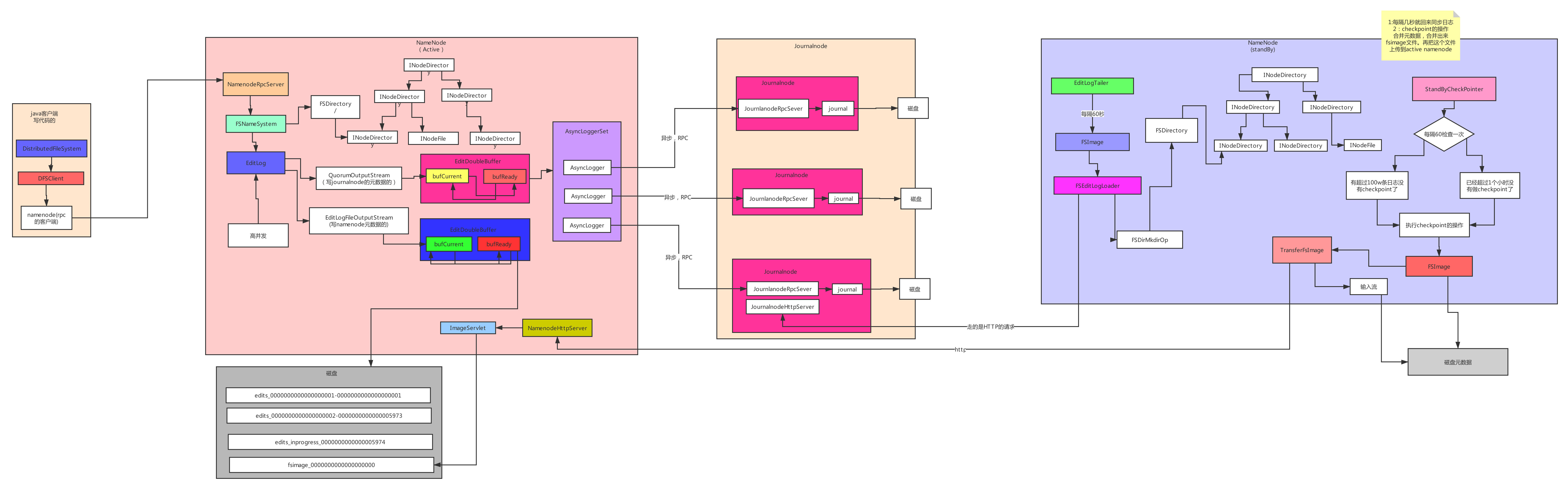
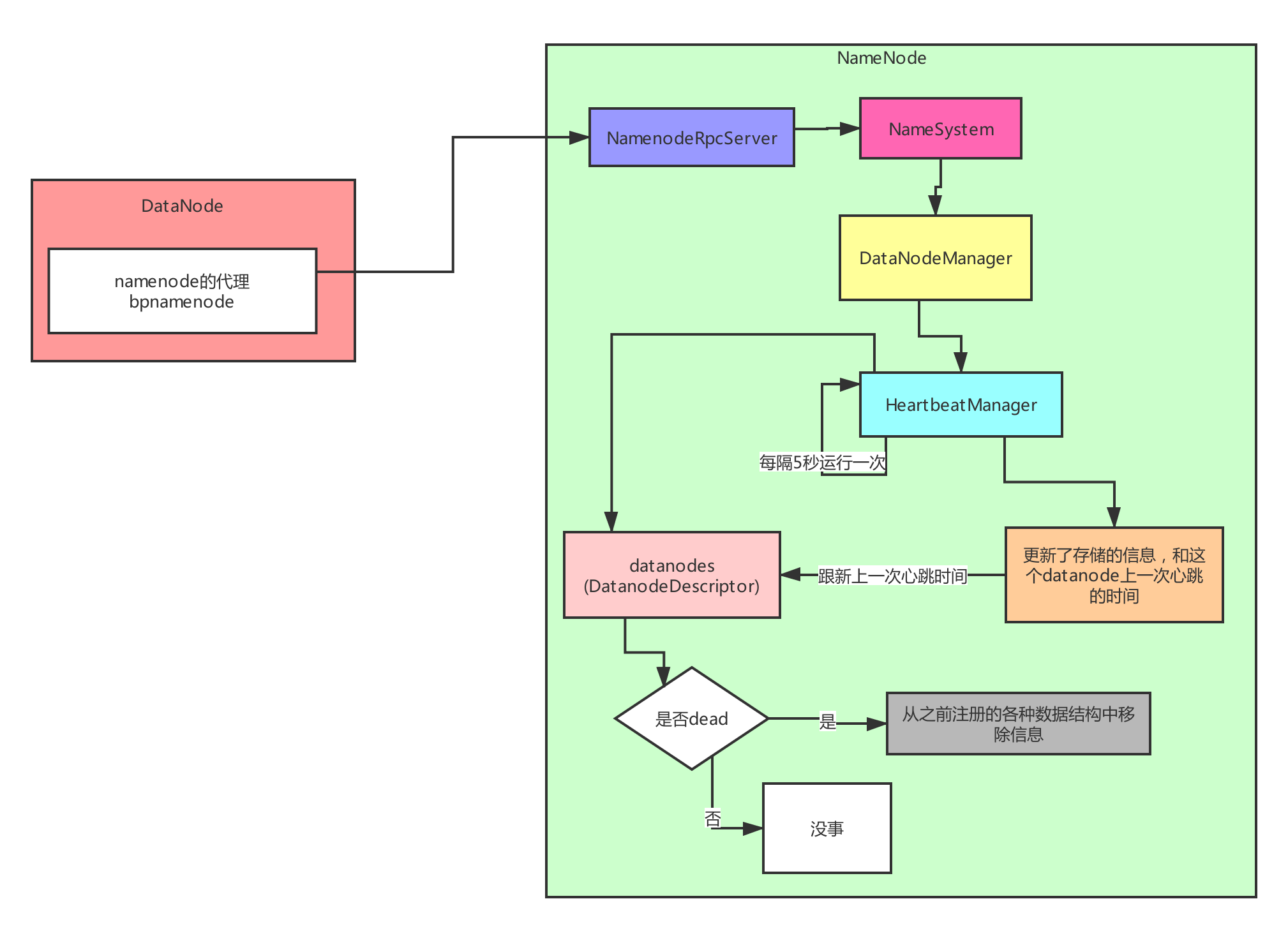
知识补充
Namenode里面的元数据是两种状态进行存储的:
1)一个是存储在内存里面,就是我们刚刚说的目录树。
因为目录树就是一个List结构,也就是说它就是一个内存,在内存里面更新元数据是很快的。
2)所以也在磁盘上面存储的了元数据。问题来了,大家想我们把一个东西写入到磁盘,性能好吗?肯定不好。
Namenode是整个集群的中心,我们在hadoop上面进行spark的计算,hive的计算,flink的计算,hbase的计算 等等的操作,会不停的,高并发的往namenode上面写元数据。
有可能一天要写1亿条元数据,或者一秒钟就要写1500/2000条元数据。所以需要namenode这儿需要支撑超高的并发。
其实hadoop采取的思路是双缓冲机制:就是开辟两个内存,一个在后台线程下写入磁盘,另外一个在接收,而且每个操作是有顺序的。
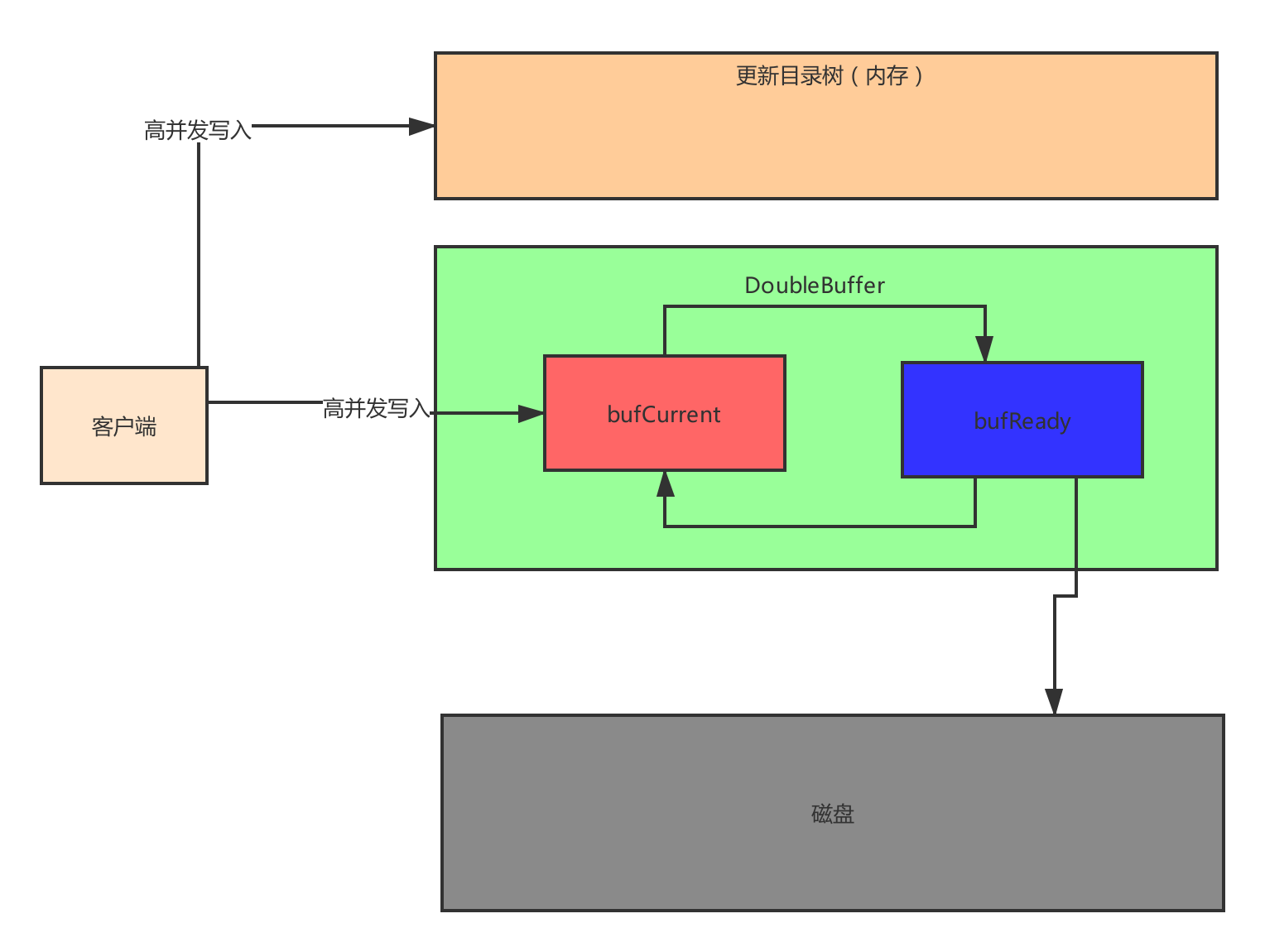
其代码的设计结构:
while (true) {
  // init stuff
  try {
    //TODO 注册核心代码
    //这个方法重要
    connectToNNAndHandshake();
    break;
  } catch (IOException ioe) {
    // Initial handshake, storage recovery or registration failed
    runningState = RunningState.INIT_FAILED;
    if (shouldRetryInit()) {
      // Retry until all namenode's of BPOS failed initialization
      LOG.error("Initialization failed for " + this + " "
          + ioe.getLocalizedMessage());
      //TODO 如果有问题sleep 5秒
      sleepAndLogInterrupts(5000, "initializing");
    } else {
      runningState = RunningState.FAILED;
      LOG.fatal("Initialization failed for " + this + ". Exiting. ", ioe);
      return;
    }
  }
}
详细实现是:
	/**
	 * 我用面向对象的思想,设计一个对象
	 * 代表着一条元数据信息
	 * @author Administrator
	 *
	 */
	public class EditLog{
		//事务的ID
		public long taxid;
		public String log;

		public EditLog(long taxid, String log) {
			this.taxid = taxid;
			this.log = log;
		}

		@Override
		public String toString() {
			return "EditLog [taxid=" + taxid + ", log=" + log + "]";
		}

	}
	public class DoubleBuffer{
		//写数据,有序队列
		LinkedList<EditLog> currentBuffer=new LinkedList<EditLog>();
		//用来把数据持久化到磁盘上面的内存
		LinkedList<EditLog> syncBuffer=new LinkedList<EditLog>();
		/**
		 * 写元数据信息
		 * @param editLog
		 */
		public void write(EditLog editLog){
			currentBuffer.add(editLog);

		}
		/**
		 * 把数据写到磁盘
		 */
		public void flush() {
			for(EditLog editLog:syncBuffer) {
				//把打印出来,我们就认为这就是写到磁盘了
				System.out.println(editLog);
			}
			syncBuffer.clear();

		}
		/**
		 * 交换一下内存
		 */
		public void exchange() {
			LinkedList<EditLog> tmp=currentBuffer;
			currentBuffer=syncBuffer;
			syncBuffer=tmp;
		}
		/**
		 * 获取到正在同步数据的内存里面事务ID最大的ID
		 * @return
		 */
		public long getMaxTaxid() {
			return syncBuffer.getLast().taxid;
		}

	}

}
package com.kaikeba.hdfsdemo.lesson02;

import java.util.LinkedList;

/**
 * 管理元数据
 * 磁盘
 * @author Administrator
 *
 * 这段代码我是模仿hadoop的源码的写的,大家一定要掌握
 * 后面我们要修改这段代码
 * 其实我现在写的这段代码跟hadoop的源码的相似有90%的相似
 * 5%
 * 5%
 *
 */
public class FSEdit {
	public static void main(String[] args) {
		FSEdit fs=new FSEdit();
		for (int i = 0; i < 1000; i++) {
			new Thread(new Runnable() {
				@Override
				public void run() {
					for (int j = 0; j < 100; j++) {
						fs.logEdit("日志");
					}

				}
			}).start();
		}
	}
	long taxid=0L;//
	DoubleBuffer doubleBuffer=new DoubleBuffer();
	//每个线程自己拥有的副本
	ThreadLocal<Long> threadLocal=new ThreadLocal<Long>();
	//是否后台正在把数据同步到磁盘上
	public boolean isSyncRunning =false;
	//正在同步磁盘 的内存块里面最大的一个ID号。
	long maxtaxid=0L;
	boolean isWait=false;
	/**
	 * 写元数据日志的核心方法
	 * @param log
	 */
	private void logEdit(String log) {
		// 性能能好吗?你都加锁了
		//新能是OK的,为什么,这把锁里面是往内存里面写数据
		//能支持很高的并发。
		//超高并发
		//线程1 1 线程2 2  线程3 3
		//线程4 5
		synchronized (this) {
			taxid++;
			threadLocal.set(taxid);
			EditLog editLog=new EditLog(taxid,log);
			//往内存里面写东西
			doubleBuffer.write(editLog);

		} //释放锁
		//把数据持久化到磁盘
		//代码运行到这儿的时候 currentBuffer 内存里面已经有3条数据了。

		//没有加锁,这叫分段加锁

		//重新加锁
		logFlush();

	}
	private void logFlush() {
		//重新加锁 线程2
		synchronized(this) {
			if(isSyncRunning) {//false true
				//获取当前线程的是事务ID
				//2
				long localTaxid=threadLocal.get();
				//2 < 3
				//5 < 3
				if(localTaxid <= maxtaxid) {
					return ;

				}
				if(isWait) {
					return;
				}
				isWait=true;
				while(isSyncRunning) {
					try {
						//一直等待
						//wait这个操作是释放锁
						this.wait(1000);
					} catch (InterruptedException e) {
						// TODO Auto-generated catch block
						e.printStackTrace();
					}

				}
				isWait=false;
				//
			}
			//代码就走到这儿
			//syncBuffer(1,2,3)
			doubleBuffer.exchange();
			//maxtaxid = 3
			if(doubleBuffer.syncBuffer.size() > 0) {
				maxtaxid=doubleBuffer.getMaxTaxid();
			}
			isSyncRunning=true;

		}//释放锁
		//把数据持久化到磁盘,比较耗费性能的。
		// 1 2 3写到磁盘
		doubleBuffer.flush();
		//分段加锁
		synchronized (this) {
			//修改标志位
			isSyncRunning=false;
			//唤醒wait;
			this.notifyAll();

		}
	}
学可能需要补的知识点:
1)this.threadGroup.setDaemon(true); // auto destroy when empty
2)	synchronized (this) {}





 扫一扫
扫一扫


 2000
2000

 被折叠的 条评论
为什么被折叠?
被折叠的 条评论
为什么被折叠?
 到【灌水乐园】发言





