java swing转android_Java: Swing中引入Android的NinePatch技术,让Swing拥有Android的外观定制能力...

本文展示了如何在Java Swing中使用NinePatch技术,以实现类似Android的外观定制,允许图片根据组件大小自动拉伸。通过引入NinePatch,Swing的外观定制变得更灵活,无需为不同尺寸的组件准备多个图片。

【摘要】

本文诣在展示如何在Swing中引入 NinePatch技术(早期有文章里中文译作九格图,暂且这么叫吧^_^,但此术非传统移动手机上的功能布局——九格图哦)。

【准备篇】

Q:何为 NinePatch技术?

A:说简单点,就是用于对图片据屏幕大小进行自动拉伸的技术。更准确的介绍详见此文:http://www.yixieshi.com/ucd/9142.html。

Q:NinePatch对Swing意味着什么?

A:利用NinePatch技术,比如:你在美化Swing的按钮UI时,再也不用根据不同的按钮大小准备不同的图片了,一张图片解决不同按钮按各自大小自动拉伸填充的问题,多么神奇!

当然,如果你对 程序比较熟,或者说对 程序外观定制比较熟的话,你将会更清楚这一点——Swing的外观定制能力将会因此变的无比灵活和强大,

很多不可能将成为现实。Android程序的外观定制其实有点Java标准平台换肤技术Synth的影子,但显然,这个聪名的小改进,使得 外观定制比Swing更容易、更灵活。

Q:从何处获得NinePatch技术呢?

A:NinePatch技术的核心只有3到4个类,拿过来用就可以了,源码地址可以在此链接找到:

后可以在附件里下载哦。

【准备好.9.png图片】

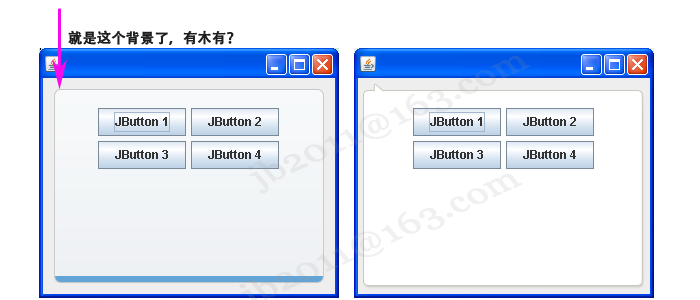
本图片将使用NinePatch技术作为演示代码中的一JPanel背景进行自动填充之用,用不同的2张图是为了方便进行效果展示:

60fdac96813ac8230cc3741ffa336235.png     

4b729585f6ce24b8ff30892de0a937cd.png

【测试代码】

69c5a8ac3fa60e0848d784a6dd461da6.png

packagejb2011.t;importjava.awt.BorderLayout;importjava.awt.Graphics;importjava.awt.Graphics2D;importjava.awt.Rectangle;importjava.io.InputStream;importjavax.swing.BorderFactory;importjavax.swing.JButton;importjavax.swing.JFrame;importjavax.swing.JPanel;importjavax.swing.SwingUtilities;importcom.android.ninepatch.NinePatch;/*** 本类用于测试从Android中引入的NinePatch(九格图)技术的可行性.

*

*@authorjb2011@163.com

*@version1.0*/

class Test extendsJPanel

{//NinePatch作为全局对象,提高性能

privateNinePatch mPatch;publicTest()

{super (newBorderLayout());//*** 关键代码:读取9格图 START

try{

InputStream stream= this.getClass().getResourceAsStream(//"content_bg2.9.png"

"content_bg3.9.png");

mPatch= NinePatch.load(stream, true /*is9Patch*/, false /*convert*/);

}catch(Exception e){

e.printStackTrace();

}//*** 关键代码:读取9格图 END//加入一个面板,用于演示

JPanel p = newJPanel();

p.setBorder(BorderFactory.createEmptyBorder(20, 20, 20, 20));//该面板设置成背景透明

p.setOpaque(false);this.add(p);//加入演示组件

p.add(new JButton("JButton 1"));

p.add(new JButton("JButton 2"));

p.add(new JButton("JButton 3"));

p.add(new JButton("JButton 4"));

}/*** 重写父类方法,以便实现自定义背景的绘制.*/@Overrideprotected voidpaintComponent(Graphics g)

{

Graphics2D g2=(Graphics2D) g;

Rectangle clip=g2.getClipBounds(); // 有点小问题,要用(0, 0, getWidth(), getHeight()),否则每次绘制的clip都不一样而导致异常现象.//*** 关键代码:使用9格图 START//使用9格图绘制面板的背景

mPatch.draw(g2, clip.x, clip.y, clip.width, clip.height);//*** 关键代码:使用9格图 END

}public static void main(finalString[] args)

{

SwingUtilities.invokeLater(newRunnable() {public voidrun() {

JFrame frame= newJFrame();

frame.setContentPane(new JPanel(newBorderLayout()));

((JPanel)frame.getContentPane()).setBorder(BorderFactory.createEmptyBorder(5,5,5,5));

frame.getContentPane().add(newTest(), BorderLayout.CENTER);

frame.setSize(300,250);

frame.setDefaultCloseOperation(JFrame.EXIT_ON_CLOSE);

frame.setLocationRelativeTo(null);

frame.setVisible(true);

}

});

}

}

69c5a8ac3fa60e0848d784a6dd461da6.png

【运行效果图】

6fb765f2f7e7f88a5717c2978a22e26d.png

【附件下载】

测试代码完整Eclipse3.5.2工程(含NinePatch的jar包哦):

================================================================================

【最后再啰嗦几句】

潜水了很多年,得益于许多无私网友的奉献,越发觉得很有必要与人分享一些东西。接下来将陆续写出“Swing整容”系列文章,

希望对需要的人有用,但因水平确实有限,不喜者还请勿喷,多谢。

有人说,Swing很丑,这话没错,但Swing真的没救了?答案当然是否定的。接下来的文章将会与Swing的L&F有关,谢谢关注。

“民工甲”的“Swing三刀”系列文章给了我最近一次Swing美化工作的部分灵感,非常感谢作者的无私,文章地址是:

http://joshuaxiao.iteye.com/blog/707514。“WilliamChen”的Swing技术文章也是相当不错,可惜多年不更新了,有兴趣的朋

From: http://www.cnblogs.com/jb2011/archive/2012/05/02/2479002.html

@import url(http://www.cppblog.com/CuteSoft_Client/CuteEditor/Load.ashx?type=style&file=SyntaxHighlighter.css);@import url(/css/cuteeditor.css);

java. nio. file. InvalidPathException: Illegal char <*> at index 33: C:\Users\ASUS\AppData\Local\Temp\* at sun. nio. fs. WindowsPathParser. normalize at sun. nio. fs. WindowsPathParser. parse at sun. nio. fs. WindowsPathParser. parse at sun. nio. fs. WindowsPath. parse at sun. nio. fs. WindowsFileSystem. getPath at com. intellij. platform. core. nio. fs. DelegatingFileSystem. getPath(DelegatingFileSystem. java:96) at java. nio. file. Path. of at java. nio. file. Paths. get at javax. imageio. ImageIO. hasCachePermission at javax. imageio. ImageIO. createImageInputStream at javax. imageio. ImageIO. read at com. android. ninepatch. GraphicsUtilities. loadCompatibleImage(GraphicsUtilities. java:37) at com. android. ninepatch. NinePatch. load(NinePatch. java:97) at com. android. layoutlib. bridge. impl. ResourceHelper. getDrawable(ResourceHelper. java:432) at android. content. res. BridgeTypedArray. getDrawable(BridgeTypedArray. java:688) at android. graphics. drawable. StateListDrawable. inflateChildElements(StateListDrawable. java:182) at android. graphics. drawable. StateListDrawable. inflate(StateListDrawable. java:126) at android. graphics. drawable. DrawableInflater. inflateFromXmlForDensity(DrawableInflater. java:141) at android. graphics. drawable. Drawable. createFromXmlInnerForDensity(Drawable. java:1394) at android. graphics. drawable. Drawable. createFromXmlForDensity(Drawable. java:1355) at android. graphics. drawable. Drawable. createFromXml(Drawable. java:1330) at com. android. layoutlib. bridge. impl. ResourceHelper. getDrawable(ResourceHelper. java:395) at android. content. res. Resources_Delegate. getDrawable(Resources_Delegate. java:188) at android. content. res. Resources. getDrawable(Resources. java:952) at android. content. Context. getDrawable(Context. java:1005) at androidx. core. content. ContextCompat$Api21Impl. getDrawable ... (ContextCompat. java:1012) at androidx. core. content. ContextCompat. getDrawable(ContextCompat. java:522) at androidx. appcompat. widget. ResourceManagerInternal. getDrawable(ResourceManagerInternal. java:149) at androidx. appcompat. widget. ResourceManagerInternal. getDrawable(ResourceManagerInternal. java:137) at androidx. appcompat. content. res. AppCompatResources. getDrawable(AppCompatResources. java:66) at androidx. appcompat. widget. TintTypedArray. getDrawable(TintTypedArray. java:84) at androidx. appcompat. widget. SwitchCompat.<init>(SwitchCompat. java:262) at com. google. android. material. switchmaterial. SwitchMaterial.<init>(SwitchMaterial. java:70) at com. google. android. material. switchmaterial. SwitchMaterial.<init>(SwitchMaterial. java:66) at jdk. internal. reflect. DirectConstructorHandleAccessor. newInstance at java. lang. reflect. Constructor. newInstanceWithCaller at java. lang. reflect. Constructor. newInstance at android. view. LayoutInflater. createViewFromTag(LayoutInflater. java:849) at android. view. LayoutInflater. rInflate_Original(LayoutInflater. java:1011) at android. view. LayoutInflater_Delegate. rInflate(LayoutInflater_Delegate. java:72) at android. view. LayoutInflater. rInflate(LayoutInflater. java:985) at android. view. LayoutInflater. rInflateChildren(LayoutInflater. java:972) at android. view. LayoutInflater. rInflate_Original(LayoutInflater. java:1014) at android. view. LayoutInflater_Delegate. rInflate(LayoutInflater_Delegate. java:72) at android. view. LayoutInflater. rInflate(LayoutInflater. java:985) at android. view. LayoutInflater. rInflateChildren(LayoutInflater. java:972) at android. view. LayoutInflater. rInflate_Original(LayoutInflater. java:1014) at android. view. LayoutInflater_Delegate. rInflate(LayoutInflater_Delegate. java:72) at android. view. LayoutInflater. rInflate(LayoutInflater. java:985) at android. view. LayoutInflater. rInflateChildren(LayoutInflater. java:972) at android. view. LayoutInflater. inflate(LayoutInflater. java:570) at android. view. LayoutInflater. inflate(LayoutInflater. java:433) Copy stack to clipboard
最新发布
08-05
评论
成就一亿技术人!
拼手气红包6.0元
还能输入1000个字符  | 博主筛选后可见
 
红包 添加红包
表情包 插入表情
 条评论被折叠 查看
添加红包

请填写红包祝福语或标题

红包个数最小为10个

红包金额最低5元

当前余额3.43前往充值 >
需支付:10.00
成就一亿技术人!
领取后你会自动成为博主和红包主的粉丝 规则
hope_wisdom
发出的红包
实付
使用余额支付
点击重新获取
扫码支付
钱包余额 0

抵扣说明:

1.余额是钱包充值的虚拟货币,按照1:1的比例进行支付金额的抵扣。
2.余额无法直接购买下载,可以购买VIP、付费专栏及课程。

余额充值