
Populate A List Item With Record Group In Oracle Forms Using Populate_List And Create_Group_From_Que...

本文介绍如何使用OracleForms中的Create_Group_From_Query、Populate_List和Populate_Group命令来动态填充列表项。通过运行时指定的查询填充列表,并提供了一个示例及下载链接。
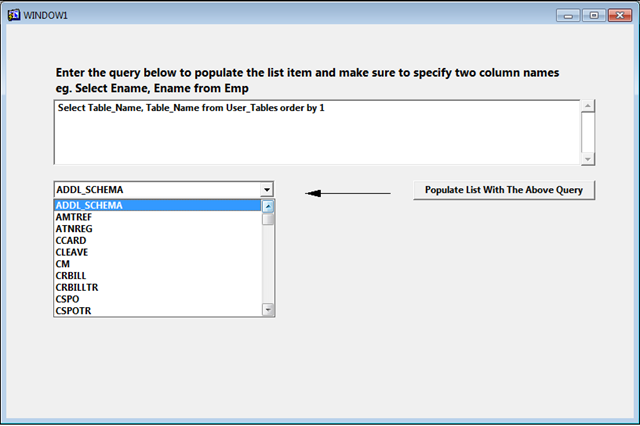
Example is given below to Populate a List Item in Oracle Forms using Create_Group_From_Query , Populate_List and Populate_Group command. In this example you can specify the query at run time to populate the list item with that query result.
 
Following is the screen shot for this example
 
image
 
You can also download this Oracle Form fmb from Google Drive with the following link Listitem.fmb
 
The following is the code written on the "Populate List With The Above Query" button:
 
DECLARE
   rg_name   VARCHAR2 (40) := 'DYNGRP';
   rg_id     RecordGroup;
   errcode   NUMBER;
BEGIN
   /*
   ** Make sure group doesn't already exist
   */
   rg_id := FIND_GROUP (rg_name);
 
   /*
   ** If it exists then delete it first then re-create it.
   */
   if not id_null(rg_id) then
     delete_group(rg_id);
   end if;
 
      rg_id :=
         CREATE_GROUP_FROM_QUERY (
            rg_name, :txtqry);
   /*
   ** Populate the record group
   */
   errcode := POPULATE_GROUP (rg_id);
     clear_list('OLIST');
     populate_list('OLIST', 'DYNGRP');
END;

在C#中实现Oracle FormsPOPULATE_GROUP功能,一般思路是从Oracle数据库中查询数据,然后将这些数据填充到相应的控件或数据结构中。以下是一个示例代码,展示了如何使用C#和OracleDataAdapter从Oracle数据库中检索数据并填充到DataTable中,类似于POPULATE_GROUP的功能: ```csharp using System; using System.Data; using Oracle.ManagedDataAccess.Client; class Program { static void Main() { // 连接字符串 string connectionString = "Data Source=YOUR_DATA_SOURCE;User ID=YOUR_USERNAME;Password=YOUR_PASSWORD;"; // 创建Oracle连接 using (OracleConnection connection = new OracleConnection(connectionString)) { try { // 打开连接 connection.Open(); // SQL查询语句 string query = "SELECT * FROM YOUR_TABLE_NAME"; // 创建OracleDataAdapter using (OracleDataAdapter adapter = new OracleDataAdapter(query, connection)) { // 创建DataTable DataTable dataTable = new DataTable(); // 填充DataTable adapter.Fill(dataTable); // 输出数据(可根据需求修改,这里仅为示例) foreach (DataRow row in dataTable.Rows) { foreach (DataColumn column in dataTable.Columns) { Console.WriteLine($"{column.ColumnName}: {row[column]}"); } Console.WriteLine(); } } } catch (Exception ex) { Console.WriteLine($"Error: {ex.Message}"); } } } } ``` ### 代码解释 1. **连接字符串**:需要根据实际情况修改`YOUR_DATA_SOURCE`、`YOUR_USERNAME`和`YOUR_PASSWORD`,以连接到正确的Oracle数据库。 2. **SQL查询语句**:将`YOUR_TABLE_NAME`替换为实际要查询的表名。 3. **OracleDataAdapter**:用于执行SQL查询并将结果填充到`DataTable`中。 4. **DataTable**:用于存储从数据库中检索的数据。 ### 注意事项 - 需要安装Oracle.ManagedDataAccess NuGet包,以使用Oracle相关的类和方法。 - 请确保数据库连接信息正确,并且具有访问相应表的权限。
评论
成就一亿技术人!
拼手气红包6.0元
还能输入1000个字符
 
红包 添加红包
表情包 插入表情
 条评论被折叠 查看
添加红包

请填写红包祝福语或标题

红包个数最小为10个

红包金额最低5元

当前余额3.43前往充值 >
需支付:10.00
成就一亿技术人!
领取后你会自动成为博主和红包主的粉丝 规则
hope_wisdom
发出的红包
实付
使用余额支付
点击重新获取
扫码支付
钱包余额 0

抵扣说明:

1.余额是钱包充值的虚拟货币,按照1:1的比例进行支付金额的抵扣。
2.余额无法直接购买下载,可以购买VIP、付费专栏及课程。

余额充值


