


 本文介绍了线程的休眠、挂起与中断操作,并通过具体代码实例展示了如何实现在窗体中自动画线段、进度条控制及线程正确停止的方式。
1.线程的休眠例子:实现在窗体中自动画线段的功能
实现界面:
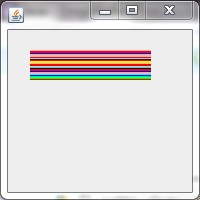
详细代码:
package com.lixiyu;
import java.awt.Color;
import java.awt.Graphics;
import java.util.Random;
import javax.swing.JFrame;
import javax.swing.WindowConstants;
public class SleepMethodTest extends JFrame{
/**
     *
     */
    private static final long serialVersionUID = -8195789572929250861L;
private Thread t;
private static Color[]color={
    Color.BLACK,Color.BLUE,Color.CYAN,Color.GREEN,Color.ORANGE,Color.YELLOW,Color.RED,Color.PINK,Color.LIGHT_GRAY
};
private static final Random rand=new Random();
private static Color getC(){
    return color[rand.nextInt(color.length)];
}
public SleepMethodTest(){
    t=new Thread(new Runnable(){
        int x=30;
        int y=50;
        public void run(){
            while(true){
                try{
                    Thread.sleep(100);
                }catch(InterruptedException e){
                    e.printStackTrace();
                }
                Graphics graphics=getGraphics();//创建Graphics对象
                graphics.setColor(getC());//设置颜色
                graphics.drawLine(x, y, 150, y++);//实现在窗体中画横线,100指画出来的线的长度
                if(y>=80){
                    y=50;
                }
            }
        }
    });
    t.start();
}
public static void main(String[] args){
    init(new SleepMethodTest(),200,200);
}
public static void init(JFrame frame,int width,int height){
    frame.setDefaultCloseOperation(WindowConstants.EXIT_ON_CLOSE);
    frame.setSize(width,height);
    frame.setVisible(true);
}
}2.线程的挂起例子:通过join方法实现对进度条的控制
实现界面:
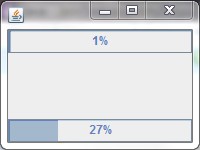
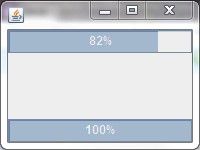
详细代码:
package com.lixiyu;
import java.awt.BorderLayout;
import javax.swing.JFrame;
import javax.swing.JProgressBar;
public class JoinTest extends JFrame{
/**
     *
     */
    private static final long serialVersionUID = 5631108658842378793L;
private Thread threadA;
private Thread threadB;
final JProgressBar progressBar=new JProgressBar();
final JProgressBar progressBar2=new JProgressBar();
int count=0;
public static void main(String[] args){
    init(new JoinTest(),200,150);
}
public JoinTest(){
    super();
    getContentPane().add(progressBar,BorderLayout.NORTH);
    getContentPane().add(progressBar2,BorderLayout.SOUTH);
    progressBar.setStringPainted(true);
    progressBar2.setStringPainted(true);
    threadA=new Thread(new Runnable(){//使用匿名内部类形式初始化Thread实例
        int count=0;
        @SuppressWarnings("static-access")
        public void run(){//重写run()方法
            while(true){
            progressBar.setValue(++count);//设置进度条的当前值
        try{
            threadA.sleep(100);
            threadB.join();//使线程B调用join方法
        }catch(Exception e){
            e.printStackTrace();
        }
            }
    }
    });
    threadA.start();

    threadB=new Thread(new Runnable(){
        int count=0;
        @SuppressWarnings("static-access")
        public void run(){
            while(true){
                progressBar2.setValue(++count);
                try{
                    threadB.sleep(100);
                }catch(Exception e){
                    e.printStackTrace();
                }
                if(count==100)
                    break;
            }
        }
    });
    threadB.start();
    }
public static void init(JFrame frame,int width,int height){
    frame.setDefaultCloseOperation(JFrame.EXIT_ON_CLOSE);
    frame.setSize(width,height);
    frame.setVisible(true);
}
}3.线程的中断例子:interrupte()设置线程正确的停止方式
实现界面:
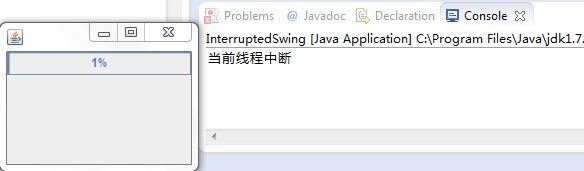
详细代码:
package com.lixiyu;
import java.awt.BorderLayout;
import javax.swing.JFrame;
import javax.swing.JProgressBar;
public class InterruptedSwing extends JFrame{
/**
     *
     */
    private static final long serialVersionUID = 2575518138753855667L;
Thread thread;
final JProgressBar progressBar=new JProgressBar();
public static void main(String[] args){
    init(new InterruptedSwing(),200,150);
}
public InterruptedSwing(){
    super();
    getContentPane().add(progressBar,BorderLayout.NORTH);
    progressBar.setStringPainted(true);

    thread=new Thread(new Runnable(){
        int count=0;
        @SuppressWarnings("static-access")
        public void run(){
            progressBar.setValue(++count);
            try{
                thread.sleep(2000);
            }catch(InterruptedException e){
                System.out.println("当前线程中断");
            }
        }
    });
    thread.start();
    thread.interrupt();
}
public static void init(JFrame frame,int width,int height){
    frame.setDefaultCloseOperation(JFrame.EXIT_ON_CLOSE);
    frame.setSize(width, height);
    frame.setVisible(true);
}
}
转载于:https://blog.51cto.com/lixiyu/1312815





 扫一扫
扫一扫


 609
609

 被折叠的 条评论
为什么被折叠?
被折叠的 条评论
为什么被折叠?
 到【灌水乐园】发言





