


 本文介绍如何使用Swagger2简化API的设计与维护。从引入依赖到配置详解,并通过实例展示如何使用注解来描述接口及其参数。

Swagger简介:
Design is the foundation of your API development. Swagger makes API design a breeze, with easy-to-use tools for developers, architects, and product owners.
大致意思是:以Swagger为基础来设计你API,使它变得更简介明了和易于维护;
使用:
1.引入依赖:
		<dependency>
			<groupId>io.springfox</groupId>
			<artifactId>springfox-swagger2</artifactId>
			<version>2.9.2</version>
		</dependency>
		<dependency>
			<groupId>io.springfox</groupId>
			<artifactId>springfox-swagger-ui</artifactId>
			<version>2.9.2</version>
		</dependency>
2.配置:
(1)新建配置类,注意与项目的启动类放在同一块:
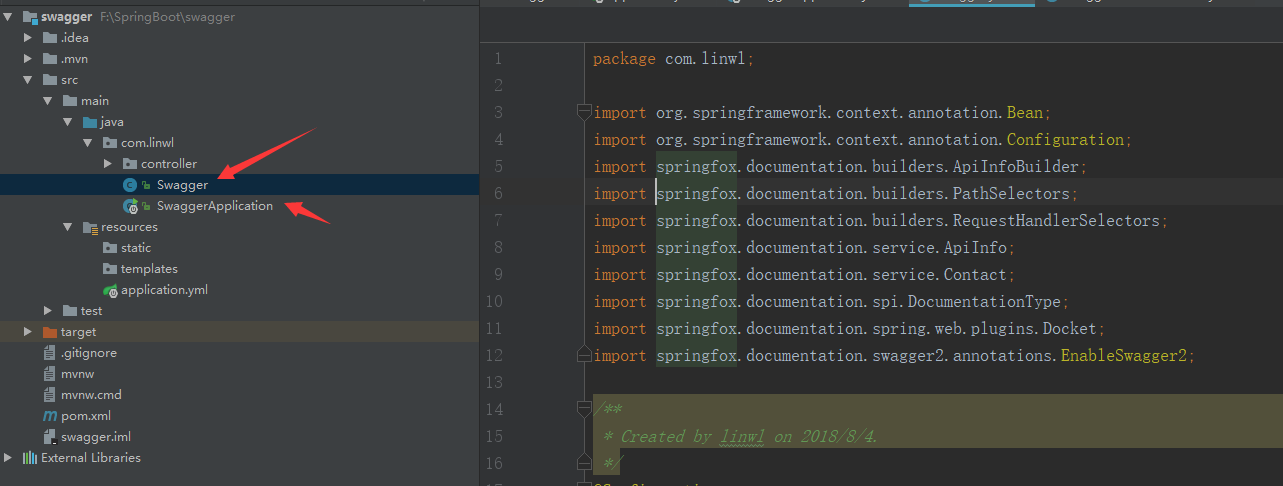
(2)配置swagger的基本信息:
import org.springframework.context.annotation.Bean;
import org.springframework.context.annotation.Configuration;
import springfox.documentation.builders.ApiInfoBuilder;
import springfox.documentation.builders.PathSelectors;
import springfox.documentation.builders.RequestHandlerSelectors;
import springfox.documentation.service.ApiInfo;
import springfox.documentation.service.Contact;
import springfox.documentation.spi.DocumentationType;
import springfox.documentation.spring.web.plugins.Docket;
import springfox.documentation.swagger2.annotations.EnableSwagger2;

/**
 * Created by linwl on 2018/8/4.
 */
@Configuration
@EnableSwagger2
public class Swagger {
    //指定扫描哪些包
    @Bean
    public Docket createRestApi(){
        return new Docket(DocumentationType.SWAGGER_2)
                .apiInfo(swaggeInfo())
                .select()
                //要扫描的包路径
                .apis(RequestHandlerSelectors.basePackage("com.linwl.controller"))
                .paths(PathSelectors.any())
                .build();
    }
    //配置swagger的基本信息
    private ApiInfo swaggeInfo(){
        return new ApiInfoBuilder()
                .title("Spring Boot 测试使用 Swagger2")
                //创始人
                .contact(new Contact("Linwl","https://github.com/swagger-api/swagger-ui/",""))
                //版本
                .version("1.0")
                //描述
                .description("API 描述")
                .build();
    }
}
(3)编写接口,通过注解对接口进行描述:
import io.swagger.annotations.Api;
import io.swagger.annotations.ApiImplicitParam;
import io.swagger.annotations.ApiImplicitParams;
import io.swagger.annotations.ApiOperation;
import org.springframework.web.bind.annotation.GetMapping;
import org.springframework.web.bind.annotation.PathVariable;
import org.springframework.web.bind.annotation.RequestMapping;
import org.springframework.web.bind.annotation.RestController;

/**
 * Created by linwl on 2018/8/4.
 */
@RestController
@RequestMapping("api")
//描述该API类
@Api("SwaggerDemoController相关的接口")
public class SwaggerDemoController {

    //描述该方法函数的用途
    @ApiOperation(value = "根据学生id查询学生信息",notes = "查询数据库中某个学生信息")
    //描述该方法函数需要传递的参数
    @ApiImplicitParam(name = "id",value = "学生Id",paramType = "path",required = true,dataType = "int" )
    @GetMapping("/{id}")
    public String getStudent(@PathVariable int id){
        return "学生Id="+id;
    }

    @ApiOperation(value = "根据学生姓名和学生年龄查询学生信息",notes = "查询数据库中符合条件的学生信息")
    @ApiImplicitParams(
           {@ApiImplicitParam(name = "name",value = "学生姓名",required = false,dataType = "String"),
            @ApiImplicitParam(name="age",value = "学生年龄",required = false,dataType = "int")
           }
    )
    @GetMapping("{name}/{age}")
    public String getStudentByNameAndAge(@PathVariable("name")String name,@PathVariable("age")Integer age){
        return "name:"+name+" age:"+age;
    }
(4)注解说明:
@Api:作用在类上,对该类提供的服务提供说明
@ApiOperation:作用在方法函数上,对该方法函数提供的服务进行说明
@ApiImplicitParam:作用在方法函数上,对该方法函数需要传递的参数进行说明;
@ApiimplicitParams:作用在方法函数上,当该Api需要传递多个参数时使用,封装@ApiImplicitParam
(5)效果图:
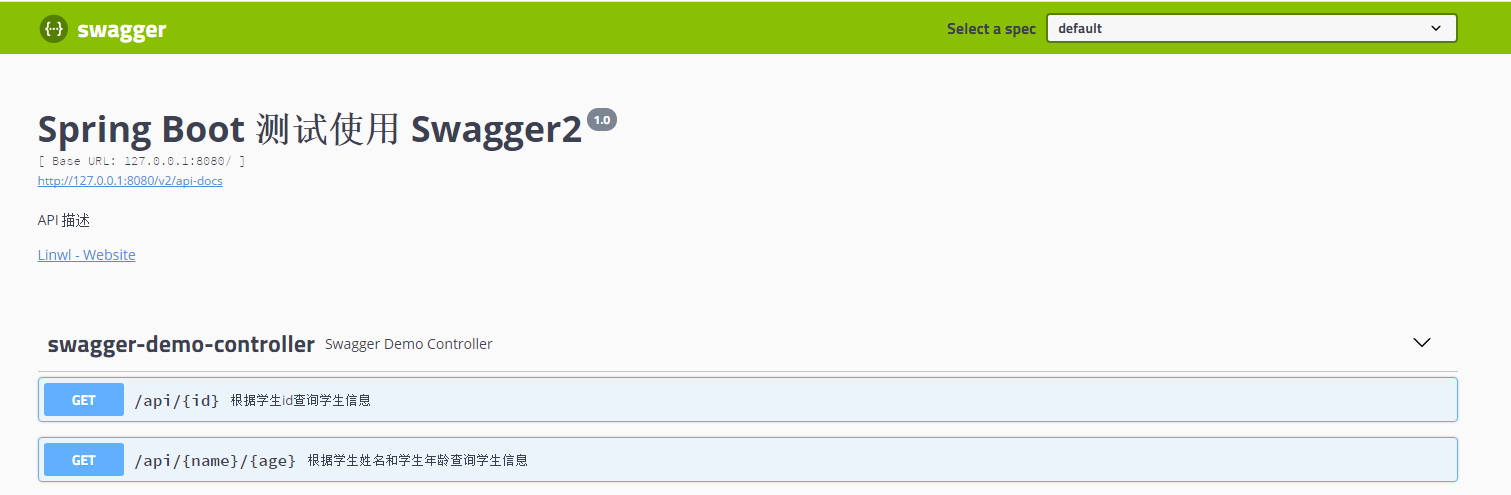
测试:
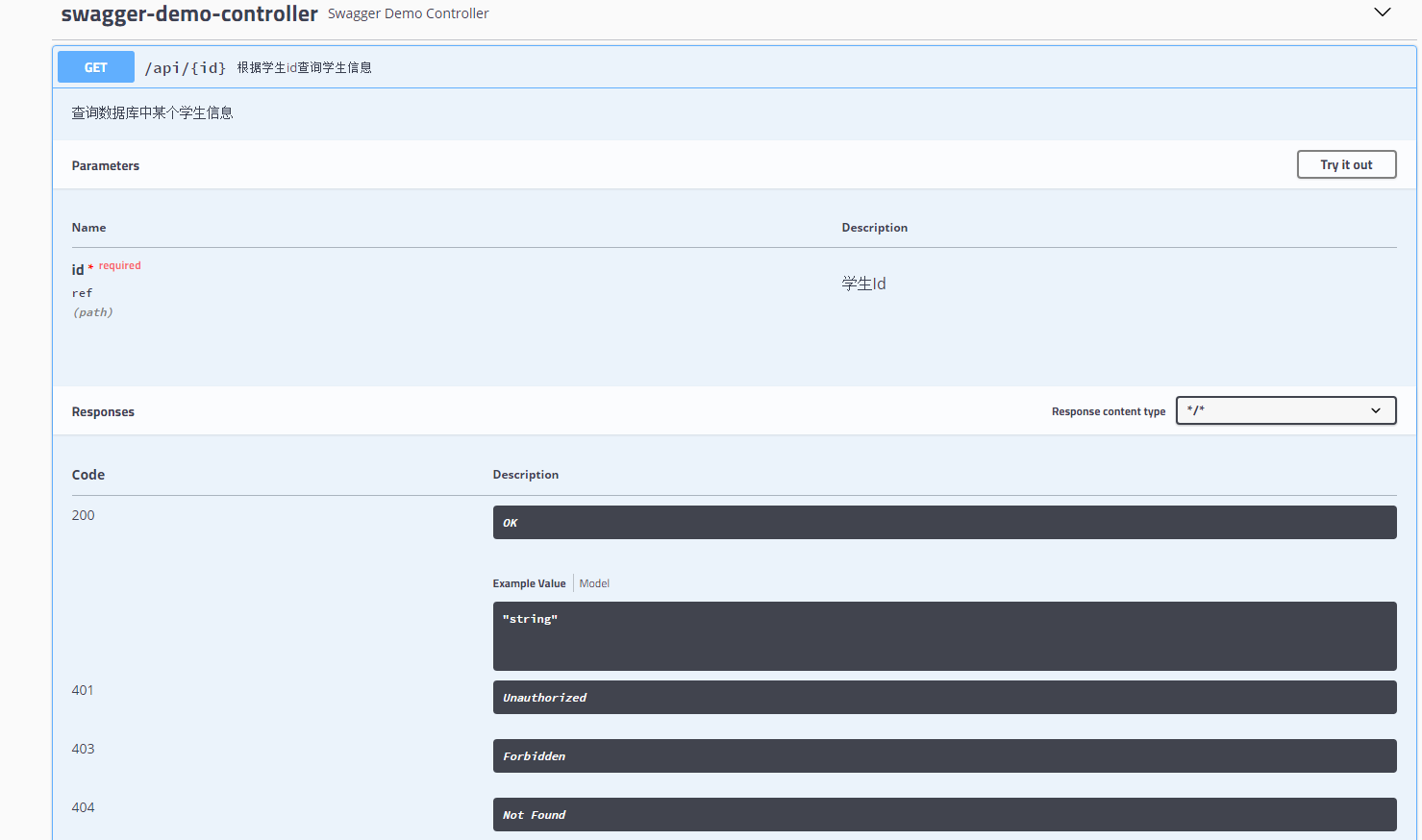
(1)点开第一个接口:
(2)点击 Try it out:
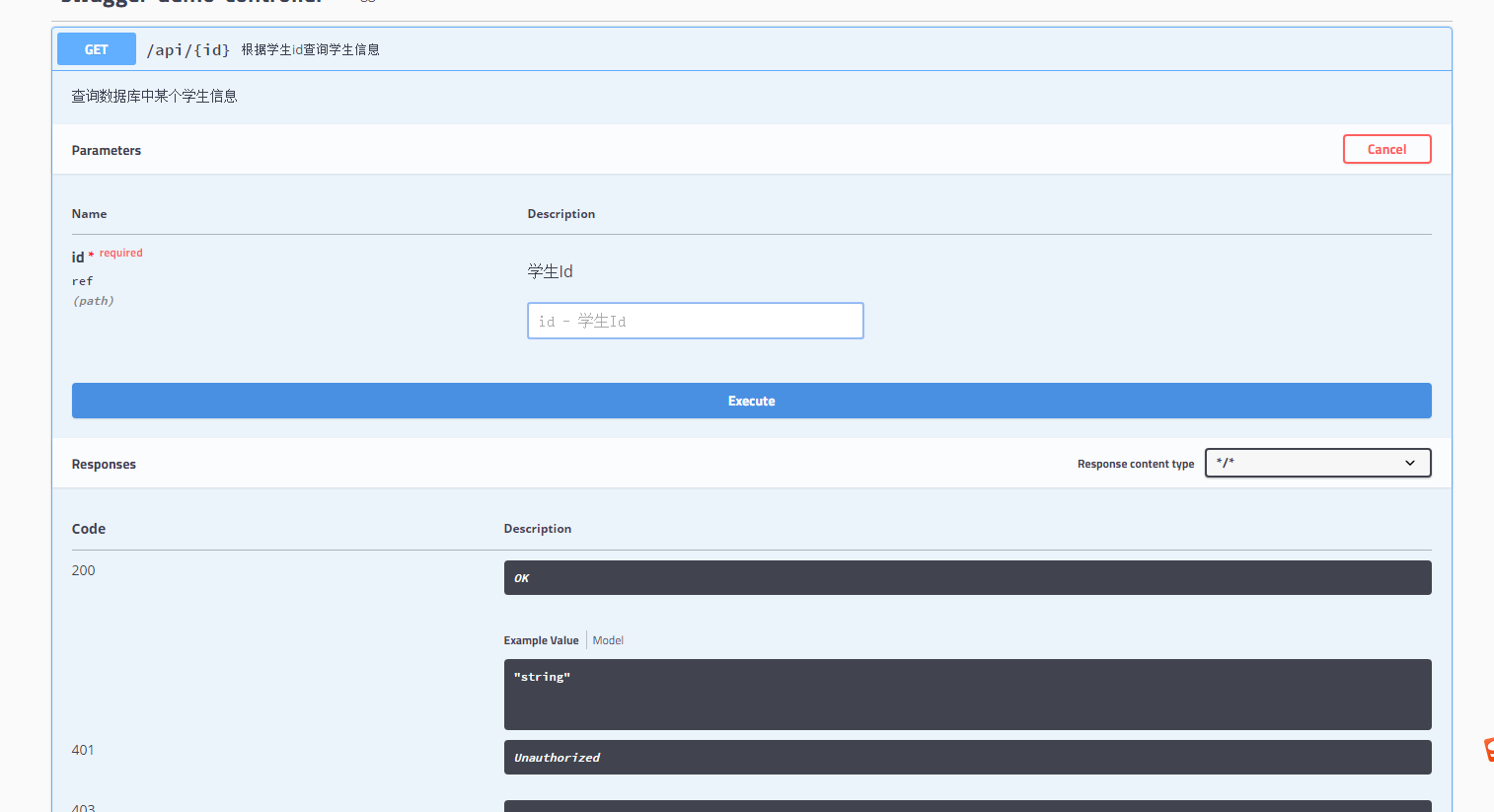
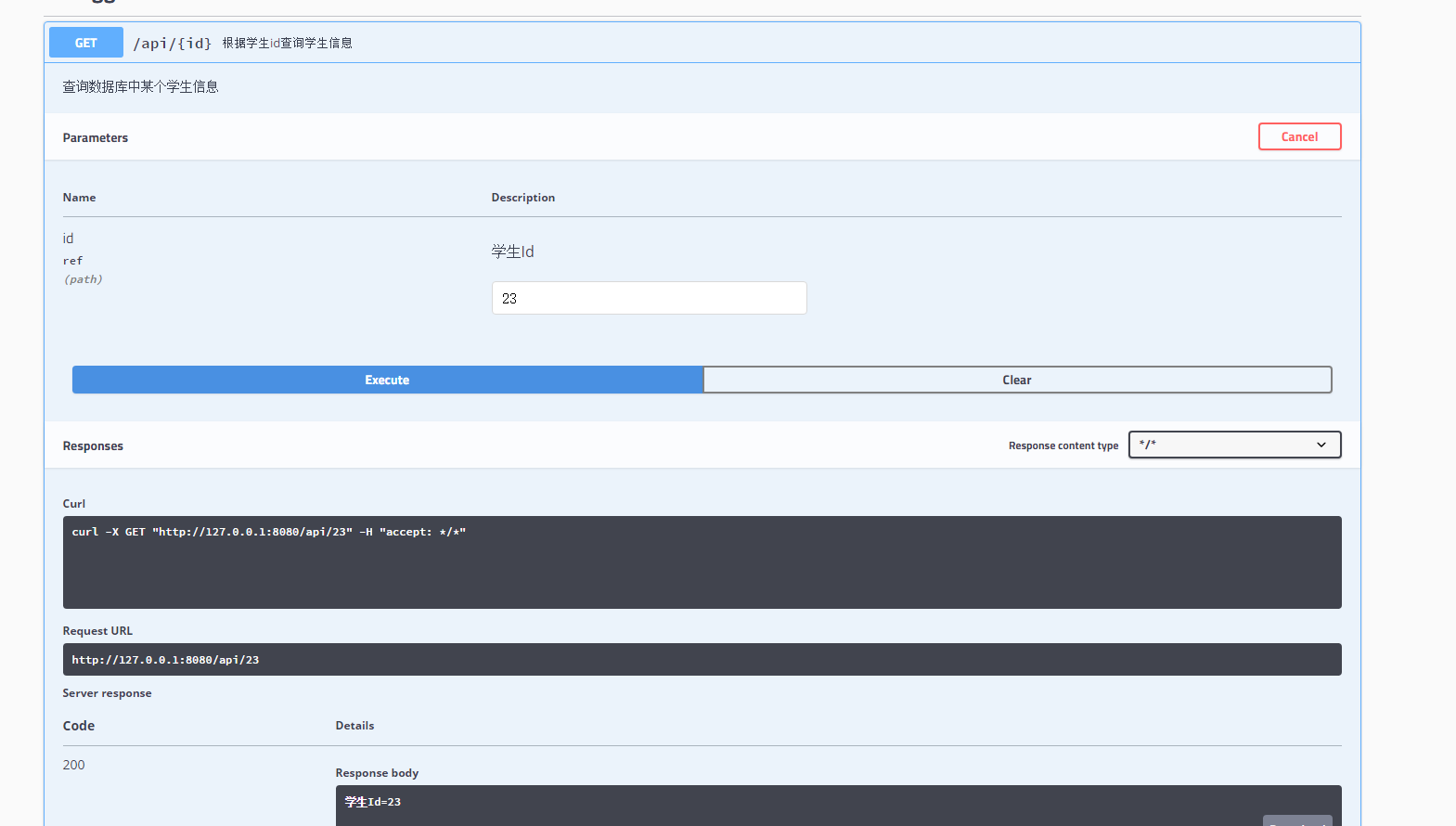
(3)填写参数,execute。查看结果:





 扫一扫
扫一扫


 7723
7723

 被折叠的 条评论
为什么被折叠?
被折叠的 条评论
为什么被折叠?
 到【灌水乐园】发言





