


 本文介绍如何使用盒布局中的box-pack和box-align属性实现元素内文字、图像等内容的水平和垂直居中。通过HTML和CSS代码示例展示了具体实现方法。

使用盒布局的时候,可以使用 box-pack 属性及box-align属性来指定元素中文字、图像及子元素水平方向或垂直方向的对齐方式。
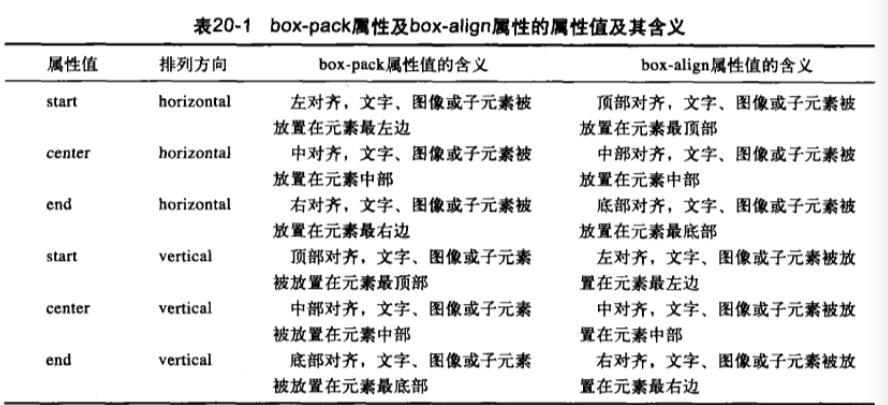
让元素设置为盒布局,然后使用这两个属性就行
<!DOCTYPE html>
<html lang="zh-CN">
<head>
    <meta charset="UTF-8">
    <title></title>
    <style>
        div{
            width: 1080px;
            height: 1000px;
            font-size: 16px;
            color: #3b4653;
            border:1px solid #e33030;

            display: -moz-box;/*设置元素为盒布局*/
            display: -webkit-box;

            -moz-box-align: center;/*垂直居中*/
            -webkit-box-align: center;

            -moz-box-pack: center;/*水平居中*/
            -webkit-box-pack: center;
        }
    </style>
</head>
<body>
    <div>
        <img src="images/hua.png" alt="">
    </div>
</body>
</html>






 扫一扫
扫一扫


 3206
3206

 被折叠的 条评论
为什么被折叠?
被折叠的 条评论
为什么被折叠?
 到【灌水乐园】发言





