


 本文介绍如何在Swift中使用UIViewController创建简单的UIView动画,包括位移动画和透明度变化动画,并提供了动画实现的具体代码。


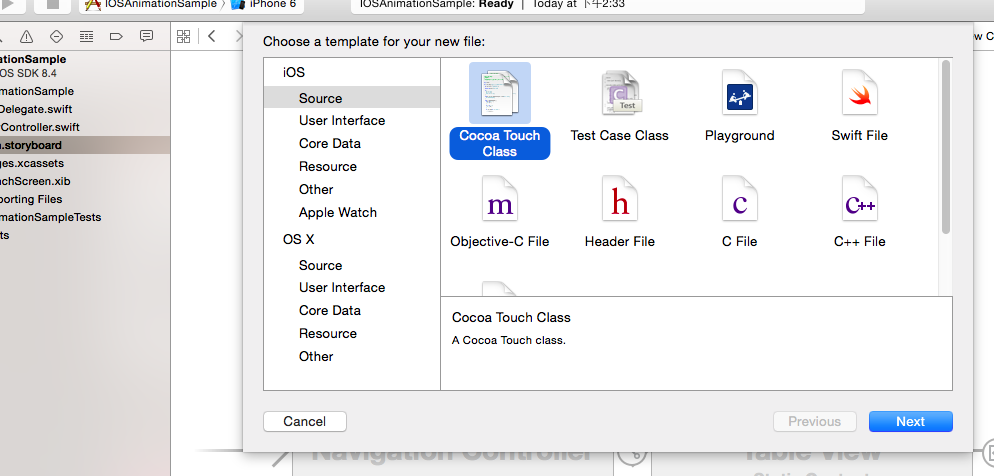
新建Cocoa Touch Class,语言是swift
然后继续为界面添加一个普通的View Controller,并且添加前面视图的静态table的转向剪头指向这个View Controller,然后在这个视图上添加普通的UIView

 1 class PositionViewController: UIViewController {
 2
 3     //2 添加 UIView组件 的链接
 4     @IBOutlet weak var redSquare: UIView!
 5
 6     override func viewDidLoad() {
 7         super.viewDidLoad()
 8
 9         // Do any additional setup after loading the view.
10     }
11
12     override func didReceiveMemoryWarning() {
13         super.didReceiveMemoryWarning()
14         // Dispose of any resources that can be recreated.
15     }
16     //1
17     override func viewDidAppear(animated: Bool) {
18         //这个方法被执行的时间在生命周期中比较合适
19         UIView.animateWithDuration(1, animations: {
20             self.redSquare.center.x = self.view.bounds.width - self.redSquare.center.x
21         })
22         UIView.animateWithDuration(1, delay: 2, options: nil, animations: {
23             self.redSquare.center.x = self.view.bounds.width - self.redSquare.center.x
24             self.redSquare.center.y = self.view.bounds.height - self.redSquare.center.y
25         }, completion: nil)
26     }
27
28
29     /*
30     // MARK: - Navigation
31
32     // In a storyboard-based application, you will often want to do a little preparation before navigation
33     override func prepareForSegue(segue: UIStoryboardSegue, sender: AnyObject?) {
34         // Get the new view controller using segue.destinationViewController.
35         // Pass the selected object to the new view controller.
36     }
37     */
38
39 }
前面都是大致的简单的入门步骤,不管是什么类型的动画的方法,比如下面的透明度变化动画:
 animations的闭包类型的参数所包含的方法就是 在设定时间内变化到达的目标值,比如这个透明度动画设置为目标透明度为alpha=0.2,比如上面简单实例里的位移动画设置为目标位置。
比较好的动画源代码的下载百度网址:
链接: http://pan.baidu.com/s/1jGnIC2U 密码: x4cy
github网址:https://codeload.github.com/JakeLin/iOSAnimationSample/zip/master





 扫一扫
扫一扫


 1万+
1万+

 被折叠的 条评论
为什么被折叠?
被折叠的 条评论
为什么被折叠?
 到【灌水乐园】发言





