


 本文介绍了一个用于Java项目的通用分页组件实现方案,包括核心类PageInfo的设计与使用方法,并展示了如何在前后端进行集成以实现分页功能。

package com.yh.util;

import java.util.ArrayList;
import java.util.List;

/**
 * @Description: 分页类
 * @Author: 张颖辉(yh)
 * @CreateDate: 2018/5/7 19:00
 * @UpdateUser: 张颖辉(yh)
 * @UpdateDate: 2018/5/7 19:00
 * @UpdateRemark: The modified content
 * @Version: 1.0
 */
public class PageInfo<T> {
    /*数据*/
    private List<T> list;
    /*总条数*/
    private Long count;
    /*总页数*/
    private Integer pages;
    /*当前页码*/
    private Integer currPage;
    /*每页条数*/
    private Integer pageSize;
    /*开始行*/
    private Long startRow;
    /*显示排列的页码(一些分页控件会使用)*/
    private List<Integer> showNos;
    /*是否有上一页*/
    private Boolean hasPrevious;
    /*是否有下一页*/
    private Boolean hasNext;

    public PageInfo(Integer currPage, Integer pageSize, Long count) {
        this.currPage = currPage;
        this.pageSize = pageSize;
        this.count = count;
        this.update();
        if (currPage > this.pages) {
            setCurrPage(this.pages);
        }
    }

    public List<T> getList() {
        return list;
    }

    public void setList(List<T> list) {
        this.list = list;
    }

    public Long getCount() {
        return count;
    }

    public void setCount(Long count) {
        this.count = count;
        this.update();
    }

    public Integer getPages() {
        return pages;
    }


    public Integer getCurrPage() {
        return currPage;
    }

    public void setCurrPage(Integer currPage) {
        currPage = currPage < 1 ? 1 : currPage;
        this.currPage = currPage;
        this.update();
    }

    public Integer getPageSize() {
        return pageSize;
    }

    public void setPageSize(Integer pageSize) {
        if (pageSize < 1) {
            throw new RuntimeException("pageSize不能小于1");
        }
        this.pageSize = pageSize;
        this.update();
    }

    public Long getStartRow() {
        return startRow;
    }

    public List<Integer> getShowNos() {
        return showNos;
    }

    public Boolean getHasPrevious() {
        this.hasPrevious=this.currPage > 1;
        return hasPrevious;
    }

    public Boolean getHasNext() {
        this.hasNext=this.currPage < this.pages;
        return hasNext;
    }


    /**
     * @Description: 更新数据:总页数,和数据开始行数
     * @Author: 张颖辉(yh)
     * @Date: 2018/5/8 10:42
     * @param: []
     * @return: void
     * @Version: 1.0
     */
    private void update() {
        if (count != null) {
            if (pageSize != null && pageSize != 0) {
                if (count % pageSize != 0) {
                    this.pages = (int) (count / pageSize) + 1;
                } else {
                    this.pages = (int) (count / pageSize);
                }
            }
        }
        if (currPage != null) {
            if (pageSize != null) {
                this.startRow = (currPage - 1) * pageSize.longValue();
            }
            /*显示排列页*/
            if (pages != null) {
                showNos = new ArrayList<>();
                for (int i = (currPage - 2 > 0 ? currPage - 2 : 1); i <= (currPage + 2 > pages ? pages : currPage + 2); i++) {
                    showNos.add(i);
                }
            }
        }
    }
}
使用方式:
服务端service关键代码:
        Long count=auditLogMapper.getCountByCondition(userId, userName, startTimeStr, endTimeStr);;
        PageInfo<AuditLog> pageInfo=new PageInfo(currPage,  pageSize, count);
        List<AuditLog> list = auditLogMapper.getAuditsByCondition(userId, userName, startTimeStr, endTimeStr, pageInfo.getStartRow(), pageInfo.getPageSize());
        pageInfo.setList(list);
        return pageInfo;
action/controller中将这个pageInfo放入request.setAttribute()中,以供jsp中使用。
前端关键代码:
引入依赖的js,css
<link href="https://cdn.bootcss.com/bootstrap/3.3.7/css/bootstrap.min.css" rel="stylesheet">
<script src="https://cdn.bootcss.com/jquery/1.12.4/jquery.min.js"></script>
<script src="https://cdn.bootcss.com/bootstrap/3.3.7/js/bootstrap.min.js"></script>
前端使用的是EL表达式结合JSTL标签库,所以要引入:
<%@ taglib prefix="c" uri="http://java.sun.com/jsp/jstl/core" %>分页控件标签:
<nav aria-label="Page navigation">
<ul class="pagination">
<li>
<a href="javascript:void(0)" onclick="pageJump(1)" aria-label="首页">
<span aria-hidden="true">«</span>
</a>
</li>
<li>
<a href="javascript:void(0)" onclick="pageJump(${page.currPage-1})" aria-label="上一页">
<span aria-hidden="true"><</span>
</a>
</li>
<c:forEach var="showNo" items="${page.showNos}">
<c:choose>
<c:when test="${showNo==page.currPage}">
<li><a href="javascript:void(0)" onclick="pageJump(${showNo})"
style="background-color: #00c0ef">${showNo}</a></li>
</c:when>
<c:otherwise>
<li><a href="javascript:void(0)" onclick="pageJump(${showNo})">${showNo}</a></li>
</c:otherwise>
</c:choose>
</c:forEach>
<li>
<a href="javascript:void(0)" onclick="pageJump(${page.currPage+1})" aria-label="下一页">
<span aria-hidden="true">></span>
</a>
</li>
<li>
<a href="javascript:void(0)" onclick="pageJump(${page.pages})" aria-label="尾页">
<span aria-hidden="true">»</span>
</a>
</li>
<li><a href="#">${page.currPage}/${page.pages}</a></li>
</ul>
</nav>javascript脚本:
        /**
         * @Description:   分页跳转
         * @Author:        张颖辉(yh)
         * @Date:          2018/5/8 15:17
         * @param:
         * @return:
         * @Version:       1.0
         */
        function pageJump(pageNo) {
            var url = "xxx.action"
            var paras = "";
            if (notNull(pageNo)) {
                paras = addPara(paras, "pageNo", pageNo);
            }
            if (notNull("${userId}")) {
                paras = addPara(paras, "userId", "${userId}");
            }
            if (notNull("${userName}")) {
                paras = addPara(paras, "userName", "${userName}");
            }
            if (notNull("${startTimeStr}")){
                paras = addPara(paras, "startTimeStr", "${startTimeStr}");
            }
            if (notNull("${endTimeStr}")){
                paras = addPara(paras, "endTimeStr", "${endTimeStr}");
            }
            window.location.href = url + paras;
        }

        /**
         * @Description:   添加参数
         * @Author:        张颖辉(yh)
         * @Date:          2018/5/8 15:16
         * @param:
         * @return:
         * @Version:       1.0
         */
        function addPara(paras, paraName, paraValue) {
            if (paras.length == 0) {
                paras = "?" + paraName + "=" + paraValue
            } else {
                paras += "&" + paraName + "=" + paraValue;
            }
            return paras;
        }

        /**
         * @Description:   查空
         * @Author:        张颖辉(yh)
         * @Date:          2018/5/8 15:16
         * @param:
         * @return:
         * @Version:       1.0
         */
        function notNull(x) {
            if (x !== null && x !== undefined && x !== '') {
                return true;
            } else {
                return false;
            }
        }
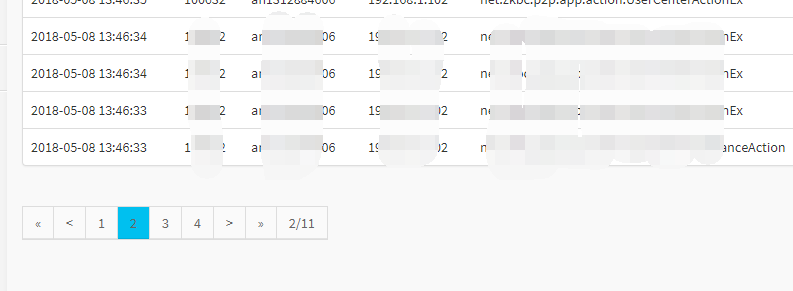
显示效果:





 扫一扫
扫一扫


 5万+
5万+

 被折叠的 条评论
为什么被折叠?
被折叠的 条评论
为什么被折叠?
 到【灌水乐园】发言





