


 本文详细介绍了CSS3中的动画特性和伸缩布局技术。包括如何使用@keyframes定义动画序列,设置animation属性实现复杂动画效果,以及利用display:flex创建响应式布局。

动画也是CSS3一个颠覆性的特性,可通过设置多个节点来精确控制一个或一组动画,常用来实现复杂的动画效果。(CSS3其他基础特性可以查看:CSS3基础特性效果)
动画
- 必要元素
- 通过@keyframes指定动画序列;
- 通过百分比将动画序列分割成多个节点;
- 在各节点中分别定义各属性
- 通过animation将动画应用于相应元素;
<!DOCTYPE html>
<html lang="en">
<head>
	<meta charset="UTF-8">
	<title>CSS3 动画</title>
	<style>
		body {
			margin: 0;
			padding: 0;
			background-color: #F7F7F7;
		}
		#timer {
			text-align: center;
			line-height: 1;
			padding: 20px 0;
			font-size: 80px;
			font-family: Arial;
			color: red;
		}
		.box {
			width: 200px;
			height: 200px;
			margin: 0 auto;
			background-color: green;
			animation: change 10s linear forwards;
		}
		/*动画序列*/
		@keyframes change {
			/*百分比是相对于动画的执行时间*/
			0% {

			}

			20% {
				width: 400px;
				height: 200px;
			}

			40% {
				/*width: 400px;*/
				height: 400px;
			}

			80% {
				width: 400px;
				height: 400px;
				background-color: yellow;
			}

			100% {
				width: 200px;
				height: 200px;
				background-color: green;
			}
		}
	</style>
</head>
<body>
	<div id="timer">0</div>
	<div class="box"></div>
	<script>
		var timer = document.getElementById('timer'),
			end = 0;
		setInterval(function () {
			if(end >=10) return;
			timer.innerHTML = ++end;
		}, 1000);
	</script>
</body>
</html>
- 关键属性
- animation-name设置动画序列名称
- animation-duration动画持续时间
- animation-delay动画延时时间
- animation-timing-function动画执行速度,linear、ease等
- animation-play-state动画播放状态,play、paused等
- animation-direction动画逆播,alternate等
- animation-fill-mode动画执行完毕后状态,forwards、backwards等
- animation-iteration-count动画执行次数,inifinate等
<!DOCTYPE html>
<html lang="en">
<head>
	<meta charset="UTF-8">
	<title>CSS3 动画</title>
	<style>
		html, body {
			height: 100%;
		}
		body {
			margin: 0;
			padding: 0;
			background-color: #F7F7F7;
		}
		.box {
			width: 200px;
			height: 200px;
			background-color: green;
			/*加上动画*/
			/*animation: animationFuc 2s;*/
			/*动画序列名称*/
			animation-name: animationFuc;
			/*动画执行时间*/
			animation-duration: 2s;
			/*动画执行速度 ease*/
			animation-timing-function: steps(3);/*特殊的速度  steps(3)*/
			/*动画延时*/
			animation-delay: 1s;
			/*当动画结束之后逆向动画回去*/
			animation-direction: alternate;
			/*动画执行的次数 (注意:逆播放也算一次)*/
			animation-iteration-count:1;
			/*播放完成是要默认回到初始状态
			forwards 保存动画结束的状态
			backwards 回到初始状态 默认
			*/
			animation-fill-mode: forwards;
		}
		.box:hover{
			/*动画暂停或者执行 默认running、paused暂停*/
			animation-play-state: paused;
		}
		/*定义动画序列*/
		@keyframes animationFuc {
			/*定义节点*/
			/*from 0% to 100%*/
			from{
			}
			to{
				/*改变的属性*/
				width: 400px;
			}
		}
	</style>
</head>
<body>
	<div class="box"></div>
</body>
</html>
多列布局
类似报纸或杂志中的排版方式,上要用以控制大篇幅文本,实际意义不大。
/*指定列数*/
-webkit-column-count: 4;
/*指定列宽*/
-webkit-column-width: 400px;
/*定义边框线 和 border一样*/
-webkit-column-rule: 2px dashed #CCC;
/*调整列间距*/
-webkit-column-gap: 50px;
伸缩布局
CSS3在布局方面做了非常大的改进,使得我们对块级元素的布局排列变得十分灵活,适应性非常强,其强大的伸缩性,在响应式开中可以发挥极大的作用。
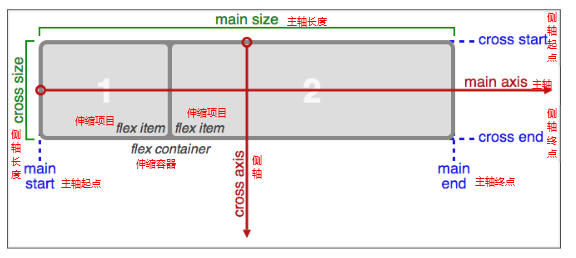
必要元素
- 指定一个盒子为伸缩盒子display:flex
- 设置属性来调整此盒的子元素的布局方式,例如:flex-direction
- 明确主侧轴及方向
- 可互换主侧轴,也可改变方向
各属性详解
- flex-direction调整主轴方向(默认为水平方向)
- justify-content调整主轴对齐
- align-items调整侧轴对齐
- flex-wrap控制是否换行
- align-content堆栈(由flex-wrap产生的独立行)对齐
- flex-flow是flex-direction、flex-wrap的简写形式
- flex控制子项目的缩放比例
- order控制子项目的排列顺序
<!DOCTYPE html>
<html lang="en">
<head>
	<meta charset="UTF-8">
	<title>Document</title>
	<style>
		body {
			margin: 0;
			padding: 0;
			font-family: '微软雅黑';
			background-color: #F7F7F7;
		}

		ul {
			margin: 0;
			padding: 0;
			list-style: none;
		}

		.wrapper {
			width: 1024px;
			margin: 0 auto;
		}

		.wrapper > section {
			min-height: 300px;
			margin-bottom: 30px;
			box-shadow: 1px 1px 4px #DDD;
			background-color: #FFF;
		}

		.wrapper > header {
			text-align: center;
			line-height: 1;
			padding: 20px;
			margin-bottom: 10px;
			font-size: 30px;
		}

		.wrapper section > header {
			line-height: 1;
			padding: 10px;
			font-size: 22px;
			color: #333;
			background-color: #EEE;
		}

		.wrapper .wrap-box {
			padding: 20px;
		}

		.wrapper .brief {
			min-height: auto;
		}

		.wrapper .flex-img {
			width: 100%;
		}

		/*全局设置*/
		section ul {
			display: flex;
		}

		section:nth-child(2) ul {
			width: 500px;
			height: 50px;
			display: flex;
		}

		section:nth-child(2) li {
			flex: 1;
			text-align: center;
			line-height: 50px;
			background-color: pink;
		}

		/*经典网页布局*/
		.layout {
			width: 400px;
			height: 600px;
			display: flex;
			/*外面盒子需要垂直排列*/
			flex-direction: column;
			justify-content: space-between;
		}

		.layout .header {
			height: 60px;
			text-align: center;
			line-height: 60px;
			background-color: green;
		}

		.layout .main {
			flex: 1;
			display: flex;
			text-align: center;
			/*overflow: scroll;*/
		}

		.layout .main .aside {
			flex: 1;
			background-color: blue;
		}

		.layout .main .content {
			flex: 2;
			background-color: yellow;
		}

		.layout .footer {
			height: 60px;
			line-height: 60px;
			text-align: center;
			background-color: red;
		}
	</style>
</head>
<body>
	<div class="wrapper">
		<header>伸缩布局</header>
		<!-- 分隔线 -->
		<section>
			<header>自适应导航</header>
			<div class="wrap-box">
				<ul>
					<li>QQ聊天</li>
					<li>商品分类</li>
					<li>我的订单</li>
					<li>购物车</li>
				</ul>
			</div>
		</section>
		<!-- 分隔线 -->
		<section>
			<header>经典网页布局</header>
			<div class="wrap-box">
				<!-- 分隔线 -->
				<div class="layout">
					<div class="header">头部</div>
					<div class="main">
						<div class="aside">侧边栏</div>
						<div class="content">主体内容</div>
					</div>
					<div class="footer">底部</div>
				</div>
			</div>
		</section>
	</div>
</body>
</html>
注意点
- 2D转换不会导致布局出现问题,旋转不会占位。(2D转换包括:translate,scale,rotate,skew,矩阵,不包括width,height等)。
- 2D转换性能比其他性能好。(定位可以使用translate而不用left等)
- border-image兼容性差,有些浏览器不支持。
- 3D转换:需要朝着X轴的正方向看,当是逆时针旋转的时候是正角度,当是顺时针旋转是负角度。(Y轴,Z轴也同样)
- 透视:perspective:两种用法:
- 设置给父元素的属性值(所有子元素都有透视效果)
- 作为transform的一个属性,只作用于当前的子元素。
- 图像近大远小。
- 视距越大,3D效果越不明显。
- transform-origin在3D转换上依然有效。
- backface-visibility:设置元素背面是否可见。(可选参数:visible(默认)或者hidden)
- 3D呈现:保留3D空间,transform-style:preserve-3d;参数还可以是flex(在2D面呈现),默认的属性。
- 在设置为3D时,还需要两个图片之间有间距:transform:translateY(2px);有兼容性
- 3D旋转后,轴也会跟着旋转。
- CSS3动画库:https://daneden.github.io/animate.css/
- 动画中,animation的from可以定义初始化状态。
- 伸缩布局定义父容器为flex后,子容器的display会默认变成行内块级元素。子容器始终都会保持在一行显示。每个子容器分配的份数是由flex属性决定的;flex:1;设置后会自适应屏幕的宽度,分配的是剩余的宽度(除了没有参加flex的剩余宽度)
- 伸缩布局主要应用在移动端布局中。
赶紧试一试吧,如果有什么问题或疑问,欢迎留言指正哦!





 扫一扫
扫一扫


 147
147

 被折叠的 条评论
为什么被折叠?
被折叠的 条评论
为什么被折叠?
 到【灌水乐园】发言





