mysql 标题隐藏_Elementor如何隐藏页面上的标题(2种办法)

本文详述了两种在Elementor中隐藏页面标题的方法,包括单个页面隐藏和全局隐藏,尤其适用于Hello Elementor和Astra主题。通过Elementor编辑器设置或使用Code snippets插件实现禁用标题,确保页面呈现更整洁的布局。

本文介绍两种隐藏Elementor页面默认标题的方法,一种是单个隐藏,一种是全局隐藏(适用于hello elementor和astra主题)。

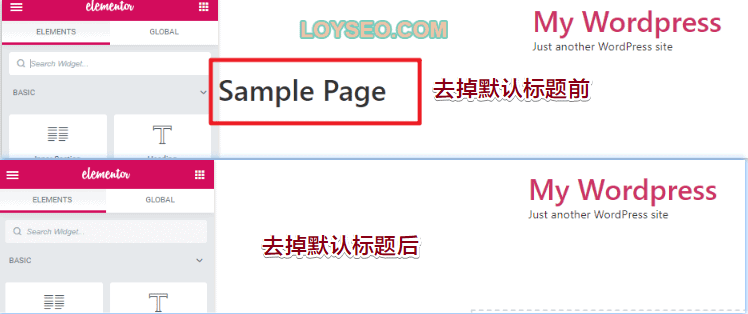
下图是隐藏标题前后的区别,所用的主题是Hello elementor。

84b29eaa3c8b16d8fe1dc49e2a0a35e0.png

如何单个隐藏页面标题

下面介绍禁用Elementor页面标题的操作步骤

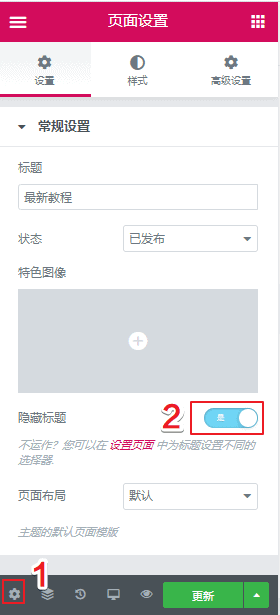
在elementor编辑页面时,点击左下角的设置按钮

然后将隐藏标题开关开启即可

aca5dfad5f1ee812725cfd1c705e392e.png

如果隐藏标题不起作用,那么应该跟你用的主题有关,你需要去elementor全局设置中修改页面标题选择器。

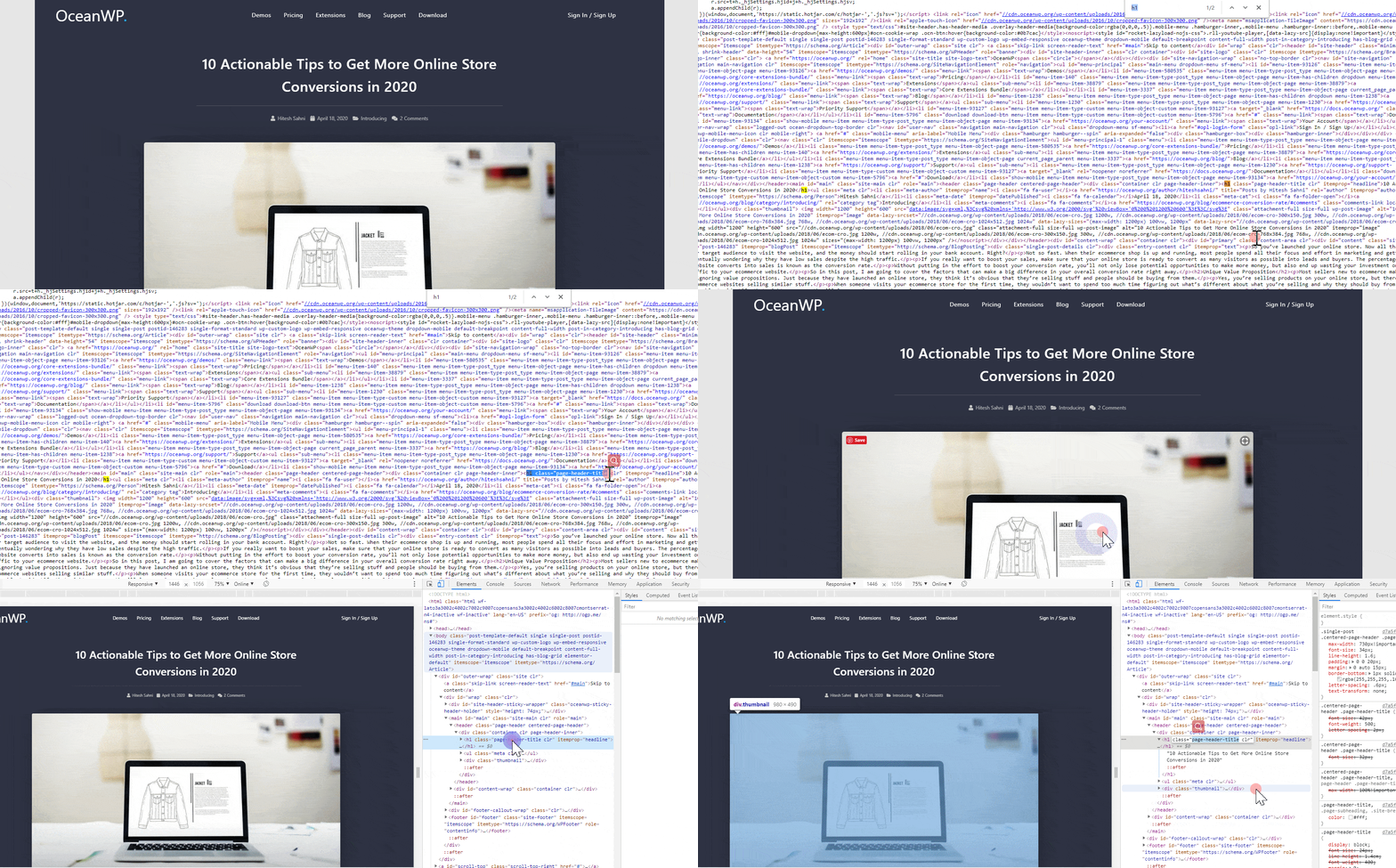
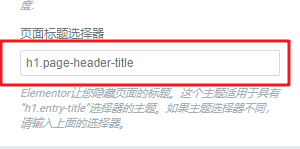
首先打开一篇文章,然后按照下面动图的两种方法任一个,去找到h1标签的class,多个class之间是空格隔开的,一般取第一个,如下图所示,我们得到h1的class是page-title-header,那么页面标题选择器是h1.page-title-header

697b7c448a8d926f8f3b55cfbcc492db.gif

74aa1dfb0c091e36d6003ed64178dd05.png

如何全局隐藏页面标题

本方法仅适用于Hello elementor和Astra主题。

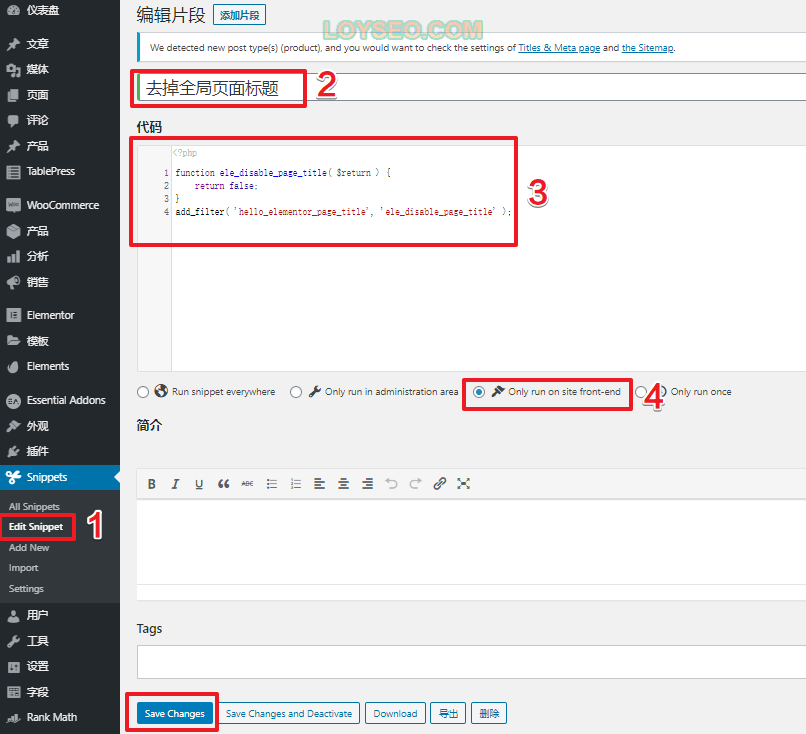
安装并启用插件Code snippets,然后按下面步骤操作

进入 Snippets > add new

输入标题,例如:禁用页面默认标题

输入如下代码

适用于hello elementor主题的代码

function ele_disable_page_title( $return ) {

return false;

}

add_filter( 'hello_elementor_page_title', 'ele_disable_page_title' );

/* Disable title on all post types. */

function your_prefix_post_title() {

$post_types = array('page');

// bail early if the current post type if not the one we want to customize.

if ( ! in_array( get_post_type(), $post_types ) ) { return; } // Disable Post featured image.

add_filter( 'astra_the_title_enabled', '__return_false' );

}

add_action( 'wp', 'your_prefix_post_title' );

选择 only run on site front-end

点击save changes保存

cde30173861442f8810c0ada4c6c4010.png

import xbot from xbot import web from xbot import print, sleep from bs4 import BeautifulSoup import pymysql import os import re import csv import hashlib import tempfile import PyPDF2 from PyPDF2 import PdfReader from docx import Document import win32com.client import requests import random import time import urllib3 from urllib3.exceptions import InsecureRequestWarning import base64 # 禁用SSL警告 urllib3.disable_warnings(InsecureRequestWarning) # ==================== 隧道代理配置 ==================== PROXY_HOST = "f606.kdltpspro.com" PROXY_PORT = 15818 PROXY_USER = "t16181473250660" PROXY_PASS = "98iw80lj" PROXY_URL = f"http://{PROXY_USER}:{PROXY_PASS}@{PROXY_HOST}:{PROXY_PORT}" print(f"🔧 代理配置: {PROXY_HOST}:{PROXY_PORT}") # 设置系统代理环境变量(让xbot使用代理) os.environ['HTTP_PROXY'] = PROXY_URL os.environ['HTTPS_PROXY'] = PROXY_URL os.environ['http_proxy'] = PROXY_URL os.environ['https_proxy'] = PROXY_URL # 数据库配置 DB_CONFIG = { "host": "192.168.100.18", "port": 3306, "user": "yiyaoqixie", "password": "123456", "database": "yiyaoqixie", # 原为 "db" -> 应使用 "database" "charset": "utf8mb4", "cursorclass": pymysql.cursors.DictCursor } # 使用您的保存路径 SAVE_BASE_DIR = r"D:\作业\yaozhi" if not os.path.exists(SAVE_BASE_DIR): os.makedirs(SAVE_BASE_DIR, exist_ok=True) print(f"📁 创建保存目录: {SAVE_BASE_DIR}") def create_proxy_session(): """创建带代理的requests session(仅用于附件下载)""" session = requests.Session() session.proxies = { 'http': PROXY_URL, 'https': PROXY_URL } auth_str = base64.b64encode(f"{PROXY_USER}:{PROXY_PASS}".encode()).decode() session.headers.update({ 'Proxy-Authorization': f'Basic {auth_str}', 'User-Agent': 'Mozilla/5.0 (Windows NT 10.0; Win64; x64) AppleWebKit/537.36 (KHTML, like Gecko) Chrome/120.0.0.0 Safari/537.36' }) session.verify = False session.trust_env = False return session # 轻量过滤函数 def clean_content_chars(text): if not isinstance(text, str): return "" return ''.join([char for char in text if ord(char) <= 0xFFFF]) def md5_id(url): return hashlib.md5(url.encode('utf-8')).hexdigest() # 数据库连接 def get_mysql_conn(): try: conn = pymysql.connect( host=DB_CONFIG["host"], port=DB_CONFIG["port"], user=DB_CONFIG["user"], password=DB_CONFIG["password"], database=DB_CONFIG["database"], charset=DB_CONFIG["charset"], connect_timeout=10 ) return conn except Exception as e: print(f"❌ 数据库连接错误: {str(e)}") return None def test_proxy_connection(): """测试代理连接""" print("🔍 测试代理连接...") try: session = create_proxy_session() response = session.get('http://httpbin.org/ip', timeout=20) if response.status_code == 200: ip_info = response.json() current_ip = ip_info.get('origin', '未知') print(f"✅ 代理连接成功,当前IP: {current_ip}") return True else: print(f"❌ 代理测试失败,状态码: {response.status_code}") return False except Exception as e: print(f"❌ 代理连接失败: {str(e)}") return False def download_attachment(attach_url, save_dir, attach_name): """下载附件文件""" if not os.path.exists(save_dir): try: os.makedirs(save_dir, exist_ok=True) except Exception as e: print(f"❌ 创建目录失败: {str(e)}") return "" valid_name = re.sub(r'[\\/:*?"<>|]', "_", attach_name) full_path = os.path.join(save_dir, valid_name) try: if attach_url.startswith(('http://', 'https://')): full_attach_url = attach_url else: full_attach_url = f"https://db.yaozh.com{attach_url}" print(f"📥 下载附件: {full_attach_url}") session = create_proxy_session() resp = session.get(full_attach_url, timeout=60, stream=True) resp.raise_for_status() with open(full_path, "wb") as f: for chunk in resp.iter_content(chunk_size=1024): if chunk: f.write(chunk) print(f"✅ 附件下载成功:{full_path}") return full_path except Exception as e: print(f"❌ 附件下载失败[{valid_name}]: {str(e)[:80]}") return "" def read_attachment_content(attach_url): """读取附件内容(PDF、Word等)""" content = "" try: session = create_proxy_session() response = session.get(attach_url, timeout=60) response.raise_for_status() if attach_url.endswith(".pdf"): with tempfile.NamedTemporaryFile(suffix=".pdf", delete=False) as temp_file: temp_file.write(response.content) temp_path = temp_file.name reader = PdfReader(temp_path) content = "\n".join([page.extract_text() for page in reader.pages if page.extract_text()]) os.unlink(temp_path) elif attach_url.endswith(".docx"): with tempfile.NamedTemporaryFile(suffix=".docx", delete=False) as temp_file: temp_file.write(response.content) temp_path = temp_file.name doc = Document(temp_path) content = "\n".join([para.text for para in doc.paragraphs]) os.unlink(temp_path) elif attach_url.endswith(".doc"): with tempfile.NamedTemporaryFile(suffix=".doc", delete=False) as temp_file: temp_file.write(response.content) temp_path = temp_file.name word = win32com.client.Dispatch("Word.Application") word.Visible = False word.DisplayAlerts = 0 doc = word.Documents.Open(FileName=temp_path, Format=0) content = doc.Range().Text.strip() doc.Close(SaveChanges=0) word.Quit() os.unlink(temp_path) except Exception as e: print(f"❌ 附件内容读取失败: {str(e)[:50]}") return clean_content_chars(content) # ==================== 关键修改:恢复使用xbot的web模块 ==================== def get_page_links(page): """获取指定页面的文章链接 - 使用xbot真实点击进入页面""" url = f"https://db.yaozh.com/policies?p={page}" print(f"📄 正在爬取第{page}页链接: {url}") try: # 使用xbot的web模块真实打开浏览器 web_object = web.create(url, 'Microsoft Edge', load_timeout=60) page_html = web_object.get_html() soup = BeautifulSoup(page_html, 'html.parser') hrefs = [] for th in soup.find_all('th'): a_tag = th.find('a', class_='cl-blue') if a_tag: href = a_tag.get('href', '') full_href = href if href.startswith(('http', 'https')) else f"https://db.yaozh.com{href}" hrefs.append(full_href) web_object.close() print(f"第{page}页共提取{len(hrefs)}个链接") return hrefs except Exception as e: print(f"❌ 获取第{page}页链接失败: {str(e)[:50]}") return [] def parse_article(detail_url): """解析文章详情页内容 - 使用xbot真实点击进入详情页""" data = { "student": "李耀铭", "title": "", "cat": "", "code": "", "public_date": "", "content": "", "attachments": "", "url": detail_url, "platform_id": md5_id(detail_url) } try: print(f"开始请求详情页: {detail_url}") # 使用xbot的web模块真实打开详情页 web_object = web.create(detail_url, 'Microsoft Edge', load_timeout=60) page_html = web_object.get_html() soup = BeautifulSoup(page_html, 'html.parser') # 提取标题 - 完全保持您原来的代码 title_element = soup.find('h1', class_="title") if title_element: data["title"] = clean_content_chars(title_element.get_text().strip()) print(f"标题: {data['title'] or '未获取'}") # 提取发布部门 - 完全保持您原来的代码 try: depart_span = soup.find('span', string='【发布部门】') if depart_span: depart_div = depart_span.parent data["cat"] = clean_content_chars(depart_div.get_text().split('】')[-1].strip()) except Exception as e: print(f"发布部门提取失败: {e}") # 提取发文字号/效力级别 - 完全保持您原来的代码 try: code_span = soup.find('span', string='【发文字号】') or soup.find('span', string='【效力级别】') if code_span: code_div = code_span.parent data["code"] = clean_content_chars(code_div.get_text().split('】')[-1].strip()) except Exception as e: print(f"发文字号提取失败: {e}") # 提取发布日期 - 完全保持您原来的代码 try: date_span = soup.find('span', string='【发布日期】') if date_span: date_div = date_span.parent data["public_date"] = clean_content_chars(date_div.get_text().split('】')[-1].strip()) except Exception as e: print(f"发布日期提取失败: {e}") # 提取正文 - 完全保持您原来的代码 content_elem = soup.find("div", class_="Three_xilan_07") if not content_elem: content_elem = soup.find("div", class_="new_detail_content") or soup.find("div", class_="text") or soup.find("div", class_="con") if content_elem: content_text = content_elem.get_text().strip() content_text = re.sub(r'\s+', ' ', content_text) data["content"] = clean_content_chars(content_text) print(f"网页正文长度: {len(data['content'])}字符") else: print("未找到正文标签,正文为空") # 处理附件 - 完全保持您原来的代码 attach_paths = [] attach_content_list = [] # 1. 优先从"相关附件"表格提取 attach_table = soup.find("table") if attach_table: for row in attach_table.find_all("tr")[1:]: cols = row.find_all("td") if len(cols) >= 2: table_attach_name = cols[1].get_text().strip() attach_link = cols[1].find("a") if attach_link and table_attach_name: attach_url = attach_link.get("href", "").strip() print(f"从表格提取附件名称: {table_attach_name}") if data["public_date"]: save_dir = os.path.join(SAVE_BASE_DIR, data["public_date"]) local_path = download_attachment(attach_url, save_dir, table_attach_name) if local_path: relative_path = os.path.relpath(local_path, SAVE_BASE_DIR) attach_paths.append(relative_path) full_attach_url = attach_url if attach_url.startswith(('http', 'https')) else f"https://db.yaozh.com{attach_url}" attach_content = read_attachment_content(full_attach_url) if attach_content: attach_content_list.append(f"【附件:{table_attach_name}】\n{attach_content}") # 2. 若表格中无附件,从relatedNews提取 else: related_news = soup.find("div", class_="relatedNews") if related_news: attach_links = related_news.select("a[href$='.pdf'], a[href$='.docx'], a[href$='.doc']") if attach_links and data["public_date"]: save_dir = os.path.join(SAVE_BASE_DIR, data["public_date"]) for link in attach_links: attach_name = link.get("title") or link.get_text().strip() if not attach_name: attach_name = link.get("href", "").split("/")[-1] or f"未命名附件_{len(attach_paths)+1}" attach_url = link.get("href", "").strip() print(f"从relatedNews提取附件名称: {attach_name}") local_path = download_attachment(attach_url, save_dir, attach_name) if local_path: relative_path = os.path.relpath(local_path, SAVE_BASE_DIR) attach_paths.append(relative_path) full_attach_url = attach_url if attach_url.startswith(('http', 'https')) else f"https://db.yaozh.com{attach_url}" attach_content = read_attachment_content(full_attach_url) if attach_content: attach_content_list.append(f"【附件:{attach_name}】\n{attach_content}") # 合并附件内容到正文 if attach_content_list: data["content"] += "\n\n" + "\n\n".join(attach_content_list) data["attachments"] = ",".join(attach_paths) if attach_paths else "" print(f"附件路径: {data['attachments'] or '无附件'}") web_object.close() except Exception as e: print(f"❌ 文章解析异常: {str(e)[:80]}") return data def save_article(data): """保存文章数据到数据库""" if not data["title"] or not data["url"]: print("标题或URL为空,跳过入库") return False try: conn = get_mysql_conn() cursor = conn.cursor() cursor.execute(""" INSERT INTO yaozh_policies ( student, title, cat, code, public_date, content, attachments, url, platform_id ) VALUES (%s, %s, %s, %s, %s, %s, %s, %s, %s) ON DUPLICATE KEY UPDATE title = VALUES(title), cat = VALUES(cat), code = VALUES(code), public_date = VALUES(public_date), content = VALUES(content), attachments = VALUES(attachments), url = VALUES(url) """, ( data["student"], data["title"], data["cat"] or "", data["code"] or "", data["public_date"] or "", data["content"] or "", data["attachments"] or "", data["url"], data["platform_id"] )) conn.commit() if cursor.rowcount == 1: print(f"✅ 数据入库成功:{data['title'][:20]}") elif cursor.rowcount == 2: print(f"🔄 数据更新成功:{data['title'][:20]}") cursor.close() conn.close() return True except Exception as e: if 'conn' in locals(): conn.rollback() print(f"❌ 数据入库失败[{data['title'][:20]}]: {str(e)[:60]}") return False def export_to_csv(csv_path, data_list): if not data_list: print("无数据可导出到CSV") return with open(csv_path, "w", encoding="utf-8-sig", newline="") as f: headers = ["student", "title", "cat", "code", "public_date", "content", "attachments", "url", "platform_id"] writer = csv.DictWriter(f, fieldnames=headers) writer.writeheader() for row in data_list: writer.writerow({k: row[k] if row[k] is not None else "" for k in headers}) print(f"CSV导出成功:{csv_path}(共{len(data_list)}条数据)") def main(params=None): print("===== 药智数据政策法规爬虫启动 =====") print(f"使用代理: {PROXY_HOST}:{PROXY_PORT}") print(f"📁 保存目录: {SAVE_BASE_DIR}") # 测试代理连接 if not test_proxy_connection(): print("⚠️ 代理连接测试失败,但程序将继续运行") total_pages = 2 all_data = [] success_count = 0 fail_count = 0 for page in range(1, total_pages + 1): try: # 页面间随机延迟 page_delay = random.uniform(4, 10) print(f"页面间延迟 {page_delay:.2f} 秒") time.sleep(page_delay) hrefs = get_page_links(page) if not hrefs: print(f"第{page}页无有效链接,跳过") continue for idx, detail_url in enumerate(hrefs, 1): print(f"\n----- 处理第{page}页第{idx}篇: {detail_url[:60]} -----") article_data = parse_article(detail_url) if article_data["title"]: if save_article(article_data): all_data.append(article_data) success_count += 1 else: fail_count += 1 else: print("文章标题为空,跳过保存") fail_count += 1 # 文章间随机延迟 article_delay = random.uniform(3, 6) print(f"文章间延迟 {article_delay:.2f} 秒") time.sleep(article_delay) except Exception as e: print(f"第{page}页处理失败: {str(e)[:100]}") fail_count += 1 error_delay = random.uniform(20, 30) print(f"出错后等待 {error_delay:.2f} 秒") time.sleep(error_delay) csv_path = os.path.join(SAVE_BASE_DIR, "all.csv") export_to_csv(csv_path, all_data) print("\n===== 程序执行完毕 =====") print(f"✅ 成功爬取: {success_count} 篇") print(f"❌ 失败数量: {fail_count} 篇") print(f"📊 CSV已导出至: {csv_path}") return f"爬取完成:成功{success_count}篇,失败{fail_count}篇" if __name__ == "__main__": main()查看代码的问题
10-31
import time import random import json import pandas as pd from selenium import webdriver from selenium.webdriver.common.by import By from selenium.webdriver.support.ui import WebDriverWait from selenium.webdriver.support import expected_conditions as EC from selenium.webdriver.edge.service import Service from selenium.webdriver.edge.options import Options import logging import os # 配置日志 logging.basicConfig(level=logging.INFO, format='%(asctime)s - %(levelname)s - %(message)s') logger = logging.getLogger(__name__) class TaobaoCrawler: def __init__(self): """初始化游客模式爬虫""" self.driver = None self.products_data = [] self.setup_browser() def setup_browser(self): """设置浏览器配置 - 使用系统自带的Edge驱动""" # 先清理可能的残留进程 try: os.system('taskkill /f /im msedge.exe 2>nul') os.system('taskkill /f /im msedgedriver.exe 2>nul') time.sleep(2) except: pass options = Options() # 简化配置 options.add_argument('--disable-blink-features=AutomationControlled') options.add_argument('--no-sandbox') options.add_argument('--disable-dev-shm-usage') options.add_argument( '--user-agent=Mozilla/5.0 (Windows NT 10.0; Win64; x64) AppleWebKit/537.36 (KHTML, like Gecko) Chrome/120.0.0.0 Safari/537.36 Edg/120.0.0.0') options.add_experimental_option('excludeSwitches', ['enable-automation']) options.add_experimental_option('useAutomationExtension', False) try: # 方法1:不使用Service,直接让Selenium自动查找系统EdgeDriver self.driver = webdriver.Edge(options=options) logger.info("使用系统EdgeDriver成功 - 游客模式") except Exception as e: logger.warning(f"系统EdgeDriver失败: {str(e)}") try: # 方法2:尝试使用当前目录的msedgedriver.exe service = Service("./msedgedriver.exe") self.driver = webdriver.Edge(service=service, options=options) logger.info("使用当前目录EdgeDriver成功") except Exception as e2: logger.error(f"所有Edge方案都失败: {str(e2)}") raise # 执行脚本来隐藏webdriver特征 self.driver.execute_script("Object.defineProperty(navigator, 'webdriver', {get: () => undefined})") self.driver.execute_cdp_cmd('Page.addScriptToEvaluateOnNewDocument', { 'source': ''' Object.defineProperty(navigator, 'webdriver', {get: () => undefined}) Object.defineProperty(navigator, 'languages', {get: () => ['zh-CN', 'zh']}) ''' }) # 设置窗口大小 self.driver.set_window_size(1366, 768) def search_products(self, keyword, pages=2, sort_by="sale-desc"): """搜索商品并爬取多页数据 - 改进版""" try: # 使用天猫搜索URL(不需要登录) search_url = f"https://list.tmall.com/search_product.htm?q={keyword}" logger.info(f"正在访问天猫: {search_url}") self.driver.get(search_url) logger.info(f"搜索关键词: {keyword}") # 随机等待,模拟人类行为 time.sleep(random.uniform(2, 5)) # 检查是否需要登录 if self._check_login_required(): logger.warning("检测到登录要求,尝试绕过...") if not self._bypass_login(): logger.error("无法绕过登录,停止爬取") return False # 尝试多种选择器等待页面加载 selectors_to_try = [ ".product-iWrap", # 天猫常用选择器 ".product", ".item", ".productItem", "[data-id]" ] element_found = False for selector in selectors_to_try: try: WebDriverWait(self.driver, 10).until( EC.presence_of_element_located((By.CSS_SELECTOR, selector)) ) logger.info(f"使用选择器找到商品列表: {selector}") element_found = True break except: continue if not element_found: logger.warning("未找到商品列表元素,尝试直接爬取") # 即使没找到元素也继续尝试爬取 # 爬取多页数据 for page in range(1, pages + 1): logger.info(f"正在爬取第 {page} 页") self._scrape_current_page() # 如果不是最后一页,尝试翻页 if page < pages: time.sleep(random.uniform(2, 4)) if not self._go_to_next_page(): logger.warning("无法翻页,停止爬取") break # 随机延迟避免被封 time.sleep(random.uniform(5, 10)) return True except Exception as e: logger.error(f"搜索商品失败: {str(e)}") return False def _check_login_required(self): """检查是否需要登录""" try: # 检查登录相关的元素 login_selectors = [ ".login-box", ".sign-in", ".login-form", "#login", ".password-login", ".fm-button" ] for selector in login_selectors: elements = self.driver.find_elements(By.CSS_SELECTOR, selector) if elements: logger.info(f"检测到登录元素: {selector}") return True return False except: return False def _bypass_login(self): """尝试绕过登录""" try: # 方法1: 刷新页面 self.driver.refresh() time.sleep(3) # 方法2: 回退到首页再重新搜索 self.driver.get("https://www.tmall.com") time.sleep(2) self.driver.get(f"https://list.tmall.com/search_product.htm?q=女装") time.sleep(3) return not self._check_login_required() except Exception as e: logger.error(f"绕过登录失败: {str(e)}") return False def _go_to_next_page(self): """翻页到下一页""" try: # 尝试多种翻页方式 next_selectors = [ "a[aria-label*='下一页']", "a[title*='下一页']", ".next-btn", ".next", ".page-next", "li.next a" ] for selector in next_selectors: try: next_btn = WebDriverWait(self.driver, 5).until( EC.element_to_be_clickable((By.CSS_SELECTOR, selector)) ) # 滚动到元素 self.driver.execute_script("arguments[0].scrollIntoView({block: 'center'});", next_btn) time.sleep(1) # 使用JavaScript点击,避免被检测 self.driver.execute_script("arguments[0].click();", next_btn) # 等待页面加载 time.sleep(random.uniform(3, 6)) logger.info("成功翻页到下一页") return True except: continue logger.warning("未找到翻页按钮") return False except Exception as e: logger.error(f"翻页失败: {str(e)}") return False def _scrape_current_page(self): """爬取当前页面的商品数据""" try: # 模拟人类滚动行为 self._simulate_human_scroll() # 尝试多种商品选择器(天猫专用) item_selectors = [ ".product-iWrap", # 天猫经典选择器 ".product", ".item", ".productItem", "[data-id]" ] items = [] for selector in item_selectors: found_items = self.driver.find_elements(By.CSS_SELECTOR, selector) if found_items: items = found_items logger.info(f"使用选择器 '{selector}' 找到 {len(items)} 个商品") break if not items: logger.warning("未找到任何商品元素") return successful_count = 0 for index, item in enumerate(items[:20]): # 限制数量避免被封 try: # 滚动到元素位置 self.driver.execute_script("arguments[0].scrollIntoView({block: 'center'});", item) time.sleep(random.uniform(0.5, 1.5)) product_data = self._extract_product_data(item) if product_data: self.products_data.append(product_data) successful_count += 1 logger.info(f"成功提取商品 {successful_count}: {product_data['title'][:30]}...") # 随机延迟,模拟人类阅读 if (index + 1) % 3 == 0: time.sleep(random.uniform(1, 3)) except Exception as e: logger.debug(f"提取第{index + 1}个商品失败: {str(e)}") continue logger.info(f"当前页面爬取完成,成功获取 {successful_count}/{len(items)} 个商品") except Exception as e: logger.error(f"爬取当前页面失败: {str(e)}") def _simulate_human_scroll(self): """模拟人类滚动行为""" try: scroll_height = self.driver.execute_script("return document.body.scrollHeight") current_pos = 0 while current_pos < scroll_height: scroll_distance = random.randint(200, 500) current_pos += scroll_distance self.driver.execute_script(f"window.scrollTo(0, {current_pos});") time.sleep(random.uniform(0.1, 0.3)) # 随机回滚一点 if random.random() > 0.5: self.driver.execute_script("window.scrollTo(0, window.scrollY - 100);") time.sleep(0.5) except Exception as e: logger.debug(f"模拟滚动失败: {str(e)}") def _extract_product_data(self, item): """从商品元素中提取数据""" try: # 提取标题(天猫专用选择器) title_selectors = [ ".productTitle", ".product-title", ".title", "a[title]" ] title = "" for selector in title_selectors: title = self._safe_find_text(item, selector) if title and title != "未知": break # 尝试从title属性获取 try: title = item.find_element(By.CSS_SELECTOR, selector).get_attribute("title") if title: break except: pass # 提取价格(天猫专用选择器) price_selectors = [ ".productPrice", ".product-price", ".c-price", ".price" ] price = "" for selector in price_selectors: price_text = self._safe_find_text(item, selector) if price_text and price_text != "未知": price = price_text break # 提取销量 sales_selectors = [ ".productStatus", ".product-status", ".sale", ".deal-cnt" ] sales = "" for selector in sales_selectors: sales_text = self._safe_find_text(item, selector) if sales_text: sales = sales_text break # 提取店铺 shop_selectors = [ ".productShop", ".product-shop", ".shopname", ".shop-name" ] shop_name = "" for selector in shop_selectors: shop_text = self._safe_find_text(item, selector) if shop_text and shop_text != "未知": shop_name = shop_text break # 构建商品数据 product_data = { "title": title or "未知", "price": price or "未知", "shop_name": shop_name or "未知", "sales": sales or "0", "location": "未知", # 天猫通常不直接显示发货地 "crawl_time": time.strftime("%Y-%m-%d %H:%M:%S") } return product_data except Exception as e: logger.debug(f"提取商品数据失败: {str(e)}") return None def _safe_find_text(self, parent, selector): """安全查找元素文本""" try: element = parent.find_element(By.CSS_SELECTOR, selector) text = element.text.strip() return text if text else "" except: return "" def save_to_csv(self, filename="taobao_products.csv"): """将爬取的数据保存为CSV文件""" if not self.products_data: logger.warning("没有数据可保存") return False try: df = pd.DataFrame(self.products_data) df.to_csv(filename, index=False, encoding='utf-8-sig') logger.info(f"数据已保存到 {filename},共 {len(self.products_data)} 条记录") return True except Exception as e: logger.error(f"保存CSV失败: {str(e)}") return False def save_to_json(self, filename="taobao_products.json"): """将爬取的数据保存为JSON文件""" if not self.products_data: logger.warning("没有数据可保存") return False try: with open(filename, 'w', encoding='utf-8') as f: json.dump(self.products_data, f, ensure_ascii=False, indent=4) logger.info(f"数据已保存到 {filename},共 {len(self.products_data)} 条记录") return True except Exception as e: logger.error(f"保存JSON失败: {str(e)}") return False def get_statistics(self): """获取爬取统计信息""" if not self.products_data: return "没有数据" total = len(self.products_data) shops = len(set(item['shop_name'] for item in self.products_data)) return f"总计: {total} 个商品, {shops} 个店铺" def close(self): """关闭浏览器""" if hasattr(self, 'driver') and self.driver: self.driver.quit() logger.info("浏览器已关闭") def __del__(self): """析构函数,确保浏览器被关闭""" self.close() # 使用示例 if __name__ == "__main__": crawler = TaobaoCrawler() try: # 搜索商品,使用天猫(不需要登录) success = crawler.search_products("女装", pages=1) if success and crawler.products_data: # 保存数据 crawler.save_to_csv("taobao_products.csv") crawler.save_to_json("taobao_products.json") # 打印统计信息 print(crawler.get_statistics()) else: print("爬取失败,没有获取到数据") except Exception as e: logger.error(f"程序运行出错: {str(e)}") finally: crawler.close()
最新发布
11-04
帮我优化以下代码: import xbot from xbot import web, print, sleep from . import package import os import hashlib import win32com.client # 用于处理doc格式(需安装pywin32) from openpyxl import load_workbook import requests import csv from pdfplumber import open as open_pdf from docx import Document # -------------------------- 新增:.doc转.docx工具函数 -------------------------- def convert_doc_to_docx(doc_path): """将.doc文件转换为.docx(仅转换一次,避免重复操作)""" docx_path = os.path.splitext(doc_path)[0] + ".docx" # 生成目标路径(同目录+改后缀) if os.path.exists(docx_path): return docx_path # 已转换过,直接返回结果 word_app = None try: # 启动Word进程(后台运行) word_app = win32com.client.DispatchEx("Word.Application") word_app.Visible = False # 隐藏窗口 word_app.DisplayAlerts = False # 禁用警告弹窗 # 打开.doc文件 doc = word_app.Documents.Open(doc_path) # 另存为.docx格式(FileFormat=16是docx的固定代码) doc.SaveAs2(docx_path, FileFormat=16) doc.Close(SaveChanges=False) # 关闭文档,不保存修改 print(f"已将.doc转换为.docx:{os.path.basename(docx_path)}") return docx_path except Exception as e: print(f".doc转换失败({os.path.basename(doc_path)}):{str(e)}") return doc_path # 转换失败则返回原路径(继续用原方式提取) finally: if word_app: word_app.Quit() # 确保关闭Word进程,避免残留 def crawl_list_pages(start_page, end_page, excel_path): """爬取列表页的标题、链接及页面URL,保存到Excel""" all_data = [] for page in range(start_page, end_page + 1): list_page_url = "https://www.nmpa.gov.cn/yaopin/ypfgwj/index.html" if page == 1 else f"https://www.nmpa.gov.cn/yaopin/ypfgwj/index_{page-1}.html" print(f"正在爬取第{page}页数据(列表页URL:{list_page_url})") web_object = web.create(list_page_url, 'edge', load_timeout=30) a_elements = web_object.find_all_by_xpath("//div[@class='list']/ul[1]/li/a") print(f"第{page}页找到{len(a_elements)}条记录") current_page_data = [] for element in a_elements: href = element.get_attribute("href") detail_url = href.replace("../..", "https://www.nmpa.gov.cn") title = element.get_text().strip() current_page_data.append({"标题": title, "详情页URL": detail_url, "列表页URL": list_page_url}) all_data.extend(current_page_data) web_object.close() save_to_excel(current_page_data, excel_path) return all_data def save_to_excel(data, excel_path): """将数据(含列表页URL)追加写入Excel""" if not os.path.exists(excel_path): print(f"错误:Excel文件不存在 → {excel_path}") return wb = load_workbook(excel_path) ws = wb["Sheet1"] max_row = ws.max_row start_row = 2 if max_row == 0 else max_row + 1 if max_row == 0: ws.cell(row=1, column=1, value="标题") ws.cell(row=1, column=2, value="详情页URL") ws.cell(row=1, column=3, value="列表页URL") for i, item in enumerate(data): ws.cell(row=start_row + i, column=1, value=item["标题"]) ws.cell(row=start_row + i, column=2, value=item["详情页URL"]) ws.cell(row=start_row + i, column=3, value=item["列表页URL"]) wb.save(excel_path) wb.close() print(f"已追加{len(data)}条数据到Excel") def extract_page_data(web_object): """从详情页提取核心数据""" suoyin_elems = web_object.find_all_by_xpath("/html/body/div[4]/div[1]/table/tbody/tr[1]/td[2]") suoyin = suoyin_elems[0].get_text().strip() if (suoyin_elems and suoyin_elems[0].get_text().strip()) else "" fenlei_elems = web_object.find_all_by_xpath("/html/body/div[4]/div[1]/table/tbody/tr[1]/td[4]") fenlei = fenlei_elems[0].get_text().strip() if (fenlei_elems and fenlei_elems[0].get_text().strip()) else "" biaoti_elems = web_object.find_all_by_xpath("/html/body/div[4]/div[1]/table/tbody/tr[2]/td[2]") biaoti_web = biaoti_elems[0].get_text().strip() if (biaoti_elems and biaoti_elems[0].get_text().strip()) else "" day_elems = web_object.find_all_by_xpath("/html/body/div[4]/div[1]/table/tbody/tr[3]/td[2]") day = day_elems[0].get_text().strip() if (day_elems and day_elems[0].get_text().strip()) else "" neirong_elems = web_object.find_all_by_xpath("/html/body/div[4]/div[5]") page_content = neirong_elems[0].get_text().strip() if (neirong_elems and neirong_elems[0].get_text().strip()) else "" return { "suoyin": suoyin, "fenlei": fenlei, "biaoti_web": biaoti_web, "day": day, "page_content": page_content } def url_to_md5(url): """URL转MD5值(32位小写)""" md5_hash = hashlib.md5() md5_hash.update(url.encode('utf-8')) return md5_hash.hexdigest() # -------------------------- 注释掉原doc提取函数(不再使用) -------------------------- # def extract_doc_content(file_path): # """提取doc格式内容(调用Windows Word应用)""" # word_app = None # try: # word_app = win32com.client.DispatchEx("Word.Application") # word_app.Visible = False # word_app.DisplayAlerts = False # doc = word_app.Documents.Open(file_path) # content = doc.Content.Text.strip() # doc.Close(SaveChanges=False) # return content # except Exception as e: # return f"【doc格式提取失败:{str(e)}(需确保本地安装Office/WPS)】" # finally: # if word_app: # word_app.Quit() # -------------------------- 修改:提取文件内容函数(加入转换逻辑) -------------------------- def extract_file_content(file_path): """提取PDF、docx、doc三种格式的内容(.doc先转为.docx)""" file_ext = file_path.split(".")[-1].lower() content = "" try: # 核心修改:.doc先转为.docx,再按docx提取 if file_ext == "doc": file_path = convert_doc_to_docx(file_path) # 转换为docx file_ext = "docx" # 切换处理逻辑 if file_ext == "pdf": # PDF提取(pdfplumber) with open_pdf(file_path) as pdf: for page in pdf.pages: content += (page.extract_text() or "") + "\n\n" elif file_ext == "docx": # docx提取(python-docx) doc = Document(file_path) for para in doc.paragraphs: para_text = para.text.strip() if para_text: content += para_text + "\n" else: content = f"【不支持的文件格式:.{file_ext}】" except Exception as e: content = f"【文件提取异常:{str(e)}】" return content.strip() def process_attachments(web_object, root_save_dir, day): """处理附件下载+多格式内容提取""" attach_info = [] lianjie_elems = web_object.find_all_by_xpath('//*[contains(@class, "text")]//p//a') for elem in lianjie_elems: href = elem.get_attribute("href") if href and "/directory/" in href: full_link = href.replace("/directory/", "https://www.nmpa.gov.cn/directory/") chinese_name = elem.get_text().strip() if "." in chinese_name: chinese_name = chinese_name.rsplit(".", 1)[0] attach_info.append((full_link, chinese_name)) if not attach_info: return "无附件", "" # 准备保存目录 day_dir = os.path.join(root_save_dir, day) if day else root_save_dir if not os.path.exists(day_dir): os.makedirs(day_dir) print(f"已创建文件夹:{day_dir}") attach_paths = [] all_attach_content = "" for idx, (link, chinese_name) in enumerate(attach_info, 1): # 处理文件名特殊字符 valid_name = chinese_name.replace("?", "").replace("*", "").replace(":", "").replace("\"", "") valid_name = valid_name.replace("<", "").replace(">", "").replace("|", "").replace("/", "").replace("\\", "") # 提取后缀并生成完整文件名 url_suffix = link.split(".")[-1].lower() if "." in link else "" valid_suffixes = ["pdf", "doc", "docx", "xls", "xlsx", "zip", "rar"] full_file_name = f"{valid_name}.{url_suffix}" if url_suffix in valid_suffixes else valid_name local_save_path = os.path.join(day_dir, full_file_name) expected_path = f"{day}/{full_file_name}" if day else full_file_name # 下载+提取内容 try: headers = {"User-Agent": "Mozilla/5.0 (Windows NT 10.0; Win64; x64) AppleWebKit/537.36"} response = requests.get(link, headers=headers, timeout=30, stream=True) if response.status_code == 200: with open(local_save_path, "wb") as f: for chunk in response.iter_content(1024): if chunk: f.write(chunk) print(f"附件{idx}下载成功:{local_save_path}") # 提取内容(支持PDF/docx/doc,doc已转为docx) attach_content = extract_file_content(local_save_path) all_attach_content += f"==== {full_file_name}\n{attach_content}\n\n" attach_paths.append(expected_path) else: print(f"附件{idx}下载失败(状态码{response.status_code})") attach_paths.append(f"{expected_path}(附件无法下载)") all_attach_content += f"==== {full_file_name}\n【下载失败,无法提取内容】\n\n" except Exception as e: print(f"附件{idx}处理异常:{str(e)}") attach_paths.append(f"{expected_path}(附件处理异常)") all_attach_content += f"==== {full_file_name}\n【处理异常:{str(e)}】\n\n" return ";".join(attach_paths), all_attach_content.rstrip("\n") def main(params): """主函数:串联完整流程(支持PDF/docx/doc提取)""" # 配置参数 excel_path = "F:/项目文档/作业/影刀医药/url.xlsx" csv_path = "F:/项目文档/作业/影刀医药/医药信息.csv" root_save_dir = "d:/yiyao" start_page = 1 end_page = 1 # 测试用1,正式运行改75 batch_size = 10 # 1. 爬取列表页 crawl_list_pages(start_page, end_page, excel_path) # 2. 加载Excel数据 wb = load_workbook(excel_path) ws = wb["Sheet1"] url_mapping = {} detail_urls = [] for row in range(2, ws.max_row + 1): title = ws.cell(row=row, column=1).value detail_url = ws.cell(row=row, column=2).value list_page_url = ws.cell(row=row, column=3).value if title and detail_url and list_page_url: url_mapping[detail_url] = {"title_backup": title, "list_page_url": list_page_url} detail_urls.append(detail_url) wb.close() print(f"共加载{len(detail_urls)}个详情页链接") # 3. 初始化CSV表头(含新增列) if not os.path.exists(csv_path): with open(csv_path, "w", encoding="utf-8-sig", newline="") as f: csv.writer(f).writerow([ "标题", "分类", "索引", "日期", "内容", "保存附件", "列表页URL", "MD5值" ]) # 4. 批量处理详情页 batch_data = [] for idx, detail_url in enumerate(detail_urls, 1): print(f"\n处理第{idx}个详情页:{detail_url}") title_backup = url_mapping[detail_url]["title_backup"] list_page_url = url_mapping[detail_url]["list_page_url"] detail_md5 = url_to_md5(detail_url) # 打开网页 web_object = web.create(detail_url, 'edge', load_timeout=2000) # 提取页面数据 page_data = extract_page_data(web_object) final_title = page_data["biaoti_web"] if page_data["biaoti_web"] else title_backup # 处理附件(多格式提取) final_attach, attach_content = process_attachments(web_object, root_save_dir, page_data["day"]) # 拼接最终内容 final_content = page_data["page_content"] if attach_content: final_content = f"{final_content}\n\n{attach_content}" if final_content else attach_content # 组装行数据 current_row = [ final_title, page_data["fenlei"], page_data["suoyin"], page_data["day"], final_content, final_attach, list_page_url, detail_md5 ] batch_data.append(current_row) # 批量写入CSV if len(batch_data) >= batch_size or idx == len(detail_urls): with open(csv_path, "a", encoding="utf-8-sig", newline="") as f: csv.writer(f).writerows(batch_data) print(f"已写入{len(batch_data)}条数据到CSV(支持doc格式)") batch_data = [] web_object.close() print(f"\n所有处理完成!共处理{len(detail_urls)}个详情页,CSV路径:{csv_path}")
10-30
评论
成就一亿技术人!
拼手气红包6.0元
还能输入1000个字符  | 博主筛选后可见
 
红包 添加红包
表情包 插入表情
 条评论被折叠 查看
添加红包

请填写红包祝福语或标题

红包个数最小为10个

红包金额最低5元

当前余额3.43前往充值 >
需支付:10.00
成就一亿技术人!
领取后你会自动成为博主和红包主的粉丝 规则
hope_wisdom
发出的红包
实付
使用余额支付
点击重新获取
扫码支付
钱包余额 0

抵扣说明:

1.余额是钱包充值的虚拟货币,按照1:1的比例进行支付金额的抵扣。
2.余额无法直接购买下载,可以购买VIP、付费专栏及课程。

余额充值