


 本文介绍了如何使用Airtest进行UI自动化测试,包括框架的简单介绍、脚本开发、配置文件设置、入口脚本的编写,以及执行过程中遇到的adb冲突和运行报错问题的解决办法。通过这个框架,可以批量执行自动化脚本并生成详细的HTML报告。
Airtest 是近几年出的,帮助文档很少,反复查看源帮助文档和其他相关资料,编写了一个安卓UI自动化的轻量小框架。
使用语言:python3.6.8 开发工具:pycharm; python安装airtest :
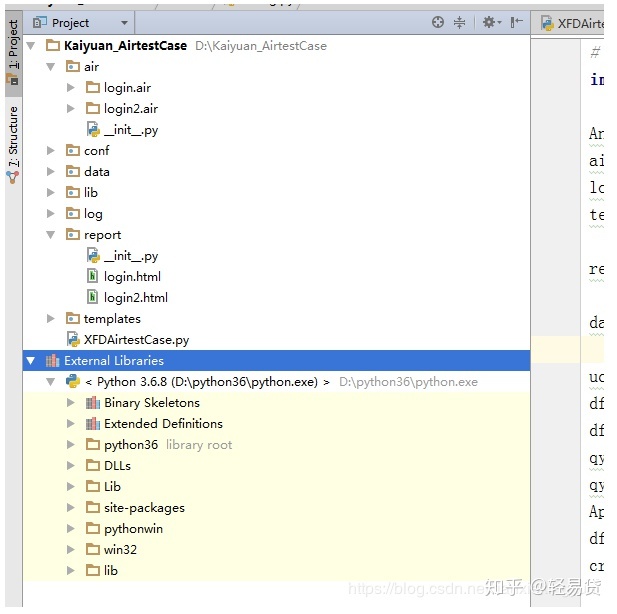
pip install airtest框架结构如下:
1、框架简单介绍
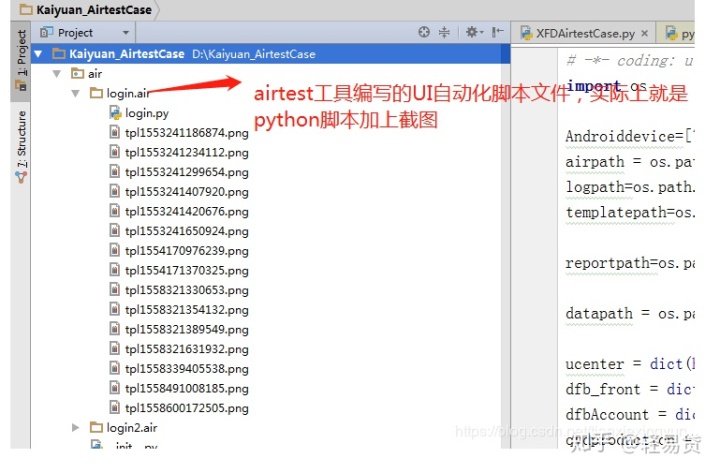
air 是多个自动化脚本
conf,lib 配置文件
data 数据
log 日志
report html 报告
XFDAirtestCase.py 入口方法,启动器
2、air 脚本的开发
通过airtest工具,开发脚本,可以录制,也可以自己编写,请参考源文档,这里不做多介绍
欢迎来到AirtestIDE官方文档 - airtest-ide documentation
3、配置文件,获取文件所在目录
# -*- coding: utf-8 -*
import os

Androiddevice=["Android://127.0.0.1:5037/172.16.81.115:5555"]#连接安卓设备127.0.0.1:5037固定写法172.16.81.115安卓真机的Ip
airpath = os.path.join(os.path.dirname(os.path.dirname(os.path.abspath(__file__))),'air')#脚本目录
logpath=os.path.join(os.path.dirname(os.path.dirname(os.path.abspath(__file__))),'log')#日志目录
templatepath=os.path.join(os.path.dirname(os.path.dirname(os.path.abspath(__file__))),'templates')#模板目录

reportpath=os.path.join(os.path.dirname(os.path.dirname(os.path.abspath(__file__))),'report')#报告目录

datapath = os.path.join(os.path.dirname(os.path.dirname(os.path.abspath(__file__))), 'data')#测试数据目录
4、入口脚本,启动器
from airtest.cli.runner import AirtestCase, run_script
from argparse import *
import shutil
from conf.config import *
from lib.log import logger
from airtest.report.report import simple_report

class XFDAirtestCase(AirtestCase):#继承AirtestCase类

    def setUp(self):
        logger.info("案例开始执行")
        super(XFDAirtestCase, self).setUp()#继承父类的setup方法

    def tearDown(self):
        logger.info("案例执行结束")
        super(XFDAirtestCase, self).tearDown()#继承父类的tearDown方法

    def run_air(self, root_dir, device):#本方法主要是查找脚本文件,目录文件,初始化AirtestCase所需要的参数,执行脚本,并生成报告

        for f in os.listdir(root_dir):#循环查找air所在的目录
            if f.endswith(".air"):#以air结尾的文件
                airName = f
                script = os.path.join(root_dir, f)#脚本目录
                logger.info(script)
                log = os.path.join(logpath +''+ airName.replace('.air', ''))#日志目录
                logger.info(log)
                if os.path.isdir(log):
                    shutil.rmtree(log)#清空日志目录文件
                else:
                    os.makedirs(log)
                args = Namespace(device=device, log=log, recording=None, script=script)#初始化父类AirtestCase所需要的参数
                try:
                    run_script(args, AirtestCase)#执行air脚本文件
                except AssertionError:
                    logger.info("案例执行失败")
                finally:
                    #output_file = log + '' + airName.replace('.air', '') + '.html'
                    output_file = reportpath + '' + airName.replace('.air', '') + '.html'#生成报告目录
                    simple_report(script, logpath=log, output=output_file)#生成报告的方法
                    logger.info("案例执行成功")


if __name__ == '__main__':
    test = XFDAirtestCase()
    #device = ['Android://127.0.0.1:5037/172.16.81.115:5555']
    test.run_air(airpath, Androiddevice)
5、执行过程,以及执行结果报告
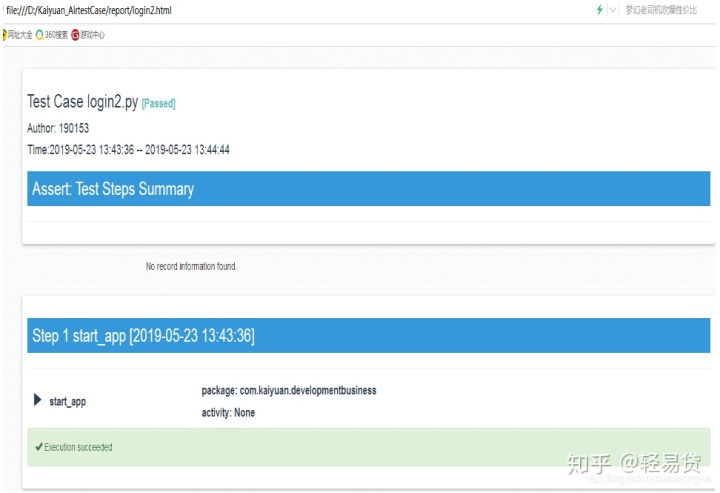
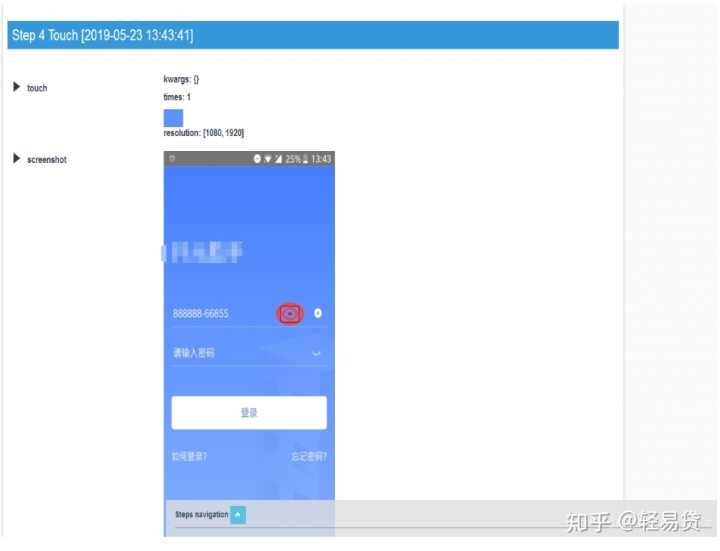
在python环境下执行入口脚本,命令如下:python XFDAirtestCase.py 循环执行air 文件下的air 脚本,以登录为例,每个air脚本对应生成一个html报告, 放到report 目录中;html 中有详细的点击步骤,也有截图,报告效果如下:

6、搭建框架中遇到的问题
(1) airtest adb 与python中的adb 冲突问题:
解决方案:把toolsadb39 中的adb 拷贝到 pyhon 的Libsite-packagesairtestcoreandroidstaticadbwindows 目录下
(2) 入口脚本 运行问题,
直接运行XFDAirtestCase.py 报错:错误如下:
Error
Traceback (most recent call last):
File "D:python36libsite-packagesairtestclirunner.py", line 26, in setUpClass
cls.args = args
NameError: name 'args' is not defined
解决方案: 通过python 命令直接执行 进到该项目下 直接执行python XFDAirtestCase.py





 扫一扫
扫一扫


 918
918

 被折叠的 条评论
为什么被折叠?
被折叠的 条评论
为什么被折叠?
 到【灌水乐园】发言





