


 本文介绍了一个AXI GPIO设备驱动的实现过程,包括内核模块的初始化、设备注册、文件操作函数的实现等内容,并提供了一段完整的驱动代码及应用层示例。该驱动实现了LED灯的开关控制功能。
驱动代码:
#include <linux/module.h>
#include <linux/kernel.h>
#include <linux/fs.h>
#include <asm/irq.h>
#include <linux/init.h>
#include <linux/delay.h>
#include <linux/device.h>            //包含了device、class 等结构的定义
#include <asm/io.h>               //包含了ioremap、iowrite等内核访问IO内存等函数
#include <linux/uaccess.h>        //包含了copy_to_user、copy_from_user等

#define DEVICE_NAME          "axiled"
#define CLASS_NAME           "zynqebb"

/* XGPIO Physical address */
#define XGPIO_PHY_ADDR 0x41200000      //This Address is based SDK
/* Register Offset Definitions */
#define XGPIO_DATA_OFFSET   (0x0)    /* Data register  */
#define XGPIO_TRI_OFFSET    (0x4)    /* I/O direction register  */

volatile unsigned long *Gpio_DIR = NULL;
volatile unsigned long *Gpio_DATA = NULL;


MODULE_AUTHOR("Xilinx ");
MODULE_DESCRIPTION("AXI GPIO moudle dirver");
MODULE_VERSION("v1.0");
MODULE_LICENSE("GPL");

static int axi_gpio_driver_major;
static struct class* axi_gpio_driver_class = NULL;
static struct device* axi_gpio_driver_device = NULL;

unsigned long axi_gpio_virt_addr = 0;        //AXI_GPIO moulde's  visual address

static ssize_t axi_gpio_write(struct file * file, const char * buf, size_t count,loff_t *off)
{
    //printk("axi_gpio_write\n");
    int  val;
    copy_from_user(&val,buf,count);
    printk("before Gpio_DATA:%lx,%lx.\n",Gpio_DATA,ioread32(Gpio_DATA));

    if(val == 1)
    {
        //点灯
        //*Gpio_DATA = (unsigned long )0x00000005;     //设置AXI GPIO的方向输出全为高
        iowrite32(0x0000000F,Gpio_DATA); //设置AXI GPIO的方向输出全为高
    }
    else
    {
        //灭灯
        iowrite32(0x00000000,Gpio_DATA); //设置AXI GPIO的方向输出全为低
    }
    printk("after Gpio_DATA:%lx,%lx.\n",Gpio_DATA,ioread32(Gpio_DATA));
    return 0;

}

static int axi_gpio_open(struct inode *inode, struct file *filp)
{
    //printk("axi_gpio_open\n");

    //配置led管脚为输出
    printk("before Gpio_DIR:%lx,%lx.\n",Gpio_DIR,ioread32(Gpio_DIR));
    //*Gpio_DIR = (unsigned long )0x00000000;       //设置AXI GPIO的方向输出
    iowrite32(0x00000000,Gpio_DIR);  //设置AXI GPIO的方向输出

    printk("after Gpio_DIR:%lx,%lx.\n",Gpio_DIR,ioread32(Gpio_DIR));

    return 0;
}

static struct file_operations axi_gpio_fops = {
    .owner = THIS_MODULE,
    .write       = axi_gpio_write,
    .open        = axi_gpio_open,
};


static int __init axi_gpio_driver_module_init(void)
{
    int ret;

    axi_gpio_driver_major=register_chrdev(0, DEVICE_NAME, &axi_gpio_fops );//内核注册设备驱动
    if (axi_gpio_driver_major < 0){
        printk("failed to register device.\n");
        return -1;
    }

    axi_gpio_driver_class = class_create(THIS_MODULE, CLASS_NAME);//创建设备类
    if (IS_ERR(axi_gpio_driver_class)){
        printk("failed to create zxi_gpio moudle class.\n");
        unregister_chrdev(axi_gpio_driver_major, DEVICE_NAME);
        return -1;
    }


    axi_gpio_driver_device = device_create(axi_gpio_driver_class, NULL, MKDEV(axi_gpio_driver_major, 0), NULL, DEVICE_NAME);
    if (IS_ERR(axi_gpio_driver_device)){
        printk("failed to create device .\n");
        unregister_chrdev(axi_gpio_driver_major, DEVICE_NAME);
        return -1;
    }


    //To get Custom IP--gpio moudle's virtual address
#if 1
    if(request_mem_region(XGPIO_PHY_ADDR, 0x1000,DEVICE_NAME) == NULL ){
        printk( "request_mem_region failed\n");
        return -1;
    }
#endif
    axi_gpio_virt_addr = (unsigned long)ioremap(XGPIO_PHY_ADDR, sizeof(u32));
    //将模块的物理地址映射到虚拟地址上
    printk( "ioremap called: phys %#08x -> virt %#08x\n",XGPIO_PHY_ADDR, axi_gpio_virt_addr );
    //指定需要操作的寄存器的地址
    Gpio_DIR =  (unsigned long *)(axi_gpio_virt_addr + XGPIO_TRI_OFFSET);
    Gpio_DATA = (unsigned long *)(axi_gpio_virt_addr + XGPIO_DATA_OFFSET);

    return 0;
}
static void __exit axi_gpio_driver_module_exit(void)
{

    //撤销映射关系
    iounmap((void *)axi_gpio_virt_addr);
#if 1
    release_mem_region(XGPIO_PHY_ADDR, 0x1000);
#endif
    device_destroy(axi_gpio_driver_class, MKDEV(axi_gpio_driver_major, 0));
    class_unregister(axi_gpio_driver_class);
    class_destroy(axi_gpio_driver_class);
    unregister_chrdev(axi_gpio_driver_major, DEVICE_NAME);
    printk("axi_gpio module exit.\n");
}

module_init(axi_gpio_driver_module_init);
module_exit(axi_gpio_driver_module_exit);
应用层代码:
#include <sys/types.h>
#include <sys/stat.h>
#include <fcntl.h>
#include <stdio.h>

/*  firstdrvtest on
  * firstdrvtest off
  */
int main(int argc, char **argv)
{
    int fd;
    int val = 1;
    fd = open("/dev/axiled", O_RDWR);
    if (fd < 0)
    {
        printf("can't open!\n");
    }
    if (argc != 2)
    {
        printf("Usage :\n");
        printf("%s <on|off>\n", argv[0]);
        return 0;
    }

    if (strcmp(argv[1], "on") == 0)
    {
        val  = 1;
    }
    else
    {
        val = 0;
    }

    write(fd, &val, 4);
    return 0;
}
插入模块:
root@plnx_arm:/mnt# insmod mytest.ko
ioremap called: phys 0x41200000 -> virt 0xf09f0000
测试设备号:

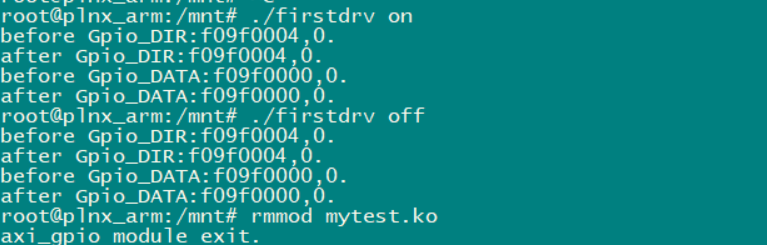
运行应用程序:





 扫一扫
扫一扫


 1495
1495

 被折叠的 条评论
为什么被折叠?
被折叠的 条评论
为什么被折叠?
 到【灌水乐园】发言





