



 本文介绍了一个利用Android的支持库PercentRelativeLayout和PercentFrameLayout来按百分比设定控件宽高的示例。通过添加'com.android.support:percent:22.2.0'依赖,开发者可以创建基于百分比的布局,适用于水平和垂直方向。详细代码示例展示了如何在布局XML中应用百分比属性。
我做了一个新的百分比支持库的示例。
需要引用 包:'com.android.support:percent:22.2.0'
它将很快就会记录在android开发网站,它只是一个概念验证
你可以在这里检查官方文档引用
这个库提供基于百分比的布局,同时水平和垂直。
简单的结果

复杂的结果
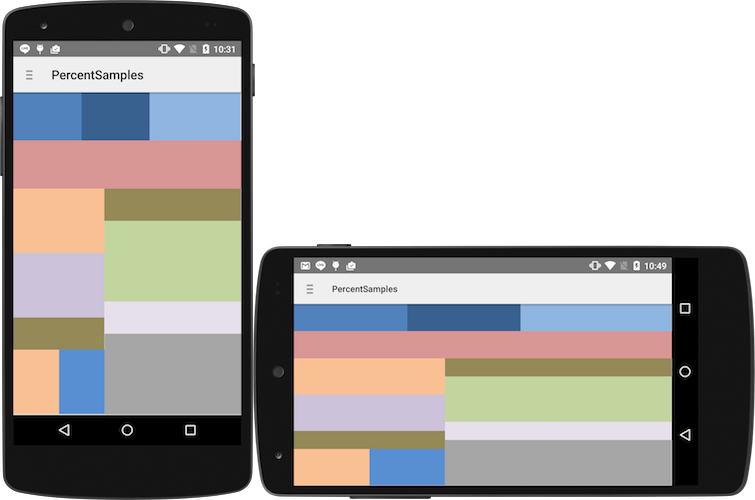
如何使用:
就百分比支持库添加到您的项目
dependencies {
        compile 'com.android.support:percent:22.2.0'
}
PercentRelativeLayout
<android.support.percent.PercentRelativeLayout
        xmlns:android="http://schemas.android.com/apk/res/android"
        xmlns:app="http://schemas.android.com/apk/res-auto"
        android:layout_width="match_parent"
        android:layout_height="match_parent">

<View
android:id="@+id/top_left"
        android:layout_width="0dp"
        android:layout_height="0dp"
        android:layout_alignParentTop="true"
        android:background="#ff44aacc"
        app:layout_heightPercent="20%"
        app:layout_widthPercent="70%" />

<View
android:id="@+id/top_right"
        android:layout_width="0dp"
        android:layout_height="0dp"
        android:layout_alignParentTop="true"
        android:layout_toRightOf="@+id/top_left"
        android:background="#ffe40000"
        app:layout_heightPercent="20%"
        app:layout_widthPercent="30%" />


<View
android:id="@+id/bottom"
        android:layout_width="match_parent"
        android:layout_height="0dp"
        android:layout_below="@+id/top_left"
        android:background="#ff00ff22"
        app:layout_heightPercent="80%" />
</android.support.percent.PercentRelativeLayout>
<android.support.percent.PercentFrameLayout
        xmlns:android="http://schemas.android.com/apk/res/android"
        xmlns:app="http://schemas.android.com/apk/res-auto"
        android:layout_width="match_parent"
        android:layout_height="match_parent">
<!-- ... XML CODE -->
</android.support.percent.PercentFrameLayout>





 扫一扫
扫一扫


 3276
3276

 被折叠的 条评论
为什么被折叠?
被折叠的 条评论
为什么被折叠?
 到【灌水乐园】发言





