


基于 DevUI MateChat 构建通信业务
智能助手
一、需求背景:
在数字化浪潮下,客服系统已成为通信运营商连接用户的核心触点 —— 用户从套餐咨询、业务办理到售后维权,90% 的需求都通过客服渠道解决。但行业数据显示,通信行业客服正面临 “高成本、低效率、差体验” 的三重挤压:人工客服成本占运营总支出的 15%,用户对响应速度的要求从 “分钟级” 压缩至 “秒级”,而单一文字推荐的转化率不足 8%,远低于电商行业的平均水平。
传统客服模式的痛点早已浮出水面:
- 合规性压力:工信部《电信服务规范》要求业务推荐需明确告知资费、有效期、退订方式,避免误导用户,纯人工沟通易出现表述不规范问题;
- 实时性焦虑:用户流失率与响应延迟呈指数级正相关,延迟 3 秒流失率提升 28%,尤其在月末流量充值、套餐到期等高峰期,人工客服排队等待时间常超 5 分钟,大量用户中途放弃;
- 转化效率低:传统客服以 “文字描述 + 链接跳转” 为主,套餐权益不直观、办理流程繁琐,用户从咨询到办理的平均路径长达 8 步,转化率不足人工咨询量的 10%。
而当运营商尝试通过 AI 升级客服系统时,又陷入了 “后端易、前端难” 的困境:
● 如何实现套餐权益的可视化展示(如流量包、宽带套餐的商品卡片)?
● 如何支持流式输出(打字机效果)提升交互体验?
● 如何快速嵌入现有业务系统,避免从零开发对话 UI、富媒体渲染等基础能力?
这些前端交互的 “拦路虎”,让很多 AI 升级方案卡在落地阶段 —— 后端接入大模型仅需 1-2 天,前端交互开发却要耗费数周甚至数月。直到华为云 DevUI MateChat(以下简称 MateChat)的出现,这一困境被彻底打破。
MateChat 以 “标准化 UI + 智能交互引擎” 为核心,提供了开箱即用的对话组件库,涵盖商品卡片推送、多轮对话记忆、流式输出、富媒体渲染等通信业务所需的核心能力。无需从零开发前端交互,仅需简单配置即可快速搭建符合行业需求的智能客服系统,让运营商将精力聚焦于业务逻辑与用户体验优化,而非重复造轮子。
本文将以通信业务智能助手项目为例,完整还原从需求分析、方案设计到落地验证的全流程,展示如何通过 MateChat 破解传统客服的效率瓶颈,构建 “咨询 - 推荐 - 转化 - 售后” 的全链路电商化闭环。
二、搭建开发环境
方式一:使用 MateChat 最新 CLI 快速创建项目
MateChat 最新推出的专属 CLI 工具,可一键完成项目初始化、依赖集成、配置预设,无需手动选择框架和配置依赖,比传统 Vite 创建方式节省 80% 配置时间,真正实现 “开箱即用”。
1.安装 MateChat CLI
打开终端执行以下命令,全局安装 MateChat CLI 工具:
npm create matechat@latest
这一指令会安装并执行https://gitcode.com/DevCloudFE/MateChat/tree/dev/packages/create-matechat ,你将会看到一些创建提示:
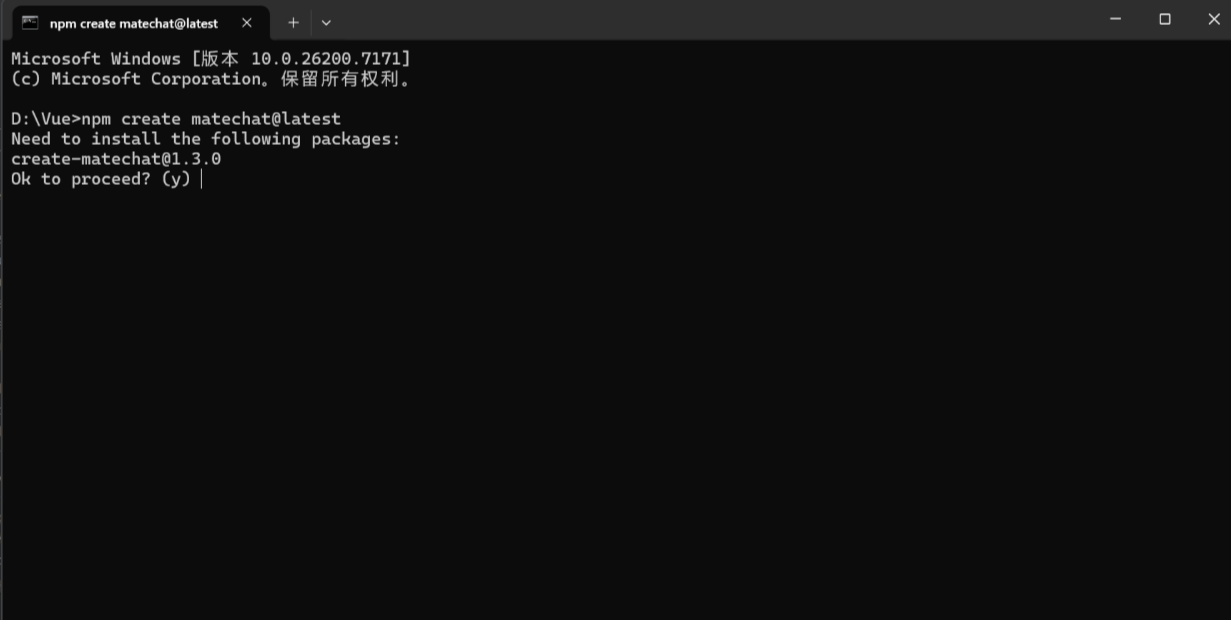
输入 y 后,输入创建项目名称:
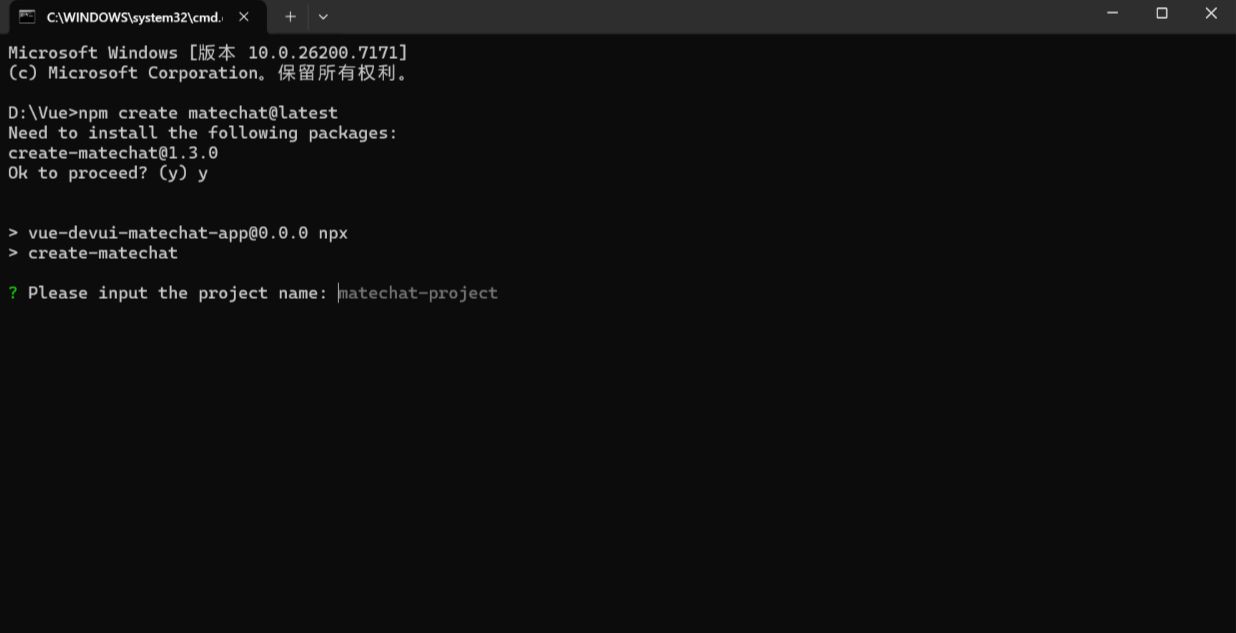
最后创建项目完成:
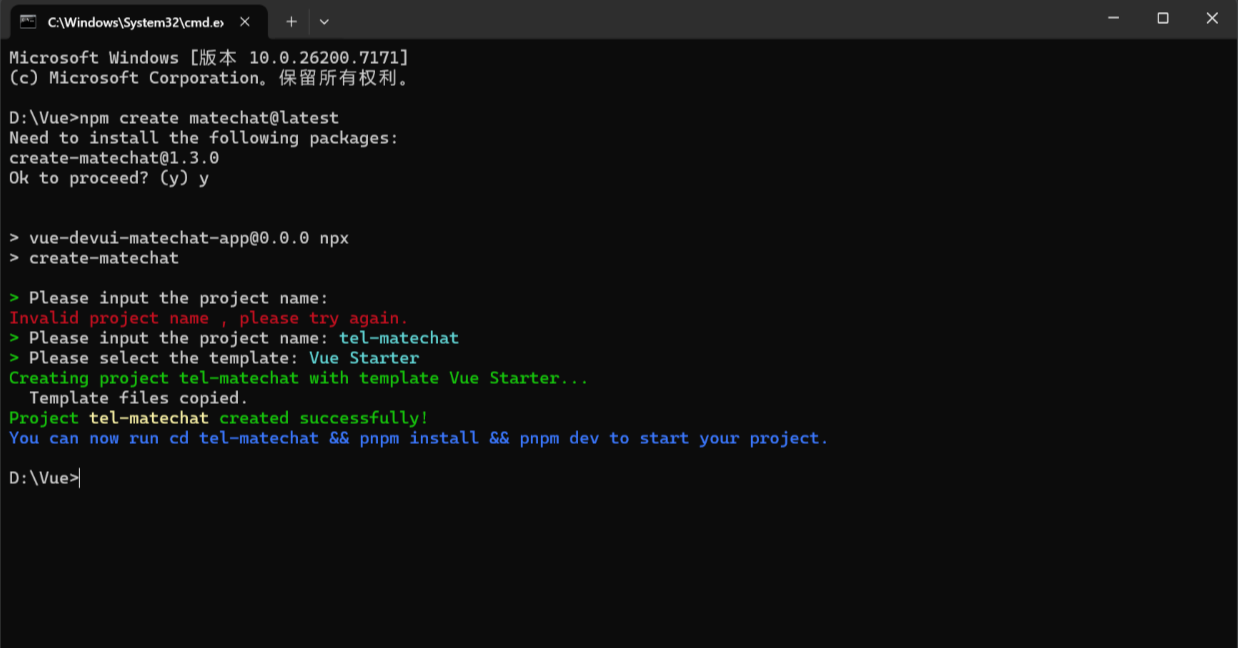
2. 一键创建项目并安装依赖
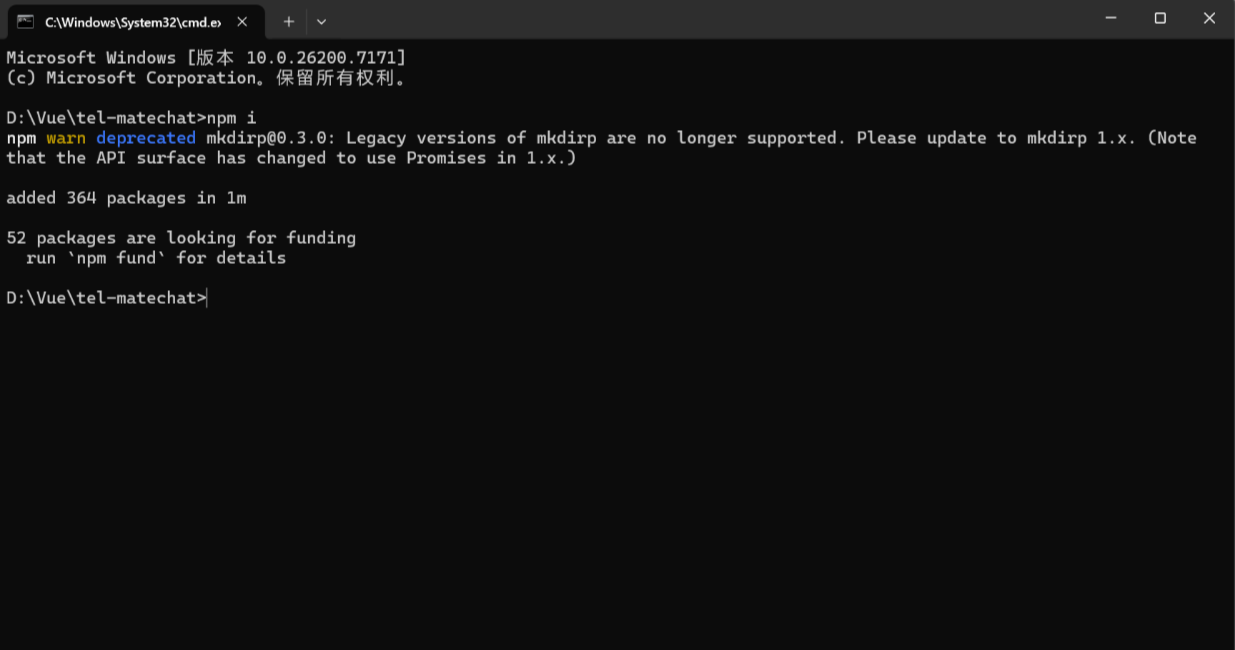
应用创建完成后通过以下命令安装依赖:
cd < your-project-name>
npm i
3. 启动项目
进入项目目录并启动,CLI 已预设好启动命令,无需额外配置:
npm run dev
启动成功后,终端会输出访问地址(默认:http://localhost:5173),打开后即可看到已预设好的聊天页面基础框架,无需手动编写布局代码,直接可进行业务逻辑开发。
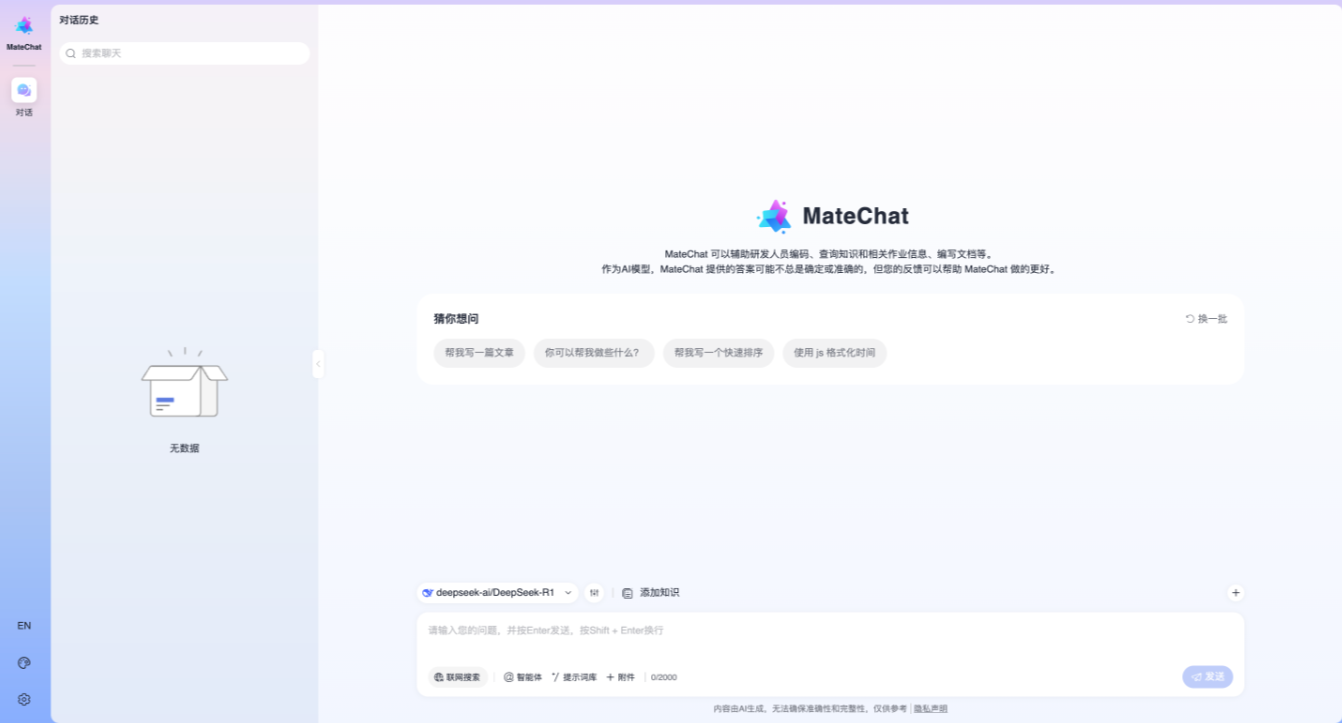
方式二:传统 Vite 初始化项目
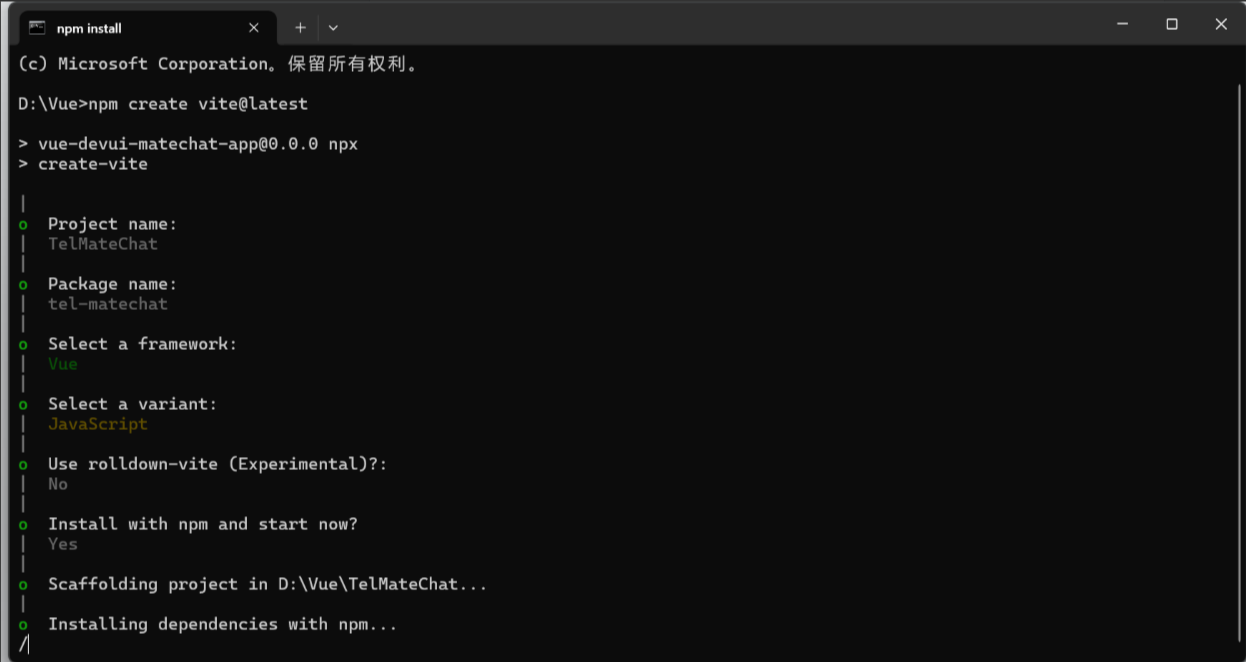
1.创建vite项目
当vue的前提环境准备好时,可以使用vite首先初始化一个vue+js项目:
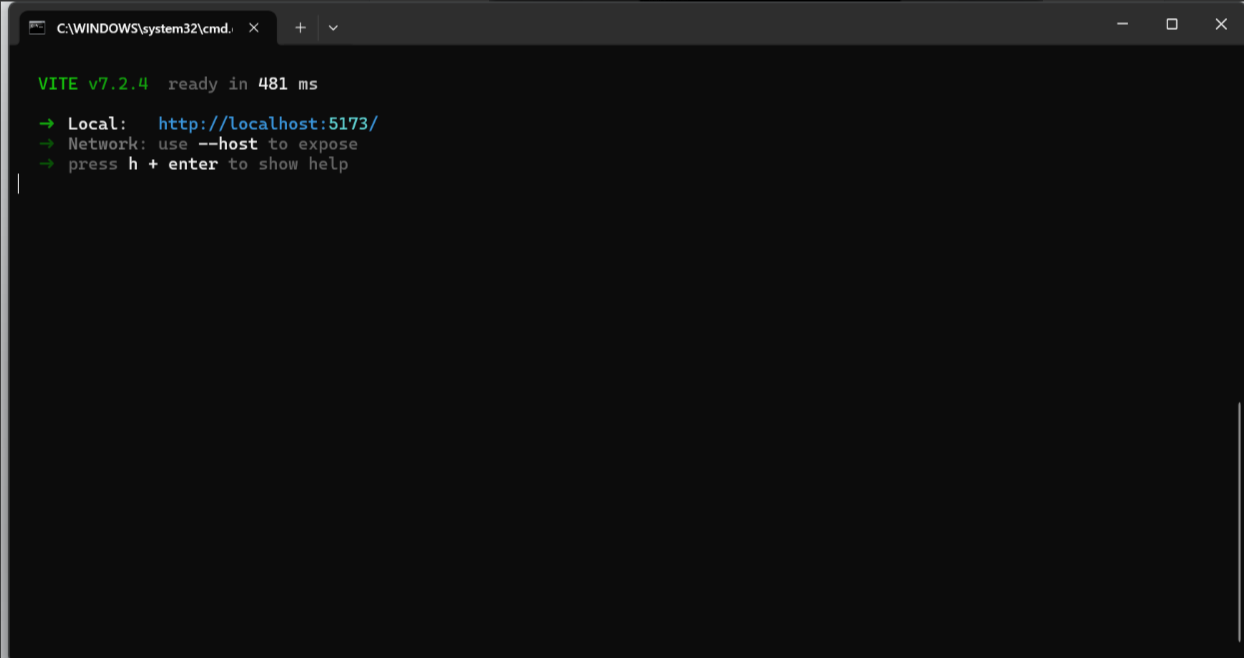
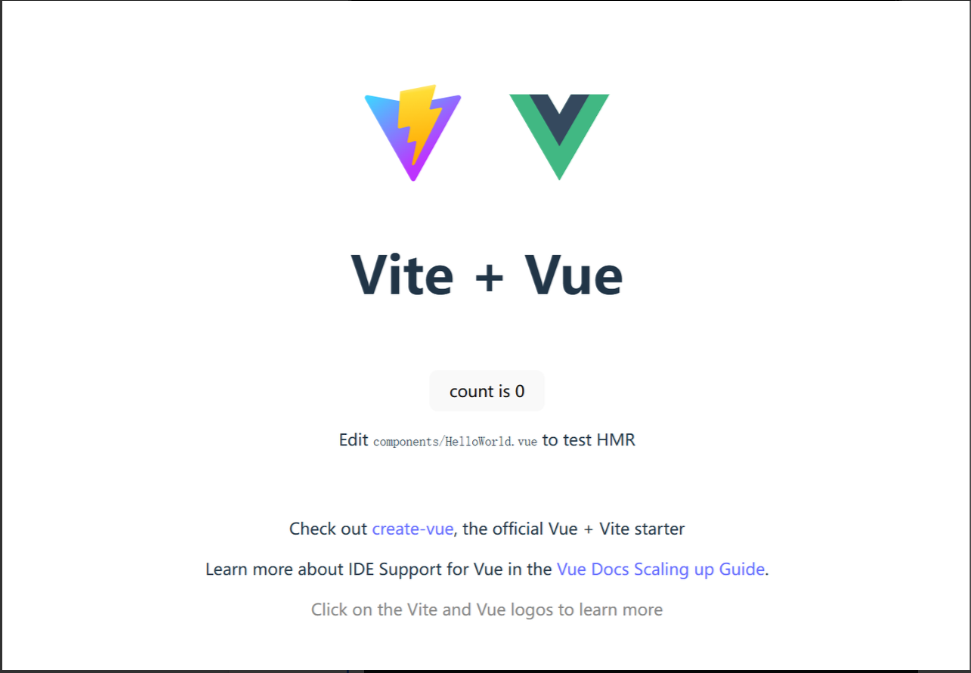
2.启动项目
当显示该页面时就表示项目启动成功,基础环境没问题:
3.引入DevUI 和 MateChat的样式和组件
在main.ts文件中引入matechat, 图标库 样式文件
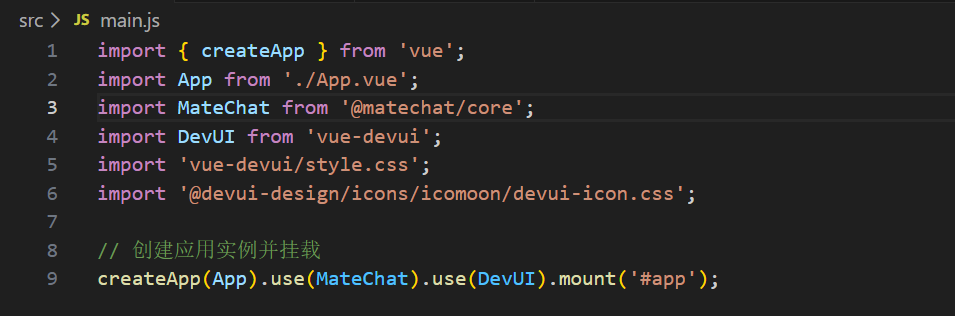
在App.vue文件中使用 MateChat 组件,如:
< template >
< McBubble :content=“‘Hello, MateChat’” :avatarConfig=“{ name: ‘matechat’ }”>
< /template>
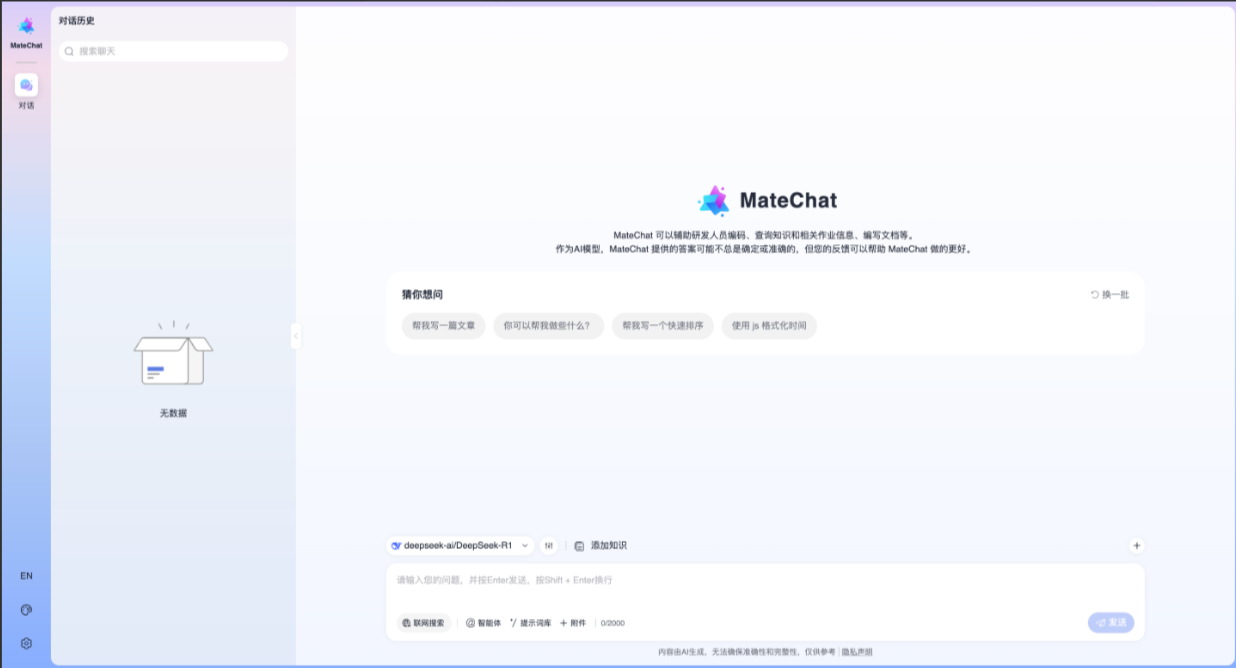
4.搭建简单的对话示例
<template>
  <McLayout class="container">
    <McHeader :title="'MateChat'" :logoImg="'https://matechat.gitcode.com/logo.svg'">
      <template #operationArea>
        <div class="operations">
          <i class="icon-helping"></i>
        </div>
      </template>
    </McHeader>
    <McLayoutContent
      v-if="startPage"
      style="display: flex; flex-direction: column; align-items: center; justify-content: center; gap: 12px"
    >
      <McIntroduction
        :logoImg="'https://matechat.gitcode.com/logo2x.svg'"
        :title="'MateChat'"
        :subTitle="'Hi,欢迎使用 MateChat'"
        :description="description"
      ></McIntroduction>
      <McPrompt
        :list="introPrompt.list"
        :direction="introPrompt.direction"
        class="intro-prompt"
        @itemClick="onSubmit($event.label)"
      ></McPrompt>
    </McLayoutContent>
    <McLayoutContent class="content-container" v-else>
      <template v-for="(msg, idx) in messages" :key="idx">
        <McBubble
          v-if="msg.from === 'user'"
          :content="msg.content"
          :align="'right'"
          :avatarConfig="{ imgSrc: 'https://matechat.gitcode.com/png/demo/userAvatar.svg' }"
        >
        </McBubble>
        <McBubble v-else :content="msg.content" :avatarConfig="{ imgSrc: 'https://matechat.gitcode.com/logo.svg' }" :loading="msg.loading"> </McBubble>
      </template>
    </McLayoutContent>
    <div class="shortcut" style="display: flex; align-items: center; gap: 8px">
      <McPrompt
        v-if="!startPage"
        :list="simplePrompt"
        :direction="'horizontal'"
        style="flex: 1"
        @itemClick="onSubmit($event.label)"
      ></McPrompt>
      <Button
        style="margin-left: auto"
        icon="add"
        shape="circle"
        title="新建对话"
        size="md"
        @click="newConversation"
      />
    </div>
    <McLayoutSender>
      <McInput :value="inputValue" :maxLength="2000" @change="(e) => (inputValue = e)" @submit="onSubmit">
        <template #extra>
          <div class="input-foot-wrapper">
            <div class="input-foot-left">
              <span v-for="(item, index) in inputFootIcons" :key="index">
                <i :class="item.icon"></i>
                {{ item.text }}
              </span>
              <span class="input-foot-dividing-line"></span>
              <span class="input-foot-maxlength">{{ inputValue.length }}/2000</span>
            </div>
            <div class="input-foot-right">
              <Button icon="op-clearup" shape="round" :disabled="!inputValue" @click="inputValue = ''"><span class="demo-button-content">清空输入</span></Button>
            </div>
          </div>
        </template>
      </McInput>
    </McLayoutSender>
  </McLayout>
</template>

<script setup lang="ts">
import { ref } from 'vue';
import { Button } from 'vue-devui/button';
import 'vue-devui/button/style.css';

const description = [
  'MateChat 可以辅助研发人员编码、查询知识和相关作业信息、编写文档等。',
  '作为AI模型,MateChat 提供的答案可能不总是确定或准确的,但您的反馈可以帮助 MateChat 做的更好。',
];
const introPrompt = {
  direction: 'horizontal',
  list: [
    {
      value: 'quickSort',
      label: '帮我写一个快速排序',
      iconConfig: { name: 'icon-info-o', color: '#5e7ce0' },
      desc: '使用 js 实现一个快速排序',
    },
    {
      value: 'helpMd',
      label: '你可以帮我做些什么?',
      iconConfig: { name: 'icon-star', color: 'rgb(255, 215, 0)' },
      desc: '了解当前大模型可以帮你做的事',
    },
    {
      value: 'bindProjectSpace',
      label: '使用js格式化时间',
      iconConfig: { name: 'icon-priority', color: '#3ac295' },
      desc: '使用 js 快速实现时间格式',
    },
  ],
};
const simplePrompt = [
  {
    value: 'quickSort',
    iconConfig: { name: 'icon-info-o', color: '#5e7ce0' },
    label: '帮我写一个快速排序',
  },
  {
    value: 'helpMd',
    iconConfig: { name: 'icon-star', color: 'rgb(255, 215, 0)' },
    label: '你可以帮我做些什么?',
  },
];
const startPage = ref(true);
const inputValue = ref('');
const inputFootIcons = [
  { icon: 'icon-at', text: '智能体' },
  { icon: 'icon-standard', text: '词库' },
  { icon: 'icon-add', text: '附件' },
];

const messages = ref<any[]>([]);

const newConversation = () => {
  startPage.value = true;
  messages.value = [];
}

const onSubmit = (evt) => {
  inputValue.value='';
  startPage.value = false;
  // 用户发送消息
  messages.value.push({
    from: 'user',
    content: evt,
  });
  setTimeout(() => {
    // 模型返回消息
    messages.value.push({
      from: 'model',
      content: evt,
    });
  }, 200);
};
</script>

<style>
.container {
  width: 1000px;
  margin: 20px auto;
  height: calc(100vh - 82px);
  padding: 20px;
  gap: 8px;
  background: #fff;
  border: 1px solid #ddd;
  border-radius: 16px;
}

.content-container {
  display: flex;
  flex-direction: column;
  gap: 8px;
  overflow: auto;
}

.input-foot-wrapper {
  display: flex;
  justify-content: space-between;
  align-items: center;
  width: 100%;
  height: 100%;
  margin-right: 8px;

  .input-foot-left {
    display: flex;
    align-items: center;
    gap: 8px;

    span {
      font-size: 14px;
      line-height: 18px;
      color: #252b3a;
      cursor: pointer;
    }

    .input-foot-dividing-line {
      width: 1px;
      height: 14px;
      background-color: #d7d8da;
    }

    .input-foot-maxlength {
      font-size: 14px;
      color: #71757f;
    }
  }

  .input-foot-right {
    .demo-button-content {
      font-size: 14px;
    }

    & > *:not(:first-child) {
      margin-left: 8px;
    }
  }
}
</style>
三、改造通信业务智能助手聊天页面
1.使用 MateChat 组件定制智能聊天页面
在App.vue文件中使用 MateChat 组件实现对话界面
<template>
  <McLayout class="container">
    <McHeader :title="'通信业务智能助手'" :logoImg="''">
      <template #operationArea>
        <div class="operations">
          <i class="icon-helping"></i>
        </div>
      </template>
    </McHeader>
    <McLayoutContent
      v-if="startPage"
      style="display: flex; flex-direction: column; align-items: center; justify-content: center; gap: 12px"
    >
      <McIntroduction
        :logoImg="''"
        :title="'通信业务智能助手'"
        :subTitle="'您好,欢迎使用通信业务智能助手'"
        :description="description"
      ></McIntroduction>
      <McPrompt
        :list="introPrompt.list"
        :direction="introPrompt.direction"
        class="intro-prompt"
        @itemClick="onSubmit($event.label)"
      ></McPrompt>
    </McLayoutContent>
    <McLayoutContent class="content-container" v-else>
      <template v-for="(msg, idx) in messages" :key="idx">
        <McBubble
          v-if="msg.from === 'user'"
          :content="msg.content"
          :align="'right'"
          :avatarConfig="{ imgSrc: 'https://placehold.co/40x40/eee/333?text=User' }"
        >
        </McBubble>
        <McBubble v-else
          :content="msg.content"
          :avatarConfig="{ imgSrc: 'https://placehold.co/40x40/5e7ce0/fff?text=Operator' }"
          :loading="msg.loading">
        </McBubble>
      </template>
    </McLayoutContent>
    <div class="shortcut" style="display: flex; align-items: center; gap: 8px">
      <McPrompt
        v-if="!startPage"
        :list="simplePrompt"
        :direction="'horizontal'"
        style="flex: 1"
        @itemClick="onSubmit($event.label)"
      ></McPrompt>
      <Button
        style="margin-left: auto"
        icon="add"
        shape="circle"
        title="新建对话"
        size="md"
        @click="newConversation"
      />
    </div>
    <McLayoutSender>
      <McInput :value="inputValue" :maxLength="2000" @change="(e) => (inputValue = e)" @submit="onSubmit">
        <template #extra>
          <div class="input-foot-wrapper">
            <div class="input-foot-left">
              <span v-for="(item, index) in inputFootIcons" :key="index">
                <i :class="item.icon"></i>
                {{ item.text }}
              </span>
              <span class="input-foot-dividing-line"></span>
              <span class="input-foot-maxlength">{{ inputValue.length }}/2000</span>
            </div>
            <div class="input-foot-right">
              <Button icon="op-clearup" shape="round" :disabled="!inputValue" @click="inputValue = ''"><span class="demo-button-content">清空输入</span></Button>
            </div>
          </div>
        </template>
      </McInput>
    </McLayoutSender>
  </McLayout>
</template>

<script setup lang="ts">
import { ref } from 'vue';
import { Button } from 'vue-devui/button';
import 'vue-devui/button/style.css';
import OpenAI from 'openai';

// 硬编码用户画像数据(用于API prompt优化,提升推荐精准度)
const userProfile = {
  userTag: '全球通客户',
  mainBehavior: '主要使用手机上网,对语音通话需求较低',
  dataUsage: '平均每月流量消耗接近套餐上限',
  devicePreference: '偏好使用步步高品牌的终端设备',
  additionalInfo: '为异网宽带客户,每月流量需求稳定'
};

// 基础配置(通信场景)
const description = [
  '通信业务智能助手可以为您提供套餐查询、流量包办理、宽带业务、资费优化等通信服务咨询。',
  '作为智能助手,我们将竭诚为您提供专业、高效的服务,帮助您选择最适合的通信业务。'
];
const introPrompt = {
  direction: 'horizontal',
  list: [
    {
      value: 'flowPackage',
      label: '推荐合适的流量包',
      iconConfig: { name: 'icon-info-o', color: '#5e7ce0' },
      desc: '根据使用习惯推荐流量包',
    },
    {
      value: 'packageUpgrade',
      label: '套餐升级建议',
      iconConfig: { name: 'icon-star', color: 'rgb(255, 215, 0)' },
      desc: '分析当前套餐并提供升级方案',
    },
    {
      value: 'broadband',
      label: '宽带业务咨询',
      iconConfig: { name: 'icon-priority', color: '#3ac295' },
      desc: '了解宽带套餐及办理流程',
    },
  ],
};
const simplePrompt = [
  {
    value: 'flowPackage',
    iconConfig: { name: 'icon-info-o', color: '#5e7ce0' },
    label: '推荐流量包',
  },
  {
    value: 'packageUpgrade',
    iconConfig: { name: 'icon-star', color: 'rgb(255, 215, 0)' },
    label: '套餐升级',
  },
  {
    value: 'broadband',
    iconConfig: { name: 'icon-priority', color: '#3ac295' },
    label: '宽带咨询',
  },
  {
    value: 'default',
    iconConfig: { name: 'icon-credit', color: '#e74c3c' },
    label: '其他业务',
  },
];

// 状态管理
const startPage = ref(true);
const inputValue = ref('');
const messages = ref<any[]>([]);
const inputFootIcons = [
  { icon: 'icon-at', text: '智能推荐' },
  { icon: 'icon-standard', text: '业务库' },
  { icon: 'icon-add', text: '办理记录' },
];

// DeepSeek API配置(通信业务专属prompt)
const client = ref<OpenAI>();
client.value = new OpenAI({
  apiKey: import.meta.env.VITE_DEEPSEEK_API_KEY || '', // 从环境变量读取API Key
  baseURL: import.meta.env.VITE_DEEPSEEK_BASE_URL || 'https://api.deepseek.com/v1', // 注意:通信场景推荐用v1端点
  dangerouslyAllowBrowser: true, // 浏览器环境启用(生产环境建议后端转发)
});

// 交互逻辑
const newConversation = () => {
  startPage.value = true;
  messages.value = [];
};

const onSubmit = (evt) => {
  inputValue.value = '';
  startPage.value = false;
  // 添加用户消息
  messages.value.push({
    from: 'user',
    content: evt,
    avatarConfig: { name: 'user' },
  });
  // 触发API调用
  fetchData(evt);
};

// API调用逻辑(流式输出+用户画像优化+通信业务适配)
const fetchData = async (ques) => {
  // 显示加载状态
  messages.value.push({
    from: 'model',
    content: '',
    avatarConfig: { name: 'model' },
    loading: true,
  });

  try {
    // 构建通信业务专属prompt(融合用户画像+需求关键词)
    const systemPrompt = `
      你是专业的通信业务智能助手,负责为客户提供套餐推荐、流量包办理、宽带业务、资费优化等服务。
      核心要求:
      1. 结合用户画像精准推荐:用户是${userProfile.userTag},${userProfile.mainBehavior},${userProfile.dataUsage},${userProfile.devicePreference},${userProfile.additionalInfo}。
      2. 推荐逻辑:优先推荐与用户需求匹配的套餐,包含套餐名称、月租、核心权益、附加权益、适用人群,语言专业且易懂。
      3. 需求对应:
         - 流量包需求:推荐定向流量包或通用流量包,突出流量额度、价格优势;
         - 套餐升级:对比当前套餐痛点,推荐更划算的高流量/高通话套餐;
         - 宽带业务:推荐融合套餐(手机+宽带),强调安装服务、速率、价格;
         - 其他业务:展示全系列套餐(基础套餐、流量畅享、家庭融合),每个类别至少2个具体套餐,总内容不少于500字。
      4. 格式要求:使用清晰的分层结构(换行分隔),避免使用Markdown,确保前端能正常渲染换行。
    `;

    // 调用DeepSeek API(流式输出)
    const response = await fetch(`${import.meta.env.VITE_DEEPSEEK_BASE_URL || 'https://api.deepseek.com/v1'}/chat/completions`, {
      method: 'POST',
      headers: {
        'Content-Type': 'application/json',
        'Authorization': `Bearer ${import.meta.env.VITE_DEEPSEEK_API_KEY || ''}`
      },
      body: JSON.stringify({
        model: 'deepseek-chat', // 推荐使用免费支持的模型,避免402报错
        messages: [
          { role: 'system', content: systemPrompt.trim() },
          { role: 'user', content: ques }
        ],
        stream: true,
        temperature: 0.7, // 控制回复多样性
        max_tokens: 1000 // 确保回复长度足够(支持500字以上)
      })
    });

    if (!response.ok) {
      throw new Error(`API调用失败,状态码:${response.status}`);
    }

    // 关闭加载状态
    messages.value[messages.value.length - 1].loading = false;

    // 处理流式响应
    const reader = response.body?.getReader();
    if (!reader) {
      throw new Error('无响应数据');
    }

    const decoder = new TextDecoder('utf-8');
    let accumulatedContent = '';
    let chatId = '';

    while (true) {
      const { done, value } = await reader.read();
      if (done) break;

      const chunk = decoder.decode(value, { stream: true });
      const lines = chunk.split('\n').filter(line => line.trim() !== '');

      for (const line of lines) {
        if (line.startsWith('data: ')) {
          const data = line.substring(6);
          if (data === '[DONE]') break;

          try {
            const json = JSON.parse(data);
            if (json.id) chatId = json.id;
            if (json.choices && json.choices.length > 0) {
              const delta = json.choices[0].delta;
              if (delta?.content) {
                accumulatedContent += delta.content;
                // 实时更新回复内容(实现打字机效果)
                messages.value[messages.value.length - 1] = {
                  from: 'model',
                  content: accumulatedContent,
                  avatarConfig: { name: 'model' },
                  id: chatId,
                  loading: false,
                };
              }
            }
          } catch (e) {
            console.error('流式数据解析错误:', e);
          }
        }
      }
    }
  } catch (error) {
    console.error('通信业务API调用异常:', error);
    // 错误提示(适配通信场景)
    messages.value[messages.value.length - 1] = {
      from: 'model',
      content: '抱歉,通信业务咨询服务暂时不可用,请检查API配置或稍后重试。如需紧急办理业务,可联系人工客服热线:10086(移动)/10010(联通)/10000(电信)。',
      avatarConfig: { name: 'model' },
      loading: false,
    };
  }
};
</script>

<style>
.container {
  width: 1000px;
  margin: 20px auto;
  height: calc(100vh - 82px);
  padding: 20px;
  gap: 8px;
  background: #f5f8ff;
  border: 1px solid #d0e0ff;
  border-radius: 16px;
}

.content-container {
  display: flex;
  flex-direction: column;
  gap: 8px;
  overflow: auto;
}

.input-foot-wrapper {
  display: flex;
  justify-content: space-between;
  align-items: center;
  width: 100%;
  height: 100%;
  margin-right: 8px;

  .input-foot-left {
    display: flex;
    align-items: center;
    gap: 8px;

    span {
      font-size: 14px;
      line-height: 18px;
      color: #252b3a;
      cursor: pointer;
    }

    .input-foot-dividing-line {
      width: 1px;
      height: 14px;
      background-color: #d7d8da;
    }

    .input-foot-maxlength {
      font-size: 14px;
      color: #71757f;
    }
  }

  .input-foot-right {
    .demo-button-content {
      font-size: 14px;
    }

    & > *:not(:first-child) {
      margin-left: 8px;
    }
  }
}

/* 确保流式输出换行生效 */
.mc-bubble {
  white-space: pre-line;
  word-break: break-all;
  line-height: 1.6;
  font-size: 14px;
}
</style>
2.对接模型服务
1.在终端通过 npm 安装 openai:
npm install openai
2.在项目根目录下新建一个 .env 文件,添加如下内容:
VITE_DEEPSEEK_API_KEY=你的DeepSeek_API_Key
VITE_DEEPSEEK_BASE_URL=https://api.deepseek.com/v1
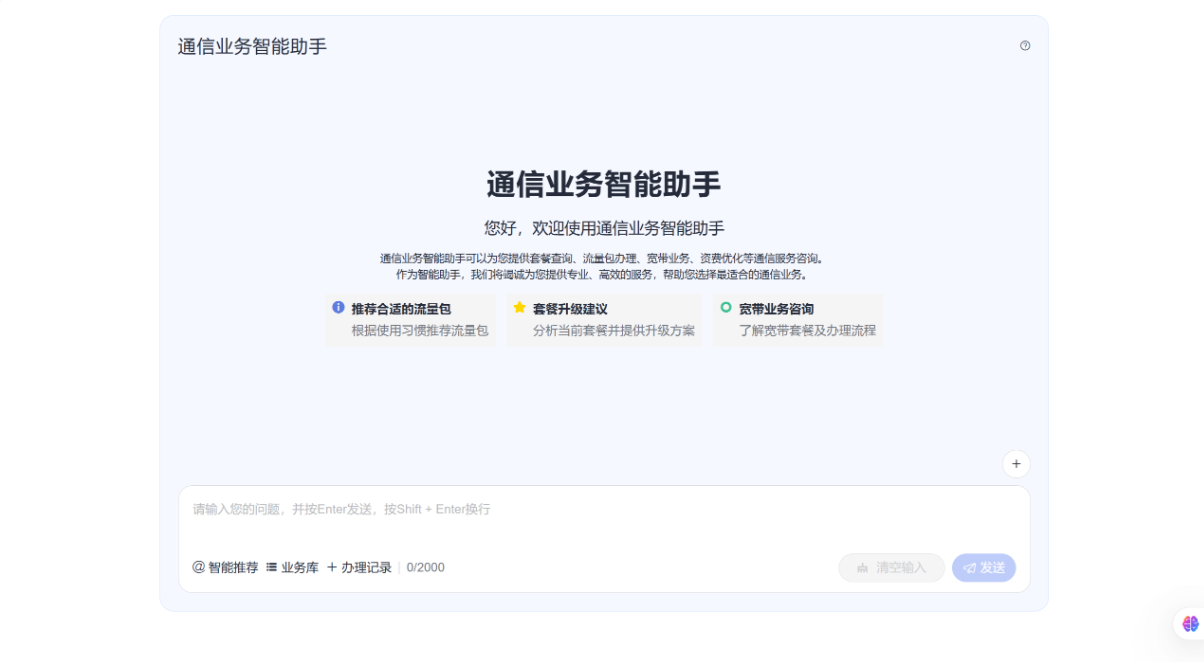
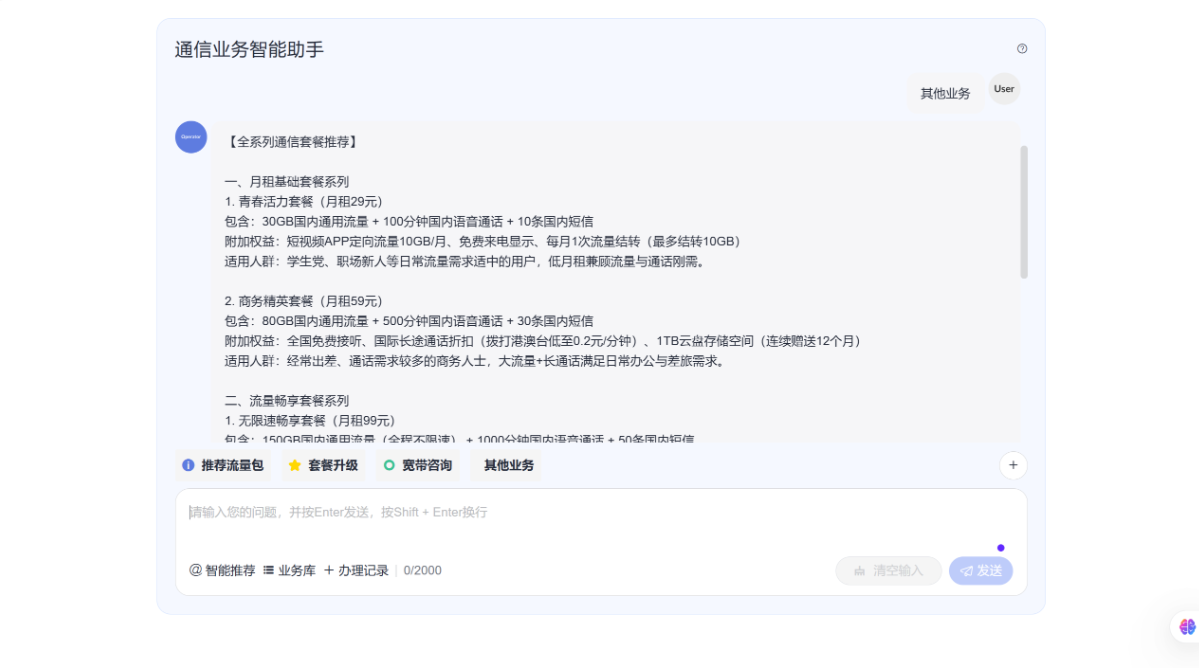
3.DevUI 构建的前端页面效果展示:
四、总结
通过 MateChat 的 “多轮对话 + 商品卡片 + 用户行为分析” 功能组合,通信业务智能助手成功实现电商化升级,构建了从咨询到转化的完整业务闭环,核心指标显著提升。同时,针对大促高并发场景的性能优化经验,为后续业务扩容与场景拓展(如接入 5G 套餐、智能硬件销售)奠定了基础,真正实现 “用技术驱动业务增长,用体验提升用户留存”。
本文 Demo 完整代码详见 GitCode 仓库 https://gitcode.com/weixin_72162790/MateChat。
mateChat的仓库是https://matechat.gitcode.com/,包含MateChat 接入示例、DevUI 组件示例页面、环境配置说明等。如果这套实践对你有帮助,请点个 ⭐ Star,方便后续查阅,解锁更多 MateChat / DevUI 场景案例 。





 扫一扫
扫一扫


 1万+
1万+

 被折叠的 条评论
为什么被折叠?
被折叠的 条评论
为什么被折叠?
 到【灌水乐园】发言





