


static关键字修饰属性,方法:
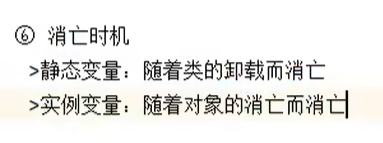
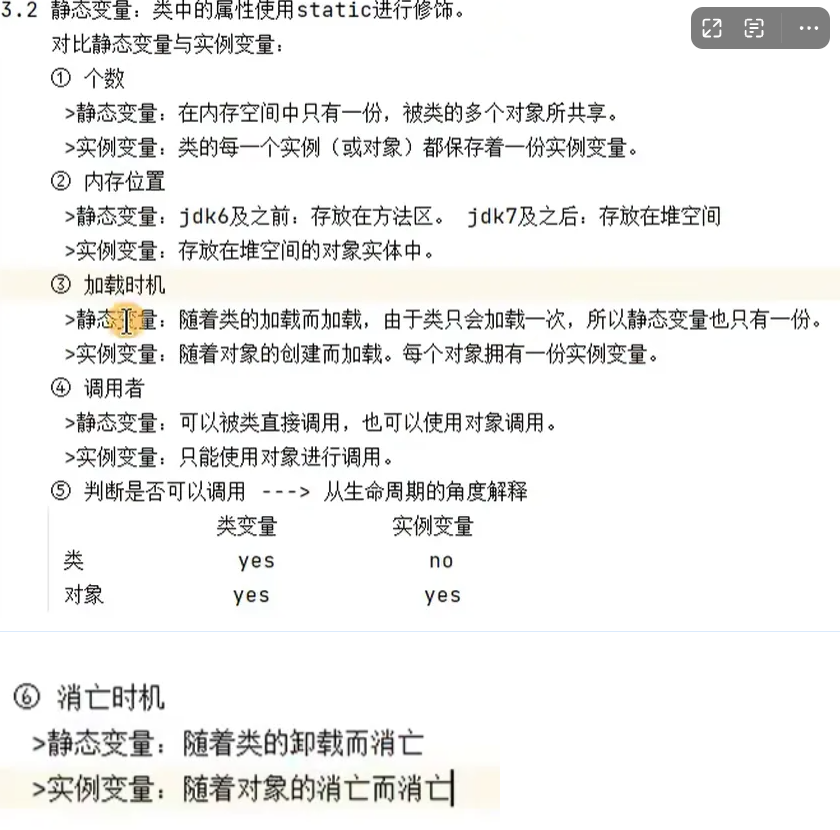
梗概:用static修饰的属性在整个类中只有一份,也叫类变量,随着类的创建而创建,随着类的消亡而消亡
static的使用:
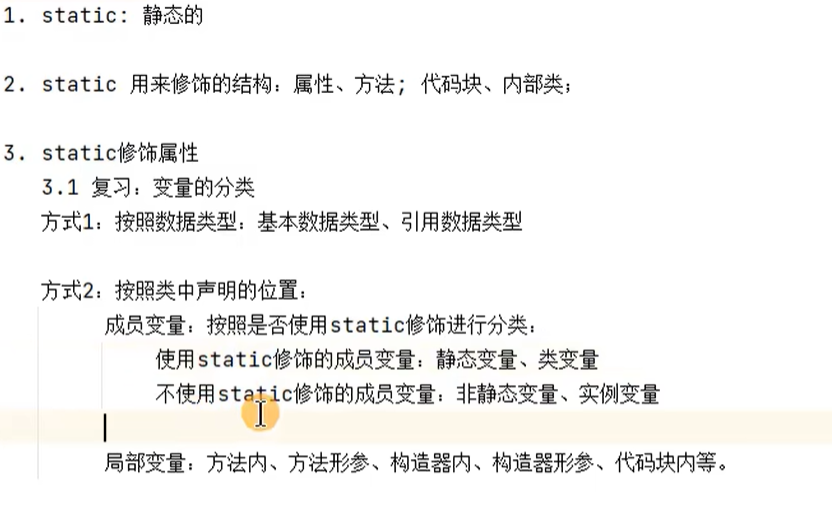
static修饰属性:
用static修饰的成员变量(实例变量),在类中只有一份;不用static修饰的成员变量,每个对象各有一份
举例:
public class ChinestTeste {
    public static void main(String[] args) {
        System.out.println(Chinese.nation);(nation用static修饰,随着类的创建而创建,在没有创建对象的时候就可以直接调用)
        Chinese c1 = new Chinese();
        Chinese c2 = new Chinese();


        c1.name = "姚明";
        c1.age = 20;
        c1.nation = "中国";


        c2.name = "刘翔";
        c2.age = 30;

        System.out.println(c1.toString());
        System.out.println(c2.toString());

    }


}

class Chinese {
    String name;
    int age;
    static String nation;

    @Override
    public String toString() {
        return "Chinese{" +
                "name='" + name + '\'' +
                ", age=" + age +
                '}' + "nation= " + nation;
    }
}
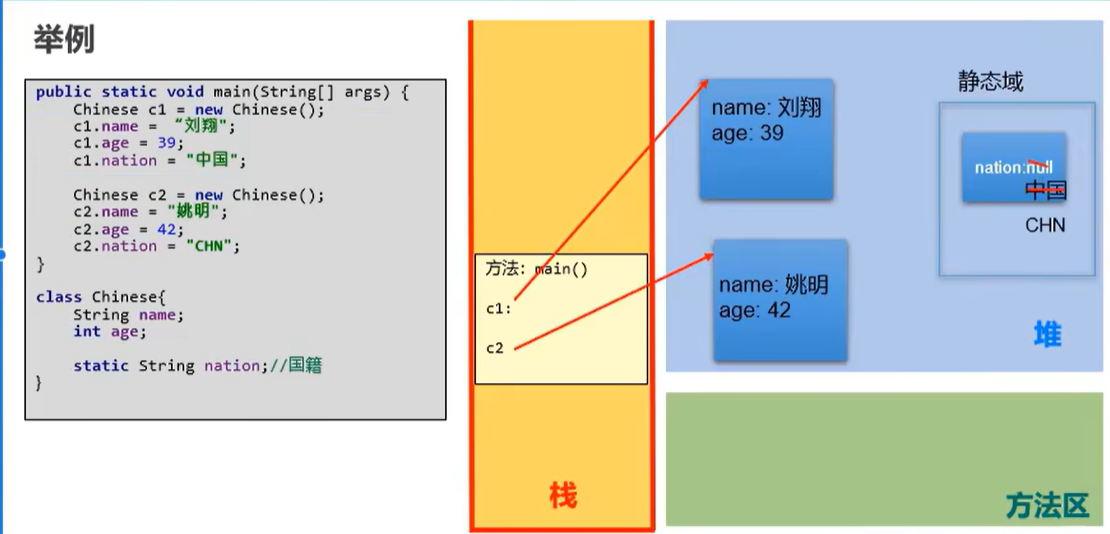
c1和c2,共用nation这个类变量,只要一个给nation赋了值,另一个也会被影响
对比静态变量(类变量)和实例变量(属性):
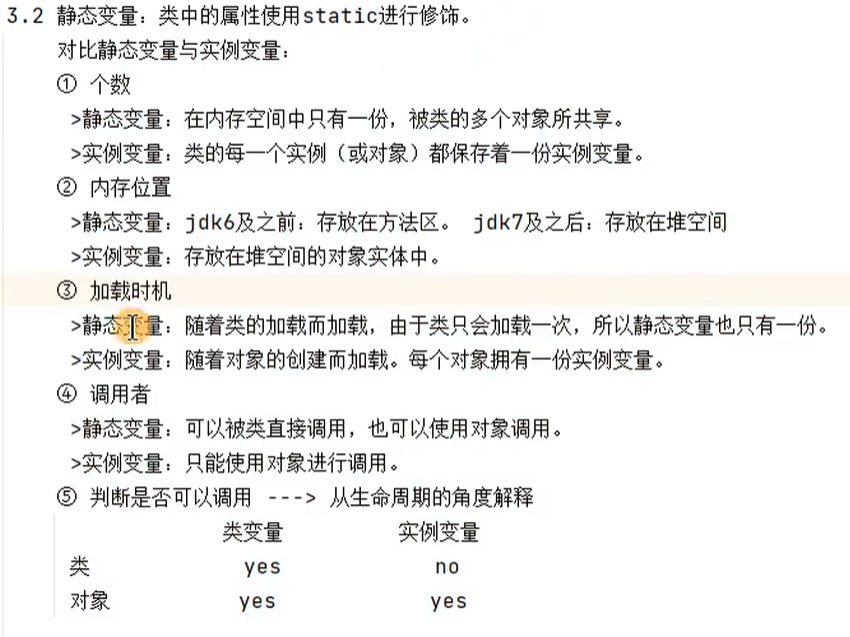
举例的内存解析:
static修饰方法(类方法,静态方法):
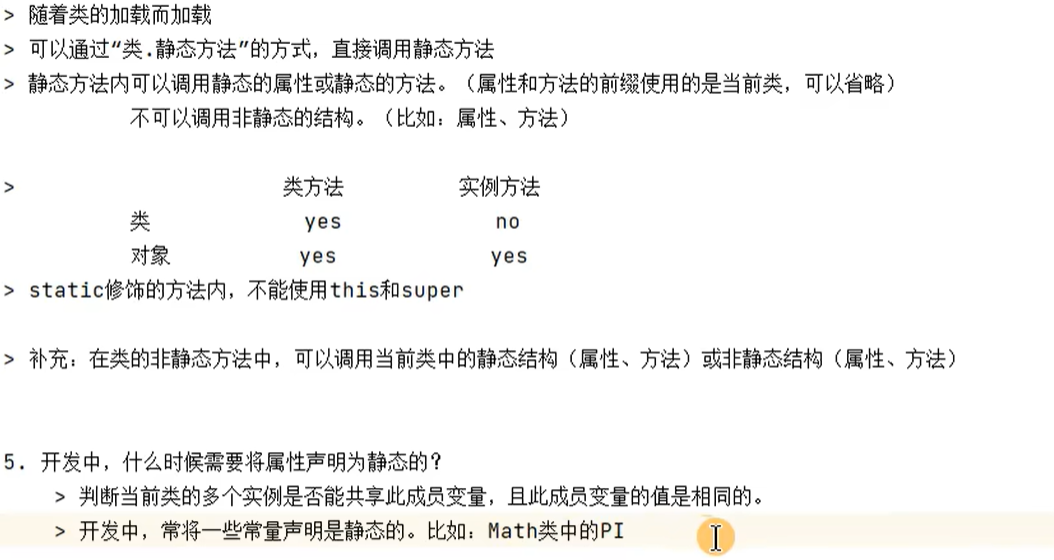
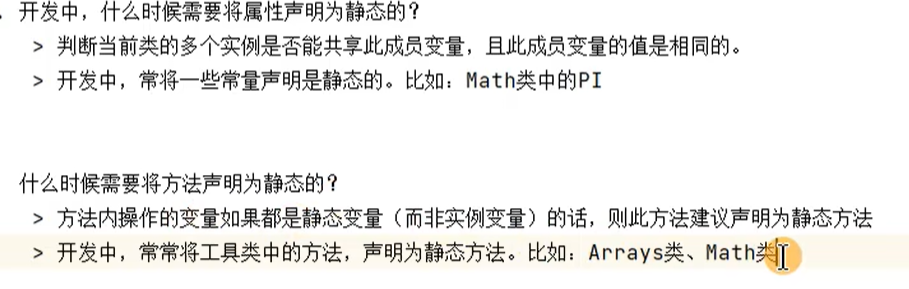
总结:
static修饰的东西,有 3 个关键特性:
- 归属权:属于「类」,不是「对象」(对象是类的副本,静态成员是类的 “公共资源”);
- 加载时机:类加载时就初始化(比对象创建早,且只初始化一次);
- 访问方式:推荐用「类名.静态成员」(也能通过对象访问,但不推荐,会误导);
- 限制:静态方法里不能直接用「非静态成员」(非静态属于对象,可能还没创建),也不能用
this/super(这俩都指向对象)
静态变量(类变量):类的 “公共属性”
- 场景:存储所有对象共享的数据(比如统计对象个数、全局配置参数);
- 对比:非静态变量(实例变量)是每个对象一份,静态变量是所有对象共用一份
静态方法(类方法):类的 “公共工具”
- 场景:不需要依赖对象状态的方法(比如工具类的方法:计算、转换、打印等);
- 注意:静态方法里只能用「静态成员」(静态变量 / 静态方法),不能用非静态成员。
static的应用举例及练习:
练习:
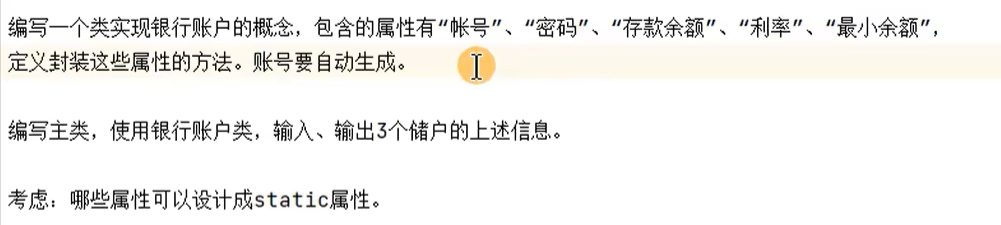
创建的类:
public class BankAccount {
    private  int account;
    private int password;
    private double balance;
    private static  double initerestRate;
    private static  double minBalance;

    private static int init = 100;


    public BankAccount() {
    this.account = init;
    init++;
    }

    public BankAccount(int password, double balance) {
        this();
        this.password = password;
        this.balance = balance;
    }

    public int getPassword() {
        return password;
    }

    public void setPassword(int password) {
        this.password = password;
    }

    public double getBalance() {
        return balance;
    }

    public void setBalance(double balance) {
        this.balance = balance;
    }

    public static double getIniterestRate() {
        return initerestRate;
    }

    public static void setIniterestRate(double initerestRate) {
        BankAccount.initerestRate = initerestRate;
    }

    public static double getMinBalance() {
        return minBalance;
    }

    public static void setMinBalance(double minBalance) {
        BankAccount.minBalance = minBalance;
    }

    @Override
    public String toString() {
        return "BankAccount{" +
                "account=" + account +
                ", password=" + password +
                ", balance=" + balance +
                '}';
    }
}
测试:
public class BankAccountTest {
    public static void main(String[] args) {
        BankAccount bankAccount1 = new BankAccount();
        System.out.println(bankAccount1);

        BankAccount bankAccount2 = new BankAccount(123456,2000);
        System.out.println(bankAccount2);


        bankAccount1.setIniterestRate(0.05);
        bankAccount1.setMinBalance(1);


        System.out.println(bankAccount1.getIniterestRate());
        System.out.println(bankAccount1.getMinBalance());

    }
}
单例设计模式和main()的理解:
单例模式设计:
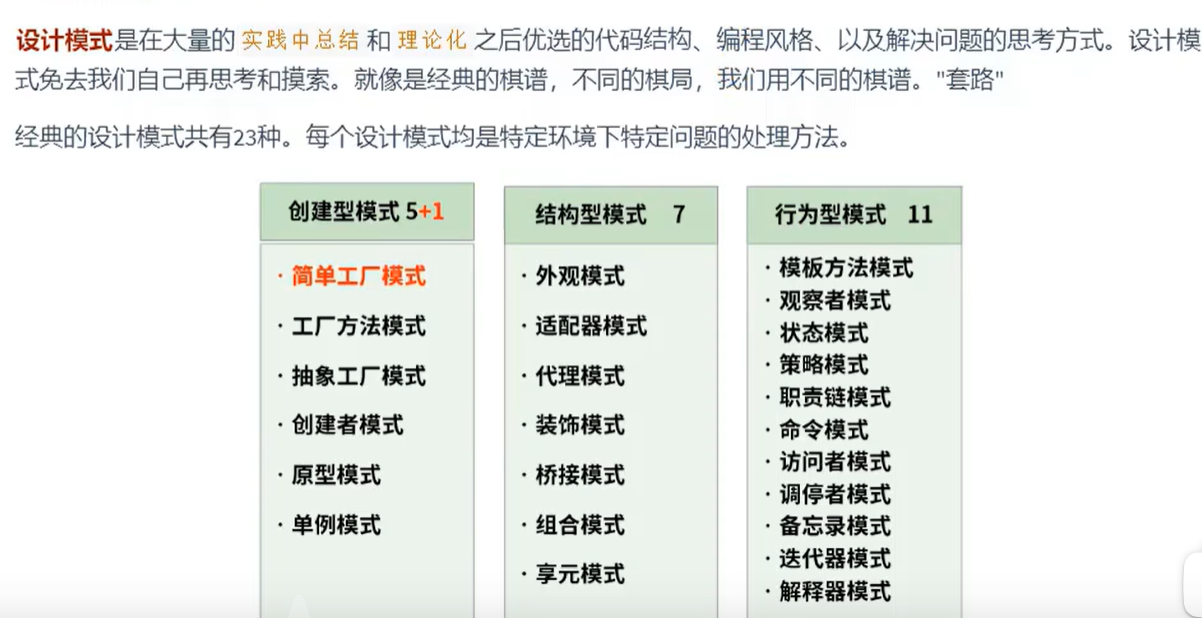

如何实现单例模式?
饿汉式(不管有没有用,都先给你创建一个实例)“立即加载”:
public class Bank {

    //1.第一步:类的构造器私有化(不让外部new)
    private Bank(){
    }

    //2.在类的内部创建当前类的实例(此属性必须声明为static,因为下面的get方法是static,static不能调用非静态的)
     private static Bank instance = new Bank();

    //3.使用get方法获取当前类的实例,必须声明为static的
    public static Bank  getInstance(){
        return instance;
    }
}
测试:
public class BankTest {
    public static void main(String[] args) {
        Bank bank1 = Bank.getInstance();
        Bank bank2 = Bank.getInstance();
        System.out.println(bank1 == bank2);//true
    }
}
懒汉式(先不创建,等到有需求了才创建)“延迟加载”:
public class Girl {
    //1.类的构造器私有化(不让外部new)
    private Girl() {
    }

    //2.声明当前类的实例(和饿汉式一样,要用static修饰,因为下面的方法是static修饰的)
    private static Girl instance = null;

    //3.通过get方法获取当前类的实例,如果未创建对象,则在方法内部进行创建
    public  static Girl getInstance() {
        if (instance == null) {
            instance = new Girl();
        }
        return instance;

    }

}

main()的理解(了解):
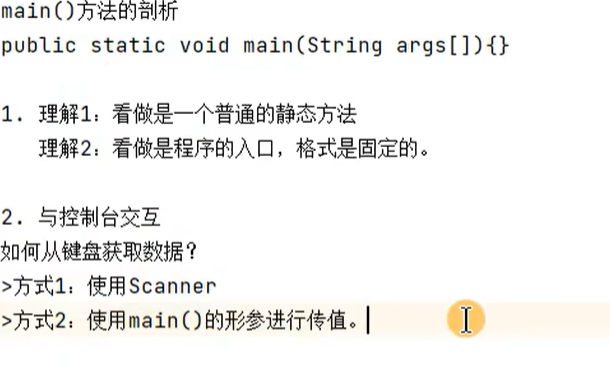
举例:
public class MainTest {
    public static void main(String[] args) {
        String[] arr = new String[]{"AA", "BB", "CC"};
        Main.main(arr);
    }
}


class Main{
    public static void main(String[] args) {
        for (int i = 0; i < args.length; i++) {
            System.out.println(args[i]);
        }
    }
}
类的成员之四:代码块
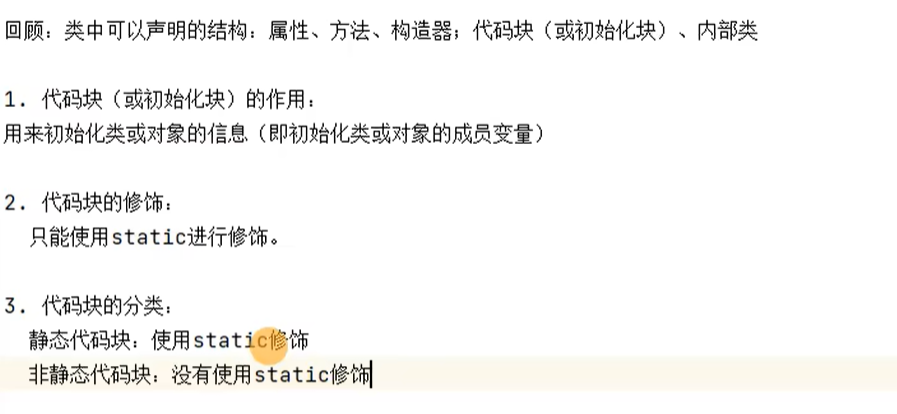
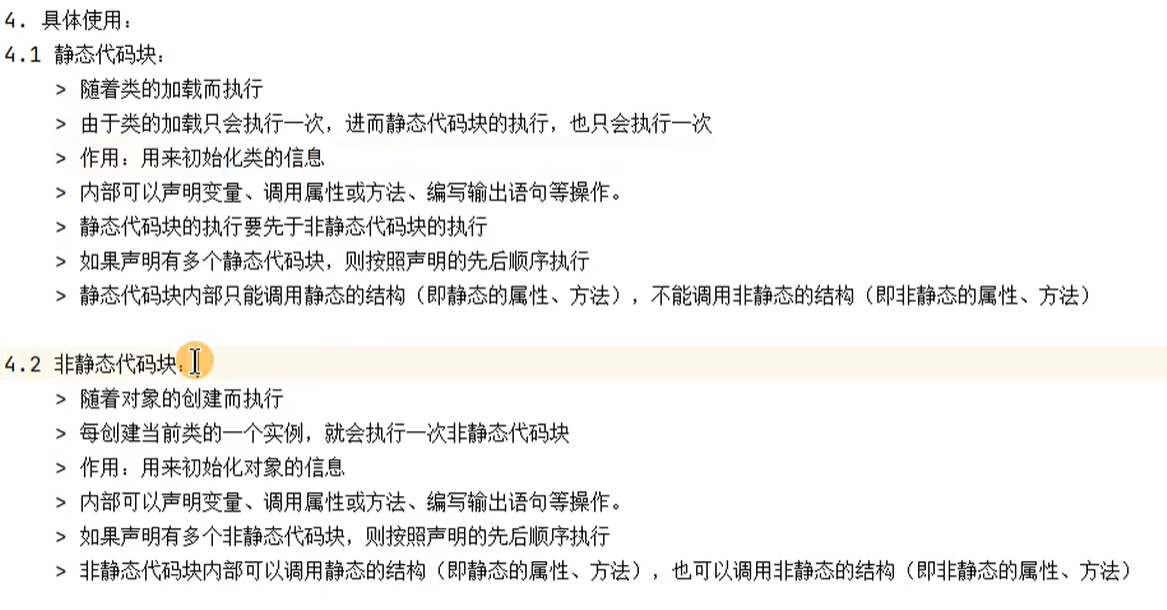
练习:
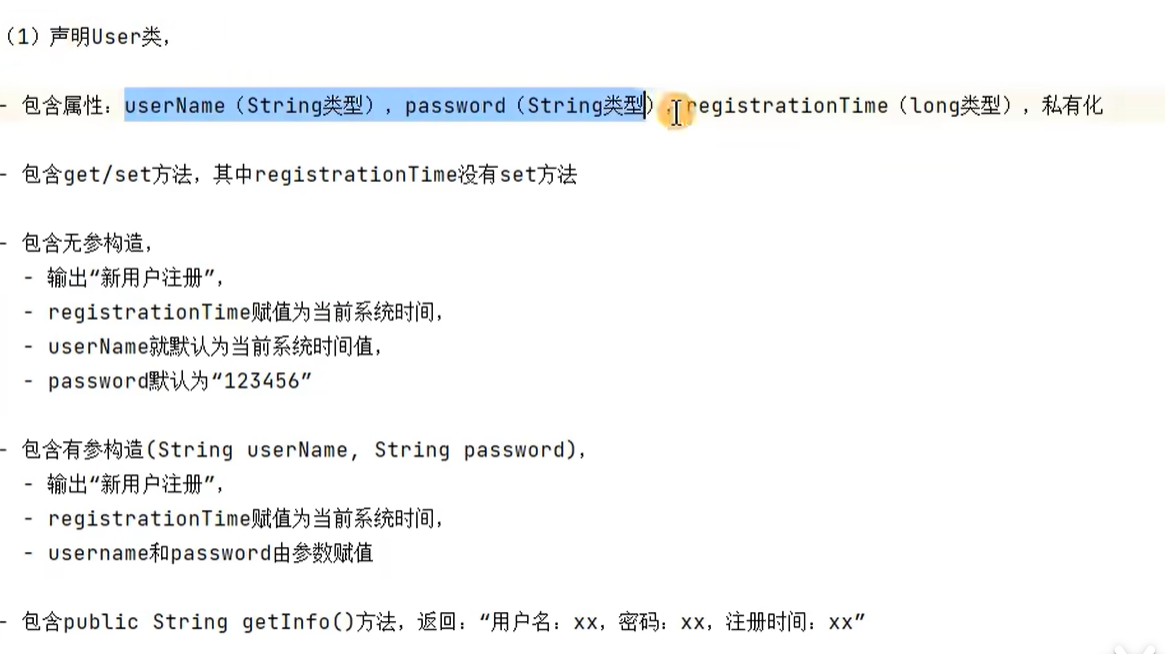
User类:
public class User {
    private String userName;
    private String password;
    private long registrtionTime;

    public String getUserName() {
        return userName;
    }

    public void setUserName(String userName) {
        this.userName = userName;
    }

    public String getPassword() {
        return password;
    }

    public void setPassword(String password) {
        this.password = password;
    }

    public long getRegistrtionTime() {
        return registrtionTime;
    }

    {
        System.out.println("新用户注册");
        registrtionTime = System.currentTimeMillis();
    }

    public User() {
        //        System.out.println("新用户注册");
//        registrtionTime = System.currentTimeMillis();
        userName = System.currentTimeMillis() + "";
        password = "123456";

    }

    public User(String userName, String password) {
//        System.out.println("新用户注册");
//        registrtionTime = System.currentTimeMillis();
        this.userName = userName;
        this.password = password;

    }

    public String getInfo() {
        return toString();
    }


    @Override
    public String toString() {
        return "User{" +
                "userName:'" + userName + '\'' +
                ", password:'" + password + '\'' +
                ", registrtionTime:" + registrtionTime +
                '}';
    }
}
测试:
public class UserTest {
    public static void main(String[] args) {
        User U1 = new User();
        System.out.println(U1.getInfo());


        User u2 = new User("妄竹", "123456");
        System.out.println(u2.getInfo());

        User u3 = new User("ogni", "123456");
        System.out.println(u3.getInfo());

    }
}
代码块不是一定要用的,比如这个例子就可以不写代码块,而是把代码块里的内容写到构造器中去
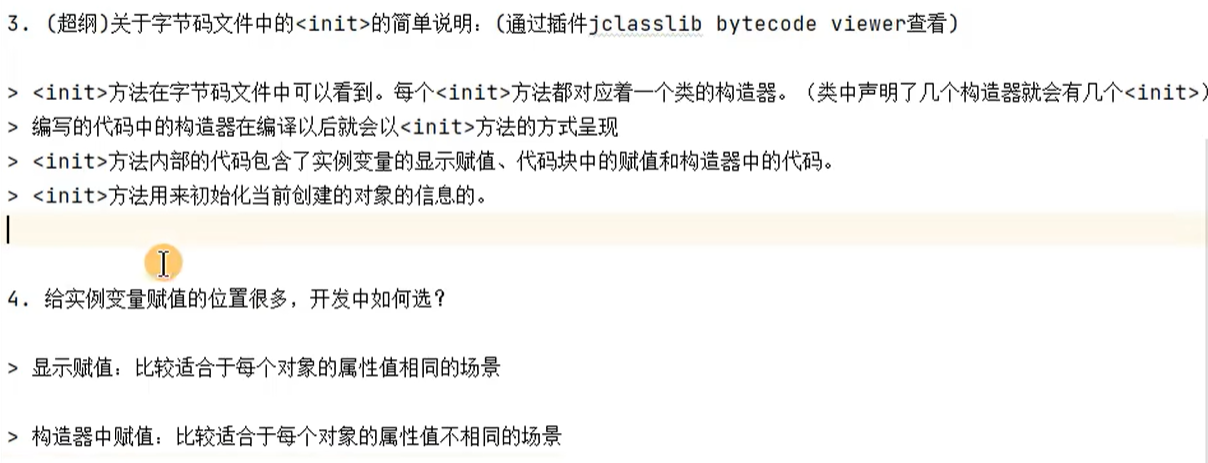
小结:类中属性赋值的位置及过程:
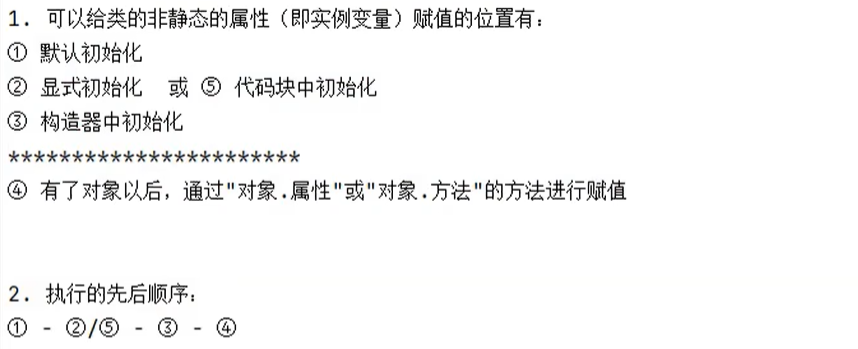
显式初始化和代码块中初始化,谁现在前面就先执行谁,后面的会把前一个的值给覆盖
代码块要早于构造器
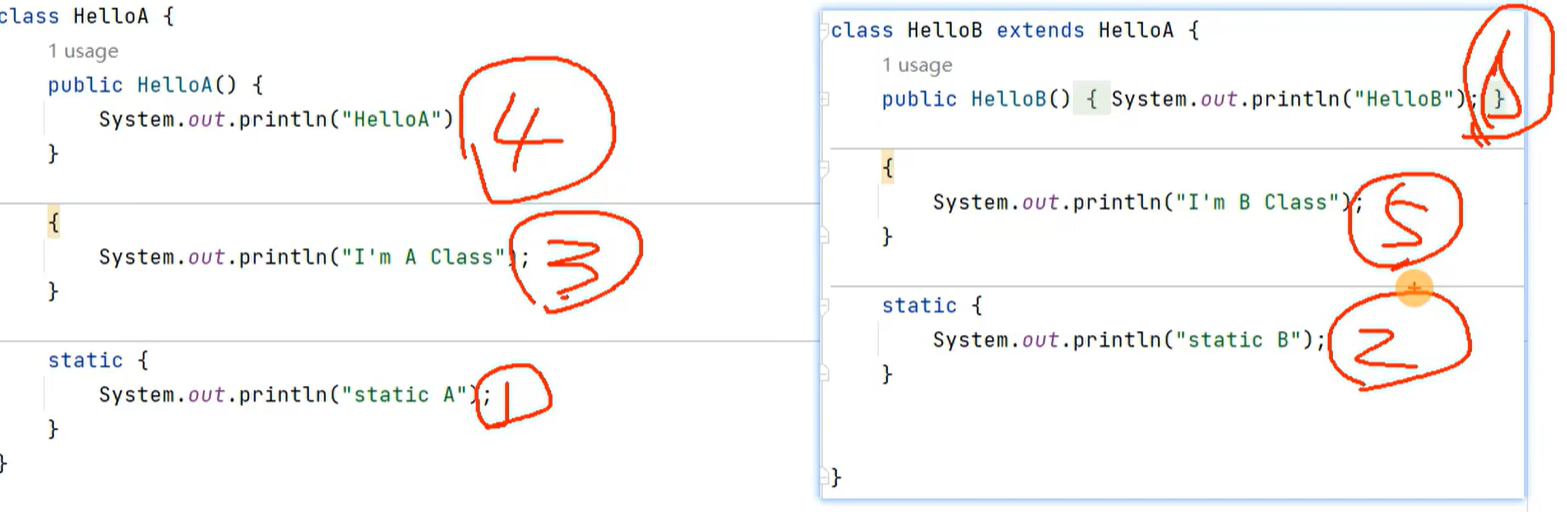
由父及子,静态先行。如果有静态代码块,先要执行完每个静态代码块,然后再根据类里的来执行,先执行完父类中的,再来子类的
比如:
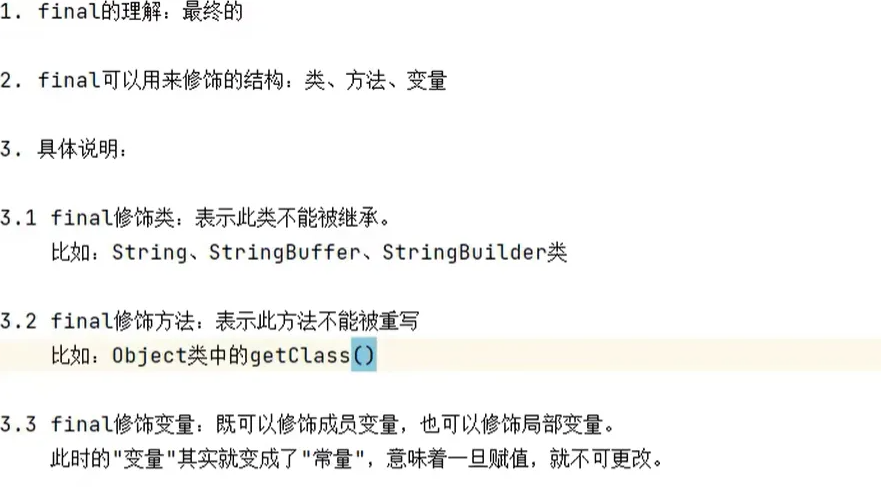
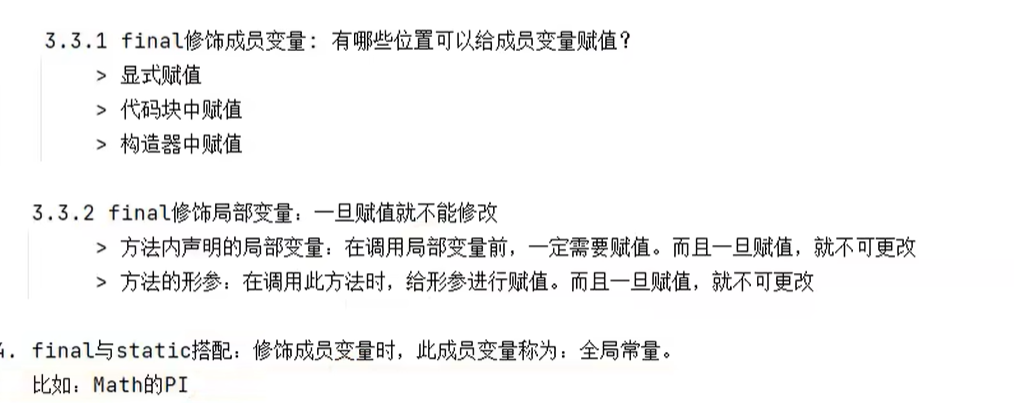
final关键字的使用:
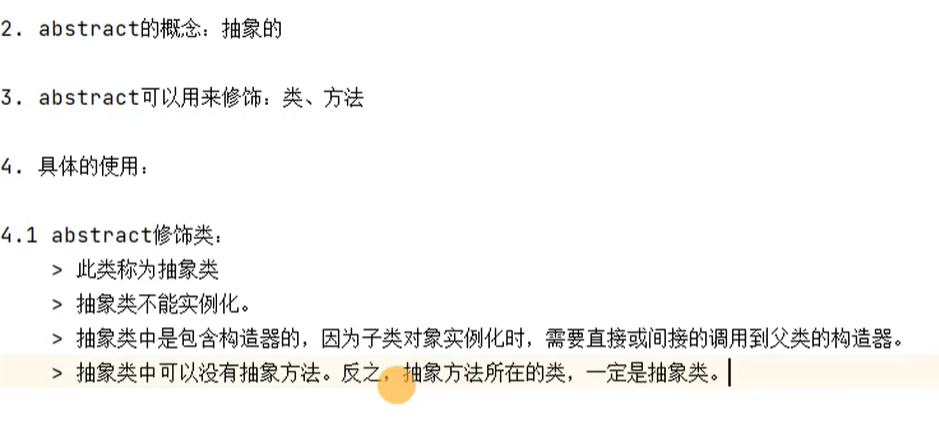
抽象类与抽象方法(abstract):

Java语法规定:包含抽象方法的类必须是抽象类
抽象类不能new对象
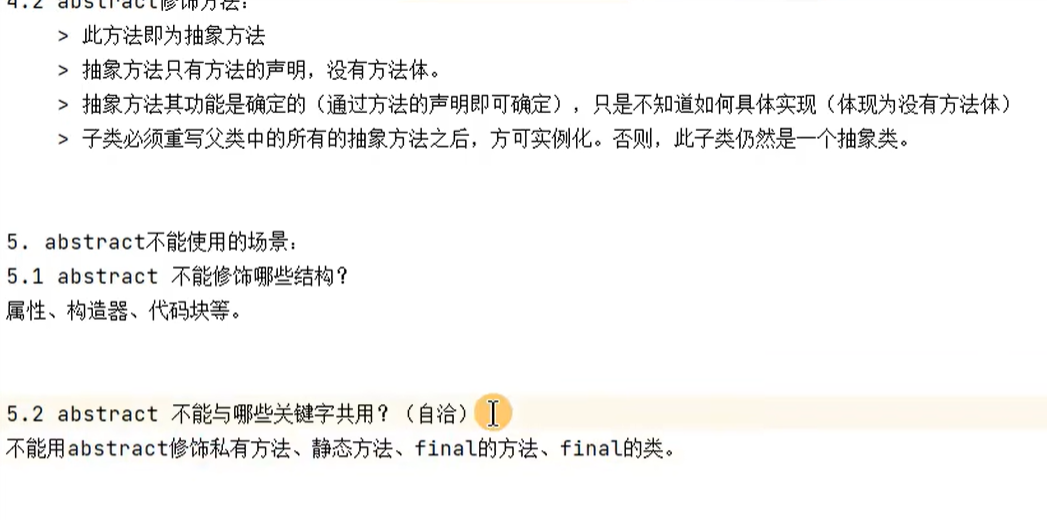
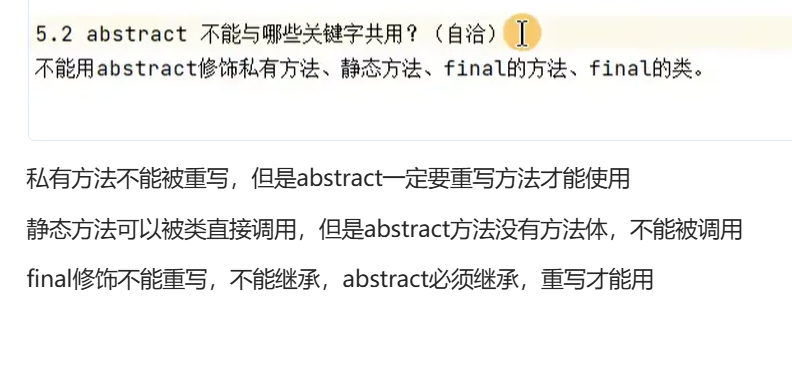
私有方法不能被重写,但是abstract一定要重写方法才能使用
静态方法可以被类直接调用,但是abstract方法没有方法体,不能被调用
final修饰不能重写,不能继承,abstract必须继承,重写才能用
练习:
abstract class Employee {
    private String name;
    private int number;
    private MyDate birthday;

    public Employee() {
    }

    public Employee(int number, MyDate birthday, String name) {
        this.number = number;
        this.birthday = birthday;
        this.name = name;
    }

    public String getName() {
        return name;
    }

    public void setName(String name) {
        this.name = name;
    }

    public int getNumber() {
        return number;
    }

    public void setNumber(int number) {
        this.number = number;
    }

    public MyDate getBirthday() {
        return birthday;
    }

    public void setBirthday(MyDate birthday) {
        this.birthday = birthday;
    }

    public abstract  double earnings();

    public  String toString() {
        return "name = " + name + ",number = " + number + ",birthday = " + birthday.toString();
    }
}
package corn.atguigu05._abstract.exer1;

/**
 * ClassName:HourlyEmployee
 * Package:corn.atguigu05._abstract.exer1
 * Description:
 *
 * @Author 妄汐霜
 * @Create 2025/11/12 21:17
 * @Version 1.0
 */
public class HourlyEmployee extends  Employee{
    private double wage;
    private double hour;

    public HourlyEmployee(){
    }
    public HourlyEmployee(double wage, double hour) {
        this.wage = wage;
        this.hour = hour;
    }

    public HourlyEmployee(int number, MyDate birthday, String name, double wage, double hour) {
        super(number, birthday, name);
        this.wage = wage;
        this.hour = hour;
    }
    public   double earnings(){
        return wage * hour;
    }
    public String toString(){
        return super.toString();
    }


}
package corn.atguigu05._abstract.exer1;

/**
 * ClassName:MyDate
 * Package:corn.atguigu05._abstract.exer1
 * Description:
 *
 * @Author 妄汐霜
 * @Create 2025/11/12 20:57
 * @Version 1.0
 */
public class MyDate {
    private int year;
    private int month;
    private int day;

    public MyDate() {
    }

    public int getYear() {
        return year;
    }

    public void setYear(int year) {
        this.year = year;
    }

    public int getMonth() {
        return month;
    }

    public void setMonth(int month) {
        this.month = month;
    }

    public int getDay() {
        return day;
    }

    public void setDay(int day) {
        this.day = day;
    }

    public MyDate(int year, int month, int day) {
        this.year = year;
        this.month = month;
        this.day = day;
    }

    @Override
    public String toString() {
        return "MyDate{" +
                "year=" + year +
                ", month=" + month +
                ", day=" + day +
                '}';
    }
}
public class SalariedEmployed  extends  Employee{
    private double monthlySalary;

    public SalariedEmployed(){
    }

    public SalariedEmployed(int number, MyDate birthday, String name, double monthlySalary) {
        super(number, birthday, name);
        this.monthlySalary = monthlySalary;
    }

    public SalariedEmployed(double monthlySalary) {
        this.monthlySalary = monthlySalary;
    }

    public double  earnings(){
        return monthlySalary;
    }
    public String toString(){
        return super.toString();
    }
}
测试:
public class PayrollSystem {
    public static void main(String[] args) {
        Scanner scan = new Scanner(System.in);

     Employee[] emp1 = new Employee[2];
     emp1[0] = new SalariedEmployed(1001,new MyDate(2006,4,8),"妄竹",18000 );
     emp1[1] = new HourlyEmployee(1002,new MyDate(2002,9,20),"妄汐霜",240,100);

        System.out.println("请输入当前的月份");

        int month = scan.nextInt();
     for(int i = 0; i < emp1.length; i++){
         System.out.println(emp1[i].toString());
         System.out.println("工资为 :" + emp1[i].earnings());
         if(month == emp1[i].getBirthday().getMonth()){
             System.out.println("生日快乐,给你加工资");
             System.out.println("你的实际工资为:" + (emp1[i].earnings()+100));


         }
     }

    }
}
模板方法设计模式:
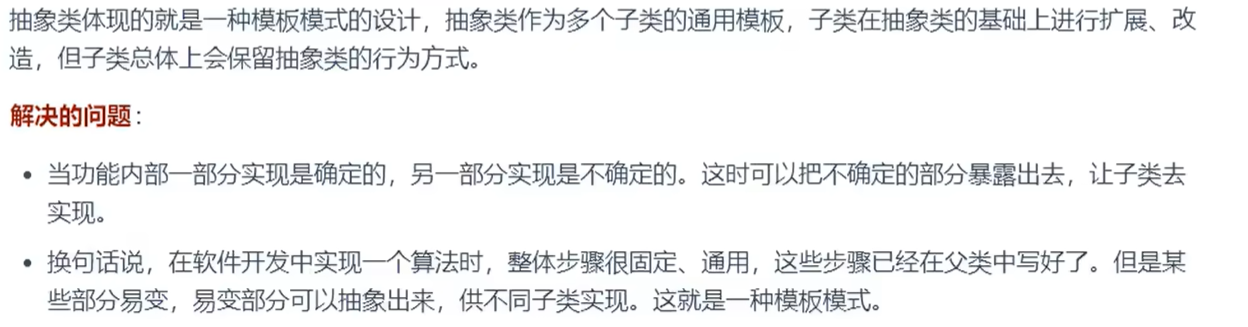
举例:
public class Bank {
    public static void main(String[] args) {
        BankTemplateMethod bank1 = new DrewMoney() ;
            bank1.process();


    }
}

    abstract class BankTemplateMethod {
        public void takeNumber() {
            System.out.println("排队取号");
        }

        public void evaluate() {
            System.out.println("反馈评分");
        }

        public abstract void transact();

        public final void process() {
            this.takeNumber();

            this.transact();

            this.evaluate();

        }

    }

    class DrewMoney extends BankTemplateMethod {
        public void transact() {
            System.out.println("我要取钱");
        }
    }

    class ManageMoney extends BankTemplateMethod {
        public void transact() {
            System.out.println("我要理财");
        }
    }
接口的使用(interface):
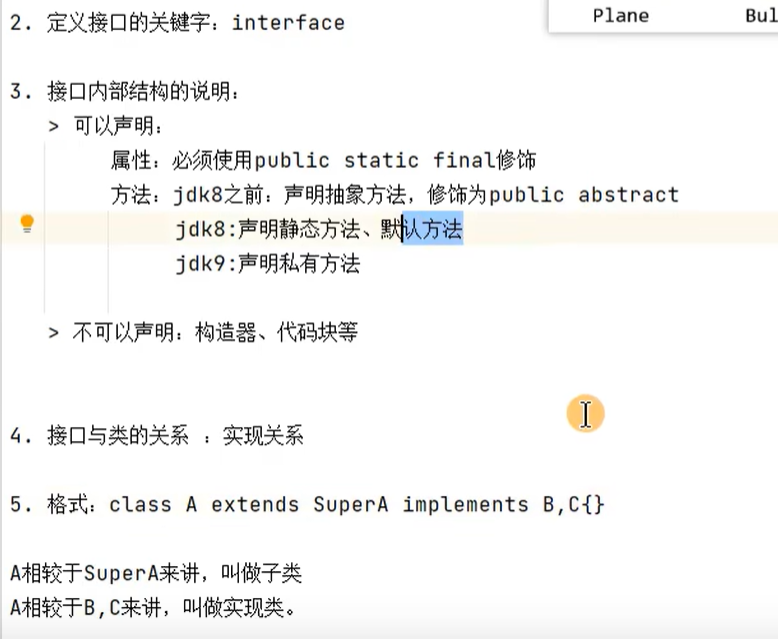
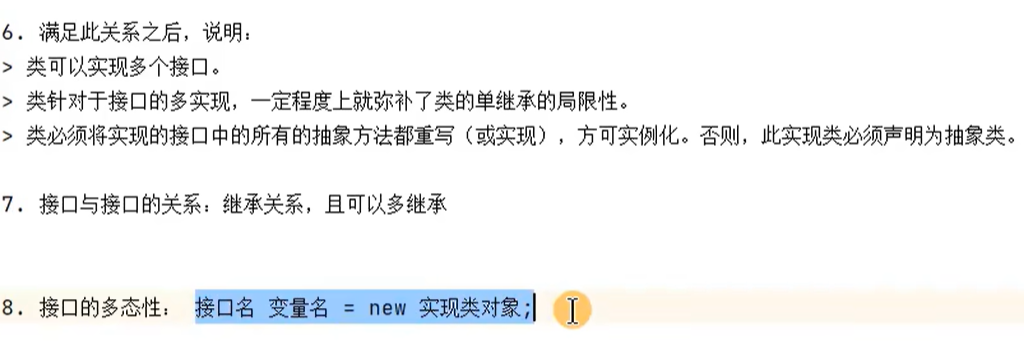
接口的理解:接口的本质是契约,标准,规范
举例1:
public class InterfaceTest {
    public static void main(String[] args) {
        System.out.println(Flyable.MAX_SPEED);
        System.out.println(Flyable.MIN_SPEED);


        Plane plane = new Plane();
        plane.fly();
        plane.attack();

        Flyable f1 = new Plane();
        f1.fly();


    }
}


interface Flyable {
    //全局常量
    public static final int MAX_SPEED = 100;//飞行最大速度
    //或者省略前面的修饰词
    // 最低速度
    int MIN_SPEED = 0;

    //抽象方法
    public abstract void fly();
}


interface Attackable {
    //或者省略前面的修饰词
    void attack();
}


interface cc extends Flyable,Attackable{


}


class Plane implements Flyable, Attackable {
    public void fly() {
        System.out.println("飞机可以飞");
    }

    @Override
    public void attack() {
        System.out.println("飞机有攻击性");
    }
}
举例2:
public class USBTest {
    public static void main(String[] args) {

        //创建接口实现类的对象
        Computer computer = new Computer();
        print print = new print();
        computer.tranferData(print);

        //创建接口实现类的匿名对象
        computer.tranferData(new Camera());

        //创建接口匿名实现类的对象
        USB usb = new USB() {
            @Override
            public void start() {
                System.out.println("U盘开始工作");
            }

            @Override
            public void stop() {
                System.out.println("U盘结束工作");
            }
        };
        computer.tranferData(usb);


        //创建接口匿名实现类的匿名对象
        computer.tranferData( new USB(){
            public void start(){
                System.out.println("扫描仪开始工作");
            }
            public void stop(){
                System.out.println("扫描仪停止工作");
            }
        });


    }


}

class  Computer{
    public  void tranferData(USB usb){
        System.out.println("设备链接成功");
        usb.start();
        System.out.println("数据传输中");
        usb.stop();

    }
}


class  Camera implements USB{
    public void start(){
        System.out.println("相机开始工作");
    }
    public void stop(){
        System.out.println("相机结束工作");
    }

}

class print implements  USB{
     public void start(){
        System.out.println("开始工作");
    }
    public  void stop(){
        System.out.println("结束工作");
    }

}


interface USB {

     public static final int hight = 10;
     public static final int  weight  = 1;

    void start();
    void stop();
}
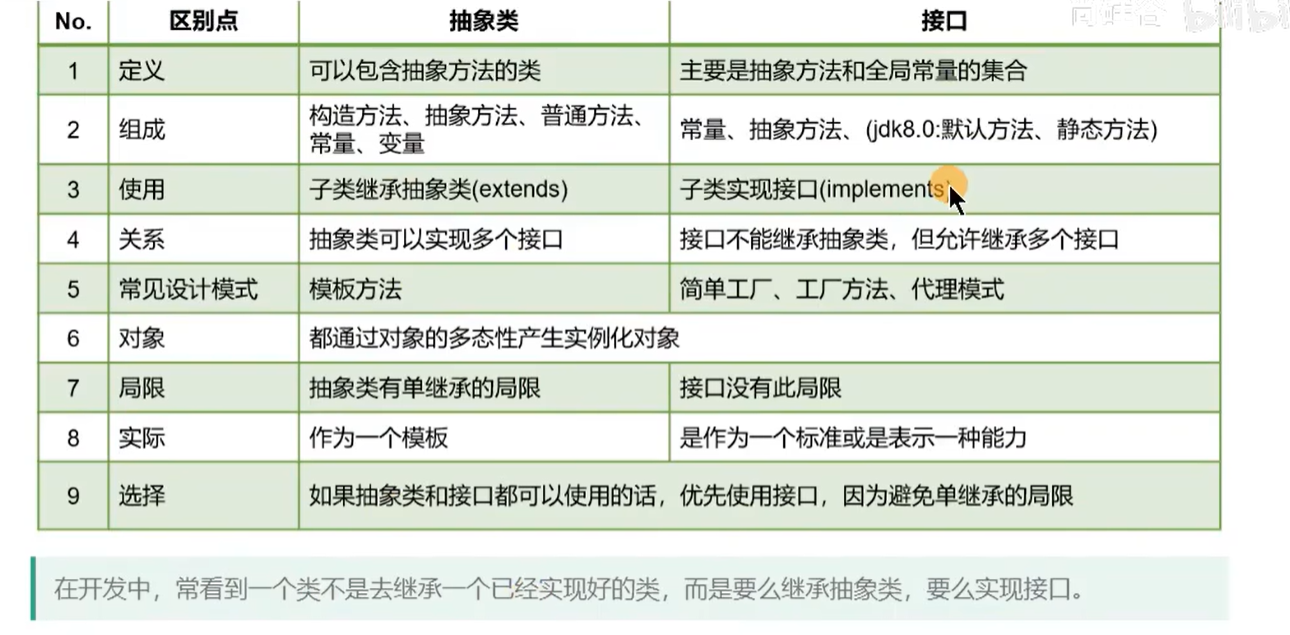
区分抽象类和接口:
共性:都可以声明抽象方法
都不能实例化
不同:1.抽象类一定有构造器,接口没有构造器
2.类与类之间是继承关系,类与接口之间是实现关系,接口与接口之间是多继承关系
练习1:
public class EatableTest {
    public static void main(String[] args) {
        Eatable[] eatable = new Eatable[3];
        eatable[0] = new Chinese();
        eatable[1] = new American();
        eatable[2] = new Indian();
        for(int i = 0; i < eatable.length; i++){
             eatable[i].eat();
        }
    }
}

interface Eatable {
    void eat();
}

class Chinese implements Eatable{
    public void eat(){
        System.out.println("用筷子吃饭");
    }
}

class American implements Eatable{
    public void eat(){
        System.out.println("用刀叉吃饭");
    }
}
class Indian implements Eatable{
    public void eat(){
        System.out.println("用手抓饭");
    }
}
练习2:
public class InterfaceTest1 {
    public static void main(String[] args) {
        CompareObject c1= new ComparableCircle(5);
        CompareObject c2 = new ComparableCircle(6);

        int comopareValue = c1.compareTo(c2);
        if(comopareValue > 0){
            System.out.println("c1大");
        } else if (comopareValue == 0) {
            System.out.println("一样大");
        }else{
            System.out.println("c2大");
        }


    }
}

class Circle{
    private double radius;
    public Circle() {
    }

    public Circle(double radius) {
        this.radius = radius;
    }

    public double getRadius() {
        return radius;
    }

    public void setRadius(double radius) {
        this.radius = radius;
    }
}
class ComparableCircle extends Circle implements CompareObject{
    public ComparableCircle(){}

    public ComparableCircle(double radius) {
        super(radius);
    }


    public int compareTo(Object o){
        if(this == o){
            return 0;
        }
        if(o instanceof ComparableCircle){
            ComparableCircle c = (ComparableCircle)o;
            if(this.getRadius() > c.getRadius()){
                return 1;
            }else if(this.getRadius() < c.getRadius()){
            return -1;
            }
            else{
                return 0;
            }
        }
        return 0;
    }
}

interface CompareObject {
    int compareTo(Object o);
}
练习3:
public class Developer {
    private String name;
    private int age;

    public Developer() {
    }


    public int getAge() {
        return age;
    }

    public void setAge(int age) {
        this.age = age;
    }

    public Developer(String name, int age) {
        this.name = name;
        this.age = age;
    }

    public void setName(String name) {
        this.name = name;
    }

    public String getName() {
        return name;
    }

    public void takingVehicle(Vehicle vehicle){
        vehicle.run();
    }
}
public class Bicycle extends Vehicle {
    public Bicycle() {
    }

    public Bicycle(String brand, String color) {
        super(brand, color);
    }

    public void run() {
        System.out.println("自行车依靠人力脚蹬");
    }


}
public class Car extends Vehicle implements IPower{
    private String carNumber;


    public Car(){

    }

    public Car(String carNumber) {
        this.carNumber = carNumber;
    }

    public Car(String brand, String color, String carNumber) {
        super(brand, color);
        this.carNumber = carNumber;
    }


    public String getCarNumber() {
        return carNumber;
    }

    public void setCarNumber(String carNumber) {
        this.carNumber = carNumber;
    }

    @Override
    public void run() {
        System.out.println("汽车考油跑");
    }


    @Override
    public void power() {
        System.out.println("汽车靠油");
    }
}
public abstract class Vehicle {
    private String brand;
    private String color;

    public Vehicle() {
    }

    public Vehicle(String brand, String color) {
        this.brand = brand;
        this.color = color;
    }

    public String getBrand(){
        return brand;
    }

    public void setBrand(String brand) {
        this.brand = brand;
    }

    public String getColor() {
        return color;
    }

    public void setColor(String color) {
        this.color = color;
    }
    public  abstract void run();
}
接口:
public interface IPower {
    void power();
}
测试:
public class VehicleTest {
    public static void main(String[] args) {
        Developer developer = new Developer();

        Vehicle[] vehicles = new Vehicle[3];
        vehicles[0] = new Car("奥迪", "紫色", "999999");
        vehicles[1] = new Bicycle("捷安特", "粉色");
        vehicles[2] = new ElectricVehicle("雅迪", "水绿色");

        for (int i = 0; i < vehicles.length; i++) {
            developer.takingVehicle(vehicles[i]);
        }
    }
}
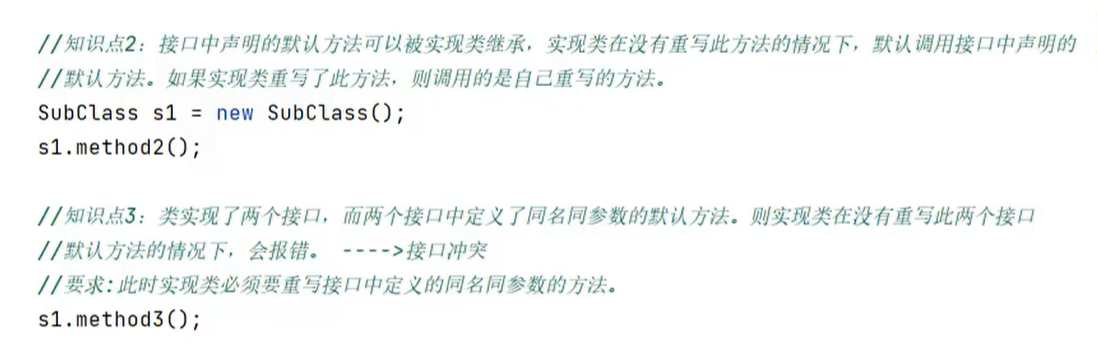
JDK8中和JDK9中接口的新特性:


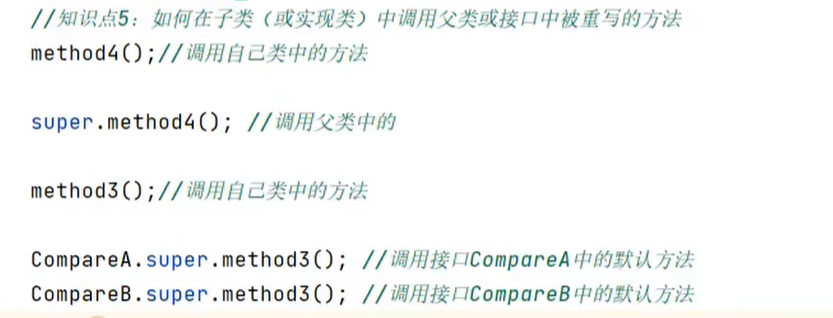
JDK9新特性:接口中可以定义私有方法。
类的成员之五:内部类:
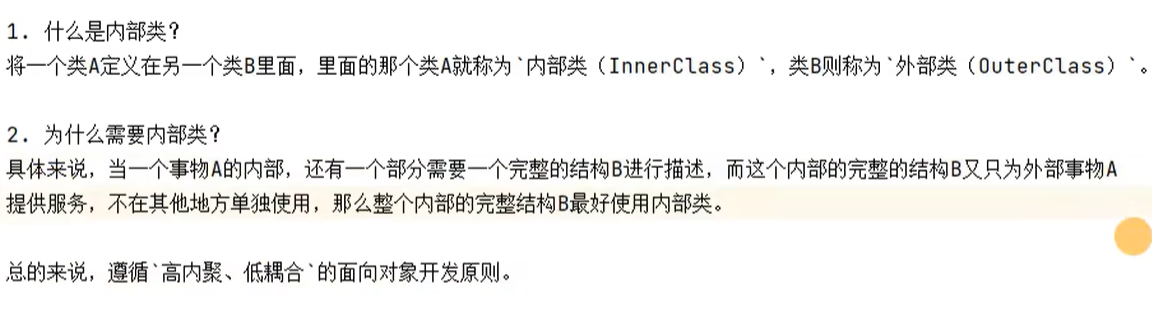
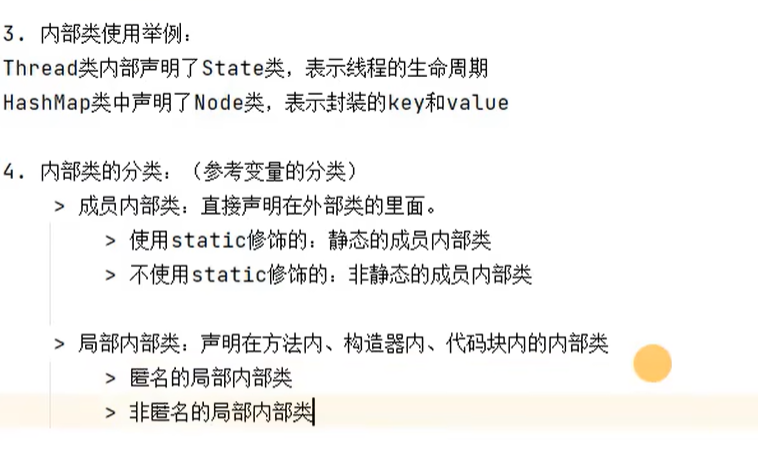
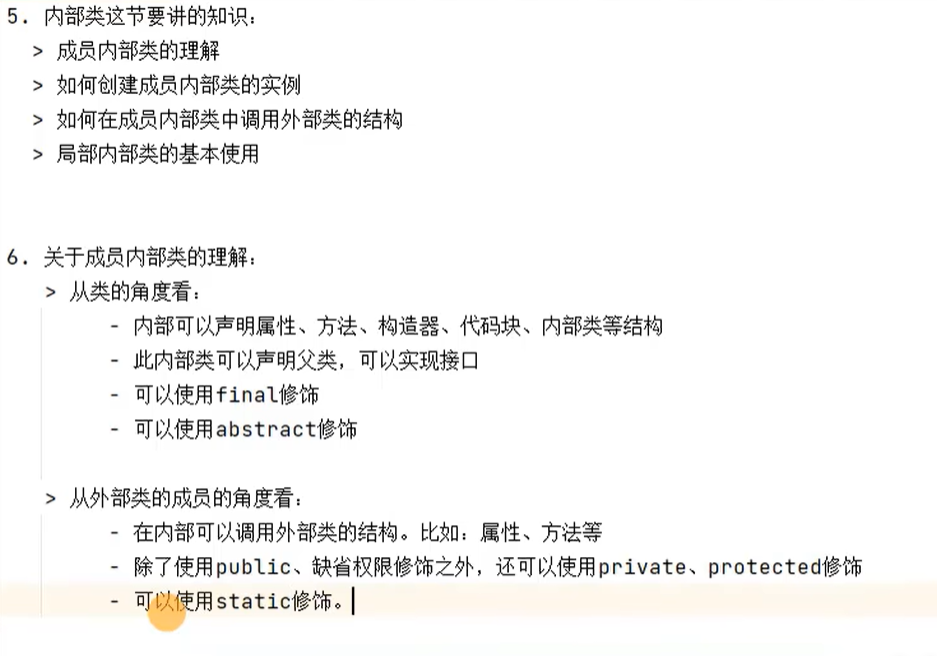
举例:
成员内部类:
public class OuterClassTest {
    public static void main(String[] args) {
        //1.创建Perosn的静态的成员内部类的实例
        Person.Dog dog = new Person.Dog();
        dog.eat();

        //2.创建Person的非静态的成员内部类的实例
        Person person = new Person();
        Person.Bird bird = person.new Bird();
        bird.eat();

        bird.show("黄鹂");

        bird.show1();


    }
}

class Person {
    String name = "tom";
    int age = 19;


    //静态成员内部类
    static class Dog {
        public void eat() {
            System.out.println("吃骨头");
        }
    }

    //非静态成员内部类
    class Bird {
        String name = "啄木鸟";
        int age;

        public void eat() {
            System.out.println("鸟觅食");
        }


        public void show(String name) {
            System.out.println("age = " + Person.this.age);
            System.out.println(name);
            System.out.println(this.name);
            System.out.println(Person.this.name);


        }

        public void show1() {
            eat();
            Person.this.eat();
        }

    }


    public void eat() {
        System.out.println("人吃饭");
    }


}
局部内部类:
public class OuterClassTest1 {

    //方法中的内部类就叫做局部内部类
    public void method1() {
        //局部内部类
        class A {

        }


    }


}
练习:

public class ObjectTest {
    public static void main(String[] args) {
        //提供一个继承Object的匿名子类的对象
        new Object(){
            public void test(){
                System.out.println("尚硅谷");
            }
        }.test();


    }
}
枚举类的两种定义及练习:
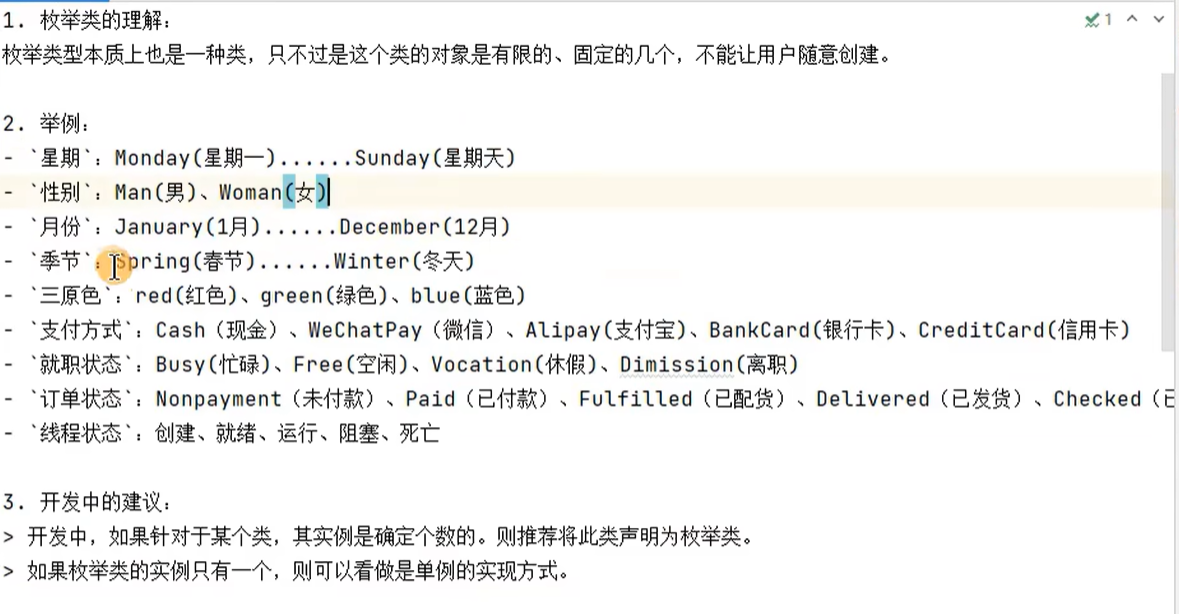
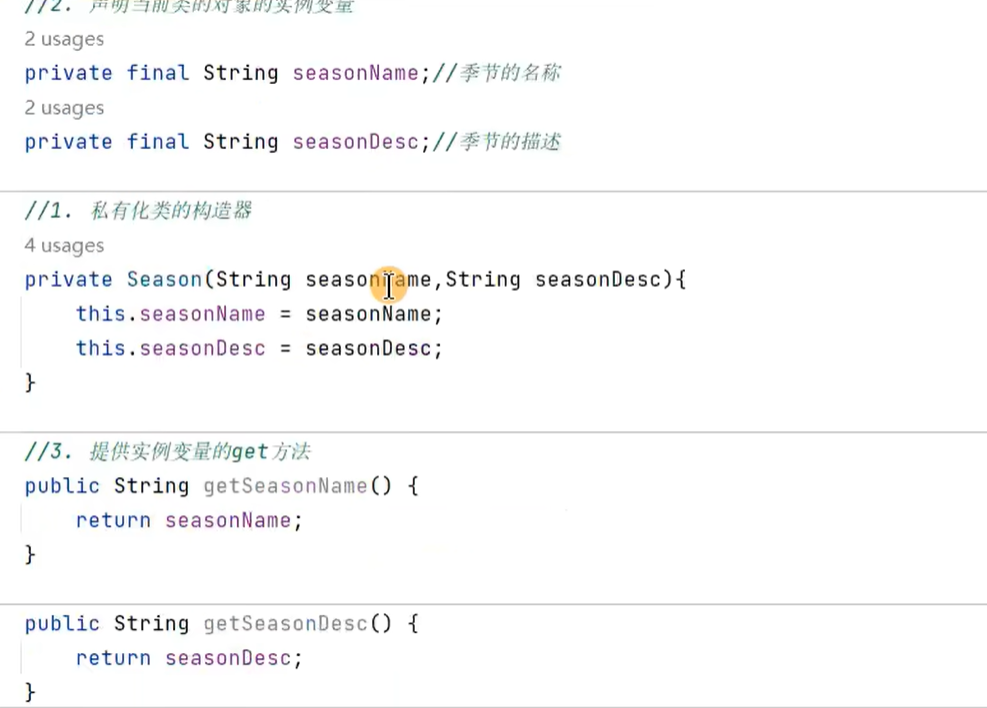
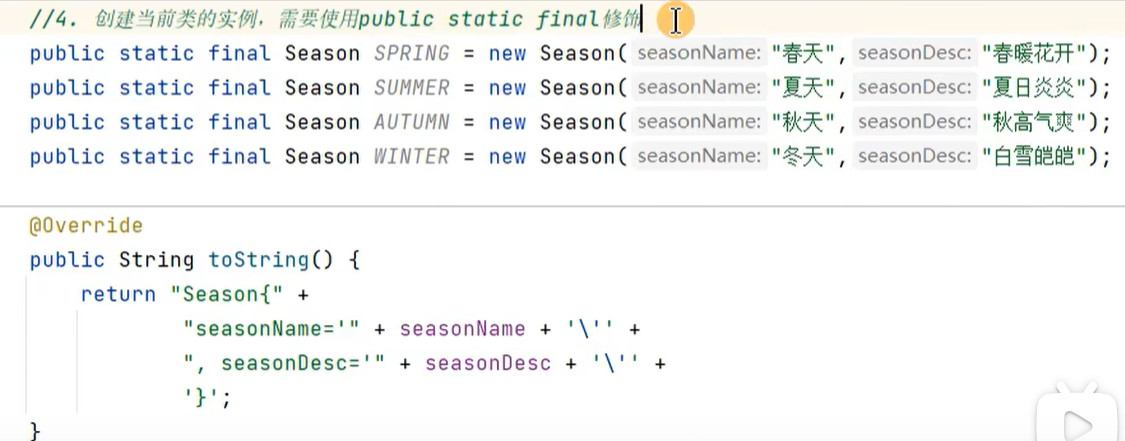
4.jdk5之前是如何定义枚举类的(了解):
5.jdk5之后是怎么定义枚举类的:
public class SeasonTest {
    public static void main(String[] args) {
        System.out.println(Season.SPRING);
        System.out.println(Season.SUMMER);
    }
}


enum Season{
    //1.必须再枚举类的开头声明多个对象,对象之间用逗号隔开
    SPRING("春天","出暖花开"),
    SUMMER("夏天","夏日炎炎"),
    AUTUMN("秋天","秋高气爽"),
    WINTER("冬天","白雪皑皑");

    //2.声明当前类的实例变量,使用private final修饰
    private  final String seasonName;
    private final String seasonDesc;

    //3.私有化类的构造器
    private Season(String seasonName,String seasonDesc){
        this.seasonName = seasonName;
        this.seasonDesc = seasonDesc;
    }

    //4.提供变量的get方法:
    public String getSeasonName() {
        return seasonName;
    }

    public String getSeasonDesc() {
        return seasonDesc;
    }

    @Override
    public String toString() {
        return "Season{" +
                "seasonName='" + seasonName + '\'' +
                ", seasonDesc='" + seasonDesc + '\'' +
                '}';
    }
}
举例:
//测试方法
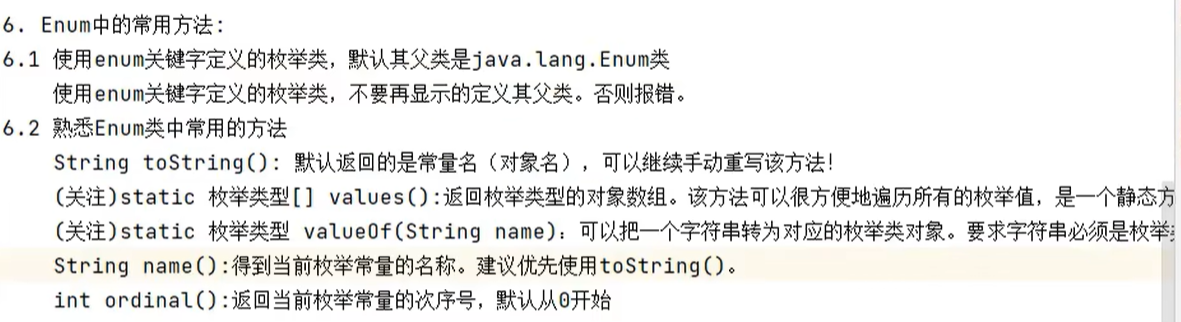
//1.toString()方法,直接调用toString方法
System.out.println(Season.SPRING.toString());
//2.name()方法,直接打印常量的名字
System.out.println(Season.SPRING.name());
//3.values()方法  把枚举类的所有对象全都取出来
Season[] values = Season.values();
for(int i = 0;i <Season.values().length;i++){
    System.out.println(values[i]);
}
//4.valueOf(String objName)方法 在枚举类中找到你想要的对象,如果没找到,就会报错
System.out.println(Season.valueOf("SPRING"));


//5.ordinal()方法  找到在枚举类中,该对象是第几个声明的对象,返回该对象的角标
System.out.println(Season.SUMMER.ordinal());
7.枚举类实现接口的操作:
情况1:枚举类实现接口,在枚举类中重写接口中的抽象方法,通过不同的枚举类对象调用此方法时,执行的是同一个方法
举例:
//通过枚举类的对象调用重写接口中的方法
        Season.SUMMER.show();

    }
}


interface SeasonTest1{
    void show();
}


enum Season implements SeasonTest1{
    //1.必须再枚举类的开头声明多个对象,对象之间用逗号隔开
    SPRING("春天","出暖花开"),
    AUTUMN("秋天","秋高气爽"),
    SUMMER("夏天","夏日炎炎"),
    WINTER("冬天","白雪皑皑");

    //2.声明当前类的实例变量,使用private final修饰
    private  final String seasonName;
    private final String seasonDesc;

    //3.私有化类的构造器
    private Season(String seasonName,String seasonDesc){
        this.seasonName = seasonName;
        this.seasonDesc = seasonDesc;
    }

    //4.提供变量的get方法:
    public String getSeasonName() {
        return seasonName;
    }

    public String getSeasonDesc() {
        return seasonDesc;
    }

    @Override
    public String toString() {
        return "Season{" +
                "seasonName='" + seasonName + '\'' +
                ", seasonDesc='" + seasonDesc + '\'' +
                '}';
    }

    @Override
    public void show() {
        System.out.println("这是一个季节");
    }
    }
情况2:让枚举类的每一个对象重写接口中的抽象方法,当通过不同的枚举对象调用此方法时,执行的是不同的方法。
举例:
Season[] values1 = Season.values();
        for(int i = 0;i <Season.values().length;i++){
            values1[i].show();
        }


    }
}

interface Info {
    void show();
}


enum Season implements Info{
    //1.必须再枚举类的开头声明多个对象,对象之间用逗号隔开
    SPRING("春天","出暖花开"){
        @Override
        public void show() {
            System.out.println("春天");
        }
    },
    AUTUMN("秋天","秋高气爽"){
        @Override
        public void show() {
            System.out.println("秋天");
        }
    },
    SUMMER("夏天","夏日炎炎"){
        public void show(){
            System.out.println("夏天");
        }
    },
    WINTER("冬天","白雪皑皑"){
        public void show(){
            System.out.println("冬天");
        }
    };
练习1:
类:
public class Employee {
    private String name;
    private int age;
    private Status status;

    public Employee() {
    }

    public Employee(String name, int age, Status status) {
        this.name = name;
        this.age = age;
        this.status = status;
    }

    public Status getStatus() {
        return status;
    }

    public void setStatus(Status status) {
        this.status = status;
    }

    public String getName() {
        return name;
    }

    public void setName(String name) {
        this.name = name;
    }

    public int getAge() {
        return age;
    }

    public void setAge(int age) {
        this.age = age;
    }

    @Override
    public String toString() {
        return "Employee{" +
                "name='" + name + '\'' +
                ", age=" + age +
                ", status=" + status +
                '}';
    }
}
枚举类:
public enum Status {
    BUSY,FREE,VOCATION,DIMISSION;
}
测试:
public class EmployeeExer {
    public static void main(String[] args) {
        Employee emp = new Employee("妄汐霜",20,Status.BUSY);
        System.out.println(emp);
    }
}
练习2:
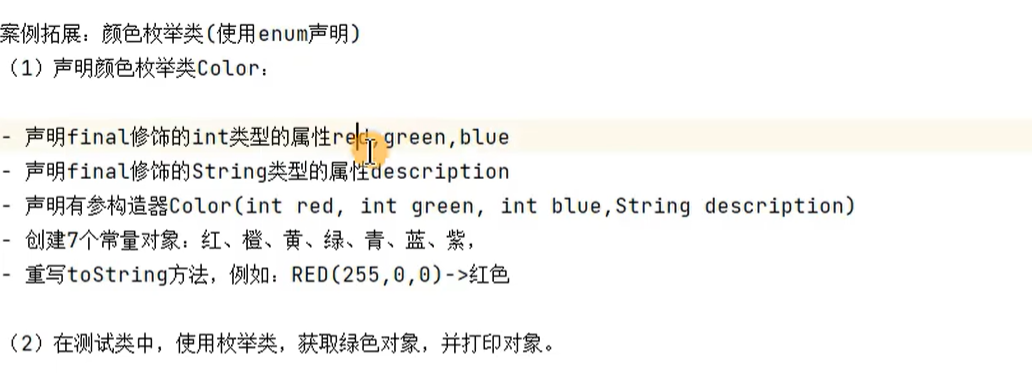
public class ColorTest{

    public static void main(String[] args) {
        System.out.println(Color.RED.getdescription());

    }

}
enum Color{
    RED(255,0,0,"红色"),
    ORANGE(255,128,0,"橙色"),
    YELLOW(255,225,0,"黄色");


    private final int red;
    private final int blue;
    private final int green;
    private final String description;


    private Color(int red, int blue, int green, String description) {
        this.red = red;
        this.blue = blue;
        this.green = green;
        this.description = description;
    }

    public int getRed() {
        return red;
    }

    public int getGreen() {
        return green;
    }

    public String getdescription() {
        return description;
    }

    public int getBlue() {
        return blue;
    }
}
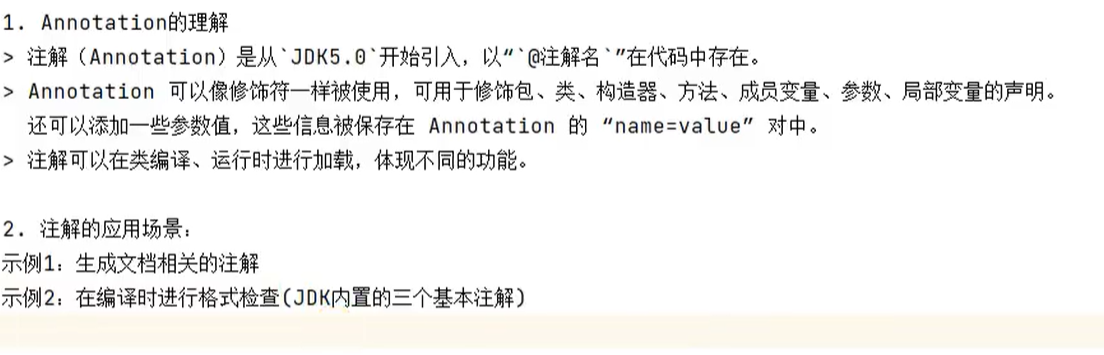
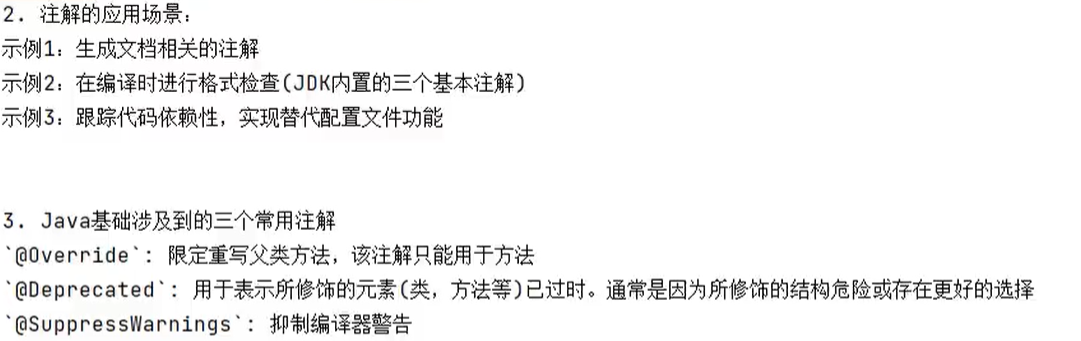
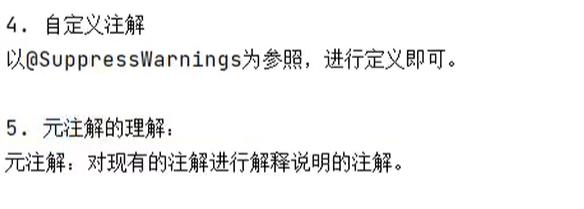
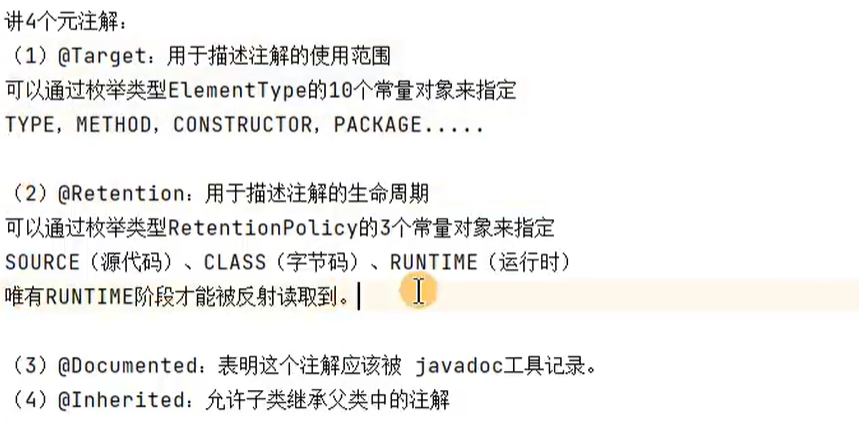
注解(annotation):
JUnit单元测试:
测试分类:
黑盒测试:不需要写代码,给输入值,看程序是否能够输出期望的值
白盒测试:需要写代码,关注程序具体的执行流程
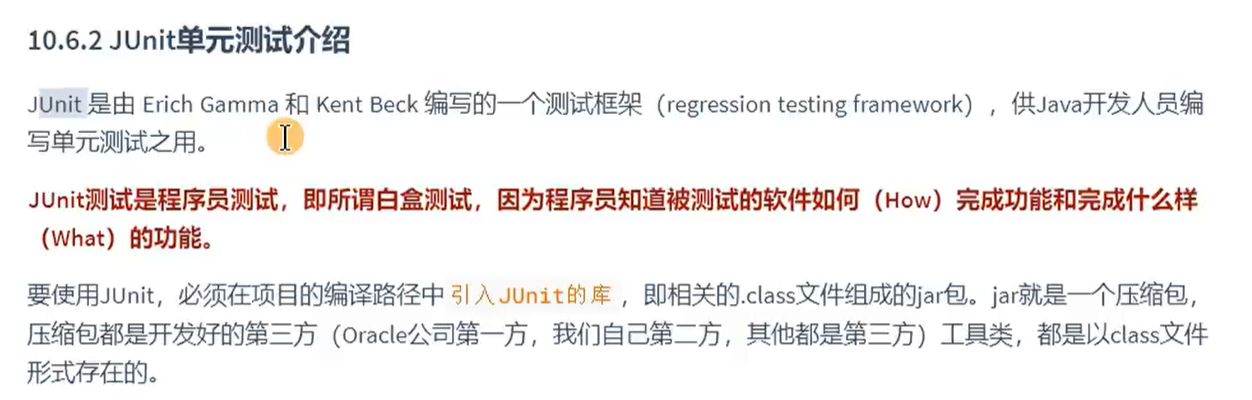
可以直接通过test,来测试方法是否可行
public class JUnitTetst {
    @Test
    public void test1(){
        System.out.println("hello" );
    }

    @Test
    public void test2(){
        System.out.println("hello" );
    }

}

包装类:

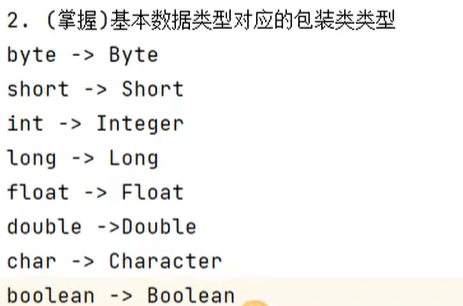


基本数据类型-->包装类①举例(这种方式已被舍弃):
public class WrapperTest {
    public static void main(String[] args) {
        int n = 10;//定义一个基本数据
        Integer num = new Integer(n);//把基本数据转换成对象
        System.out.println(num);//然后就可以调用对象的方法

        boolean b = false;
        Boolean boolean1 = new Boolean(b);
        System.out.println(boolean1);


        String str = "true";
        Boolean b1 = new Boolean(str);//也可以把String类型的转换成boolean类型的
        System.out.println(b1);

        String str1 = "fAlse123";
        boolean b2 = new Boolean(str1);//这种方法不区分大小写,只要识别出和true不一样,就判定为false
        System.out.println(b2);

    }
}
基本数据类型-->包装类②举例:
        int i1= 12;
        Integer ii1 = Integer.valueOf(i1);//把基本数据类型包装成类,再创建对象
        System.out.println(ii1);//通过这个对象,可以直接打印


        boolean b1 = true;
        Boolean b2 = Boolean.valueOf(b1);
        System.out.println(b2);

        boolean b3 = true;
        boolean bb3 = Boolean.valueOf(b3);

        boolean b4 = false;
        Boolean bb4 = Boolean.valueOf(b4);
        System.out.println(b4);


        String str = "tRue";
        Boolean bb5 = Boolean.valueOf(str);
        System.out.println(bb5);

        String str1 = "fAlse123";//只要和true不一样,就判定为false
        Boolean bb6 = Boolean.valueOf(str1);
        System.out.println(bb6);

包装类转换为基本数据类型变量,
举例:
Integer ii1 = Integer.valueOf(10);
int i1 = ii1.intValue();//包装类转换为基本数据类型
System.out.println(i1);

Boolean bb1 = Boolean.valueOf(true);
boolean b1 = bb1.booleanValue();
System.out.println(b1);
新特性:
自动装箱:基本数据类型-->包装类(装箱)
//自动装箱
    int i1 = 12;
    Integer ii1 = i1;


    boolean b1 = true;
    Boolean bb1 = b1;
自动拆箱:包装类-->基本数据类型(拆箱)
//自动拆箱
        int i1 = 12;
            Integer ii2 = i1;//自动装箱

            int i2 = ii2;//自动拆箱
        System.out.println(i2);
String与基本数据类型,包装类之间的转换:
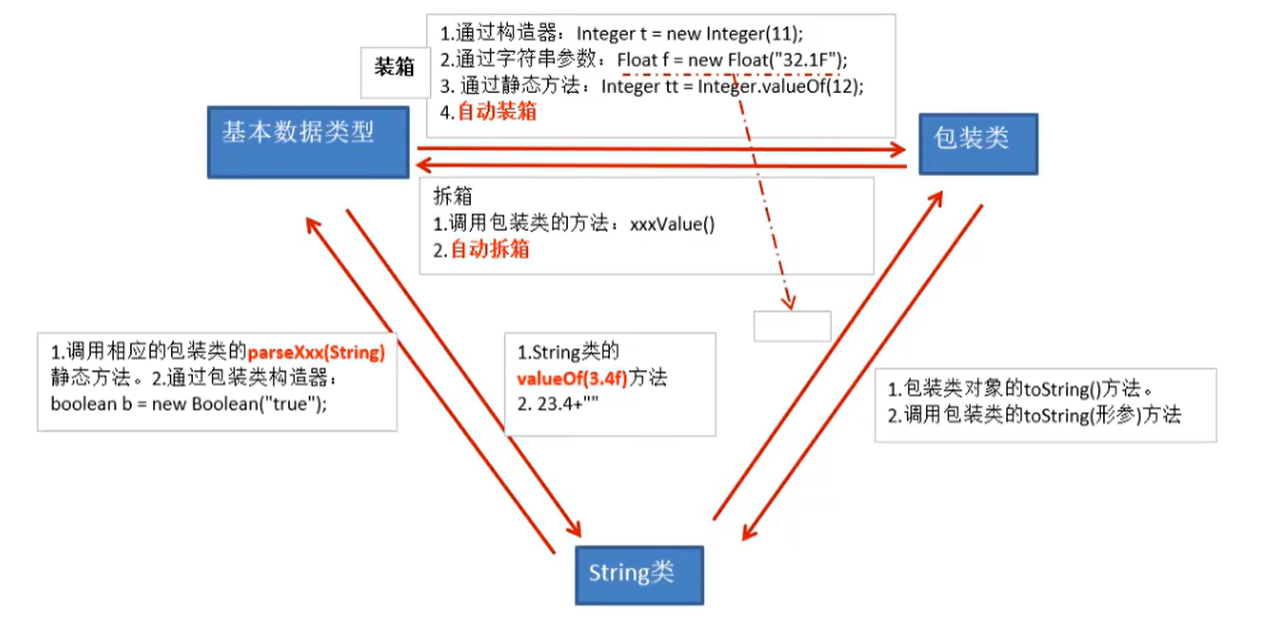
基本数据类型,包装类转换成String类型:
//基本数据类型,包装类转换成String类型:
// 方式1:调用String的静态方法valueof
int i1 = 10;
String str = String.valueOf(i1);
boolean b1 = true;
String str2 = String.valueOf(b1);
Boolean b2 = b1;//自动装箱
String str3 = String.valueOf(b2);
//方式2:加""
String str4 = "" + i1;
String str5 = "" + b1;
String类型转换为基本数据类型:
//String类型转换为基本数据类型:
// 调用包装类的parseXXX方法
String str6 = "123";
int i2 = Integer.parseInt(str6);
System.out.println(i2 + 10);

String str7 = "true";
boolean b3 = Boolean.parseBoolean(str7);
System.out.println(b3);
转换的时候注意观察转换类型是否正确,否则会报错
练习:
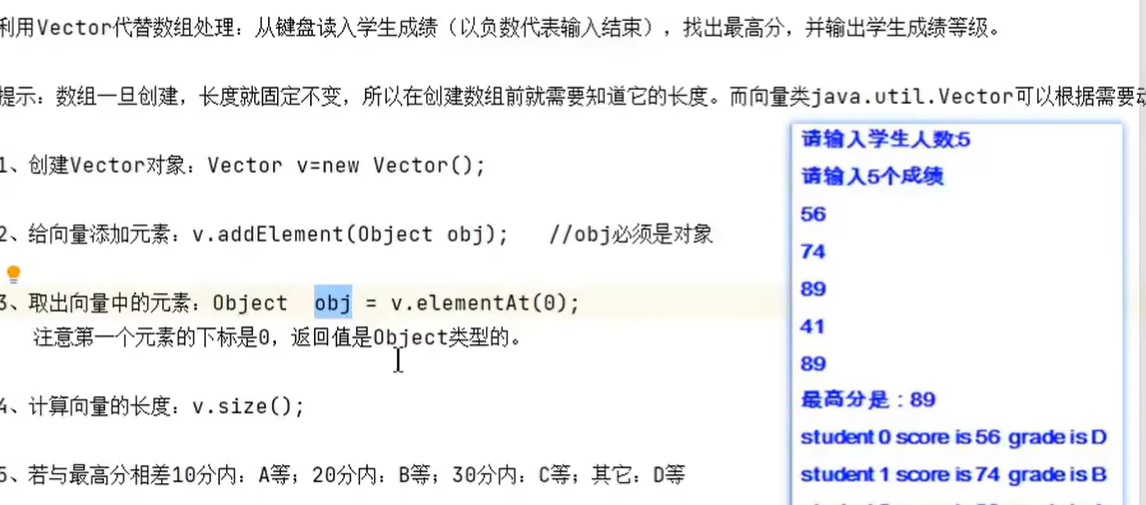
public class WraperExerTest {
    public static void main(String[] args) {
        Vector  v = new Vector();
        Scanner sc = new Scanner(System.in);
        int maxScore = 0;
        while(true){
            System.out.println("请输入学生的成绩");
            int c = sc.nextInt();
            Integer score = Integer.valueOf(c);
            if(c < 0){
                break;
            }
            v.addElement(score);
            if(score > maxScore){
                maxScore = score;
            }
        }

        for(int i=0;i<v.size();i++){
            v.elementAt(i);
            int s = (Integer)v.elementAt(i);
            if(maxScore - s <= 10 ){
                System.out.println("A档");
            } else if (maxScore - s <= 20) {
                System.out.println("B");
            }else if (maxScore - s <= 30) {
                System.out.println("C");
            }else{
                System.out.println("D");
            }
            System.out.println("student " + i + "成绩是:" + v.elementAt(i));
            System.out.println();

        }


     sc.close();
    }
}
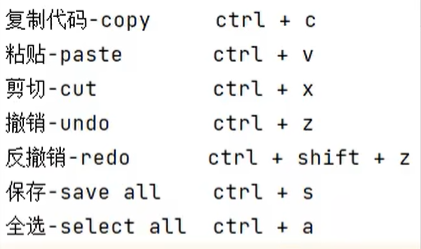
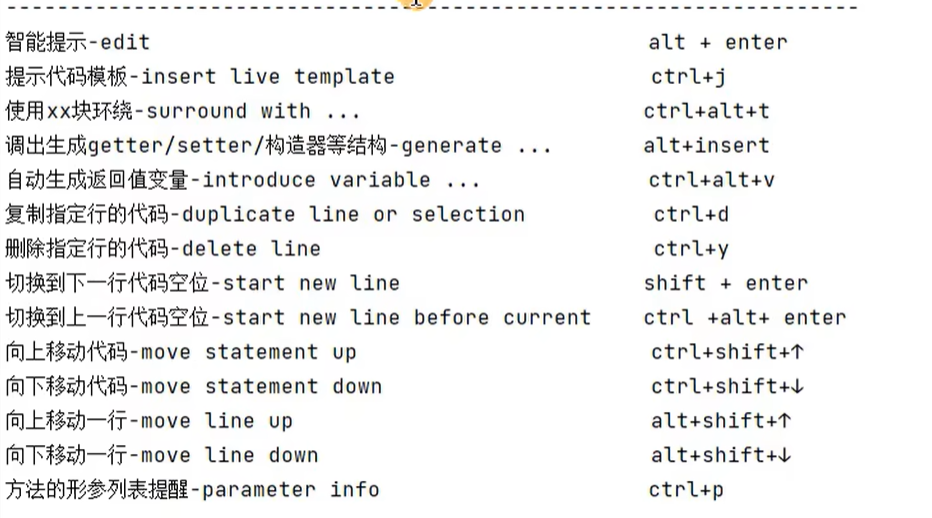
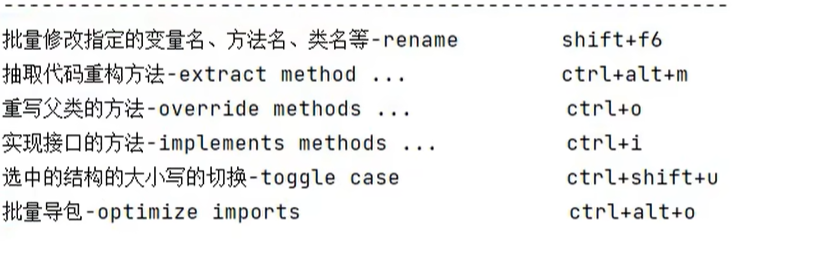
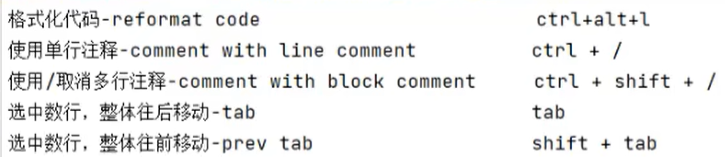
IDEA快捷键:
企业真题:
静态变量和实例变量的区别?
静态属性和静态方法是否可以被继承?是否可以被重写?
静态方法不能被重写,不存在多态性。但可以重载
是否可以从一个static方法内部发出对非static方法的调用?
静态方法只能使用静态的,如果想从一个static方法内部发出对非static方法的调用,只能通过对象来对非静态方法调用
main()方法的public能不能换成private,为什么?
可以改,但是改完之后就不是程序入口了,只是一个普通方法
类的组成和属性赋值执行的先后顺序?
默认赋值-->显式赋值/代码块赋值-->构造器赋值
静态代码块,普通代码块,构造方法,从类加载开始的执行顺序?
静态代码块-->普通代码块-->构造方法
final不能用于修饰构造方法?
不能
fianl或static final修饰成员变量,能不能进行++操作?
不能,++的话这个值自身就变了,如果是+1的话就可以,因为这个值本身没变
为什么不能用abstract修饰属性,私有方法,构造器,静态方法,final的方法?
构造器和抽象类的区别
接口可以有自己属性吗?
可以,必须是 public static fianl的
访问接口的默认方法如何使用?
使用实现类的对象进行调用,而且实现还可以重写此默认方法。
枚举类可以继承吗?
使用enum定义的,其父类就是Enum类,就不要再继承其他的类了





 扫一扫
扫一扫


 1210
1210

 被折叠的 条评论
为什么被折叠?
被折叠的 条评论
为什么被折叠?
 到【灌水乐园】发言





