



 本文介绍如何为X4412开发板配置Linux内核驱动,包括设备树文件详解、内核编译及根文件系统的构建过程,并分享了常见问题及其解决思路。
代码: git clone https://github.com/chasinglulu/linux.git -b X4412-Kernel
设备树文件
linux-4.16.0/arch/arm/boot/dts/exynos4412-x4412.dts
/*
 * X4412 board device tree source
 *
 * Device tree source file for 9tripod's X4412 board which is based on
 * Samsung's Exynos4412 SoC.
 *
 * This program is free software; you can redistribute it and/or modify
 * it under the terms of the GNU General Public License version 2 as
 * published by the Free Software Foundation.
*/

/dts-v1/;
#include <dt-bindings/gpio/gpio.h>
#include <dt-bindings/input/input.h>
#include <dt-bindings/interrupt-controller/irq.h>
#include <dt-bindings/pwm/pwm.h>
#include "exynos4412.dtsi"
#include "exynos4412-ppmu-common.dtsi"
#include "exynos-mfc-reserved-memory.dtsi"

/ {
    model = "X4412 board based on Exynos4412";
    compatible = "9tripod,X4412", "samsung,exynos4412", "samsung,exynos4";

    memory@40000000 {
        device_type = "memory";
        reg = <0x40000000 0x40000000>;
    };

    chosen {
        bootargs = "console=ttySAC3,115200";
        stdout-path = &serial_3;
    };

    firmware@0203F000 {
        compatible = "samsung,secure-firmware";
        reg = <0x0203F000 0x1000>;
    };

    fixed-rate-clocks {
        xxti {
            compatible = "samsung,clock-xxti";
            clock-frequency = <0>;
        };

        xusbxti {
            compatible = "samsung,clock-xusbxti";
            clock-frequency = <24000000>;
        };
    };

    leds {
        compatible = "gpio-leds";
        led1 {
            label = "led1:heart";
            gpios = <&gpx1 6 GPIO_ACTIVE_LOW>;
            default-state = "on";
            linux,default-trigger = "heartbeat";
        };

        led2 {
            label = "led2";
            gpios = <&gpx1 7 GPIO_ACTIVE_LOW>;
            default-state = "off";
        };

        led3 {
            label = "led3";
            gpios = <&gpx2 6 GPIO_ACTIVE_LOW>;
            default-state = "off";
        };

        led4 {
            label = "led4";
            gpios = <&gpx2 7 GPIO_ACTIVE_LOW>;
            default-state = "off";
            linux,default-trigger = "timer";
        };
    };

    gpio-keys {
        compatible = "gpio-keys";

        left {
            label = "Key Left";
            linux,code = <KEY_LEFT>;
            gpios = <&gpx1 0 GPIO_ACTIVE_LOW>;
        };

        right {
            label = "Key Right";
            linux,code = <KEY_RIGHT>;
            gpios = <&gpx1 1 GPIO_ACTIVE_LOW>;
        };

        vol-up {
            label = "Key Vol+";
            linux,code = <KEY_UP>;
            gpios = <&gpx1 2 GPIO_ACTIVE_LOW>;
        };

        vol-down {
            label = "Key Vol-";
            linux,code = <KEY_DOWN>;
            gpios = <&gpx1 3 GPIO_ACTIVE_LOW>;
        };
    };

    camera: camera {
        pinctrl-names = "default";
        pinctrl-0 = <&cam_port_a_clk_active>;
        status = "okay";
        assigned-clocks = <&clock CLK_MOUT_CAM0>;
        assigned-clock-parents = <&clock CLK_XUSBXTI>;
    };
};

&fimc_0 {
    status = "okay";
    assigned-clocks = <&clock CLK_MOUT_FIMC0>,
            <&clock CLK_SCLK_FIMC0>;
    assigned-clock-parents = <&clock CLK_MOUT_MPLL_USER_T>;
    assigned-clock-rates = <0>, <176000000>;
};

&fimc_1 {
    status = "okay";
    assigned-clocks = <&clock CLK_MOUT_FIMC1>,
            <&clock CLK_SCLK_FIMC1>;
    assigned-clock-parents = <&clock CLK_MOUT_MPLL_USER_T>;
    assigned-clock-rates = <0>, <176000000>;
};

&ehci {
    status = "okay";

    port@0 {
        status = "okay";
    };

    port@1 {
        status = "okay";
    };

    port@2 {
        status = "okay";
    };
};

&pwm {
    status = "okay";
    pinctrl-0 = <&pwm1_out>;
    pinctrl-names = "default";
    samsung,pwm-outputs = <1>;
};

&i2c_2 {
    status = "okay";
};

&i2c_8 {
    status = "okay";
};

&exynos_usbphy {
    status = "okay";
};

&hsotg {
    dr_mode = "peripheral";
    status="okay";
};

&mshc_0 {
    pinctrl-0 = <&sd4_clk &sd4_cmd &sd4_bus4 &sd4_bus8>;
    pinctrl-names = "default";
    status = "okay";

    cd-gpio= <&gpk0 2 GPIO_ACTIVE_HIGH>;
    clock-frequency = <400000000>;
    samsung,dw-mshc-ciu-div = <0>;
    samsung,dw-mshc-sdr-timing = <2 3>;
    samsung,dw-mshc-ddr-timing = <1 2>;
    bus-width = <8>;
    cap-mmc-highspeed;
};

&sdhci_2 {
    bus-width = <4>;
    pinctrl-0 = <&sd2_clk &sd2_cmd &sd2_cd &sd2_bus4>;
    pinctrl-names = "default";
    cd-gpios = <&gpk2 2 GPIO_ACTIVE_HIGH>;
    cd-inverted;
    card-detect-delay = <200>;
    cap-sd-highspeed;
    status = "okay";
};

&serial_0 {
    status = "okay";
};

&serial_1 {
    status = "okay";
};

&serial_2 {
    status = "okay";
};

&serial_3 {
    status = "okay";
};

&pinctrl_0 {
    hsic_reset: hsic-reset {
        samsung,pins = "gpc0-0";
        samsung,pin-function = <EXYNOS_PIN_FUNC_INPUT>;
        Samsung,pin-pud = <EXYNOS_PIN_PULL_NONE>;
        samsung,pin-drv = <EXYNOS4_PIN_DRV_LV4>;
    };
};
配置与编译
make ARCH=arm exynos_defconfig
make ARCH=arm ACROSS_COMPILE=arm-linux-gnueabihf- -j8
cat linux-4.16.0/arch/arm/boot/zImage linux-4.16.0/arch/arm/boot/dts/exynos4412-x4412.dtb > zImage_dtb
根文件系统
使用ubuntu-base构建根文件系统,这样能快速构建一个比较完善的文件系统。
1 Install Tools
sudo apt-get install qemu-user-static binfmt-support2 get ubuntu-base
wget http://cdimage.ubuntu.com/ubuntu-base/releases/18.04/release/ubuntu-base-18.04-base-armhf.tar.gz3 create rootfs
mkdir ubuntu-18.04
sudo tar -xzf ubuntu-base-18.04-base-armhf.tar.gz -C ubuntu-18.04当执行chroot时,会调用arm架构的/bin/bash程序,这时需要借助qemu-arm-static模拟执行这个程序
sudo cp /usr/bin/qemu-arm-static ubuntu-18.04/usr/bin/将宿主机的DNS配置复制到目标机的根文件系统中,用于后面工具的下载
sudo cp /etc/resolv.conf rootfs/etc/resolv.conf安装内核modules
cd linux-4.16.0
sudo make ARCH=arm CROSS_COMPILE=arm-linux-gnueabihf- mudules_install INSTALL_MOD_PATH=/path/to/ubuntu-18.04/
挂载必要文件系统
sudo mount -t proc /proc ubuntu-18.04/proc
sudo mount -t sysfs /sys ubuntu-18.04/sys
sudo mount -o bind /dev ubuntu-18.04/dev
sudo mount -o bind /dev/pts ubuntu-18.04/dev/pts
sudo chroot ubuntu-18.04
安装基本软件
apt-get sudo vim bash-completion net-tools ethtool wireless-tools ifupdown network-manager iputils-ping resolvconf udev make gcc添加用户
adduser ubuntu
addgroup ubuntu adm
addgroup ubuntu sudo
addgroup ubuntu audio
addgroup ubuntu video
addgroup ubuntu dialout
设置主机名称
echo "X4412" >/etc/hostname
echo "127.0.0.1 localhost" >/etc/hosts
echo "127.0.0.1 X4412" >>/etc/hosts
4 package rootfs
exit
sudo umount ubuntu-18.04/proc
sudo umount ubuntu-18.04/sys
sudo umount ubuntu-18.04/dev/pts
sudo umount ubuntu-18.04/dev

cd ubuntu-18.04
sudo tar -cjf ../ubuntu-rootfs.18.04.tar.bz2 .
烧写
制作SD启动卡更新X4412开发板上的映像,参考开发板使用手册
结果
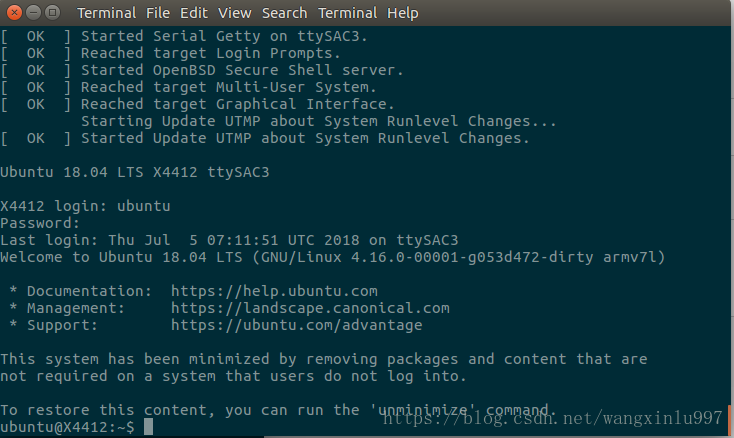
现在DM9000C以太网卡驱动不能正确适配,重启后usb不能识别外接设备,camera驱动也不能适配





 扫一扫
扫一扫


 2364
2364

 被折叠的 条评论
为什么被折叠?
被折叠的 条评论
为什么被折叠?
 到【灌水乐园】发言





