


 文章介绍了如何通过编写AutoHotkey脚本来创建自定义快捷键,实现Foxmail中快速带附件回复邮件的功能。用户只需将鼠标置于要回复的邮件上,按下F1/F2/F3,就能自动模拟鼠标右键点击、选择更多操作并触发预设的Alt+1/2/3快捷键进行回复。
Foxmail的带附件回复按钮,没有快捷键,因此设计脚本实现一键带附件回复。
思路:获取鼠标所在位置,在邮件处右击,模拟按键M(更多操作),再模拟按键E。等待回复框出现,出现后模拟Alt+1(快捷回复设置的短语快捷键)。
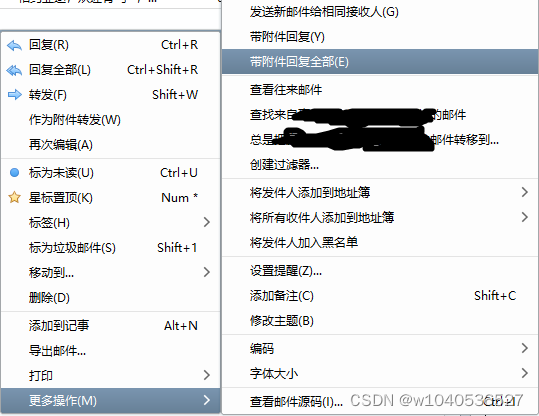
使用的AHK版本为1.1。
主要
#SingleInstance Force
TrayTip ,,鼠标放在要回复的邮件上,按F1/F2/F3自动带附件回复全部。`n并触发ALT+1/2/3的快捷键
Sleep 5000
TrayTip
return
#ifWinActive ahk_class TFoxMainFrm.UnicodeClass
F1::
Send {RButton}me
WinWait,ahk_class TFoxComposeForm.UnicodeClass,,5,
Sleep 1000
;MsgBox %ErrorLevel%
if ErrorLevel
{
    return
}
else
    Send !1
Return
F2::
Send {RButton}me
WinWait,ahk_class TFoxComposeForm.UnicodeClass,,5,
Sleep 1000
;MsgBox %ErrorLevel%
if ErrorLevel
{
    return
}
else
    Send !2
Return
F3::
Send {RButton}me
WinWait,ahk_class TFoxComposeForm.UnicodeClass,,5,
Sleep 1000
;MsgBox %ErrorLevel%
if ErrorLevel
{
    return
}
else
    Send !3
Return
#ifWinActive





 扫一扫
扫一扫


 4257
4257

 被折叠的 条评论
为什么被折叠?
被折叠的 条评论
为什么被折叠?
 到【灌水乐园】发言





