


 本文介绍了Java中JDBC的基础知识,包括JDBC的概念、核心API、如何导入和注册驱动,以及连接数据库所需的参数。详细讲解了使用JDBC创建数据库连接、Statement接口以及释放资源的方法。还探讨了Statement的不足,如SQL拼接、SQL注入问题,引出PreparedStatement接口,解释其执行原理和优势,强调了其在防止SQL注入和提升效率上的作用。
1、JDBC入门
1.1、 客户端操作MYSQL数据库的方式
(1) 使用第三方客户端来访问MYSQL:MySQL Workbench(官方)、SQLyong、Navicat、SQLWare。。。
(2) 使用MYSQL自带的命令行方式或者DOM命令
(3)在Java中,数据库存取技术可分为如下几类:
● JDBC直接访问数据库
● JDO技术(Java Data Object)
● 第三方O/R工具,如Hibernate, Mybatis 等
JDBC是java访问数据库的基石,JDO, Hibernate等只是更好的封装了JDBC。
1.1.1、什么是JDBC
JDBC是SUN公司(Oracle公司甲骨文)提供一套用于数据库操作的接口API,Java程序员只需要面向这套接口编程即可。不同的数据库厂商,需要针对这套接口,提供不同实现。不同的实现的集合,即为不同数据库的驱动。JDBC规范定义接口,具体的实现由各大数据库厂商来实现。
JDBC(Java Database Connectivity)是一个独立于特定数据库管理系统(DBMS)、通用的SQL数据库存取和操作的公共接口(一组API),定义了用来访问数据库的标准Java类库,使用这个类库可以以一种标准的方法、方便地访问数据库资源
JDBC是Java访问数据库的标准解决方案,真正怎么操作数据库还需要具体的实现类,也就是数据库驱动。每个数据库厂商根据自家数据库的通信方式编写好自己数据库的实现类,也就是驱动。所以我们只需要会调用JDBC接口中的方法即可,数据库驱动由数据库厂商提供。
使用JDBC的好处:
(1)程序员如果要开发访问数据库的程序,只需要会调用JDBC接口的方法即可,不用关注类是如何实现的。
(2) 使用同一套Java代码,进行少量的修改就可以访问其他JDBC支持的数据库。

1.1.2、使用JDBC开发用到的包
| 包 | 说明 |
|---|---|
| java.sql | 所有与JDBC访问数据库相关的接口和类 |
| javax.sql | 数据库的扩展包,提供数据库额外的功能,如:连接池 |
| 数据库的驱动 | 由各大数据库厂商提供,需要额外去下载,是对JDBC接口的实现类 |
1.1.3、 JDBC的核心API
| 接口 | 说明 |
|---|---|
| DriverManager类 | 管理和注册数据库驱动,得到数据库连接对象 |
| Connection接口 | 一个连接对象,可用于创建Statement和PreparedStatement对象 |
| Statement接口 | 一个SQL语句对象,用于将SQL语句发送给数据库服务器 |
| PreparedStatement接口 | 一个SQL语句对象,是Statement的子接口 |
| ResultSet接口 | 用于封装数据库查询的结果集,返回给客户端Java程序 |

1.2、导入驱动JAP包
下载地址:https://dev.mysql.com/downloads/connector/j/

新建一个jdbc_base工程,然后创建一个文件夹,名为lib


然后复制MYSQL数据库驱动jar包,到lib目录
添加lib目录到 Add as Library

1.3、加载和注册驱动
加载和注册驱动的方法:Class.forName(数据库驱动实现类),数据库驱动由mysql厂商提供,它的驱动类是:com.mysql.cj.jdbc.Driver
public static void main(String[]args){
        try{
            //1、加载数据库的驱动类,通过反射的方式创建驱动类对象
            Class.forName("com.mysql.cj.jdbc.Driver");
            }catch(ClassNotFoundException ce){
            ce.printStackTrace();
        }
}
【从JDBC3开始,Class.forName可以省略】
1.4、DriverManager类
作用:
(1)管理和注册驱动
(2)创建数据库的连接,并返回一个连接对象Connection
DriverManager中的方法:
Connection getConnection(String url,String user,String password):通过连接字符串,用户名,密码返回一个数据库连接对象
1.5、使用JDBC连接数据库的四个参数
| 参数 | 说明 |
|---|---|
| 用户名 | 登录数据库的用户名 |
| 密码 | 登录数据库的密码 |
| 连接字符串URL | 不同的数据库URL是不同的,MYSQL的写法是:jdbc:mysql://localhost:3306/数据库名?serverTimezone=UTC [&参数名=参数值&参数名=值] |
| 驱动类的字符串名 | com.mysql.cj.jdbc.Driver |
1.5.1、连接数据库的URL地址格式
JDBC URL 用于标识一个被注册的驱动程序,驱动程序管理器通过这个 URL 选择正确的驱动程序,从而建立到数据库的连接。JDBC URL的标准由三部分组成,各部分间用冒号分隔。
jdbc:<子协议>:<子名称>
协议:JDBC URL中的协议总是jdbc
子协议:子协议用于标识一个数据库驱动程序(数据库管理系统的名称)
子名称:一种标识数据库的方法。子名称可以依不同的子协议而变化,用子名称的目的是为了定位数据库提供足够的信息
例如:

MySQL的连接URL编写方式:
jdbc:mysql://主机名称:mysql服务端口号/数据库名称?参数=值&参数=值
jdbc:mysql://localhost:3306/testdb
jdbc:mysql://localhost:3306/testdb?useUnicode=true&characterEncoding=utf8(如果JDBC程序与服务器端的字符集不一致,会导致乱码,那么可以通过参数指定服务器端的字符集)
jdbc:mysql://localhost:3306/testdb?user=root&password=123456
Oracle9i:
jdbc:oracle:thin:@主机名称:oracle服务端口号:数据库名称
jdbc:oracle:thin:@localhost:1521:testdb
SQLServer:
jdbc:sqlserver://主机名称:sqlserver服务端口号:DatabaseName=数据库名称
jdbc:sqlserver://localhost:1433:DatabaseName=testdb
1.6、案例:获取MYSQL的数据库连接对象
public static void main(String[]args){
        String url="jdbc:mysql://localhost:3306/db2?serverTimezone=UTC&characterEncoding=utf8";
        try{
            //1、加载数据库的驱动类,通过反射的方式创建驱动类对象
            Class.forName("com.mysql.cj.jdbc.Driver");
            //2、获取数据库连接对象Connection
            Connection conn=DriverManager.getConnection(url,"root","RootBDIT628@#");
            //判断连接对象是否成功获取
            if(conn!=null){
                System.out.println("ok");
            }else{
                System.out.println("fail");
            }
            }catch(ClassNotFoundException|SQLException ce){
                ce.printStackTrace();
            }
        }
1.6.1、Connection接口
Connection接口:具体的实现类由数据库厂商实现,代表一个数据库连接对象
Connection方法:Statement createStatement():创建一个SQL语句对象
1.7、Statement接口
Statement作用: 代表一条SQL语句对象,用于发送SQL语句给服务器,用于执行静态SQL语句并返回它所生成结果的对象
Statement中的方法:
| 方法 | 说明 |
|---|---|
| int executeUpdate(String sql) | 用于发送DML语句,增删改的操作:INSERT、UPDATE、DELETE ,返回的结果是表示SQL语句影响的行数 |
| ResultSet executeQuery(String sql) | 用于发送DQL语句,执行查询的操作,SELECT返回值:表示查询到的结果集 |
1.8、释放资源
(1) 需要释放的对象,ResultSet结果集,Statement对象,Connection对象
(2)释放原则:先开的后关,后开的先关:ResultSet->Statement->Connection
(3)放在finally代码块中,或者try()自动关闭
1.9、需求:使用JDBC在MYSQL的数据库中创建一张学生表
package com.bdit;

import java.sql.Connection;
import java.sql.DriverManager;
import java.sql.SQLException;
import java.sql.Statement;

/**
 * @Description : 使用JDBC创建学生对象: id name gender birthday
 */
public class Demo1 {
    public static void main(String[] args)  {
        String url="jdbc:mysql://localhost:3306/db2?serverTimezone=UTC&characterEncoding=utf8";
        Connection conn=null;
        Statement st=null;
        try {
            //1、加载数据库的驱动类,通过反射的方式创建驱动类对象
            Class.forName("com.mysql.cj.jdbc.Driver");
            //2、获取数据库连接对象Connection
            conn= DriverManager.getConnection(url,"root","RootBDIT628@#");
            //判断连接对象是否成功获取
            if(conn!=null){
                System.out.println("ok");
            }else{
                System.out.println("fail");
            }
            //3.获取Statement对象
            st=conn.createStatement();
            //准备SQL语句
            String sql="create table student(id int primary key auto_increment," +
                    "name varchar(20) not null,gender varchar(10) not null,birthday date)";
            //4、执行SQL(DDL没有返回结果)
            int i=st.executeUpdate(sql);
            System.out.println("表创建成功");

        }catch (ClassNotFoundException | SQLException ce){
            ce.printStackTrace();
        }finally {
            //先判断是否null
            if(st!=null){
                try {
                    st.close();
                } catch (SQLException e) {
                    e.printStackTrace();
                }
            }
            if(conn!=null){
                try {
                    conn.close();
                } catch (SQLException e) {
                    e.printStackTrace();
                }
            }

        }
    }
}
1.10、 封装数据库工具类DbUtils
什么时候自己创建工具类?
如果一个功能经常要用到,我们建议把这个功能封装成一个工具类,可以在不同的地方重用。
把上面的代码中出现了很多重复的代码,可以把这些公共代码抽取出来。
DbUtils包含3个方法:
字符串常量:用户名、密码、URL、驱动类
得到数据库连接对象,getConnection();
关闭所有的资源
package com.bdit.utils;

import java.sql.*;

/**
 * 工具类:公共的数据库连接和关闭类
 */
public class DbUtils {
    private static String user;
    private static String password;
    private static String url;
    private static String driver;
    static {
        user="root";
        password="root";
        url="jdbc:mysql://localhost:3306/my_db3?useUnicode=true&characterEncoding=utf8&serverTimezone=GMT%2B8";
        driver="com.mysql.cj.jdbc.Driver";
        try {
            Class.forName(driver);
        } catch (ClassNotFoundException e) {
            e.printStackTrace();
        }
    }

    /**
     * 返回一个数据库连接对象Connection
     * @return
     * @throws SQLException
     */
    public static Connection getConnection() throws SQLException {
        Connection conn=DriverManager.getConnection(url,user,password);
        return conn;
    }

    public static void close(Connection conn,Statement statement){
        close(statement);
        close(conn);
    }

    public static void close(Connection conn,Statement statement,ResultSet resultSet){
        close(resultSet);
        close(conn,statement);
    }

    public static void close(Connection conn){
        if(conn!=null){
            try {
                conn.close();
            } catch (SQLException throwables) {
                throwables.printStackTrace();
            }
        }
    }

    public static void close(Statement statement){
        if(statement!=null){
            try {
                statement.close();
            } catch (SQLException throwables) {
                throwables.printStackTrace();
            }
        }
    }

    public static void close(ResultSet resultSet){
        if(resultSet!=null){
            try {
                resultSet.close();
            } catch (SQLException throwables) {
                throwables.printStackTrace();
            }
        }
    }
}
1.11、带属性文件的DbUtils
jdbc.properties
driver=com.mysql.cj.jdbc.Driver
username=root
password=root
url=jdbc:mysql://localhost:3306/my_db3?useUnicode=true&characterEncoding=utf8&serverTimezone=GMT%2B8
package com.bdit.utils;
import java.io.IOException;
import java.io.InputStream;
import java.sql.*;
import java.util.Properties;
/**
* 工具类:公共的数据库连接和关闭类
*/
public class DbUtils2 {
private static String user;
private static String password;
private static String url;
private static String driver;
private static Properties properties;
static {
//读取属性文件,获取InputStream
InputStream is=Thread.currentThread().getContextClassLoader().getResourceAsStream("jdbc.properties");
properties=new Properties();
try {
//加载流
properties.load(is);
driver=properties.getProperty("driver");
Class.forName(driver);
} catch (ClassNotFoundException | IOException e) {
e.printStackTrace();
}
user= properties.getProperty("username");
password=properties.getProperty("password");
url=properties.getProperty("url");
}
/**
* 返回一个数据库连接对象Connection
* @return
* @throws SQLException
*/
public static Connection getConnection() throws SQLException {
Connection conn=DriverManager.getConnection(url,user,password);
return conn;
}
public static void close(Connection conn,Statement statement){
close(statement);
close(conn);
}
public static void close(Connection conn,Statement statement,ResultSet resultSet){
close(resultSet);
close(conn,statement);
}
public static void close(Connection conn){
if(conn!=null){
try {
conn.close();
} catch (SQLException throwables) {
throwables.printStackTrace();
}
}
}
public static void close(Statement statement){
if(statement!=null){
try {
statement.close();
} catch (SQLException throwables) {
throwables.printStackTrace();
}
}
}
public static void close(ResultSet resultSet){
if(resultSet!=null){
try {
resultSet.close();
} catch (SQLException throwables) {
throwables.printStackTrace();
}
}
}
}1.12、改进JDBC代码来完成Student的CRUD操作
ResultSet接口,是用来封装查询的结果集,对结果集进行遍历操作,获取每一条记录
ResultSet接口的方法:
(1) boolean next()游标向下移动1行,判断当前指向的记录是否还有下一条记录,如果返回true,表示还有;如果返回false表示没有。
(2)获取数据有两种方式:
通过列名:getXxx(String param):Xxx表示数据类型,参数是列名
通过列索引:getXxx(int index):Xxx表示护具类型,index索引从1开始
package com.bdit;

import com.bdit.model.Student;
import com.bdit.utils.DbUtils2;

import java.sql.*;
import java.time.LocalDateTime;
import java.util.ArrayList;
import java.util.List;

/**
 * 增删改查
 */
public class StudentCRUD {
    public static void main(String[] args) {
//        Timestamp timestamp=Timestamp.valueOf(LocalDateTime.now());
//        Student student=new Student(1007,"刘备",200,99.9,timestamp,"刘皇叔");
//        save(student);
        //System.out.println(findById(1006));
//        Student student=findById(1007);
//        student.setStuAge(3000);
//        student.setDes("三国最憋屈的老大");
//        boolean flag=update(student);
//        if(flag){
//            System.out.println("===============修改成功===============");
//        }else{
//            System.out.println("================修改失败==============");
//        }
//        boolean delete=delete(1001);
//        if (delete) {
//            System.out.println("===============删除成功===============");
//        } else {
//            System.out.println("================删除失败==============");
//        }
        List<Student> list=findAll();
        for(Student student:list){
            System.out.println(student);
        }
    }
    public static void save(Student student){
        Connection conn=null;
        Statement statement=null;
        try {
            conn= DbUtils2.getConnection();
            statement= conn.createStatement();
            String sql="INSERT INTO student(stuId,stuName,stuAge,score,birthday,des)" +
                    " values("+student.getStuId()+",'"+student.getStuName()+"',"+student.getStuAge()+","+student.getScore()+",'"+student.getTimestamp()+"','"+student.getDes()+"')";
            int i=statement.executeUpdate(sql);
            if(i>0){
                System.out.println("================添加成功===============");
            }else{
                System.out.println("================添加失败===============");
            }
        } catch (SQLException throwables) {
            throwables.printStackTrace();
        }finally {
            DbUtils2.close(conn,statement);
        }
    }

    /**
     * 根据学生id查询学生信息,并返回
     * @param stuId
     * @return
     */
    public static Student findById(Integer stuId){
        Connection conn=null;
        Statement statement=null;
        ResultSet resultSet=null;
        Student student=null;
        try {
            conn=DbUtils2.getConnection();
            statement=conn.createStatement();
            String sql="select * from student where stuId="+stuId;
            resultSet=statement.executeQuery(sql);
            if(resultSet.next()){
                student=new Student();
                student.setStuId(resultSet.getInt("stuId"));
                student.setStuName(resultSet.getString("stuName"));
                student.setStuAge(resultSet.getInt("stuAge"));
                student.setScore(resultSet.getDouble("score"));
                student.setTimestamp(resultSet.getTimestamp("birthday"));
                student.setDes(resultSet.getString("des"));
            }
        } catch (SQLException throwables) {
            throwables.printStackTrace();
        }finally {
            DbUtils2.close(conn,statement,resultSet);
        }
        return student;
    }

    public static boolean update(Student student){
        Connection conn=null;
        Statement statement=null;
        int i=0;
        try {
            conn= DbUtils2.getConnection();
            statement= conn.createStatement();
            String sql="update student set stuName='"+student.getStuName()+"',stuAge="+student.getStuAge()+",score="+student.getScore()+",birthday='"+student.getTimestamp()+"',des='"+student.getDes()+"' where stuId="+student.getStuId();
            i=statement.executeUpdate(sql);
        } catch (SQLException throwables) {
            throwables.printStackTrace();
        }finally {
            DbUtils2.close(conn,statement);
        }
        if(i>0){
            return  true;
        }else{
            return false;
        }
    }

    public static boolean delete(Integer stuId){
        Connection conn=null;
        Statement statement=null;
        int i=0;
        try {
            conn= DbUtils2.getConnection();
            statement= conn.createStatement();
            String sql="delete from student where stuId="+stuId;
            i=statement.executeUpdate(sql);
        } catch (SQLException throwables) {
            throwables.printStackTrace();
        }finally {
            DbUtils2.close(conn,statement);
        }
        if(i>0){
            return  true;
        }else{
            return false;
        }
    }

    public static List<Student> findAll(){
        List<Student> list=new ArrayList<>();
        Connection conn=null;
        Statement statement=null;
        ResultSet resultSet=null;
        Student student=null;
        try {
            conn=DbUtils2.getConnection();
            statement=conn.createStatement();
            String sql="select * from student";
            resultSet=statement.executeQuery(sql);

            while(resultSet.next()){
                student=new Student();
                student.setStuId(resultSet.getInt("stuId"));
                student.setStuName(resultSet.getString("stuName"));
                student.setStuAge(resultSet.getInt("stuAge"));
                student.setScore(resultSet.getDouble("score"));
                student.setTimestamp(resultSet.getTimestamp("birthday"));
                student.setDes(resultSet.getString("des"));
                list.add(student);
            }
        } catch (SQLException throwables) {
            throwables.printStackTrace();
        }finally {
            DbUtils2.close(conn,statement,resultSet);
        }
        return list;
    }
}
2、PreparedStatement
2.1、Statement的不足
(1)SQL拼接
(2)SQL注入
SQL 注入是利用某些系统没有对用户输入的数据进行充分的检查,而在用户输入数据中注入非法的 SQL 语句段或命令,从而利用系统的 SQL 引擎完成恶意行为的做法。对于 Java 而言,要防范 SQL 注入,只要用 PreparedStatement 取代 Statement 就可以了。
(3)处理Blob类型的数据
BLOB (binary large object),二进制大对象,BLOB常常是数据库中用来存储二进制文件的字段类型。
插入BLOB类型的数据必须使用PreparedStatement,因为BLOB类型的数据无法使用字符串拼接写的。
MySQL的四种BLOB类型(除了在存储的最大信息量上不同外,他们是等同的)
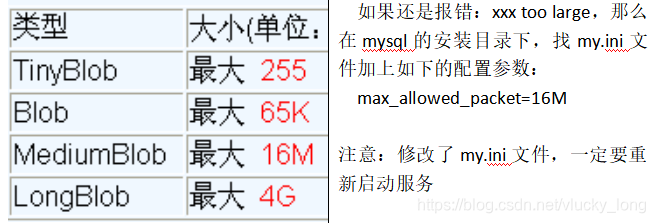
实际使用中根据需要存入的数据大小定义不同的BLOB类型。
需要注意的是:如果存储的文件过大,数据库的性能会下降。
2.2、SQL注入问题
2.2.1、案例:用户登录
1、 创建一张用户表
create table user(
        id int primary key auto_increment,
        name varchar(32),
        password varchar(50)
);

insert into user(name,password) values('zhangsan','123456'),('lisi','654321');
2、实现登录
package com.bdit;

import com.bdit.utils.DbUtils;

import java.sql.Connection;
import java.sql.ResultSet;
import java.sql.SQLException;
import java.sql.Statement;
import java.util.Scanner;

public class Demo4 {

    public static void main(String[] args) {
        Scanner sc=new Scanner(System.in);
        System.out.println("请输入用户名:");
        String name=sc.next();
        System.out.println("请输入密码:");
        String password=sc.next();
        login(name,password);

    }

    public static void login(String name,String password){
        //通过工具类,获取连接对象
        Connection conn=null;
        Statement st=null;
        ResultSet rs=null;
        try {
            conn= DbUtils.getConnection();
            st=conn.createStatement();
            //SQL
            String sql="select * from user where name='"+name+"' and password='"+password+"'";
            rs=st.executeQuery(sql);
            if(rs.next()){
                System.out.println("登录成功,欢迎"+name);
            }else{
                System.out.println("登录失败");
            }
        } catch (SQLException e) {
            e.printStackTrace();
        }finally {
            DbUtils.close(conn,st,rs);
        }
    }
}
当我们输入以下代码,我们发现我们账号和密码都不对竟然也能登录成功
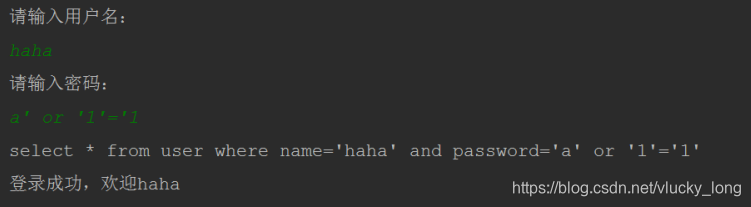
问题分析:
select * from user where name=‘haha’ and password=‘a’ or ‘1’=‘1’
name=’haha’ and password=’a’ 结果是false
or ‘1’=’1’ 真
相当于select * from user where true;
我们让用户输入的密码和SQL语句进行字符串拼接,用户输入的内容作为了SQL语句语法的一部分,改变了原有SQL真正的含义,以上问题称为SQL注入。要解决SQL注入就不能让用户输入的密码和我们的SQL语句进行简单的字符串拼接。
2.3、PreparedStatement接口
PreparedStatement是Statement接口的子接口,继承了父接口中的所有方法,它是一个预编译的SQL语句。
2.3.1、PreparedStatement的执行原理
Statement对象执行一条SQL语句都会先得到SQL语句发送给数据库,数据库在进行编译和执行;如果有1万条SQL语句,数据库需要编译1万次,执行1万次,效率低。
PreparedStatement会先将SQL语句发送给数据库预编译,PreparedStatement会引用预编译后的结果,可以多次传入不同的参数给PreparedSatement对象执行。如果有1万条插入语句,数据库只需要编译一次,传入1万次不同的参数并执行,减少了SQL语句编译的次数,提供了执行效率。
因为有预先编译的功能,提高SQL的执行效率
可以有效的防止SQL注入的问题,安全性更高。
2.3.2、Connection 创建PreparedSatement对象
| 方法 | |
|---|---|
| PreparedStatement preareStatement(sql) | 指定预编译的SQL语句,SQL语句中使用占位符?表示参数,创建一个语句对象 |
2.3.3、PreparedStatement接口中的方法
| 方法 | |
|---|---|
| int executeUpdate() | 执行DML语句 |
| ResultSet executeQuery() | 执行DQL语句 |
2.3.4、PreparedStatement的好处
preareStatement()会先将SQL语句发送给数据库预编译,PreparedStatement会引用预编译后的结果,可以多次传入不同的参数给PreparedStatement对象并执行,减少SQL编译次数,提高效率
安全性更高,没有SQL注入的隐患
提高了程序的可读性
package com.bdit;

import com.bdit.utils.DbUtils;

import java.sql.*;
import java.util.Scanner;

public class Demo5 {

    public static void main(String[] args) {
        Scanner sc=new Scanner(System.in);
        System.out.println("请输入用户名:");
        String name=sc.nextLine();
        System.out.println("请输入密码:");
        String password=sc.nextLine();
        login(name,password);

    }

    public static void login(String name,String password){
        //通过工具类,获取连接对象
        Connection conn=null;
        PreparedStatement st=null;
        ResultSet rs=null;
        try {
            conn= DbUtils.getConnection();
            //SQL
            String sql="select * from user where name=? and password=?";
            st=conn.prepareStatement(sql);
            //给占位符赋值
            st.setString(1,name);
            st.setString(2,password);

            rs=st.executeQuery();
            if(rs.next()){
                System.out.println("登录成功,欢迎"+name);
            }else{
                System.out.println("登录失败");
            }
        } catch (SQLException e) {
            e.printStackTrace();
        }finally {
            DbUtils.close(conn,st,rs);
        }
    }
}





 扫一扫
扫一扫


 1217
1217


 到【灌水乐园】发言



