QDateEdit
{
    border: 1px solid rgb(22,63,23);
  color: rgb(233, 233, 233);
}

QDateEdit:on { /* shift the text when the popup opens */
    padding-top: 3px;
    padding-left: 4px;
}

QDateEdit::drop-down {
    subcontrol-origin: padding;
    subcontrol-position: top right;
    width: 20px;

    border-left-color: darkgray;
    border-left-style: solid; /* just a single line */
    border-top-right-radius: 3px; /* same radius as the QComboBox */
    border-bottom-right-radius: 3px;
}


QDateEdit::down-arrow {
    image: url(:/YxStreamClient/Resources/comboxarrow.png);
}

QDateEdit::down-arrow:on { /* shift the arrow when popup is open */
    top: 1px;
    left: 1px;
}

QCalendarWidget QTableView
{
 alternate-background-color: rgb( 2,  65, 130);
}
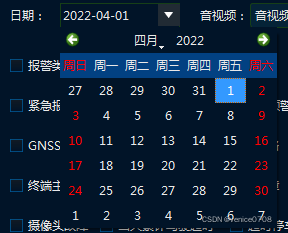



 这篇博客介绍了如何使用Qt样式表(QSS)来定制QDateEdit组件和QCalendarWidget的外观。通过设置不同的QSS属性,如边框颜色、内边距、下拉箭头的图像等,可以实现日期编辑框和日历视图的个性化设计。内容包括了如何调整控件在弹出时的位置和状态变化时的样式。此外,还展示了如何为QCalendarWidget设置交替背景色,增强视觉效果。





 扫一扫
扫一扫


 528
528

 被折叠的 条评论
为什么被折叠?
被折叠的 条评论
为什么被折叠?
 到【灌水乐园】发言





