 MySQL数据库操作:创建与删除索引



 本文介绍了如何在MySQL数据库中查看、使用EXPLAIN分析查询效率,并演示了创建和删除索引的过程。通过创建索引`index_status`于'order_info'表的'status'列,显著减少了查询特定状态数据时的扫描行数,从而提高查询速度。最后展示了如何使用DROP INDEX语句删除已创建的索引。
Mysql数据库(十)创建索引
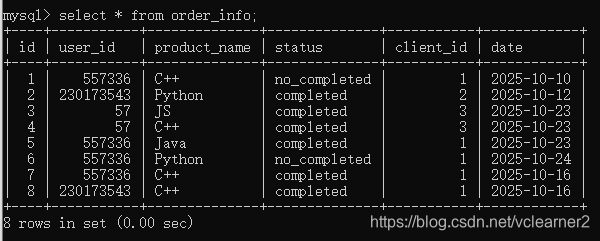
表order_info
1、show indexes from order_info;查看表的索引,从表中可以看出只有一个索引,这个索引是主键(primary key) id

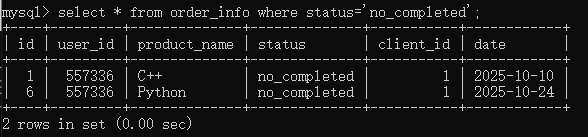
2、从表中找到状态是 no_completed 的两条数据
3、explain select * from order_info where status='no_completed';在语句前,加上explain 查看寻找过程,这里可以看到rows=8,说明这条语句查询了数据库中的全部8条记录。

4、创建索引
create index index_status on order_info(status);
Query OK, 0 rows affected (0.27 sec)
Records: 0  Duplicates: 0  Warnings: 0
5、再次查看查询过程,rows=2 ,只需要查询两条记录。

6、查看表的索引,已经有两条索引了。可以看到新建的索引index_status

7、 drop index index_status on order_info;删除索引
drop index index_status on order_info;
Query OK, 0 rows affected (0.13 sec)
Records: 0  Duplicates: 0  Warnings: 0





 扫一扫
扫一扫


 809
809

 被折叠的 条评论
为什么被折叠?
被折叠的 条评论
为什么被折叠?
 到【灌水乐园】发言





