




记录以前配置Hexo走过的坑,避免重复造轮子,方便以后自己再次配置Hexo用来参考使用。
前言
每次更换系统的时候都会导致的我的hexo博客得重新配置一遍,每次都得去对照next主题的官方文档去配置,很耗时间。所以为了避免重复造轮子,所以这里我就把已经配置好配置文件参数贴上,这样在下次配置的时候就不会再那么耗时间了。
安装Hexo
npm install hexo-cli -g
cd /blog
hexo init
安装next主题
git clone https://github.com/theme-next/hexo-theme-next themes/next站点配置文件
_config.yml
# Hexo Configuration
## Docs: https://hexo.io/docs/configuration.html
## Source: https://github.com/hexojs/hexo/
# Site
title: 国光
subtitle: 安安静静写博客
description: 宁静致远
author: 国光
language: zh-Hans
timezone: Asia/Shanghai
# URL
## If your site is put in a subdirectory, set url as ‘http://yoursite.com/child’ and root as ‘/child/’
url: http://www.sqlsec.com/
root: /
permalink: :year/:month/:title.html
permalink_defaults:
# Directory
source_dir: source
public_dir: public
tag_dir: tags
archive_dir: archives
category_dir: categories
code_dir: downloads/code
i18n_dir: :lang
skip_render:
# Writing
new_post_name: :title.md # File name of new posts
default_layout: post
titlecase: false # Transform title into titlecase
external_link: true # Open external links in new tab
filename_case: 0
render_drafts: false
post_asset_folder: false
relative_link: false
future: true
highlight:
enable: true
line_number: true
auto_detect: false
tab_replace:
# Home page setting
# path: Root path for your blogs index page. (default = ‘’)
# per_page: Posts displayed per page. (0 = disable pagination)
# order_by: Posts order. (Order by date descending by default)
index_generator:
path: ‘’
per_page: 10
order_by: -date
# Category & Tag
default_category: uncategorized
category_map:
tag_map:
# Date / Time format
## Hexo uses Moment.js to parse and display date
## You can customize the date format as defined in
## http://momentjs.com/docs/#/displaying/format/
date_format: YYYY-MM-DD
time_format: HH:mm:ss
# Pagination
## Set per_page to 0 to disable pagination
per_page: 10
pagination_dir: page
# Search
search:
path: search.xml
field: post
format: html
limit: 10000
# Extensions
## Plugins: https://hexo.io/plugins/
## Themes: https://hexo.io/themes/
theme: next
# Deployment
## Docs: https://hexo.io/docs/deployment.html
deploy:
type: git
repo: https://github.com/tezukanice/tezukanice.github.io.git
brachanc: master
next6.1.0 完整的配置文件
# ---------------------------------------------------------------
# Theme Core Configuration Settings
# ---------------------------------------------------------------
# If false, merge configs from _data/next.yml into default configuration (rewrite).
# If true, will fully override default configuration by options from _data/next.yml (override). Only for NexT settings.
# And if true, all config from default NexT _config.yml must be copied into next.yml. Use if you know what you are doing.
# Useful if you want to comment some options from NexT _config.yml by next.yml without editing default config.
override: false
# Allow to cache content generation. Introduced in NexT v6.0.0.
cache:
enable: true
# Redefine custom file paths. Introduced in NexT v6.0.2.
# If commented, will be used default custom file paths.
# For example, you want to put your custom styles file
# outside theme directory in root source/_data, set
# styles: source/_data/styles.styl
#custom_file_path:
# Default paths: layout/_custom/*
#head: source/_data/head.swig
#header: source/_data/header.swig
#sidebar: source/_data/sidebar.swig
# Default path: source/css/_variables/custom.styl
#variables: source/_data/variables.styl
# Default path: source/css/_mixins/custom.styl
#mixins: source/_data/mixins.styl
# Default path: source/css/_custom/custom.styl
#styles: source/_data/styles.styl
# ---------------------------------------------------------------
# Site Information Settings
# ---------------------------------------------------------------
# To get or check favicons visit: https://realfavicongenerator.net
# Put your favicons into hexo-site/source/ (recommend) or hexo-site/themes/next/source/images/ directory.
# Default NexT favicons placed in hexo-site/themes/next/source/images/ directory.
# And if you want to place your icons in hexo-site/source/ root directory, you must remove /images prefix from pathes.
# For example, you put your favicons into hexo-site/source/images directory.
# Then need to rename & redefine they on any other names, otherwise icons from Next will rewrite your custom icons in Hexo.
favicon:
small: https://image.3001.net/images/20171225/1514176695784.png
medium: https://image.3001.net/images/20171225/1514176695784.png
apple_touch_icon: https://image.3001.net/images/20171225/1514176695784.png
safari_pinned_tab: https://image.3001.net/images/20171225/1514176695784.png
#android_manifest: /images/manifest.json
#ms_browserconfig: /images/browserconfig.xml
# Set rss to false to disable feed link.
# Leave rss as empty to use site’s feed link.
# Set rss to specific value if you have burned your feed already.
rss: atom.xml
footer:
# Specify the date when the site was setup.
# If not defined, current year will be used.
since: 2016
# Icon between year and copyright info.
icon:
# Icon name in fontawesome, see: https://fontawesome.com/v4.7.0/icons
# heart is recommended with animation in red (#ff0000).
name: gg
# If you want to animate the icon, set it to true.
animated: true
# Change the color of icon, using Hex Code.
color: “#e33636”
# If not defined, will be used author from Hexo main config.
copyright: “国光”
# -------------------------------------------------------------
powered:
# Hexo link (Powered by Hexo).
enable: false
# Version info of Hexo after Hexo link (vX.X.X).
version: false
theme:
# Theme & scheme info link (Theme - NexT.scheme).
enable: false
# Version info of NexT after scheme info (vX.X.X).
version: false
# -------------------------------------------------------------
# Any custom text can be defined here.
custom_text: 你看得到我打在屏幕上的字,看不到我落在键盘上的泪
# ---------------------------------------------------------------
# SEO Settings
# ---------------------------------------------------------------
# Canonical, set a canonical link tag in your hexo, you could use it for your SEO of blog.
# See: https://support.google.com/webmasters/answer/139066
# Tips: Before you open this tag, remember set up your URL in hexo _config.yml ( ex. url: http://yourdomain.com )
canonical: true
# Change headers hierarchy on site-subtitle (will be main site description) and on all post/pages titles for better SEO-optimization.
seo: true
# If true, will add site-subtitle to index page, added in main hexo config.
# subtitle: Subtitle
index_with_subtitle: true
# ---------------------------------------------------------------
# Menu Settings
# ---------------------------------------------------------------
# When running the site in a subdirectory (e.g. domain.tld/blog), remove the leading slash from link value (/archives -> archives).
# Usage: Key: /link/ || icon
# Key is the name of menu item. If translate for this menu will find in languages - this translate will be loaded; if not - Key name will be used. Key is case-senstive.
# Value before || delimeter is the target link.
# Value after || delimeter is the name of FontAwesome icon. If icon (with or without delimeter) is not specified, question icon will be loaded.
menu:
home: / || home
Web: /ggs/Web || internet-explorer
CTF: /ggs/CTF/ || flag-checkered
Python: /ggs/Python/ || product-hunt
Others: /ggs/Others/ || edit
Code: /ggs/Code/ || terminal
archives: /avs/ || code-fork
tags: /tags/ || tags
about: /about/ || venus
sitemap: /baidusitemap.xml || map-marker
X1cT34m: /x1ct34m.html || users
#categories: /categories/ || th
#archives: /archives/ || archive
#schedule: /schedule/ || calendar
#sitemap: /sitemap.xml || sitemap
#commonweal: /404/ || heartbeat
# Enable/Disable menu icons / item badges.
menu_settings:
icons: true
badges: true
# ---------------------------------------------------------------
# Scheme Settings
# ---------------------------------------------------------------
# Schemes
#scheme: Muse
#scheme: Mist
#scheme: Pisces
scheme: Gemini
# ---------------------------------------------------------------
# Sidebar Settings
# ---------------------------------------------------------------
# Posts / Categories / Tags in sidebar.
site_state: true
# Social Links.
# Usage: Key: permalink || icon
# Key is the link label showing to end users.
# Value before || delimeter is the target permalink.
# Value after || delimeter is the name of FontAwesome icon. If icon (with or without delimeter) is not specified, globe icon will be loaded.
social:
微信: https://image.3001.net/images/20171229/15145284949493.png || weixin
QQ: https://image.3001.net/images/20171229/15145285185419.png || qq
知乎: https://image.3001.net/images/20171229/15145285354450.png || tags
微博: https://image.3001.net/images/20171229/15145285485053.png || weibo
#GitHub: https://github.com/yourname || github
#E-Mail: mailto:yourname@gmail.com || envelope
#Google: https://plus.google.com/yourname || google
#Twitter: https://twitter.com/yourname || twitter
#FB Page: https://www.facebook.com/yourname || facebook
#VK Group: https://vk.com/yourname || vk
#StackOverflow: https://stackoverflow.com/yourname || stack-overflow
#YouTube: https://youtube.com/yourname || youtube
#Instagram: https://instagram.com/yourname || instagram
#Skype: skype:yourname?call|chat || skype
social_icons:
enable: true
icons_only: false
transition: false
# Dependencies: exturl: true in Tags Settings section below.
# To encrypt links above use https://www.base64encode.org
# Example encoded link: GitHub: aHR0cHM6Ly9naXRodWIuY29tL3RoZW1lLW5leHQ= || github
exturl: false
# Follow me on GitHub banner in right-top corner.
# Usage: permalink || title
# Value before || delimeter is the target permalink.
# Value after || delimeter is the title and aria-label name.
#github_banner: https://github.com/yourname || Follow me on GitHub
# Blog rolls
links_icon: themeisle
links_title: 大佬们
#links_layout: block
links_layout: inline
links:
Demon: http://www.ggsec.cn
SWing: http://bestwing.me
即刻安全: http://www.secist.com
4dmin$5: http://www.lsafe.org
小陈: http://www.hackxc.cc
AdminTony: http://admintony.com
Xman|巨侠: http://www.xmanblog.net
hyhm2n: http://www.imipy.com
黑果小兵: https://blog.daliansky.net
爱情守望者: https://www.waitsun.com
互联网运营培训: https://www.paurl.com
#Title: http://example.com/
# Sidebar Avatar
# in theme directory(source/images): /images/avatar.gif
# in site directory(source/uploads): /uploads/avatar.gif
avatar: https://image.3001.net/images/20171226/15142933784705.png
# Table Of Contents in the Sidebar
toc:
enable: true
# Automatically add list number to toc.
number: true
# If true, all words will placed on next lines if header width longer then sidebar width.
wrap: false
# Creative Commons 4.0 International License.
# http://creativecommons.org/
# Available: by | by-nc | by-nc-nd | by-nc-sa | by-nd | by-sa | zero
#creative_commons: by-nc-sa
#creative_commons:
sidebar:
# Sidebar Position, available value: left | right (only for Pisces | Gemini).
position: left
#position: right
# Sidebar Display, available value (only for Muse | Mist):
# - post expand on posts automatically. Default.
# - always expand for all pages automatically
# - hide expand only when click on the sidebar toggle icon.
# - remove Totally remove sidebar including sidebar toggle.
display: post
#display: always
#display: hide
#display: remove
# Sidebar offset from top menubar in pixels (only for Pisces | Gemini).
offset: 12
# Back to top in sidebar (only for Pisces | Gemini).
b2t: true
# Scroll percent label in b2t button.
scrollpercent: true
# Enable sidebar on narrow view (only for Muse | Mist).
onmobile: false
# ---------------------------------------------------------------
# Post Settings
# ---------------------------------------------------------------
# Automatically scroll page to section which is under <!-- more --> mark.
scroll_to_more: true
# Automatically saving scroll position on each post/page in cookies.
save_scroll: false
# Automatically excerpt description in homepage as preamble text.
excerpt_description: true
# Automatically Excerpt. Not recommend.
# Please use <!-- more --> in the post to control excerpt accurately.
auto_excerpt:
enable: false
length: 150
# Post meta display settings
post_meta:
item_text: true
created_at: true
updated_at: true
# Only show ‘updated’ if different from ‘created’.
updated_diff: false
categories: true
# Post wordcount display settings
# Dependencies: https://github.com/theme-next/hexo-symbols-count-time
symbols_count_time:
separated_meta: true
item_text_post: true
item_text_total: true
awl: 5
wpm: 200
# Manual define the border radius in codeblock
# Leave it empty for the default 1
codeblock:
border_radius:
# Wechat Subscriber
wechat_subscriber:
enabled: true
qcode: https://image.3001.net/images/20180721/1532144848788.gif
description: 欢迎您扫一扫上面的二维码,加入我们的小队!
# Reward
reward_comment: 听说,打赏我的人最后都找到了真爱。
wechatpay: https://image.3001.net/images/20180721/15321448021003.gif
alipay: https://image.3001.net/images/20180721/15321446416364.gif
#bitcoin: /images/bitcoin.png
# Related popular posts
# Dependencies: https://github.com/tea3/hexo-related-popular-posts
related_posts:
enable: true
title: 您可能还会喜欢:
display_in_home: false
params:
maxCount: 5
#PPMixingRate: 0.0
#isDate: false
#isImage: false
#isExcerpt: false
# Declare license on posts
post_copyright:
enable: true
license: <a href=“https://www.sqlsec.com” rel=“external nofollow” target="_blank">CC BY-NC-SA 4.0</a>
# ---------------------------------------------------------------
# Misc Theme Settings
# ---------------------------------------------------------------
# Reduce padding / margin indents on devices with narrow width.
mobile_layout_economy: false
# Android Chrome header panel color ($brand-bg / $headband-bg => $black-deep).
android_chrome_color: “#222”
# Custom Logo.
# !!Only available for Default Scheme currently.
# Options:
# enabled: [true/false] - Replace with specific image
# image: url-of-image - Images’s url
custom_logo:
enabled: false
image:
# Code Highlight theme
# Available values: normal | night | night eighties | night blue | night bright
# https://github.com/chriskempson/tomorrow-theme
highlight_theme: normal
# Enable “cheers” for archive page.
cheers_enabled: true
# Manual define the max content width
# !!Only available for Gemini Scheme currently
# Leave it empty for the default 75% (suggest not less than 1000px)
#max_content_width: 1000px
# Manual define the sidebar width
# !!Only available for Gemini Scheme currently
# Leave it empty for the default 240
sidebar_width:
# ---------------------------------------------------------------
# Font Settings
# - Find fonts on Google Fonts (https://www.google.com/fonts)
# - All fonts set here will have the following styles:
# light, light italic, normal, normal italic, bold, bold italic
# - Be aware that setting too much fonts will cause site running slowly
# - Introduce in 5.0.1
# ---------------------------------------------------------------
# CAUTION! Safari Version 10.1.2 bug: https://github.com/iissnan/hexo-theme-next/issues/1844
# To avoid space between header and sidebar in Pisces / Gemini themes recommended to use Web Safe fonts for global (and logo):
# Arial | Tahoma | Helvetica | Times New Roman | Courier New | Verdana | Georgia | Palatino | Garamond | Comic Sans MS | Trebuchet MS
# ---------------------------------------------------------------
font:
enable: false
# Uri of fonts host. E.g. //fonts.googleapis.com (Default).
host:
# Font options:
# external: true will load this font family from host above.
# family: Times New Roman. Without any quotes.
# size: xx. Use px as unit.
# Global font settings used for all elements in <body>.
global:
external: true
family: Lato
size:
# Font settings for Headlines (H1, H2, H3, H4, H5, H6).
# Fallback to global font settings.
headings:
external: true
family:
size:
# Font settings for posts.
# Fallback to global font settings.
posts:
external: true
family:
# Font settings for Logo.
# Fallback to global font settings.
logo:
external: true
family:
size:
# Font settings for <code> and code blocks.
codes:
external: true
family:
size:
# ---------------------------------------------------------------
# Third Party Services Settings
# ---------------------------------------------------------------
# Math Equations Render Support
math:
enable: true
# Default(true) will load mathjax/katex script on demand
# That is it only render those page who has ‘mathjax: true’ in Front Matter.
# If you set it to false, it will load mathjax/katex srcipt EVERY PAGE.
per_page: true
engine: mathjax
#engine: katex
# hexo-rendering-pandoc (or hexo-renderer-kramed) needed to full MathJax support.
mathjax:
# Use 2.7.1 as default, jsdelivr as default CDN, works everywhere even in China
cdn: //cdn.jsdelivr.net/npm/mathjax@2.7.1/MathJax.js?config=TeX-AMS-MML_HTMLorMML
# For newMathJax CDN (cdnjs.cloudflare.com) with fallback to oldMathJax (cdn.mathjax.org).
#cdn: //cdn.mathjax.org/mathjax/latest/MathJax.js?config=TeX-AMS-MML_HTMLorMML
# For direct link to MathJax.js with CloudFlare CDN (cdnjs.cloudflare.com).
#cdn: //cdnjs.cloudflare.com/ajax/libs/mathjax/2.7.1/MathJax.js?config=TeX-MML-AM_CHTML
# For automatic detect latest version link to MathJax.js and get from Bootcss.
#cdn: //cdn.bootcss.com/mathjax/2.7.1/latest.js?config=TeX-AMS-MML_HTMLorMML
# hexo-renderer-markdown-it-plus (or hexo-renderer-markdown-it with markdown-it-katex plugin)
# needed to full Katex support.
katex:
# Use 0.7.1 as default, jsdelivr as default CDN, works everywhere even in China
cdn: //cdn.jsdelivr.net/npm/katex@0.7.1/dist/katex.min.css
# CDNJS, provided by cloudflare, maybe the best CDN, but not works in China
#cdn: //cdnjs.cloudflare.com/ajax/libs/KaTeX/0.7.1/katex.min.css
# Bootcss, works great in China, but not so well in other region
#cdn: //cdn.bootcss.com/KaTeX/0.7.1/katex.min.css
# Han Support
# Dependencies: https://github.com/theme-next/theme-next-han
han: false
# Pangu Support
# Dependencies: https://github.com/theme-next/theme-next-pangu
# For more information: https://github.com/vinta/pangu.js
pangu: true
# Swiftype Search API Key
#swiftype_key:
# Baidu Analytics ID
#baidu_analytics:
# Disqus
disqus:
enable: false
shortname:
count: true
lazyload: false
# Hypercomments
#hypercomments_id:
# changyan
changyan:
enable: false
appid:
appkey:
# Valine.
# You can get your appid and appkey from https://leancloud.cn
# more info please open https://valine.js.org
valine:
enable: true
appid:
appkey:
notify: false # mail notifier , https://github.com/xCss/Valine/wiki
verify: false # Verification code
placeholder: 听说帅的人都会来吐槽?
avatar: # gravatar style
guest_info: nick,mail #mail,link # custom comment header
pageSize: 5 # pagination size
# Support for youyan comments system.
# You can get your uid from http://www.uyan.cc
#youyan_uid: your uid
# Support for LiveRe comments system.
# You can get your uid from https://livere.com/insight/myCode (General web site)
#livere_uid: your uid
# Gitment
# Introduction: https://imsun.net/posts/gitment-introduction/
gitment:
enable: false
mint: true # RECOMMEND, A mint on Gitment, to support count, language and proxy_gateway
count: true # Show comments count in post meta area
lazy: false # Comments lazy loading with a button
cleanly: false # Hide ‘Powered by …’ on footer, and more
language: # Force language, or auto switch by theme
github_user: # MUST HAVE, Your Github Username
github_repo: # MUST HAVE, The name of the repo you use to store Gitment comments
client_id: # MUST HAVE, Github client id for the Gitment
client_secret: # EITHER this or proxy_gateway, Github access secret token for the Gitment
proxy_gateway: # Address of api proxy, See: https://github.com/aimingoo/intersect
redirect_protocol: # Protocol of redirect_uri with force_redirect_protocol when mint enabled
# Baidu Share
# Available value:
# button | slide
# Warning: Baidu Share does not support https.
#baidushare:
## type: button
# Share
# This plugin is more useful in China, make sure you known how to use it.
# And you can find the use guide at official webiste: http://www.jiathis.com/.
# Warning: JiaThis does not support https.
#jiathis:
##uid: Get this uid from http://www.jiathis.com/
#add_this_id:
# NeedMoreShare2
# Dependencies: https://github.com/theme-next/theme-next-needmoreshare2
# See: https://github.com/revir/need-more-share2
# Also see: https://github.com/DzmVasileusky/needShareButton
# iconStyle: default | box
# boxForm: horizontal | vertical
# position: top / middle / bottom + Left / Center / Right
# networks: Weibo,Wechat,Douban,QQZone,Twitter,Linkedin,Mailto,Reddit,
# Delicious,StumbleUpon,Pinterest,Facebook,GooglePlus,Slashdot,
# Technorati,Posterous,Tumblr,GoogleBookmarks,Newsvine,
# Evernote,Friendfeed,Vkontakte,Odnoklassniki,Mailru
needmoreshare2:
enable: false
postbottom:
enable: false
options:
iconStyle: box
boxForm: horizontal
position: bottomCenter
networks: Weibo,Wechat,Douban,QQZone,Twitter,Facebook
float:
enable: false
options:
iconStyle: box
boxForm: horizontal
position: middleRight
networks: Weibo,Wechat,Douban,QQZone,Twitter,Facebook
# Google Webmaster tools verification setting
# See: https://www.google.com/webmasters/
#google_site_verification:
# Google Analytics
#google_analytics:
# Bing Webmaster tools verification setting
# See: https://www.bing.com/webmaster/
#bing_site_verification:
# Yandex Webmaster tools verification setting
# See: https://webmaster.yandex.ru/
#yandex_site_verification:
# CNZZ count
#cnzz_siteid:
# Application Insights
# See https://azure.microsoft.com/en-us/services/application-insights/
# application_insights:
# Post widgets & FB/VK comments settings.
# ---------------------------------------------------------------
# Facebook SDK Support.
# https://github.com/iissnan/hexo-theme-next/pull/410
facebook_sdk:
enable: false
app_id: #<app_id>
fb_admin: #<user_id>
like_button: #true
webmaster: #true
# Facebook comments plugin
# This plugin depends on Facebook SDK.
# If facebook_sdk.enable is false, Facebook comments plugin is unavailable.
facebook_comments_plugin:
enable: false
num_of_posts: 10 # min posts num is 1
width: 100% # default width is 550px
scheme: light # default scheme is light (light or dark)
# VKontakte API Support.
# To get your AppID visit https://vk.com/editapp?act=create
vkontakte_api:
enable: false
app_id: #<app_id>
like: true
comments: true
num_of_posts: 10
# Star rating support to each article.
# To get your ID visit https://widgetpack.com
rating:
enable: false
id: #<app_id>
color: fc6423
# ---------------------------------------------------------------
# Show number of visitors to each article.
# You can visit https://leancloud.cn get AppID and AppKey.
leancloud_visitors:
enable: false
app_id: #<app_id>
app_key: #<app_key>
# Dependencies: https://github.com/theme-next/hexo-leancloud-counter-security
# If you don’t care about security in lc counter and just want to use it directly
# (without hexo-leancloud-counter-security plugin), set the security to false.
security: true
betterPerformance: false
# Another tool to show number of visitors to each article.
# visit https://console.firebase.google.com/u/0/ to get apiKey and projectId
# visit https://firebase.google.com/docs/firestore/ to get more information about firestore
firestore:
enable: false
collection: articles #required, a string collection name to access firestore database
apiKey: #required
projectId: #required
bluebird: false #enable this if you want to include bluebird 3.5.1(core version) Promise polyfill
# Show Views/Visitors of the website/page with busuanzi.
# Get more information on http://ibruce.info/2015/04/04/busuanzi/
busuanzi_count:
enable: true
total_visitors: true
total_visitors_icon: user
total_views: true
total_views_icon: eye
post_views: true
post_views_icon: eye
# Tencent analytics ID
# tencent_analytics:
# Tencent MTA ID
# tencent_mta:
# Enable baidu push so that the blog will push the url to baidu automatically which is very helpful for SEO
baidu_push: true
# Google Calendar
# Share your recent schedule to others via calendar page
#
# API Documentation:
# https://developers.google.com/google-apps/calendar/v3/reference/events/list
calendar:
enable: false
calendar_id: <required>
api_key: <required>
orderBy: startTime
offsetMax: 24
offsetMin: 4
timeZone:
showDeleted: false
singleEvents: true
maxResults: 250
# Algolia Search
# See: https://github.com/theme-next/hexo-theme-next/blob/master/docs/ALGOLIA-SEARCH.md
# Dependencies: https://github.com/theme-next/theme-next-algolia-instant-search
algolia_search:
enable: false
hits:
per_page: 10
labels:
input_placeholder: Search for Posts
hits_empty: “We didn’t find any results for the search:
q
u
e
r
y
"
<
/
s
p
a
n
>
h
i
t
s
s
t
a
t
s
<
s
p
a
n
c
l
a
s
s
=
"
t
o
k
e
n
p
u
n
c
t
u
a
t
i
o
n
"
>
:
<
/
s
p
a
n
>
<
s
p
a
n
c
l
a
s
s
=
"
t
o
k
e
n
s
t
r
i
n
g
"
>
"
{query}"</span> hits_stats<span class="token punctuation">:</span> <span class="token string">"
query"</span>hitsstats<spanclass="tokenpunctuation">:</span><spanclass="tokenstring">"{hits} results found in ${time} ms”
# Local search
# Dependencies: https://github.com/theme-next/hexo-generator-searchdb
local_search:
enable: true
# if auto, trigger search by changing input
# if manual, trigger search by pressing enter key or search button
trigger: auto
# show top n results per article, show all results by setting to -1
top_n_per_article: 1
# unescape html strings to the readable one
unescape: false
# Bookmark Support
# Dependencies: https://github.com/theme-next/theme-next-bookmark
bookmark:
enable: true
# if auto
# - save the reading position when closing the page
# - or clicking the bookmark-icon
# if manual, only save it by clicking the bookmark-icon
save: auto
# ---------------------------------------------------------------
# Tags Settings
# ---------------------------------------------------------------
# External URL with BASE64 encrypt & decrypt.
# Usage: {% exturl text url “title” %}
# Alias: {% extlink text url “title” %}
exturl: false
# Note tag (bs-callout).
note:
# Note tag style values:
# - simple bs-callout old alert style. Default.
# - modern bs-callout new (v2-v3) alert style.
# - flat flat callout style with background, like on Mozilla or StackOverflow.
# - disabled disable all CSS styles import of note tag.
style: flat
icons: true
border_radius: 3
# Offset lighter of background in % for modern and flat styles (modern: -12 | 12; flat: -18 | 6).
# Offset also applied to label tag variables. This option can work with disabled note tag.
light_bg_offset: 0
# Label tag.
label: true
# Tabs tag.
tabs:
enable: true
transition:
tabs: false
labels: true
border_radius: 0
# Reading progress bar
# Dependencies: https://github.com/theme-next/theme-next-reading-progress
reading_progress:
enable: true
color: “#ef3939”
height: 2px
#! ---------------------------------------------------------------
#! DO NOT EDIT THE FOLLOWING SETTINGS
#! UNLESS YOU KNOW WHAT YOU ARE DOING
#! ---------------------------------------------------------------
# Use velocity to animate everything.
motion:
enable: true
async: false
transition:
# Transition variants:
# fadeIn | fadeOut | flipXIn | flipXOut | flipYIn | flipYOut | flipBounceXIn | flipBounceXOut | flipBounceYIn | flipBounceYOut
# swoopIn | swoopOut | whirlIn | whirlOut | shrinkIn | shrinkOut | expandIn | expandOut
# bounceIn | bounceOut | bounceUpIn | bounceUpOut | bounceDownIn | bounceDownOut | bounceLeftIn | bounceLeftOut | bounceRightIn | bounceRightOut
# slideUpIn | slideUpOut | slideDownIn | slideDownOut | slideLeftIn | slideLeftOut | slideRightIn | slideRightOut
# slideUpBigIn | slideUpBigOut | slideDownBigIn | slideDownBigOut | slideLeftBigIn | slideLeftBigOut | slideRightBigIn | slideRightBigOut
# perspectiveUpIn | perspectiveUpOut | perspectiveDownIn | perspectiveDownOut | perspectiveLeftIn | perspectiveLeftOut | perspectiveRightIn | perspectiveRightOut
post_block: fadeIn
post_header: slideDownIn
post_body: slideDownIn
coll_header: slideLeftIn
# Only for Pisces | Gemini.
sidebar: slideUpIn
# Fancybox. There is support for old version 2 and new version 3.
# Please, choose only any one variant, do not need to install both.
# For install 2.x: https://github.com/theme-next/theme-next-fancybox
# For install 3.x: https://github.com/theme-next/theme-next-fancybox3
fancybox: true
# Added switch option for separated repo in 6.0.0.
# Dependencies: https://github.com/theme-next/theme-next-fastclick
fastclick: true
# Added switch option for separated repo in 6.0.0.
# Dependencies: https://github.com/theme-next/theme-next-jquery-lazyload
lazyload: false
# Progress bar in the top during page loading.
# Dependencies: https://github.com/theme-next/theme-next-pace
pace: true
# Themes list:
#pace-theme-big-counter
#pace-theme-bounce
#pace-theme-barber-shop
#pace-theme-center-atom
#pace-theme-center-circle
#pace-theme-center-radar
#pace-theme-center-simple
#pace-theme-corner-indicator
#pace-theme-fill-left
#pace-theme-flash
#pace-theme-loading-bar
#pace-theme-mac-osx
#pace-theme-minimal
# For example
# pace_theme: pace-theme-center-simple
pace_theme: pace-theme-bounce
# Canvas-nest
# Dependencies: https://github.com/theme-next/theme-next-canvas-nest
canvas_nest: false
# JavaScript 3D library.
# Dependencies: https://github.com/theme-next/theme-next-three
# three_waves
three_waves: false
# canvas_lines
canvas_lines: false
# canvas_sphere
canvas_sphere: false
# Only fit scheme Pisces
# Dependencies: https://github.com/theme-next/theme-next-canvas-ribbon
# Canvas-ribbon
# size: The width of the ribbon.
# alpha: The transparency of the ribbon.
# zIndex: The display level of the ribbon.
canvas_ribbon:
enable: false
size: 300
alpha: 0.6
zIndex: -1
# Script Vendors.
# Set a CDN address for the vendor you want to customize.
# For example
# jquery: https://ajax.googleapis.com/ajax/libs/jquery/2.2.0/jquery.min.js
# Be aware that you should use the same version as internal ones to avoid potential problems.
# Please use the https protocol of CDN files when you enable https on your site.
vendors:
# Internal path prefix. Please do not edit it.
_internal: lib
# Internal version: 2.1.3
jquery:
# Internal version: 2.1.5
# See: http://fancyapps.com/fancybox/
fancybox:
fancybox_css: https://chao.jsanhuan.cn/jquery.fancybox.css
# Internal version: 1.0.6
# See: https://github.com/ftlabs/fastclick
fastclick:
# Internal version: 1.9.7
# See: https://github.com/tuupola/jquery_lazyload
lazyload:
# Internal version: 1.2.1
# See: http://VelocityJS.org
velocity:
# Internal version: 1.2.1
# See: http://VelocityJS.org
velocity_ui:
# Internal version: 0.7.9
# See: https://faisalman.github.io/ua-parser-js/
ua_parser:
# Internal version: 4.6.2
# See: http://fontawesome.io/
fontawesome:
# Internal version: 1
# https://www.algolia.com
algolia_instant_js:
algolia_instant_css:
# Internal version: 1.0.2
# See: https://github.com/HubSpot/pace
# Or use direct links below:
# pace: //cdn.bootcss.com/pace/1.0.2/pace.min.js
# pace_css: //cdn.bootcss.com/pace/1.0.2/themes/blue/pace-theme-flash.min.css
pace: //chao.jsanhuan.cn/pace.min.js
pace_css: //chao.jsanhuan.cn/pace-theme-bounce.min.css
# Internal version: 1.0.0
# https://github.com/hustcc/canvas-nest.js
canvas_nest:
# three
three:
# three_waves
# https://github.com/jjandxa/three_waves
three_waves:
# three_waves
# https://github.com/jjandxa/canvas_lines
canvas_lines:
# three_waves
# https://github.com/jjandxa/canvas_sphere
canvas_sphere:
# Internal version: 1.0.0
# https://github.com/zproo/canvas-ribbon
canvas_ribbon:
# Internal version: 3.3.0
# https://github.com/ethantw/Han
han:
# Internal version: 3.3.0
# https://github.com/vinta/pangu.js
pangu:
# needMoreShare2
# https://github.com/revir/need-more-share2
needmoreshare2_js:
needmoreshare2_css:
# bookmark
# Internal version: 1.0.0
# https://github.com/theme-next/theme-next-bookmark
bookmark:
# reading_progress
# Internal version: 1.0
# https://github.com/theme-next/theme-next-reading-progress
# Example: https://cdn.jsdelivr.net/gh/theme-next/theme-next-reading-progress@1.1/reading_progress.min.js
reading_progress:
# valine comment
# Example: https://cdn.jsdelivr.net/npm/valine@1.1.8/dist/Valine.min.js
valine: https://chao.jsanhuan.cn/Valine.min.js
# Assets
css: css
js: js
images: images
# Theme version
version: 6.1.0
Hexo插件的安装
npm install hexo-generator-feed --save                 #RSS
npm install hexo-deployer-git --save                   #git部署
npm install hexo-generator-searchdb --save             #搜索
npm install hexo-generator-seo-friendly-sitemap --save #sitemap
npm install hexo-generator-baidu-sitemap --save        #百度sitemap
Hexo-editor
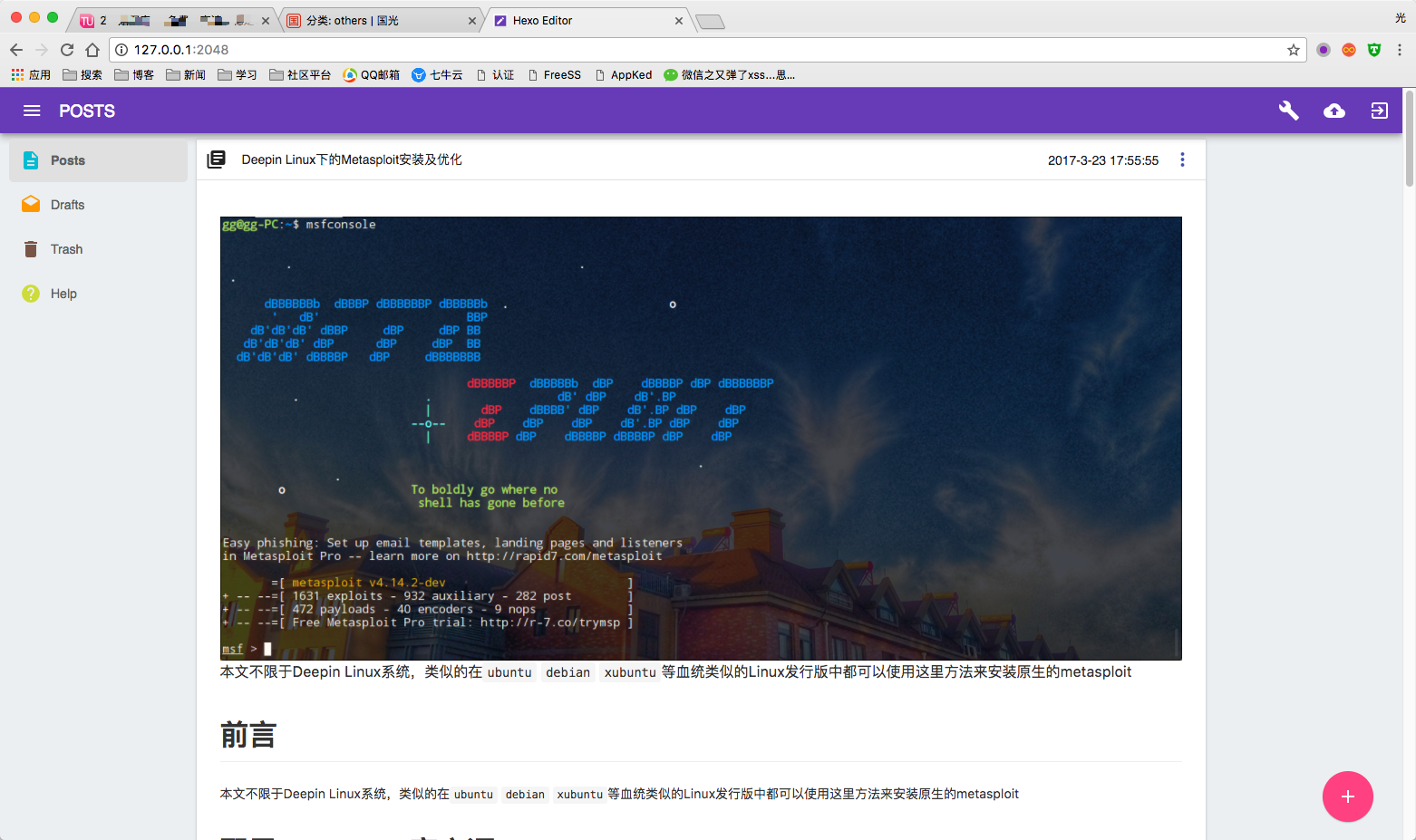
简介
这是一个本地化Hexo第三方编辑器,完美兼容hexo,支持MarkDown文件实时编写。下面是效果图:
项目地址
https://github.com/tajpure/hexo-editor
操作
git clone https://github.com/tajpure/hexo-editor.git
cd hexo-editor
npm install --production
npm start
转自:https://www.sqlsec.com/2017/07/hexo.html
作者:国光

 1万+


 扫一扫


 被折叠的 条评论
为什么被折叠?
 到【灌水乐园】发言


