原理
高亮关键字
- 将文本存入数组,以
text标签循环渲染,当有关键字keyword时,将文本的关键字替换成%%keyword%%再分割split成数组去渲染。 - 当前节点文本等于关键字
class="{{ item == searchValue ? 'searchHigh' : ''}}"时,添加highLight样式。
———————————————————————————————————————————
到这里高亮关键字就实现了。
类似于ctrl+f搜索定位
- 小程序没有办法操作
dom元素不会返回像web端一样的dom节点。 - 给所有循环渲染的
text标签加上id。 - 利用
wx.createSelectorQuery().selectAll('.searchHigh').boundingClientRect获取所有添加了highLight样式的节点id数组 - 数组的
length就是找到关键字的总数,创建一个activeNodeIndex控制上一条和下一条。 - 当
text标签的id和数组中取出的选中id相同时,添加选中selected样式。 - 可以利用
scrollview的scrollIntoView(selector)滚动到选中的节点,前提是scrollview的enhanced属性要为true。 - 也可以用
wx.pageScrollTo。具体看你使用的场景。
效果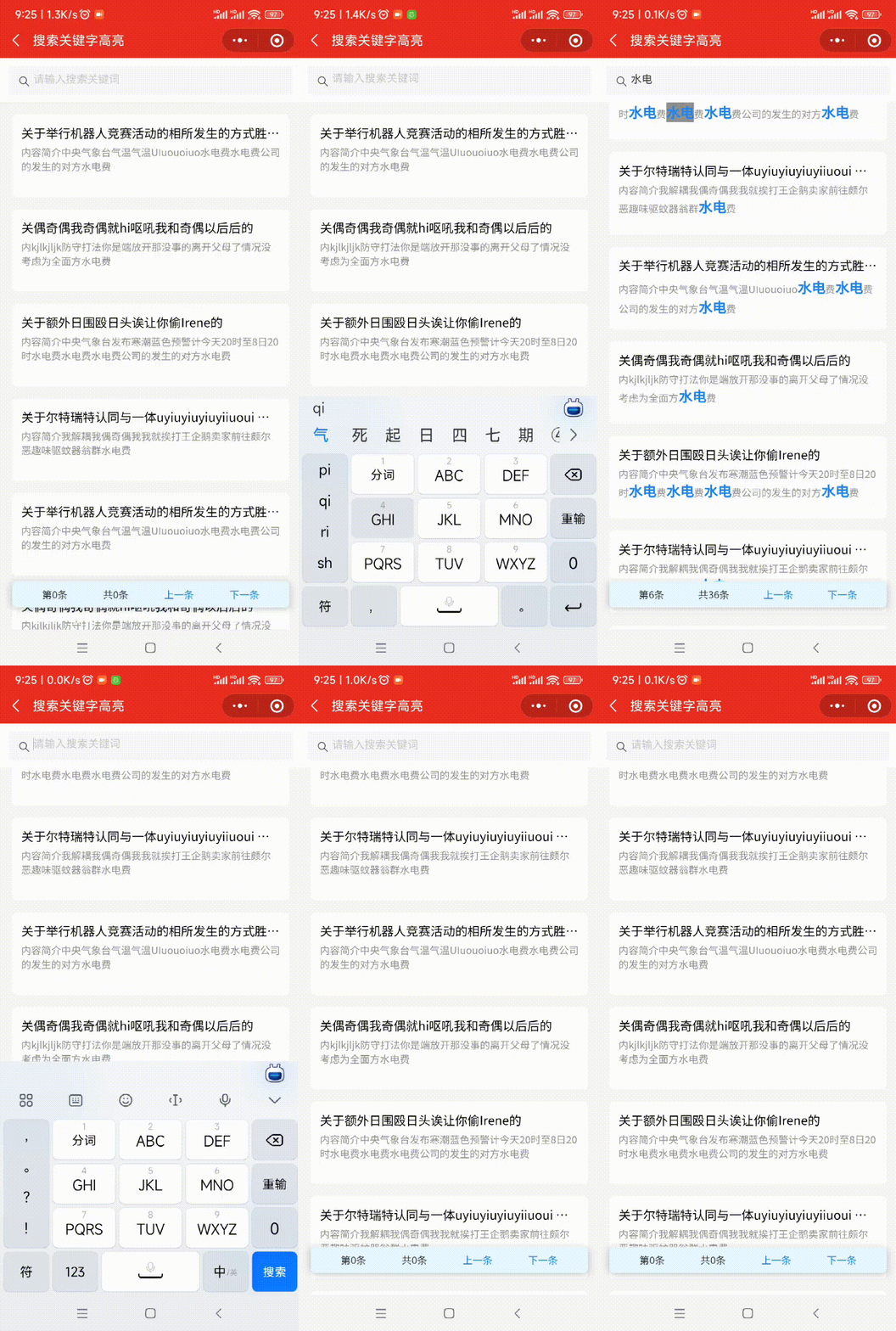
源码(mpx)
<template>
<view class="container">
<van-search
id="searchPanel"
value="{{ searchValue }}"
placeholder="请输入搜索关键词"
bind:change="inpChange"
/>
<view class="statistic-bar">
<text>第{{ current }}条</text>
<text>共{{ totalKeywordNodes }}条</text>
<text style="color: #1d84f6" bindtap="handleScroll('pre')">上一条</text>
<text style="color: #1d84f6" bindtap="handleScroll('next')">下一条</text>
</view>
<scroll-view scroll-y enhanced style="height: {{listHeight}}px" class="listPanel">
<view class="news_item" wx:for="{{newList}}" wx:key="index">
<view class="descBox">
<view class="news_title textoverflow">{{ item.title }}</view>
<view class="news_text">
<text
wx:for="{{ item.jj }}"
wx:for-index="secondIndex"
wx:key="secondIndex"
id="text_{{index + '_'+ secondIndex}}"
class="{{ item == searchValue ? 'searchHigh' : ''}}"
wx:class="{{ {selected: 'text_'+index + '_'+ secondIndex === keywordNodes[activeNodeIndex]} }}"
>{{ item }}</text
>
</view>
</view>
</view>
</scroll-view>
</view>
</template>
<script>
import { createPage } from '@mpxjs/core'
createPage({
data: {
mainHeight: 0,
seachPanelHeight: 0,
searchValue: '',
scrollView: null,
newList: [
{
title: '关于举行机器人竞赛活动的相所发生的方式胜多负少的',
jj: '内容简介中央气象台气温气温UIuouoiuo水电费水电费公司的发生的对方水电费'
},
{
title: '关偶奇偶我奇偶就hi呕吼我和奇偶以后后的',
jj: '内kjlkjljk防守打法你是端放开那没事的离开父母了情况没考虑为全面方水电费'
},
{
title: '关于额外日围殴日头诶让你偷Irene的',
jj: '内容简介中央气象台发布寒潮蓝色预警计今天20时至8日20时水电费水电费水电费公司的发生的对方水电费'
},
{
title: '关于尔特瑞特认同与一体uyiuyiuyiuyiiuoui 胜多负少的',
jj: '内容简介我解耦我偶奇偶我我就挨打王企鹅卖家前往颇尔恶趣味驱蚊器翁群水电费'
}
],
keywordNodes: [],
activeNodeIndex: 0
},
computed: {
listHeight () {
return this.mainHeight - this.seachPanelHeight
},
totalKeywordNodes () {
return this.keywordNodes.length
},
current () {
if (this.keywordNodes.length === 0) {
return 0
} else {
return this.activeNodeIndex + 1
}
}
},
onReady () {
this.getWindowHeight()
this.getFields()
this.mockData()
},
methods: {
mockData () {
let temp = []
for (let i = 0; i < 4; i++) {
temp = temp.concat(this.newList)
}
this.setData({
newList: temp
})
},
getWindowHeight () {
const that = this
wx.getSystemInfo({
success (res) {
that.setData({
mainHeight: res.windowHeight
})
}
})
},
getFields () {
const that = this
const query = wx.createSelectorQuery()
query.select('#searchPanel').fields({
dataset: true,
size: true
}, res => {
that.setData({
seachPanelHeight: res.height
})
}).exec()
},
getInf (str, key) {
return str
.replace(new RegExp(`${key}`, 'g'), `%%${key}%%`)
.split('%%')
.filter(item => {
if (item) {
return true
}
return false
})
},
inpChange (e) {
let key = e.detail
this.setData({
activeNodeIndex: 0,
keywordNodes: [],
searchValue: e.detail
})
if (key) {
this.newList.forEach(element => {
if (element.jj instanceof Array) {
element.jj = element.jj.join('')
}
let newContent2 = this.getInf(element.jj, key)
element.jj = newContent2
})
this.$nextTick(() => {
wx.createSelectorQuery()
.selectAll('.searchHigh')
.boundingClientRect(res => {
let keywordNodes = res.map(item => item.id)
this.setData({
keywordNodes: keywordNodes
})
})
.select('.listPanel')
.node(res => {
this.setData({
scrollView: res.node
})
this.scrollToView(0)
})
.exec()
})
}
},
scrollToView (index) {
this.$nextTick(() => {
this.scrollView.scrollIntoView("#" + this.keywordNodes[index])
})
},
handleScroll (type) {
switch (type) {
case 'pre':
if (this.activeNodeIndex === 0) {
this.activeNodeIndex = this.keywordNodes.length - 1
} else {
this.activeNodeIndex--
}
break;
default:
if (this.activeNodeIndex === this.keywordNodes.length - 1) {
this.activeNodeIndex = 0
} else {
this.activeNodeIndex++
}
break;
}
this.scrollToView(this.activeNodeIndex)
}
}
})
</script>
<style scoped>
.container {
width: 100%;
overflow: scroll;
--webkit-overflow-scrolling: touch-action;
}
.statistic-bar {
position: fixed;
left: 16px;
bottom: 30px;
right: 16px;
border-radius: 12rpx;
background-color: #e6f7ff;
z-index: 999;
display: flex;
justify-content: space-around;
width: calc(100% - 16px -16px);
padding: 16rpx 32rpx;
box-sizing: border-box;
font-size: 26rpx;
box-shadow: 6rpx 6rpx 15rpx rgba(0, 0, 0, 0.125), -6rpx 0rpx 15rpx rgba(0, 0, 0, 0.125);
color: #323233;
}
.listPanel {
box-sizing: border-box;
background-color: #f5f5f5;
}
.news_item {
width: 100%;
height: 208rpx;
padding: 0 32rpx;
margin: 32rpx 0;
box-sizing: border-box;
}
.descBox {
width: 100%;
height: 100%;
background: #fff;
border-radius: 12rpx;
padding: 24rpx;
box-sizing: border-box;
}
.news_title {
width: 100%;
font-size: 32rpx;
font-weight: 500;
text-align: left;
color: black;
margin-bottom: 10rpx;
}
.news_text {
font-size: 26rpx;
font-weight: 400;
color: #909090;
text-align: left;
margin-bottom: 7rpx;
display: -webkit-box;
-webkit-line-clamp: 2;
overflow: hidden;
text-overflow: ellipsis;
-webkit-box-orient: vertical;
word-break: break-all;
}
.textoverflow {
display: -webkit-box;
-webkit-line-clamp: 1;
overflow: hidden;
text-overflow: ellipsis;
-webkit-box-orient: vertical;
word-break: break-all;
}
.searchHigh {
font-size: 36rpx;
color: #1d84f6;
font-weight: bold;
}
.selected {
background: #909090;
}
</style>
<script type="application/json">
{
"navigationBarTitleText": "搜索关键字高亮",
"usingComponents": {
"van-search": "@vant/weapp/dist/search/index"
}
}
</script>






 本文介绍了一种在小程序中实现高亮搜索的方法,通过将文本分割并动态渲染关键字,结合使用wx.createSelectorQuery()来获取匹配项的位置信息,实现了类似Ctrl+F的搜索功能,并能平滑滚动到指定的搜索结果。





 扫一扫
扫一扫


 9096
9096


 到【灌水乐园】发言



