
[Qt] 实现Multi-select Combo Box

因为工作的原因,需要在Qt里面用到multi-select combo box,就是那种可以在下拉框中选中多个条目并展示出来的combo box。Qt design里面自带的combo box只能选择一个选项,于是又去了一下,并没有发现有特别符合自己的需求的,于是就自己动手实现了一个MultiSelectComboBox,先上结果,代码和效果图都放在github上了:Multi-select Combo Box

最终的结果如下图所示:
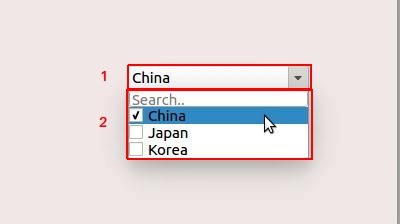
整个控件继承于Qt原生的Combobox,在原生Combobox的基础上主要做了两处修改,分别如上图中1,2所示。1中原生Combobox主体部分换成了一个line edit,用于写入选择的结果,这里我用";"做多个选择之间的分隔符,下文中我们将统称这部分为mLineEdit; 2中combobox的popup部分,这里主要用两种自定义控件来构成,一是位于popup第一排的一个line edit,用于接收用户输入后搜索并调整下方popup条目显示,二是剩下的所有条目,以check box的方式显示每一条预设选项,有“选中”和“未选中”两种状态,下文中我们将统称这里的条目为item

下面讲一下我认为实现这个控件时需要注意的一些细节:

1. mLineEdit要设置成readonly,因为只需要显示选中的条目,不需要任何的编辑;

2. 上图1中的部分被设置成mLineEdit以后,会变成在popup收起状态时,只能通过点击最右边的向下的三角形才能显示出popup,这样的话会有一个比较不好的体验,因为点那个小三角形其实还是挺费劲的,就是这个地方:

我们期望的效果应该是点这个小三角形和line edit都能呼出popup,所以做了如下修改:

2.1 重写了MultiSelectComboBox的eventFilter,单独处理这个line edit的鼠标点击事件:

bool MultiSelectComboBox::eventFilter(QObject* aObject, QEvent* aEvent)
{
    if(aObject == mLineEdit && aEvent->type() == QEvent::MouseButtonRelease) {
        showPopup();
        return false;
    }
    return false;
}

2.2 在MultiSelectComboBox的构造函数中,为此line edit安装该event filter:

    mLineEdit->installEventFilter(this);

3. 在原生combobox中,因为是单选,所以选中一个item后popup就会收起,但如果是多选的话,我们显然不希望这样,我们希望的是在完成多个条目的选择之后再收起,那么我们就需要对原本的hidePopup函数做一些修改,即在选中2中的条目时,不hide popup,其余时候正常hide popup,于是重写hidePopup函数如下:

void MultiSelectComboBox::hidePopup()
{
    int width = this->width();
    int height = mListWidget->height();
    int x = QCursor::pos().x() - mapToGlobal(geometry().topLeft()).x() + geometry().x();
    int y = QCursor::pos().y() - mapToGlobal(geometry().topLeft()).y() + geometry().y();
    if (x >= 0 && x <= width && y >= this->height() && y <= height + this->height())
    {
        // Item was clicked, do not hide popup
    }
    else
    {
        QComboBox::hidePopup();
    }
}

4. 在item被选中时,需要通知mLineEdit选中的条目有变化,显示的信息需要修改,这里我以“;”作为分隔符,各位可根据自己的需求自行更改:

void MultiSelectComboBox::stateChanged(int aState)
{
    Q_UNUSED(aState);
    QString selectedData("");
    int count = mListWidget->count();

    for (int i = 1; i < count; ++i)
    {
        QWidget *widget = mListWidget->itemWidget(mListWidget->item(i));
        QCheckBox *checkBox = static_cast<QCheckBox *>(widget);

        if (checkBox->isChecked())
        {
            selectedData.append(checkBox->text()).append(";");
        }
    }
    if (selectedData.endsWith(";"))
    {
        selectedData.remove(selectedData.count() - 1, 1);
    }
    if (!selectedData.isEmpty())
    {
        mLineEdit->setText(selectedData);
    }
    else
    {
        mLineEdit->clear();
    }

    mLineEdit->setToolTip(selectedData);
    emit selectionChanged();
}

5. 原生的combobox中有一个currentText()函数,用于以QString的类型获取选中的结果,但是对于多选来说,选中结果会有多条,所以这里重新写了一个currentText(),使其返回类型为QStringList,方便后续处理:

QStringList MultiSelectComboBox::currentText()
{
    QStringList emptyStringList;
    if(!mLineEdit->text().isEmpty())
    {
        emptyStringList = mLineEdit->text().split(';');
    }
    return emptyStringList;
}

6. 原生的count函数会返回目前的popup中有多少条item,这个也需要重写,因为有个search bar,那一条不应该算在count里面:

int MultiSelectComboBox::count() const
{
    int count = mListWidget->count() - 1;// Do not count the search bar
    if(count < 0)
    {
        count = 0;
    }
    return count;
}

7. MultiSelectCombobox的鼠标滚轮事件和按键事件应该被屏蔽掉,不然会造成一些意外的异常:

void MultiSelectComboBox::wheelEvent(QWheelEvent* aWheelEvent)
{
    // Do not handle the wheel event
    Q_UNUSED(aWheelEvent);
}

void MultiSelectComboBox::keyPressEvent(QKeyEvent* aEvent)
{
    // Do not handle key event
    Q_UNUSED(aEvent);
}

基本上上述就是一些比较核心的点了,希望上述内容能够对读到这篇文章的人有所帮助。

class AdvancedMultiFilterWidget(QWidget): """高级多条件筛选器组件 - 参考图片设计""" filter_changed = pyqtSignal() def __init__(self, parent=None): super().__init__(parent) self.dataframe = None self.filtered_data = None self.filter_conditions = [] self.is_collapsed = False self.init_ui() def init_ui(self): self.main_layout = QVBoxLayout() self.main_layout.setContentsMargins(10, 5, 10, 5) # 标题栏和工具栏 self.create_header() # 筛选条件容器 self.filters_container = QWidget() self.filters_layout = QGridLayout(self.filters_container) self.filters_layout.setSpacing(10) # 滚动区域 self.scroll_area = QScrollArea() self.scroll_area.setWidgetResizable(True) self.scroll_area.setWidget(self.filters_container) self.scroll_area.setMaximumHeight(300) self.scroll_area.setVerticalScrollBarPolicy(Qt.ScrollBarAsNeeded) self.scroll_area.setHorizontalScrollBarPolicy(Qt.ScrollBarAsNeeded) self.main_layout.addWidget(self.scroll_area) # 操作按钮栏 self.create_action_buttons() # 状态栏 self.status_label = QLabel("筛选器就绪") self.status_label.setStyleSheet("color: #666; font-size: 10px; padding: 5px;") self.main_layout.addWidget(self.status_label) self.setLayout(self.main_layout) # 设置样式 self.setStyleSheet(""" QWidget { font-size: 12px; } QGroupBox { font-weight: bold; border: 2px solid #cccccc; border-radius: 5px; margin: 5px 0px; padding-top: 10px; } QGroupBox::title { subcontrol-origin: margin; left: 8px; padding: 0 5px 0 5px; } """) def create_header(self): """创建标题栏""" header_frame = QFrame() header_frame.setFrameStyle(QFrame.StyledPanel | QFrame.Raised) header_layout = QHBoxLayout(header_frame) # 标题 title_label = QLabel("🔍 高级筛选器") title_label.setFont(QFont("微软雅黑", 12, QFont.Bold)) header_layout.addWidget(title_label) header_layout.addStretch() # 折叠/展开按钮 self.collapse_btn = QPushButton("📁 折叠") self.collapse_btn.setMaximumWidth(80) self.collapse_btn.clicked.connect(self.toggle_collapse) header_layout.addWidget(self.collapse_btn) # 清除所有筛选 clear_all_btn = QPushButton("🗑️ 清除全部") clear_all_btn.setMaximumWidth(100) clear_all_btn.clicked.connect(self.clear_all_filters) header_layout.addWidget(clear_all_btn) self.main_layout.addWidget(header_frame) def create_action_buttons(self): """创建操作按钮栏""" button_frame = QFrame() button_layout = QHBoxLayout(button_frame) # 应用筛选按钮 apply_btn = QPushButton("✅ 应用筛选") apply_btn.setStyleSheet("QPushButton { background-color: #4CAF50; color: white; font-weight: bold; padding: 6px 12px; }") apply_btn.clicked.connect(self.apply_filters) button_layout.addWidget(apply_btn) # 重置按钮 reset_btn = QPushButton("🔄 重置") reset_btn.setStyleSheet("QPushButton { background-color: #f44336; color: white; font-weight: bold; padding: 6px 12px; }") reset_btn.clicked.connect(self.reset_filters) button_layout.addWidget(reset_btn) # 导出筛选结果 export_btn = QPushButton("📤 导出结果") export_btn.setStyleSheet("QPushButton { background-color: #2196F3; color: white; font-weight: bold; padding: 6px 12px; }") export_btn.clicked.connect(self.export_filtered_data) button_layout.addWidget(export_btn) button_layout.addStretch() # 筛选结果统计 self.result_label = QLabel("结果: 0 行") self.result_label.setStyleSheet("font-weight: bold; color: #2196F3;") button_layout.addWidget(self.result_label) self.main_layout.addWidget(button_frame) def set_dataframe(self, df): """设置数据源""" self.dataframe = df.copy() self.filtered_data = df.copy() self.setup_default_filters() self.update_result_count() def setup_default_filters(self): """设置默认筛选条件 - 参考图片布局""" if self.dataframe is None: return # 清除现有筛选器 self.clear_layout(self.filters_layout) columns = self.dataframe.columns.tolist() # 第一行筛选器 row = 0 col = 0 # Project ID 筛选 (文本输入) if len(columns) > 0: self.add_text_filter("Project ID", columns[0], row, col) col += 1 # Project Owner 筛选 (下拉选择) if len(columns) > 1: self.add_dropdown_filter("Project Owner", columns[1], row, col) col += 1 # Project Type 筛选 (下拉选择) if len(columns) > 2: self.add_dropdown_filter("Project Type", columns[2], row, col) col += 1 # OEM 筛选 (下拉选择) if len(columns) > 3: self.add_dropdown_filter("OEM", columns[3], row, col) # 第二行筛选器 row = 1 col = 0 # PR/JJ/SF# 筛选 (文本输入) if len(columns) > 4: self.add_text_filter("PR/JJ/SF#", columns[4], row, col) col += 1 # Sold to Customer 筛选 (下拉选择) if len(columns) > 5: self.add_dropdown_filter("Sold to Customer", columns[5], row, col) col += 1 # Project Status 筛选 (下拉选择) if len(columns) > 6: self.add_dropdown_filter("Project Status", columns[6], row, col) col += 1 # Approval Status 筛选 (下拉选择) if len(columns) > 7: self.add_dropdown_filter("Approval Status", columns[7], row, col) # 第三行筛选器 row = 2 col = 0 # Lost Reason 筛选 (下拉选择) if len(columns) > 8: self.add_dropdown_filter("Lost Reason", columns[8], row, col) col += 1 # POS Customer 筛选 (下拉选择) if len(columns) > 9: self.add_dropdown_filter("POS Customer", columns[9], row, col) col += 1 # Won Date 筛选 (日期范围) if len(columns) > 10: self.add_date_range_filter("Won Date", columns[10], row, col) col += 1 # Project Property 筛选 (下拉选择) if len(columns) > 11: self.add_dropdown_filter("Project Property", columns[11], row, col) def add_text_filter(self, label, column, row, col): """添加文本筛选器""" group_box = QGroupBox(label) group_box.setMaximumWidth(180) layout = QVBoxLayout(group_box) # 文本输入框 text_input = QLineEdit() text_input.setPlaceholderText(f"输入{label}") text_input.setObjectName(f"text_filter_{column}") layout.addWidget(text_input) # 筛选选项 options_layout = QHBoxLayout() contains_cb = QCheckBox("包含") contains_cb.setChecked(True) contains_cb.setObjectName(f"contains_{column}") options_layout.addWidget(contains_cb) exact_cb = QCheckBox("精确") exact_cb.setObjectName(f"exact_{column}") options_layout.addWidget(exact_cb) layout.addLayout(options_layout) self.filters_layout.addWidget(group_box, row, col) def add_dropdown_filter(self, label, column, row, col): """添加下拉筛选器""" group_box = QGroupBox(label) group_box.setMaximumWidth(180) layout = QVBoxLayout(group_box) # 下拉选择框 combo_box = QComboBox() combo_box.setObjectName(f"dropdown_filter_{column}") # 添加选项 combo_box.addItem("全部") if self.dataframe is not None and column in self.dataframe.columns: unique_values = self.dataframe[column].dropna().unique() for value in sorted(unique_values.astype(str)): combo_box.addItem(str(value)) layout.addWidget(combo_box) # 多选支持 multi_select_btn = QPushButton("📋 多选") multi_select_btn.setMaximumHeight(25) multi_select_btn.clicked.connect(lambda: self.show_multi_select_dialog(column, label)) layout.addWidget(multi_select_btn) self.filters_layout.addWidget(group_box, row, col) def add_date_range_filter(self, label, column, row, col): """添加日期范围筛选器""" group_box = QGroupBox(label) group_box.setMaximumWidth(200) layout = QVBoxLayout(group_box) # 开始日期 start_layout = QHBoxLayout() start_layout.addWidget(QLabel("从:")) start_date = QDateEdit() start_date.setDate(QDate.currentDate().addMonths(-1)) start_date.setCalendarPopup(True) start_date.setObjectName(f"start_date_{column}") start_layout.addWidget(start_date) layout.addLayout(start_layout) # 结束日期 end_layout = QHBoxLayout() end_layout.addWidget(QLabel("到:")) end_date = QDateEdit() end_date.setDate(QDate.currentDate()) end_date.setCalendarPopup(True) end_date.setObjectName(f"end_date_{column}") end_layout.addWidget(end_date) layout.addLayout(end_layout) # 启用复选框 enable_cb = QCheckBox("启用日期筛选") enable_cb.setObjectName(f"enable_date_{column}") layout.addWidget(enable_cb) self.filters_layout.addWidget(group_box, row, col) def show_multi_select_dialog(self, column, label): """显示多选对话框""" if self.dataframe is None or column not in self.dataframe.columns: return dialog = MultiSelectDialog(self.dataframe[column].dropna().unique(), label, self) if dialog.exec_() == QDialog.Accepted: selected_values = dialog.get_selected_values() # 这里可以保存选中的值,用于筛选 print(f"Selected values for {column}: {selected_values}") def clear_layout(self, layout): """清除布局中的所有控件""" while layout.count(): child = layout.takeAt(0) if child.widget(): child.widget().deleteLater() def toggle_collapse(self): """切换折叠状态""" self.is_collapsed = not self.is_collapsed if self.is_collapsed: self.scroll_area.hide() self.collapse_btn.setText("📂 展开") else: self.scroll_area.show() self.collapse_btn.setText("📁 折叠") def clear_all_filters(self): """清除所有筛选条件""" # 重置所有筛选控件 for i in range(self.filters_layout.count()): item = self.filters_layout.itemAt(i) if item and item.widget(): widget = item.widget() self.reset_filter_widget(widget) # 重置数据 if self.dataframe is not None: self.filtered_data = self.dataframe.copy() self.update_result_count() self.filter_changed.emit() def reset_filter_widget(self, widget): """重置单个筛选控件""" if isinstance(widget, QGroupBox): for child in widget.findChildren(QLineEdit): child.clear() for child in widget.findChildren(QComboBox): child.setCurrentIndex(0) for child in widget.findChildren(QCheckBox): if "contains" in child.objectName(): child.setChecked(True) else: child.setChecked(False) def apply_filters(self): """应用所有筛选条件""" if self.dataframe is None: return filtered_df = self.dataframe.copy() # 应用文本筛选 filtered_df = self.apply_text_filters(filtered_df) # 应用下拉筛选 filtered_df = self.apply_dropdown_filters(filtered_df) # 应用日期筛选 filtered_df = self.apply_date_filters(filtered_df) self.filtered_data = filtered_df self.update_result_count() self.filter_changed.emit() # 显示筛选结果消息 QMessageBox.information(self, "筛选完成", f"筛选完成!结果: {len(filtered_df)} 行数据") def apply_text_filters(self, df): """应用文本筛选""" for i in range(self.filters_layout.count()): item = self.filters_layout.itemAt(i) if item and item.widget(): widget = item.widget() text_input = widget.findChild(QLineEdit) if text_input and text_input.text().strip(): column = text_input.objectName().replace("text_filter_", "") if column in df.columns: text_value = text_input.text().strip() # 检查筛选模式 contains_cb = widget.findChild(QCheckBox, f"contains_{column}") exact_cb = widget.findChild(QCheckBox, f"exact_{column}") if exact_cb and exact_cb.isChecked(): df = df[df[column].astype(str) == text_value] elif contains_cb and contains_cb.isChecked(): df = df[df[column].astype(str).str.contains(text_value, case=False, na=False)] return df def apply_dropdown_filters(self, df): """应用下拉筛选""" for i in range(self.filters_layout.count()): item = self.filters_layout.itemAt(i) if item and item.widget(): widget = item.widget() combo_box = widget.findChild(QComboBox) if combo_box and combo_box.currentText() != "全部": column = combo_box.objectName().replace("dropdown_filter_", "") if column in df.columns: selected_value = combo_box.currentText() df = df[df[column].astype(str) == selected_value] return df def apply_date_filters(self, df): """应用日期筛选""" for i in range(self.filters_layout.count()): item = self.filters_layout.itemAt(i) if item and item.widget(): widget = item.widget() enable_cb = widget.findChild(QCheckBox) if enable_cb and "enable_date" in enable_cb.objectName() and enable_cb.isChecked(): column = enable_cb.objectName().replace("enable_date_", "") if column in df.columns: start_date_widget = widget.findChild(QDateEdit, f"start_date_{column}") end_date_widget = widget.findChild(QDateEdit, f"end_date_{column}") if start_date_widget and end_date_widget: start_date = start_date_widget.date().toPyDate() end_date = end_date_widget.date().toPyDate() # 转换列为日期类型 try: df[column] = pd.to_datetime(df[column]) df = df[(df[column].dt.date >= start_date) & (df[column].dt.date <= end_date)] except: continue return df def reset_filters(self): """重置所有筛选""" self.clear_all_filters() def update_result_count(self): """更新结果计数""" if self.filtered_data is not None: count = len(self.filtered_data) total = len(self.dataframe) if self.dataframe is not None else 0 self.result_label.setText(f"结果: {count}/{total} 行") self.status_label.setText(f"筛选完成 - 显示 {count} 行,共 {total} 行") else: self.result_label.setText("结果: 0 行") self.status_label.setText("筛选器就绪") def export_filtered_data(self): """导出筛选结果""" if self.filtered_data is None or len(self.filtered_data) == 0: QMessageBox.warning(self, "警告", "没有数据可导出!") return file_path, _ = QFileDialog.getSaveFileName(self, "导出筛选结果", "", "CSV files (*.csv);;Excel files (*.xlsx)") if file_path: try: if file_path.endswith('.csv'): self.filtered_data.to_csv(file_path, index=False, encoding='utf-8-sig') else: self.filtered_data.to_excel(file_path, index=False) QMessageBox.information(self, "成功", f"筛选结果已导出到: {file_path}") except Exception as e: QMessageBox.warning(self, "错误", f"导出失败: {str(e)}") 深度解释上述代码,解释的时候需要将使用到的函数全部解释,并定义代码进行注释,返回注释后的代码
08-27
评论 7
添加红包

请填写红包祝福语或标题

红包个数最小为10个

红包金额最低5元

当前余额3.43前往充值 >
需支付:10.00
成就一亿技术人!
领取后你会自动成为博主和红包主的粉丝 规则
hope_wisdom
发出的红包

打赏作者

ThisIsClark

你的鼓励将是我创作的最大动力

¥1 ¥2 ¥4 ¥6 ¥10 ¥20
扫码支付:¥1
获取中
扫码支付

您的余额不足,请更换扫码支付或充值

打赏作者

实付
使用余额支付
点击重新获取
扫码支付
钱包余额 0

抵扣说明:

1.余额是钱包充值的虚拟货币,按照1:1的比例进行支付金额的抵扣。
2.余额无法直接购买下载,可以购买VIP、付费专栏及课程。

余额充值


