


 本文介绍使用FFmpeg录制桌面视频及系统内部声音的方法,并探讨如何实现先录制视频后录制音频的技术细节。通过实例演示,文章展示了如何创建缓冲区保存音频数据,并在完成视频录制后进行音频数据的写入。
目前能看到的ffmpeg博客,在音视频录制同步时,都是音频和视频根据时间换算,交错写入文件。
现在问题来了,音频和视频在ffmpeg里面是两个通道,能否先写入所有录制的视频,再写入所有录制的音频呢,这个经过验证是可以的。
首先ffmpeg的doc目录下,有个doc/examples/muxing.c文件,对其进行改造,先写视频,再写音频,如下所示:
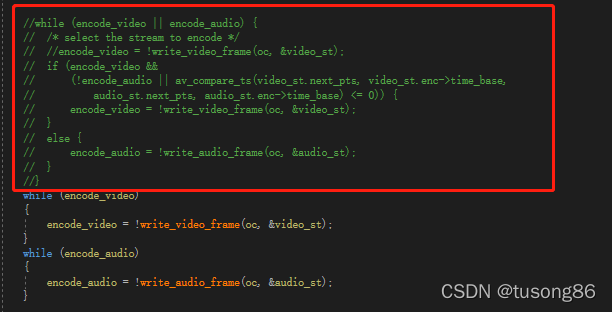
红色方框注释的部分,是原有的逻辑,下面的两个while循环分别用于写视频和音频,结果是ok的,音视频同步。
上面的例子太简单,而且数据量不大,为此本人单独写了一个例子,将桌面视频和系统声音录制同时录制下来,录制了五分钟,所有的桌面视频写入文件后,再开始写入录制的系统声音,结果也是好的。
在进行这项测试之前,本人按照正常方式,写了一篇音视频同步的博客。
ffmpeg录制桌面视频和系统内部声音(音视频同步)
本人在此基础上,进行了如下修改:
首先,录制五分钟期间,音频数据要在五分钟结束之后写,故本人特意创建一个比较大的缓冲区,用来装音频数据。

最后,在音视频混合时,本人先写完视频,再写音频,下面的两个循环中,第一个循环while(m_bRecord)里面写入的是视频文件,后面的while(1)写入的是音频文件,红色方框内的音视频时间自然不要理会。
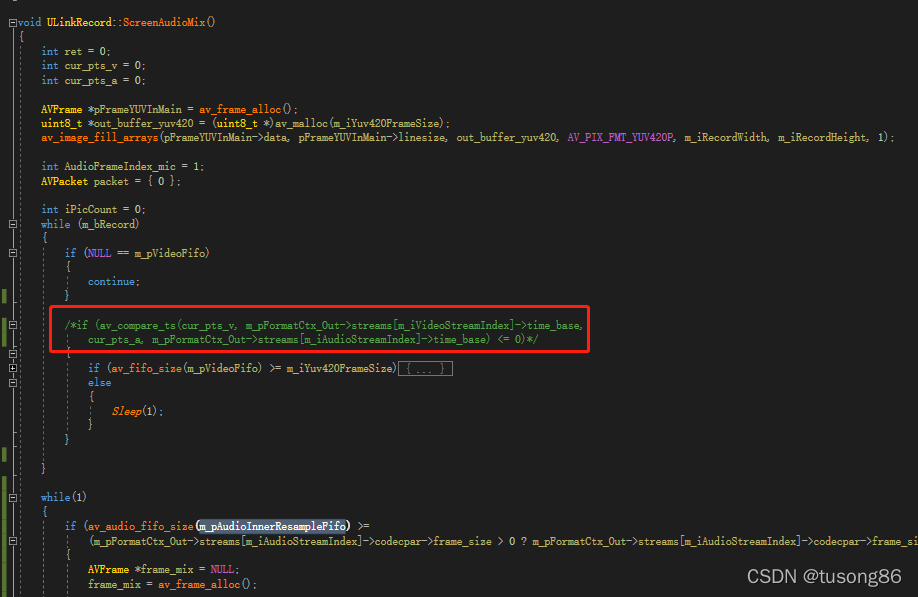
下面给出修改的文件ULinkRecord.cpp的内容,其他文件就不需要再贴了,读者参考博客
ffmpeg录制桌面视频和系统内部声音(音视频同步)
#include "ULinkRecord.h"
#include "log/log.h"
#include "appfun/appfun.h"
#include "CaptureScreen.h"
typedef struct BufferSourceContext {
const AVClass *bscclass;
AVFifoBuffer *fifo;
AVRational time_base; ///< time_base to set in the output link
AVRational frame_rate; ///< frame_rate to set in the output link
unsigned nb_failed_requests;
unsigned warning_limit;
/* video only */
int w, h;
enum AVPixelFormat pix_fmt;
AVRational pixel_aspect;
char *sws_param;
AVBufferRef *hw_frames_ctx;
/* audio only */
int sample_rate;
enum AVSampleFormat sample_fmt;
int channels;
uint64_t channel_layout;
char *channel_layout_str;
int got_format_from_params;
int eof;
} BufferSourceContext;
static char *dup_wchar_to_utf8(const wchar_t *w)
{
char *s = NULL;
int l = WideCharToMultiByte(CP_UTF8, 0, w, -1, 0, 0, 0, 0);
s = (char *)av_malloc(l);
if (s)
WideCharToMultiByte(CP_UTF8, 0, w, -1, s, l, 0, 0);
return s;
}
/* just pick the highest supported samplerate */
static int select_sample_rate(const AVCodec *codec)
{
const int *p;
int best_samplerate = 0;
if (!codec->supported_samplerates)
return 44100;
p = codec->supported_samplerates;
while (*p) {
if (!best_samplerate || abs(44100 - *p) < abs(44100 - best_samplerate))
best_samplerate = *p;
p++;
}
return best_samplerate;
}
/* select layout with the highest channel count */
static int select_channel_layout(const AVCodec *codec)
{
const uint64_t *p;
uint64_t best_ch_layout = 0;
int best_nb_channels = 0;
if (!codec->channel_layouts)
return AV_CH_LAYOUT_STEREO;
p = codec->channel_layouts;
while (*p) {
int nb_channels = av_get_channel_layout_nb_channels(*p);
if (nb_channels > best_nb_channels) {
best_ch_layout = *p;
best_nb_channels = nb_channels;
}
p++;
}
return best_ch_layout;
}
unsigned char clip_value(unsigned char x, unsigned char min_val, unsigned char max_val) {
if (x > max_val) {
return max_val;
}
else if (x < min_val) {
return min_val;
}
else {
return x;
}
}
//RGB to YUV420
bool RGB24_TO_YUV420(unsigned char *RgbBuf, int w, int h, unsigned char *yuvBuf)
{
unsigned char*ptrY, *ptrU, *ptrV, *ptrRGB;
memset(yuvBuf, 0, w*h * 3 / 2);
ptrY = yuvBuf;
ptrU = yuvBuf + w * h;
ptrV = ptrU + (w*h * 1 / 4);
unsigned char y, u, v, r, g, b;
for (int j = h - 1; j >= 0; j--) {
ptrRGB = RgbBuf + w * j * 3;
for (int i = 0; i < w; i++) {
b = *(ptrRGB++);
g = *(ptrRGB++);
r = *(ptrRGB++);
y = (unsigned char)((66 * r + 129 * g + 25 * b + 128) >> 8) + 16;
u = (unsigned char)((-38 * r - 74 * g + 112 * b + 128) >> 8) + 128;
v = (unsigned char)((112 * r - 94 * g - 18 * b + 128) >> 8) + 128;
*(ptrY++) = clip_value(y, 0, 255);
if (j % 2 == 0 && i % 2 == 0) {
*(ptrU++) = clip_value(u, 0, 255);
}
else {
if (i % 2 == 0) {
*(ptrV++) = clip_value(v, 0, 255);
}
}
}
}
return true;
}
ULinkRecord::ULinkRecord()
{
InitializeCriticalSection(&m_csVideoSection);
InitializeCriticalSection(&m_csAudioInnerSection);
InitializeCriticalSection(&m_csAudioInnerResampleSection);
InitializeCriticalSection(&m_csAudioMicSection);
InitializeCriticalSection(&m_csAudioMixSection);
avdevice_register_all();
}
ULinkRecord::~ULinkRecord()
{
DeleteCriticalSection(&m_csVideoSection);
DeleteCriticalSection(&m_csAudioInnerSection);
DeleteCriticalSection(&m_csAudioInnerResampleSection);
DeleteCriticalSection(&m_csAudioMicSection);
DeleteCriticalSection(&m_csAudioMixSection);
}
void ULinkRecord::SetRecordPath(const char* pRecordPath)
{
m_strRecordPath = pRecordPath;
if (!m_strRecordPath.empty())
{
if (m_strRecordPath[m_strRecordPath.length() - 1] != '\\')
{
m_strRecordPath = m_strRecordPath + "\\";
}
}
}
void ULinkRecord::SetRecordRect(RECT rectRecord)
{
m_iRecordPosX = rectRecord.left;
m_iRecordPosY = rectRecord.top;
m_iRecordWidth = rectRecord.right - rectRecord.left;
m_iRecordHeight = rectRecord.bottom - rectRecord.top;
}
int ULinkRecord::StartRecord()
{
int iRet = -1;
do
{
Clear();
m_pAudioConvertCtx = swr_alloc();
av_opt_set_channel_layout(m_pAudioConvertCtx, "in_channel_layout", AV_CH_LAYOUT_STEREO 最低0.47元/天 解锁文章






 扫一扫
扫一扫


 267
267

 被折叠的 条评论
为什么被折叠?
被折叠的 条评论
为什么被折叠?
 到【灌水乐园】发言





