


 本文详细介绍了使用ffmpeg库实现本地麦克风声音和系统声音的混音,以及混合后的音频与桌面录制视频整合成MP4文件的过程。通过创建多个线程分别处理音频和视频的捕获、重采样、混音和编码,实现了高效的多媒体处理。文章还指出了在处理不同采样率设备时可能出现的问题,并给出了相应的解决方案。
之前本人写过一篇博客:
ffmpeg 本地麦克风声音和系统声音混音后,再混合本地桌面成最终的mp4文件
但是存在着下面两个问题:
1.系统声音和麦克风对应的设备的采样率不一样,没有进行重采样,比如系统声音设备的采样率是 48000,若不进行重采样,则最终系统声音播放出来,会发现播放变慢。
2.av_read_frame采集的视频图像,在用下面两个函数编码时,avcodec_receive_packet经常返回 AVERROR(EAGAIN),若单纯写一个桌面录制的功能,在主线程中进行抓图,编码,则大概率发现是正常的,但是如果创建一个子线程,然后在这个线程里面进行抓图,编码,就会发现出错概率很高。
我曾经将ffmpeg命令行在子线程中调用,发现录制1分钟时,生成的视频文件只有2M。
ret = avcodec_send_frame(pCodecEncodeCtx_Video, pFrameYUV);
if (ret == AVERROR(EAGAIN))
{


	continue;
}

ret = avcodec_receive_packet(pCodecEncodeCtx_Video, &packet);
if (ret == AVERROR(EAGAIN))
{


	continue;
}
针对第一个问题:系统声音设备的采样率是48000,麦克风的是44100,最终编码的声音要求是44100,则先将系统声音重采样成44100,再和麦克风的混音即可。
针对第二个问题:估计是自己目前学艺不精的问题,av_read_frame出现了大问题,故本人自己采取gdi抓图,不用ffmpeg的库函数av_read_frame,关于这个的具体细节,读者可以参考我写的一篇博客:ffmpeg录制桌面(自己用gdi抓图)
下面讲讲本人录制桌面视频,系统音频,麦克风音频的大致方法。
m_hAudioInnerCapture = CreateThread(NULL, 0, AudioInnerCaptureProc, this, 0, NULL);
m_hAudioInnerResample = CreateThread(NULL, 0, AudioInnerResampleProc, this, 0, NULL);
m_hAudioMicCapture = CreateThread(NULL, 0, AudioMicCaptureProc, this, 0, NULL);
m_hAudioMix = CreateThread(NULL, 0, AudioMixProc, this, 0, NULL);
m_hScreenCapture = CreateThread(NULL, 0, ScreenCaptureProc, this, 0, NULL);
m_hScreenAudioMix = CreateThread(NULL, 0, ScreenAudioMixProc, this, 0, NULL);
上面代码中,一共创建了6个线程,其中:
m_hAudioInnerCapture代码的是系统声音抓取。
m_hAudioInnerResample代表的是系统声音重采样。
m_hAudioMicCapture代表的是麦克风声音抓取。
m_hAudioMix代表的是混音,是将重采样后的系统声音和麦克风声音混合。
m_hScreenCapture代表的是桌面图像抓取
m_hScreenAudioMix代表的是桌面图像和混合后的音频进行混合,生成最终的mp4文件。
如下所示,本人定义了五个队列,其中m_pVideoFifo代表的是桌面图像,m_hScreenCapture线程往这个队列里面写数据,m_hScreenAudioMix从这个队列里面读取数据。
m_pAudioInnerFifo代表的系统声音,原始的,m_hAudioInnerCapture线程往这个队列里面写数据,m_hAudioInnerResample线程从这个队列里面读取数据,进行重采样,然后将采样后的结果放入队列
m_pAudioInnerResampleFifo。
AVFifoBuffer *m_pVideoFifo = NULL;
	AVAudioFifo *m_pAudioInnerFifo = NULL;
	AVAudioFifo *m_pAudioInnerResampleFifo = NULL;
	AVAudioFifo *m_pAudioMicFifo = NULL;
	AVAudioFifo *m_pAudioMixFifo = NULL;
下面我给出自己的代码结构:
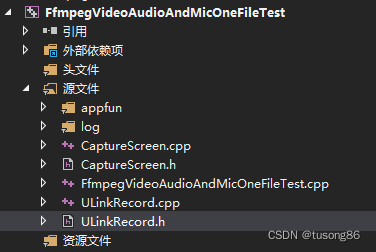
其中appfun和log两个文件夹,没有具体业务含义,大家不用管。
CaptureScreen.cpp用于gdi抓取桌面图像。
ULinkRecord.cpp里面完成了音视频的抓取,混音,以及声音和视频混合。
FfmpegVideoAudioAndMicOneFileTest.cpp是调用方,其代码如下:
#include "ULinkRecord.h"
#include <stdio.h>
#include <conio.h>


int main()
{


	ULinkRecord cULinkRecord;

	cULinkRecord.SetMicName(L"麦克风 (2- Synaptics HD Audio)");
	cULinkRecord.SetRecordPath("E:\\learn\\ffmpeg\\FfmpegTest\\x64\\Release");

	RECT rect;
	rect.left = 0;
	rect.top = 0;
	rect.right = 1920;
	rect.bottom = 1080;

	cULinkRecord.SetRecordRect(rect);

	cULinkRecord.StartRecord();

	Sleep(60000);

	printf("begin StopRecord\n");
	cULinkRecord.StopRecord();
	printf("end StopRecord\n");
	return 0;
}
可以看出,本次抓取的时长为1分钟。
下面再给出其他4个主要文件的内容,尽管很长,我还是觉得贴出来会比较好。
CaptureScreen.h内容如下:
#ifndef _CCAPTURE_SCREEN_HH
#define _CCAPTURE_SCREEN_HH

#include<time.h>
#include <d3d9.h>
#include <stdio.h>
#include <stdlib.h>
#include <stdarg.h>
#include <windows.h>

#include <tchar.h>
#include <winbase.h>
#include <winreg.h>
#include <Strsafe.h>


//
// ---抓屏类----
//
class CCaptureScreen
{


public:
	CCaptureScreen(void);
	~CCaptureScreen(void);

public:
	/*-----------定义外部调用函数-----------*/
	int Init(int&, int&);//初始化
	BYTE* CaptureImage(); //抓取屏幕

private:
	/*-----------定义内部调用函数-----------*/
	void* CaptureScreenFrame(int, int, int, int);//抓屏
	HCURSOR FetchCursorHandle(); //获取鼠标光标

private:
	/*-----------定义私有变量-----------*/
	int m_width;
	int m_height;
	UINT   wLineLen;
	DWORD  dwSize;
	DWORD  wColSize;

	//设备句柄
	HDC hScreenDC;
	HDC hMemDC;
	//图像RGB内存缓存
	PRGBTRIPLE m_hdib;
	//位图头信息结构体
	BITMAPINFO pbi;

	HBITMAP hbm;
	//鼠标光标
	HCURSOR m_hSavedCursor;


};

#endif //--_CCAPTURE_SCREEN_HH
CaptureScreen.cpp内容如下:
//#include "stdafx.h"
#include "CaptureScreen.h"

CCaptureScreen::CCaptureScreen(void)
{


	m_hdib = NULL;
	m_hSavedCursor = NULL;
	hScreenDC = NULL;
	hMemDC = NULL;
	hbm = NULL;
	m_width = 1920;
	m_height = 1080;
	FetchCursorHandle();
}
//
// 释放资源
//
CCaptureScreen::~CCaptureScreen(void)
{


	DeleteObject(hbm);
	if (m_hdib){


		free(m_hdib);
		m_hdib = NULL;
	}
	if (hScreenDC){


		::ReleaseDC(NULL, hScreenDC);
	}
	if (hMemDC) {


		DeleteDC(hMemDC);
	}
	if (hbm)
	{


		DeleteObject(hbm);
	}
}

//
// 初始化
//
int CCaptureScreen::Init(int& src_VideoWidth, int& src_VideoHeight)
{


	hScreenDC = ::GetDC(GetDesktopWindow());
	if (hScreenDC == NULL) return 0;

	int m_nMaxxScreen = GetDeviceCaps(hScreenDC, HORZRES);
	int m_nMaxyScreen = GetDeviceCaps(hScreenDC, VERTRES);

	hMemDC = ::CreateCompatibleDC(hScreenDC);
	if (hMemDC == NULL) return 0;

	m_width = m_nMaxxScreen;
	m_height = m_nMaxyScreen;

	if (!m_hdib){


		m_hdib = (PRGBTRIPLE)malloc(m_width * m_height * 3);//24位图像大小
	}
	//位图头信息结构体
	pbi.bmiHeader.biSize = sizeof(BITMAPINFOHEADER);
	pbi.bmiHeader.biWidth = m_width;
	pbi.bmiHeader.biHeight = m_height;
	pbi.bmiHeader.biPlanes = 1;
	pbi.bmiHeader.biBitCount = 24;
	pbi.bmiHeader.biCompression = BI_RGB;

	src_VideoWidth = m_width;
	src_VideoHeight = m_height;

	hbm = CreateCompatibleBitmap(hScreenDC, m_width, m_height);
	SelectObject(hMemDC, hbm);

	wLineLen = ((m_width * 24 + 31) & 0xffffffe0) / 8;
	wColSize = sizeof(RGBQUAD)* ((24 <= 8) ? 1 << 24 : 0);
	dwSize = (DWORD)(UINT)wLineLen * (DWORD)(UINT)m_height;

	return 1;
}

//抓取屏幕数据
BYTE* CCaptureScreen::CaptureImage()
{


	VOID*  alpbi = CaptureScreenFrame(0, 0, m_width, m_height);
	return (BYTE*)(alpbi);
}

void* CCaptureScreen::CaptureScreenFrame(int left, int top, int width, int height)
{


	if (hbm == NULL || hMemDC == NULL || hScreenDC == NULL) return NULL;

	BitBlt(hMemDC, 0, 0, width, height, hScreenDC, left, top, SRCCOPY);
	/*-------------------------捕获鼠标-------------------------------*/
	{


		POINT xPoint;
		GetCursorPos(&xPoint);
		HCURSOR hcur = FetchCursorHandle();
		xPoint.x -= left;
		xPoint.y -= top;

		ICONINFO iconinfo;
		BOOL ret;
		ret = GetIconInfo(hcur, &iconinfo);
		if (ret){


			xPoint.x -= iconinfo.xHotspot;
			xPoint.y -= iconinfo.yHotspot;

			if (iconinfo.hbmMask) DeleteObject(iconinfo.hbmMask);
			if (iconinfo.hbmColor) DeleteObject(iconinfo.hbmColor);
		}
		/*画鼠标*/
		::DrawIcon(hMemDC, xPoint.x, xPoint.y, hcur);
	}
	//动态分配的内存
	PRGBTRIPLE hdib = m_hdib;
	if (!hdib)
		return hdib;

	GetDIBits(hMemDC, hbm, 0, m_height, hdib, (LPBITMAPINFO)&pbi, DIB_RGB_COLORS);
	return hdib;
}

//
// 获取窗体鼠标光标
//
HCURSOR CCaptureScreen::FetchCursorHandle()
{


	if (m_hSavedCursor == NULL)
	{


		m_hSavedCursor = GetCursor();
	}
	return m_hSavedCursor;
}
ULinkRecord.h的内容如下:
#pragma once
#include <string>
#include <Windows.h>
#ifdef __cplusplus
extern "C"
{
#endif
#include "libavcodec/avcodec.h"
#include "libavformat/avformat.h"
#include "libswscale/swscale.h"
#include "libswresample/swresample.h"
#include "libavdevice/avdevice.h"
#include "libavutil/audio_fifo.h"
#include "libavutil/avutil.h"
#include "libavutil/fifo.h"
#include "libavutil/frame.h"
#include "libavutil/imgutils.h"
#include "libavfilter/avfilter.h"
#include "libavfilter/buffersink.h"
#include "libavfilter/buffersrc.h"
#pragma comment(lib, "avcodec.lib")
#pragma comment(lib, "avformat.lib")
#pragma comment(lib, "avutil.lib")
#pragma comment(lib, "avdevice.lib")
#pragma comment(lib, "avfilter.lib")
#pragma comment(lib, "postproc.lib")
#pragma comment(lib, "swresample.lib")
#pragma comment(lib, "swscale.lib")
#ifdef __cplusplus
};
#endif
class ULinkRecord
{
public:
ULinkRecord();
~ULinkRecord();
public:
void SetMicName(const wchar_t* pMicName);
void SetRecordPath(const char* pRecordPath);
void SetRecordRect(RECT rectRecord);
int StartRecord();
void StopRecord();
private:
int OpenAudioInnerCapture();
int OpenAudioMicCapture();
int OpenOutPut();
int InitFilter(const char* filter_desc);
void Clear();
private:
static DWORD WINAPI AudioInnerCaptureProc(LPVOID lpParam);
void AudioInnerCapture();
static DWORD WINAPI AudioInnerResampleProc(LPVOID lpParam);
void AudioInnerResample();
static DWORD WINAPI AudioMicCaptureProc(LPVOID lpParam);
void AudioMicCapture();
static DWORD WINAPI AudioMixProc(LPVOID lpParam);
void AudioMix();
static DWORD WINAPI ScreenCaptureProc(LPVOID lpParam);
void ScreenCapture();
static DWORD WINAPI ScreenAudioMixProc(LPVOID lpParam);
void ScreenAudioMix();
private:
std::wstring m_wstrMicName;
std::string m_strRecordPath;
std::string m_strFilePrefix;
private:
CRITICAL_SECTION m_csVideoSection;
CRITICAL_SECTION m_csAudioInnerSection;
CRITICAL_SECTION m_csAudioInnerResampleSection;
CRITICAL_SECTION m_csAudioMicSection;
CRITICAL_SECTION m_csAudioMixSection;
AVFifoBuffer *m_pVideoFifo = NULL;
AVAudioFifo *m_pAudioInnerFifo = NULL;
AVAudioFifo *m_pAudioInnerResampleFifo = NULL;
AVAudioFifo *m_pAudioMicFifo = NULL;
AVAudioFifo *m_pAudioMixFifo = NULL;
AVFormatContext *m_pFormatCtx_Out = NULL;
AVFormatContext *m_pFormatCtx_AudioInner = NULL;
AVFormatContext *m_pFormatCtx_AudioMic = NULL;
AVCodecContext *m_pReadCodecCtx_AudioInner = NULL;
AVCodecContext *m_pReadCodecCtx_AudioMic = NULL;
AVCodec *m_pReadCodec_Video = NULL;
AVCodecContext *m_pCodecEncodeCtx_Video = NULL;
AVCodecContext *m_pCodecEncodeCtx_Audio = NULL;
AVCodec *m_pCodecEncode_Audio = NULL;
SwsContext *m_pImgConvertCtx = NULL;
SwrContext *m_pAudioInnerResampleCtx = NULL;
SwrContext *m_pAudioConvertCtx = NULL;
AVFilterGraph* m_pFilterGraph = NULL;
AVFilterContext* m_pFilterCtxSrcInner = NULL;
AVFilterContext* m_pFilterCtxSrcMic = NULL;
AVFilterContext* m_pFilterCtxSink = NULL;
int m_iVideoStreamIndex  最低0.47元/天 解锁文章






 扫一扫
扫一扫


 2815
2815


 到【灌水乐园】发言



