


一、字节流读写
单位:字节 (byte),即 8 位二进制数。
读取方式:它不管你读的是什么文件(是图片、视频还是文本),它都把内容当成一串原始的二进制数据来搬运。
你的代码:inputStream.read(bytes) 读取的就是纯粹的字节。如果你用 System.out.printf("0x%02X", bytes[i]) 打印,看到的是内存中的真实二进制数据。
适用:所有类型的文件(万能)。
使用 Java 字节流读取任何二进制数据
法一:
public class Demo7_1 {
    public static void main(String[] args) throws IOException {
        //选择合适的 InputStream 子类(如 FileInputStream),并指定数据源。
        InputStream inputStream = new FileInputStream("./1.txt");

        //循环读取数据
        while(true) {
            int data = inputStream.read();
            if(data == -1) {
                break;
            }

            //以 16 进制格式化打印读取数据
            System.out.printf("0x%X\n",data);
        }

        关闭流(释放资源)
        inputStream.close();
    }
}
以上代码就实现了从 1.txt 文件中读取字节数据的功能,我们来刨析一下:
1、为什么要 使用 InputStream inputStream = new FileInputStream("./1.txt");
“左边写父类(或接口),右边写具体的实现类” —— 这是写出高质量、可扩展 Java 代码的基本功。
(1)、语法层面:向上转型(Upcasting)
选择合适的 InputStream 子类(如 FileInputStream),并指定数据源。 InputStream inputStream = new FileInputStream("./1.txt"); 是一种典型的 “父类引用指向子类对象” 的写法,体现了 Java 中 多态(Polymorphism) 和 面向抽象编程 的核心思想FileInputStream 是 InputStream 的子类。将子类对象赋值给父类类型的变量,称为 向上转型。这在 Java 中是自动且安全的,不需要强制类型转换。
// 向上转型(隐式)
InputStream inputStream = new FileInputStream("..."); // ✅ 合法

// 向下转型(需显式强转,且有风险)
FileInputStream fis = (FileInputStream) inputStream; // ⚠️ 需确保类型匹配
(2)、设计层面:面向接口/抽象类编程
虽然 InputStream 是一个 抽象类(不是接口),但它扮演了“通用输入流”的角色。这种写法的好处是:
- 代码更通用、灵活
你后续调用的方法(如 read()、close())都是通过 InputStream 定义的通用接口进行的。
这意味着:将来可以轻松替换数据源,而无需修改使用逻辑。
// 今天读文件
InputStream in = new FileInputStream("data.txt");

// 明天读网络
InputStream in = new SocketInputStream(socket);

// 后天读内存
InputStream in = new ByteArrayInputStream(bytes);
→ 只要右边换一个 InputStream 的实现类,左边和后续代码完全不用动
- 解耦与可维护性高
你的业务逻辑只依赖于“能读字节”这个能力(InputStream 抽象),而不关心底层是文件、网络还是内存。这符合 “依赖倒置原则”(DIP)。
- 便于组合与装饰(Decorator 模式)
Java I/O 流大量使用装饰器模式,这种写法天然支持:
InputStream in = new BufferedInputStream(
                    new FileInputStream("large.txt")
                 );
这里 BufferedInputStream 包装了 FileInputStream,但对外仍表现为 InputStream,使用方式不变
2、int data = inputStream.read();
是 Java 字节流(InputStream)中最基础、最核心的单字节读取操作。它的作用是从输入流中读取下一个字节的数据,并以 int 类型返回。
(1)、返回值含义

⚠️ 注意:虽然读的是 byte(有符号,-128~127),但返回 int 是为了能用 -1 表示结束,同时避免负数字节(如 0xFF = -1)与结束标志混淆。
(2)为什么返回 int 而不是 byte?
如果返回 byte,那么当读到字节值为 -1(即 0xFF)时,程序无法区分这是“有效数据”还是“流结束”。使用 int 后:有效字节被提升为 0~255 的正整数;-1 专用于表示“结束”,无歧义。
3、关闭字节流
inputStream.close(); 是 Java I/O 操作中释放系统资源的关键一步。它的作用是关闭输入流,并释放与该流关联的所有底层系统资源(如文件句柄、网络连接、内存缓冲区等)。
为什么必须调用 close()?
-
防止资源泄漏(Resource Leak)
-
每打开一个文件,操作系统会分配一个 文件描述符(File Descriptor)。
-
如果不关闭流,这些描述符会一直被占用,直到程序退出。
-
操作系统对单个进程能打开的文件数有限制(如 Linux 默认 1024),资源耗尽会导致程序崩溃(抛出
IOException: Too many open files)。
-
-
确保数据完整性(对输出流更重要)
-
虽然
InputStream主要是读取,但某些流(如带缓冲的BufferedInputStream)可能在内部维护状态,及时关闭有助于清理。
-
-
符合“谁打开,谁关闭”原则
-
良好的编程习惯:打开资源后,必须显式或隐式地关闭它。
-
法二
public class Demo7_2 {
    public static void main(String[] args) throws IOException {
        InputStream inputStream = new FileInputStream("./1.txt");

        //通过 read 读取数据,一次就读一个字节数组
        while(true) {
            //长度随便定,无所谓
            byte[] bytes = new byte[1024];

            //read 方法会尽可能的把参数的数组填满
            //返回值表示实际读取到的字节数
            int n = inputStream.read(bytes);
            if(n == -1) {
                break;
            }
            for (int i = 0; i < n; i++) {
                System.out.printf("0x%X\n",bytes[i]);
            }
        }

        //若上面代码出现异常,close() 可能执行不到
        inputStream.close();
    }
}
法二与法一的区别是,这使用字节流逐块读取文件并以十六进制形式打印每个字节
4、int n = inputStream.read(bytes);
是 Java 字节流(InputStream)中“批量读取”数据的标准写法,属于 I/O 编程中最核心、最常用的模式之一。
- 参数:
byte[] b—— 一个字节数组,作为缓冲区(buffer),用于接收读取到的数据。 - 返回值:
int—— 表示实际读取到的字节数(不是数组长度!)。
✅ 所以
int n = inputStream.read(bytes);的意思是:
“尝试从输入流中读取最多bytes.length个字节,存入bytes数组,并把实际读到的字节数赋给变量n。”
✅ 具体过程(以文件大小 > 1024 字节为例)
假设文件总长度为 2500 字节,你使用 byte[1024] 缓冲区:
| 循环次数 | 调用 read(bytes) 后 | 实际返回值 n | 读取的字节范围 | 流内部指针位置 |
|---|---|---|---|---|
| 第 1 次 | 读取前 1024 字节 | n = 1024 | 字节 0 ~ 1023 | 指向第 1024 字节(即下一次从 1024 开始) |
| 第 2 次 | 读取接下来的 1024 字节 | n = 1024 | 字节 1024 ~ 2047 | 指向第 2048 字节 |
| 第 3 次 | 读取剩余 452 字节 | n = 452 | 字节 2048 ~ 2499 | 指向文件末尾(EOF) |
| 第 4 次 | 尝试再读 | n = -1 | 无数据 | 已到末尾,返回 -1 |
法三:
public class Demo7_3 {
    public static void main(String[] args) throws IOException {
        InputStream inputStream = null;
        try {
            inputStream = new FileInputStream("./1.txt");
            //通过 read 读取数据,一次就读一个字节数组
            while(true) {
                //长度随便定,无所谓
                byte[] bytes = new byte[1024];

                //read 方法会尽可能的把参数的数组填满
                //返回值表示实际读取到的字节数
                int n = inputStream.read(bytes);
                if(n == -1) {
                    break;
                }
                for (int i = 0; i < n; i++) {
                    System.out.printf("0x%X\n",bytes[i]);
                }
            }

        } finally {
            //关闭文件
            inputStream.close();
        }
    }
}
法三保证了inputStream.close() 被执行
5、保证inputStream.close() 被执行
在法二中,虽然方法声明了 throws IOException,但 read() 或 printf() 在循环中仍可能抛出异常。一旦异常抛出,程序会直接跳转到调用栈上层,跳过 close() 语句。结果:文件句柄未释放 → 资源泄漏(Resource Leak)。
法四:
public class Demo8 {
    // try with resource
    public static void main(String[] args) {
        try(InputStream inputStream = new FileInputStream("./1.txt")) {
            while(true) {
                byte[] bytes = new byte[1024];
                int n = inputStream.read(bytes);
                if(n == -1) {
                    break;
                }
                for (int i = 0; i < n; i++) {
                    System.out.printf("0x%X\n",bytes[i]);
                }
            }
            // close 不必写了
            //会在 try 结束的时候,自动调用 close()
        }catch (IOException e) {
            e.printStackTrace();
        }
    }
}
6、使用 try-with-resources 确保资源释放
try-with-resources 是 Java 7 引入的一种自动资源管理(Automatic Resource Management, ARM) 语法,用于确保每个打开的资源在使用完毕后都能被正确关闭,即使发生异常也不会泄漏资源。
“任何实现了 Closeable / AutoCloseable 的资源,都必须用 try-with-resources 管理!
✅ 基本语法
try (ResourceType resource = new ResourceType(...)) {
    // 使用 resource 的代码
} catch (ExceptionType e) {
    // 处理异常
}
// resource 在此处自动关闭(无论是否抛出异常)
前提:资源类必须实现
java.lang.AutoCloseable接口(Closeable是其子接口)。
Java I/O 中的所有流(如FileInputStream、FileReader)都实现了该接口。
7、3 种 read 方法
1、int read()
-
读取单个字节(8 位)。
-
返回该字节的 无符号整数值(0 ~ 255)。
-
如果已到达流末尾(EOF),返回
-1。
2、int read(byte[] b)
-
尝试读取 最多
b.length个字节 到数组b中。 -
返回 实际读取的字节数(
0 ≤ n ≤ b.length)。 -
如果已到流末尾,返回
-1。
3. int read(byte[] b, int off, int len)
-
从输入流中读取 最多
len个字节,存入数组b的 从索引off开始的位置。 -
返回 实际读取的字节数。
-
流结束时返回
-1。
使用 Java 字节流写任何二进制数据
法一:
public class Demo9_1 {
    public static void main(String[] args) {
        //如果没有 true 会把原来的内容清空再写
        try(OutputStream outputStream = new FileOutputStream("./1.txt")) {

            // 97 十进制,表示 a
            outputStream.write(97);
            outputStream.write(98);
            outputStream.write(99);
        } catch (IOException e) {
            e.printStackTrace();
        }
    }
}
法二:
public class Demo9_2 {
    public static void main(String[] args) {
        //加了 true, 实现了追加写的作业,原来的内容不消失
        try(OutputStream outputStream = new FileOutputStream("./1.txt",true)) {

            // 97 十进制,表示 a
            outputStream.write(97);
            outputStream.write(98);
            outputStream.write(99);
        } catch (IOException e) {
            e.printStackTrace();
        }
    }
}
法三:
public class Demo9_3 {
    public static void main(String[] args) {
        try(OutputStream outputStream = new FileOutputStream("./1.txt",true)) {
            byte[] bytes = {97,98,99};
            outputStream.write(bytes);
        }catch (IOException e) {
            e.printStackTrace();
        }
    }
}
法四:
ublic class Demo9_4 {
    public static void main(String[] args) {
        try (OutputStream outputStream = new FileOutputStream("./1.txt",true)) {

            byte[] bytes = {97,98,99,100,101,102,103,104,105,106};
            outputStream.write(bytes,2,3);
        } catch (IOException e) {
            e.printStackTrace();
        }
    }
}
二、字符流读写
单位:字符 (char),即 16 位 Unicode 字符。
读取方式:它专门用于读取文本。它在底层其实也是读取字节,但它会根据指定的编码规则(如 UTF-8、GBK),自动将“字节”翻译成“人类可读的字符”。
适用:纯文本文件(.txt, .java, .html 等)。
使用字符流读取数据
public class Demo10 {
    public static void main(String[] args) {
        try(Reader reader = new FileReader("./1.txt")) {
            //使用 read 方法读取数据
//            while(true) {
//                int data = reader.read();
//                if(data == -1) {
//                    break;
//                }
//                char c = (char)data;
//                System.out.println(c);
//            }

            while(true) {
                char[] chars = new char[1024];
                int n = reader.read(chars);
                if(n == -1) {
                    break;
                }
                for (int i = 0; i < n; i++) {
                    System.out.println(chars[i]);
                }
            }
        } catch(IOException e) {
            e.printStackTrace();
        }
    }
}
1. int read()
这是最基本的方法,用于逐个字符读取。
2. int read(char[] cbuf)
此方法通过字符数组进行批量读取,能显著提升读取效率。
3. int read(char[] cbuf, int off, int len)
这是最灵活的重载方法,允许将字符读入数组的指定部分。
使用字符流写数据
public class Demo11 {
    public static void main(String[] args) {
        try(Writer writer = new FileWriter("./1.txt",true)) {

            writer.write('我');
            writer.write('真');
            writer.write('美');
            char[] chars = {'我','真','美'};
            writer.write(chars);

            String s = "你也挺美的";
            writer.write(s);
        }catch (IOException e) {
            e.printStackTrace();
        }
    }
}
1、void write(int c)
-
功能:写入单个字符。参数
c是一个表示字符的整数(0-65535,对应Unicode字符)。 -
示例:
writer.write(65); // 写入字符 'A'
writer.write('H'); // 直接写入字符 'H'
2、void write(char[] cbuf)
- 功能:写入整个字符数组
cbuf中的所有字符。 - 示例:
char[] chars = {'H', 'e', 'l', 'l', 'o'};
writer.write(chars);
3、void write(char[] cbuf, int off, int len)
- 功能:写入字符数组
cbuf中从索引off开始的len个字符。这是对字符数组进行部分写入的精确控制方法。 - 示例:
char[] chars = {'H', 'e', 'l', 'l', 'o'};
writer.write(chars, 0, 3); // 只写入 "Hel"
4、void write(String str)
- 功能:写入整个字符串
str。 - 示例:
writer.write("Hello, World!");
5、void write(String str, int off, int len)
- 功能:写入字符串
str中从索引off开始的len个字符。这是对字符串进行部分写入的精确控制方法。 - 参数:
str:要写入的字符串。startingIndex(off):获取字符部分的起始索引。lengthOfstring(len):要写入的字符串长度。
- 示例:
String str = "GeeksForGeeks";
writer.write(str, 0, 5); // 写入 "Geeks"[11](@ref)
三、字节流与字符流的区别
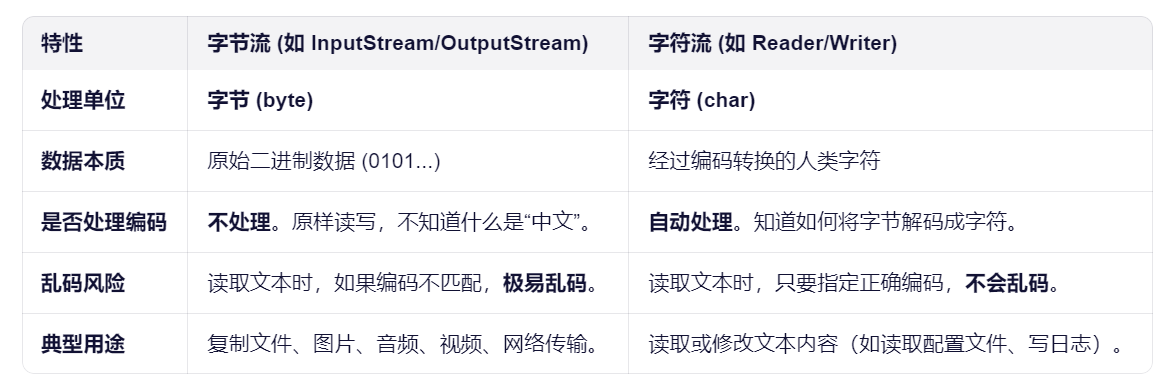
假设文件里存的是中文字符 “中”:
-
在磁盘上(UTF-8编码):它实际上占用了 3 个字节,数据可能是
0xE4 0xB8 0xAD。 -
字节流读取:
-
它会读出 3 个独立的字节:
E4、B8、AD。 -
如果你直接把这些字节转成字符串打印,可能会显示乱码(比如
涓),因为它不知道这 3 个字节合起来才表示一个“中”字。
-
-
字符流读取:
-
它会根据编码规则(UTF-8),把这 3 个字节自动拼装、翻译,最终给你返回一个字符
'中'。
-





 扫一扫
扫一扫


 16万+
16万+

 被折叠的 条评论
为什么被折叠?
被折叠的 条评论
为什么被折叠?
 到【灌水乐园】发言





