


1 加载目录并进入docker环境
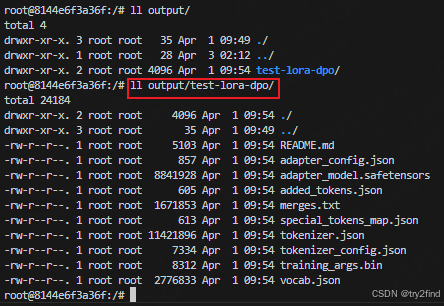
docker run -it --entrypoint /bin/bash -v /home/pretrained_model/output/:/output ollama/ollama将dpo后的模型路径/home/pretrained_model/output/ 映射到docker中的/output目录
临时调试容器: 始终添加 --rm 参数,
避免积累无用容器: docker run -it --rm --entrypoint /bin/bash ollama/ollama
2 安装git
查看系统版本
root@8144e6f3a36f:/# cat /etc/os-release
NAME="Ubuntu"
VERSION="20.04.6 LTS (Focal Fossa)"
ID=ubuntu
ID_LIKE=debian
PRETTY_NAME="Ubuntu 20.04.6 LTS"
安装git
root@8144e6f3a36f:/# apt update && apt install -y git
root@8144e6f3a36f:/# git --version
git version 2.25.1
3 下载llama.cpp
root@8144e6f3a36f:/# git clone https://github.com/ggerganov/llama.cpp.git
Cloning into 'llama.cpp'...
remote: Enumerating objects: 47622, done.
remote: Counting objects: 100% (133/133), done.
remote: Compressing objects: 100% (104/104), done.
remote: Total 47622 (delta 79), reused 29 (delta 29), pack-reused 47489 (from 3)
Receiving objects: 100% (47622/47622), 99.78 MiB | 5.51 MiB/s, done.
Resolving deltas: 100% (34186/34186), done.
4 安装miniconda
# 更新 apt 并安装依赖
apt update && apt install -y wget bzip2

# 下载 Miniconda(Linux 64位版本)
wget https://repo.anaconda.com/miniconda/Miniconda3-latest-Linux-x86_64.sh -O ~/miniconda.sh

# 运行安装脚本(自动安装到 /root/miniconda3)
bash ~/miniconda.sh -b -p /opt/miniconda3

# 将 conda 加入 PATH
echo 'export PATH="/opt/miniconda3/bin:$PATH"' >> ~/.bashrc
source ~/.bashrc

# 验证安装
conda --version
root@8144e6f3a36f:/llama.cpp# conda --version
conda 25.1.1
5 创建并进入虚拟环境
root@69e2b4914bb1:/llama.cpp# conda activate llama

CondaError: Run 'conda init' before 'conda activate'

root@69e2b4914bb1:/llama.cpp# source activate llama
(llama) root@69e2b4914bb1:/llama.cpp# ll
6 退出docker后重启
(base) [nlp ~]$ docker attach 69e
You cannot attach to a stopped container, start it first
(base) [nlp ~]$ docker start 69e
69e
(base) [nlp ~]$ docker attach 69e
root@69e2b4914bb1:/# ll
total 8
drwxr-xr-x.    1 root root  140 Apr  7 10:08 ./
drwxr-xr-x.    1 root root  140 Apr  7 10:08 ../
7 合并dpo lora模型
TypeError: __init__() got an unexpected keyword argument 'corda_config'遇到上面问题需要切换虚拟环境
lora_merge.py
import torch
from peft import PeftModel
from transformers import AutoModelForCausalLM, AutoTokenizer

base_model_path = '/Qwen2.5-0.5B-Instruct'           # 初始base模型路径或者模型名字
adapter_model_path = '/home/output/test-lora-dpo'       # 你的DPO adapter模型路径
output_merged_path = '/home/output/merge-lora-dpo'              # 合并后模型保存路径

# 加载基本模型和adapter
base_model = AutoModelForCausalLM.from_pretrained(
    base_model_path,
    torch_dtype=torch.float16,
    device_map='auto'
)
model = PeftModel.from_pretrained(base_model, adapter_model_path, device_map='auto')

# 合并adapter权重到主模型
model = model.merge_and_unload()

# 保存合并后的模型(完整的HF格式权重)
model.save_pretrained(output_merged_path)
# Tokenizer也复制一份到新路径:
tok = AutoTokenizer.from_pretrained(base_model_path)
tok.save_pretrained(output_merged_path)
合并模型:
(llmtuner) [llm_finetune]$ python lora_merge.py
Sliding Window Attention is enabled but not implemented for `sdpa`; unexpected results may be encountered.
[2025-04-08 10:40:30,289] [INFO] [real_accelerator.py:239:get_accelerator] Setting ds_accelerator to cuda (auto detect)
(llmtuner) [llm_finetune]$
合并后的模型:
(base) [merge-lora-dpo]$ du -h *
4.0K    added_tokens.json
4.0K    config.json
4.0K    generation_config.json
1.6M    merges.txt
943M    model.safetensors
4.0K    special_tokens_map.json
8.0K    tokenizer_config.json
11M     tokenizer.json
2.7M    vocab.json
模型结构应类似:
my_dpo_model/
├── config.json
├── tokenizer.json(或tokenizer.model)
├── pytorch_model.bin (或model.safetensors)
├── tokenizer_config.json
├── special_tokens_map.json
└── (...其他必要文件)
(llama) root@69e2b4914bb1:/llama.cpp# python convert_hf_to_gguf.py ../output/merge-lora-dpo --outtype f16 --outfile ../output/convert.bin
INFO:hf-to-gguf:Loading model: merge-lora-dpo
INFO:gguf.gguf_writer:gguf: This GGUF file is for Little Endian only
INFO:hf-to-gguf:Exporting model...
INFO:hf-to-gguf:gguf: loading model part 'model.safetensors'
INFO:hf-to-gguf:token_embd.weight, torch.float16 --> F16, shape = {896, 151936}
INFO:hf-to-gguf:Set model quantization version
INFO:gguf.gguf_writer:Writing the following files:
INFO:gguf.gguf_writer:../output/convert.bin: n_tensors = 290, total_size = 988.2M
Writing: 100%|█████████████████████████████████████████████████████████████████████████████████████████████████████████████████████████████████████████████████████████████████████████████████████████| 988M/988M [00:00<00:00, 1.01Gbyte/s]
INFO:hf-to-gguf:Model successfully exported to ../output/convert.bin8 将HF模型转换到GGML FP16格式(中间步骤)
如果你的模型使用的是LLaMA2架构,可以指定类型:
python convert_hf_to_gguf.py ../output/merge-lora-dpo --outtype f16 --outfile ../output/dop_model_f16.gguf
你还可以转换到更小的量化,如Q4_0:
python convert_hf_to_gguf.py ../output/merge-lora-dpo --outtype q4_0 --outfile ../output/dop_model_q4_0.gguf会报错
usage: convert_hf_to_gguf.py [-h] [--vocab-only] [--outfile OUTFILE] [--outtype {f32,f16,bf16,q8_0,tq1_0,tq2_0,auto}] [--bigendian] [--use-temp-file] [--no-lazy] [--model-name MODEL_NAME]
                             [--verbose] [--split-max-tensors SPLIT_MAX_TENSORS] [--split-max-size SPLIT_MAX_SIZE] [--dry-run] [--no-tensor-first-split] [--metadata METADATA]
                             [--print-supported-models] [--remote]
                             [model]
convert_hf_to_gguf.py: error: argument --outtype: invalid choice: 'q4_0' (choose from 'f32', 'f16', 'bf16', 'q8_0', 'tq1_0', 'tq2_0', 'auto')
最终得到:
(base) [nlp output]$ du -sh *
1.3G    convert.bin
1.2G    dop_model_f16.gguf
913M    dop_model_q8_0.gguf
958M    merge-lora-dpo
24M test-lora-dpo 最低0.47元/天 解锁文章






 扫一扫
扫一扫


 被折叠的 条评论
为什么被折叠?
被折叠的 条评论
为什么被折叠?
 到【灌水乐园】发言





