



 本文探讨游戏对象运动的本质,并通过三种不同的方法实现物体的抛物线运动。此外,还详细介绍了两种实现太阳系模拟的方法,一种是手动设置每个行星的参数,另一种则是通过通用脚本轻松添加新的行星。
Homework03
1. 简答并用程序验证
- 游戏对象运动的本质是什么?
游戏对象运动的本质是游戏对象的
Transform中Position、Rotation、Scale属性值的变化
- 请用三种方法以上方法,实现物体的抛物线运动。(如,修改Transform属性,使用向量Vector3的方法…)
- 使用Transform.Translate
public int xSpeed = 5;
public int ySpeed = 5;
void Update()
{
    transform.Translate(Vector3.right * Time.deltaTime * xSpeed + Vector3.up * Time.deltaTime * ySpeed);
}
- 使用Vector3
public int xSpeed = 5;
public int ySpeed = 5;
void Update()
{
    transform.position += Vector3.right * Time.deltaTime * xSpeed;
    transform.position += Vector3.up * Time.deltaTime * ySpeed;
}
- 直接修改Transform
public int xSpeed = 5;
public int ySpeed = 5;
void Update()
{
    transform.position += new Vector3(Time.deltaTime * xSpeed, Time.deltaTime * ySpeed, 0);
}
- 写一个程序,实现一个完整的太阳系, 其他星球围绕太阳的转速必须不一样,且不在一个法平面上。
方法一:相较于课堂实验,不过多创建了几个行星,较为简单,代码如下
using System.Collections;
using System.Collections.Generic;
using UnityEngine;

public class solar : MonoBehaviour
{
    public Transform sun;
    public Transform mercury;   //水星
    public Transform venus;     // 金星
    public Transform earth;     // 地球
    public Transform mars;      // 火星
    public Transform jupiter;   // 木星
    public Transform saturn;    // 土星
    public Transform uranus;    // 天王星
    public Transform neptune;   // 海王星
    // Start is called before the first frame update
    void Start() {
    	// 注意需要设置成不在同一法平面
        sun.position = Vector3.zero;
        mercury.position = new Vector3(7, -1, 0);
        venus.position = new Vector3(10, -0.6f, 0);
        earth.position = new Vector3(12, 0, 0);
        mars.position = new Vector3(14, -0.03f, 0);
        jupiter.position = new Vector3(18, -0.048f, 0);
        saturn.position = new Vector3(22, -0.02f, 0);
        uranus.position = new Vector3(26, -0.7f, 0);
        neptune.position = new Vector3(29, -0.8f, 0);
    }

    // Update is called once per frame
    void Update() {
        earth.RotateAround(sun.position, Vector3.up, 10 * Time.deltaTime);
        earth.Rotate(Vector3.up * 30 * Time.deltaTime);

        mercury.RotateAround(sun.position, new Vector3(0.18f,1,0), 10 * 365 / 87.7f * Time.deltaTime);
        venus.RotateAround(sun.position, new Vector3(0.1f, 1, 0), 10 * 365 / 224.7f * Time.deltaTime);
        mars.RotateAround(sun.position, new Vector3(0.05f, 1, 0), 10 * 1 / 1.9f * Time.deltaTime);
        jupiter.RotateAround(sun.position, new Vector3(0.08f, 1, 0), 10 * 1 / 11.8f * Time.deltaTime);
        saturn.RotateAround(sun.position, new Vector3(0.03f, 1, 0), 10 * 1 / 29.5f * Time.deltaTime);
        uranus.RotateAround(sun.position, new Vector3(0.12f, 1, 0), 10 * 1 / 80.4f * Time.deltaTime);
        neptune.RotateAround(sun.position, new Vector3(0.14f, 1, 0), 10 * 1 / 164.8f * Time.deltaTime);
    }
}
游戏对象、素材及实现效果如下图
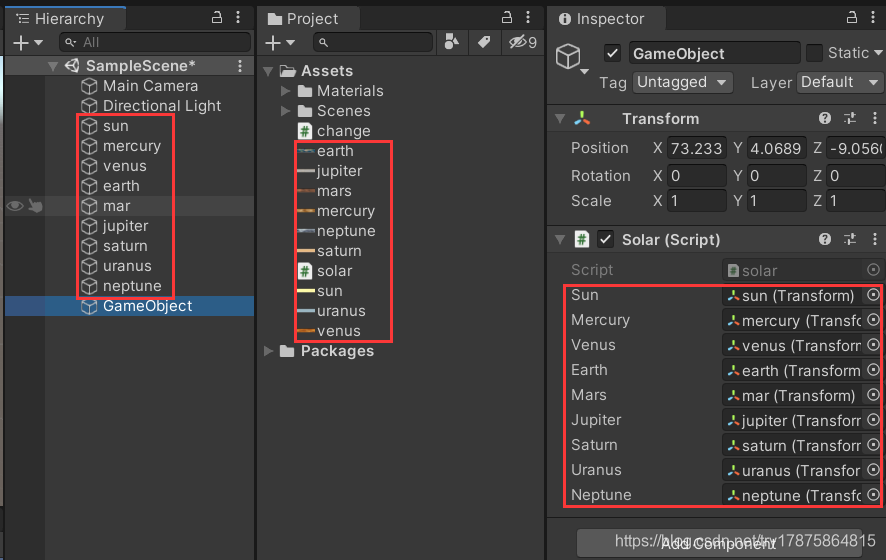
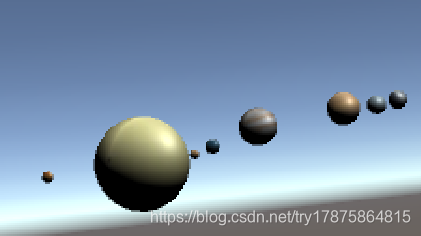
方法二:方法一过于繁琐且添加新的行星时需要直接修改代码较不方便,所以直接编写一个RotateRound脚本然后将该脚本添加到新的行星上即可。代码如下:
using System.Collections;
using System.Collections.Generic;
using UnityEngine;

public class solar2 : MonoBehaviour
{
    public Transform center;
    // 公转速度
    public int speed;
    // 公转偏角,为了不再同一法平面
    public int xAngle;
    public int yAngle;
    // Start is called before the first frame update
    void Start() {
        speed = (int)Random.Range(1, 10);
        xAngle = (int)Random.Range(0, 2);
        yAngle = (int)Random.Range(0, 2);
    }

    // Update is called once per frame
    void Update() {
        Vector3 angle = Vector3.up * xAngle + Vector3.forward * yAngle;
        transform.RotateAround(center.transform.position, angle, speed * Time.deltaTime);
    }
}
2. 编程实践
详见另一篇博客
3. 思考题
- 使用向量与变换,实现并扩展 Tranform 提供的方法,如 Rotate、RotateAround 等
将transform看成一个非常直观的旋转矩阵,利用矩阵乘向量得到旋转后的位置,矩阵连乘得到复合旋转。利用Quaternion.Euler(x,y,z),直观上按 z、x、y 轴旋转的一个序列,即q = qy * qx * qz
注意顺序不可交换。
public class MyRotate : MonoBehaviour
{
    // Start is called before the first frame update
    void Start()
    {
        Rotate(this.transform, 45f, 45f, 45f);
        RotateAround(this.transform, new Vector3(10, 10, 10), new Vector3(90, 90, 90), 30);
    }

    public void Rotate(Transform myTransform,float xAngle, float yAngle, float zAngle){
        Quaternion p1 = Quaternion.AngleAxis(zAngle, Vector3.forward);
        Quaternion p2 = Quaternion.AngleAxis(xAngle, Vector3.right);
        Quaternion p3 = Quaternion.AngleAxis(yAngle, Vector3.up);
        myTransform.rotation *= p3 * p2 * p1;
    }

	public void RotateAround(Transform myTransform,Vector3 point, Vector3 axis, float angle){
        Quaternion p1 = Quaternion.AngleAxis(angle,axis);
        Vector3 distance = myTransform.position - point;
        myTransform.position = p1 * myTransform.position;
        myTransform.rotation *= p1;
    }
}





 扫一扫
扫一扫


 8999
8999

 被折叠的 条评论
为什么被折叠?
被折叠的 条评论
为什么被折叠?
 到【灌水乐园】发言





