



 本文介绍了作者使用C++和QML为Lua开发的简易集成开发环境的初步成果,包括本地文件读取和代码高亮显示功能。通过文件路径读取实现本地文件的加载,并使用QSyntaxHighlighter类进行代码高亮,避免了污染本地文件的问题。目前项目已实现的功能包括在TextEdit中显示文件内容和高亮,下一步计划实现行号显示。
人是新人,已经大四临近毕业。今天的毕业设计组会开完,在老师的提醒下,我就想写两篇文章,以纪念我的大学生活和惨不忍睹毕设项目。(我知道自己的程序写的很烂,第一次发文,也很紧张)
我的毕业设计是实现一个简易的Lua集成开发环境,最主要的要求是实现能够代码编辑,高亮显示,断点调试和单步调试。老师没有规定语言,但是我只有C++摸得比较熟,同时也是想挑战一下自己吧,想做点不一样的,在网上搜索的时候看到很多QML与C++的信息,瞬间感觉qml好厉害,所以选择了QML与C++来编写Lua的ide。使用的编辑器是Qt Creator。
到目前为止,我已经实现了本地文件读取,高亮,行号。下面是目前功能和代码的展示。
一.本地读取
本地读取是我在编写编译器时的第一个难点,首先我们要了解QML读取文件的两种方式:一种是通过qrc添加资源,另一种是通过文件路径读取。我选择了通过文件路径读取,编写一个组件File,在选择文件后将其中数据显示到控制台中的TextEdit区域。
以下为部分代码:
File.h
#ifndef QT_HUB_FILE_H
#define QT_HUB_FILE_H

#include <QObject>

class File : public QObject
{
    Q_OBJECT
public:
    File();

    Q_PROPERTY(QString source READ source WRITE setSource NOTIFY sourceChanged)
    Q_PROPERTY(QString text   READ text   WRITE setText   NOTIFY textChanged)

    QString source() const;
    void setSource(const QString &source);

    QString text() const;
    void setText(const QString &text);


signals:
    void sourceChanged();
    void textChanged();

private slots:
    void readFile();

private:
    QString m_source;
    QString m_text;
};

#endif // FILE_H
File.cpp
#include "File.h"

#include <QFile>
#include <QDebug>

File::File()
{
    connect(this, SIGNAL(sourceChanged()), this, SLOT(readFile()));
}

void File::setSource(const QString &source)
{
    m_source = source;
    emit sourceChanged();
}

QString File::source() const
{
    return m_source;
}

void File::setText(const QString &text)
{
    QFile file(m_source);
    if (!file.open(QIODevice::WriteOnly)) {
        m_text = "";
        qDebug() << "Error:" << m_source << "open failed!";
    }
    else {
        qint64 byte = file.write(text.toUtf8());
        if (byte != text.toUtf8().size()) {
            m_text = text.toUtf8().left(byte);
            qDebug() << "Error:" << m_source << "open failed!";
        }
        else {
            m_text = text;
        }

        file.close();
    }

    emit textChanged();
}

void File::readFile()
{
    QFile file(m_source);
    if (!file.open(QIODevice::ReadOnly)) {
        m_text = "";
        qDebug() << "Error:" << m_source << "open failed!";
    }

    m_text = file.readAll();
    emit textChanged();
}


QString File::text() const
{
    return m_text;
}
注册对象后,在main.qml中的引用:
File {
    id: file
    source: "F:/Luap/learn/选择路径.lua"
}
然后在TextEdit中引用file.text,在组件加载完和文字改变时修改text和file.text即可。
二.代码高亮
在完成这个功能时查了很多资料,发现实现 代码高亮有很多方法。其中我尝试过使用和设置TextEdit自带的textFormat中的Richtext,发现它会将输入的字符串自动加标签(类似于Html),从而修改显示文字的字体,颜色和大小等属性。但是由于我实现了本地读取,在组件加载后我实现了即时保存功能,这就导致我在创建调试程序后,TextEdit在读取xxx.lua时会污染本地文件,同时无法显示文本内容。截图如下:
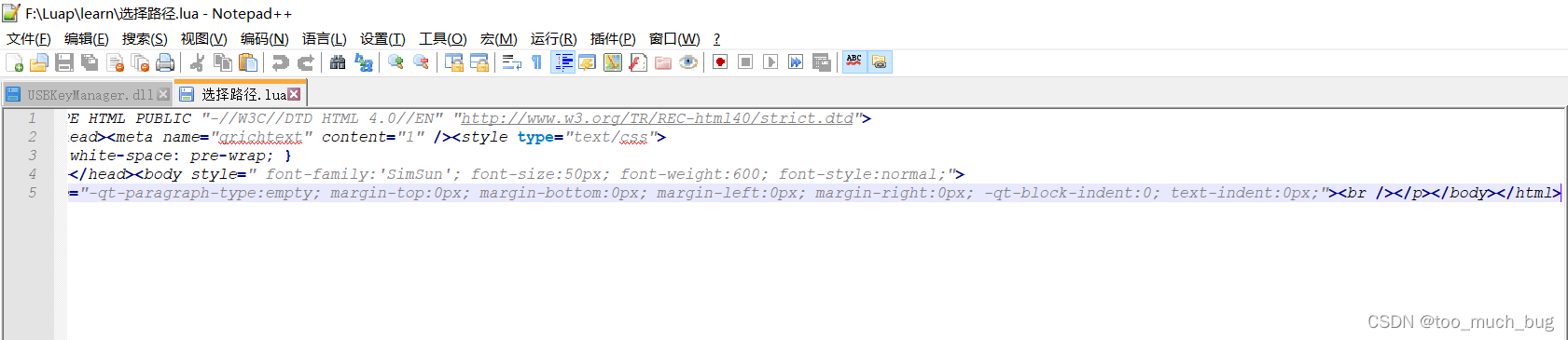
所以我没有使用该类方法。我选择使用QSyntaxHighlighter类库。QSyntaxHighlighter类允许我们定义语法突出显示规则,此外,我们还可以使用该类来查询文档的当前格式或用户数据。我个人理解是先创建多个包含相关元素的 List,同时规定其中元素的字体和颜色,然后一行行读入文本中的信息,与List中的信息进行比对,如果对比匹配成功,换字体,没匹配上,就跳过,默认颜色和字体。
以下为部分代码:
HighLighter.h
#ifndef CODEHIGHLIGHTER_H
#define CODEHIGHLIGHTER_H

#include <QSyntaxHighlighter>
#include <QTextCharFormat>
#include<QQuickTextDocument>

class HighLighter: public QSyntaxHighlighter
{
    Q_OBJECT

public:
    HighLighter(QTextDocument *parent = 0);
    Q_INVOKABLE void setDocument(QQuickTextDocument *pDoc);

protected:
    Q_INVOKABLE void highlightBlock(const QString &text) override;

private:
    struct HighlightingRule
    {
        QRegExp pattern;
        QTextCharFormat format;
    };
    QVector<HighlightingRule> highlightingRules;

    QRegExp commentStartExpression;         //多行注释开始标识符
    QRegExp commentEndExpression;           //多行注释结束标识符

    QTextCharFormat keywordFormat;          //关键字
    QTextCharFormat classFormat;            //类
    QTextCharFormat singleLineKey;          //单行关键字
    QTextCharFormat singleLineValue;        //单行值
    QTextCharFormat singleLineCommentFormat;//单行注释
    QTextCharFormat multiLineCommentFormat; //多行注释
    QTextCharFormat quotationFormat;        //字符串标识符
    QTextCharFormat functionFormat;         //方法标识符
};

#endif // CODEHIGHLIGHTER_H
HighLighter.cpp
#include "Highlighter.h"
#include <QtDebug>
#include<QQuickTextDocument>

HighLighter::HighLighter(QTextDocument *parent)
    : QSyntaxHighlighter(parent)
{
    HighlightingRule rule;

    //对于下面正则表达式,标记为紫色,类名称
    classFormat.setFontWeight(QFont::Bold);
    classFormat.setForeground(Qt::darkMagenta);
    rule.pattern = QRegExp("\\b[A-Za-z]+:\\b");
    rule.format = classFormat;
    highlightingRules.append(rule);
    rule.pattern = QRegExp("\\b[A-Za-z]+\\.\\b");
    rule.format = classFormat;
    highlightingRules.append(rule);

    //字符串,标记深红色
    quotationFormat.setForeground(Qt::darkRed);
    rule.pattern = QRegExp("\".*\"");
    rule.format = quotationFormat;
    highlightingRules.append(rule);
    rule.pattern = QRegExp("'.*'");
    rule.format = quotationFormat;
    highlightingRules.append(rule);

    //函数标记为斜体蓝色
    functionFormat.setFontItalic(true);
    functionFormat.setForeground(Qt::blue);
    rule.pattern = QRegExp("\\b[A-Za-z0-9_]+(?=\\()");
    rule.format = functionFormat;
    highlightingRules.append(rule);

    //关键字
    QStringList keywords = {
        "and", "break", "do", "else", "elseif", "end", "false",
        "for", "function", "if", "in", "local", "nil", "not", "or",
        "repeat", "return", "then", "true", "unitl", "while", "goto"
    };
    //对于下面关键字部分,标记为深蓝色
    keywordFormat.setForeground(Qt::darkBlue);
    keywordFormat.setFontWeight(QFont::Bold);
    QStringList keywordPatterns;
    for(int i=0; i<keywords.length(); i++)
    {
        QString pattern = "\\b" + keywords[i] + "\\b";
        rule.pattern = QRegExp(pattern);
        rule.format = keywordFormat;
        highlightingRules.append(rule);
    }

    //对于下面正则表达式,单行注释标记为绿色
    singleLineCommentFormat.setForeground(Qt::darkGreen);
    singleLineCommentFormat.setFontItalic(true);
    //rule.pattern = QRegExp("//[^\n]*");
    rule.pattern = QRegExp("--[^\n]*");
    rule.format = singleLineCommentFormat;
    highlightingRules.append(rule);

    //对于多行注释
    multiLineCommentFormat.setForeground(Qt::darkGreen);
    multiLineCommentFormat.setFontItalic(true);
    //commentStartExpression = QRegExp("/\\*");
    //commentEndExpression = QRegExp("\\*/");
    //Lua 多行注释 --[[xx]]
    commentStartExpression = QRegExp("--\\[\\[");
    commentEndExpression = QRegExp("\\]\\]");
}

void HighLighter::highlightBlock(const QString &text)
{
    foreach (const HighlightingRule &rule, highlightingRules) {
        QRegExp expression(rule.pattern);
        int index = expression.indexIn(text);
        qDebug()<<text;
        while (index >= 0) {
            int length = expression.matchedLength();
            setFormat(index, length, rule.format);
            index = expression.indexIn(text, index + length);
        }
    }

    setCurrentBlockState(0);

    int startIndex = 0;
    if (previousBlockState() != 1)
        startIndex = commentStartExpression.indexIn(text);


    while (startIndex >= 0) {
        int endIndex = commentEndExpression.indexIn(text, startIndex);
        int commentLength=0;
        if (endIndex == -1) {
            setCurrentBlockState(1);
            commentLength = text.length() - startIndex;
        } else {
            commentLength = endIndex - startIndex
                    + commentEndExpression.matchedLength();
        }
        setFormat(startIndex, commentLength, multiLineCommentFormat);
        startIndex = commentStartExpression.indexIn(text, startIndex + commentLength);
    }
}

void HighLighter::setDocument(QQuickTextDocument *pDoc)
{
    QSyntaxHighlighter::setDocument(pDoc->textDocument());
}
main.qml中的引用:
TextEdit {
                id:t1
                anchors.rightMargin: -73
                anchors.leftMargin: 44
                anchors.topMargin: 8
                anchors.bottomMargin: -8
                anchors.fill: parent
                font.pixelSize: 30
                font.family:heiti.name
                //textFormat: TextEdit.RichText
                selectedTextColor: "#00BFFF"
                onTextChanged: {
                    file.text = text
                }
                Component.onCompleted: {
                    text = file.text
                    h1.setDocument(t1.textDocument)
                    //console.log(t1.lineCount)
                }
                selectByMouse: true
                onCursorRectangleChanged: flicka.ensureVisible(cursorRectangle)
            }
以上为我当前毕业项目进度,明天会发如何显示行号。欢迎大家评论。





 扫一扫
扫一扫


 575
575

 被折叠的 条评论
为什么被折叠?
被折叠的 条评论
为什么被折叠?
 到【灌水乐园】发言





