


 本文介绍如何使用Freemarker模板引擎生成Word文档,并利用Aspose库将Word文档转换为PDF格式。首先,通过Freemarker的模板和数据映射,可以批量生成带有动态内容的Word文档。其次,借助Aspose库,即使是在Java环境中,也能轻松实现Word到PDF的转换,但需注意使用破解版Aspose库仅限于学习研究。
1)生成doc
采用模板生成doc,优点:兼容性强、样式丰富且可控。
模板制作流程:
- 准备好doc模板,对于需要动态填充的内容,用标签符替代,如:
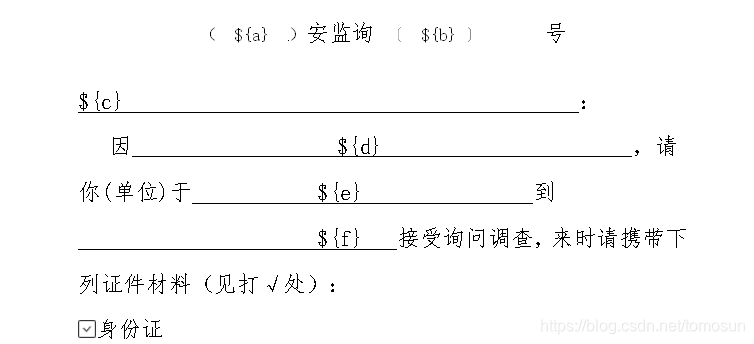
- 将doc另存为xml格式,如果模板中存在需根据内容动态填充的图片信息时,可先插入一张固定图片,然后再xml中找到<pkg:binaryData>标签,将标签中的base64字符串替换为标签符,如:

- 将xml文件,另存为ftl格式,该文件为程序中需要用到的模板文件
生成流程:
- 引入依赖:
implementation group: 'org.freemarker', name: 'freemarker', version: '2.3.28'
- 核心代码:
public static void writerWordFile(String savePath) throws IOException {
    Configuration configuration =  new Configuration();
    configuration.setDefaultEncoding("utf-8");
    configuration.setDirectoryForTemplateLoading(new File("F:/"));
    Map<String, Template> allTemplates = new HashMap<>();
    try {
        allTemplates.put("resume", configuration.getTemplate("安全生产行政执法文书_v3.ftl"));
    } catch (IOException e) {
        e.printStackTrace();
        throw new RuntimeException(e);
    }
    File f = new File(savePath);
    Template t = allTemplates.get("resume");
    try {
        String selected = "iVBORw0KGgoAAAANSUhEUgAAABAAAAAQCAYAAAAf8/9hAAAAyklEQVQ4T9VT0QlCMQzs5S3gJoZmAZ1AN9ARnhPoCLqBm6gDtHQE3cAFXiIRBFG0PBHB/PbuyN2lEJFpCGEZQuDQY8zsCGCBGONRVeellH0PfmDmERGtISKWUkIf8g3r3D8SYOZryKWU0tuCk4lop6rjqkCMsQUw67rOwWdmHjRNszOzTc55ex/2yxBFxIFDFyEir3efc24fm3rbgouY2QTAIaXkx/Y01Rrdjqpu3cpHArXjqm7wG4FvfKapma0ADGsr37+b2QlAewH+QJnPSgMBHQAAAABJRU5ErkJggg==";
        String notSelected = "iVBORw0KGgoAAAANSUhEUgAAABAAAAAQCAYAAAAf8/9hAAAATklEQVQ4T2NkgIACBgYGASibWOoDAwPDBEao5gMMDAwXiNUJVWfAwMDgADKgAYpJ1A9W3jBqwGgYDKN0AMqJFGUm5Oz8n8gcBcpD4OwMAHiZG/HuHKfxAAAAAElFTkSuQmCC";
        Writer w = new OutputStreamWriter(new FileOutputStream(f), "utf-8");
        Map<String, String> dataMap = new HashMap<>();
        dataMap.put("a","11111");
        dataMap.put("b","222");
        dataMap.put("c","33333333333333333333333333333");
        dataMap.put("d","444444444444444444444444444444");
        dataMap.put("e","555");
        dataMap.put("f","666");
        dataMap.put("img1",notSelected);
        dataMap.put("img2",notSelected);
        dataMap.put("img3",notSelected);
        dataMap.put("img4",selected);
        t.process(dataMap, w);
        w.close();
    } catch (Exception ex) {
        ex.printStackTrace();
        throw new RuntimeException(ex);
    }
2)根据doc生成pdf
本案例采用aspose破解版,仅供学习参考。
生成流程:
- 下载破解lib:aspose-words-18.6-jdk16.jar、JByteMod-1.8.0.jar
https://download.youkuaiyun.com/download/tomosun/12254972
- 核心代码:
public static void docToPDF(String inPath, String outPath) throws Exception {
    if (!getLicense()) { // 验证License 若不验证则转化出的pdf文档会有水印产生
        return;
    }
    try {
        long old = System.currentTimeMillis();
        File file = new File(outPath); // 新建一个空白pdf文档
        FileOutputStream os = new FileOutputStream(file);
        // Address是将要被转化的word文档
        Document doc = new Document(inPath);
        doc.save(os, SaveFormat.PDF);// 全面支持DOC, DOCX, OOXML, RTF HTML, OpenDocument, PDF,
        // EPUB, XPS, SWF 相互转换
        long now = System.currentTimeMillis();
        System.out.println("共耗时:" + ((now - old) / 1000.0) + "秒"); // 转化用时
    } catch (Exception e) {
        e.printStackTrace();
    }
}

public static boolean getLicense() throws Exception {
    boolean result = false;
    try {

        InputStream is = com.aspose.words.Document.class
                .getResourceAsStream("/com.aspose.words.lic_2999.xml");
        License aposeLic = new License();
        aposeLic.setLicense(is);
        result = true;
        is.close();
    } catch (Exception e) {
        e.printStackTrace();
        throw e;
    }
    return result;
}





 扫一扫
扫一扫


 1219
1219

 被折叠的 条评论
为什么被折叠?
被折叠的 条评论
为什么被折叠?
 到【灌水乐园】发言





