
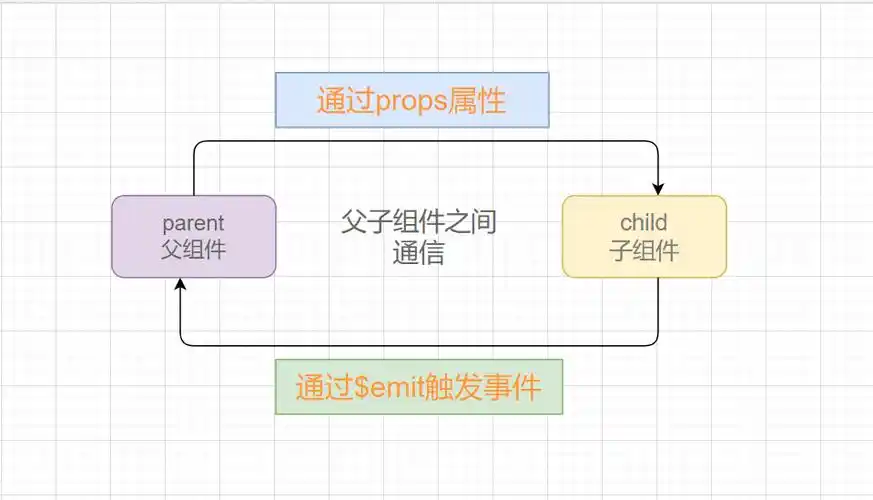
Vue2子组件向父组件传值&父组件向子组件传值

前言:示例图

一、子组件向父组件传值

传值:this.$emit('方法名','值')

接收:在父组件上加上@emit的方法名="方法名($event)"

子组件:

querydata() {
 //第一个参数是父组件接受的触事件,第二个参数是值,可以是数组或者单独值
  this.$emit('querydata', this.queryinfo)
},

 父组件:

<template>
    <View_dashboard  ref="dasboard" @querydata="querydata($event)"/>
</template>
<script>
import View_dashboard from './dashboard.vue'
export default {
   components: {
            View_dashboard//注册组件
        },
   data(){
    return{
    queryinfo:{}
    }
   },
created(){
 this.querydata()
}
methods:{
 querydata(queryinfo) {
  this.queryinfo = queryinfo
 },
}
</script>

二、父组件向子组件传值

父组件向子组件传值:动态值用 【:子组件接收的方法名=‘值’】;静态值用【子组件接收的方法名=‘值’】

子组件接收:props: {
DataSource:{
Type: Array,//类型:Array数组、String字符串、Boolean布尔值、Int整型(具体使用情况多)、Object对象
        default: []
    }
}

 父组件:

<template>
    <View_dashboard  ref="dasboard" :DataSource="DataSource"/>
</template>
<script>
import View_dashboard from './dashboard.vue'
export default {
   components: {
            View_dashboard//注册组件
        },
   data(){
    return{}
    
   },

methods:{

}
</script>

子组件:

<template>
<div>{{this.DataSource}}</div>
</template>

<script>
export default{
props: {
DataSource:{
Type: Array,//类型:Array数组、String字符串、Boolean布尔值、Int整型(具体使用情况多)、Object对象
        default: []
    }
}
}
</script>

### Vue2子组件父组件实时的方法 在 Vue2 中,子组件可以通过 `$emit` 方法触发自定义事件来通知父组件数据的变化。为了实现实时更新的效果,通常会在子组件内部使用 `watch` 或者其他响应式机制监控某些属性的状态变化。 #### 使用 watch 和 emit 的方式 当检测到特定的数据发生变化时,通过调用 `this.$emit(&#39;eventName&#39;, data)` 来发送消息给父级组件: ```javascript // 子组件 ChildComponent.vue export default { props: [&#39;initialValue&#39;], data() { return { localValue: this.initialValue, }; }, watch: { localValue(newValue, oldValue) { console.log(`local value changed from ${oldValue} to ${newValue}`); // 当本地状态改变时发出 change-event 并附带新旧两个参数 this.$emit(&#39;change-event&#39;, newValue); } } } ``` 父组件可以监听这个名为 `change-event` 的自定义事件并作出相应处理[^1]: ```html &lt;!-- ParentComponent.vue --&gt; &lt;template&gt; &lt;div class=&quot;parent&quot;&gt; &lt;!-- 绑定 @change-event 到 handleChildChange 函数上 --&gt; &lt;child-component :initial-value=&quot;someData&quot; v-on:change-event=&quot;handleChildChange&quot;&gt;&lt;/child-component&gt; {{ receivedValue }} &lt;/div&gt; &lt;/template&gt; &lt;script&gt; import ChildComponent from &#39;./ChildComponent&#39;; export default { components: { ChildComponent }, data() { return { someData: &#39;init&#39;, receivedValue: &#39;&#39; }; }, methods: { handleChildChange(valueFromChild) { console.log(&quot;Received new value:&quot;, valueFromChild); this.receivedValue = valueFromChild; } } }; &lt;/script&gt; ``` 上述代码展示了如何利用 `watch` 监听器捕捉子组件内变量的变化,并借助 `$emit()` 将这些变更同步回上级组件中去。
评论
成就一亿技术人!
拼手气红包6.0元
还能输入1000个字符
 
红包 添加红包
表情包 插入表情
 条评论被折叠 查看
添加红包

请填写红包祝福语或标题

红包个数最小为10个

红包金额最低5元

当前余额3.43前往充值 >
需支付:10.00
成就一亿技术人!
领取后你会自动成为博主和红包主的粉丝 规则
hope_wisdom
发出的红包
实付
使用余额支付
点击重新获取
扫码支付
钱包余额 0

抵扣说明:

1.余额是钱包充值的虚拟货币,按照1:1的比例进行支付金额的抵扣。
2.余额无法直接购买下载,可以购买VIP、付费专栏及课程。

余额充值


