



 本文介绍了如何在Jenkins中配置时区为北京时间,并利用SSH Pipeline Step Plugins进行远程机器操作。通过示例展示了如何定义远程服务器的详细信息,如主机名、用户名、密码等,以及执行远程shell脚本。
Jenkins时区设置为北京时间 打开 【系统管理】->【脚本命令行】运行下面的命令
System.setProperty('org.apache.commons.jelly.tags.fmt.timeZone', 'Asia/Shanghai')
1.在jenkins上安装SSHpipeline Step Plugins
2.scripts
pipeline{
agent any
stages {
stage ('Pipeline configuration') {
agent none
steps {
script {
stage ('Pull & PushImage') {
def remote = [:]
remote.name = 'test'
remote.host ='192.168.248.190'
remote.user = 'root'
remote.password ='password'
remote.allowAnyHosts= true
writeFile file:'jemeter.sh', text: 'cd /ibm \n ls'
sshScript remote: remote,script: "jemeter.sh"
}
}
}
}
}
}
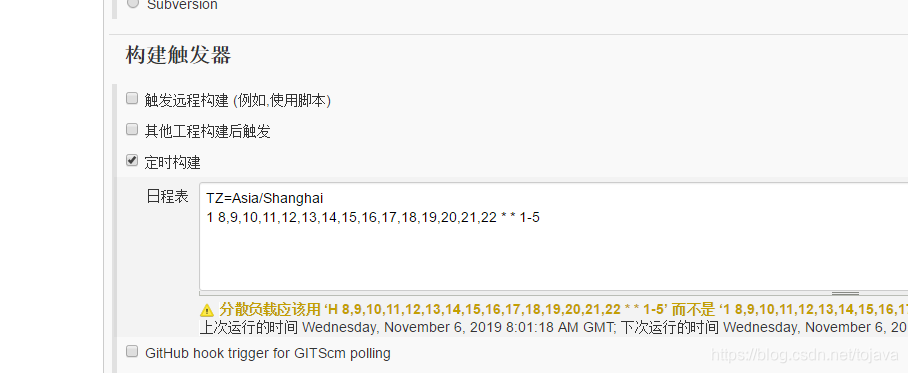
CRON job
TZ=Asia/Shanghai
1 8,9,10,11,12,13,14,15,16,17,18,19,20,21,22 * * 1-5
作者:sckehan
链接:https://www.jianshu.com/p/e8a4fdef1805
来源:简书
简书著作权归作者所有,任何形式的转载都请联系作者获得授权并注明出处。





 扫一扫
扫一扫


 969
969

 被折叠的 条评论
为什么被折叠?
被折叠的 条评论
为什么被折叠?
 到【灌水乐园】发言





