


 本文介绍了Python的在线学习资源,如Python3教程和在线IDE,以及PEP008编码风格指南。重点讲解了Pytest单元测试框架的使用,Python配置文件处理和命令行参数解析。此外,讨论了包导入问题的解决方案,项目结构最佳实践,以及f-strings的强大功能。
Useful Links
- Python在线教程: Python3 教程 | 菜鸟教程
- Python Onlien IDE: Online Python IDE - OnlineIDE
- Python PEP-008 Coding Style: PEP 8 – Style Guide for Python Code | peps.python.org
- 单元测试框架 Pytest
- Python读取配置文件: Python: How would you save a simple settings/config file?
- Python 命令行参数解析: 推荐直接使用argparse
- 常见问题解决
-
- PyCharm 提示找不到包
-
-
- 检查下sys.path.可以直接把对应的代码目录设置为Root. Mark Directory as Source Root
- pycharmimport包找不到、红线的解决办法 - 百度文库
-
-
- Python 如何import不同目录的包
-
- Python3 模块管理: Python3 模块 | 菜鸟教程
Standard Project Layout
This is what Repository Structure and Python — Kenneth Reitz.
This repository is available on GitHub.
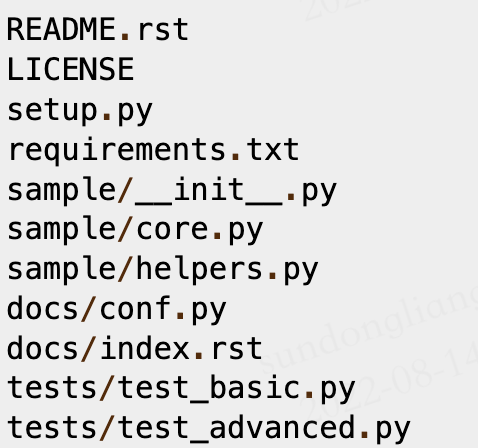
参考
f-string
import datetime
today = datetime.datetime.today()
print(f"{today:%Y-%m-%d}")
# 2022-07-04
print(f"{today:%Y}")
x = 10
y = 25
print(f"x = {x}, y = {y}")
# x = 10, y = 25
print(f"{x = }, {y = }") # 更方便! (3.8+)
# x = 10, y = 25
print(f"{x = :.3f}")
# x = 10.000参考链接
- 实用!f-strings 比你想象的还要强大





 扫一扫
扫一扫


 被折叠的 条评论
为什么被折叠?
被折叠的 条评论
为什么被折叠?
 到【灌水乐园】发言





