



 本文介绍了一个基于Vue.js的音乐盒子项目,详细讲述了如何利用Vue的核心特性实现界面展示、搜索音乐、播放控制等功能。项目适用于熟悉HTML、布局和Vue基础知识的开发者,通过实践加深对Vue框架的理解。
Vue 是一套用于构建用户界面的渐进式JavaScript框架。与其它大型框架不同的是,Vue 被设计为可以自底向上逐层应用。Vue 的核心库只关注视图层,方便与第三方库或既有项目整合。Vue.js是一套构建用户界面的渐进式框架。与其他重量级框架不同的是,Vue 采用自底向上增量开发的设计。Vue 的核心库只关注视图层,并且非常容易学习,非常容易与其它库或已有项目整合。另一方面,Vue 完全有能力驱动采用单文件组件和Vue生态系统支持的库开发的复杂单页应用。
Vue.js 的目标是通过尽可能简单的 API 实现响应的数据绑定和组合的视图组件 。
Vue.js 自身不是一个全能框架——它只聚焦于视图层。因此它非常容易学习,非常容易与其它库或已有项目整合。另一方面,在与相关工具和支持库一起使用时 ,Vue.js 也能完美地驱动复杂的单页应用。
本次项目实验环境:HBuilder或vs code即可
相关知识内容:基本的html知识,布局知识,vue知识以及包含接口ajax的应用
效果图
1.界面
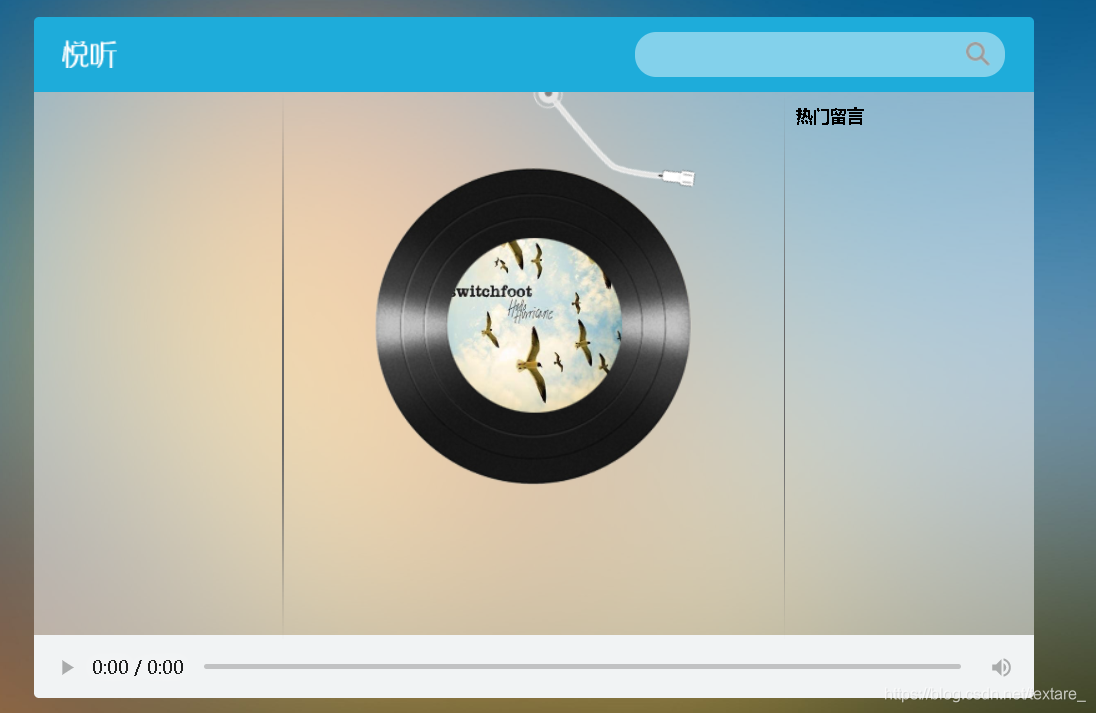
2.搜索音乐
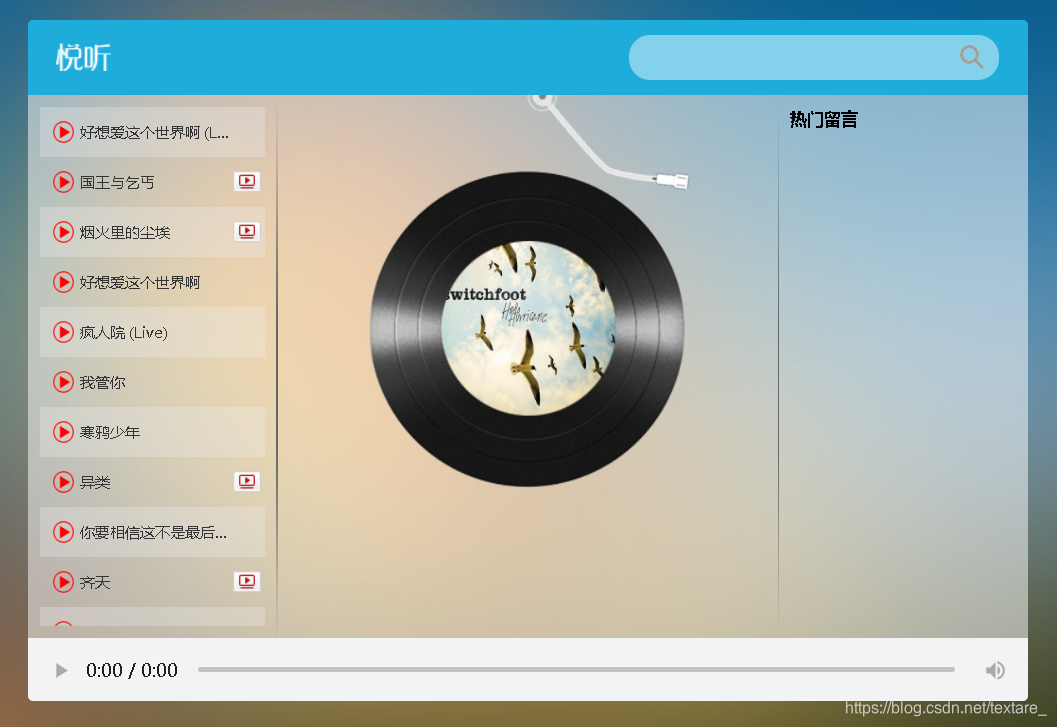
3.播放音乐

4.查看音乐进度条

5.查看评论
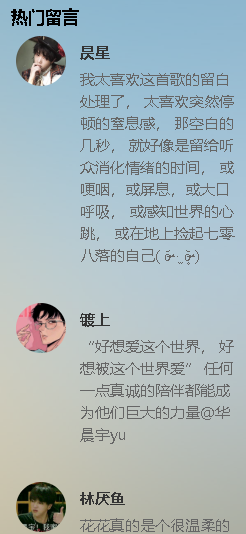
6.播放mv
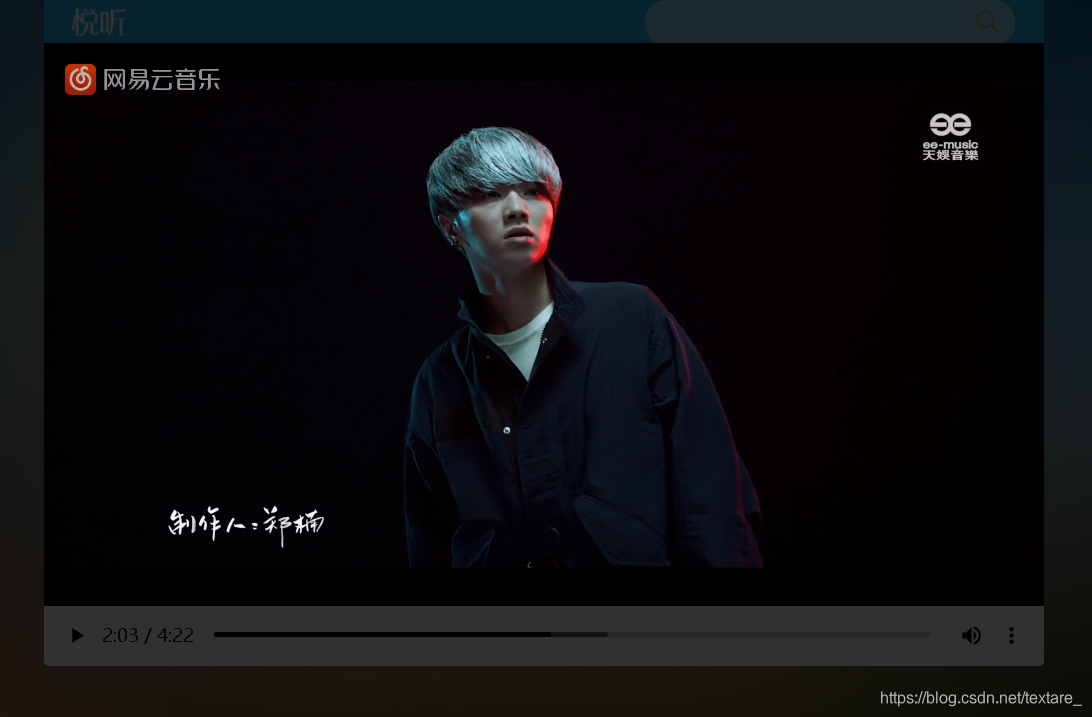
上述主要实现的就是这些效果了,完成最基本的音乐盒子功能。
接下来是代码实现功能。
1.主页设计player.html布局设计
<!DOCTYPE html>
<html lang="en">

<head>
  <meta charset="UTF-8" />
  <meta name="viewport" content="width=device-width, initial-scale=1.0" />
  <meta http-equiv="X-UA-Compatible" content="ie=edge" />
  <title>Document</title>
  <!-- 样式 -->
  <link rel="stylesheet" href="css/index.css">
</head>

<body>
  <div class="wrap">
    <div class="play_wrap" id="player">
      <div class="search_bar">
        <img src="img/player_title.png" alt="" />
        <!-- 搜索歌曲 -->
        <input type="text" autocomplete="off" v-model='query' @keyup.enter="searchMusic();" />
      </div>
      <div class="center_con">
        <!-- 搜索歌曲列表 -->
        <div class='song_wrapper' ref='song_wrapper'>
          <ul class="song_list">
            <li v-for="item in musicList">
              <!-- 点击放歌 -->
              <a href="javascript:;" @click='playMusic(item.id)'></a>
              <b>{{item.name}}</b>
              <span>
                <i @click="playMv(item.mvid)" v-if="item.mvid!=0"></i>
              </span>
            </li>

          </ul>
          <img src="img/line.png" class="switch_btn" alt="">
        </div>
        <!-- 歌曲信息容器 -->
        <div class="player_con" :class="{playing:isPlay}">
          <img src="img/player_bar.png" class="play_bar" />
          <!-- 黑胶碟片 -->
          <img src="img/disc.png" class="disc autoRotate" />
          <img :src="coverUrl==''?'./img/cover.png':coverUrl" class="cover autoRotate" />
        </div>
        <!-- 评论容器 -->
        <div class="comment_wrapper" ref='comment_wrapper'>
          <h5 class='title'>热门留言</h5>
          <div class='comment_list'>

            <dl v-for="item in hotComments">
              <dt>
                <img :src="item.user.avatarUrl" alt="" />
              </dt>
              <dd class="name">{{item.user.nickname}}</dd>
              <dd class="detail">
                {{item.content}}
              </dd>
            </dl>
          </div>
          <img src="img/line.png" class="right_line">
        </div>
      </div>
      <div class="audio_con">
        <audio ref='audio' @play="play" @pause="pause" :src="musicUrl" controls autoplay loop class="myaudio"></audio>
      </div>
      <div class="video_con" v-show="showVideo">
        <video ref='video' :src="mvUrl" controls="controls"></video>
        <div class="mask" @click="closeMv"></div>
      </div>
    </div>
  </div>
  <script src="./js/main.js"></script>
  !-- 开发环境版本,包含了有帮助的命令行警告 -->
  <script src="https://cdn.jsdelivr.net/npm/vue/dist/vue.js"></script>
  <!-- 官网提供的 axios 在线地址 -->
  <script src="https://unpkg.com/axios/dist/axios.min.js"></script>
- 引用index.css的设计
body,
ul,
dl,
dd {
  margin: 0px;
  padding: 0px;
}

.wrap {
  position: fixed;
  left: 0;
  top: 0;
  width: 100%;
  height: 100%;
  background: url(../img/bg.jpg) no-repeat;
  background-size: 100% 100%;
}

.play_wrap {
  width: 800px;
  height: 544px;
  position: fixed;
  left: 50%;
  top: 50%;
  margin-left: -400px;
  margin-top: -272px;
  /* background-color: #f9f9f9; */
}

.search_bar {
  height: 60px;
  background-color: #1eacda;
  border-top-left-radius: 4px;
  border-top-right-radius: 4px;
  display: flex;
  align-items: center;
  justify-content: space-between;
  position: relative;
  z-index: 11;
}

.search_bar img {
  margin-left: 23px;
}

.search_bar input {
  margin-right: 23px;
  width: 296px;
  height: 34px;
  border-radius: 17px;
  border: 0px;
  background: url(../img/zoom.png) 265px center no-repeat
    rgba(255, 255, 255, 0.45);
  text-indent: 15px;
  outline: none;
}

.center_con {
  height: 435px;
  background-color: rgba(255, 255, 255, 0.5);
  display: flex;
  position: relative;
}

.song_wrapper {
  width: 200px;
  height: 435px;
  box-sizing: border-box;
  padding: 10px;
  list-style: none;
  position: absolute;
  left: 0px;
  top: 0px;
  z-index: 1;
}

.song_stretch {
  width: 600px;
}

.song_list {
  width: 100%;
  overflow-y: auto;
  overflow-x: hidden;
  height: 100%;
}
.song_list::-webkit-scrollbar {
  display: none;
}

.song_list li {
  font-size: 12px;
  color: #333;
  height: 40px;
  display: flex;
  flex-wrap: wrap;
  align-items: center;
  width: 580px;
  padding-left: 10px;
}

.song_list li:nth-child(odd) {
  background-color: rgba(240, 240, 240, 0.3);
}

.song_list li a {
  display: block;
  width: 17px;
  height: 17px;
  background-image: url(../img/play.png);
  background-size: 100%;
  margin-right: 5px;
  box-sizing: border-box;
}

.song_list li b {
  font-weight: normal;
  width: 122px;
  overflow: hidden;
  text-overflow: ellipsis;
  white-space: nowrap;
}

.song_stretch .song_list li b {
  width: 200px;
}

.song_stretch .song_list li em {
  width: 150px;
}

.song_list li span {
  width: 23px;
  height: 17px;
  margin-right: 50px;
}
.song_list li span i {
  display: block;
  width: 100%;
  height: 100%;
  cursor: pointer;
  background: url(../img/table.png) left -48px no-repeat;
}

.song_list li em,
.song_list li i {
  font-style: normal;
  width: 100px;
}

.player_con {
  width: 400px;
  height: 435px;
  position: absolute;
  left: 200px;
  top: 0px;
}

.player_con2 {
  width: 400px;
  height: 435px;
  position: absolute;
  left: 200px;
  top: 0px;
}

.player_con2 video {
  position: absolute;
  left: 20px;
  top: 30px;
  width: 355px;
  height: 265px;
}

.disc {
  position: absolute;
  left: 73px;
  top: 60px;
  z-index: 9;
}
.cover {
  position: absolute;
  left: 125px;
  top: 112px;
  width: 150px;
  height: 150px;
  border-radius: 75px;
  z-index: 8;
}
.comment_wrapper {
  width: 180px;
  height: 435px;
  list-style: none;
  position: absolute;
  left: 600px;
  top: 0px;
  padding: 25px 10px;
}
.comment_wrapper .title {
  position: absolute;
  top: 0;
  margin-top: 10px;
}
.comment_wrapper .comment_list {
  overflow: auto;
  height: 410px;
}
.comment_wrapper .comment_list::-webkit-scrollbar {
  display: none;
}
.comment_wrapper dl {
  padding-top: 10px;
  padding-left: 55px;
  position: relative;
  margin-bottom: 20px;
}

.comment_wrapper dt {
  position: absolute;
  left: 4px;
  top: 10px;
}

.comment_wrapper dt img {
  width: 40px;
  height: 40px;
  border-radius: 20px;
}

.comment_wrapper dd {
  font-size: 12px;
}

.comment_wrapper .name {
  font-weight: bold;
  color: #333;
  padding-top: 5px;
}

.comment_wrapper .detail {
  color: #666;
  margin-top: 5px;
  line-height: 18px;
}
.audio_con {
  height: 50px;
  background-color: #f1f3f4;
  border-bottom-left-radius: 4px;
  border-bottom-right-radius: 4px;
}
.myaudio {
  width: 800px;
  height: 40px;
  margin-top: 5px;
  outline: none;
  background-color: #f1f3f4;
}
/* 旋转的动画 */
@keyframes Rotate {
  from {
    transform: rotateZ(0);
  }
  to {
    transform: rotateZ(360deg);
  }
}
/* 旋转的类名 */
.autoRotate {
  animation-name: Rotate;
  animation-iteration-count: infinite;
  animation-play-state: paused;
  animation-timing-function: linear;
  animation-duration: 5s;
}
/* 是否正在播放 */
.player_con.playing .disc,
.player_con.playing .cover {
  animation-play-state: running;
}

.play_bar {
  position: absolute;
  left: 200px;
  top: -10px;
  z-index: 10;
  transform: rotate(-25deg);
  transform-origin: 12px 12px;
  transition: 1s;
}
/* 播放杆 转回去 */
.player_con.playing .play_bar {
  transform: rotate(0);
}
/* 搜索历史列表 */
.search_history {
  position: absolute;
  width: 296px;
  overflow: hidden;
  background-color: rgba(255, 255, 255, 0.3);
  list-style: none;
  right: 23px;
  top: 50px;
  box-sizing: border-box;
  padding: 10px 20px;
  border-radius: 17px;
}
.search_history li {
  line-height: 24px;
  font-size: 12px;
  cursor: pointer;
}
.switch_btn {
  position: absolute;
  right: 0;
  top: 0;
  cursor: pointer;
}
.right_line {
  position: absolute;
  left: 0;
  top: 0;
}
.video_con video {
  position: fixed;
  width: 800px;
  height: 546px;
  left: 50%;
  top: 50%;
  margin-top: -273px;
  transform: translateX(-50%);
  z-index: 990;
}
.video_con .mask {
  position: fixed;
  width: 100%;
  height: 100%;
  left: 0;
  top: 0;
  z-index: 980;
  background-color: rgba(0, 0, 0, 0.8);
}
.video_con .shutoff {
  position: fixed;
  width: 40px;
  height: 40px;
  background: url(../img/shutoff.png) no-repeat;
  left: 50%;
  margin-left: 400px;
  margin-top: -273px;
  top: 50%;
  z-index: 995;
}
- 应用vue 的main.js文件
/*
  1:歌曲搜索接口
    请求地址:https://autumnfish.cn/search
    请求方法:get
    请求参数:keywords(查询关键字)
    响应内容:歌曲搜索结果

  2:歌曲url获取接口
    请求地址:https://autumnfish.cn/song/url
    请求方法:get
    请求参数:id(歌曲id)
    响应内容:歌曲url地址
  3.歌曲详情获取
    请求地址:https://autumnfish.cn/song/detail
    请求方法:get
    请求参数:ids(歌曲id)
    响应内容:歌曲详情(包括封面信息)
  4.热门评论获取
    请求地址:https://autumnfish.cn/comment/hot?type=0
    请求方法:get
    请求参数:id(歌曲id,地址中的type固定为0)
    响应内容:歌曲的热门评论
  5.mv地址获取
    请求地址:https://autumnfish.cn/mv/url
    请求方法:get
    请求参数:id(mvid,为0表示没有mv)
    响应内容:mv的地址
*/
var app = new Vue({
  el: "#player",
  data: {
    // 查询关键字
    query: "",
    // 歌曲数组
    musicList: [],
    // 歌曲地址
    musicUrl: "",
    // 歌曲封面
    musicCover: "",
    // 歌曲评论
    hotComments: [],
    // 动画播放状态
    isPlaying: false,
    // 遮罩层的显示状态
    isShow: false,
    // mv地址
    mvUrl: ""
  },
  methods: {
    // 歌曲搜索
    searchMusic: function() {
      var that = this;
      axios.get("https://autumnfish.cn/search?keywords=" + this.query).then(
        function(response) {
          // console.log(response);
          that.musicList = response.data.result.songs;
          console.log(response.data.result.songs);
        },
        function(err) {}
      );
    },
    // 歌曲播放
    playMusic: function(musicId) {
      //   console.log(musicId);
      var that = this;
      // 获取歌曲地址
      axios.get("https://autumnfish.cn/song/url?id=" + musicId).then(
        function(response) {
          // console.log(response);
          // console.log(response.data.data[0].url);
          that.musicUrl = response.data.data[0].url;
        },
        function(err) {}
      );

      // 歌曲详情获取
      axios.get("https://autumnfish.cn/song/detail?ids=" + musicId).then(
        function(response) {
          // console.log(response);
          // console.log(response.data.songs[0].al.picUrl);
          that.musicCover = response.data.songs[0].al.picUrl;
        },
        function(err) {}
      );

      // 歌曲评论获取
      axios.get("https://autumnfish.cn/comment/hot?type=0&id=" + musicId).then(
        function(response) {
          // console.log(response);
          // console.log(response.data.hotComments);
          that.hotComments = response.data.hotComments;
        },
        function(err) {}
      );
    },
    // 歌曲播放
    play: function() {
      // console.log("play");
      this.isPlaying = true;
    },
    // 歌曲暂停
    pause: function() {
      // console.log("pause");
      this.isPlaying = false;
    },
    // 播放mv
    playMV: function(mvid) {
      var that = this;
      axios.get("https://autumnfish.cn/mv/url?id=" + mvid).then(
        function(response) {
          // console.log(response);
          console.log(response.data.data.url);
          that.isShow = true;
          that.mvUrl = response.data.data.url;
        },
        function(err) {}
      );
    },
    // 隐藏
    hide: function() {
      this.isShow = false;
    }
  }
});
以上就是基本的代码编写,其实vue.js框架更加方便了我们对前端编写的很多方便性,大家可以互相学习一下。最后附上源码。
源码
链接: https://gitee.com/zhou_xiaoxuan/codes/o5jmudn3b1ghpvyazx92w91#%E5%B8%83%E5%B1%80css%E7%9A%84%E7%BC%96%E5%86%99.
(在页面最下面就有)
最后感谢一下b站pink老师的指导所作的项目






 扫一扫
扫一扫


 1425
1425


 到【灌水乐园】发言



