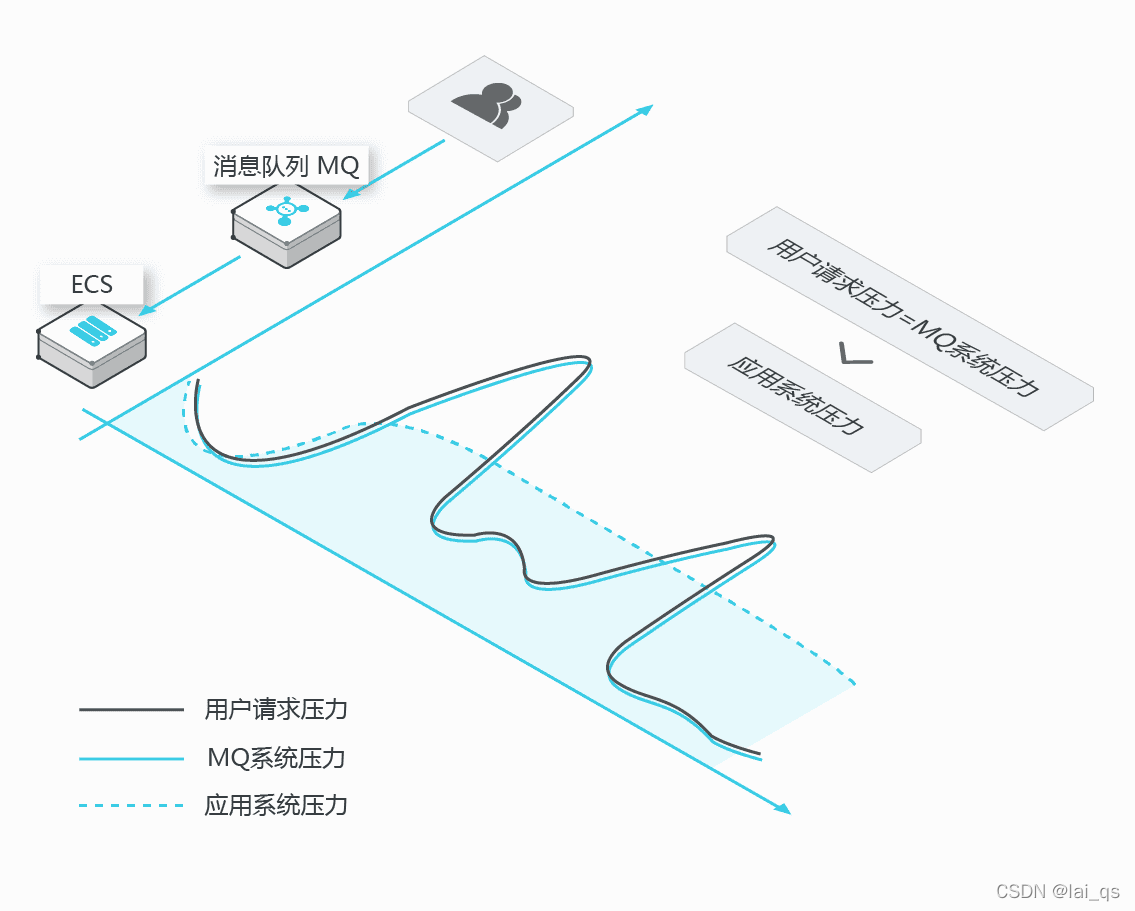
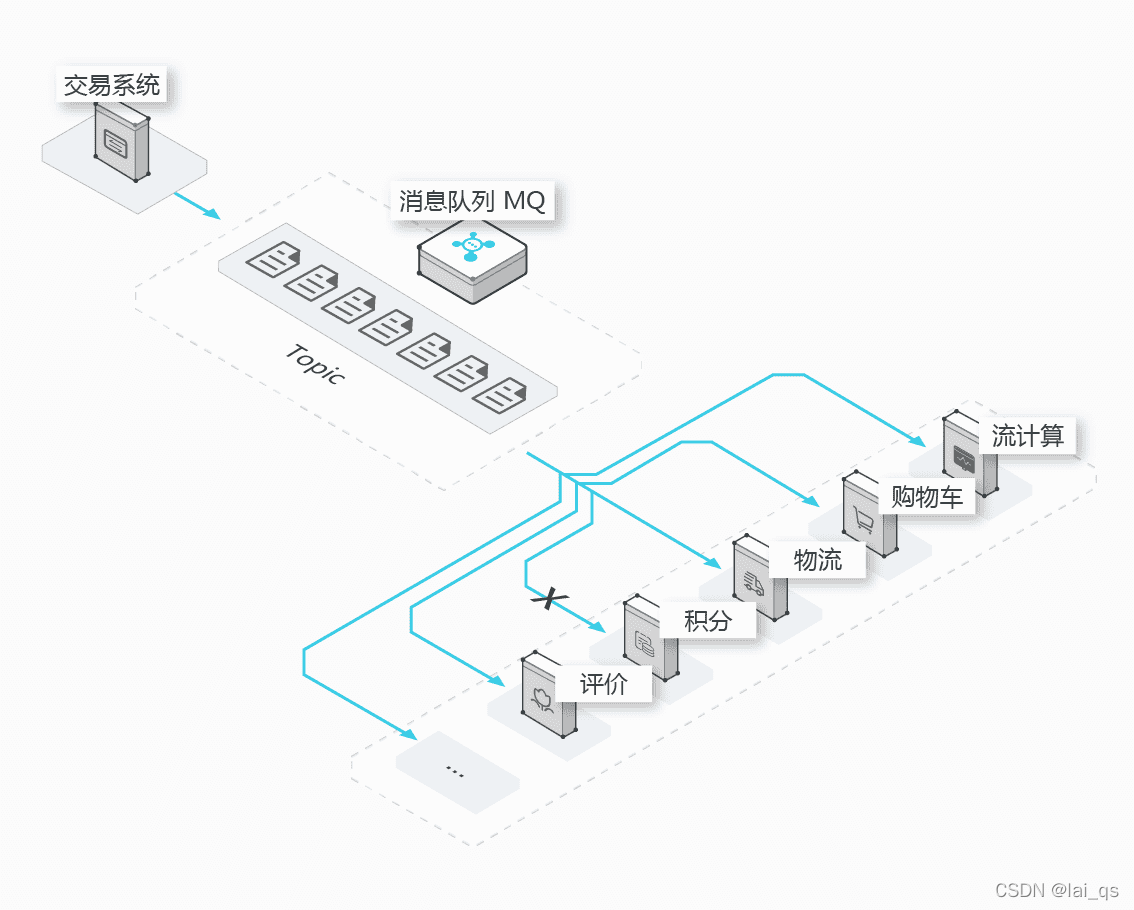
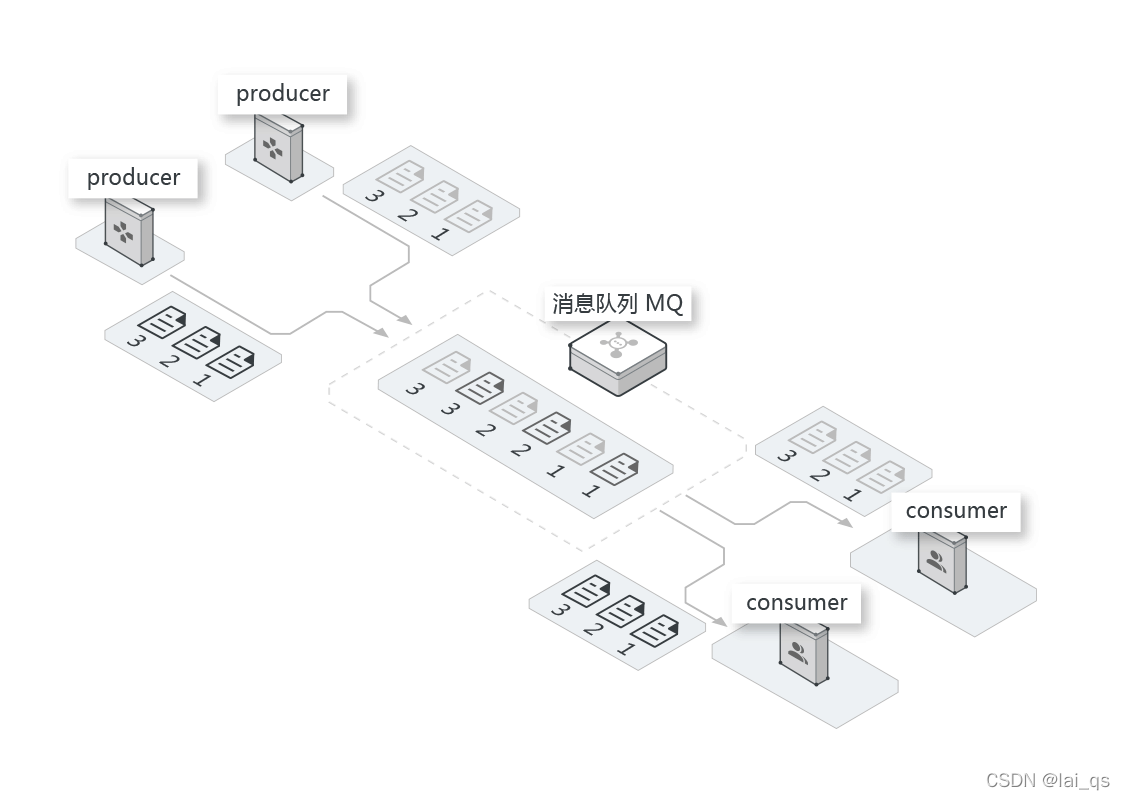
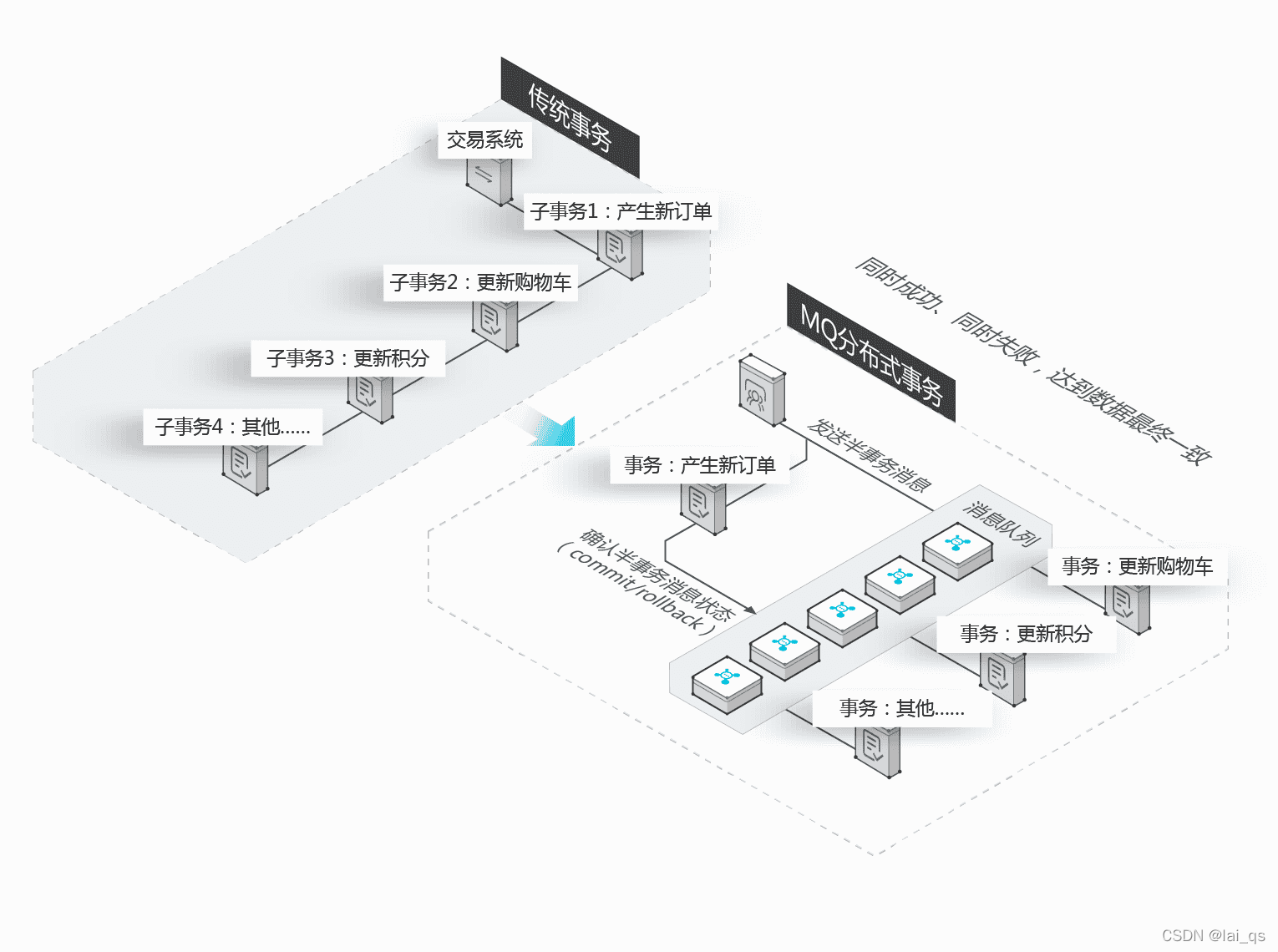
首先RocketMQ是阿里巴巴自研出来的,也已开源。其性能和稳定性从双11就能看出来,借用阿里的一句官方介绍:历年双 11 在始终保证高性能前提下,支持亿级消息堆积,不影响集群的正常服务,在削峰填谷(蓄洪)、微服务解耦的场景下尤为重要;这,就能说明RocketMQ的强大。 削峰填谷(主要解决诸如秒杀、抢红包、企业开门红等大型活动时皆会带来较高的流量脉冲,或因没做相应的保护而导致系统超负荷甚至崩溃,或因限制太过导致请求大量失败而影响用户体验,海量消息堆积能力强) 异步解耦(高可用松耦合架构设计,对高依赖的项目之间进行解耦,当下游系统出现宕机,不会影响上游系统的正常运行,或者雪崩) 顺序消息(顺序消息即保证消息的先进先出,比如证券交易过程时间优先原则,交易系统中的订单创建、支付、退款等流程) 分布式事务消息(确保数据的最终一致性,大量引入 MQ 的分布式事务,既可以实现系统之间的解耦,又可以保证最终的数据一致性,减少系统间的交互) 首先去阿里云控制台创建所需消息队列资源,包括消息队列 RocketMQ 的实例、Topic、Group ID (GID),以及鉴权需要的 AccessKey(AK)。 在springboot项目pom.xml添加需要的依赖 < ! -- RocketMQ -- >
< dependency> < groupId> . aliyun. openservices< / groupId>
< artifactId> - client< / artifactId>
< version> 1.8 .0 . Final< / version>
< / dependency>
在对应环境的application-xx.properties文件配置参数 ##-- -- -- - 鉴权需要的 AccessKey (AK)(实际项目,这里填写阿里云自己的账号信息)-- -
rocketmq. accessKey= xxAxxxxxxxxxx
rocketmq. secretKey= xxxxxxxxxiHxxxxxxxxxxxxxx## 实例TCP 协议公网接入地址(实际项目,填写自己阿里云MQ的公网地址)
rocketmq. nameSrvAddr= http: / / MQ_INST_* * * * * * * * * * * 85_ BbM* * * * * * * * * * * * * * * * * * * * yuncs. com: 80
#普通消息topic (实际项目,填写自己阿里云MQ中的topic名称和groupid)
rocketmq. topic= common
rocketmq. groupId= GID- message
rocketmq. tag= *
#定时/ 延时消息
rocketmq. timeTopic= time- lapse
rocketmq. timeGroupId= GID- message
rocketmq. timeTag= *
@Configuration
@ConfigurationProperties ( prefix = "rocketmq" )
public class MqConfig {
private String accessKey;
private String secretKey;
private String nameSrvAddr;
private String topic;
private String groupId;
private String tag;
private String timeTopic;
private String timeGroupId;
private String timeTag;
public Properties getMqPropertie ( ) {
Properties properties = new Properties ( ) ;
properties. setProperty ( PropertyKeyConst. AccessKey , this . accessKey) ;
properties. setProperty ( PropertyKeyConst. SecretKey , this . secretKey) ;
properties. setProperty ( PropertyKeyConst . NAMESRV_ADDR, this . nameSrvAddr) ;
properties. setProperty ( PropertyKeyConst. SendMsgTimeoutMillis , "4000" ) ;
return properties;
}
public String getAccessKey ( ) {
return accessKey;
}
public void setAccessKey ( String accessKey) {
this . accessKey = accessKey;
}
public String getSecretKey ( ) {
return secretKey;
}
public void setSecretKey ( String secretKey) {
this . secretKey = secretKey;
}
public String getNameSrvAddr ( ) {
return nameSrvAddr;
}
public void setNameSrvAddr ( String nameSrvAddr) {
this . nameSrvAddr = nameSrvAddr;
}
public String getTopic ( ) {
return topic;
}
public void setTopic ( String topic) {
this . topic = topic;
}
public String getGroupId ( ) {
return groupId;
}
public void setGroupId ( String groupId) {
this . groupId = groupId;
}
public String getTag ( ) {
return tag;
}
public void setTag ( String tag) {
this . tag = tag;
}
public String getTimeTopic ( ) {
return timeTopic;
}
public void setTimeTopic ( String timeTopic) {
this . timeTopic = timeTopic;
}
public String getTimeGroupId ( ) {
return timeGroupId;
}
public void setTimeGroupId ( String timeGroupId) {
this . timeGroupId = timeGroupId;
}
public String getTimeTag ( ) {
return timeTag;
}
public void setTimeTag ( String timeTag) {
this . timeTag = timeTag;
}
}
给消息生产者注入配置信息,ProducerBean用于将Producer集成至Spring Bean中
@Configuration
public class ProducerClient {
@Autowired
private MqConfig mqConfig;
@Bean ( initMethod = "start" , destroyMethod = "shutdown" )
public ProducerBean buildProducer ( ) {
ProducerBean producer = new ProducerBean ( ) ;
producer. setProperties ( mqConfig. getMqPropertie ( ) ) ;
return producer;
}
}
为了方便使用,我封装了一个发送消息的类,消息的Message参数和配置,看代码注释,很容易理解
@Component
public class ProducerUtil {
private Logger logger = LoggerFactory . getLogger ( ProducerUtil . class ) ;
@Autowired
private MqConfig config;
@Autowired
private ProducerBean producer;
public SendResult sendMsg ( String msgTag, byte [ ] messageBody, String msgKey) {
Message msg = new Message ( config. getTopic ( ) , msgTag, msgKey, messageBody) ;
return this . send ( msg, Boolean . FALSE) ;
}
public SendResult sendTimeMsg ( String msgTag, byte [ ] messageBody, String msgKey, long delayTime) {
Message msg = new Message ( config. getTimeTopic ( ) , msgTag, msgKey, messageBody) ;
msg. setStartDeliverTime ( delayTime) ;
return this . send ( msg, Boolean . FALSE) ;
}
public void sendOneWayMsg ( String msgTag, byte [ ] messageBody, String msgKey) {
Message msg = new Message ( config. getTopic ( ) , msgTag, msgKey, messageBody) ;
this . send ( msg, Boolean . TRUE) ;
}
private SendResult send ( Message msg, Boolean isOneWay) {
try {
if ( isOneWay) {
producer. sendOneway ( msg) ;
success ( msg, "单向消息MsgId不返回" ) ;
return null ;
} else {
SendResult sendResult = producer. send ( msg) ;
if ( sendResult != null ) {
success ( msg, sendResult. getMessageId ( ) ) ;
return sendResult;
} else {
error ( msg, null ) ;
return null ;
}
}
} catch ( Exception e) {
error ( msg, e) ;
return null ;
}
}
private ExecutorService threads = Executors . newFixedThreadPool ( 3 ) ;
public void sendAsyncMsg ( String msgTag, byte [ ] messageBody, String msgKey) {
producer. setCallbackExecutor ( threads) ;
Message msg = new Message ( config. getTopic ( ) , msgTag, msgKey, messageBody) ;
try {
producer. sendAsync ( msg, new SendCallback ( ) {
@Override
public void onSuccess ( final SendResult sendResult) {
assert sendResult != null ;
success ( msg, sendResult. getMessageId ( ) ) ;
}
@Override
public void onException ( final OnExceptionContext context) {
error ( msg, context. getException ( ) ) ;
}
} ) ;
} catch ( ONSClientException e) {
error ( msg, e) ;
}
}
private void error ( Message msg, Exception e) {
logger. error ( "发送MQ消息失败-- Topic:{}, Key:{}, tag:{}, body:{}"
, msg. getTopic ( ) , msg. getKey ( ) , msg. getTag ( ) , new String ( msg. getBody ( ) ) ) ;
logger. error ( "errorMsg --- {}" , e. getMessage ( ) ) ;
}
private void success ( Message msg, String messageId) {
logger. info ( "发送MQ消息成功 -- Topic:{} ,msgId:{} , Key:{}, tag:{}, body:{}"
, msg. getTopic ( ) , messageId, msg. getKey ( ) , msg. getTag ( ) , new String ( msg. getBody ( ) ) ) ;
}
}
注入封装的发送消息util类,在业务系统需要的地方调用来发送消息即可
@Autowired
private ProducerUtil producer;
public String mqTest ( ) {
JSONObject body = new JSONObject ( ) ;
body. put ( "userId" , "this is userId" ) ;
body. put ( "notice" , "同步消息" ) ;
producer. sendMsg ( "userMessage" , body. toJSONString ( ) . getBytes ( ) , "messageId" ) ;
producer. sendOneWayMsg ( "userMessage" , "单向消息" . getBytes ( ) , "messageId" ) ;
producer. sendAsyncMsg ( "userMessage" , "异步消息" . getBytes ( ) , "messageId" ) ;
producer. sendTimeMsg ( "userMessage" , "延时消息" . getBytes ( ) , "messageId" , System . currentTimeMillis ( ) + 30000 ) ;
return "ok" ;
}
接下来是消息消费者的配置和接收消息(一般在下游系统或者相关联的系统),接收消息的项目照旧,添加依赖jar包 ons-client v1.8.0.Final 、配置mq参数链接(mq的配置文件参数要和生产者项目配置的一样)、添加MqConfig类(上面有写) 注入配置、订阅消息、添加消息处理的方法 @Configuration
public class ConsumerClient {
@Autowired
private MqConfig mqConfig;
@Autowired
private MqMessageListener messageListener;
@Autowired
private MqTimeMessageListener timeMessageListener;
@Bean ( initMethod = "start" , destroyMethod = "shutdown" )
public ConsumerBean buildConsumer ( ) {
ConsumerBean consumerBean = new ConsumerBean ( ) ;
Properties properties = mqConfig. getMqPropertie ( ) ;
properties. setProperty ( PropertyKeyConst . GROUP_ID, mqConfig. getGroupId ( ) ) ;
properties. setProperty ( PropertyKeyConst. ConsumeThreadNums , "20" ) ;
consumerBean. setProperties ( properties) ;
Map < Subscription , MessageListener > = new HashMap < Subscription , MessageListener > ( ) ;
Subscription subscription = new Subscription ( ) ;
subscription. setTopic ( mqConfig. getTopic ( ) ) ;
subscription. setExpression ( mqConfig. getTag ( ) ) ;
subscriptionTable. put ( subscription, messageListener) ;
Subscription subscriptionTime = new Subscription ( ) ;
subscriptionTime. setTopic ( mqConfig. getTimeTopic ( ) ) ;
subscriptionTime. setExpression ( mqConfig. getTimeTag ( ) ) ;
subscriptionTable. put ( subscriptionTime, timeMessageListener) ;
consumerBean. setSubscriptionTable ( subscriptionTable) ;
return consumerBean;
}
}
@Component
public class MqTimeMessageListener implements MessageListener {
private Logger logger = LoggerFactory . getLogger ( this . getClass ( ) ) ;
@Override
public Action consume ( Message message, ConsumeContext context) {
logger. info ( "接收到MQ消息 -- Topic:{}, tag:{},msgId:{} , Key:{}, body:{}" , message. getTopic ( ) , message. getTag ( ) , message. getMsgID ( ) , message. getKey ( ) , new String ( message. getBody ( ) ) ) ;
try {
String msgTag = message. getTag ( ) ;
String msgKey = message. getKey ( ) ;
switch ( msgTag) {
case "userMessage" :
if (
break ;
}
break ;
}
return Action. CommitMessage ;
} catch ( Exception e) {
logger. error ( "消费MQ消息失败! msgId:" + message. getMsgID ( ) + "----ExceptionMsg:" + e. getMessage ( ) ) ;
return Action. ReconsumeLater ;
}
}
}
@Component
public class MqMessageListener implements MessageListener {
private Logger logger = LoggerFactory . getLogger ( this . getClass ( ) ) ;
@Override
public Action consume ( Message message, ConsumeContext context) {
logger. info ( "接收到MQ消息. Topic :" + message. getTopic ( ) + ", tag :" + message. getTag ( ) + " msgId : " + message. getMsgID ( ) + ", Key :" + message. getKey ( ) + ", body:" + new String ( message. getBody ( ) ) ) ;
try {
String msgTag = message. getTag ( ) ;
String msgKey = message. getKey ( ) ;
switch ( msgTag) {
case "userMessage" :
break ;
}
return Action. CommitMessage ;
} catch ( Exception e) {
logger. error ( "消费MQ消息失败! msgId:" + message. getMsgID ( ) + "----ExceptionMsg:" + e. getMessage ( ) ) ;
return Action. ReconsumeLater ;
}
}
}
2019 - 08 - 17 15 : 11 : 06.837 INFO 9996 --- [ nio- 8080 -exec- 9 ] com . dyj . shop . mq . ProducerUtil : 发送MQ消息成功 -- Topic : common , msgId : C0A86532270C2A139A5555A7E5DD0000 , Key : messageId , tag : userMessage , body : { "userId" : "this is userId" , "notice" : "同步消息" }
2019 - 08 - 17 15 : 11 : 06.841 INFO 9996 --- [ nio- 8080 -exec- 9 ] com . dyj . shop . mq . ProducerUtil : 发送MQ消息成功 -- Topic : common , msgId : 单向消息MsgId不返回 , Key : messageId , tag : userMessage , body : 单向消息
2019 - 08 - 17 15 : 11 : 06.901 INFO 9996 --- [ pool- 6 -thread- 1 ] com . dyj . shop . mq . ProducerUtil : 发送MQ消息成功 -- Topic : common , msgId : C0A86532270C2A139A5555A7E6630004 , Key : messageId , tag : userMessage , body : 异步消息
2019 - 08 - 17 15 : 11 : 07.060 INFO 9996 --- [ nio- 8080 -exec- 9 ] com . dyj . shop . mq . ProducerUtil : 发送MQ消息成功 -- Topic : time-lapse , msgId : C0A86532270C2A139A5555A7E69F0006 , Key : messageId , tag : userMessage , body : 定时 / 延时消息
消费者接收到消息,可以看到普通消息的发送时间和接收到消息的时间,就相差几毫秒,值得注意的是:延时消息按照生产者定义的30秒后消费者才收到。这就是延时消息的好玩之处 2019 - 08 - 17 15 : 11 : 06.881 INFO 10942 --- [ MessageThread_7 ] com . dyj . timer . mq . MqMessageListener : 接收到MQ消息 . Topic : common , tag : userMessage msgId : C0A86532270C2A139A5555A7E5DD0000 , Key : messageId , body : { "userId" : "this is userId" , "notice" : "同步消息" }
2019 - 08 - 17 15 : 11 : 06.934 INFO 10942 --- [ MessageThread_8 ] com . dyj . timer . mq . MqMessageListener : 接收到MQ消息 . Topic : common , tag : userMessage msgId : C0A86532270C2A139A5555A7E6550002 , Key : messageId , body : 单向消息
2019 - 08 - 17 15 : 11 : 06.947 INFO 10942 --- [ MessageThread_9 ] com . dyj . timer . mq . MqMessageListener : 接收到MQ消息 . Topic : common , tag : userMessage msgId : C0A86532270C2A139A5555A7E6630004 , Key : messageId , body : 异步消息
2019 - 08 - 17 15 : 11 : 36.996 INFO 10942 --- [ essageThread_10 ] com . dyj . timer . mq . MqTimeMessageListener : 接收到MQ消息 . Topic : time-lapse , tag : userMessage msgId : cd900e16f7cba68369ec498ae2f9dd6c , Key : messageId , body : 定时 / 延时消





 本文详细介绍了如何在SpringBoot项目中整合阿里云RocketMQ,包括创建资源、配置参数、编写配置类和消息生产者、消费者代码,展示了同步、异步、定时消息的发送与接收,强调了RocketMQ在削峰填谷、异步解耦、顺序消息和分布式事务等方面的优势。





 扫一扫
扫一扫


 1500
1500

 被折叠的 条评论
为什么被折叠?
被折叠的 条评论
为什么被折叠?
 到【灌水乐园】发言





