



一、关于 OfficeUtils
OfficeUtils(Office工具箱)软件是一款免费、易用、绿色的 Office/WPS/PDF 辅助处理工具,该工具无需掌握数据库和编程知识,也无需掌握复杂的公式,对新手友好,提供的功能如:PDF转Word、PDF图片提取、Excel表格图片识别、Excel多列组合排序、Excel表合并、Excel提取身份证生日、Word口算题等…
下载地址:
v3.5.0: https://download.youkuaiyun.com/download/surfsky/89491808
文章目录
二、安装包说明
OfficeUtils 软件下载后解压,里面包含了 OfficeUtils.exe 文件。
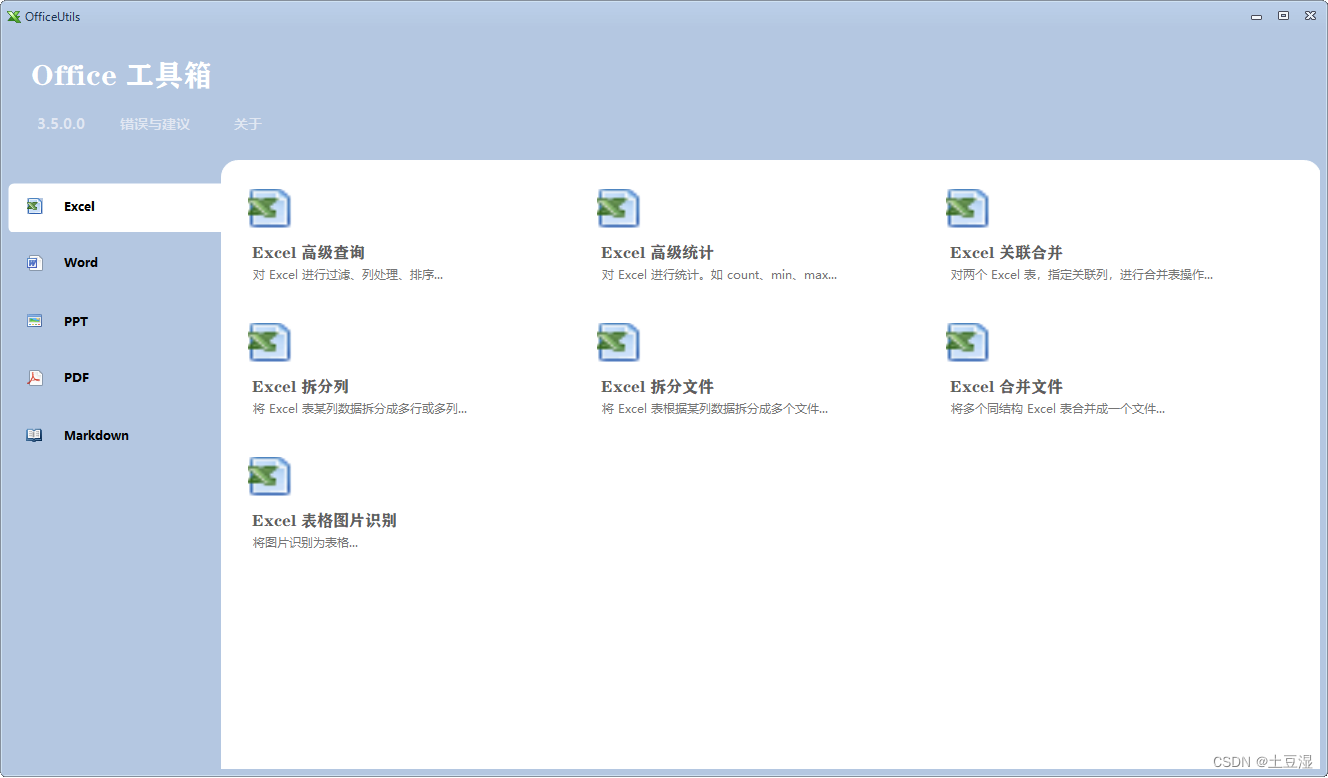
双击 OfficeUtils.exe 文件,打开软件。其首页如下,该软件提供了Excel/Word/PPT/PDF等文件的处理工具。点击相应图标即可弹出对应的向导窗口进行处理。
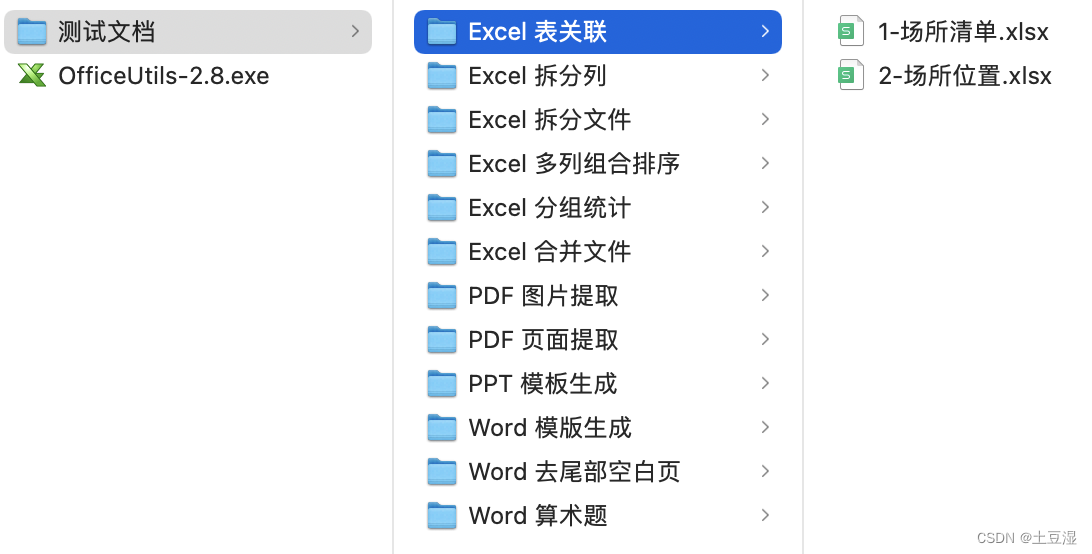
测试文档目录如下,供功能测试用:
三、使用帮助
本章节将根据文件类型进行分类,并描述 OfficeUtils 相关工具模块的功能。
3.1 Excel 工具
3.1.1 Excel 高级查询
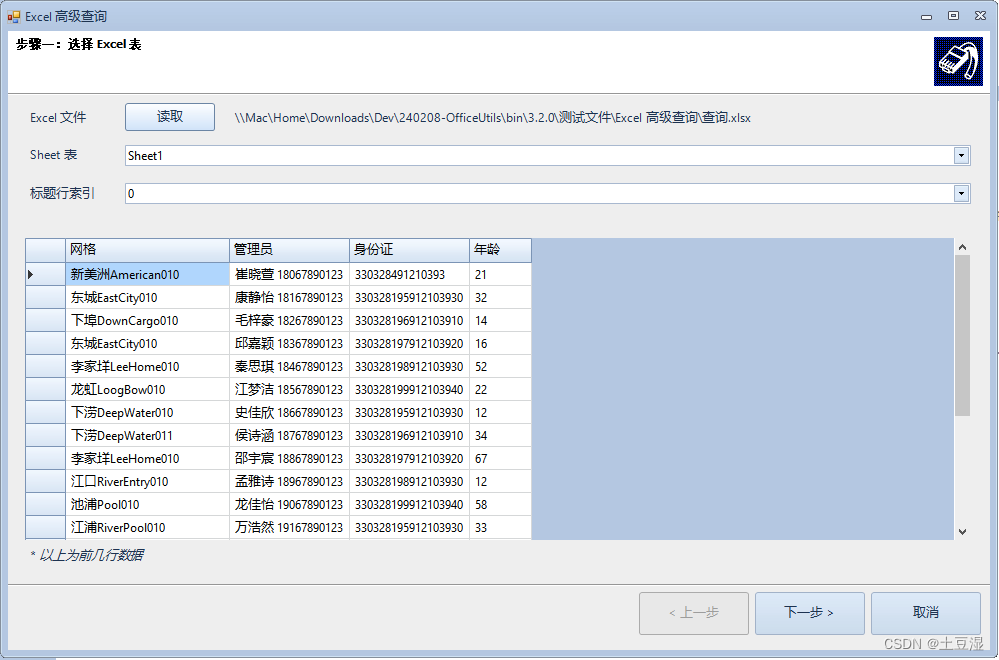
该工具 可对Excel表格进行条件过滤、多列排序、列处理等功能。如下图所示,选择Excel表后,会显示原始的表结构和少许数据,若表格解析无误,点击下一步。
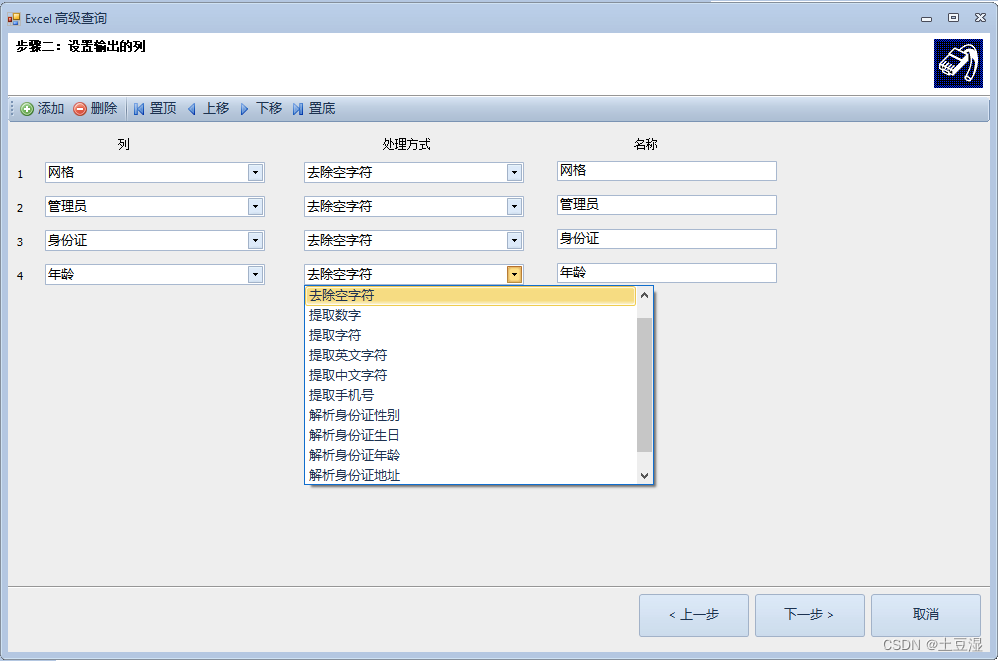
在此步骤中设置列的处理方式,如:去除空格、提取数字、提取数字求和、提取字符、提取英文字符、提取中文字符、提取手机号、转化为中文大写数字、解析身份证年龄、解析身份证生日、解析身份证男女、解析身份证籍贯等。并可设置的别称。
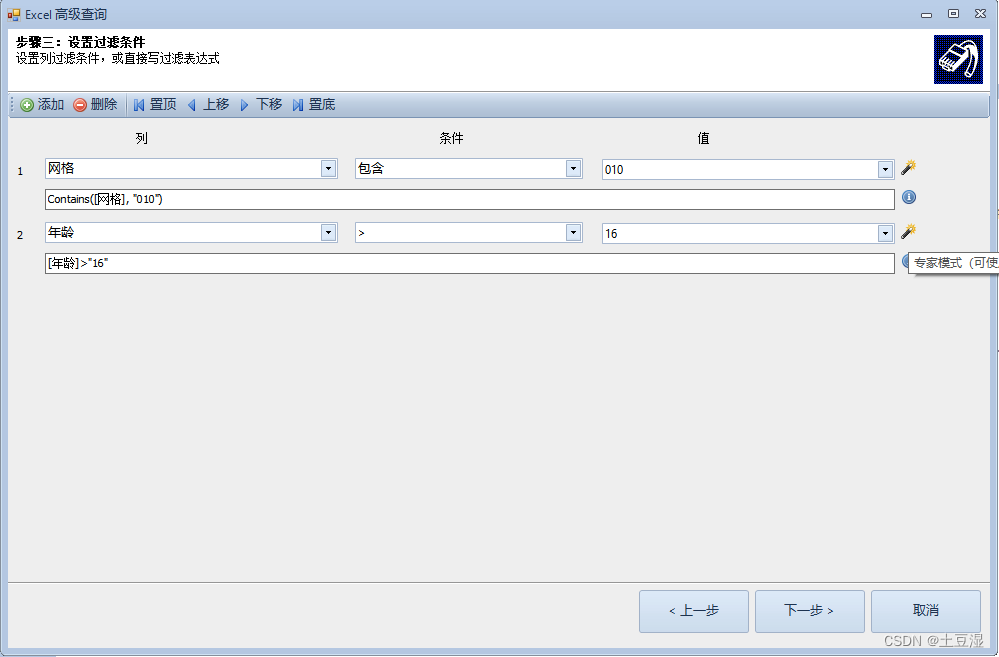
点击下一步,在该步骤可对数据进行条件过滤。点击右侧的“专家模式”会显示公式文本框,供书写更灵活的公式(公式清单)
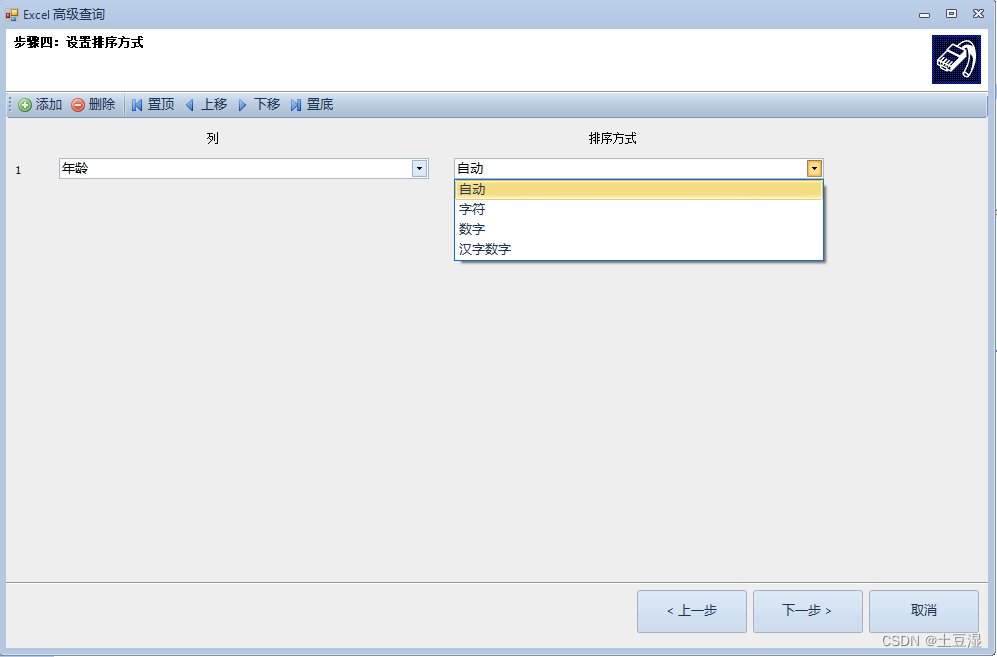
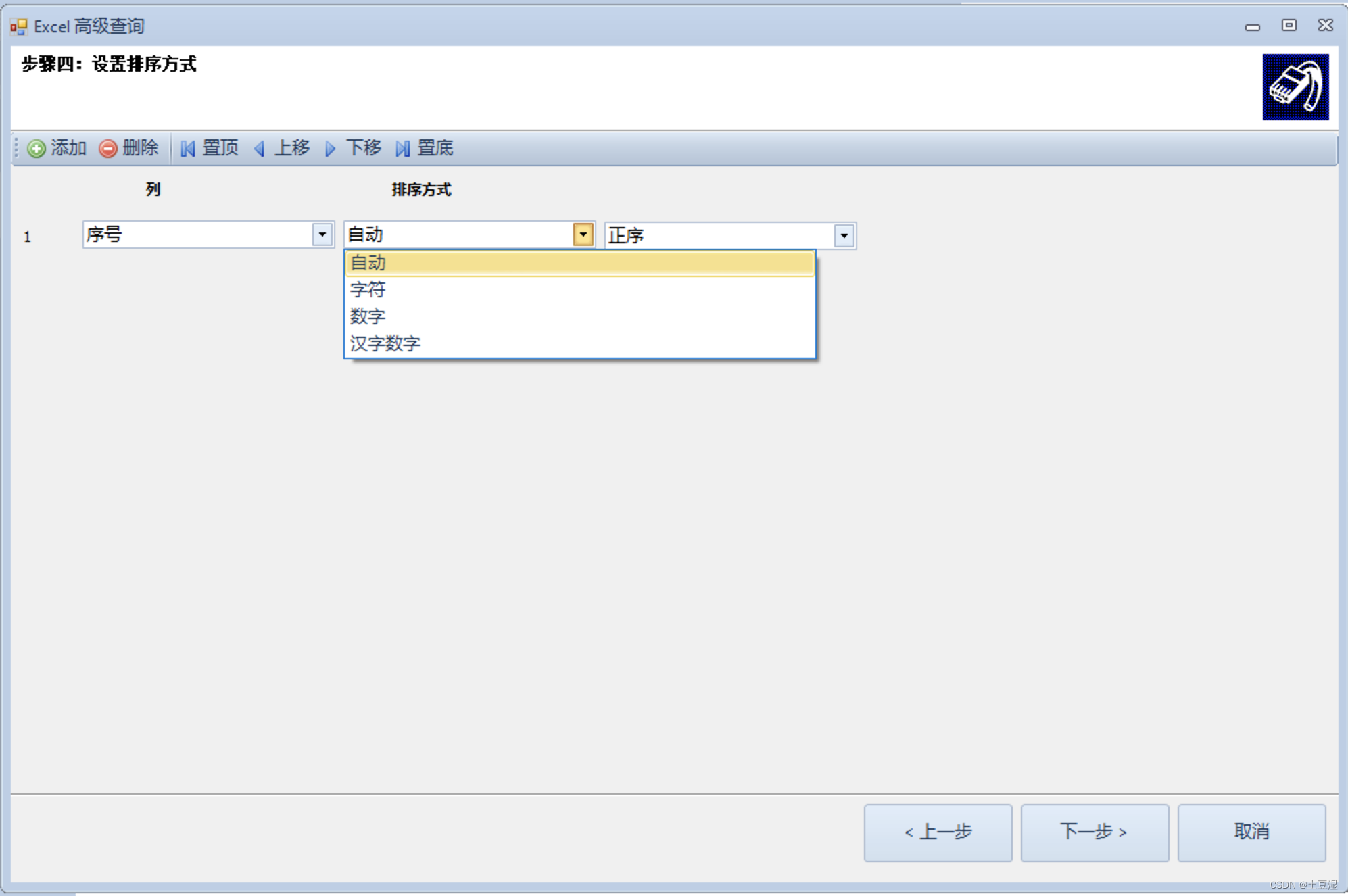
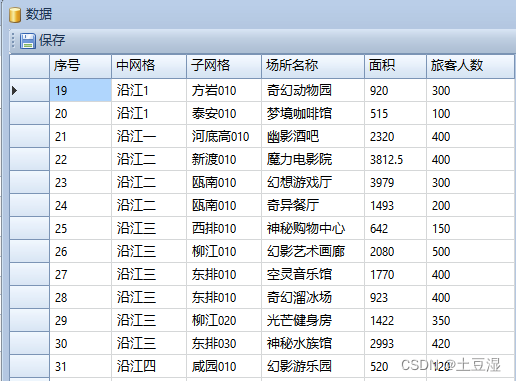
点击下一步,设置排序方式。在该步骤可多选几个列进行组合排序,并支持多种排序方式(如字符串数字、汉字数字),可对文本数字进行正确排序(如字符串“1、2、11“会正确排序,不会出现根据字符串顺序排序为“1、11、2”的现象),可以对中文大写数字进行正确排序(如一、二、三、四)。
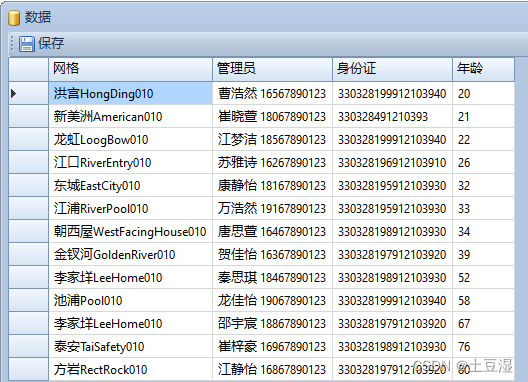
进行处理。处理结果如下:
3.1.2 Excel 高级统计
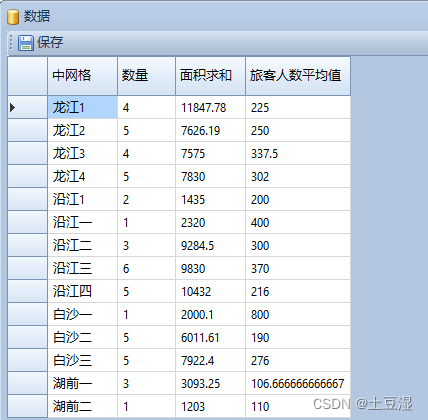
该工具可以对 Excel 文件多列进行组合统计,如下图,可统计示例文件中的中网格的场所数量和相关列的合计、最大值、最小值、平均值、方差。此外,换一种角度来说,该软件也是数据去重、提取数据唯一值的工具。
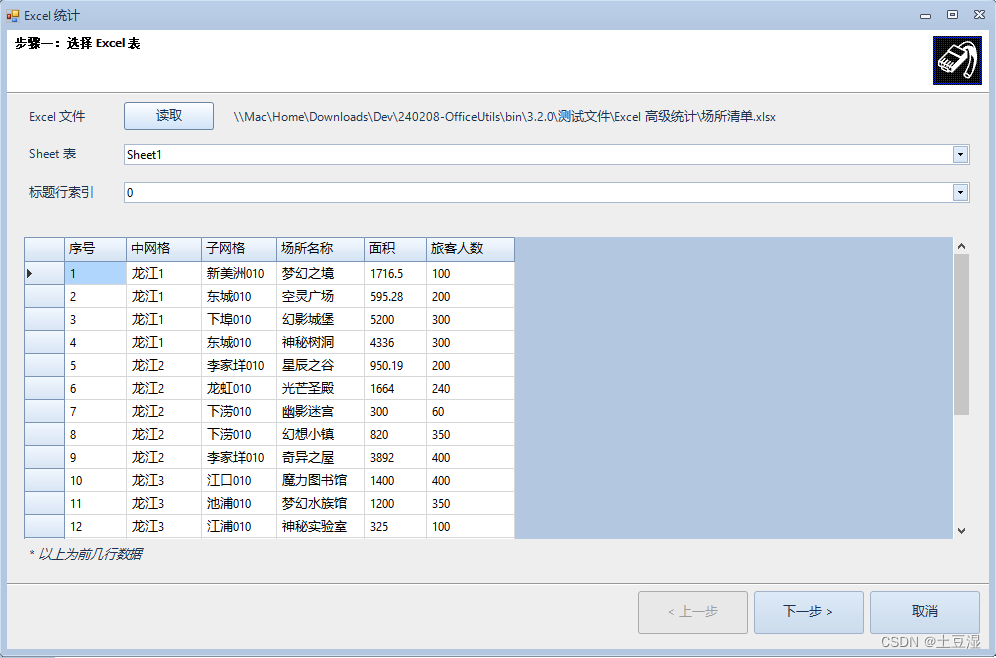
点击下一步
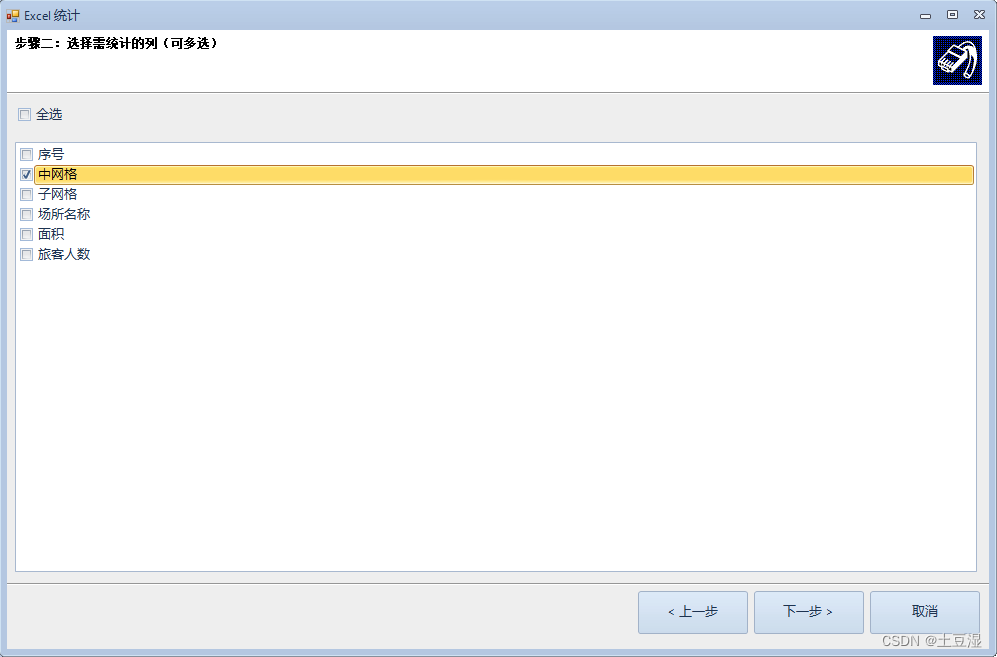
选择需要统计(唯一)的列,这里选择“中网格”,将根据中网格进行统计。点击下一步:
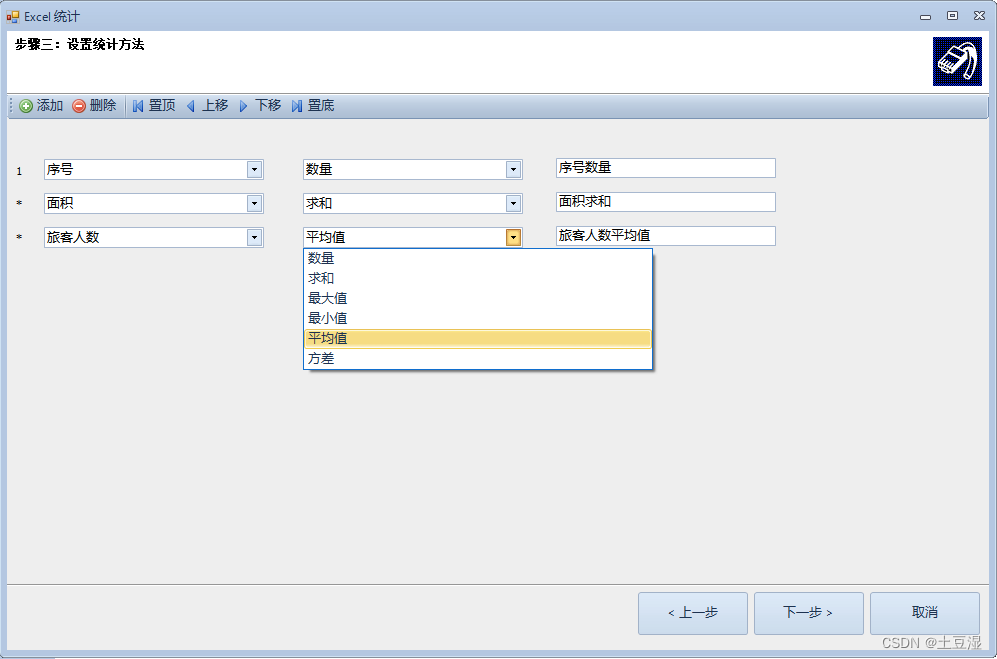
在该窗口中设置统计的方法,如:数量、求和、平均值、最大值、最小值、方差等。点击下一步开始处理并在弹出窗口中展示处理结果。
3.1.3 Excel 高级排序
该工具可对 Excel 的多列进行组合排序(该功能再3.2.0版本已合并到Excel高级查询工具中),支持字符串数字、汉字数字排序。如下图,可根据产品和手套芯颜色两个列进行组合排序。该工具也支持对文本数字进行正确排序(如字符串“1、2、11“会正确排序,不会出现根据字符串顺序排序为“1、11、2”的现象),可以对中文大写数字进行正确排序(如一、二、三、四)。
处理结果如下
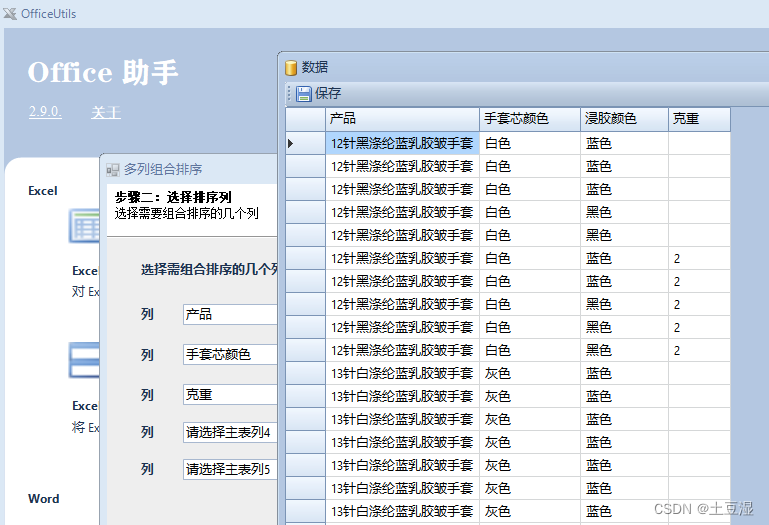
中英文数字混合排序示例
3.1.4 Excel 关联合并
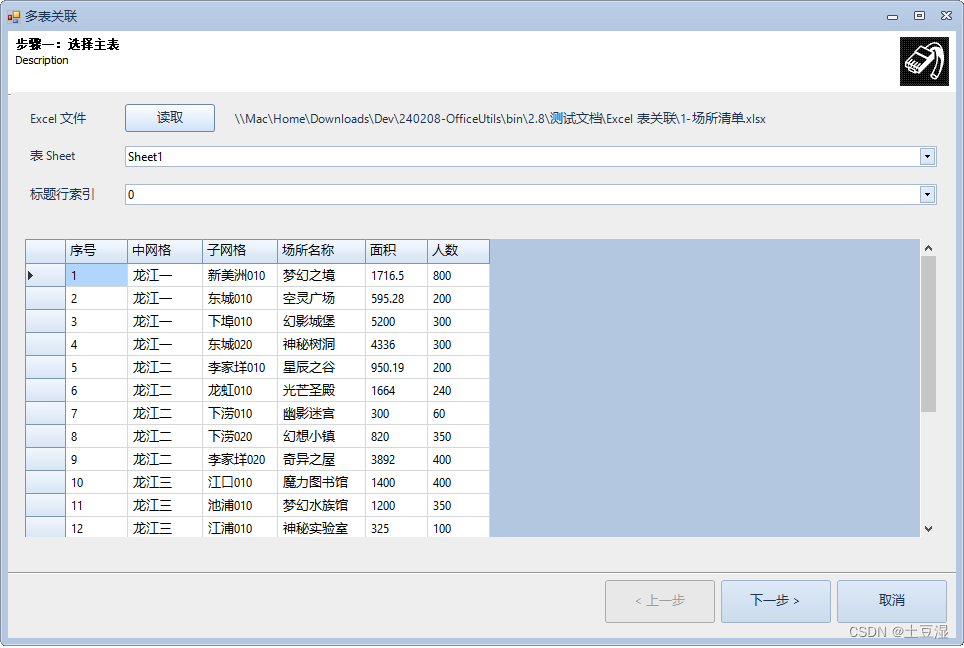
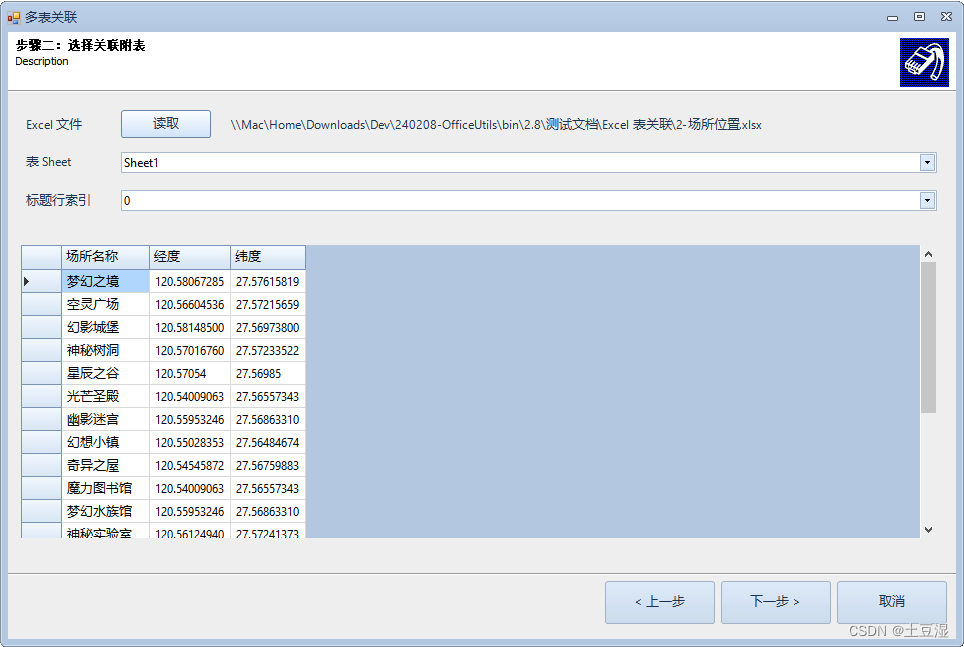
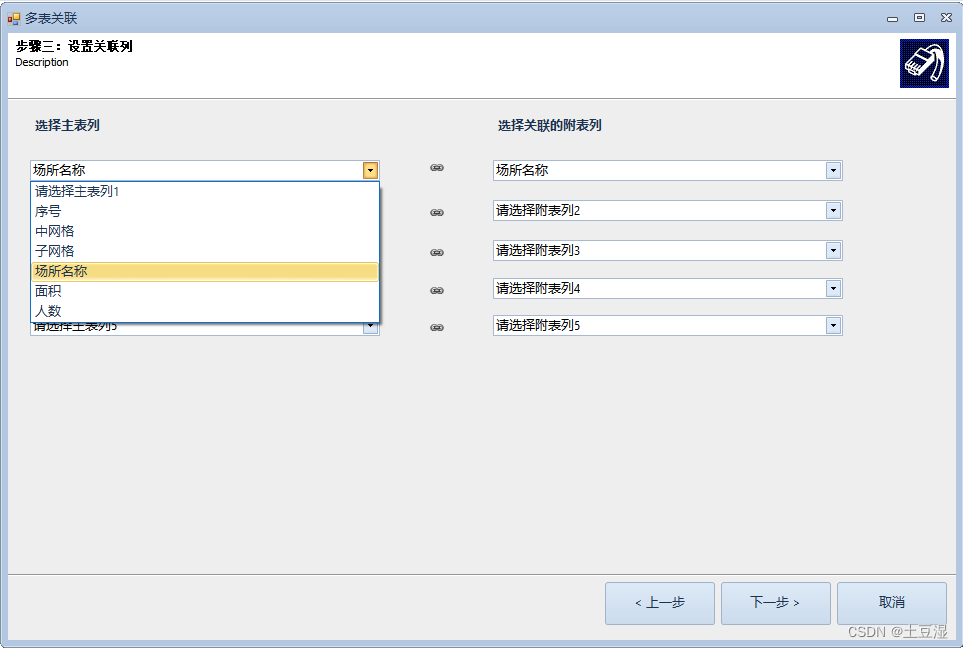
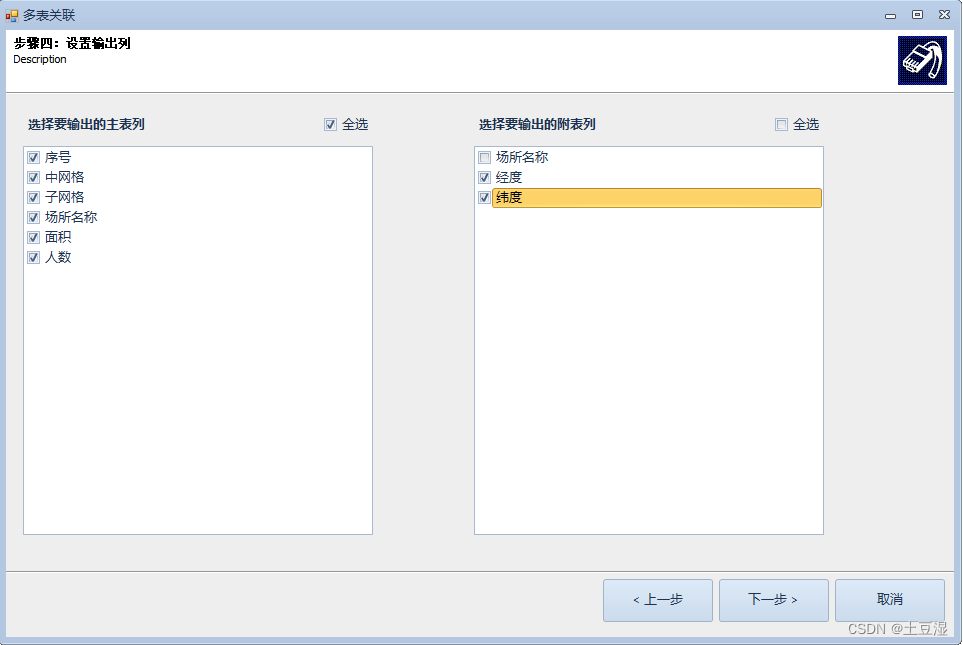
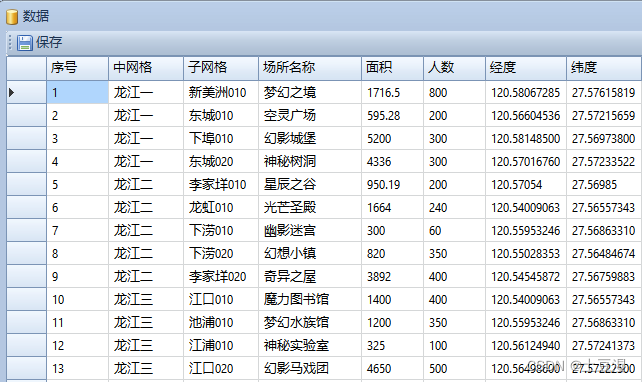
该工具可对两个表进行关联合并。如下图的示例文件,一个文件是场所清单,一个文件是场所位置(含经纬度信息),该工具可以将两个表,根据“场所名称“合并成一个文件,同时包含场所信息和经纬度信息。
(1)设置主表
(2)设置关联的附表
(3)设置关联关系。将主表的“场所名称”和附表的”场所名称“对应起来。
(4)设置输出的列。此处设置了主表的所有列和附表的“经度、纬度”两个列。
(5)处理。处理结果如下,这样就将两个表的数据关联合并起来了。
此外,“Excel关联合并工具”也是一种自定义排序规则的方案。我们工作中经常遇到,如考勤数据要根据科室和职务进行排序,那么我们可以维护一个科室人员表,再把科室人员表作为主表,考勤表作为副表,根据姓名进行关联,就可以实现自定义排序的考勤表了。
3.1.5 Excel 拆分列
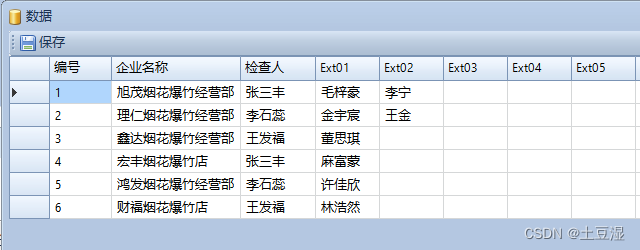
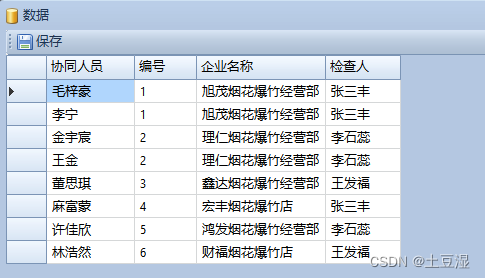
该工具可以对某个 Excel 列的数据进行拆分(该列数据由,、| 等符号分隔),可拆分成多列,或者多行。如下图,对“巡检协同人员“列进行解析拆分。
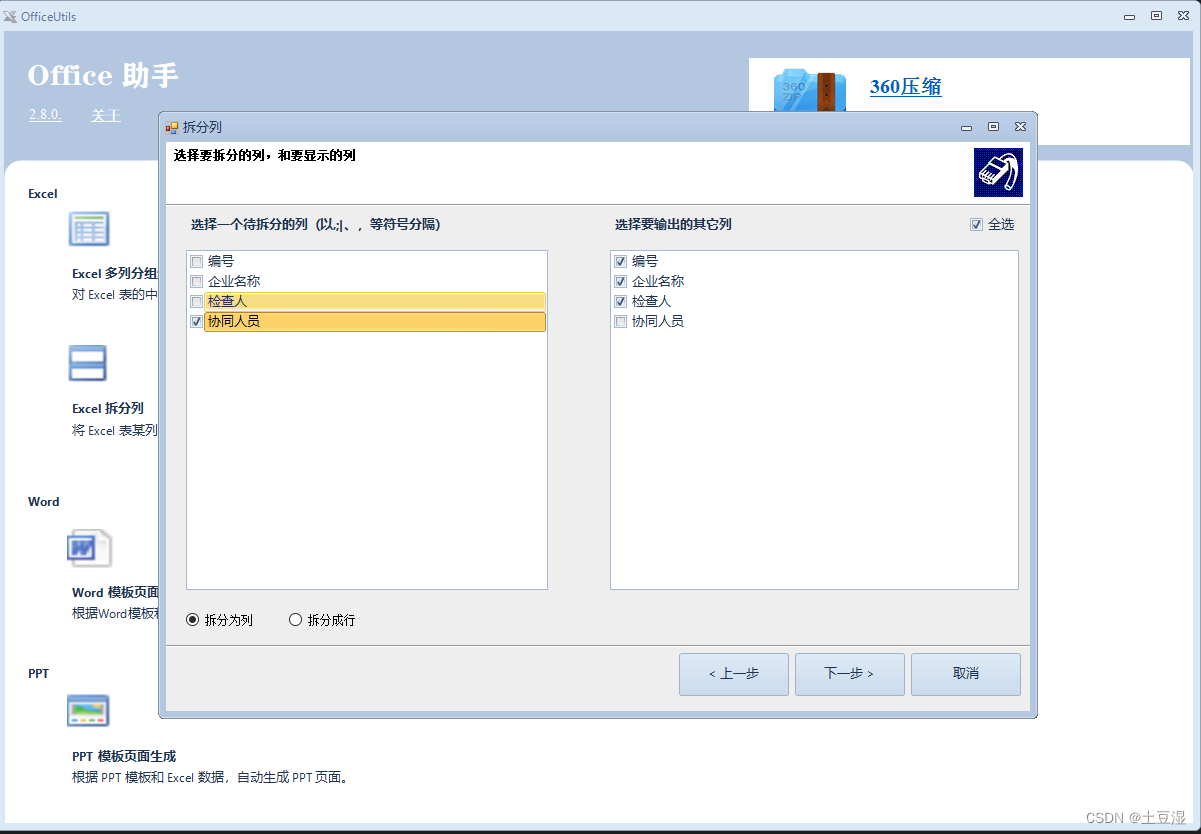
拆分成列的结果如下,它扩展列很多列,用于容纳拆分的数据。
拆分成行的结果如下,它将协同人员的数据拆分成多行,其它列的数据原样带入。该功能可用于制作透视表。
3.1.6 Excel 拆分文件
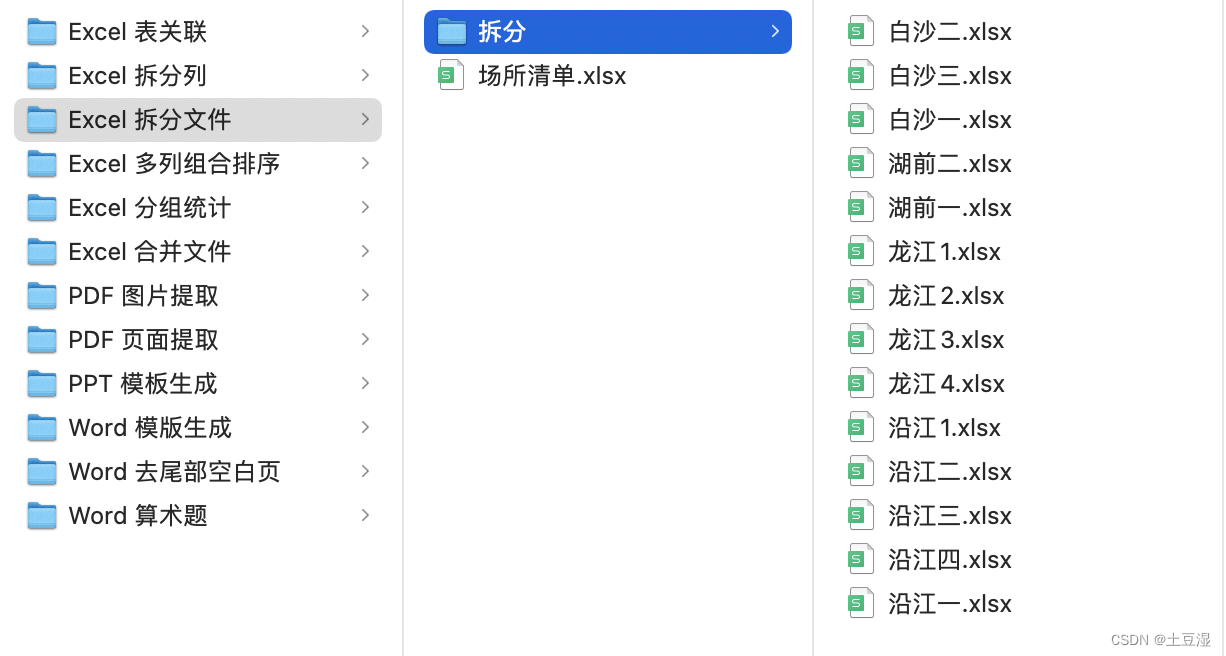
该工具可对一个大Excel文件,根据某个列的数据,拆分为多个文件或Sheet。该功能常用于数据分工采集处理,对一个大数据表进行拆分后,分派给多个人进行编辑。再使用3.1.6 的Excel 文件合并工具进行合并。
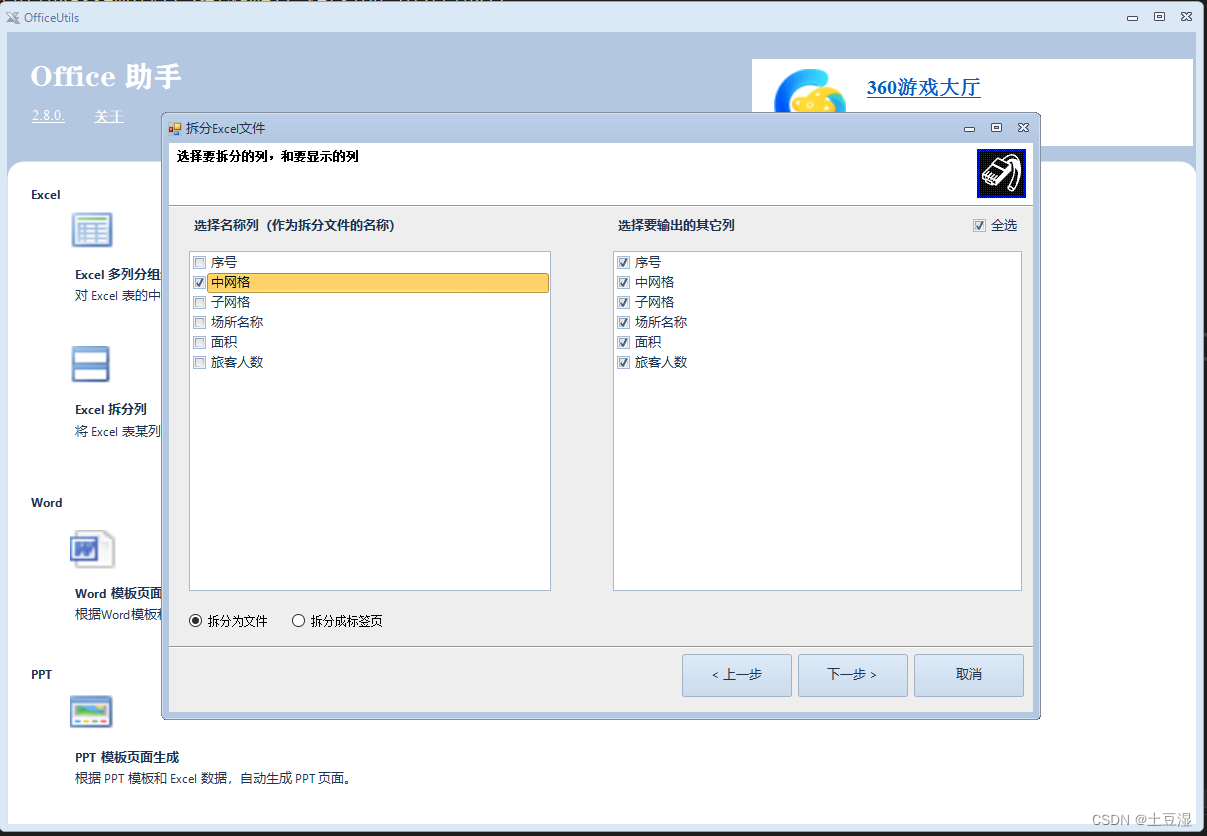
拆分成文件的结果如下:
拆分成Sheet的结果如下:
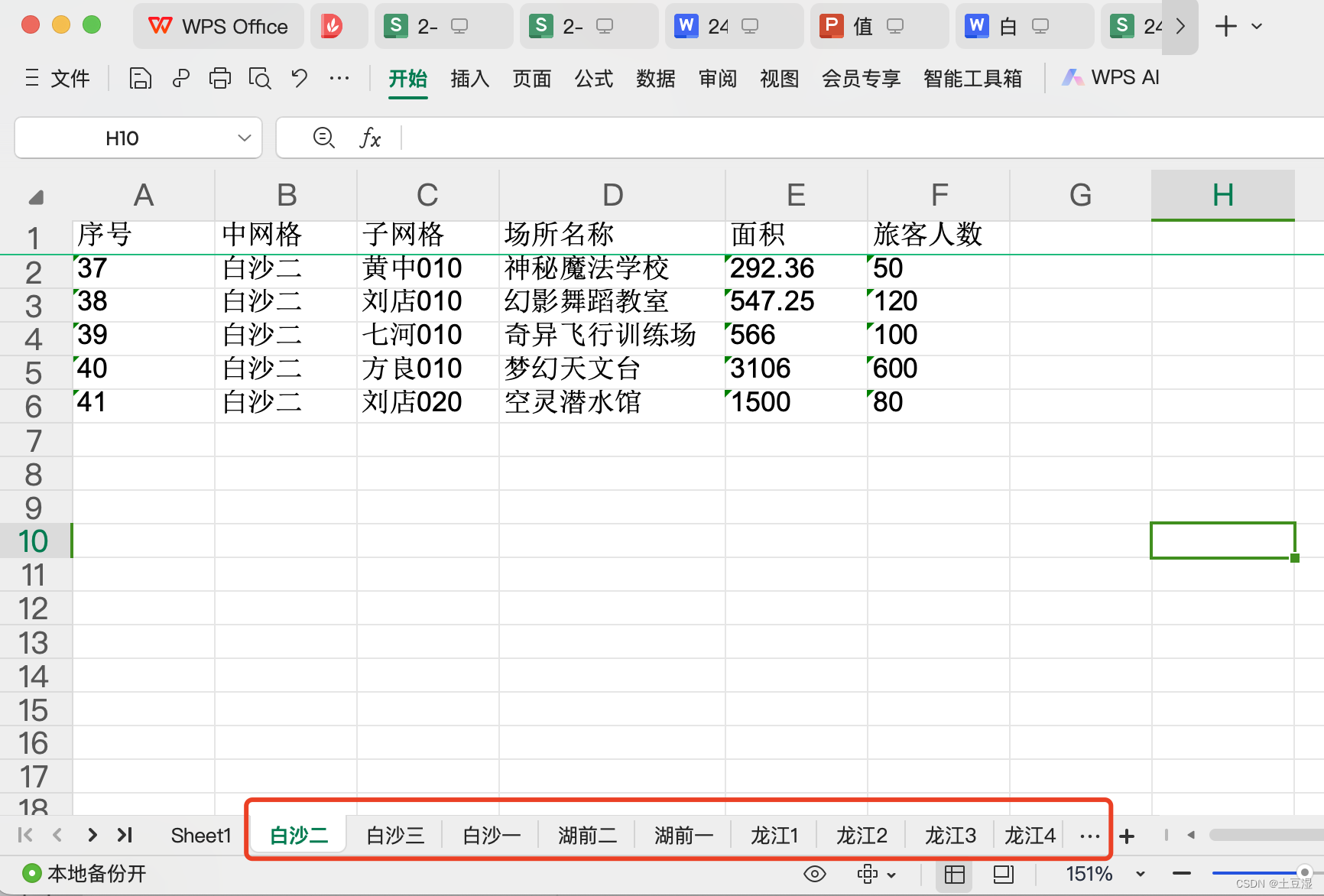
3.1.7 Excel 合并文件
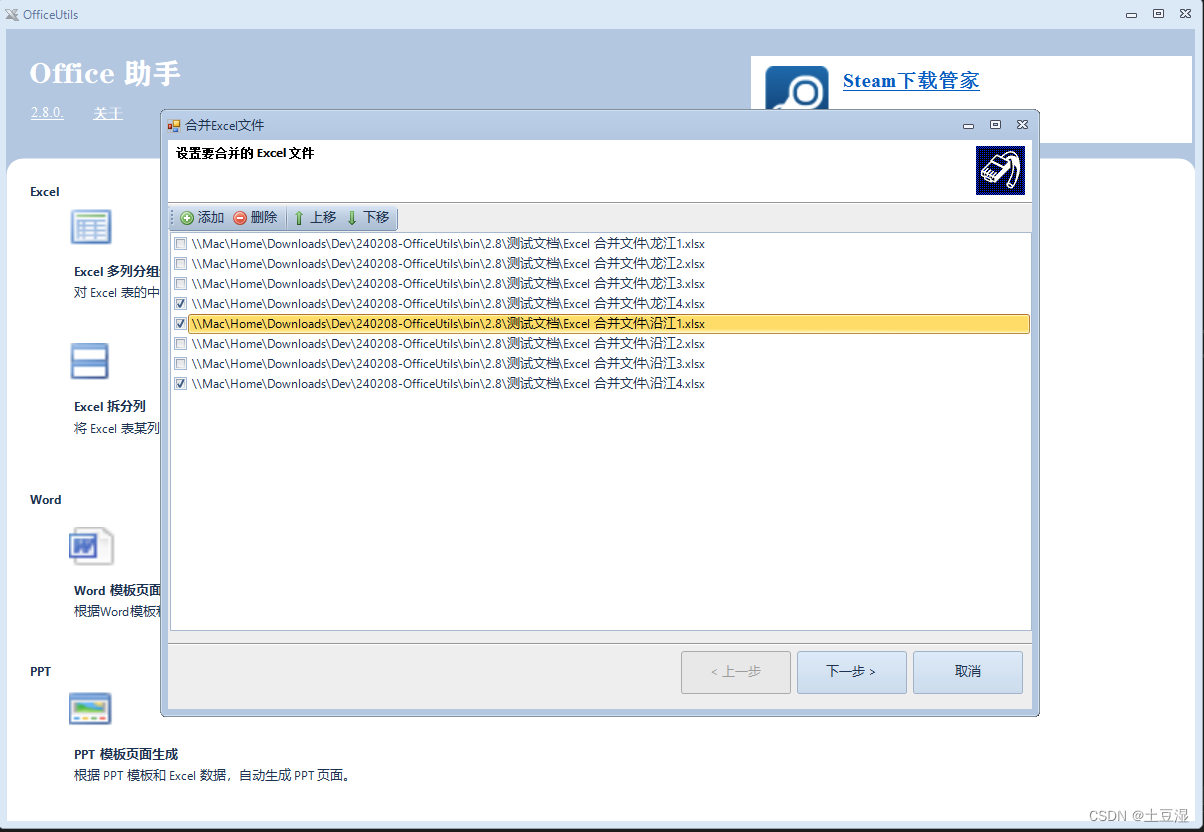
该工具可对同结构(带相同标题行)的 Excel 文件(及内部的所有Sheet)进行合并。如下图所示,可在该工具中添加、删除、排序需要合并的 Excel 文件,一键将该清单合并成一个大的 Excel 文件。
3.1.8 Excel 表格图片识别
该工具可将表格图片识别为Excel。如下图所示,选择好图片后:
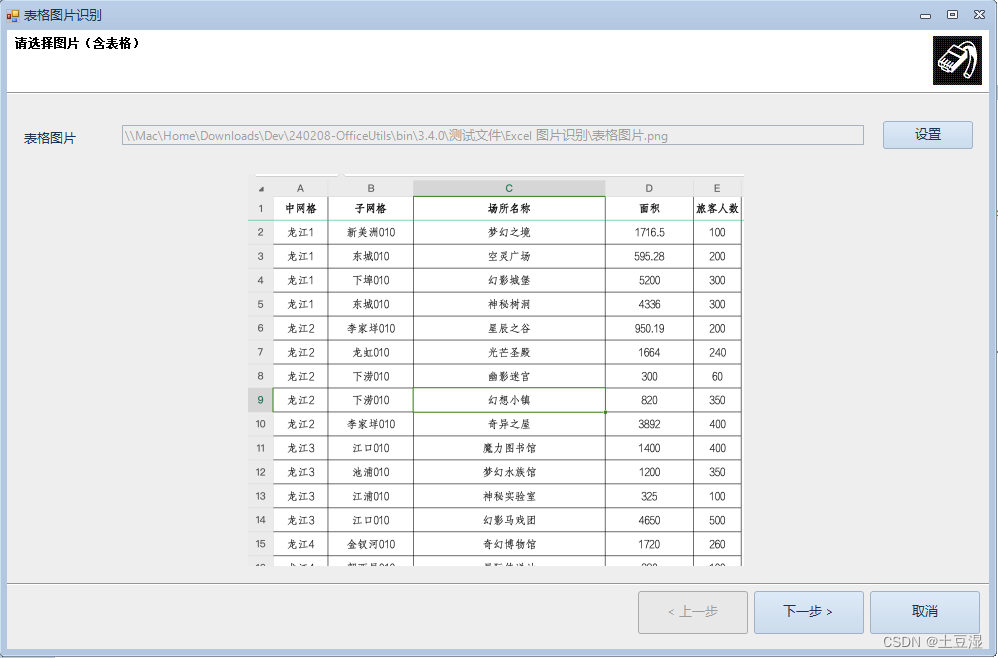
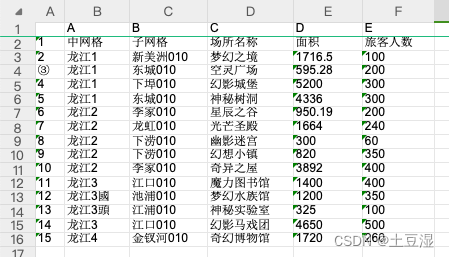
点击下一步,设置好输出excel文件后,处理。处理完毕后会自动打开识别好的文件:
3.2 Word 工具
3.2.1 Word 模版文件生成
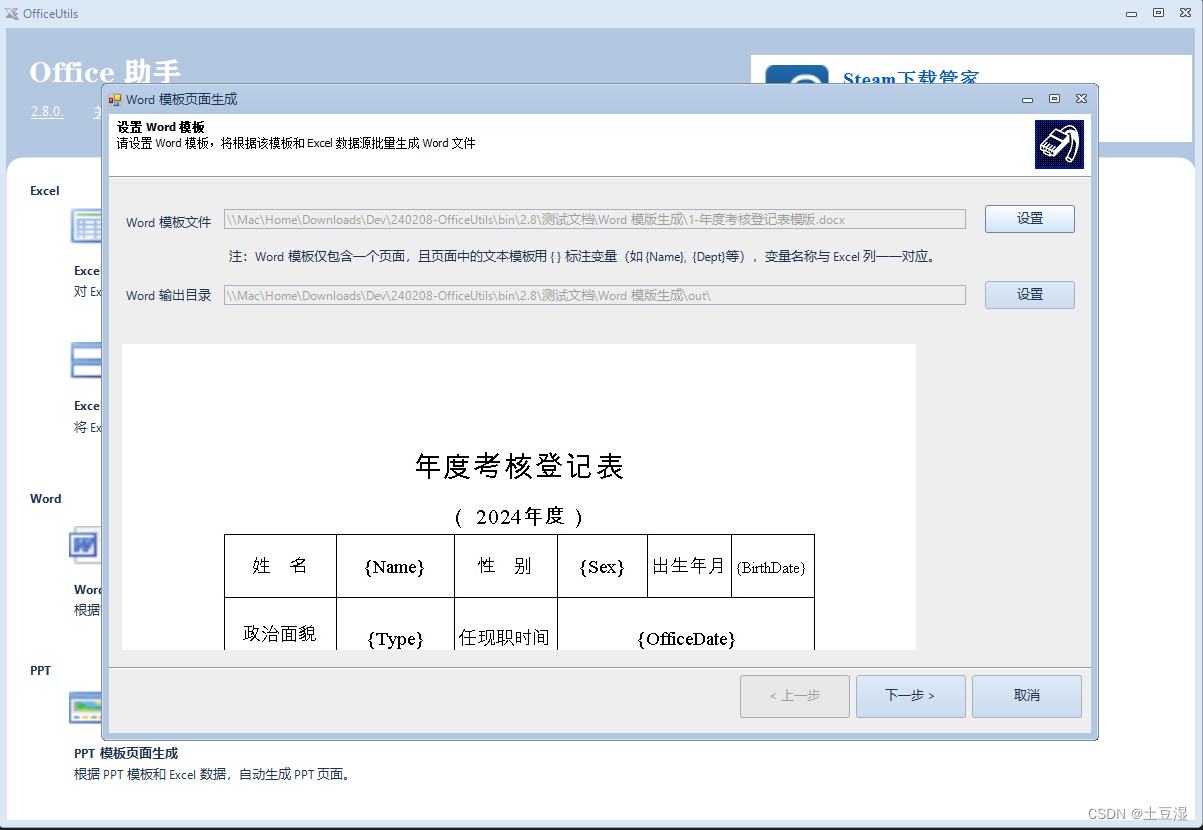
该工具可根据 Word 模版和 Excel 数据文件,批量生成一批 Word 文件。模版文件中,可用**{变量}** 方式定义变量,该变量的名称要和 Excel 中的列一一对应。
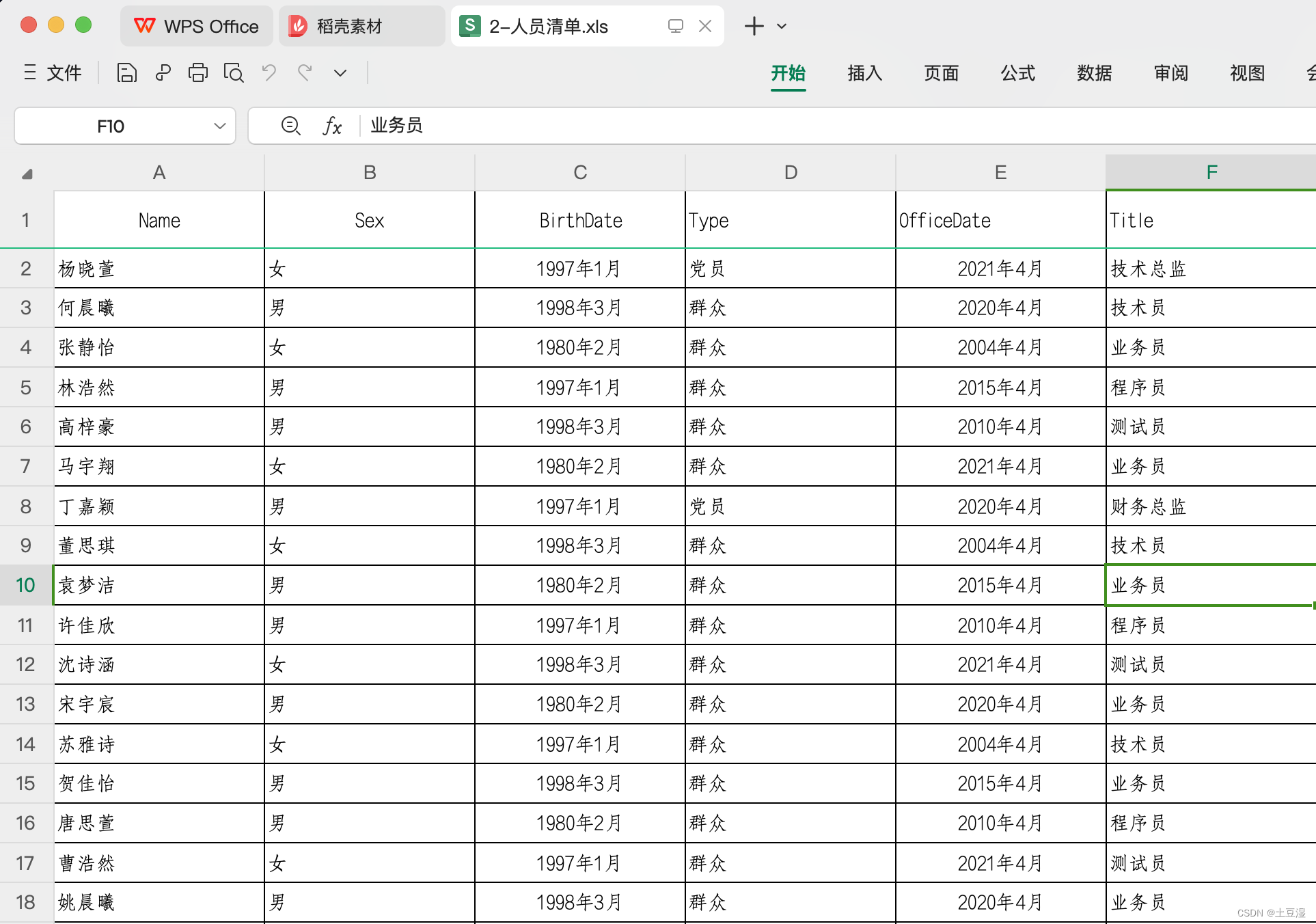
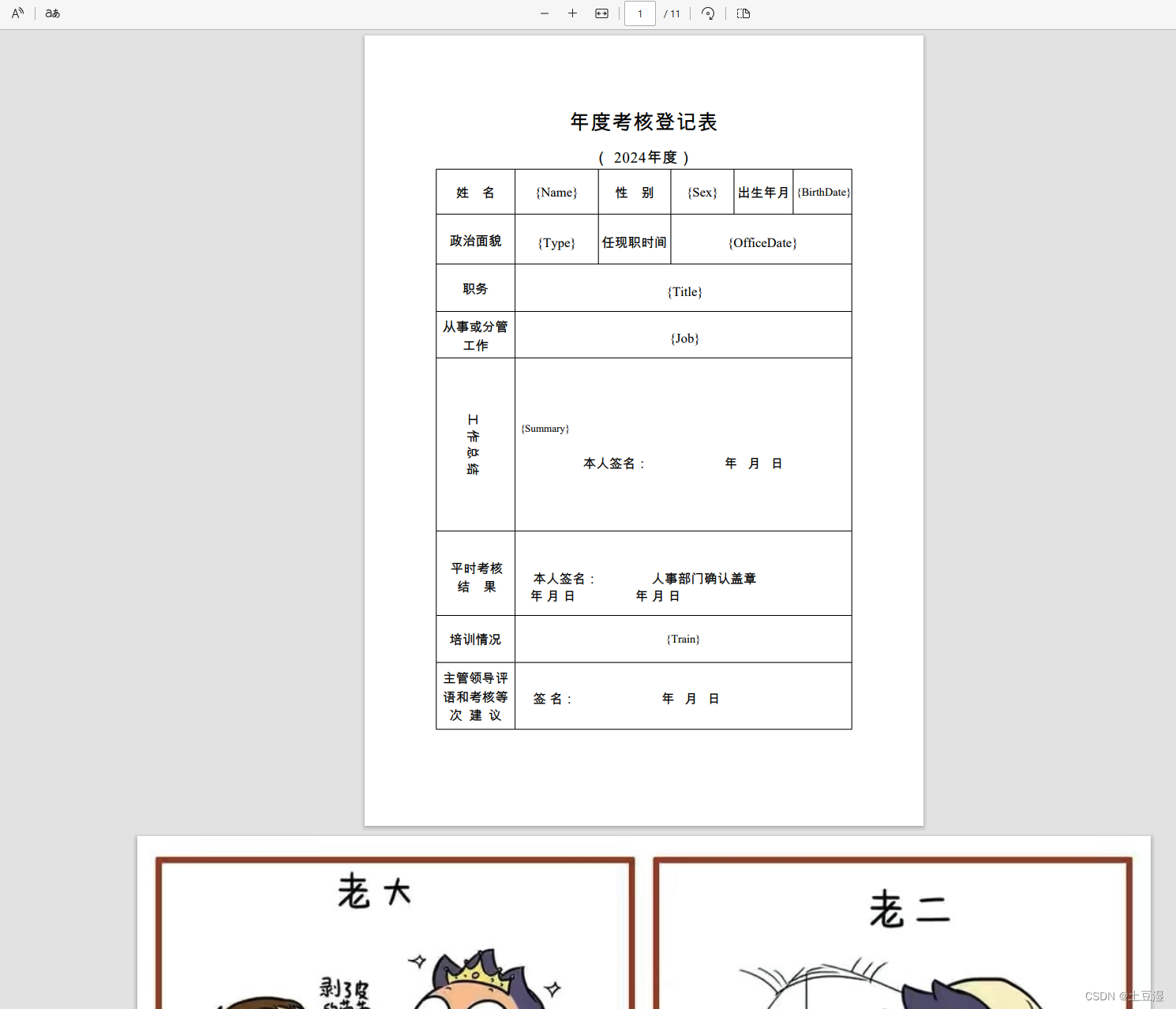
第一步设置模版文件。如下图,可根据一个年度考核登记表模版文件和对应的部门人员 Excel 文件,批量生成部门的年度考核表。如模版文件中,定义了一个 {Name} {Sex} {BirthDate} 等模版变量,对应的 Excel 文件中相应的数据列,配置好后,该工具会循环遍历 Excel 数据,填入模版生成一批 Word 文件。
第二步设置数据来源(excel文件)
第三步配置其它参数,如文件名列、文件格式。

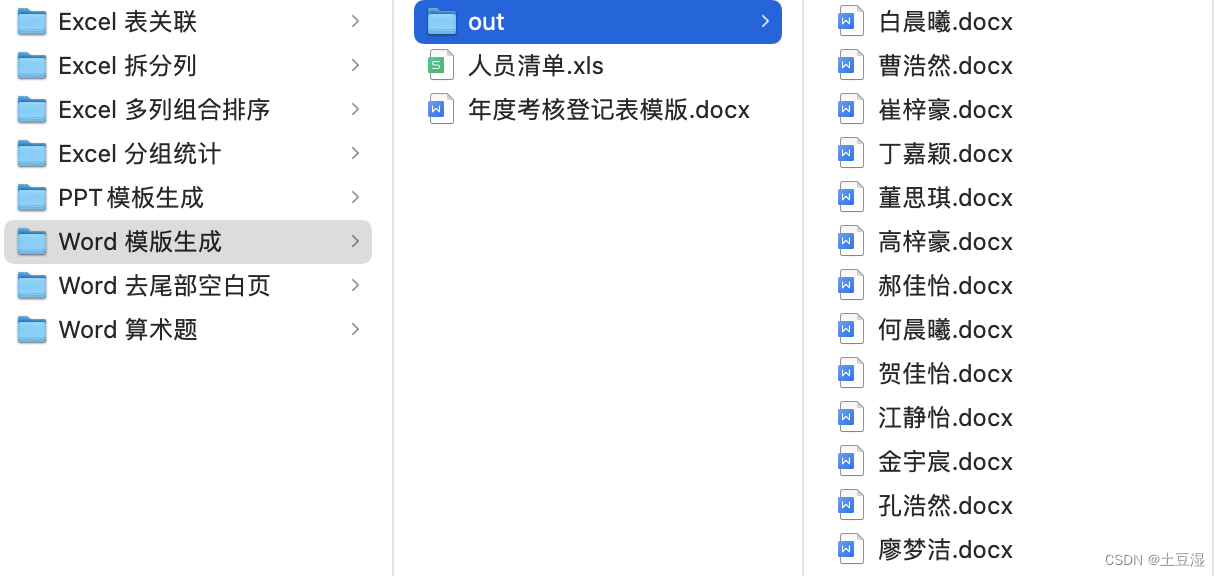
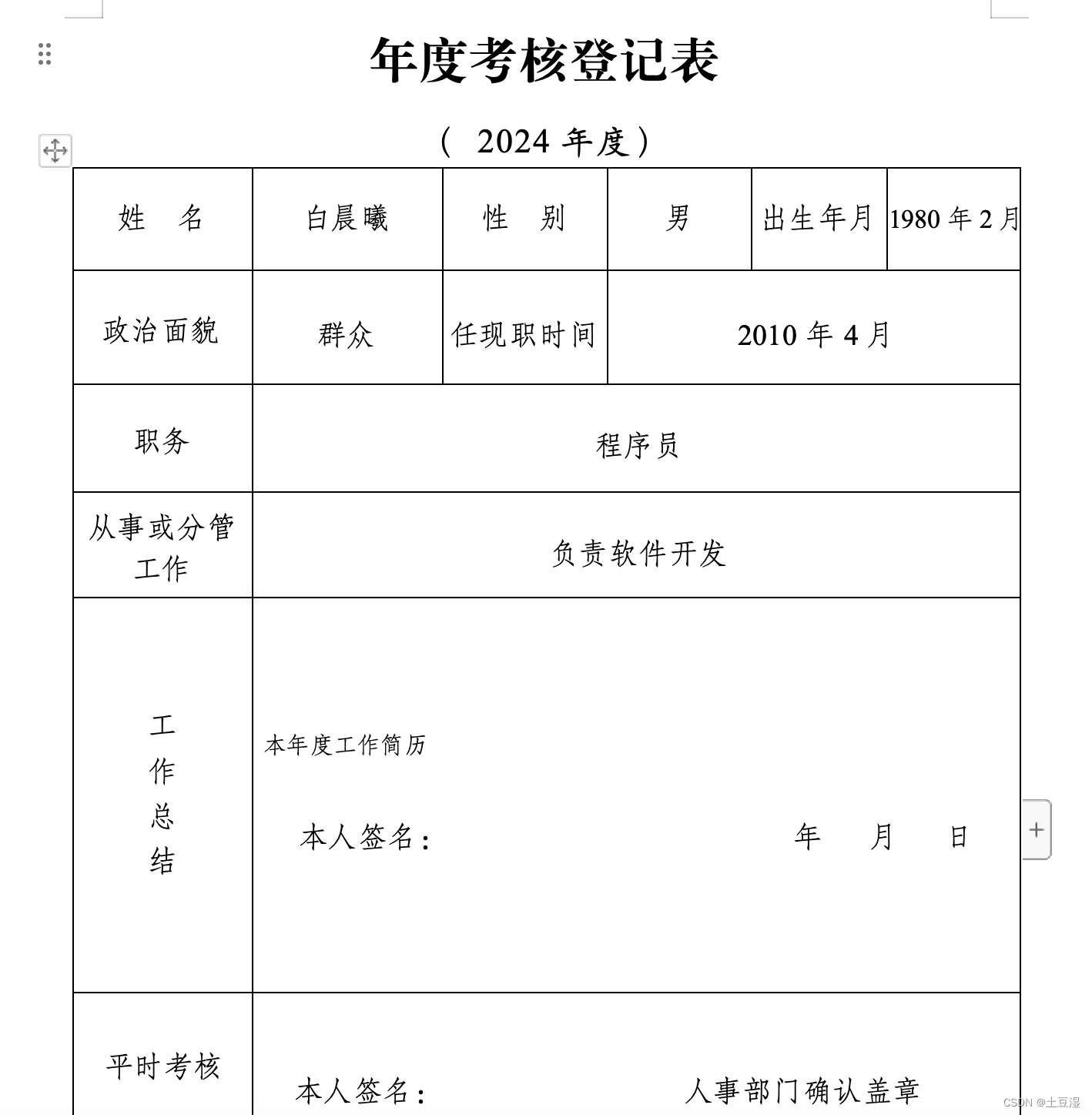
OK,生成的结果如下:
3.2.2 Word 文档合成
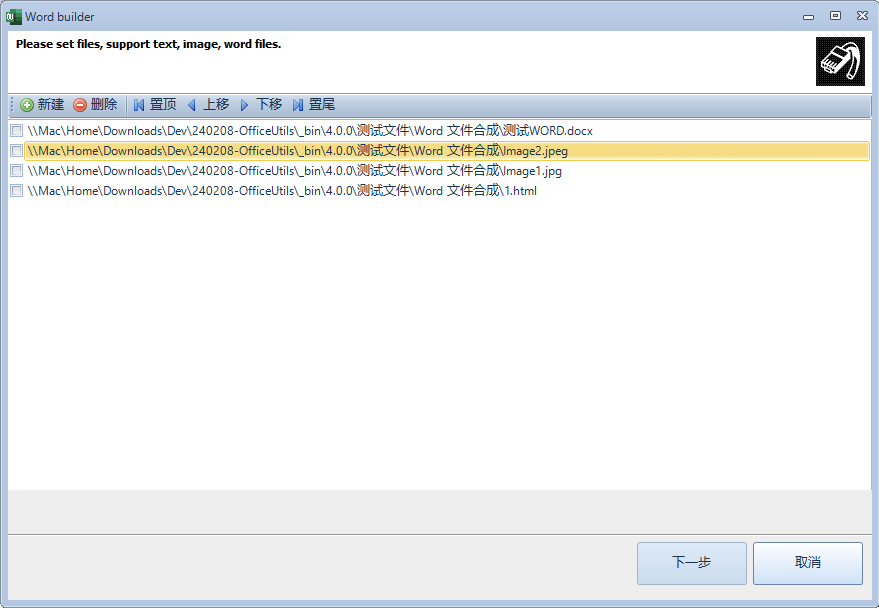
该工具可将文本、图片、word文件合成一个大的 Word 文档。如下图所示,在第一步批量新增需要合并的文件,并可以调整这些文件的顺序。点击下一步即可合成一个大的word文档。
3.2.3 Word 口算题生成器
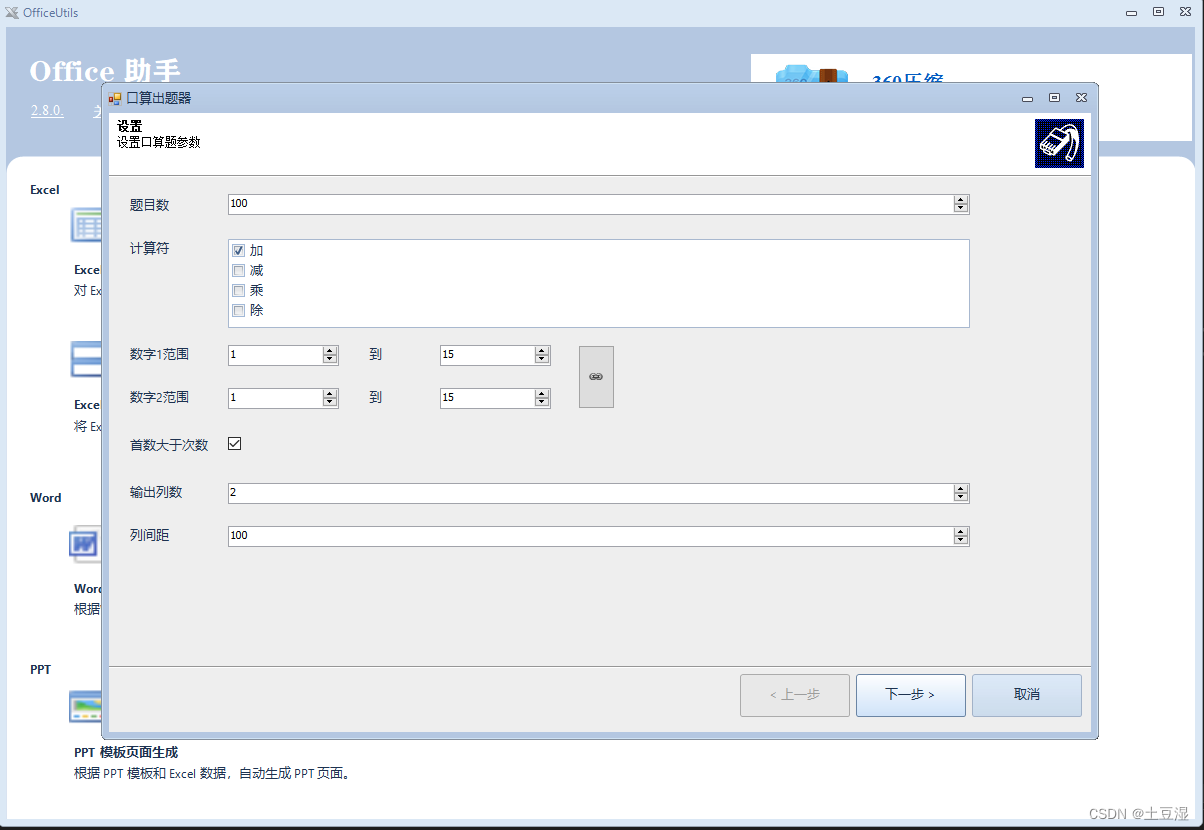
该工具可批量生成口算题 Word 文档。如下图所示,可以设置题目的数量、计算符号(加减乘除)、数字的范围、首数是否大于次数、输出Word的列书、排版的参数等信息,自动生成口算Word文件。鸡娃神器。
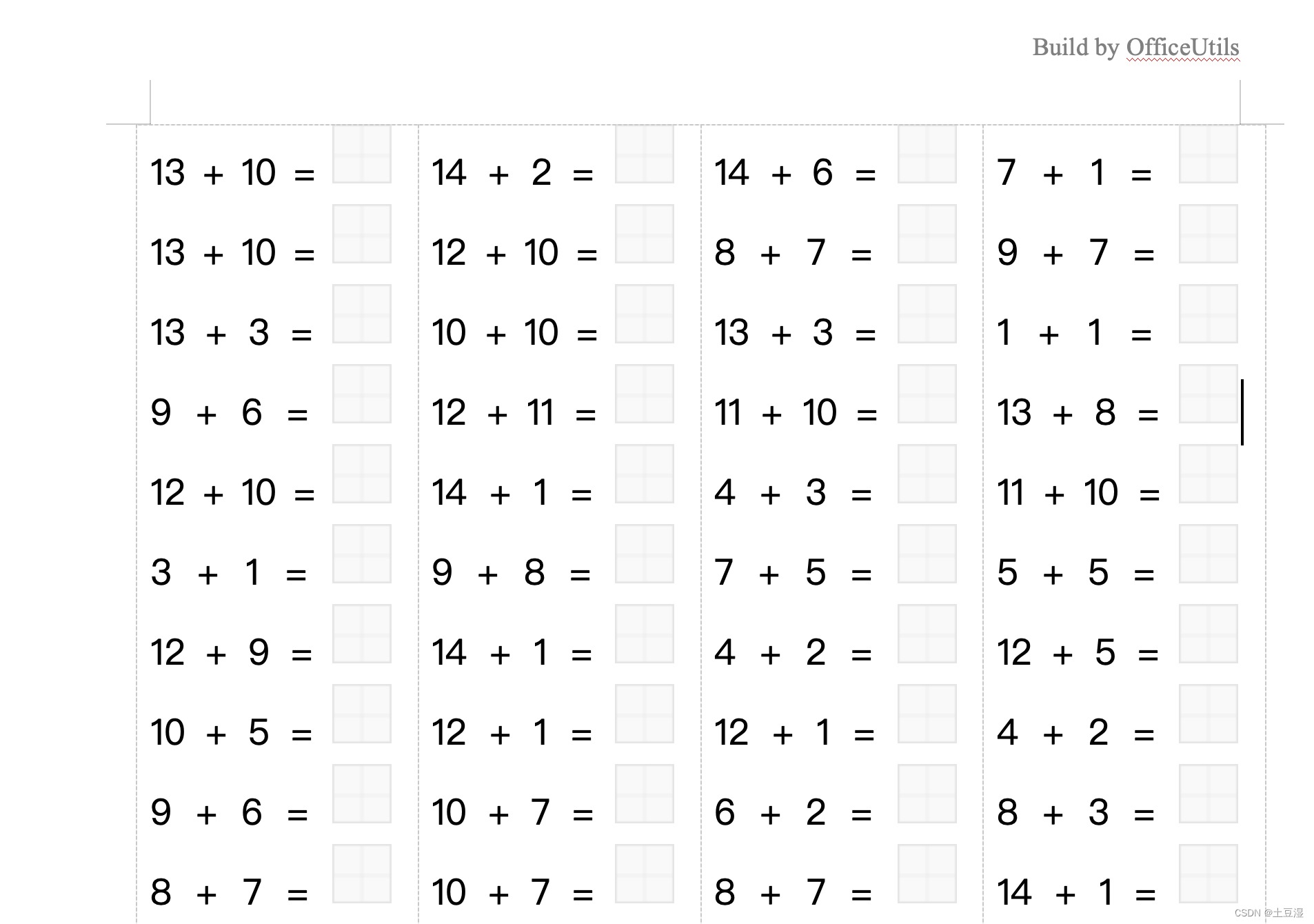
生成的算术题Word如下,排版都排好了,可直接打印:
3.3 PPT 工具
3.3.1 PPT 模版页面生成
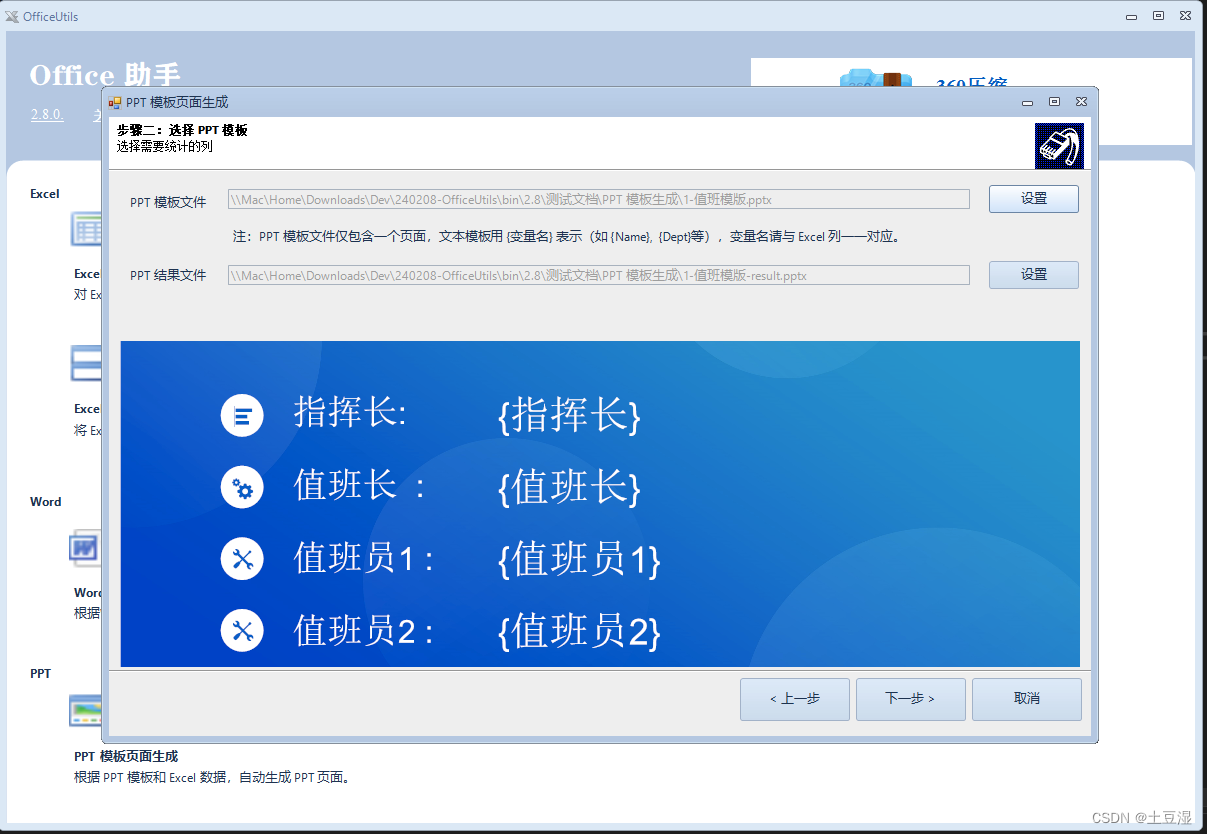
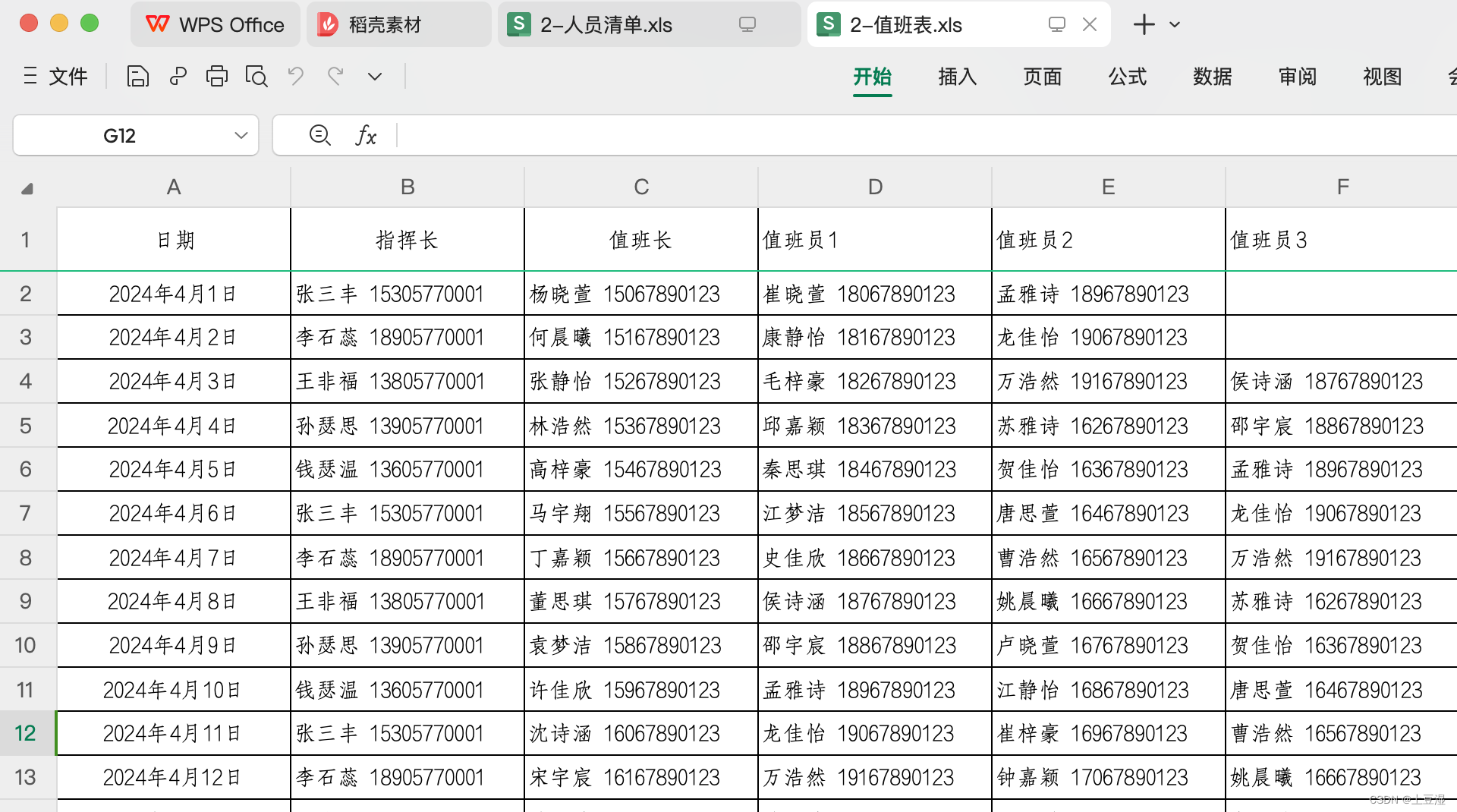
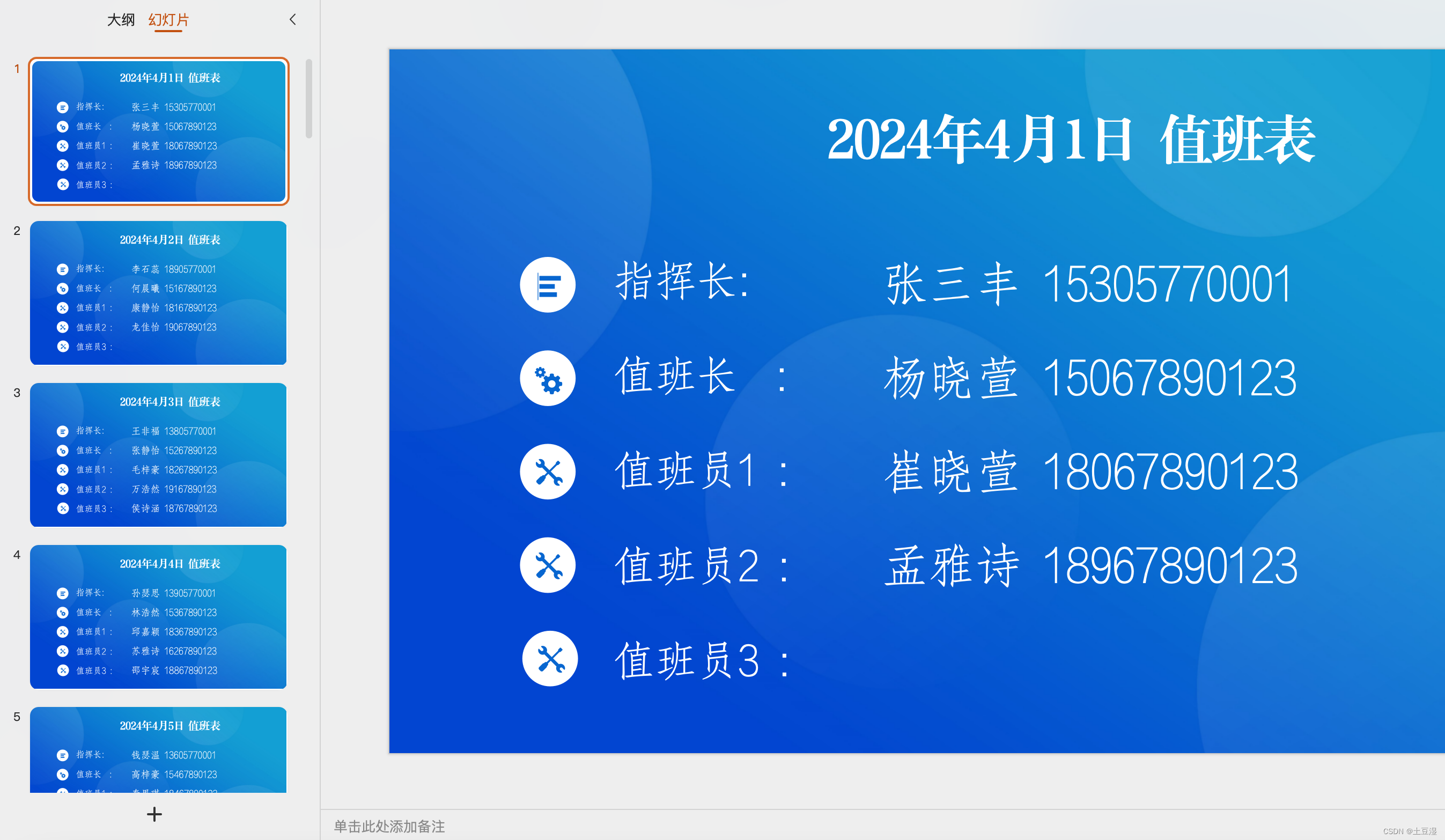
该工具和前面的“Word模版文件批量生成”比较类似,可根据 PPT 模版文件和 Excel 数据文件,批量生成 PPT 页面。如下图,有一个PPT 值班模版,和一个值班表 Excel文件,配置好后就可以自动生成一个月的值班PPT页面。
组合生成的结果如下
3.4 PDF 工具
3.4.1 PDF 转 Word
该工具可将 PDF 文件逆转化为 Word 文件。
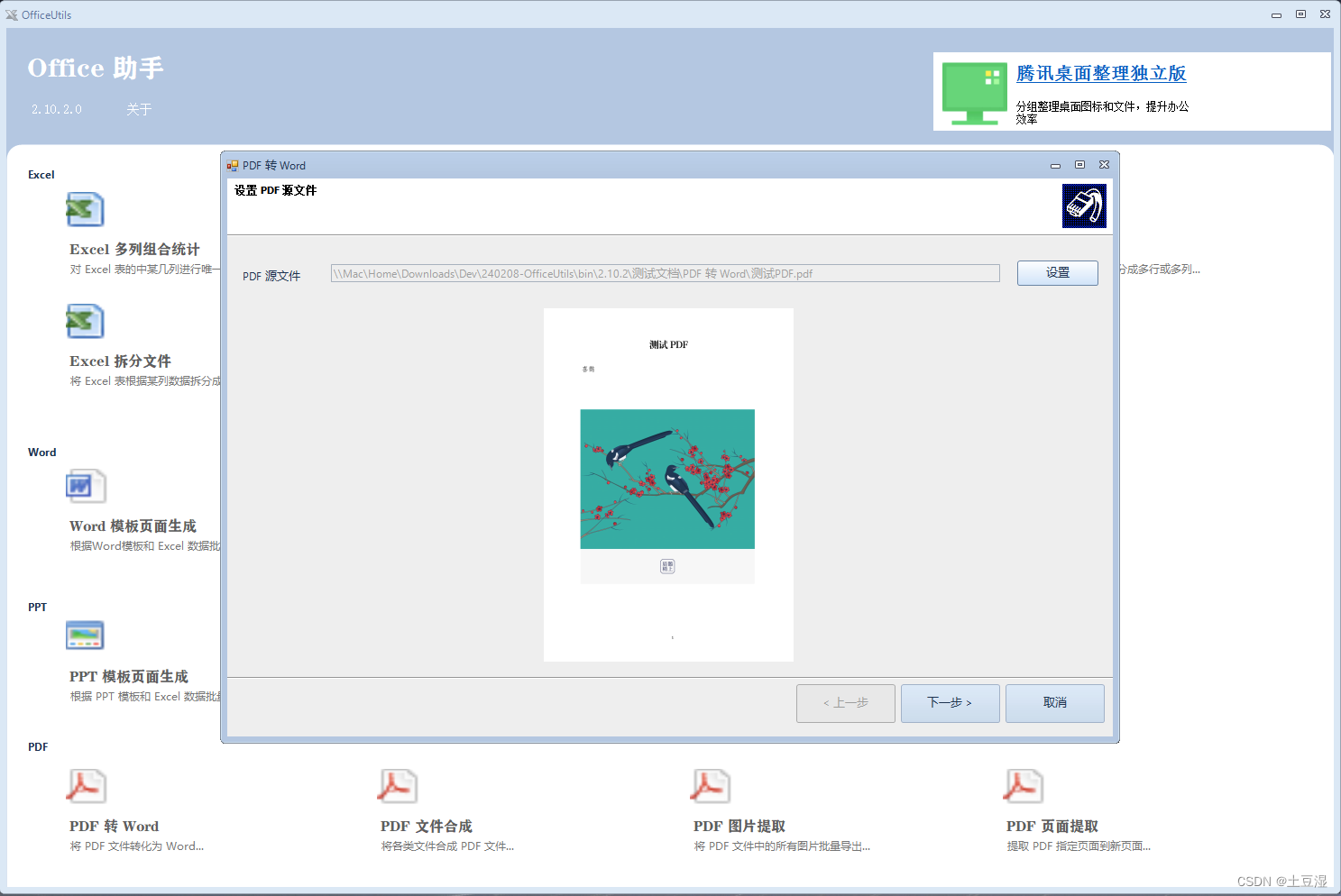
转化后的 Word 文档如:

3.4.2 PDF 文件合成
该工具可将各类文件合并成一个PDF文件,支持的文件格式有:jpg, jpeg, png, tif, tiff, bmp, doc, docx, ppt, pptx, pdf 等。
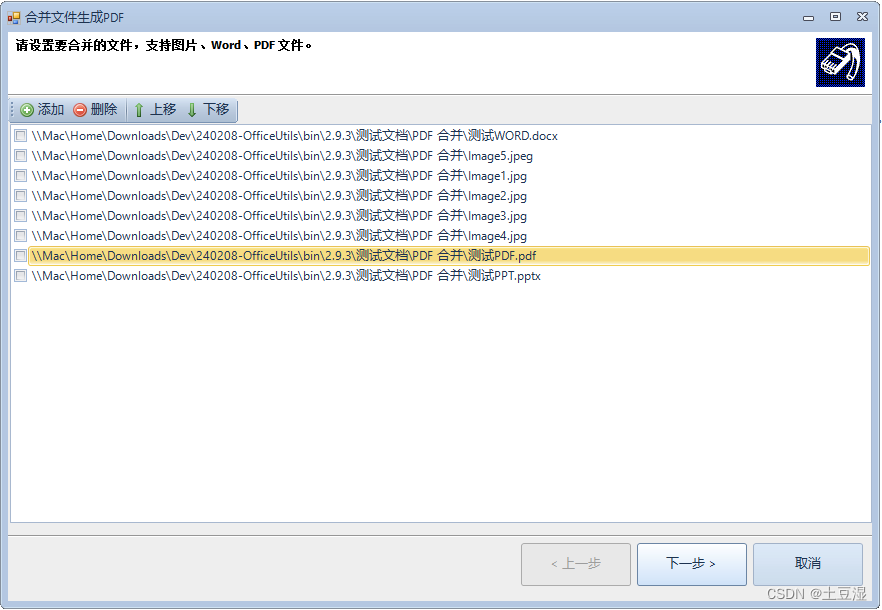
生成结果如
3.4.3 PDF 图片提取
该工具可将PDF文件中的图片批量提取出来。如下图所示,示例文件中有5张图片,均可以一次性导出。
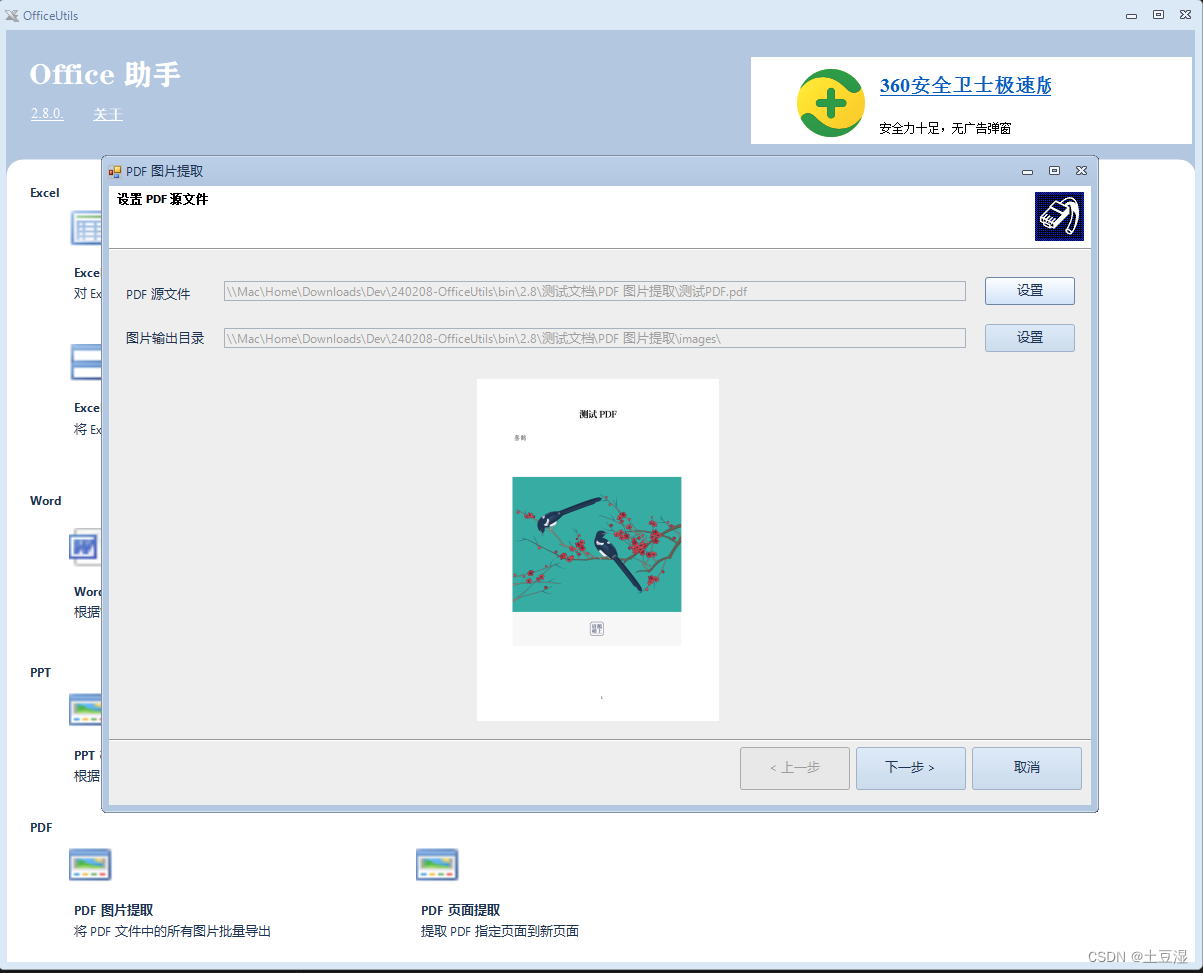
导出的图片列表如:

3.4.4 PDF 页面提取
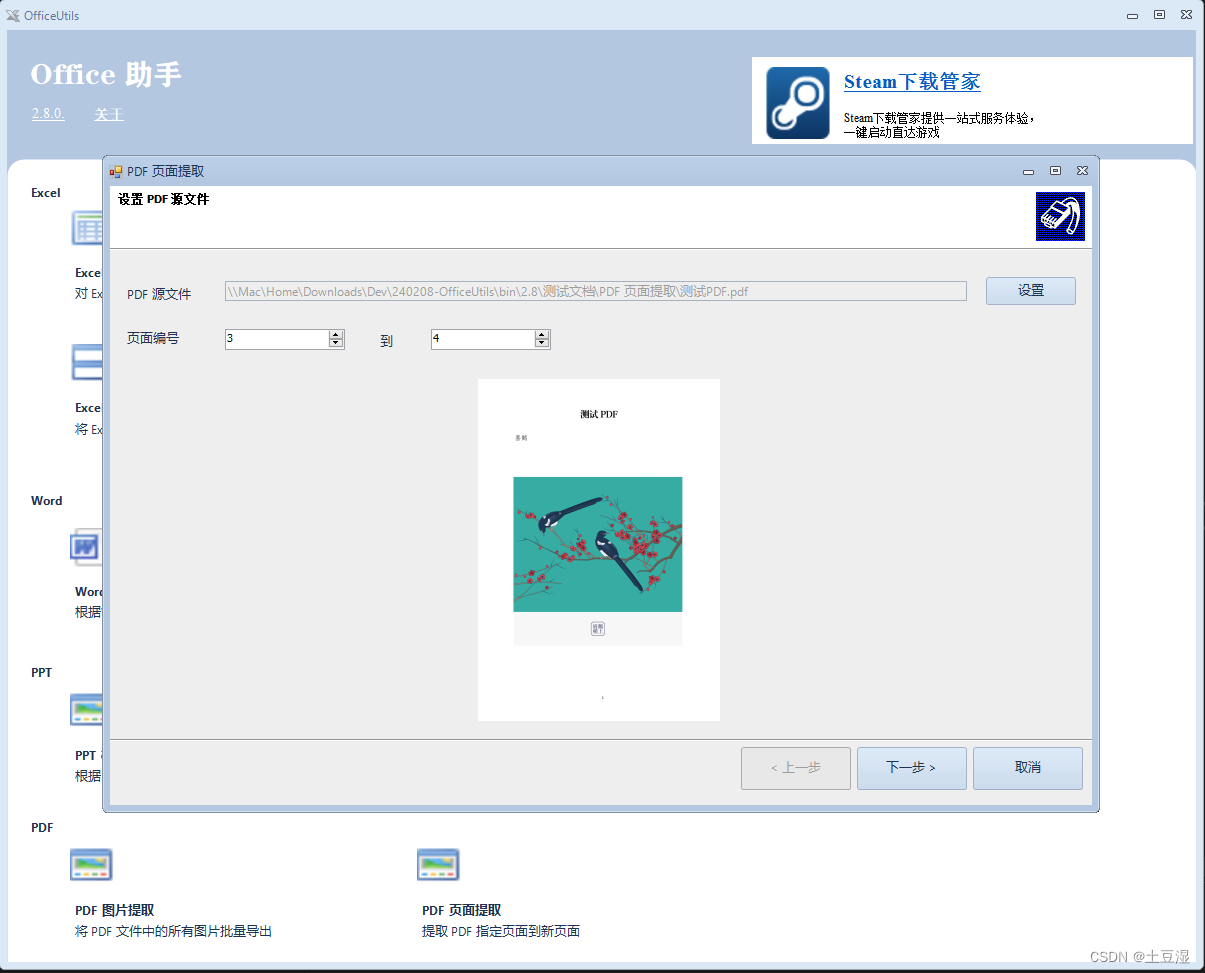
该工具可以将指定PDF文件中的某几页文件抽取出来,生成新的PDF文件。很适合在无法获取原始Word文件的情况下,抽取指定PDF页面。
3.5 Markdown 工具
3.5.1 Markdown 转网页或 Word 文件
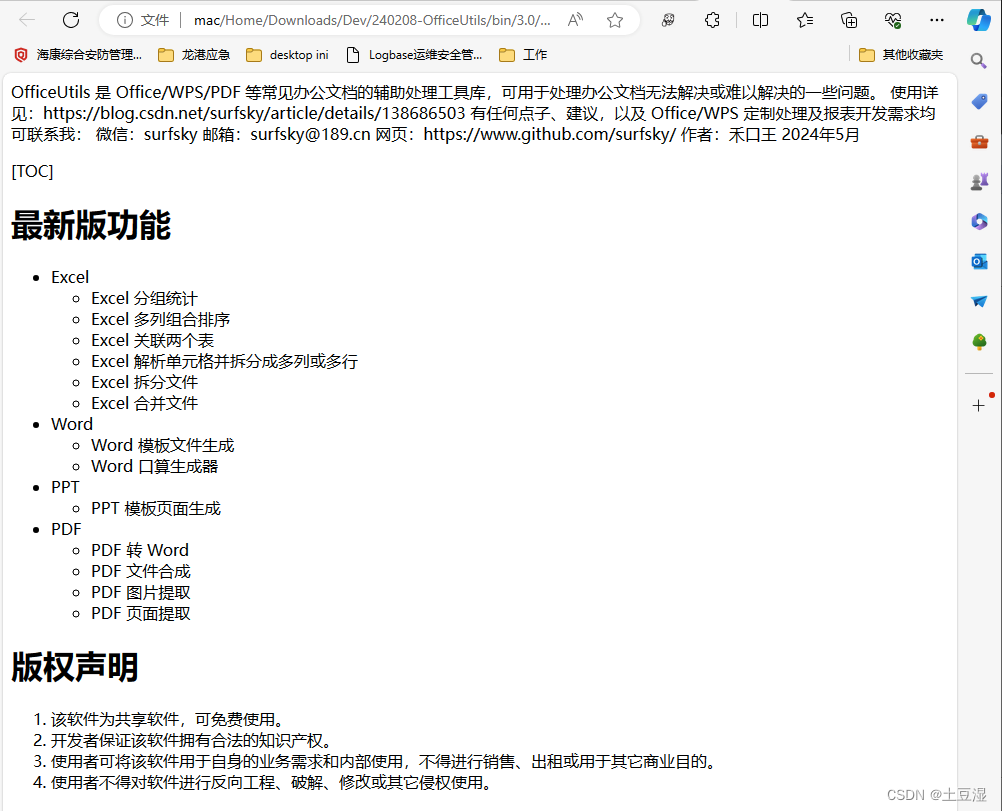
该工具 可将 Markdown 文件转化为网页(.html)或者 Word(.docx)文件格式。在该工具窗口中选择待转化的 Markdown 文件,并选择转化为网页文件还是 Word 文件,下面的文本框中会展示该文件的前几行供预览,点击下一步即可处理。

转化结果如下
注:Markdown 是一种书写友好的带格式的文本格式,常用于写项目说明、转化为可出版文档。
3.6 Email 工具
3.6.1 Email 批量群发工具
该工具 可批量群发邮件,邮件的标题、正文、附件、地址均可进行配置。如图:

点击Email 批量群发模块。在第一步选择群发邮件清单Excel。

点击下一步,设置邮件的标题和内容:

点击下一步,设置smtp邮件服务器相关信息。这里以mail.189.cn的邮件服务器为例:

点击下一步就可以发送了,发送完毕后可查看软件目录下的logs文件,查看邮件发送情况。
其中mail.189.cn 的邮件服务器可以这么设置:

为了安全可以设置客户端专用密码,以替代邮箱密码。

四、附录支持的公式
虽然 OfficeUtils 不推荐使用公式,它推荐以向导方式简易地提供数据处理工作。但该工具还是提供了公式能力,以获取更为专业化、定制化的数据。
4.1 支持的操作符Operators
| Operator | Description |
|---|---|
| + | Additive / Unary plus / Concatenate string / Datetime addition |
| - | Subtraction / Unary minus / Datetime subtraction |
| * | Multiplication , can be omitted in front of an open bracket |
| / | Division |
| % | Remainder (Modulo) |
| ^ | Power |
| & | Concatenate string |
| ! | Not operator for boolean |
| > | Greater |
| >= | Greater equal |
| < | Less |
| <= | Less equal |
| <> | Not equal |
| != | Not equal |
4.2 支持的逻辑函数
| Function | Description |
|---|---|
| AND(logical1, [logical2], …) | Determine if all conditions are TRUE |
| OR(logical1, [logical2], …) | Determine if any conditions in a test are TRUE |
| NOT(logical) | To confirm one value is not equal to another |
| XOR(logical1, [logical2], …) | Exclusive OR function |
4.3 支持的文本函数
| Function | Description |
|---|---|
| LEFT(text, num_chars) | Extracts a given number of characters from the left side of a supplied text string |
| RIGHT(text, num_chars) | Extracts a given number of characters from the right side of a supplied text string |
| MID(text, start_num, num_chars) | Extracts a given number of characters from the middle of a supplied text string |
| REVERSE(text) | Reverse a string |
| LOWER(text) | Converts all letters in the specified string to lowercase |
| UPPER(text) | Converts all letters in the specified string to uppercase |
| PROPER(text) | Capitalizes words given text string |
| TRIM(text) | Removes extra spaces from text |
| TEXT(value, [format_text]) | Convert a numeric value into a text string. You can use the TEXT function to embed formatted numbers inside text |
| REPLACE(old_text, start_num, num_chars, new_text) | Replaces characters specified by location in a given text string with another text string |
| SUBSTITUTE(text, old_text, new_text) | Replaces a set of characters with another |
| FIND(find_text, within_text, [start_num]) | Returns the location of a substring in a string (case sensitive) |
| SEARCH(find_text, within_text, [start_num]) | Returns the location of a substring in a string (case insensitive) |
| CONCAT(text1, text2, text3,…) | Combines the text from multiple strings |
| REPT(text, repeat_time) | Repeats characters a given number of times |
| ------------------------------------------------------ | ---------------------------------------------------------- |
| ISBLANK(text) | Returns TRUE when a given string is null or empty, otherwise return FALSE |
| ISNUMBER(text) | Check if a value is a number |
| LEN(text) | Returns the length of a string/ text |
| CHAR(ascii-code) | Return character from ascii code |
| CODE(char) | Returns a ascii code of a character |
| VALUE(text) | Convert numbers stored as text to numbers |
| ISLIKE(text, sqlpattern) | Returns TRUE when a given string match the sqlpattern string(support _*%). eg: IsLike(“Abcd”, “_bc%”) -> true |
| ISIN(text, text1,text2,…) | Returns TRUE when a given string in a array eg: IsIn(“A”, “A”, “B”, “C”) -> true |
4.4 支持的日期时间函数
| Function | Description |
|---|---|
| Today() | Today() |
| Now() | Now() |
| Date(.) | Date(‘2024-01-01 12:00’) |
| Year(.) | Year(‘2024-01-01 12:00’) |
| Month(.) | Month(Today()) |
| Day(.) | Day(Today()) |
| Hour(.) | Hour(Today()) |
| Minute(.) | Minute(Today()) |
| Second(.) | Second(Today()) |
| Weekday(.) | Weekday(Today()) |
| Age(.) | Age(Today()) |
| AddYears(…) | AddYears(Today(), 1) |
| AddMonths(…) | AddMonths(Today(), 1) |
| AddDays(…) | AddDays(Today(), 1) |
| AddHours(…) | AddHours(Today(), 1) |
| AddMinutes(…) | AddMinutes(Today(), 1) |
| AddSeconds(…) | AddSeconds(Today(), 1) |
| AddDate(…) | AddDate(Today(), 1,0,0,0,0,0) |
4.5 支持的数学函数
| Function | Description |
|---|---|
| MOD(number, divisor) | Get remainder of two given numbers after division operator. |
| ROUND(number, num_digits) | Returns the rounded approximation of given number using half-even rounding mode ( you can change to another rounding mode) |
| FLOOR(number, significance) | Rounds a given number towards zero to the nearest multiple of a specified significance |
| CEILING(number, significance) | Rounds a given number away from zero, to the nearest multiple of a given number |
| POWER(number, power) | Returns the result of a number raised to a given power |
| RAND() | Produces a random number between 0 and 1 |
| SQRT(number) | Returns the correctly rounded positive square root of given number |
| LN(number) | Returns the natural logarithm (base e) of given number |
| LOG10(number) | Returns the logarithm (base 10) of given number |
| EXP(number) | Returns e raised to the power of given number |
| ABS(number) | Returns the absolute value of given number |
| FACT(number) | Returns the factorial of a given number |
| INT(number) | Returns the Integer value of given number |
4.6 支持的数学三角函数
| Function | Description |
|---|---|
| PI() | Return value of Pi |
| SIN(number) | Returns the trigonometric sine of the angle given in radians |
| SINH(number) | Returns the hyperbolic sine of a number |
| ASIN(number) | Returns the arc sine of an angle, in the range of -pi/2 through pi/2 |
| COS(number) | Returns the trigonometric cos of the angle given in radians |
| COSH(number) | Returns the hyperbolic cos of a number |
| ACOS(number) | Returns the arc cosine of an angle, in the range of 0.0 through pi |
| TAN(number) | Returns the tangent of the angle given in radians |
| TANH(number) | Returns the hyperbolic tangent of a number |
| ATAN(number) | Returns the arc tangent of an angle given in radians |
| ATAN2(x_number, y_number) | Returns the arctangent from x- and y-coordinates |
| COT(number) | Returns the cotangent of an angle given in radians |
| COTH(number) | Returns the hyperbolic cotangent of a number |
| SEC(number) | Returns the secant of an angle given in radians |
| CSC(number) | Returns the cosecant of an angle given in radians |
| RADIANS(degrees) | Convert degrees to radians |
| DEGREES(radians) | Convert radians to degrees |
4.7 支持的数学统计函数
| Function | Description |
|---|---|
| SUM(number1, [number2],…) | Return sum of numbers supplied |
| AVERAGE(number1, [number2],…) | Return average of numbers supplied |
| MIN(number1, [number2],…) | Return the smallest value from the numbers supplied |
| MAX(number1, [number2],…) | Return the biggest value from the numbers supplied |
| ----------------------------------- | ---------------------------------------------------------- |
| COUNT(number1, [number2],…) | Return count of numbers supplied |
| VARIANCE(number1, [number2],…) | Return the variance value from the numbers supplied |
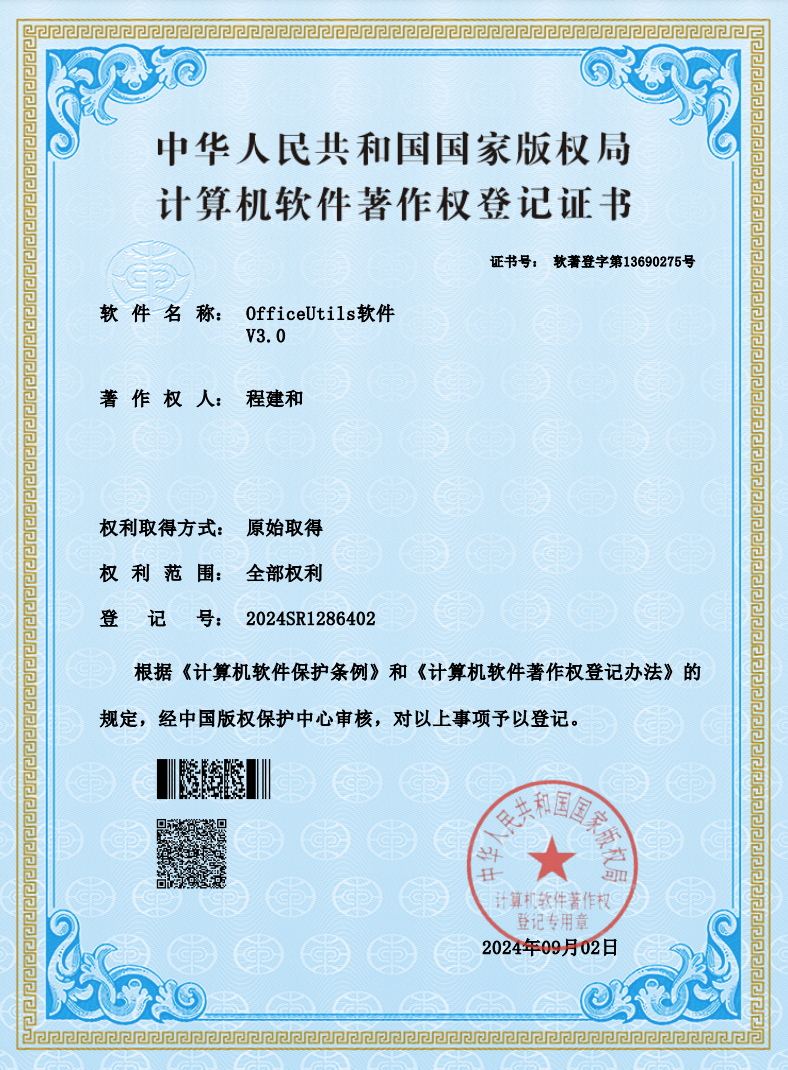
5 软件著作权





 扫一扫
扫一扫


 586
586

 被折叠的 条评论
为什么被折叠?
被折叠的 条评论
为什么被折叠?
 到【灌水乐园】发言





