





 这篇教程展示了如何通过编程方式而非声明式来创建饼图。代码示例使用了Dojo库,创建了一个基于一周网站访问量数据的饼图。这种方式确保了图表创建的稳定性和可控性。
实现了用程序代码来创建饼图,而不是用声明式。教程里面说:建议用代码而不是声明式的,代码的创建方式更稳定更可控。
代码如下:
<!DOCTYPE HTML>
<html lang="en">
<head>
<meta charset="utf-8">
<title>Demo: Basic Programmatic Chart</title>
<link rel="stylesheet" href="css/style.css" media="screen">
</head>
<body>
<h1>Demo: Basic Programmatic Chart</h1>
<!-- create the chart -->
<div id="chartNode" style="width: 550px; height: 550px;"></div>
<!-- load dojo and provide config via data attribute -->
<script src="dojo/dojo.js" data-dojo-config="isDebug: 1, async: 1, parseOnLoad: 1"></script>
<script>
// x and y coordinates used for easy understanding of where they should display
// Data represents website visits over a week period
chartData = [
{ x: 1, y: 19021 },
{ x: 1, y: 12837 },
{ x: 1, y: 12378 },
{ x: 1, y: 21882 },
{ x: 1, y: 17654 },
{ x: 1, y: 15833 },
{ x: 1, y: 16122 }
];
require([
// Require the basic 2d chart resource
"dojox/charting/Chart",
// Require the theme of our choosing
"dojox/charting/themes/Claro",
// Charting plugins:
// Require the Pie type of Plot
"dojox/charting/plot2d/Pie",
// Wait until the DOM is ready
"dojo/domReady!"
], function(Chart, theme, PiePlot){
// Create the chart within it's "holding" node
var pieChart = new Chart("chartNode");
// Set the theme
pieChart.setTheme(theme);
// Add the only/default plot
pieChart.addPlot("default", {
type: PiePlot, // our plot2d/Pie module reference as type value
radius: 200,
fontColor: "black",
labelOffset: -20
});
// Add the series of data
pieChart.addSeries("January",chartData);
// Render the chart!
pieChart.render();
});
</script>
</body>
</html>
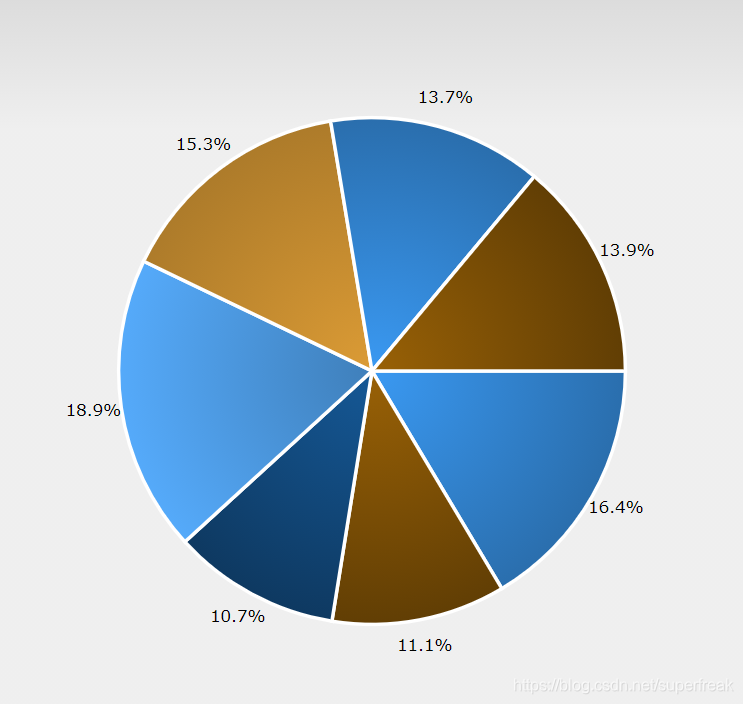
实现效果如下:





 扫一扫
扫一扫


 2万+
2万+

 被折叠的 条评论
为什么被折叠?
被折叠的 条评论
为什么被折叠?
 到【灌水乐园】发言





