


 本文详细介绍Visual Studio中的宏定义,包括Configuration、DevEnvDir、FrameworkDir等常见宏的作用及用途,帮助开发者更好地理解并利用这些宏来优化项目设置。
版本
Visual Studio版本:VS2010
步骤
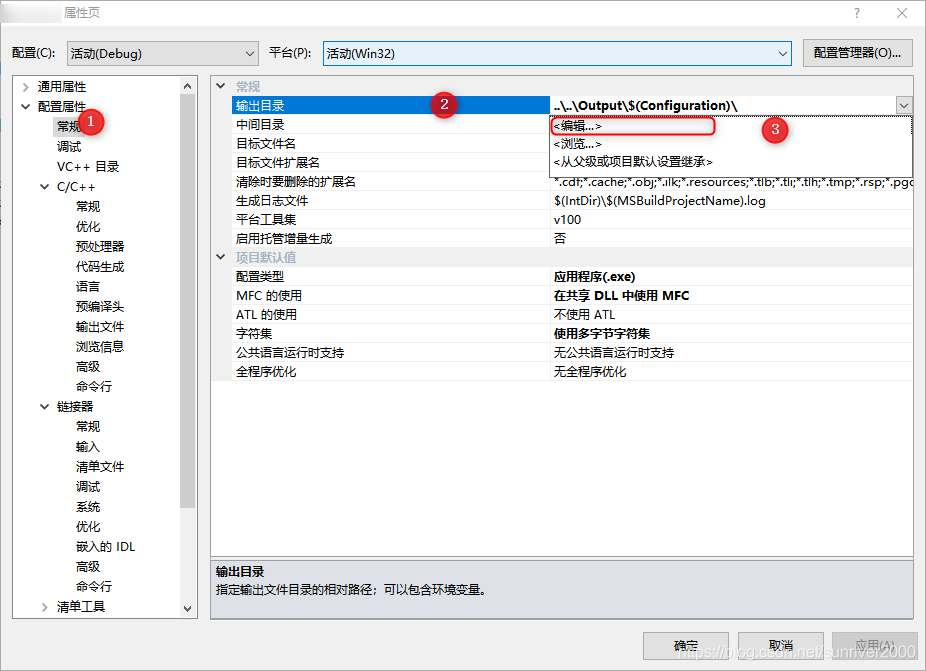
1、在 解决方案管理器 中右击选择 属性,弹出工程属性页。
在左侧列表框中选择 常规 页面,在 输出目录 中点选 编辑。
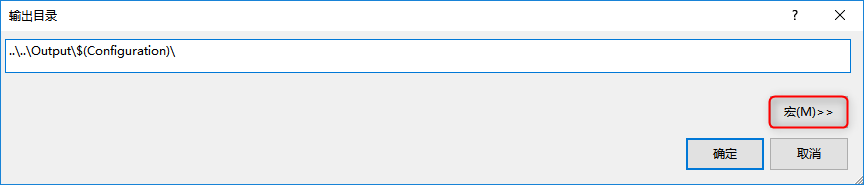
2、在 输出目录 页面点选 宏 按钮。
3、弹出以下页面,可以查看宏定义内容。
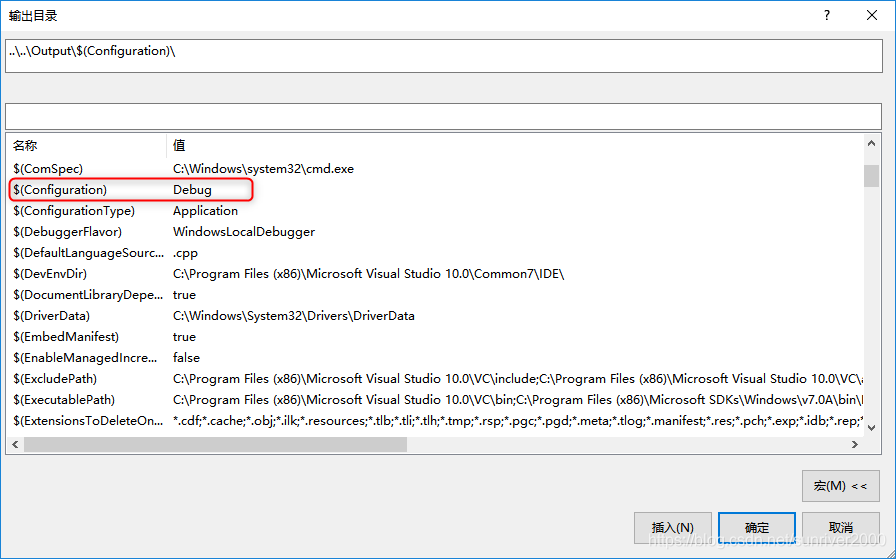
以下摘抄至Microsoft官方网站,有关 MSBuild 命令和属性的常用宏。
常见宏列表
下表说明了常用的子集可用宏;有许多更未在此处列出。 转到宏对话框以查看所有属性和它们在项目中的当前值。
| Macro | Description |
|---|---|
| $(Configuration) | The name of the current project configuration, for example, "Debug". |
| $(DevEnvDir) | The installation directory of Visual Studio (defined as drive + path); includes the trailing backslash '\'. |
| $(FrameworkDir) | The directory into which the .NET Framework was installed. |
| $(FrameworkSDKDir) | The directory into which you installed the .NET Framework. The .NET Framework could have been installed as part of Visual Studio or separately. |
| $(FrameworkVersion) | The version of the .NET Framework used by Visual Studio. Combined with $(FrameworkDir), the full path to the version of the .NET Framework use by Visual Studio. |
| $(FxCopDir) | The path to the fxcop.cmd file. The fxcop.cmd file is not installed with all Visual Studio editions. |
| $(IntDir) | Path to the directory specified for intermediate files. If this is a relative path, intermediate files go to this path appended to the project directory. This path should have a trailing slash. This resolves to the value for the Intermediate Directory property. Do not use $(OutDir) to define this property. |
| $(OutDir) | Path to the output file directory. If this is a relative path, output files go to this path appended to the project directory. This path should have a trailing slash. This resolves to the value for the Output Directory property. Do not use $(IntDir) to define this property. |
| $(Platform) | The name of current project platform, for example, "Win32". |
| $(PlatformShortName) | The short name of current architecture, for example, "x86" or "x64". |
| $(ProjectDir) | The directory of the project (defined as drive + path); includes the trailing backslash '\'. |
| $(ProjectExt) | The file extension of the project. It includes the '.' before the file extension. |
| $(ProjectFileName) | The file name of the project (defined as base name + file extension). |
| $(ProjectName) | The base name of the project. |
| $(ProjectPath) | The absolute path name of the project (defined as drive + path + base name + file extension). |
| $(RemoteMachine) | Set to the value of the Remote Machine property on the Debug property page. See Changing Project Settings for a C/C++ Debug Configuration for more information. |
| $(RootNameSpace) | The namespace, if any, containing the application. |
| $(SolutionDir) | The directory of the solution (defined as drive + path); includes the trailing backslash '\'. Defined only when building a solution in the IDE. |
| $(SolutionExt) | The file extension of the solution. It includes the '.' before the file extension. Defined only when building a solution in the IDE. |
| $(SolutionFileName) | The file name of the solution (defined as base name + file extension). Defined only when building a solution in the IDE. |
| $(SolutionName) | The base name of the solution. Defined only when building a solution in the IDE. |
| $(SolutionPath) | The absolute path name of the solution (defined as drive + path + base name + file extension). Defined only when building a solution in the IDE. |
| $(TargetDir) | The directory of the primary output file for the build (defined as drive + path); includes the trailing backslash '\'. |
| $(TargetExt) | The file extension of the primary output file for the build. It includes the '.' before the file extension. |
| $(TargetFileName) | The file name of the primary output file for the build (defined as base name + file extension). |
| $(TargetName) | The base name of the primary output file for the build. |
| $(TargetPath) | The absolute path name of the primary output file for the build (defined as drive + path + base name + file extension). |
| $(VCInstallDir) | The directory that contains the C++ content of your Visual Studio installation. This property contains the version of the targeted Microsoft C++ (MSVC) toolset, which might be different that the host Visual Studio. For example, when building with $(PlatformToolset) = v140, $(VCInstallDir) contains the path to the Visual Studio 2015 installation. |
| $(VSInstallDir) | The directory into which you installed Visual Studio. This property contains the version of the targeted Visual Studio toolset, which might be different that the host Visual Studio. For example, when building with $(PlatformToolset) = v110, $(VSInstallDir) contains the path to the Visual Studio 2012 installation. |
| $(WebDeployPath) | The relative path from the web deployment root to where the project outputs belong. Returns the same value as RelativePath. |
| $(WebDeployRoot) | The absolute path to the location of <localhost>. For example, c:\inetpub\wwwroot. |
中文列表翻译不一定准确,仅做参考。
| 宏 | 描述 |
|---|---|
| $(Configuration) | 当前项目配置的名称,例如,“调试”。 |
| $(DevEnvDir) | Visual Studio 的安装目录(定义为驱动器 + 路径);包括尾随反斜杠“\”。 |
| $(FrameworkDir) | 在其中安装了 .NET Framework 的目录。 |
| $(FrameworkSDKDir) | 在其中安装了 .NET Framework 的目录。 .NET Framework 可能已作为 Visual Studio 的一部分安装或单独安装。 |
| $(FrameworkVersion) | Visual Studio 使用的.NET framework 版本。 结合 $(FrameworkDir),Visual Studio 使用的.NET Framework 版本的完整路径。 |
| $(FxCopDir) | fxcop.cmd 文件的路径。 Fxcop.cmd 文件不随所有 Visual Studio 版本安装。 |
| $(IntDir) | 为中间文件指定的目录路径。 如果这是一个相对路径,则中间文件将转到追加到项目目录的此路径。 此路径应具有尾随斜杠。 这将解析为 Intermediate Directory 属性的值。 请勿使用 $(OutDir) 定义此属性。 |
| $(OutDir) | 输出文件目录的路径。 如果这是一个相对路径,则输出文件将转到追加到项目目录中的此路径。 此路径应具有尾随斜杠。 这将解析为 Output Directory 属性的值。 请勿使用 $(IntDir) 定义此属性。 |
| $(Platform) | 当前项目平台的名称(例如“Win32”)。 |
| $(PlatformShortName) | 当前体系结构,例如,"x86"或"x64"短名称。 |
| $(ProjectDir) | 项目的目录(定义为驱动器 + 路径);包括尾随反斜杠“\”。 |
| $(ProjectExt) | 项目的文件扩展名。 文件扩展名之前包括“.”。 |
| $(ProjectFileName) | 项目的文件名称(定义为基名称 + 文件扩展名)。 |
| $(ProjectName) | 项目的基名称。 |
| $(ProjectPath) | 项目的绝对路径名称(定义为驱动器 + 路径 + 基名称 + 文件扩展名)。 |
| $(RemoteMachine) | 设置为“调试”属性页上 Remote Machine 属性的值。 有关详细信息,请参阅 更改 C/C++ 调试配置的项目设置 。 |
| $(RootNameSpace) | 包含应用程序的命名空间(如果存在)。 |
| $(SolutionDir) | 解决方案的目录(定义为驱动器 + 路径);包括尾随反斜杠“\”。 仅当在 IDE 中生成解决方案时定义。 |
| $(SolutionExt) | 解决方案的文件扩展名。 文件扩展名之前包括“.”。 仅当在 IDE 中生成解决方案时定义。 |
| $(SolutionFileName) | 解决方案的文件名称(定义为基名称 + 文件扩展名)。 仅当在 IDE 中生成解决方案时定义。 |
| $(SolutionName) | 解决方案的基名称。 仅当在 IDE 中生成解决方案时定义。 |
| $(SolutionPath) | 解决方案的绝对路径名称(定义为驱动器 + 路径 + 基名称 + 文件扩展名)。 仅当在 IDE 中生成解决方案时定义。 |
| $(TargetDir) | 生成的主输出文件的目录(定义为驱动器 + 路径);包括尾随反斜杠 “\”。 |
| $(TargetExt) | 生成的主输出文件的文件扩展名。 文件扩展名之前包括“.”。 |
| $(TargetFileName) | 生成的主输出文件的文件名称(定义为基名称 + 文件扩展名)。 |
| $(TargetName) | 生成的主输出文件的基名称。 |
| $(TargetPath) | 生成的主输出文件的绝对路径名称(定义为驱动器 + 路径 + 基名称 + 文件扩展名)。 |
| $(VCInstallDir) | 包含 Visual Studio 安装的 C++ 内容的目录。 此属性包含的目标 Microsoft 版本C++(MSVC) 工具集,它可能不同,与主机 Visual Studio。 例如,使用生成时$(PlatformToolset) = v140, $ (vcinstalldir) 包含 Visual Studio 2015 安装的路径。 |
| $(VSInstallDir) | 在其中安装了 Visual Studio 的目录。 此属性包含目标 Visual Studio 工具集的版本,它可能与主机 Visual Studio 不同。 例如,当使用 $(PlatformToolset) = v110进行生成时, $(VSInstallDir) 包含 Visual Studio 2012 安装的路径。 |
| $(WebDeployPath) | 从 Web 部署根到项目输出位置的相对路径。 返回与 RelativePath相同的值。 |
| $(WebDeployRoot) | <localhost> 的位置的绝对路径。 例如,c:\inetpub\wwwroot。 |





 扫一扫
扫一扫


 847
847

 被折叠的 条评论
为什么被折叠?
被折叠的 条评论
为什么被折叠?
 到【灌水乐园】发言





