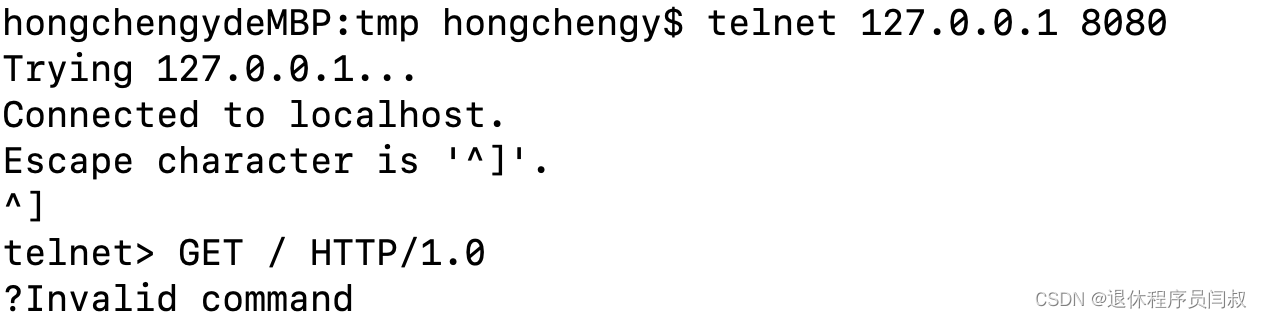
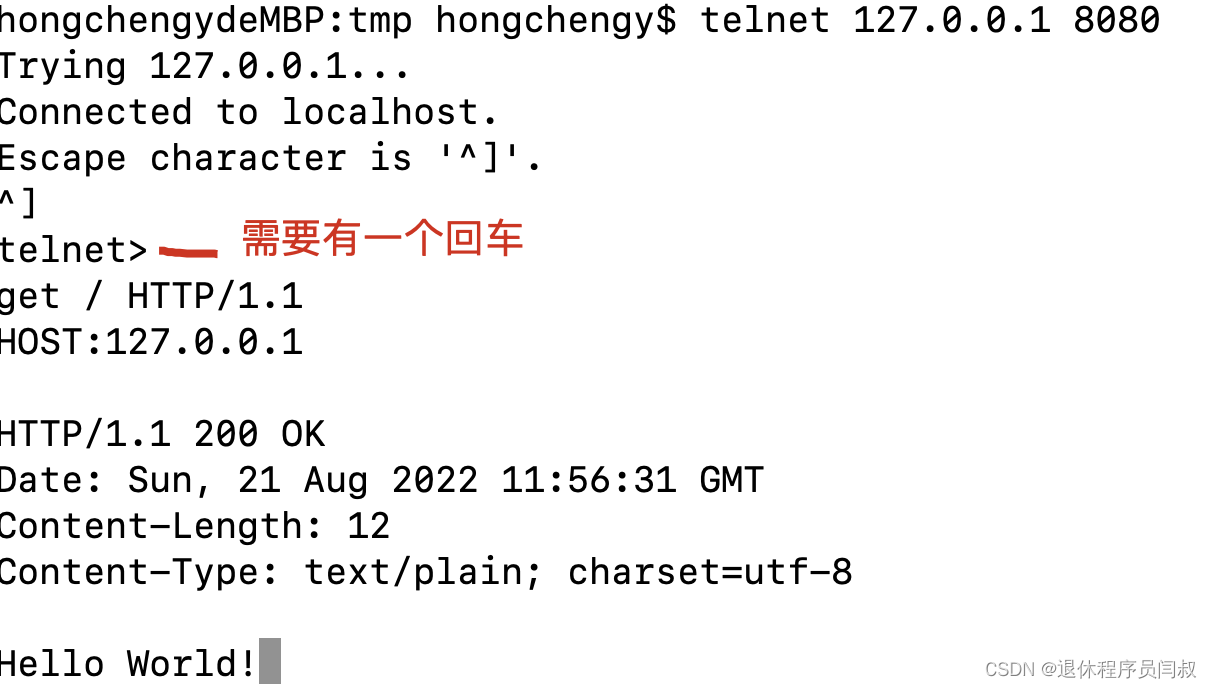
telnet GET / HTTP/1.1一回车显示?Invalid command

博客提及环境为macOS Monterey 12.5,最初输入后发现需先输入一个回车。主要围绕macOS环境下的输入情况展开。
  • 环境:macOS Monterey 12.5
  • 这是一开始的输入
  •  后来发现需要先输入一个回车


import telnetlib import time import csv # --- Telnet configuration --- JUMP_SERVER_HOST = '221.7.180.242' JUMP_SERVER_PORT = 23 TELNET_TIMEOUT = 10 def read_olt_config_from_csv(filename): """ Reads OLT configuration from a CSV file. Returns a list of dictionaries: [{'ip': ..., 'gpon_interface': ..., ...}] """ configs = [] try: with open(filename, mode='r', encoding='utf-8') as f: reader = csv.DictReader(f) for row in reader: # Strip whitespace cleaned_row = {k: v.strip() for k, v in row.items()} configs.append(cleaned_row) print(f"✅ 成功加载 {len(configs)} 条 OLT 配置。") return configs except FileNotFoundError: print(f"❌ 错误:文件 '{filename}' 未找到。") return [] except Exception as e: print(f"❌ 读取 CSV 时发生错误: {e}") return [] def send_command(tn, command, wait_for, timeout=TELNET_TIMEOUT): """ Send command and wait for expected prompt. Returns decoded output. """ tn.write(command.encode('ascii') + b'\n') output = tn.read_until(wait_for.encode(), timeout=timeout) return output.decode('utf-8', errors='ignore') def telnet_to_olt_via_jump(config): """ Connect to OLT via jump server and apply dynamic GPON config from CSV. """ tn = None olt_host = config['ip'] gpon_intf = config['gpon_interface'] ont_id = config['ont_id'] lineprofile_id = config['lineprofile_id'] try: # Step 1: Connect to jump host print(f"🔗 尝试连接跳板机: {JUMP_SERVER_HOST}:{JUMP_SERVER_PORT}") tn = telnetlib.Telnet(JUMP_SERVER_HOST, JUMP_SERVER_PORT, TELNET_TIMEOUT) # Login to jump server tn.read_until(b"Password:", timeout=TELNET_TIMEOUT) tn.write('GGlt2020##'.encode('ascii') + b'\n') tn.read_until(b'>', timeout=TELNET_TIMEOUT) # Step 2: Telnet to OLT print(f"🚀 从跳板机连接 OLT: {olt_host}") tn.write(f'telnet {olt_host}\n'.encode('ascii')) tn.read_until(b"Username:", timeout=TELNET_TIMEOUT) # Step 3: Login to OLT tn.write('huangguizhen'.encode('ascii') + b'\n') tn.read_until(b"Password:", timeout=TELNET_TIMEOUT) tn.write('Asd-12345678'.encode('ascii') + b'\n') output = tn.read_until(b'>', timeout=TELNET_TIMEOUT).decode('utf-8') if 'failed' in output.lower(): print(f"❌ 登录失败 - OLT: {olt_host}") return False print(f"✅ 已登录 OLT: {olt_host}") # Step 4: Enable and Config mode send_command(tn, 'enable', '#') send_command(tn, 'config', '(config)#') # Step 5: Build and execute dynamic commands cmd1 = f'int gpon {gpon_intf}' cmd2 = f'ont modify {ont_id} {ont_id} ont-lineprofile-id {lineprofile_id}'+ '\n' print(f"📌 正在执行:") print(f" → {cmd1}") print(f" → {cmd2}") # Execute commands res1 = send_command(tn, cmd1, '(config)#') print("响应:", res1) res2 = send_command(tn, cmd2, '(config)#') print("响应:", res2) # Check if "Error" or "invalid" appears combined_output = res1 + res2 if any(kw in combined_output.lower() for kw in ['error', 'invalid', 'fail']): print(f"⚠️ 命令执行可能出错,请检查输出。") # Step 6: Save configuration print("💾 正在保存配置...") send_command(tn, 'quit', 'quit') tn.write(b'save\n'+ b'\n') time.sleep(1) final_save = tn.read_very_eager().decode('utf-8', errors='ignore') print("保存结果:\n", final_save) print(f"🎉 OLT {olt_host} 配置完成!") return True except Exception as e: print(f"❌ 处理 OLT {olt_host} 时发生异常: {e}") return False finally: if tn: tn.close() print("🔌 连接已关闭。\n") # --- Main Execution --- if __name__ == "__main__": CONFIG_FILE = 'olt_config.csv' # Read configurations configs = read_olt_config_from_csv(CONFIG_FILE) if not configs: print("⛔ 未加载到有效配置,程序退出。") exit(1) success_count = 0 total_count = len(configs) for idx, config in enumerate(configs, start=1): ip = config['ip'] print("\n" + "=" * 60) print(f"🔄 处理第 {idx}/{total_count} 台设备: {ip}") print("=" * 60) result = telnet_to_olt_via_jump(config) if result: success_count += 1 # Delay between devices time.sleep(3) print(f"\n📊 批量任务完成!成功: {success_count}/{total_count}"),添加端口号,10.0.100.113,0/4,7,99,99
10-17
评论
添加红包

请填写红包祝福语或标题

红包个数最小为10个

红包金额最低5元

当前余额3.43前往充值 >
需支付:10.00
成就一亿技术人!
领取后你会自动成为博主和红包主的粉丝 规则
hope_wisdom
发出的红包

打赏作者

退休程序员闫叔

你的鼓励将是我创作的最大动力

¥1 ¥2 ¥4 ¥6 ¥10 ¥20
扫码支付:¥1
获取中
扫码支付

您的余额不足,请更换扫码支付或充值

打赏作者

实付
使用余额支付
点击重新获取
扫码支付
钱包余额 0

抵扣说明:

1.余额是钱包充值的虚拟货币,按照1:1的比例进行支付金额的抵扣。
2.余额无法直接购买下载,可以购买VIP、付费专栏及课程。

余额充值