


一、前言
最近在github上看了soul网关的设计,突然就来了兴趣准备自己从零开始写一个高性能的网关。折腾了大概三周时间,我的网关ship-gate核心功能基本都已完成,写这篇文章是记录我是如何从零开始手写一个网关的。
二、设计
2.1技术选型
网关是所有请求的入口,所以要求有很高的吞吐量,为了实现这点可以使用请求异步化来解决。目前一般有以下两种方案:
-
Tomcat/Jetty+NIO+Servlet3
Servlet3已经支持异步,这种方案使用比较多,京东,有赞和Zuul,都用的是这种方案。
-
Netty+NIO
Netty为高并发而生,目前唯品会的网关使用这个策略,在唯品会的技术文章中在相同的情况下Netty是每秒30w+的吞吐量,Tomcat是13w+,可以看出是有一定的差距的,但是Netty需要自己处理HTTP协议,这一块比较麻烦。
后面发现Soul网关是基于Spring WebFlux(底层Netty)的,不用太关心HTTP协议的处理,于是决定也用Spring WebFlux。
网关的第二个特点是具备可扩展性,比如Netflix Zuul有preFilters,postFilters等在不同的阶段方便处理不同的业务,基于责任链模式将请求进行链式处理即可实现。
在微服务架构下,服务都会进行多实例部署来保证高可用,请求到达网关时,网关需要根据URL找到所有可用的实例,这时就需要服务注册和发现功能,即注册中心。
现在流行的注册中心有Apache的Zookeeper和阿里的Nacos两种(consul有点小众),因为之前写RPC框架时已经用过了Zookeeper,所以这次就选择了Nacos。
前端部分考虑部署方便性,没有采用流行的前后端分离的方式(其实是不会vue😂),而是使用layui+thymeleaf的方式。
2.2需求清单
首先要明确目标,即开发一个具备哪些特性的网关,总结下后如下:
-
自定义路由规则
可基于version的路由规则设置,路由对象包括DEFAUL,HEADER和QUERY三种,匹配方式包括=、regex、like三种。
-
跨语言
HTTP协议天生跨语言
-
高性能
Netty本身就是一款高性能的通信框架,同时server将一些路由规则等数据缓存到JVM内存避免请求admin服务。
-
高可用
支持集群模式防止单节点故障,无状态。
-
灰度发布
灰度发布(又名金丝雀发布)是指在黑与白之间,能够平滑过渡的一种发布方式。在其上可以进行A/B testing,即让一部分用户继续用产品特性A,一部分用户开始用产品特性B,如果用户对B没有什么反对意见,那么逐步扩大范围,把所有用户都迁移到B上面来。通过特性一可以实现。
-
接口鉴权
基于责任链模式,用户开发自己的鉴权插件即可。
-
负载均衡
支持多种负载均衡算法,如随机,轮询,加权轮询等。利用SPI机制可以根据配置进行动态加载。
2.3架构设计
在参考了一些优秀的网关Zuul,Spring Cloud Gateway,Soul后,将项目划分为以下几个模块。
| 名称 | 描述 |
|---|---|
| ship-admin | 后台管理界面,配置路由规则等 |
| ship-server | 网关服务端,核心功能模块 |
| ship-client-spring-boot-starter | 网关客户端,自动注册服务信息到注册中心 |
| ship-common | 一些公共的代码,如pojo,常量等。 |
它们之间的关系如图:
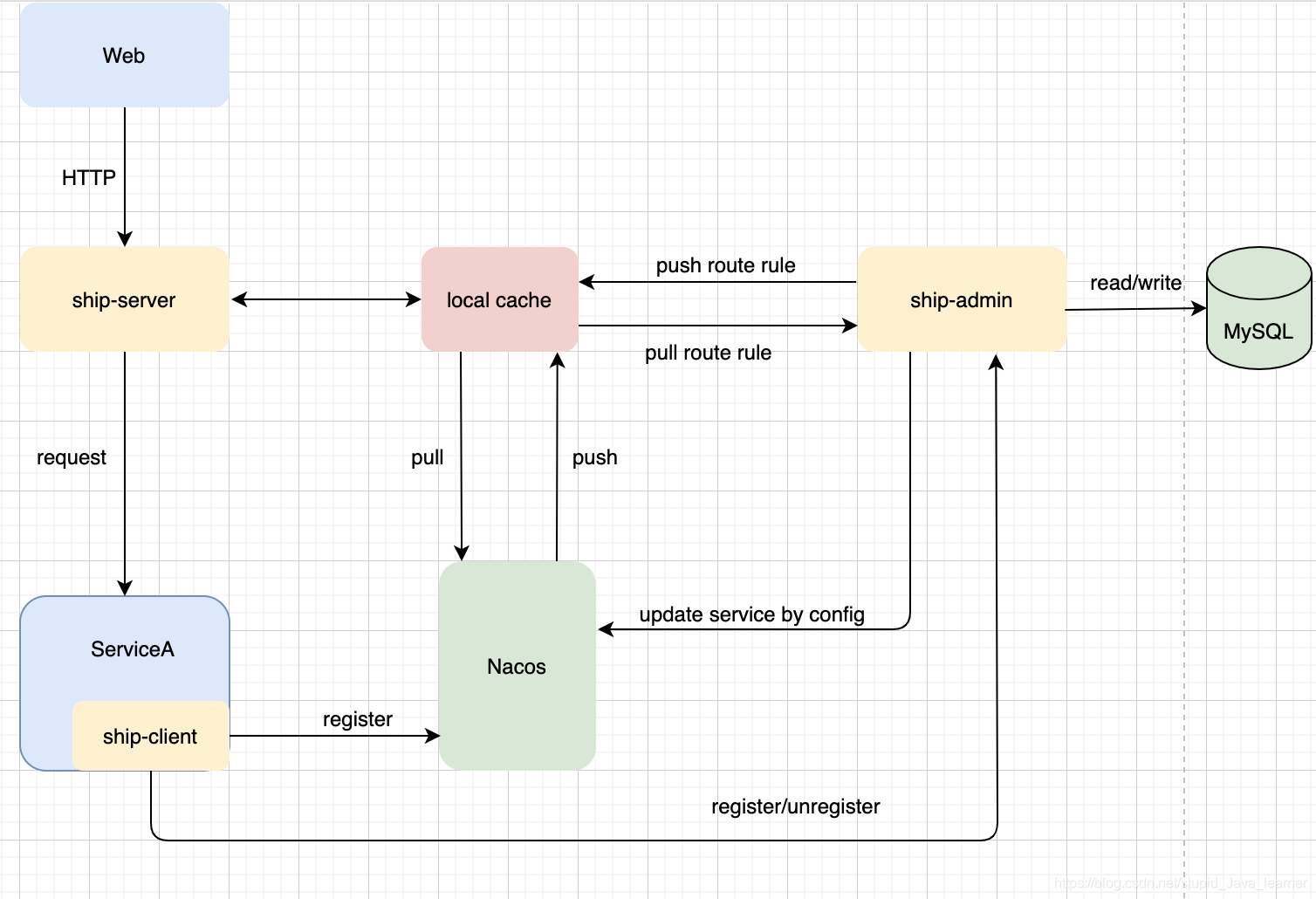
注意:这张图与实际实现有点出入,Nacos push到本地缓存的那个环节没有实现,目前只有ship-server定时轮询pull的过程。同时,ServiceA在项目启动和下线时主动发送HTTP请求通知ship-admin。用户如果在admin后台修改了实例权重,服务状态(启用/禁用)等,ship-admin定时同步更新数据到注册中心。
2.4表结构设计
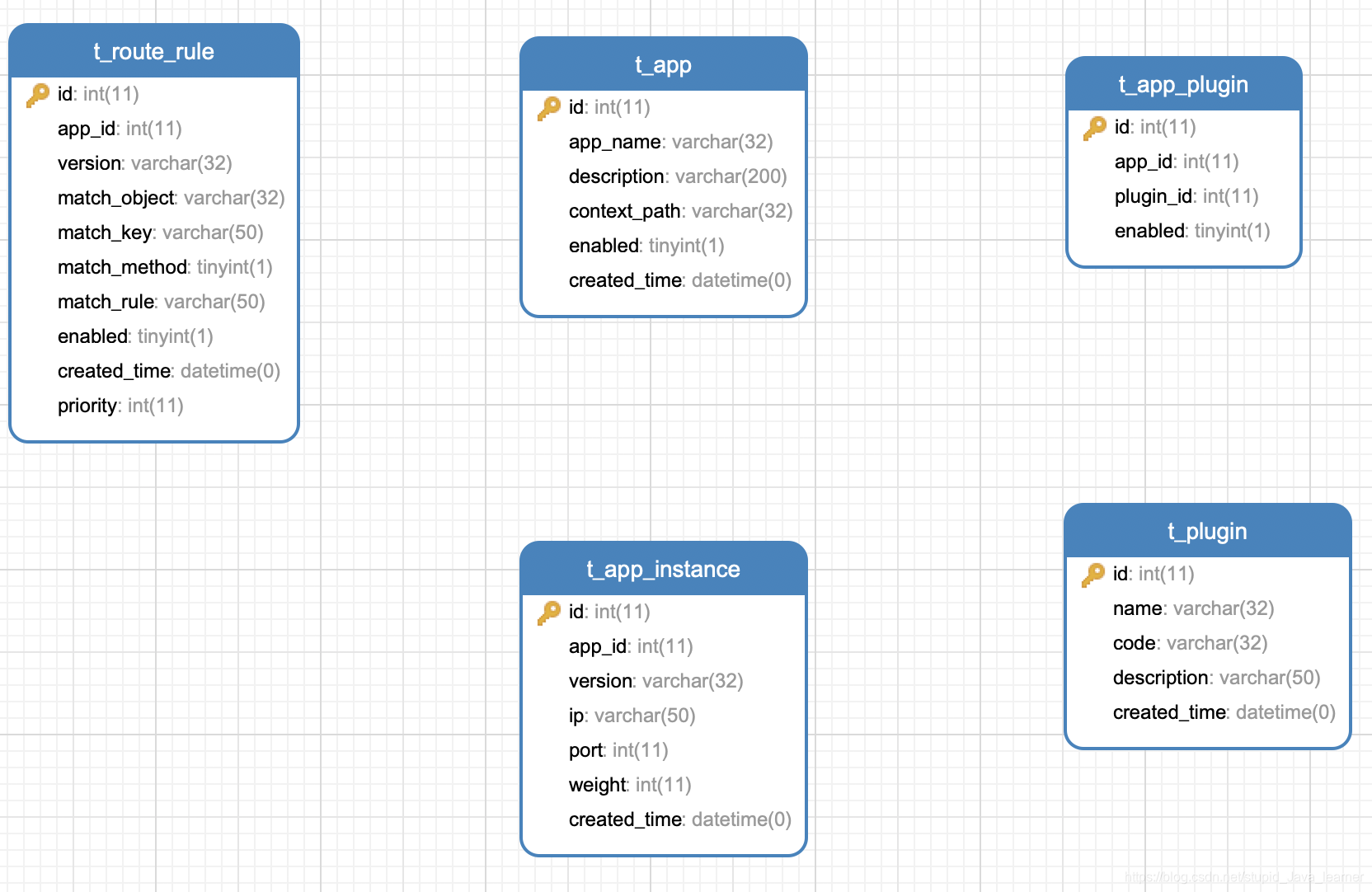
三、编码
3.1 ship-client-spring-boot-starter
首先创建一个spring-boot-starter命名为ship-client-spring-boot-starter,不知道如何自定义starter的可以看我以前写的《开发自己的starter》。
其核心类 AutoRegisterListener 就是在项目启动时做了两件事:
1.将服务信息注册到Nacos注册中心
2.通知ship-admin服务上线了并注册下线hook。
代码如下:
/**
 * Created by 2YSP on 2020/12/21
 */
public class AutoRegisterListener implements ApplicationListener<ContextRefreshedEvent> {

    private final static Logger LOGGER = LoggerFactory.getLogger(AutoRegisterListener.class);

    private volatile AtomicBoolean registered = new AtomicBoolean(false);

    private final ClientConfigProperties properties;

    @NacosInjected
    private NamingService namingService;

    @Autowired
    private RequestMappingHandlerMapping handlerMapping;

    private final ExecutorService pool;

    /**
     * url list to ignore
     */
    private static List<String> ignoreUrlList = new LinkedList<>();

    static {
        ignoreUrlList.add("/error");
    }

    public AutoRegisterListener(ClientConfigProperties properties) {
        if (!check(properties)) {
            LOGGER.error("client config port,contextPath,appName adminUrl and version can't be empty!");
            throw new ShipException("client config port,contextPath,appName adminUrl and version can't be empty!");
        }
        this.properties = properties;
        pool = new ThreadPoolExecutor(1, 4, 0, TimeUnit.SECONDS, new LinkedBlockingQueue<>());
    }

    /**
     * check the ClientConfigProperties
     *
     * @param properties
     * @return
     */
    private boolean check(ClientConfigProperties properties) {
        if (properties.getPort() == null || properties.getContextPath() == null
                || properties.getVersion() == null || properties.getAppName() == null
                || properties.getAdminUrl() == null) {
            return false;
        }
        return true;
    }


    @Override
    public void onApplicationEvent(ContextRefreshedEvent event) {
        if (!registered.compareAndSet(false, true)) {
            return;
        }
        doRegister();
        registerShutDownHook();
    }

    /**
     * send unregister request to admin when jvm shutdown
     */
    private void registerShutDownHook() {
        final String url = "http://" + properties.getAdminUrl() + AdminConstants.UNREGISTER_PATH;
        final UnregisterAppDTO unregisterAppDTO = new UnregisterAppDTO();
        unregisterAppDTO.setAppName(properties.getAppName());
        unregisterAppDTO.setVersion(properties.getVersion());
        unregisterAppDTO.setIp(IpUtil.getLocalIpAddress());
        unregisterAppDTO.setPort(properties.getPort());
        Runtime.getRuntime().addShutdownHook(new Thread(() -> {
            OkhttpTool.doPost(url, unregisterAppDTO);
            LOGGER.info("[{}:{}] unregister from ship-admin success!", unregisterAppDTO.getAppName(), unregisterAppDTO.getVersion());
        }));
    }

    /**
     * register all interface info to register center
     */
    private void doRegister() {
        Instance instance = new Instance();
        instance.setIp(IpUtil.getLocalIpAddress());
        instance.setPort(properties.getPort());
        instance.setEphemeral(true);
        Map<String, String> metadataMap = new HashMap<>();
        metadataMap.put("version", properties.getVersion());
        metadataMap.put("appName", properties.getAppName());
        instance.setMetadata(metadataMap);
        try {
            namingService.registerInstance(properties.getAppName(), NacosConstants.APP_GROUP_NAME, instance);
        } catch (NacosException e) {
            LOGGER.error("register to nacos fail", e);
            throw new ShipException(e.getErrCode(), e.getErrMsg());
        }
        LOGGER.info("register interface info to nacos success!");
        // send register request to ship-admin
        String url = "http://" + properties.getAdminUrl() + AdminConstants.REGISTER_PATH;
        RegisterAppDTO registerAppDTO = buildRegisterAppDTO(instance);
        OkhttpTool.doPost(url, registerAppDTO);
        LOGGER.info("register to ship-admin success!");
    }


    private RegisterAppDTO buildRegisterAppDTO(Instance instance) {
        RegisterAppDTO registerAppDTO = new RegisterAppDTO();
        registerAppDTO.setAppName(properties.getAppName());
        registerAppDTO.setContextPath(properties.getContextPath());
        registerAppDTO.setIp(instance.getIp());
        registerAppDTO.setPort(instance.getPort());
        registerAppDTO.setVersion(properties.getVersion());
        return registerAppDTO;
    }
}
3.2 ship-server
ship-sever包括了两个部分,
1. 请求动态路由的主流程
2. 本地缓存数据和ship-admin及nacos同步。第二部分在3.3再讲。
ship-server实现动态路由的原理是利用WebFilter拦截请求,然后将请求交给plugin chain去链式处理。
PluginFilter根据URL解析出appName,然后将启用的plugin组装成plugin chain。
public class PluginFilter implements WebFilter {

    private ServerConfigProperties properties;

    public PluginFilter(ServerConfigProperties properties) {
        this.properties = properties;
    }

    @Override
    public Mono<Void> filter(ServerWebExchange exchange, WebFilterChain chain) {
        String appName = parseAppName(exchange);
        if (CollectionUtils.isEmpty(ServiceCache.getAllInstances(appName))) {
            throw new ShipException(ShipExceptionEnum.SERVICE_NOT_FIND);
        }
        PluginChain pluginChain = new PluginChain(properties, appName);
        pluginChain.addPlugin(new DynamicRoutePlugin(properties));
        pluginChain.addPlugin(new AuthPlugin(properties));
        return pluginChain.execute(exchange, pluginChain);
    }

    private String parseAppName(ServerWebExchange exchange) {
        RequestPath path = exchange.getRequest().getPath();
        String appName = path.value().split("/")[1];
        return appName;
    }
}
PluginChain继承了AbstractShipPlugin并持有所有要执行的插件。
/**
 * @Author: Ship
 * @Description:
 * @Date: Created in 2020/12/25
 */
public class PluginChain extends AbstractShipPlugin {
    /**
     * the pos point to current plugin
     */
    private int pos;
    /**
     * the plugins of chain
     */
    private List<ShipPlugin> plugins;

    private final String appName;

    public PluginChain(ServerConfigProperties properties, String appName) {
        super(properties);
        this.appName = appName;
    }

    /**
     * add enabled plugin to chain
     *
     * @param shipPlugin
     */
    public void addPlugin(ShipPlugin shipPlugin) {
        if (plugins == null) {
            plugins = new ArrayList<>();
        }
        if (!PluginCache.isEnabled(appName, shipPlugin.name())) {
            return;
        }
        plugins.add(shipPlugin);
        // order by the plugin's order
        plugins.sort(Comparator.comparing(ShipPlugin::order));
    }

    @Override
    public Integer order() {
        return null;
    }

    @Override
    public String name() {
        return null;
    }

    @Override
    public Mono<Void> execute(ServerWebExchange exchange, PluginChain pluginChain) {
        if (pos == plugins.size()) {
            return exchange.getResponse().setComplete();
        }
        return pluginChain.plugins.get(pos++).execute(exchange, pluginChain);
    }

    public String getAppName() {
        return appName;
    }

}
AbstractShipPlugin实现了ShipPlugin接口,并持有ServerConfigProperties配置对象。
public abstract class AbstractShipPlugin implements ShipPlugin {

    protected ServerConfigProperties properties;

    public AbstractShipPlugin(ServerConfigProperties properties) {
        this.properties = properties;
    }
}
ShipPlugin接口定义了所有插件必须实现的三个方法order(),name()和execute()。
public interface ShipPlugin {
    /**
     * lower values have higher priority
     *
     * @return
     */
    Integer order();

    /**
     * return current plugin name
     *
     * @return
     */
    String name();

    Mono<Void> execute(ServerWebExchange exchange,PluginChain pluginChain);

}
DynamicRoutePlugin继承了抽象类AbstractShipPlugin,包含了动态路由的主要业务逻辑。
/**
 * @Author: Ship
 * @Description:
 * @Date: Created in 2020/12/25
 */
public class DynamicRoutePlugin extends AbstractShipPlugin {

    private final static Logger LOGGER = LoggerFactory.getLogger(DynamicRoutePlugin.class);

    private static WebClient webClient;

    private static final Gson gson = new GsonBuilder().create();

    static {
        HttpClient httpClient = HttpClient.create()
                .tcpConfiguration(client ->
                        client.doOnConnected(conn ->
                                conn.addHandlerLast(new ReadTimeoutHandler(3))
                                        .addHandlerLast(new WriteTimeoutHandler(3)))
                                .option(ChannelOption.TCP_NODELAY, true)
                );
        webClient = WebClient.builder().clientConnector(new ReactorClientHttpConnector(httpClient))
                .build();
    }

    public DynamicRoutePlugin(ServerConfigProperties properties) {
        super(properties);
    }

    @Override
    public Integer order() {
        return ShipPluginEnum.DYNAMIC_ROUTE.getOrder();
    }

    @Override
    public String name() {
        return ShipPluginEnum.DYNAMIC_ROUTE.getName();
    }

    @Override
    public Mono<Void> execute(ServerWebExchange exchange, PluginChain pluginChain) {
        String appName = pluginChain.getAppName();
        ServiceInstance serviceInstance = chooseInstance(appName, exchange.getRequest());
//        LOGGER.info("selected instance is [{}]", gson.toJson(serviceInstance));
        // request service
        String url = buildUrl(exchange, serviceInstance);
        return forward(exchange, url);
    }

    /**
     * forward request to backend service
     *
     * @param exchange
     * @param url
     * @return
     */
    private Mono<Void> forward(ServerWebExchange exchange, String url) {
        ServerHttpRequest request = exchange.getRequest();
        ServerHttpResponse response = exchange.getResponse();
        HttpMethod method = request.getMethod();

        WebClient.RequestBodySpec requestBodySpec = webClient.method(method).uri(url).headers((headers) -> {
            headers.addAll(request.getHeaders());
        });

        WebClient.RequestHeadersSpec<?> reqHeadersSpec;
        if (requireHttpBody(method)) {
            reqHeadersSpec = requestBodySpec.body(BodyInserters.fromDataBuffers(request.getBody()));
        } else {
            reqHeadersSpec = requestBodySpec;
        }
        // nio->callback->nio
        return reqHeadersSpec.exchange().timeout(Duration.ofMillis(properties.getTimeOutMillis()))
                .onErrorResume(ex -> {
                    return Mono.defer(() -> {
                        String errorResultJson = "";
                        if (ex instanceof TimeoutException) {
                            errorResultJson = "{\"code\":5001,\"message\":\"network timeout\"}";
                        } else {
                            errorResultJson = "{\"code\":5000,\"message\":\"system error\"}";
                        }
                        return ShipResponseUtil.doResponse(exchange, errorResultJson);
                    }).then(Mono.empty());
                }).flatMap(backendResponse -> {
                    response.setStatusCode(backendResponse.statusCode());
                    response.getHeaders().putAll(backendResponse.headers().asHttpHeaders());
                    return response.writeWith(backendResponse.bodyToFlux(DataBuffer.class));
                });
    }

    /**
     * weather the http method need http body
     *
     * @param method
     * @return
     */
    private boolean requireHttpBody(HttpMethod method) {
        if (method.equals(HttpMethod.POST) || method.equals(HttpMethod.PUT) || method.equals(HttpMethod.PATCH)) {
            return true;
        }
        return false;
    }

    private String buildUrl(ServerWebExchange exchange, ServiceInstance serviceInstance) {
        ServerHttpRequest request = exchange.getRequest();
        String query = request.getURI().getQuery();
        String path = request.getPath().value().replaceFirst("/" + serviceInstance.getAppName(), "");
        String url = "http://" + serviceInstance.getIp() + ":" + serviceInstance.getPort() + path;
        if (!StringUtils.isEmpty(query)) {
            url = url + "?" + query;
        }
        return url;
    }


    /**
     * choose an ServiceInstance according to route rule config and load balancing algorithm
     *
     * @param appName
     * @param request
     * @return
     */
    private ServiceInstance chooseInstance(String appName, ServerHttpRequest request) {
        List<ServiceInstance> serviceInstances = ServiceCache.getAllInstances(appName);
        if (CollectionUtils.isEmpty(serviceInstances)) {
            LOGGER.error("service instance of {} not find", appName);
            throw new ShipException(ShipExceptionEnum.SERVICE_NOT_FIND);
        }
        String version = matchAppVersion(appName, request);
        if (StringUtils.isEmpty(version)) {
            throw new ShipException("match app version error");
        }
        // filter serviceInstances by version
        List<ServiceInstance> instances = serviceInstances.stream().filter(i -> i.getVersion().equals(version)).collect(Collectors.toList());
        //Select an instance based on the load balancing algorithm
        LoadBalance loadBalance = LoadBalanceFactory.getInstance(properties.getLoadBalance(), appName, version);
        ServiceInstance serviceInstance = loadBalance.chooseOne(instances);
        return serviceInstance;
    }


    private String matchAppVersion(String appName, ServerHttpRequest request) {
        List<AppRuleDTO> rules = RouteRuleCache.getRules(appName);
        rules.sort(Comparator.comparing(AppRuleDTO::getPriority).reversed());
        for (AppRuleDTO rule : rules) {
            if (match(rule, request)) {
                return rule.getVersion();
            }
        }
        return null;
    }


    private boolean match(AppRuleDTO rule, ServerHttpRequest request) {
        String matchObject = rule.getMatchObject();
        String matchKey = rule.getMatchKey();
        String matchRule = rule.getMatchRule();
        Byte matchMethod = rule.getMatchMethod();
        if (MatchObjectEnum.DEFAULT.getCode().equals(matchObject)) {
            return true;
        } else if (MatchObjectEnum.QUERY.getCode().equals(matchObject)) {
            String param = request.getQueryParams().getFirst(matchKey);
            if (!StringUtils.isEmpty(param)) {
                return StringTools.match(param, matchMethod, matchRule);
            }
        } else if (MatchObjectEnum.HEADER.getCode().equals(matchObject)) {
            HttpHeaders headers = request.getHeaders();
            String headerValue = headers.getFirst(matchKey);
            if (!StringUtils.isEmpty(headerValue)) {
                return StringTools.match(headerValue, matchMethod, matchRule);
            }
        }
        return false;
    }

}
3.3 数据同步
app数据同步
后台服务(如订单服务)启动时,只将服务名,版本,ip地址和端口号注册到了Nacos,并没有实例的权重和启用的插件信息怎么办?
一般在线的实例权重和插件列表都是在管理界面配置,然后动态生效的,所以需要ship-admin定时更新实例的权重和插件信息。
对应实现代码为ship-admin的NacosSyncListener类。
package cn.sp.sync;

import cn.sp.constants.EnabledEnum;
import cn.sp.constants.NacosConstants;
import cn.sp.pojo.NacosMetadata;
import cn.sp.pojo.dto.AppInfoDTO;
import cn.sp.pojo.dto.ServiceInstance;
import cn.sp.service.AppService;
import cn.sp.utils.OkhttpTool;
import cn.sp.utils.ShipThreadFactory;
import cn.sp.utils.StringTools;
import com.alibaba.nacos.api.annotation.NacosInjected;
import com.alibaba.nacos.api.naming.NamingService;
import com.alibaba.nacos.api.naming.pojo.ListView;
import com.google.gson.Gson;
import com.google.gson.GsonBuilder;
import org.slf4j.Logger;
import org.slf4j.LoggerFactory;
import org.springframework.beans.factory.annotation.Value;
import org.springframework.context.ApplicationListener;
import org.springframework.context.annotation.Configuration;
import org.springframework.context.event.ContextRefreshedEvent;
import org.springframework.util.CollectionUtils;

import javax.annotation.Resource;
import java.util.HashMap;
import java.util.List;
import java.util.Map;
import java.util.concurrent.ScheduledThreadPoolExecutor;
import java.util.concurrent.TimeUnit;

/**
 * @Author: Ship
 * @Description:
 * @Date: Created in 2020/12/30
 */
@Configuration
public class NacosSyncListener implements ApplicationListener<ContextRefreshedEvent> {

    private static final Logger LOGGER = LoggerFactory.getLogger(NacosSyncListener.class);

    private static ScheduledThreadPoolExecutor scheduledPool = new ScheduledThreadPoolExecutor(1,
            new ShipThreadFactory("nacos-sync", true).create());

    @NacosInjected
    private NamingService namingService;

    @Value("${nacos.discovery.server-addr}")
    private String baseUrl;

    @Resource
    private AppService appService;

    @Override
    public void onApplicationEvent(ContextRefreshedEvent event) {
        if (event.getApplicationContext().getParent() != null) {
            return;
        }
        String url = "http://" + baseUrl + NacosConstants.INSTANCE_UPDATE_PATH;
        scheduledPool.scheduleWithFixedDelay(new NacosSyncTask(namingService, url, appService), 0, 30L, TimeUnit.SECONDS);
    }

    class NacosSyncTask implements Runnable {

        private NamingService namingService;

        private String url;

        private AppService appService;

        private Gson gson = new GsonBuilder().create();

        public NacosSyncTask(NamingService namingService, String url, AppService appService) {
            this.namingService = namingService;
            this.url = url;
            this.appService = appService;
        }

        /**
         * Regular update weight,enabled plugins,enabled status to nacos instance
         */
        @Override
        public void run() {
            try {
                // get all app names
                ListView<String> services = namingService.getServicesOfServer(1, Integer.MAX_VALUE, NacosConstants.APP_GROUP_NAME);
                if (CollectionUtils.isEmpty(services.getData())) {
                    return;
                }
                List<String> appNames = services.getData();
                List<AppInfoDTO> appInfos = appService.getAppInfos(appNames);
                for (AppInfoDTO appInfo : appInfos) {
                    if (CollectionUtils.isEmpty(appInfo.getInstances())) {
                        continue;
                    }
                    for (ServiceInstance instance : appInfo.getInstances()) {
                        Map<String, Object> queryMap = buildQueryMap(appInfo, instance);
                        String resp = OkhttpTool.doPut(url, queryMap, "");
                        LOGGER.debug("response :{}", resp);
                    }
                }

            } catch (Exception e) {
                LOGGER.error("nacos sync task error", e);
            }
        }

        private Map<String, Object> buildQueryMap(AppInfoDTO appInfo, ServiceInstance instance) {
            Map<String, Object> map = new HashMap<>();
            map.put("serviceName", appInfo.getAppName());
            map.put("groupName", NacosConstants.APP_GROUP_NAME);
            map.put("ip", instance.getIp());
            map.put("port", instance.getPort());
            map.put("weight", instance.getWeight().doubleValue());
            NacosMetadata metadata = new NacosMetadata();
            metadata.setAppName(appInfo.getAppName());
            metadata.setVersion(instance.getVersion());
            metadata.setPlugins(String.join(",", appInfo.getEnabledPlugins()));
            map.put("metadata", StringTools.urlEncode(gson.toJson(metadata)));
            map.put("ephemeral", true);
            map.put("enabled", EnabledEnum.ENABLE.getCode().equals(appInfo.getEnabled()));
            return map;
        }
    }
}
ship-server再定时从Nacos拉取app数据更新到本地Map缓存。
/**
 * @Author: Ship
 * @Description: sync data to local cache
 * @Date: Created in 2020/12/25
 */
@Configuration
public class DataSyncTaskListener implements ApplicationListener<ContextRefreshedEvent> {

    private static ScheduledThreadPoolExecutor scheduledPool = new ScheduledThreadPoolExecutor(1,
            new ShipThreadFactory("service-sync", true).create());

    @NacosInjected
    private NamingService namingService;

    @Autowired
    private ServerConfigProperties properties;

    @Override
    public void onApplicationEvent(ContextRefreshedEvent event) {
        if (event.getApplicationContext().getParent() != null) {
            return;
        }
        scheduledPool.scheduleWithFixedDelay(new DataSyncTask(namingService)
                , 0L, properties.getCacheRefreshInterval(), TimeUnit.SECONDS);
        WebsocketSyncCacheServer websocketSyncCacheServer = new WebsocketSyncCacheServer(properties.getWebSocketPort());
        websocketSyncCacheServer.start();
    }


    class DataSyncTask implements Runnable {

        private NamingService namingService;

        public DataSyncTask(NamingService namingService) {
            this.namingService = namingService;
        }

        @Override
        public void run() {
            try {
                // get all app names
                ListView<String> services = namingService.getServicesOfServer(1, Integer.MAX_VALUE, NacosConstants.APP_GROUP_NAME);
                if (CollectionUtils.isEmpty(services.getData())) {
                    return;
                }
                List<String> appNames = services.getData();
                List<String> onlineAppNames = new ArrayList<>();
                // get all instances
                for (String appName : appNames) {
                    List<Instance> instanceList = namingService.getAllInstances(appName, NacosConstants.APP_GROUP_NAME);
                    if (CollectionUtils.isEmpty(instanceList)) {
                        continue;
                    }
                    ServiceCache.add(appName, buildServiceInstances(instanceList));
                    List<String> pluginNames = getEnabledPlugins(instanceList);
                    PluginCache.add(appName, pluginNames);
                    onlineAppNames.add(appName);
                }
                ServiceCache.removeExpired(onlineAppNames);
                PluginCache.removeExpired(onlineAppNames);

            } catch (NacosException e) {
                e.printStackTrace();
            }
        }

        private List<String> getEnabledPlugins(List<Instance> instanceList) {
            Instance instance = instanceList.get(0);
            Map<String, String> metadata = instance.getMetadata();
            // plugins: DynamicRoute,Auth
            String plugins = metadata.getOrDefault("plugins", ShipPluginEnum.DYNAMIC_ROUTE.getName());
            return Arrays.stream(plugins.split(",")).collect(Collectors.toList());
        }

        private List<ServiceInstance> buildServiceInstances(List<Instance> instanceList) {
            List<ServiceInstance> list = new LinkedList<>();
            instanceList.forEach(instance -> {
                Map<String, String> metadata = instance.getMetadata();
                ServiceInstance serviceInstance = new ServiceInstance();
                serviceInstance.setAppName(metadata.get("appName"));
                serviceInstance.setIp(instance.getIp());
                serviceInstance.setPort(instance.getPort());
                serviceInstance.setVersion(metadata.get("version"));
                serviceInstance.setWeight((int) instance.getWeight());
                list.add(serviceInstance);
            });
            return list;
        }
    }
}
路由规则数据同步
同时,如果用户在管理后台更新了路由规则,ship-admin需要推送规则数据到ship-server,这里参考了soul网关的做法利用websocket在第一次建立连接后进行全量同步,此后路由规则发生变更就只作增量同步。
服务端WebsocketSyncCacheServer:
/**
 * @Author: Ship
 * @Description:
 * @Date: Created in 2020/12/28
 */
public class WebsocketSyncCacheServer extends WebSocketServer {

    private final static Logger LOGGER = LoggerFactory.getLogger(WebsocketSyncCacheServer.class);

    private Gson gson = new GsonBuilder().create();

    private MessageHandler messageHandler;

    public WebsocketSyncCacheServer(Integer port) {
        super(new InetSocketAddress(port));
        this.messageHandler = new MessageHandler();
    }


    @Override
    public void onOpen(WebSocket webSocket, ClientHandshake clientHandshake) {
        LOGGER.info("server is open");
    }

    @Override
    public void onClose(WebSocket webSocket, int i, String s, boolean b) {
        LOGGER.info("websocket server close...");
    }

    @Override
    public void onMessage(WebSocket webSocket, String message) {
        LOGGER.info("websocket server receive message:\n[{}]", message);
        this.messageHandler.handler(message);
    }

    @Override
    public void onError(WebSocket webSocket, Exception e) {

    }

    @Override
    public void onStart() {
        LOGGER.info("websocket server start...");
    }


    class MessageHandler {

        public void handler(String message) {
            RouteRuleOperationDTO operationDTO = gson.fromJson(message, RouteRuleOperationDTO.class);
            if (CollectionUtils.isEmpty(operationDTO.getRuleList())) {
                return;
            }
            Map<String, List<AppRuleDTO>> map = operationDTO.getRuleList()
                    .stream().collect(Collectors.groupingBy(AppRuleDTO::getAppName));
            if (OperationTypeEnum.INSERT.getCode().equals(operationDTO.getOperationType())
                    || OperationTypeEnum.UPDATE.getCode().equals(operationDTO.getOperationType())) {
                RouteRuleCache.add(map);
            } else if (OperationTypeEnum.DELETE.getCode().equals(operationDTO.getOperationType())) {
                RouteRuleCache.remove(map);
            }
        }
    }
}
客户端WebsocketSyncCacheClient:
/**
 * @Author: Ship
 * @Description:
 * @Date: Created in 2020/12/28
 */
@Component
public class WebsocketSyncCacheClient {

    private final static Logger LOGGER = LoggerFactory.getLogger(WebsocketSyncCacheClient.class);

    private WebSocketClient client;

    private RuleService ruleService;

    private Gson gson = new GsonBuilder().create();

    public WebsocketSyncCacheClient(@Value("${ship.server-web-socket-url}") String serverWebSocketUrl,
                                    RuleService ruleService) {
        if (StringUtils.isEmpty(serverWebSocketUrl)) {
            throw new ShipException(ShipExceptionEnum.CONFIG_ERROR);
        }
        this.ruleService = ruleService;
        ScheduledThreadPoolExecutor executor = new ScheduledThreadPoolExecutor(1,
                new ShipThreadFactory("websocket-connect", true).create());
        try {
            client = new WebSocketClient(new URI(serverWebSocketUrl)) {
                @Override
                public void onOpen(ServerHandshake serverHandshake) {
                    LOGGER.info("client is open");
                    List<AppRuleDTO> list = ruleService.getEnabledRule();
                    String msg = gson.toJson(new RouteRuleOperationDTO(OperationTypeEnum.INSERT, list));
                    send(msg);
                }

                @Override
                public void onMessage(String s) {
                }

                @Override
                public void onClose(int i, String s, boolean b) {
                }

                @Override
                public void onError(Exception e) {
                    LOGGER.error("websocket client error", e);
                }
            };

            client.connectBlocking();
            //使用调度线程池进行断线重连,30秒进行一次
            executor.scheduleAtFixedRate(() -> {
                if (client != null && client.isClosed()) {
                    try {
                        client.reconnectBlocking();
                    } catch (InterruptedException e) {
                        LOGGER.error("reconnect server fail", e);
                    }
                }
            }, 10, 30, TimeUnit.SECONDS);

        } catch (Exception e) {
            LOGGER.error("websocket sync cache exception", e);
            throw new ShipException(e.getMessage());
        }
    }

    public <T> void send(T t) {
        while (!client.getReadyState().equals(ReadyState.OPEN)) {
            throw new ShipException("Please check if the ship-server is started!");
        }
        client.send(gson.toJson(t));
    }
}
四、测试
4.1动态路由测试
-
本地启动nacos ,sh startup.sh -m standalone
-
启动ship-admin,启动成功后就可以登录管理后台了(地址:http://localhost:9001/user/login/page,账号:admin/1234)。
-
本地启动两个ship-example实例。
实例1配置:
ship:
  http:
    app-name: order
    version: gray_1.0
    context-path: /order
    port: 8081
    admin-url: 127.0.0.1:9001

server:
  port: 8081

nacos:
  discovery:
    server-addr: 127.0.0.1:8848
实例2配置:
ship: http: app-name: order version: prod_1.0 context-path: /order port: 8082 admin-url: 127.0.0.1:9001 server: port: 8082 nacos: discovery: server-addr: 127.0.0.1:8848 -
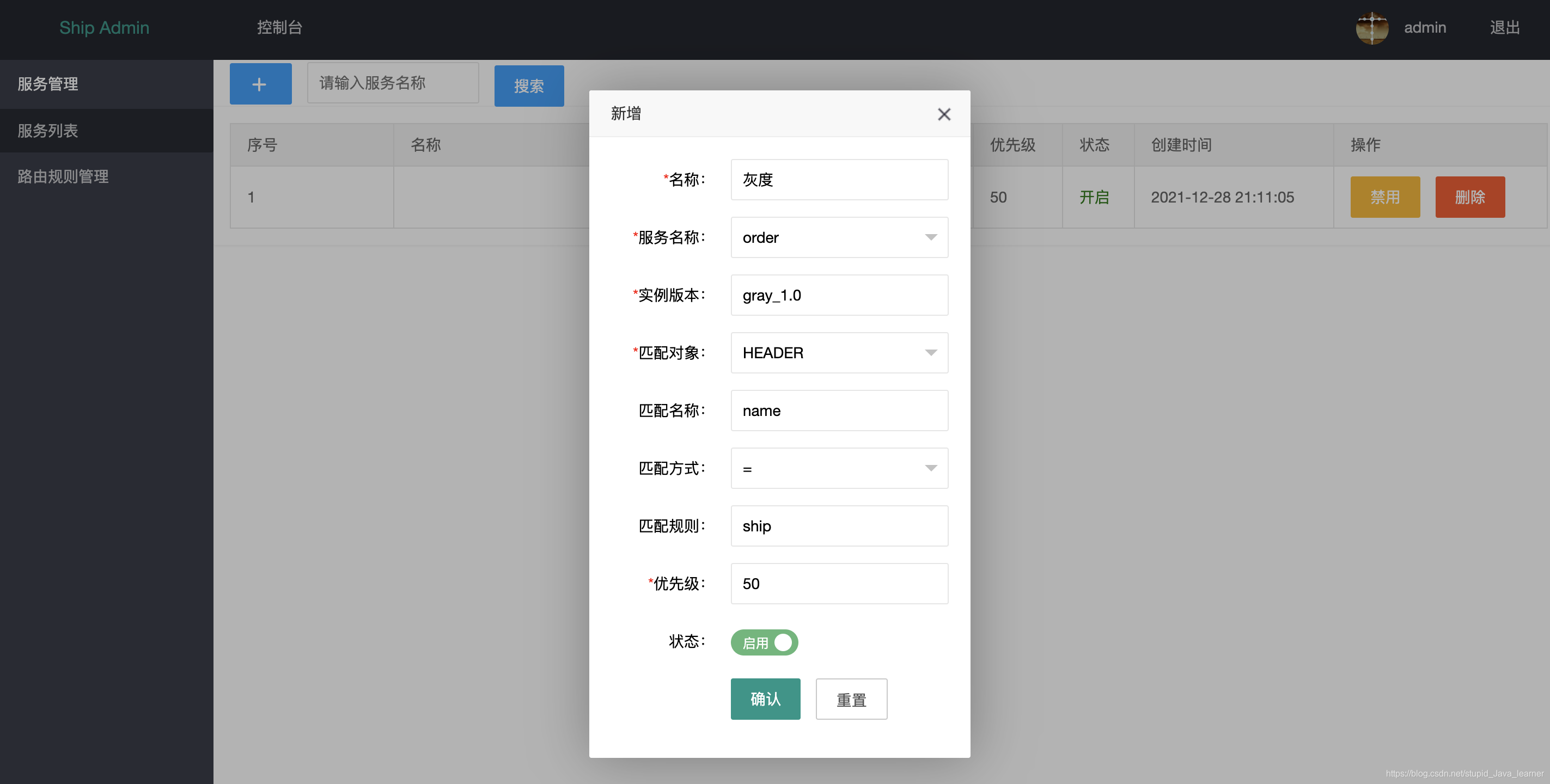
在admin后台添加路由规则配置,该规则表示当http header 中的name=ship时请求路由到gray_1.0版本的节点。
-
启动ship-server,看到以下日志时则可以进行测试了
2021-01-02 19:57:09.159 INFO 30413 --- [SocketWorker-29] cn.sp.sync.WebsocketSyncCacheServer : websocket server receive message: [{"operationType":"INSERT","ruleList":[{"id":1,"appId":5,"appName":"order","version":"gray_1.0","matchObject":"HEADER","matchKey":"name","matchMethod":1,"matchRule":"ship","priority":50}]}] -
用Postman请求http://localhost:9000/order/user/add,POST方式,header设置name=ship,可以看到只有实例1有日志显示。
==========add user,version:gray_1.0
4.2性能压测
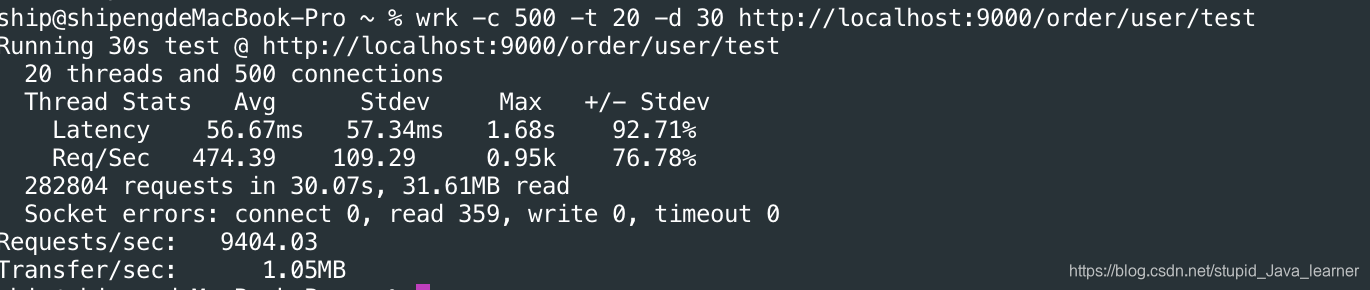
压测环境:
MacBook Pro 13英寸
处理器 2.3 GHz 四核Intel Core i7
内存 16 GB 3733 MHz LPDDR4X
后端节点个数一个
压测工具:wrk
压测结果:20个线程,500个连接数,吞吐量大概每秒9400个请求。
五、总结
千里之行始于足下,开始以为写一个网关会很难,但当你实际开始行动时就会发现其实没那么难,所以迈出第一步很重要。过程中也遇到了很多问题,还在github上给soul和nacos这两个开源项目提了两个issue,后来发现是自己的问题,尴尬😅。本文代码已全部上传到github,点击这里即可,最后,希望此文对你有所帮助。
参考资料:
https://nacos.io/zh-cn/docs/quick-start.html

 396


 扫一扫


 被折叠的 条评论
为什么被折叠?
 到【灌水乐园】发言


