



 本文通过实例讲解了Key-Value Observing(KVO)的使用方法及原理,包括如何为对象属性添加监听器并触发回调方法,解释了KVO的本质,并演示了如何手动调用KVO。
KVO的使用
之前写过关于KVO原理的文章,最近在复习这里,再回去看感觉不是很清晰,就再写一篇吧
KVO的全称是Key-Value-Observing,人称键值监听,就是监听某个对象属性值的改变
KVO的使用很简单,其实就是给某个属性添加一个监听者,然后这个属性的值改变后,触发回调方法
    self.student1 = [[ModelStudent alloc] init];
    _student1.age = 10;
    NSKeyValueObservingOptions options = NSKeyValueObservingOptionNew | NSKeyValueObservingOptionOld;
    // 注册观察者
    [_student1 addObserver:self forKeyPath: @"age" options: options context:nil];
// 改变对象的age属性的值
- (void)touchesBegan:(NSSet<UITouch *> *)touches withEvent:(UIEvent *)event {
    _student1.age = 20;
    NSLog(@"_student1.age  ----    %ld", (long)_student1.age);
}
// 实现方法(回调)
- (void)observeValueForKeyPath:(NSString *)keyPath ofObject:(id)object change:(NSDictionary<NSKeyValueChangeKey,id> *)change context:(void *)context {
    NSLog(@"触发了KVO   -   %@", change);
}
// 移除
- (void)dealloc {
    [_student1 removeObserver:self forKeyPath:@"age" context:nil];
    NSLog(@"dealloc");
}
点击后age属性值改变,打印结果

添加KVO后改变
我建了两个student实例对比观察:
    self.student1 = [[ModelStudent alloc] init];
    _student1.age = 10;
    NSKeyValueObservingOptions options = NSKeyValueObservingOptionNew | NSKeyValueObservingOptionOld;
    [_student1 addObserver:self forKeyPath: @"age" options: options context:nil];

    self.student2 = [[ModelStudent alloc] init];
    _student2.age = 10;
同时改变值
- (void)touchesBegan:(NSSet<UITouch *> *)touches withEvent:(UIEvent *)event {
    _student1.age = 20;
    NSLog(@"_student1.age  ----    %ld", (long)_student1.age);

    _student2.age = 30;
    NSLog(@"_student2.age  ----    %ld", (long)_student2.age);
}
其他都不改变
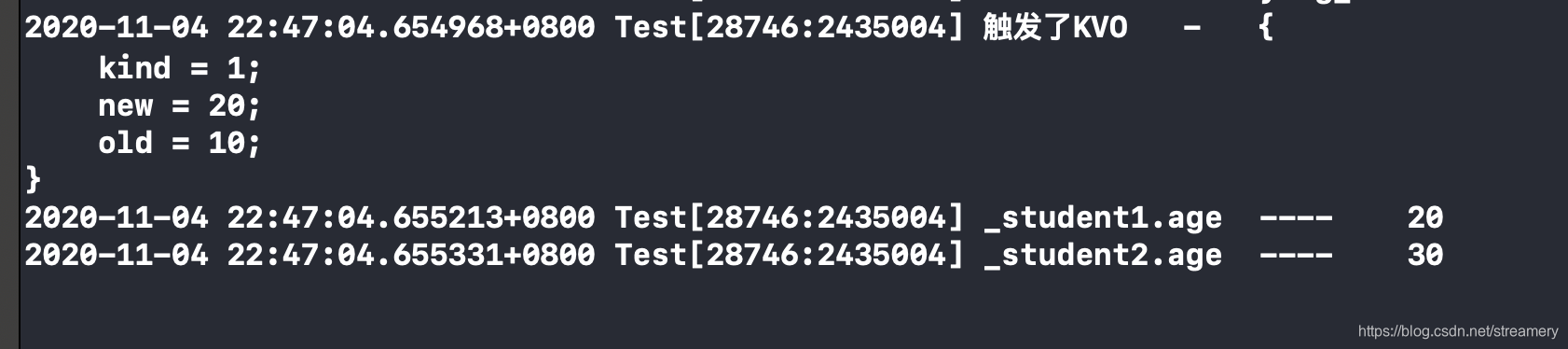
说明只有studen1被监听了,但是给ModelStudent的setAge:方法打断点,会发现都调用了 这个方法
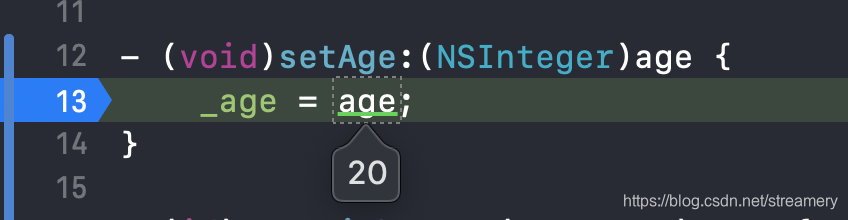
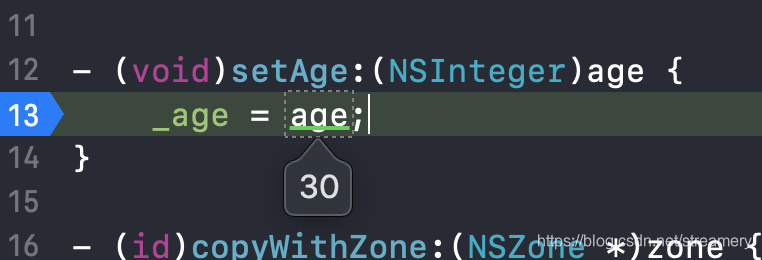
那么为什么student1被监听了,student2不可以呢
KVO本质
在打印出两者的isa和class:
    self.student1 = [[ModelStudent alloc] init];
    _student1.age = 10;
    NSKeyValueObservingOptions options = NSKeyValueObservingOptionNew | NSKeyValueObservingOptionOld;
    [_student1 addObserver:self forKeyPath: @"age" options: options context:nil];

    self.student2 = [[ModelStudent alloc] init];
    _student2.age = 10;

    NSLog(@"stu1 %s ---  stu2 %s", object_getClassName(_student1), object_getClassName(_student2));

再打印一下两者的setAge方法:
NSLog(@"stu1 %p --- stu2 %p", [_student1 methodForSelector:@selector(setAge:)], [_student2 methodForSelector:@selector(setAge:)]);

在控制台输出中,可以看到student1的setAge:方法实现是Foundation的_NSSetLongLongValueAndNotify,而student2的方法实现还是ModelStudent类的setAge:方法
可以发现,添加KVO的话,对象的isa会指向另外一个类对象
使用KVO监听的student 对象的isa指向了NSKVONotifying_ModelStudent类对象,那么他的set方法就在此类对象中,而且NSKVONotifying_ModelStudent类是ModelStudent的子类,当调用NSKVONotifying_ModelStudent的setAge方法时,就会调用Foundation框架中的_NSSetLongLongValueAndNotify方法
NSKVONotifying_ModelStudent是runtime运行时动态创建的类
_NSSetLongLongValueAndNotify方法内部实现是:
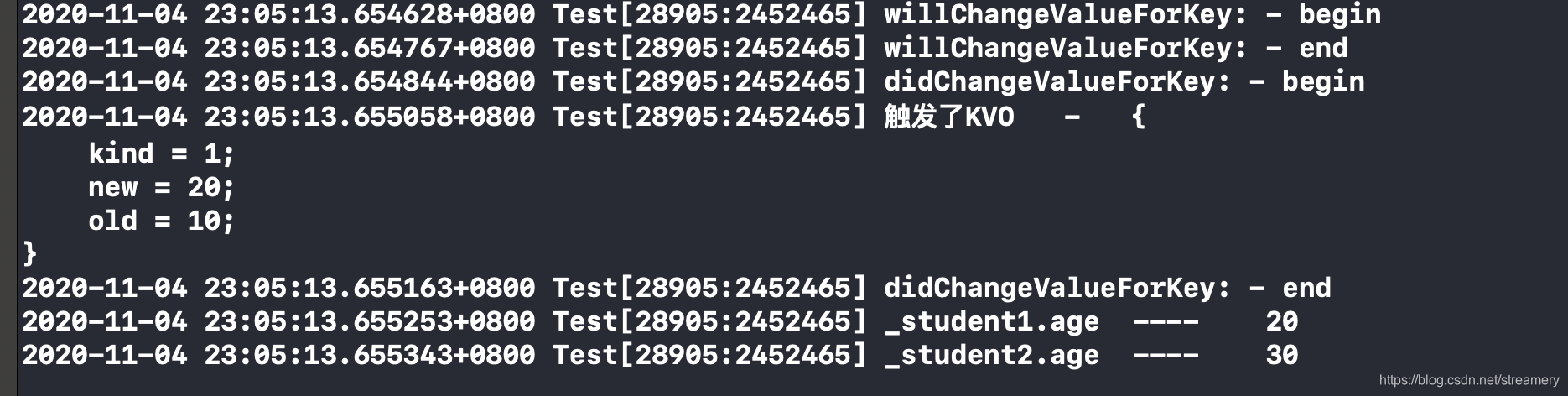
首先调用willChangeValueForKey:
调用didChangeValueForKey:当调用这个方法时内部就会触发监听器Observer的监听方法和调用父类的setAge:方法 observeValueForKeyPath:ofObject:change:context:这时候就能知道监听对象的属性值的改变了
验证一下:
在ModelStudent.m中
- (void)setAge:(NSInteger)age {
    _age = age;
}

- (void)willChangeValueForKey:(NSString *)key {
    NSLog(@"willChangeValueForKey: - begin");
    [super willChangeValueForKey:key];
    NSLog(@"willChangeValueForKey: - end");
}

- (void)didChangeValueForKey:(NSString *)key {
    NSLog(@"didChangeValueForKey: - begin");
    [super didChangeValueForKey:key];
    NSLog(@"didChangeValueForKey: - end");
}
再改变值:
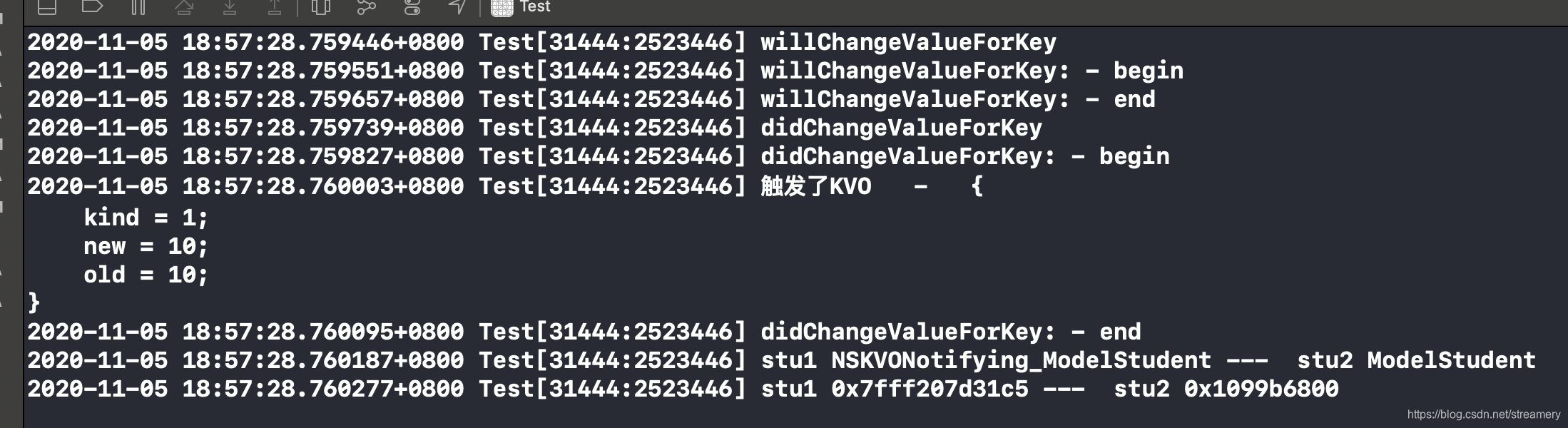
手动调用KVO
之前我以为的手动调用KVO是不添加观察者就能触发KVO,后来才明白是添加观察者后不改变值就能触发KVO
理解了KVO的原理就不难明白只要手动调用了willChangeValueForKey:和didChangeValueForKey:方法就能触发KVO方法
即在setAge:方法中手动加入这两个方法:
    self.student1 = [[ModelStudent alloc] init];
    _student1.age = 10;
    NSKeyValueObservingOptions options = NSKeyValueObservingOptionNew | NSKeyValueObservingOptionOld;
    [_student1 addObserver:self forKeyPath: @"age" options: options context:nil];
    // 手动执行方法
    NSLog(@"willChangeValueForKey");
    [_student1 willChangeValueForKey:@"age"];
    NSLog(@"didChangeValueForKey");
    [_student1 didChangeValueForKey:@"age"];


    self.student2 = [[ModelStudent alloc] init];
    _student2.age = 10;

    NSLog(@"stu1 %s ---  stu2 %s", object_getClassName(_student1), object_getClassName(_student2));
    NSLog(@"stu1 %p ---  stu2 %p", [_student1 methodForSelector:@selector(setAge:)], [_student2 methodForSelector:@selector(setAge:)]);
注意:给成员变量添加KVO是不会触发的!





 扫一扫
扫一扫


 902
902

 被折叠的 条评论
为什么被折叠?
被折叠的 条评论
为什么被折叠?
 到【灌水乐园】发言





