





 本文通过一个简单的Android应用示例,探讨了MVP(Model-View-Presenter)架构模式。作者作为六年经验的安卓开发者,指出MVP模式在实际应用中的问题,如接口爆炸、Presenter权重过高以及解耦效果。在示例中,展示了如何在输入框验证字符长度的场景下运用MVP,涉及四个接口和八个对象,对此表示困惑。作者认为这种复杂性使得MVP在小规模项目中显得过于繁琐。
作为一个6年安卓老开发,我从来没有使用过MVP,看到一堆的接口,火气不打一处来。因为面试的需要,勉强研究了下MVP是什么,优缺点。
数据、View、Presenter,View 将操作给 Presenter,Presenter 去获取数据,数
据获取好了返回给 Presenter,Presenter 去刷新 View。PV,PM 双向依赖
1.接口爆炸
2.Presenter 很重
3.解耦
看的再多不亲自体验,翠花来上代码:
先看下业务,一个输入框,当字符长度小于5时候提示,
“内容太短了,还不到5个字符”,字符长度大于10,提示“内容太长了,超过10个字符了”。

1.Model 代码:
1.1 model
model 负责创建模型所需要的数据
public class Model {
    public String getContent() {
        return content;
    }

    public void setContent(String content) {
        this.content = content;
    }

    String content;
}
1.2 ModelInterface
ModelInterface负责定义 页面数据变动时,业务功能。接口只负责定义动作,具体实现有显现类完成。
public interface ModelInterface {
    void handleContent(Model model, OnBusinessHandleLisenner listner);

}
1.4 ModelIml
实现类负责具体业务检验,以及业务校验下的接口回调。
public class ModelIml implements ModelInterface {
    @Override
    public void handleContent(Model model, OnBusinessHandleLisenner listner) {
        if (model.content.length() > 10) {
            listner.contentTooLong();
        } else if (model.content.length() < 5) {
            listner.contentTooShort();
        }
    }
}
2.View 代码:
2.1 activity
ublic class MVPActivity extends AppCompatActivity implements ViewInterFace{

    private TextView tv;

    @Override
        protected void onCreate(Bundle savedInstanceState) {
        super.onCreate(savedInstanceState);
        Log.e("MainActivity","onCreate");
        setContentView(R.layout.activity_mvp);
        final EditText et = findViewById(R.id.et);
        tv = findViewById(R.id.tv);
        final Presenter presenter = new Presenter(MVPActivity.this);

        //焦点监听
        et.addTextChangedListener(new TextWatcher() {
            @Override
            public void beforeTextChanged(CharSequence charSequence, int i, int i1, int i2) {

            }

            //选择内容正在变动
            @Override
            public void onTextChanged(CharSequence charSequence, int i, int i1, int i2) {
                //事件的发起
                Model model = new Model();
                model.setContent(charSequence.toString());
                presenter.contentChange(model);
            }


            @Override
            public void afterTextChanged(Editable editable) {

            }
        });
    }


    @Override
    public void onSetContentLong() {
        tv.setText("内容太长了,超过10个字符了");
    }

    @Override
    public void onSetContentShort() {
        tv.setText("内容太短了,还不到5个字符");
    }
}
xml代码:
<?xml version="1.0" encoding="utf-8"?>
<LinearLayout xmlns:android="http://schemas.android.com/apk/res/android"
    xmlns:app="http://schemas.android.com/apk/res-auto"
    xmlns:tools="http://schemas.android.com/tools"
    android:layout_width="match_parent"
    android:layout_height="match_parent"
    android:orientation="vertical"
    tools:context=".activity.MainActivity">

   <EditText
       android:id="@+id/et"
       android:hint="请输入内容"
       android:layout_width="match_parent"
       android:layout_height="60dp">

   </EditText>
    <TextView
        android:id="@+id/tv"
        android:layout_width="match_parent"
        android:layout_height="wrap_content"
        android:text="内容太短了,还不到5个字符"
        android:textSize="20sp"
        android:textColor="@color/colorPrimary">
    </TextView>

</LinearLayout>
2.2 ViewInterFace
public interface ViewInterFace {
    void onSetContentLong();
    void onSetContentShort();
}
3 Presenter
3.1 OnBusinessHandleLisenner
public interface  OnBusinessHandleLisenner {
    void contentTooLong();
    void contentTooShort();
}
3.2 PresenterInterface
public interface PresenterInterface {
    void contentChange(Model model);
}
3.3 Presenter
public class Presenter implements PresenterInterface, OnBusinessHandleLisenner {

    ViewInterFace viewInterFace;
    private final ModelIml modelIml;

    public Presenter(ViewInterFace viewInterFace) {
        //1.构造方法设置 viewInterFace
        this.viewInterFace = viewInterFace;
        //2.创建ModelIml 实例
        modelIml = new ModelIml();
    }

    @Override
    public void contentChange(Model model) {
        //3.响应事件
        modelIml.handleContent(model, Presenter.this);
    }

    @Override
    public void contentTooLong() {
        //4.回调处理视图
        if (viewInterFace != null) {
            viewInterFace.onSetContentLong();
        }
    }

    @Override
    public void contentTooShort() {
        if (viewInterFace != null) {
            viewInterFace.onSetContentShort();
        }
    }
}
一个简单业务下来,需要四个接口,8个对象。接口把人整到懵逼,所以数接口重一点也不夸张。
整个presenter,承担了 维护,业务数据承接,业务数据传递,业务接口回调,界面更新 等功能。
为了整明白整个架构,画了一张图:
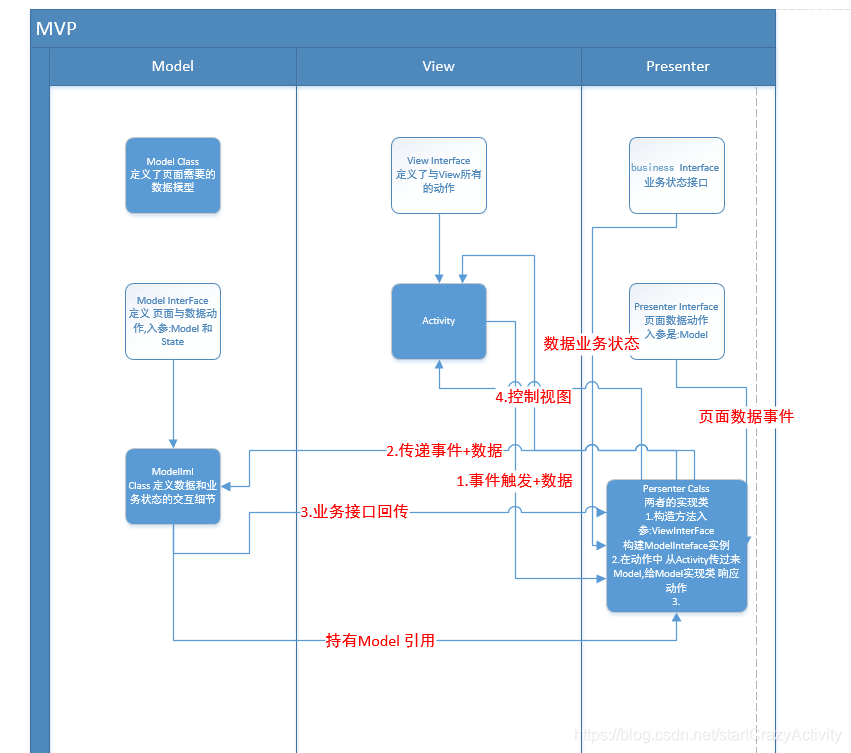
Presenter 做的事情有:
1.实现Persenter Interface 和 Business Interface。
2.构造方法入参是,ViewInterFace 。
3.构造方法中创建,ModelIml 实例。
4.在activity 中定义 响应 交互的方法调用。
5.传递响应给ModelIml。
6.回调 Business Interface。
7.Business Interface回调中调用 ViewInterFace(即actiivty)更新视图。





 扫一扫
扫一扫


 1474
1474

 被折叠的 条评论
为什么被折叠?
被折叠的 条评论
为什么被折叠?
 到【灌水乐园】发言





