


 本文深入解析AOP(面向切面编程)的概念、原理及在Android中的应用实践,通过示例详细介绍了AOP的术语、使用流程及如何通过AspectJ实现预编译和运行期动态代理。
AOP使用及原理
AOP简介
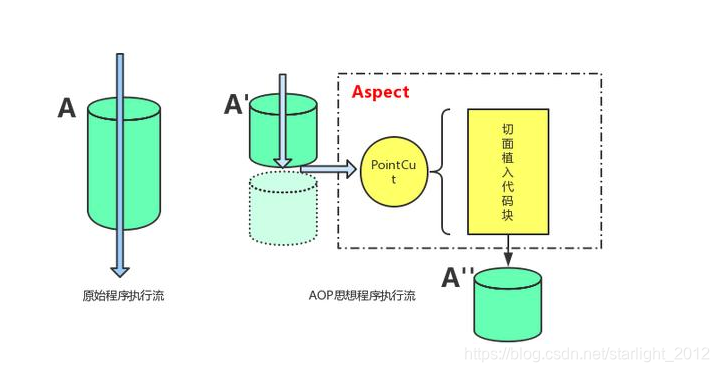
AOP是Aspect Oriented Programming的缩写,中译文为面向切向编程。通过预编译方式和运行期动态代理实现程序功能的统一维护的一种技术。AOP是OOP的延续,是软件开发中的一个热点,也是spring框架中的一个重要内容,是函数式编程的一种衍生泛型。利用AOP可以对业务逻辑的各个部分进行隔离,从而使得业务逻辑各部分之间的耦合度降低,提供程序的可重用性,同时提高了开发效率。在Android中可以使用到LOG日志,权限管理,登录拦截、性能监控、数据校验、缓存等模块。
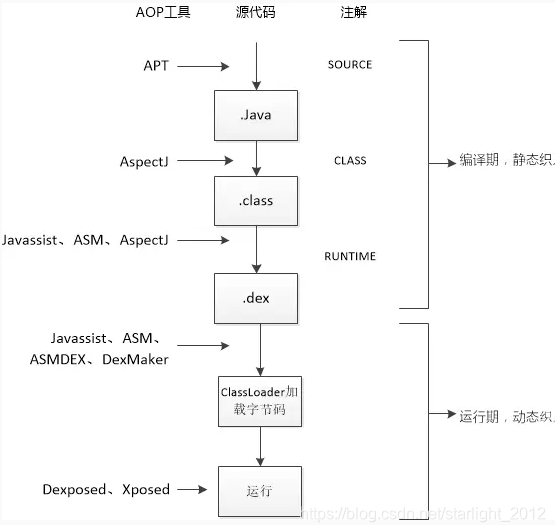
AOP使用
1、前面讲到AOP是通过预编译和运行期动态代理实现切面编程,在Android中使用AOP时需要引入Aspectj。在项目根目录build.gradle中导入aspectj依赖。
// Top-level build file where you can add configuration options common to all sub-projects/modules.
apply from:'pluginConfig.gradle'

buildscript {
    ext {
        kotlin_version = '1.3.72'
    }
    repositories {
        google()
        jcenter()

    }
    dependencies {
        classpath 'com.android.tools.build:gradle:4.0.0'
        classpath "org.jetbrains.kotlin:kotlin-gradle-plugin:$kotlin_version"

        //添加aspectj
        classpath 'org.aspectj:aspectjtools:1.8.13'
        classpath 'org.aspectj:aspectjrt:1.8.13'
    }
}

allprojects {
    repositories {
        google()
        jcenter()

    }
}

task clean(type: Delete) {
    delete rootProject.buildDir
}
在使用aspectj modul中build.gradle中导入aspectj的jar包。
apply plugin: 'com.android.application'

android {
    compileSdkVersion 29
    buildToolsVersion "29.0.2"
    defaultConfig {
        applicationId "com.yellow.star.crotchet"
        minSdkVersion 16
        targetSdkVersion 29
        versionCode 1
        versionName "1.0"
        testInstrumentationRunner "androidx.test.runner.AndroidJUnitRunner"
    }
    buildTypes {
        release {
            minifyEnabled false
            proguardFiles getDefaultProguardFile('proguard-android-optimize.txt'), 'proguard-rules.pro'
        }
    }

    compileOptions {
        sourceCompatibility JavaVersion.VERSION_1_8
        targetCompatibility JavaVersion.VERSION_1_8
    }
}

dependencies {
    implementation fileTree(include: ['*.jar'], dir: 'libs')
    implementation 'androidx.appcompat:appcompat:1.1.0'
    implementation 'androidx.constraintlayout:constraintlayout:1.1.3'
    implementation project(path: ':crotchetaopannotation')
    testImplementation 'junit:junit:4.12'
    androidTestImplementation 'androidx.test.ext:junit:1.1.1'
    androidTestImplementation 'androidx.test.espresso:espresso-core:3.2.0'

	//引入aspectj依赖
    implementation 'org.aspectj:aspectjrt:1.8.13'

    implementation project(path: ':crotchetCommon')

    api project(path: ':crotchetaop')
}

//使用aspectj编译器替换java编译器
import org.aspectj.bridge.IMessage
import org.aspectj.bridge.MessageHandler
import org.aspectj.tools.ajc.Main

//application使用applicationVariants  library使用libraryVariants
project.android.applicationVariants.all { variant ->
    JavaCompile javaCompile = variant.javaCompile
    javaCompile.doLast {
        String[] args = ["-showWeaveInfo",
                         "-1.8",
                         "-inpath", javaCompile.destinationDir.toString(),
                         "-aspectpath", javaCompile.classpath.asPath,
                         "-d", javaCompile.destinationDir.toString(),
                         "-classpath", javaCompile.classpath.asPath,
                         "-bootclasspath", project.android.bootClasspath.join(
                File.pathSeparator)]

        MessageHandler handler = new MessageHandler(true);
        new Main().run(args, handler)

        def log = project.logger
        for (IMessage message : handler.getMessages(null, true)) {
            switch (message.getKind()) {
                case IMessage.ABORT:
                case IMessage.ERROR:
                case IMessage.FAIL:
                    log.error message.message, message.thrown
                    break;
                case IMessage.WARNING:
                case IMessage.INFO:
                    log.info message.message, message.thrown
                    break;
                case IMessage.DEBUG:
                    log.debug message.message, message.thrown
                    break;
            }
        }
    }
}
前面说的aspectj是在预编译期间生成相关辅助文件代码,在使用aspectj时需要改变当前项目的编译器,使用aspectj编译器。aspectj编译期兼容java编译器。在modul build.gradle中加入以下代码替换java编译器。
import org.aspectj.bridge.IMessage
import org.aspectj.bridge.MessageHandler
import org.aspectj.tools.ajc.Main

project.android.applicationVariants.all { variant ->
    JavaCompile javaCompile = variant.javaCompile
    javaCompile.doLast {
        String[] args = ["-showWeaveInfo",
                         "-1.8",
                         "-inpath", javaCompile.destinationDir.toString(),
                         "-aspectpath", javaCompile.classpath.asPath,
                         "-d", javaCompile.destinationDir.toString(),
                         "-classpath", javaCompile.classpath.asPath,
                         "-bootclasspath", project.android.bootClasspath.join(
                File.pathSeparator)]

        MessageHandler handler = new MessageHandler(true);
        new Main().run(args, handler)

        def log = project.logger
        for (IMessage message : handler.getMessages(null, true)) {
            switch (message.getKind()) {
                case IMessage.ABORT:
                case IMessage.ERROR:
                case IMessage.FAIL:
                    log.error message.message, message.thrown
                    break;
                case IMessage.WARNING:
                case IMessage.INFO:
                    log.info message.message, message.thrown
                    break;
                case IMessage.DEBUG:
                    log.debug message.message, message.thrown
                    break;
            }
        }
    }
}
project.android.applicationVariants在apply plugin: 'com.android.application’时使用applicationVariants,
在apply plugin: 'com.android.library’时需要改成project.android.libraryVariants。
2、定义AOP相关注解(目标类)
/**
 * 日志拦截注解
 */
@Retention(RetentionPolicy.RUNTIME)
@Target(ElementType.METHOD)
public @interface CrotchetLogIntercept {
}
3、创建Aspectj切面,使用Aspectj编译器时,需要在切面处理类加上@Aspect注解
/**
 * 日志拦截器处理类  切面
 */
@Aspect
public class CrotchetLogInterceptAspect {

    private static final String TAG = "CrotchetLogInterceptAsp";

    //切入点   切点表达式
  @Pointcut("execution(@com.yellow.star.crotchet.aop.annotation.CrotchetLogIntercept * *.*(..))")
    public void logFilter() {
    }

    //通知
    @Around("logFilter()")
    public void aroundLogPoint(ProceedingJoinPoint joinPoint) throws Throwable {
        joinPoint.proceed();
        Log.e(TAG, "aroundLogPoint: ");
    }

}
4、在需要做日志拦截的的地方添加注解
package com.yellow.star.crotchet;


import android.os.Bundle;
import android.util.Log;
import android.view.View;

import com.yellow.star.crotchet.aop.annotation.CrotchetLogIntercept;

import androidx.annotation.Nullable;
import androidx.appcompat.app.AppCompatActivity;

/**
 * app启动界面
 */
public class LaunchActivity extends AppCompatActivity {


    @Override
    protected void onCreate(@Nullable Bundle savedInstanceState) {
        super.onCreate(savedInstanceState);
        setContentView(R.layout.activity_launch);

        findViewById(R.id.bt).setOnClickListener(new View.OnClickListener() {
            @Override
            public void onClick(View v) {
                test();
            }
        });
    }

    //连接点
    @CrotchetLogIntercept
    public void test() {
        Log.e("aaa", "test: ");
        findViewById(R.id.bt).setOnClickListener(new View.OnClickListener() {
            @Override
            public void onClick(View v) {

            }
        });
    }
}
到此AOP通过切面完成test()方法的日志打印。
AOP术语讲解
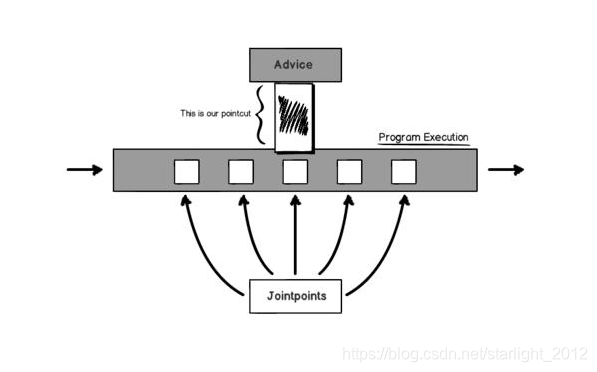
- JoinPoint(连接点):所谓连接点是指那些被拦截到的点,Aspectj可以让你在构造器或者属性注入,或抛出异常时都可以时连接点,方法有关的前前后后都是连接点。
- Pointcut(切入点):所谓切入点是指我们要对那些Joinpoint进行拦截的定义。切入点上面说的连接点的基础上,来定义切入点,你的一个类里,有15个方法,那就有十几个连接点了对吧,但是你并不想在所有方法附件都使用通知(使用叫织入,下面再说),你只是想让其中几个,在调用这几个方法之前、之后或者抛出异常时干点什么,那么就用切入点来定义这几个方法,让切点来筛选连接点,选中那几个你想要的方法。
- Advice(通知/增强):所谓通知是指拦截到JoinPoint之后要做的事情就是通知。
- Introduction(引入):允许我们向现有的类添加新方法属性。这不就是把切面(也就是新方法属性:通知定义的)用到目标类中吗。
- Target(目标对象): 引入中所提到的目标类,也就是要被通知的对象,也就是真正的业务逻辑,他可以在毫不知情的情况下,被咋们织入切面。二自己专注于业务本身的逻辑。
- Weaving(织入):是指把增强应用到目标对象来创建新的代理对象的过程,Aspectj采用编译器织入和类装载期织入。
- Proxy(代理):一个类被AOP织入增强后,就产生一个结果代理类。
- Aspect(切面):是切入点和通知(引介)的结合。现在发现了吧,没连接点什么事,链接点就是为了让你好理解切点搞出来的,明白这个概念就行了。通知说明了干什么和什么时候干(什么时候通过方法名中的befor,after,around等就能知道),二切入点说明了在哪干(指定到底是哪个方法),这就是一个完整的切面定义。
连接点
| Join Points | 说明 | 示例 |
|---|---|---|
| method call | 函数调用 | 比如调用Log.e(),这是一处JPoint |
| method execution | 函数执行 | 比如Log.e()的执行内部,是一处JPoint。注意和method call的区别是电泳某个函数的地方。而execution是某个函数执行内部。 |
| constructor call | 构造函数调用 | 和method call类似 |
| constructur execution | 构造函数执行 | 和method execution类似 |
| field get | 获取某个变量 | 比如读取DemoActivity.debug成员 |
| field set | 设置某个标量 | 比如设置DemoActivity.debug成员 |
| pre-initialization | Object在构造函数中得一些工作 | 很少使用 |
| initialization | object在构造函数中做得工作 | |
| static initialization | 类初始化 | 比如类的static{} |
| handler | 异常处理 | 比如try catch(XXX)中,对应catch内的执行 |
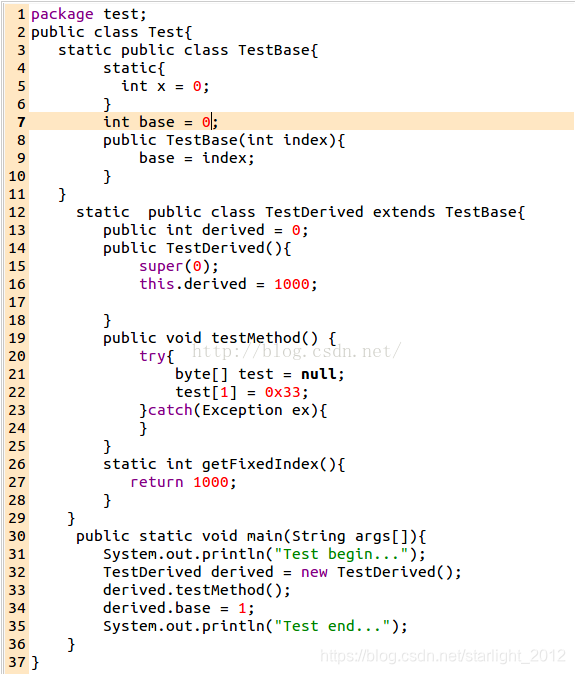
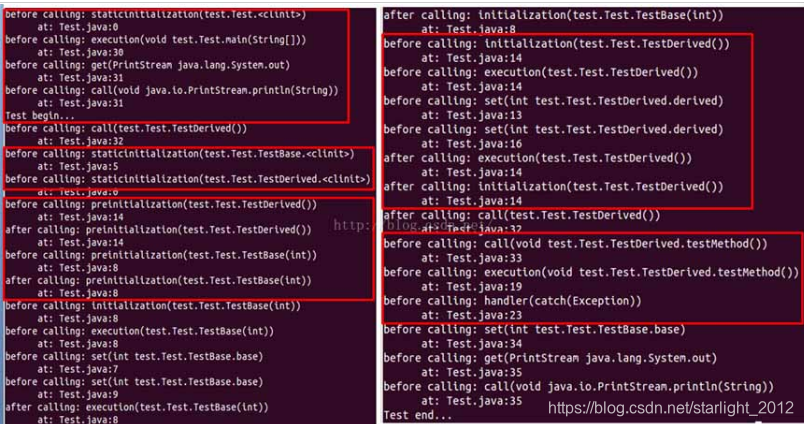
在上述打印的join point连接点都可以做切面处理。连接点是Aspectj定义好一个程序中的关键函数(包含构造函数)和代码段(staticblock)。
切点表达式
| JPoint | 说明 | Pointcut语法 |
|---|---|---|
| method call | 函数被调用 | call(MethodSignature) |
| method execution | 函数执行内部 | execution(MethodSignature) |
| costructor call | 构造函数被调用 | call(ConstructorSignature) |
| constructor execution | 构造函数执行内部 | execution(ConstructorSignature) |
| field get | 读"变量" | get(FieldSignature) |
| field set | 写"变量" | set(FieldSignature) |
| pre-initialization | 与构造函数有关,很少用到 | preinitialization(ConstructorSignature) |
| initialization | 与构造函数有关,很少用到 | initialization(ConstructorSignature) |
| static initialization | static块初始化 | staticinitialization(TypeSignature) |
| handler | 异常处理 | handler(TypeSignature)只能与@Before()配合使用,不支持@After、@Around等 |
| advice execution | advice执行 | adviceexecution() |
| Signature | 语法 |
|---|---|
| MethodSignature | @注解 访问权限 返回值类型 类名.函数名(参数) |
| ConstructorSignature | @注解 访问权限 类名.new(参数) |
| FieldSignature | @注解 访问权限 变量类型 类名.成员变量名 |
| TypeSignature | 类名,可以使用通配符,包括**和…以及+号。其中* *号用于匹配除.号之外的任意字符,而…则表示任意子package,+号表示子类。 |
定义切点表达式
//execution表示函数执行内部,使用注解com.yellow.star.crotchet.aop.annotation.CrotchetLogIntercept的方法,
//* *.*(..)  第一*表示返回类型   第二个*表示包名   第三个*表示方法名  (..)表示方法参数
@Pointcut("execution(@com.yellow.star.crotchet.aop.annotation.CrotchetLogIntercept * *.*(..))")
前面描述Aspectj定义的join point连接点,我们可以通过切点表达式处理需要处理的连接点,添加相应切面功能,
Advice分类
| 类型 | 描述 |
|---|---|
| Before | 前置通知, 在目标执行之前执行通知 |
| After | 后置通知, 目标执行后执行通知 |
| Around | 环绕通知, 在目标执行中执行通知, 控制目标执行时机 |
| AfterReturning | 后置返回通知, 目标返回时执行通知 |
| AfterThrowing | 异常通知, 目标抛出异常时执行通知 |
Before就是在调用AOP连接点(方法)之前调用的切面方法,在此可以插入相关切面业务逻辑。
After就是在调用AOP连接点(方法)之后调用的切面方法,在此可以插入相关切面业务逻辑。
Around before和around是指JPoint执行前或执行后备触发,而around就替代了原JPoint,在执行JPoint方法时需要手动调用proceed方法。
after():returning(返回值类型)
after():throwing(异常类型)
returning和throwing后面都可以指定具体的类型,如果不指定的话则匹配的时候不限定类型,假设JPoint是一个函数调用的话,那么函数调用执行完有两种方式退出,一个是正常的return,另外一个是抛异常。注意,after()默认包括returning和throwing两种情况
AOP原理分析
aop是基于预编译和运行期动态代理实现切面编程,我们在使用AOP注解定义连接点时如下
 @CrotchetLogIntercept
    public void test() {
        Log.e("aaa", "test: ");
    }
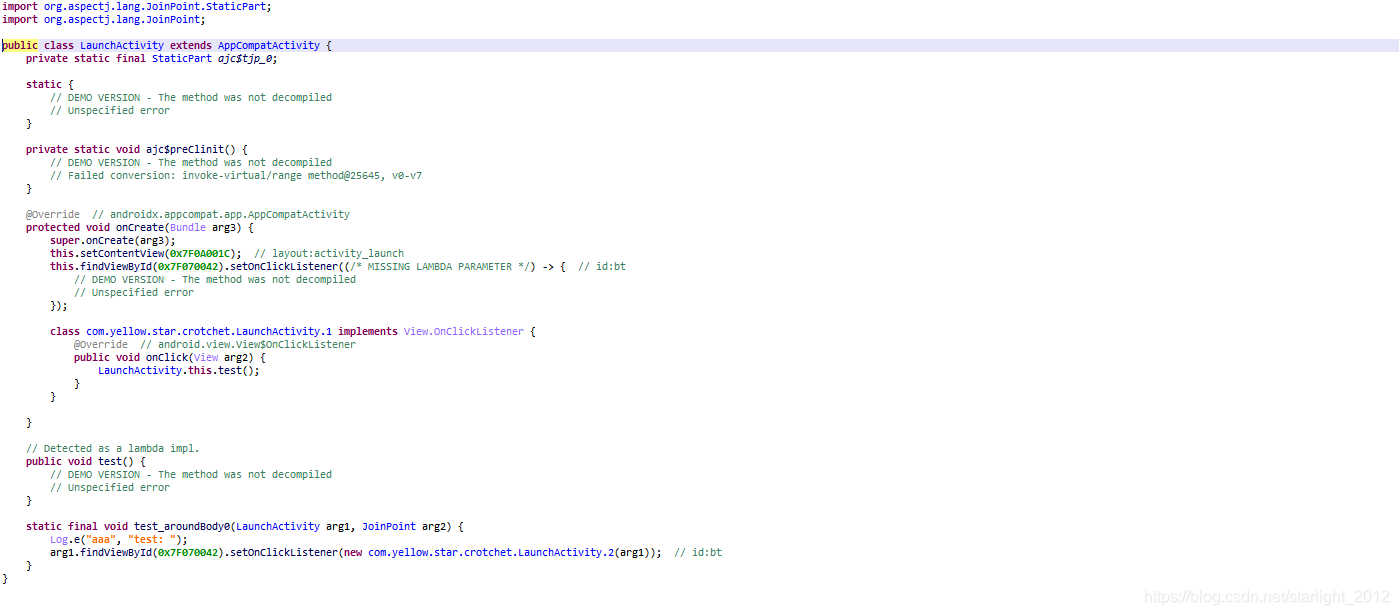
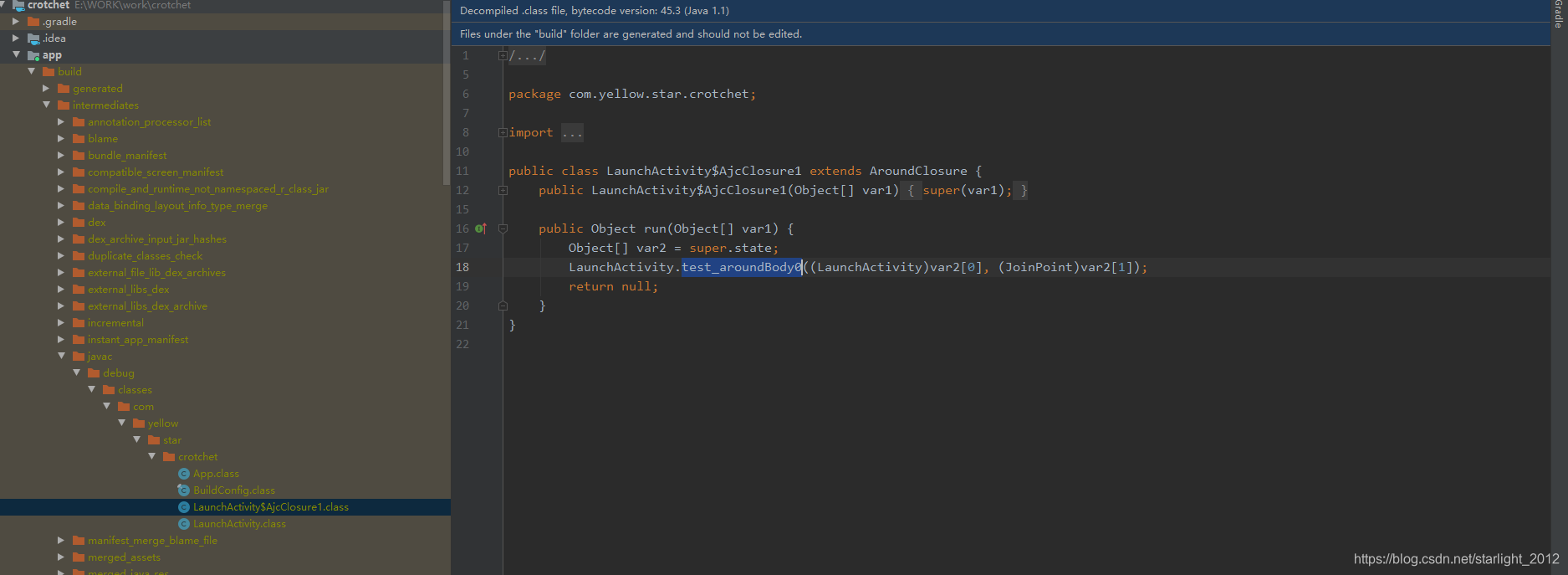
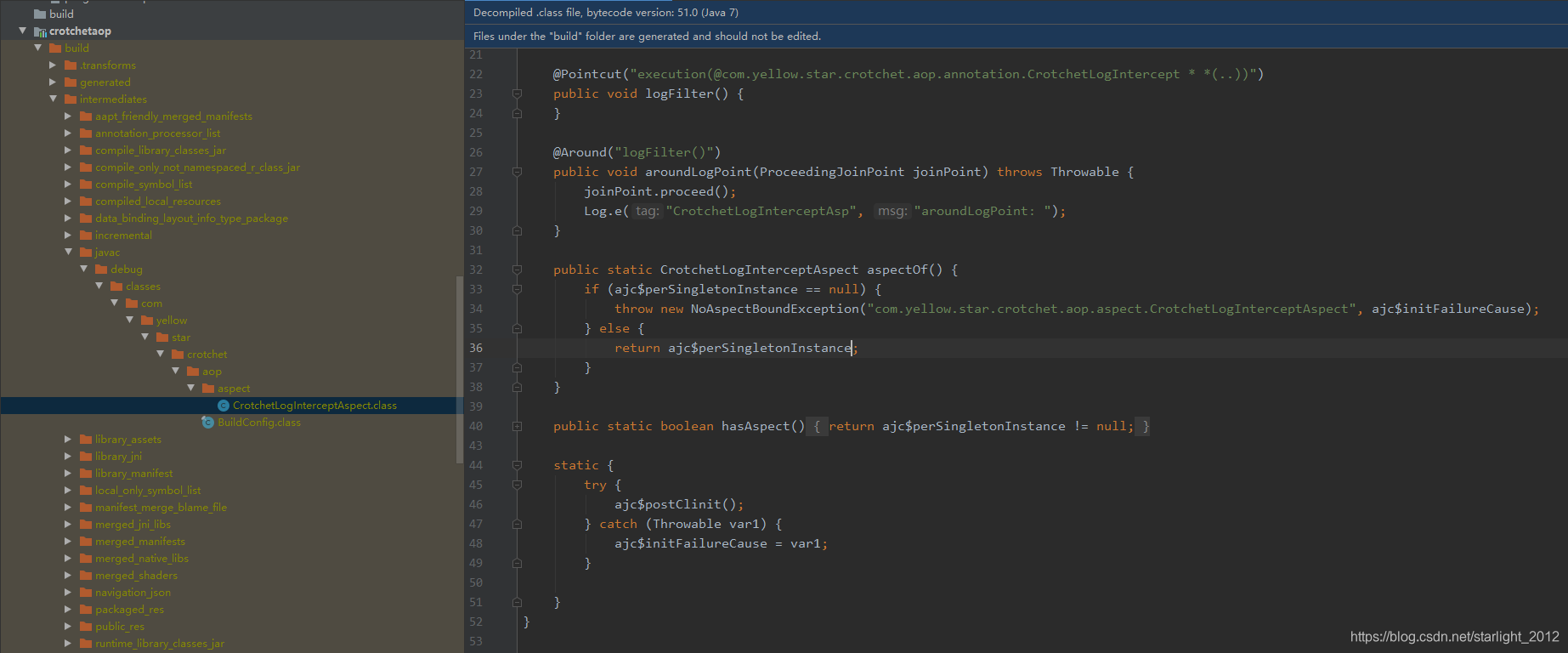
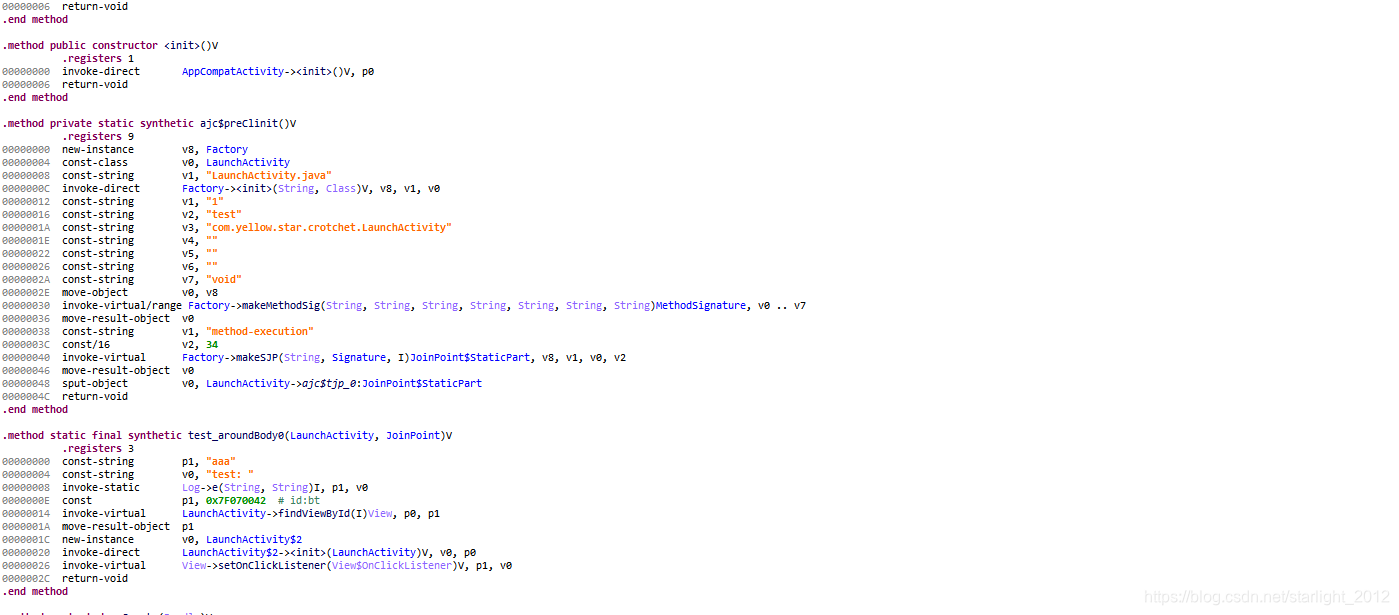
在gradle中制定当前编译器为aspectj编译器时,生成class时会生成一个静态方法test_aroundBody0,在静态方法中把当前用注解处理的类代码拷贝到静态方法中如图:
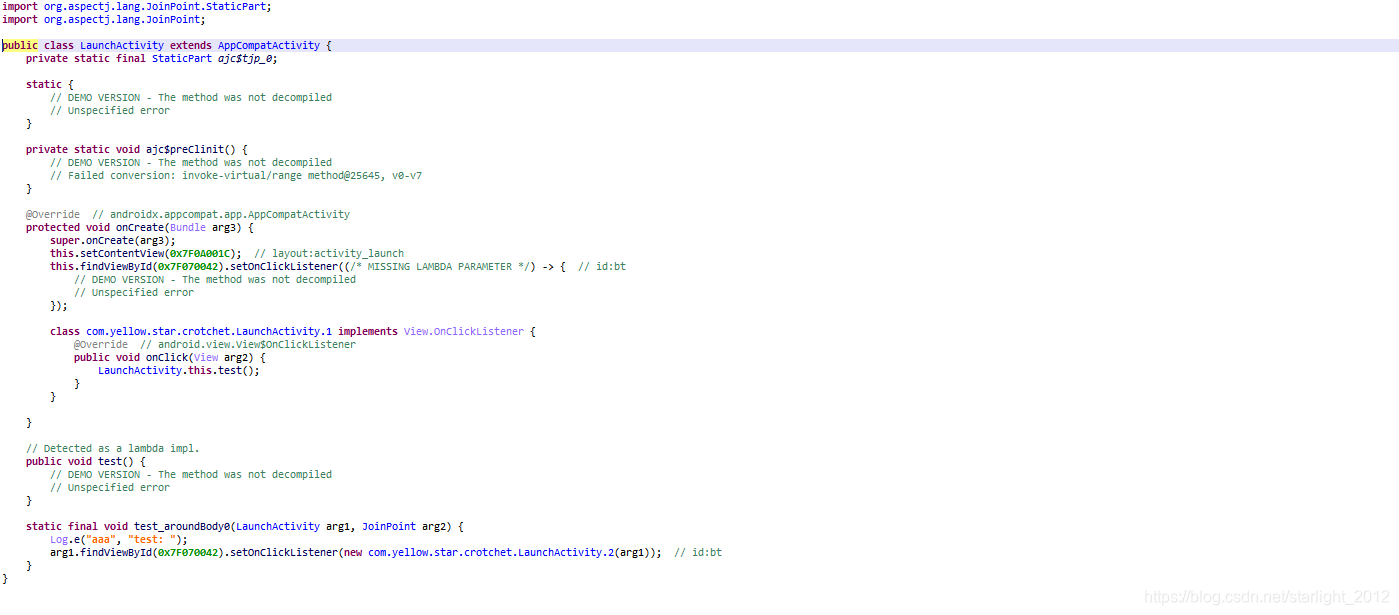
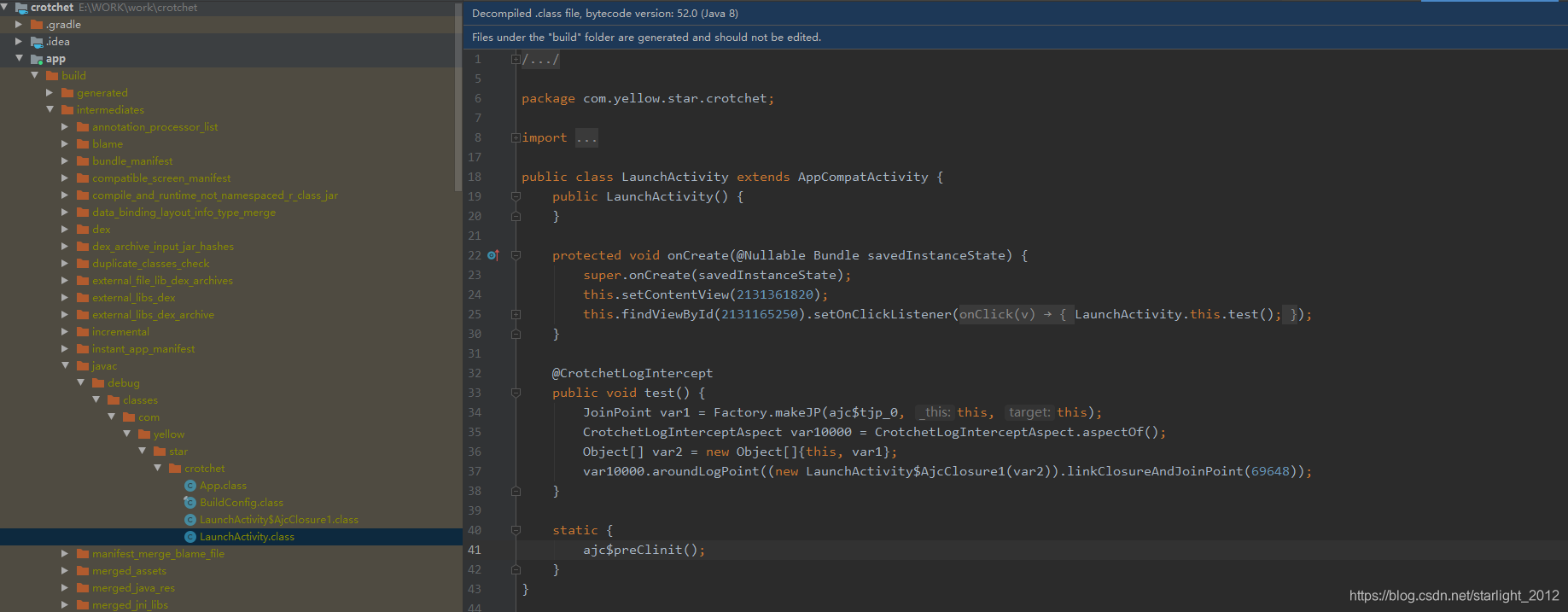
在当前class类中生成内部类,类名$AjcClosure1,在内部类中调用拷贝test()代码块的静态方法test_aroundBody0,在原来test()方法中添加Aspectj的动态代理,通过Factory.makeJP()生成JoinPoint连接点对象,通过调用@Aspectj切面类aspectOf()获取切面类实例,然后调用调用切面类中通知织入的方法,把当前生成的JoinPoint对象传递过去。在切面中处理相关逻辑,可以通过JoinPoint对象获取当前类,方法参数等信息,通过JoinPoint.proceded()回调到注解连接点静态方法中,执行原有代码逻辑。
AOP实现伪代码
import java.lang.annotation.ElementType;
import java.lang.annotation.Retention;
import java.lang.annotation.RetentionPolicy;
import java.lang.annotation.Target;

public class AOPDemo {

    public static void main(String[] args) {
        //正常OOP思想
        A a = new A();
        a.test();

        //AOP切面编程
        BClass b = new BClass();
        b.test();
    }


    //正常调用逻辑
    public static class A {
        public void test() {
            System.out.println("AAAAAA");
        }
    }


    //原始java文件
    public static class B {
        @LOG
        public void test() {

        }
    }

    //编译后的class文件
    public static class BClass {

        private static final JoinPoint ajc$tjp_0 = null;

        private static void ajc$preClinit() {
            //初始化ajc$tjp_0对象
        }

        static {
            BClass.ajc$preClinit();
        }

		//原有连接点方法修改成运行期动态代理代码,在原有方法中调用切面织入功能
        public void test() {
            JoinPoint joinPoint = new JoinPoint();
            AOPAspect aopAspect = AOPAspect.aspectOf();
            Object[] var2 = new Object[]{this, joinPoint};
            aopAspect.handleAspect(new AjcClosure1(var2));
        }

        //这个静态方法会拷贝注解连接点方法内的代码块
        public static void test_aroundBody0(BClass bClass, JoinPoint joinPoint) {
            System.out.println("AAAAAA");
        }

        public class AjcClosure1 {

            private Object[] args;

            public AjcClosure1(Object[] args) {
                this.args = args;
            }

            public Object run(Object[] args) {
                BClass.test_aroundBody0((BClass) args[0], (JoinPoint) args[1]);
                return null;
            }
        }

    }

    public static class JoinPoint {

    }


    //AOP切片处理类
    public static class AOPAspect {

        private static AOPAspect aopAspect;

        public void handleAspect(BClass.AjcClosure1 ajcClosure1) {
            //打印日志
            System.out.println("AOP调用方法之前打印日志");
            ajcClosure1.run(ajcClosure1.args);
        }

        static {
            aopAspect = new AOPAspect();
        }

        public static AOPAspect aspectOf() {
            return aopAspect;
        }
    }


    //AOP注解
    @Retention(RetentionPolicy.CLASS)
    @Target(ElementType.METHOD)
    public @interface LOG {

    }
}
AOP总结
OOP面向对象编程,对于数据校验,日志打印、统一登录等功能模块,需要在特定的对象方法中调用,加以判断然后处理相关业务逻辑,在代码复用性较低,耦合度高,需要在每个模块依赖调用,AOP切面编程,基于预编译和动态代理技术,抽取业务代码,在运行期动态调用切面处理代码,在切面处可以对数据进行校验等业务代码处理,对于模块依赖较低,复用性较高,适合与android日志埋点、权限管理,登录拦截、性能监控等模块。可以节约开发时间。





 扫一扫
扫一扫


 1013
1013

 被折叠的 条评论
为什么被折叠?
被折叠的 条评论
为什么被折叠?
 到【灌水乐园】发言





