


 本文详细介绍了 Nexus 2.14.8 版本在 Ubuntu 18.04 系统上的安装过程,包括设置运行权限、环境变量、配置文件修改以及开机启动项的设置。解决了手动启动正常但在开机启动时失效的问题。
安装方面没什么特别的,主要是开机启动的设置,这个东西查了好多博客弄了好久没成功。手动调用/home/ricky/sotfWare/nexus-2.14.8-01/bin/nexus start 的时候是可以的,但把这个命令弄进启动脚本中之后就失效了,而且会导致其它启动项失效。不知道什么原因。。。。
后来自己弄OK了,记录一下方便以后用。
-
先说安装,我下载的是nexus-2.14.8-01-bundle.tar.gz 并没使用最新的,主要是想把以前的库直接copy过去省事。
-
复制到/home/ricky/sotfWare 下解压 tar -xzvf nexus-2.14.8-01-bundle.tar.gz
-
设置运行权限
-
sudo chown root nexus-2.14.8-01
sudo chown root sonatype-work
sudo chmod 777 nexus-2.14.8-01
sudo chmod 777 sonatype-work -
设置环境变量
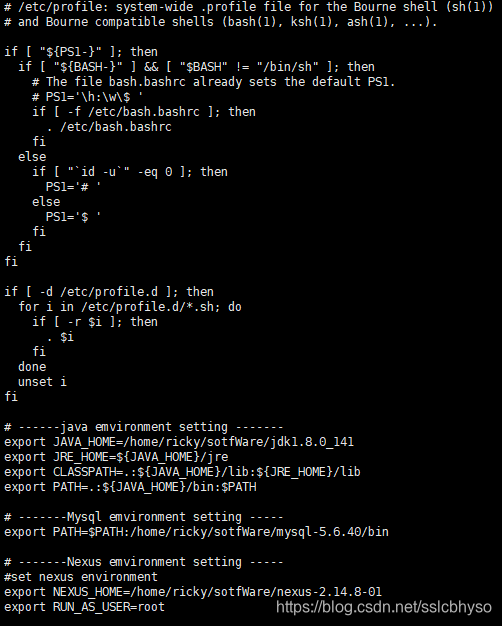
sudo vim /etc/profile 在后面加入
export NEXUS_HOME=/home/ricky/sotfWare/nexus-2.14.8-01
export RUN_AS_USER=root
-
修改/home/ricky/sotfWare/nexus-2.14.8-01/bin/jsw/conf/wrapper.conf 这里和下面的配置修改都和设置启动之后能否正常运行有关
-
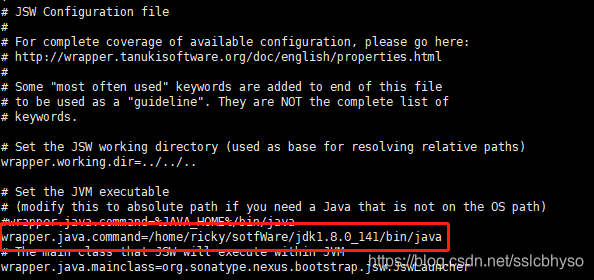
vim /home/ricky/sotfWare/nexus-2.14.8-01/bin/jsw/conf/wrapper.conf
修改wrapper.java.command=/home/ricky/sotfWare/jdk1.8.0_141/bin/java 把jdk的路径填好
-
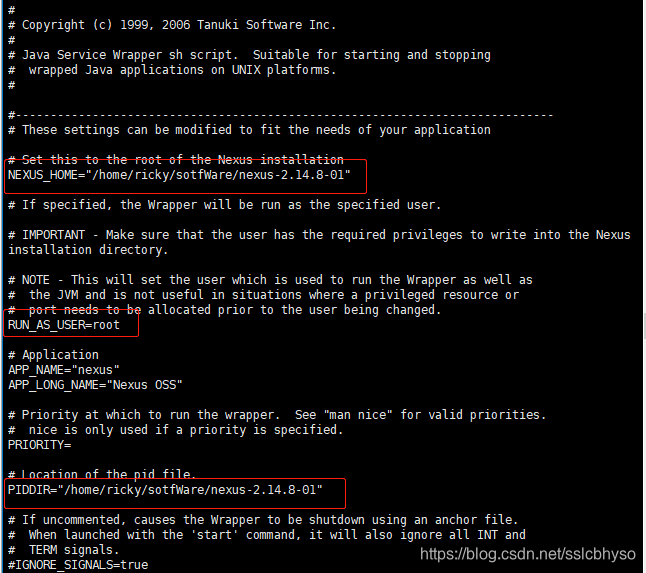
修改 vim /home/ricky/sotfWare/nexus-2.14.8-01/bin/nexus
NEXUS_HOME="/home/ricky/sotfWare/nexus-2.14.8-01"
RUN_AS_USER=root
PIDDIR="/home/ricky/sotfWare/nexus-2.14.8-01"
-
修改完了上面的用命令 /home/ricky/sotfWare/nexus-2.14.8-01/bin/nexus start 已经可以启动了
-
接下来是配置开机启动项 Ubuntu 18.04采用了新的启动管理方式所以要做下处理
-
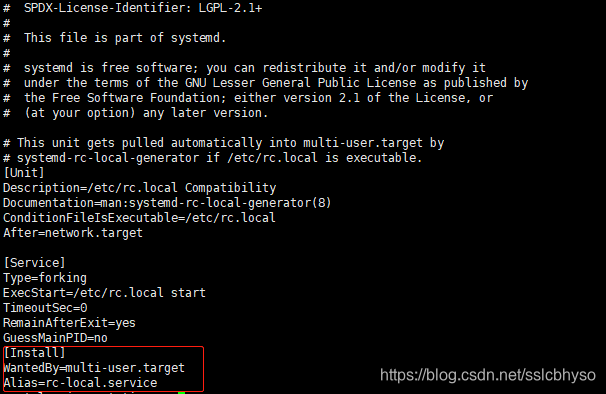
在vim /lib/systemd/system/rc.local.service 中加入
-
[Install]
WantedBy=multi-user.target
Alias=rc-local.service
-
然后建立/etc/rc.local文件
-
- 先建立rc-local.service
-
- sudo vim /etc/systemd/system/rc-local.service
-
- 将下列内容复制进rc-local.service文件
[Unit]
Description=/etc/rc.local Compatibility
ConditionPathExists=/etc/rc.local
[Service]
Type=forking
ExecStart=/etc/rc.local start
TimeoutSec=0
StandardOutput=tty
RemainAfterExit=yes
SysVStartPriority=99
[Install]
WantedBy=multi-user.target
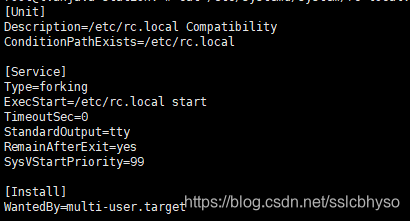
- 将下列内容复制进rc-local.service文件
-
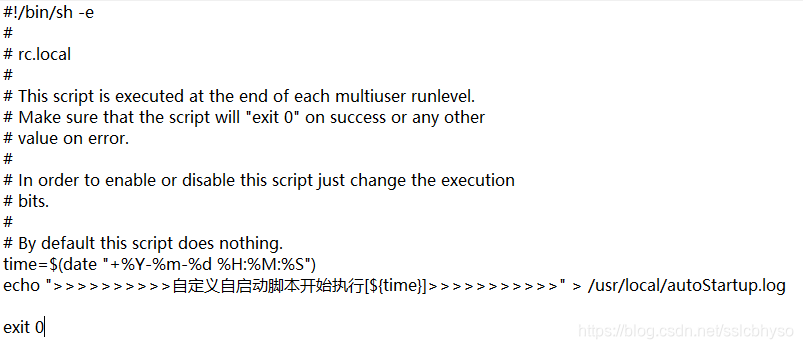
接下来创建文件rc.local
-
sudo vim /etc/rc.local 将下面内容复制进去
-
-
给rc.local加上权限,启用服务
sudo chmod +x /etc/rc.local
sudo systemctl enable rc-local
ln -s /lib/systemd/system/rc.local.service /etc/systemd/system/ -
启动服务并检查状态
sudo systemctl start rc-local.service
sudo systemctl status rc-local.service -
到这里ubuntu 的开机启动配置好了,以后把想要启动的命令放在/etc/rc.local中 exit 0 前就可以启动了,接下来说重点是Nexus的启动配置
-
- cp /home/ricky/sotfWare/nexus-2.14.8-01/bin/nexus /etc/init.d/nexusd
-
- chmod -R 755 /etc/init.d/nexusd
-
- 此处试下用这个命令systemctl stat nexusd.service 启动nexus ,OK的
-
然后把该命令放进/etc/rc.local中如图:
-
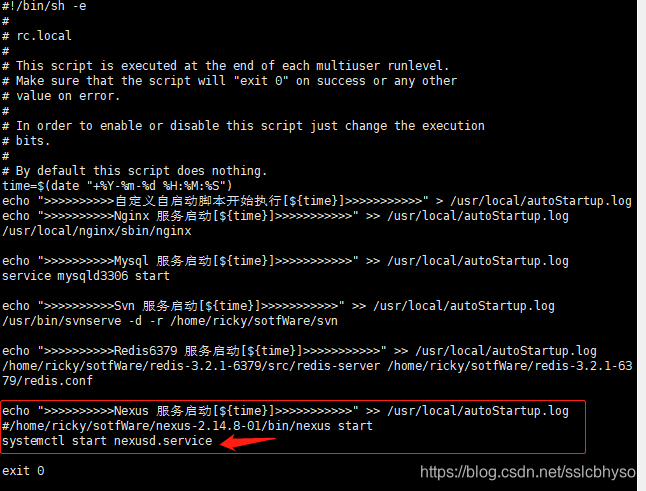
-
然后重启机器,就可以了。我之前是直接把/home/ricky/sotfWare/nexus-2.14.8-01/bin/nexus start这个命令填到脚本里的,结果是手动启动可以,但重启开机的时候起不来反而会影响其它服务的正常启动。
-
后来经过上面的配置后把systemctl start nexusd.service 这个命令放进去就可以了。





 扫一扫
扫一扫


 564
564

 被折叠的 条评论
为什么被折叠?
被折叠的 条评论
为什么被折叠?
 到【灌水乐园】发言





