VSCode测试demo

1、先在F盘新建一个文件夹,命名Cproject

2、file - open folder - 选择Cproject

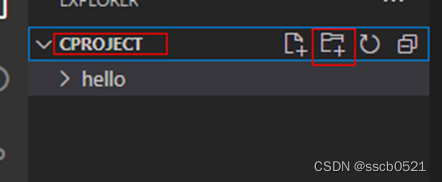
3、在Cproject下新建文件夹hello

在这里插入图片描述

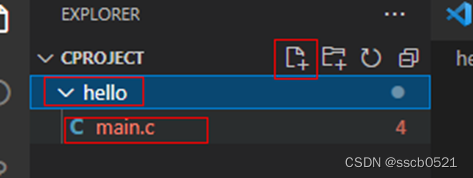
4、在hello文件夹下新建main.c

在这里插入图片描述

#include <stdio.h>

int main()
{
    printf("hello word \n");
    return 0;
}

5、F5调试选择C++(GDB/LLDB)

6、选择gcc.exe,在terminal窗口查看调试信

在这里插入图片描述

VSCode运行C# demo可以参考以下方法: - **调试运行C#控制台程序**:可以专门花时间使用VS Code,了解它调试代码和运行C#控制台的方式。不过若之前习惯使用VS开发C#项目,需进行适应。可将此过程记录下来,以便后续参考 [^1]。 - **详细操作过程**:调试路径需要设置,如将`"program": "${workspaceFolder}/bin/Debug/netcoreapp2.1/C#vscode测试.dll"`修改为`"program": "${workspaceFolder}/bin/Debug/netcoreapp2.1/win10-x64/C#vscode测试.dll"`,这样调试并同时产生新的exe文件,都会在`win10-x64`文件夹里 [^2]。 - **设置一键运行单个C#文件**:若遇到控制台运行C#无法识别`csc`命令的问题,可参考知乎文章“控制台运行C#无法识别csc命令解决”的`csc`命令无法执行部分。要注意,“添加一个路径 ;C:\Windows\Microsoft.NET\Framework\v2.0.50727\”里的`v2.0.50727`是Framework的版本号,可依据开发需求选择不同版本号,一般电脑默认.NET Framework的不同版本都安装在`C:\Windows\Microsoft.NET\Framework\`位置。此外,还需要安装并配置插件Code Runner [^3]。 - **运行与调试配置**:可对`launch.json`内容进行设置,示例如下: ```json { "version": "0.2.0", "configurations": [ { // Use IntelliSense to find out which attributes exist for C# debugging // Use hover for the description of the existing attributes // For further information visit https://github.com/OmniSharp/omnisharp-vscode/blob/master/debugger-launchjson.md "name": ".NET Core Launch (console)", "type": "coreclr", "request": "launch", "preLaunchTask": "build", // If you have changed target frameworks, make sure to update the program path. "program": "${workspaceFolder}/Study_Class/bin/Debug/net5.0/Study_Class.dll", "args": [], "cwd": "${workspaceFolder}/Study_Class", // For more information about the 'console' field, see https://aka.ms/VSCode-CS-LaunchJson-Console "console": "internalConsole", "stopAtEntry": false }, { "name": ".NET Core Attach", "type": "coreclr", "request": "attach" } ] } ``` 上述配置中,需根据实际情况修改`program`和`cwd`等字段 [^4]。
评论
添加红包

请填写红包祝福语或标题

红包个数最小为10个

红包金额最低5元

当前余额3.43前往充值 >
需支付:10.00
成就一亿技术人!
领取后你会自动成为博主和红包主的粉丝 规则
hope_wisdom
发出的红包
实付
使用余额支付
点击重新获取
扫码支付
钱包余额 0

抵扣说明:

1.余额是钱包充值的虚拟货币,按照1:1的比例进行支付金额的抵扣。
2.余额无法直接购买下载,可以购买VIP、付费专栏及课程。

余额充值