


1. BMP图片格式简介
BMP(Bitmap)是Windows操作系统中的标准图像文件格式,采用位映射存储格式,除了图像深度可选以外,不采用其他任何压缩。由于其格式简单,在嵌入式系统中被广泛使用。
2. BMP文件结构
BMP文件由四个部分组成:文件信息头、位图信息头、颜色表和像素数据。对于24位BMP图片,颜色表通常不存在。
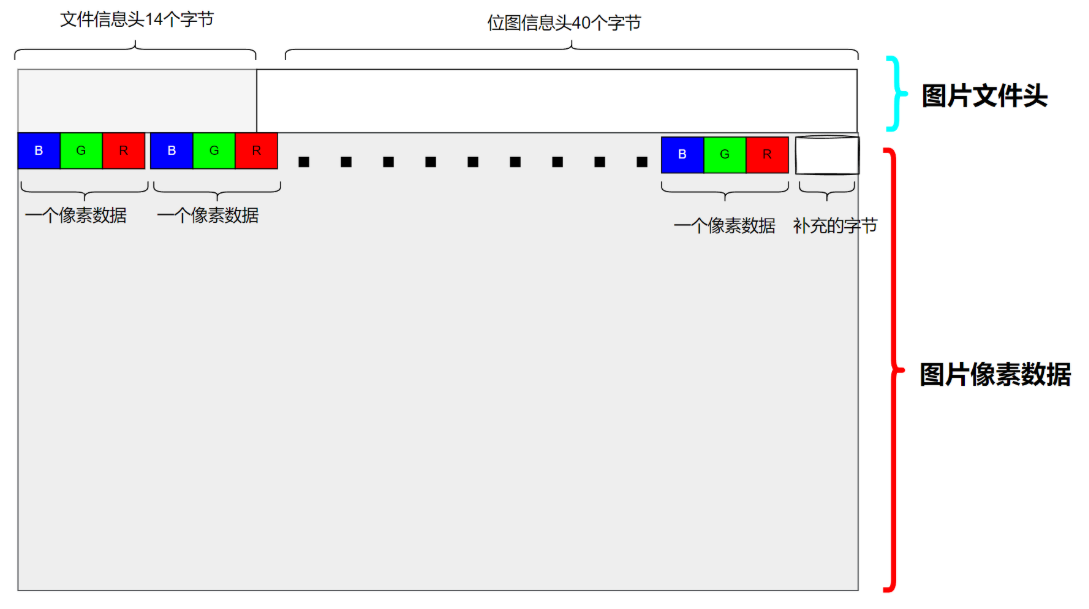
2.1 文件信息头(BITMAPFILEHEADER)
文件信息头包含BMP文件的类型、大小和位图数据的起始位置等信息。
| 字段名称 | 大小(字节) | 描述 |
|---|---|---|
| bfType | 2 | 文件类型,对于BMP文件,这两个字节的值是0x4D42,即字符’BM’ |
| bfSize | 4 | 文件大小,以字节为单位,表示整个BMP文件的大小 |
| bfReserved1 | 2 | 保留字节,必须设置为0 |
| bfReserved2 | 2 | 保留字节,必须设置为0 |
| bfOffBits | 4 | 从文件头到位图数据的偏移量,以字节为单位 |
2.2 位图信息头(BITMAPINFOHEADER)
位图信息头包含BMP图像的宽度、高度、压缩格式和颜色等信息。
| 字段名称 | 大小(字节) | 描述 |
|---|---|---|
| biSize | 4 | 信息头的大小,以字节为单位。默认这个值是40 |
| biWidth | 4 | 图像的宽度,以像素为单位 |
| biHeight | 4 | 图像的高度,以像素为单位。如果此值为正,表示图像是倒立的(即数据从图像的底部开始) |
| biPlanes | 2 | 图像的位面数,必须为1 |
| biBitCount | 2 | 每个像素的位数。对于24位BMP图像,此值为24 |
| biCompression | 4 | 图像的压缩类型。对于不压缩的图像,此值为0 |
| biSizeImage | 4 | 图像的大小,以字节为单位。对于不压缩的图像,这可以设置为0 |
| biXPelsPerMeter | 4 | 水平分辨率,每米的像素数。通常设置为0 |
| biYPelsPerMeter | 4 | 垂直分辨率,每米的像素数。通常设置为0 |
| biClrUsed | 4 | 使用的颜色数。如果为0,则表示使用所有可能的颜色。对于24位BMP图像,此值通常设置为0 |
| biClrImportant | 4 | 重要颜色的数量。如果为0,则表示所有颜色都是重要的。对于24位BMP图像,此值通常设置为0 |
2.3 像素数据
- 每个像素用3字节表示(B、G、R顺序,即蓝、绿、红)
- 图像数据按行存储,从下到上(第一行数据是实际图像最后一行颜色)
- 每行像素数据必须填充到4字节的倍数(行对齐)
- 例如:宽度为3像素(9字节)的行会填充到12字节
3. 24位BMP图片显示原理
在嵌入式系统中显示BMP图片的基本原理:
- 读取文件头信息:获取图片的宽度、高度和像素数据偏移量
- 处理像素数据:按照BGR顺序读取每个像素的颜色值
- 处理行对齐:跳过每行末尾的填充字节
- 写入显示设备:将像素数据写入帧缓冲区(如
/dev/fb0)
4. 示例代码解析
4.1 读取BMP文件信息的代码
#include <stdio.h>
#include <errno.h>
#include <string.h>

// 设置最大对齐数1,读取文件时,每个成员刚好保存对应位置的数据
#pragma pack(1)
typedef struct
{
    unsigned short bfType;
    unsigned int bfSize;
    unsigned short bfReserverd1;
    unsigned short bfReserverd2;
    unsigned int bfOffBits;
} bmpfile_head_t; // bmp文件信息头

typedef struct
{
    unsigned int biSize;
    unsigned int biWidth;
    int biHeight;
    unsigned short biPlanes;
    unsigned short biBitCount;
    unsigned int biCompression;
    unsigned int biSizeImage;
    unsigned int biXPelsPerMeter;
    unsigned int biYPelsPerMeter;
    unsigned int biClrUsed;
    unsigned int biClrmportant;
} bmpbit_head_t; // bmp位图信息头
#pragma pack()   // 取消设置的对齐数,还原为默认

int read_bmp_info(char *bmppath)
{
    bmpfile_head_t filehead;
    bmpbit_head_t bithead;
    FILE *bmpfp = fopen(bmppath, "r");
    if (bmpfp == NULL)
    {
        printf("open %s: %s\r\n", bmppath, strerror(errno));
        return -1;
    }
    fread(&filehead, sizeof(filehead), 1, bmpfp); // 读取bmp文件信息头
    fread(&bithead, sizeof(bithead), 1, bmpfp);   // 读取bmp位图信息头

    // 打印bmp文件信息头
    printf("bfType:%#x\nbfSize:%d\nbfOffBits:%d\n",
           filehead.bfType, filehead.bfSize, filehead.bfOffBits);

    // 打印bmp位图信息头
    printf("biWidth:%d\nbiHeight:%d\nbiBitCount:%d\nbiSizeImage:%d\n",
           bithead.biWidth, bithead.biHeight, bithead.biBitCount, bithead.biSizeImage);

    if (bithead.biBitCount / 8 != 3)
    {
        printf("The picture is not a 24-bit bmp!!!\r\n");
        fclose(bmpfp);
        return -1;
    }

    fclose(bmpfp);
    return 0;
}
4.2 在开发板上显示24位BMP图片的代码
#include <stdio.h>
#include <errno.h>
#include <string.h>
#include <sys/mman.h>
#include <fcntl.h>
#include <unistd.h>
#include <stdlib.h>

// 结构体定义同上...

/**
 * bmppath: 图片路径
 * lcdp: 屏幕文件内存映射后的内存
 */
int show_24bmp(char *bmppath, unsigned int *lcdp)
{
    bmpfile_head_t filehead;
    bmpbit_head_t bithead;
    FILE *bmpfp = fopen(bmppath, "r");
    if (bmpfp == NULL)
    {
        printf("open %s: %s\r\n", bmppath, strerror(errno));
        return -1;
    }
    fread(&filehead, sizeof(filehead), 1, bmpfp); // 读取bmp文件信息头
    fread(&bithead, sizeof(bithead), 1, bmpfp);   // 读取bmp位图信息头

    if (bithead.biBitCount != 24)
    {
        printf("The picture is not a 24-bit bmp!!!\r\n");
        fclose(bmpfp);
        return -1;
    }

    // 读取像素数据,通过内存映射方法写入到文件中
    unsigned char *readbuf = calloc(1, bithead.biWidth * 3);
    int pad = (4 - bithead.biWidth * 3 % 4) % 4; // 计算每行填充字节数

    // 读一行,写一行(从下往上读取,从上往下显示)
    for (int y = bithead.biHeight - 1; y >= 0; y--)
    {
        fread(readbuf, bithead.biWidth * 3, 1, bmpfp);
        fseek(bmpfp, pad, SEEK_CUR); // 跳过填充字节
        for (int x = 0; x < bithead.biWidth; x++)
        {
            // 将BGR转换为RGB并写入显存
            *(lcdp + y * 1024 + x) = readbuf[0 + x * 3] |        // 蓝色分量
                                     readbuf[1 + x * 3] << 8 |   // 绿色分量
                                     readbuf[2 + x * 3] << 16;   // 红色分量
        }
    }

    free(readbuf);
    fclose(bmpfp);
    return 0;
}

int main(void)
{
    int lcdfd = open("/dev/fb0", O_RDWR);
    if (lcdfd < 0)
    {
        perror("open /dev/fb0 fail...");
        return -1;
    }

    // 内存映射帧缓冲区
    unsigned int *lcdp = mmap(NULL, 1024 * 600 * 4, PROT_READ | PROT_WRITE,
                             MAP_SHARED, lcdfd, 0);
    if (lcdp == MAP_FAILED)
    {
        perror("mmap /dev/fb0 fail...");
        close(lcdfd);
        return 0;
    }

    show_24bmp("./01.bmp", lcdp); // 显示图片

    close(lcdfd);
    munmap(lcdp, 1024 * 600 * 4);

    return 0;
}
5. 关键技术点
5.1 结构体对齐
使用#pragma pack(1)确保结构体成员按1字节对齐,这样可以准确读取BMP文件头中的数据。
5.2 行对齐处理
BMP文件要求每行数据必须是4字节的倍数,需要通过计算填充字节数并跳过这些字节。
5.3 图像方向处理
由于BMP文件从下往上存储像素数据,而显示设备从上往下显示,需要在读取时进行反向处理。
5.4 颜色格式转换
BMP文件使用BGR格式,而大多数显示设备使用RGB格式,需要进行颜色分量的重新排列。





 扫一扫
扫一扫


 1263
1263

 被折叠的 条评论
为什么被折叠?
被折叠的 条评论
为什么被折叠?
 到【灌水乐园】发言





