


官方安装说明:
Building
Kostas edited this page on 29 Nov 2018 · 59 revisions
Pages 27
Home
123
Author's Words
Auto Tests
Browser Requirements
Building
- 欲速则不达。- Haste makes waste.
Environment
macOS
Windows
Dependencies
Optional
Compiling
Troubleshooting
Hacker's magical scripts
Command Line Options
Comparison
Customizing Output
Download
FAQ
Feature List
Font Files
How can I help?
Introduction
Clone this wiki locally
- 欲速则不达。
- Haste makes waste.
Environment
pdf2htmlEX can be built in a Unix-like environment:
GNU/Linux (for Ubuntu 12.10+, Fedora)
macOS
Windows/Cygwin
Windows/Mingw-w64
Windows/MinGW, with some modifications to pdf2htmlEX. See pdf2htmlEX on TeX Wiki (in Japanese), special thanks to Haruhiko Okumura.
macOS
An easy way to install pdf2htmlEX on macOS is to use brew. After installing brew, open a terminal:
brew install pdf2htmlEX
Windows
An easy way to build pdf2htmlEX on Windows is MSYS2 + mingw-w64. Build-pdf2htmlEX-on-Windows (in Chinese)
Dependencies
Fedora
sudo yum install cmake gcc gnu-getopt java-1.8.0-openjdk libpng-devel fontforge-devel cairo-devel poppler-devel libspiro-devel freetype-devel poppler-data libjpeg-turbo-devel git make gcc-c++
Manual
CMake, pkg-config
GNU Getopt
C++ Compiler that supports C++11, for example
GCC >= 4.6.3
A recent version of Clang
libspiro
poppler >= 0.25.0 with xpdf headers (compile with --enable-xpdf-headers)
Install libpng (and headers) BEFORE you compile poppler if you want PNG background images generated
Install libjpeg (and headers) BEFORE you compile poppler if you want JPG background images generated
Install poppler-data if your want CJK support
fontforge (with header files)
A recent version or my fork, use the pdf2htmlEX branch, which is a modified version of the 20140101 release.
Older versions may or may not work.
Optional
To generate SVG background images and process Type 3 fonts
cairo >= 1.10.0 with SVG support
FreeType
Add -DENABLE_SVG=OFF to cmake to disable it.
To add hinting information for TTF fonts
ttfautohint
Run pdf2htmlEX with --external-hint-tool=ttfautohint
To optimize CSS and JavaScript code with YUI Compressor and closure-compiler
java >= 6
Compiling
git clone git://github.com/coolwanglu/pdf2htmlEX.git
cd pdf2htmlEX
cmake . && make && sudo make install
Stable releases can be found at https://github.com/coolwanglu/pdf2htmlEX/releases.
In order to create the debug version, add -DCMAKE_BUILD_TYPE=Debug to cmake.
Troubleshooting
If you installed poppler or fontforge into a place other than /usr (If you install them from source code, they are installed to /usr/local by default), you need to set up environment variables for pkg-config, and maybe also INCLUDE_PATH, LIBRARY_PATH and LD_LIBRARY_PATH because some GNU/Linux distributions do not set them up for you (e.g. Fedora). If you are not sure about this, just install those libraries to /usr by passing --prefix=/usr to configure.
If you see error messages about:
goo/GooString.h, read the dependencies again, poppler should be compiled with --enable-xpdf-headers
spiroentrypoints.h, install header files of libspiro
undefined reference of Py_xxx, install header files of python-2.x
libintl.h, install gettext and set your system include path accordingly.
glib.h: No such file or directory, install the development header files of glib-2.0, and make sure that the location of glib.h is in INCLUDE_PATH.
Hacker's magical scripts
These scripts have been reported to be useful in various situations. They have NOT been tested by pdf2htmlEX's authors, use at your own risk! If you want to contribute, please create your own gist somewhere, and post a link and description here.
rajeevkannav/pdf2htmlEX.sh install on Ubuntu 15.04
实操步骤:
-
项目拉取
git clone git://github.com/coolwanglu/pdf2htmlEX.git
cd pdf2htmlEX
# 后台执行
cmake . && make && sudo make install
-
执行cmake时报错,找不到poppler和libfontforge两个库。
poppler这个好解决,直接去官网下载源码编译安装即可:
wget https://poppler.freedesktop.org/poppler-0.33.0.tar.xz
 tar -xf poppler-0.33.0.tar.xz
 cd poppler-0.33.0/
./configure --enable-poppler-glib
sudo make install
3. fontforge类库安装
git clone https://github.com/coolwanglu/fontforge.git fontforge.gitgit checkout pdf2htmlEX
./autogen.sh
./configuremakesudo make install

# 注意下面都是不对的。
sudo apt-get install lfontforgesudo
apt-get install libfontforge1sudo
apt-get install libfontforge-dev
4. 切换到pdf2html目录,执行cmake .
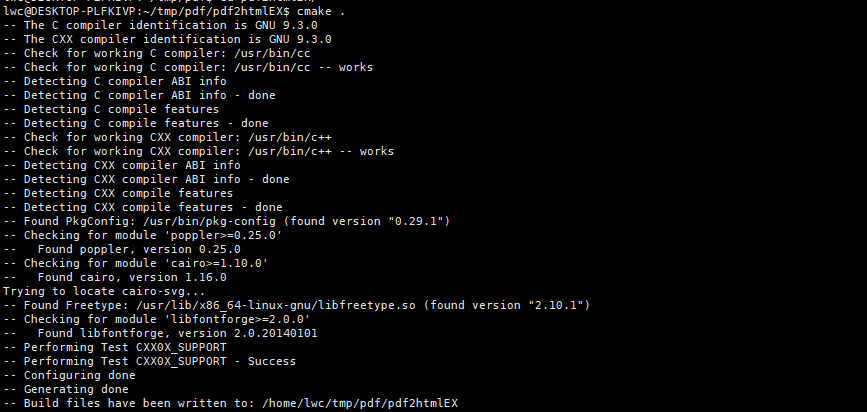
6 然后make && sudo make install
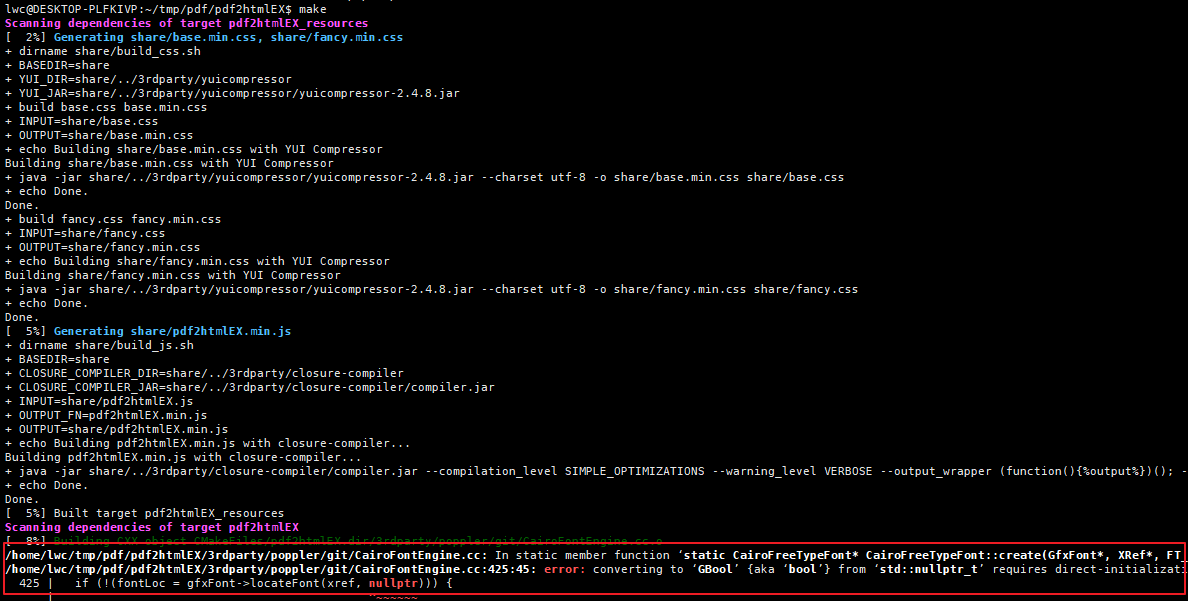
结果一直报错。百度半天没找到结果
不知道是版本问题还是系统问题没搞定。
最终打开源码把报错的行给注掉了。编译终于通过了。
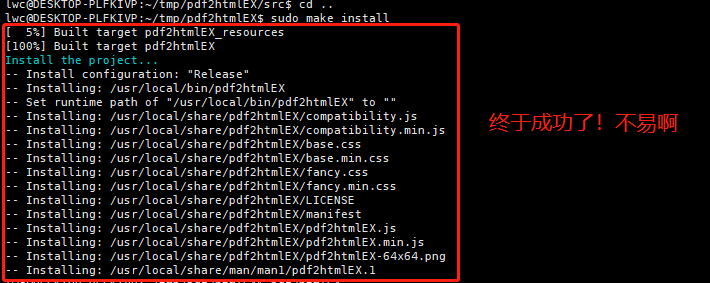
7. 试水

体验就是效果真是不错!没得说,很强大!
官方文档中提供的一键安装脚本:
HOME_PATH=$(cd ~/ && pwd)
LINUX_ARCH="$(lscpu | grep 'Architecture' | awk -F\: '{ print $2 }' | tr -d ' ')"
POPPLER_SOURCE="http://poppler.freedesktop.org/poppler-0.33.0.tar.xz"
FONTFORGE_SOURCE="https://github.com/fontforge/fontforge.git"
PDF2HTMLEX_SOURCE="https://github.com/coolwanglu/pdf2htmlEX.git"


  echo "Updating all Ubuntu software repository lists ..."
apt-get update
  echo "Installing basic dependencies ..."
apt-get install -qq -y cmake gcc libgetopt++-dev git
  echo "Installing Poppler ..."
apt-get install -qq -y pkg-config libopenjpeg-dev libfontconfig1-dev libfontforge-dev poppler-data poppler-utils poppler-dbg

  echo "Downloading poppler via source ..."
wget "$POPPLER_SOURCE"
tar -xvf poppler-0.33.0.tar.xz
cd poppler-0.33.0/
./configure --enable-xpdf-headers
make
make install

  echo "Installing fontforge ..."
cd "$HOME_PATH"
apt-get install -qq -y packaging-dev pkg-config python-dev libpango1.0-dev libglib2.0-dev libxml2-dev giflib-dbg
apt-get install -qq -y libjpeg-dev libtiff-dev uthash-dev libspiro-dev
  echo "cloning fontforge via source ..."
git clone --depth 1 "$FONTFORGE_SOURCE"
cd fontforge/
./bootstrap
./configure
make
sudo make install

  echo "Installing Pdf2htmlEx ..."
cd "$HOME_PATH"
git clone --depth 1 "$PDF2HTMLEX_SOURCE"
cd pdf2htmlEX/
cmake .
make
sudo make install

echo 'export LD_LIBRARY_PATH=/usr/local/lib:$LD_LIBRARY_PATH' >> ~/.bashrc
source ~/.bashrc

cd "$HOME_PATH" && rm -rf "poppler-0.33.0.tar.xz"
cd "$HOME_PATH" && rm -rf "poppler-0.33.0"
cd "$HOME_PATH" && rm -rf "fontforge"
cd "$HOME_PATH" && rm -rf "pdf2htmlEX"
省心方式:docker
docker pull bwits/pdf2htmlex-alpine
alias pdf2htmlEX="docker run -ti --rm -v ~/pdf:/pdf bwits/pdf2htmlex-alpine pdf2htmlEX"
命令说明:
This page lists some common recipes of pdf2htmlEX
First thing first
It is highly recommended that you install ttfautohint and always add --external-hint-tool=ttfautohint to each of the following recipes. This tool enhances font rendering for all browsers on Windows.
Double check you have poppler-data installed, for CJK characters.
Double check you have run sudo make install, or pdf2htmlEX may not be executed correctly
The simplest case
Suppose you have a PDF file pdf/test.pdf, simply running
pdf2htmlEX --zoom 1.3 pdf/test.pdf
would produce a single HTML file test.html in the current directory.
Advanced
pdf2htmlEX -f 3 -l 5 --fit-width 1024 --bg-format jpg pdf/test.pdf
would convert only the 3rd, 4th and 5th pages, and fit the page width to 1024 pixels. Background images will be generated in the JPEG format.
For publishers
pdf2htmlEX --embed cfijo --dest-dir out pdf/test.pdf
would produce a test.html and accompanying files in the out directory, in this way all the resources (fonts, images, css and javascript) are stored in separated files such that the viewer can take more advantage of browser caches.
For advanced publishers
pdf2htmlEX --embed cfijo --split-pages 1 --dest-dir out --page-filename test-%d.page pdf/test.pdf
would do something similar above, but each individual page is stored in a separated file. The files are named as test-0.page, test-1.page and so on, as specified in the command line. There is still a test.html which loads the pages dynamically through ajax. In this way the publishers are given full control, who can organize the pages as they like, for example, to implement lazy page loading.
The Ultimate Hand
pdf2htmlEX --fallback 1 pdf/test.pdf
would also produce a single test.html, which, however, consists of images and hidden text. This mode provides maximum accuracy and compatibility, at the cost of larger file size. Use this mode only when pdf2htmlEX cannot correctly process your files otherwise.
More
Just remember man pdf2htmlEX and pdf2htmlEX --help are always your best friends.
相关文档:
pdf2htmlEx学习笔记之ubuntu编译_tounicode cmap is not valid and got dropped for fo-优快云博客
Building · coolwanglu/pdf2htmlEX Wiki · GitHub
https://gist.github.com/rajeevkannav/d07f822e209a22d07176
pdf2htmlex linux 编译,关于pdf2html的各种编译-优快云博客
https://stackoverflow.com/questions/68757803/pdf2htmlex-cairofontengine-cc-error-during-dobuild

 595


 扫一扫


 被折叠的 条评论
为什么被折叠?
 到【灌水乐园】发言


