


目录
3、大屏适配方案(scale) 还有一种是vw vh也可以解决,下面使用scale解决
1、中国地图json数据生成
2、echarts 国内镜像版
ISQQW.COM x ECharts 文档(国内同步镜像) - 配置项
3、大屏适配方案(scale) 还有一种是vw vh也可以解决,下面使用scale解决
<template>
    <div class="content">
        <div class="box" ref="box">
            <!-- 内容区域 -->
        </div>
    </div>
</template>

<script setup>
import { ref, onMounted } from 'vue'

const box = ref()
// 计算缩放的比例
function getScale (w = 1920, h = 1080) {
  // window窗口宽度比例
  const ww = window.innerWidth / w
  // window窗口高度比例
  const wh = window.innerHeight / h
  return ww < wh ? ww : wh
}
// 当window 窗口发生变化触发
window.onresize = () => {
  box.value.style.transform = `scale(${getScale()}) translate(-50%,-50%)`
}
onMounted(() => {
  // 控制数据大屏的放大与缩小
  box.value.style.transform = `scale(${getScale()}) translate(-50%,-50%)`
})
</script>

<style scoped>
.content{
  width: 100vw;
  height: 100vh;
  background: red;
  position: relative;
}

.box{
  width: 1920px;
  height: 1080px;
  background: pink;
  /* overflow: hidden; */
  transform-origin: left top;
  /* display: flex; */
  position: fixed;
  top: 50%;
  left: 50%;
}
</style>
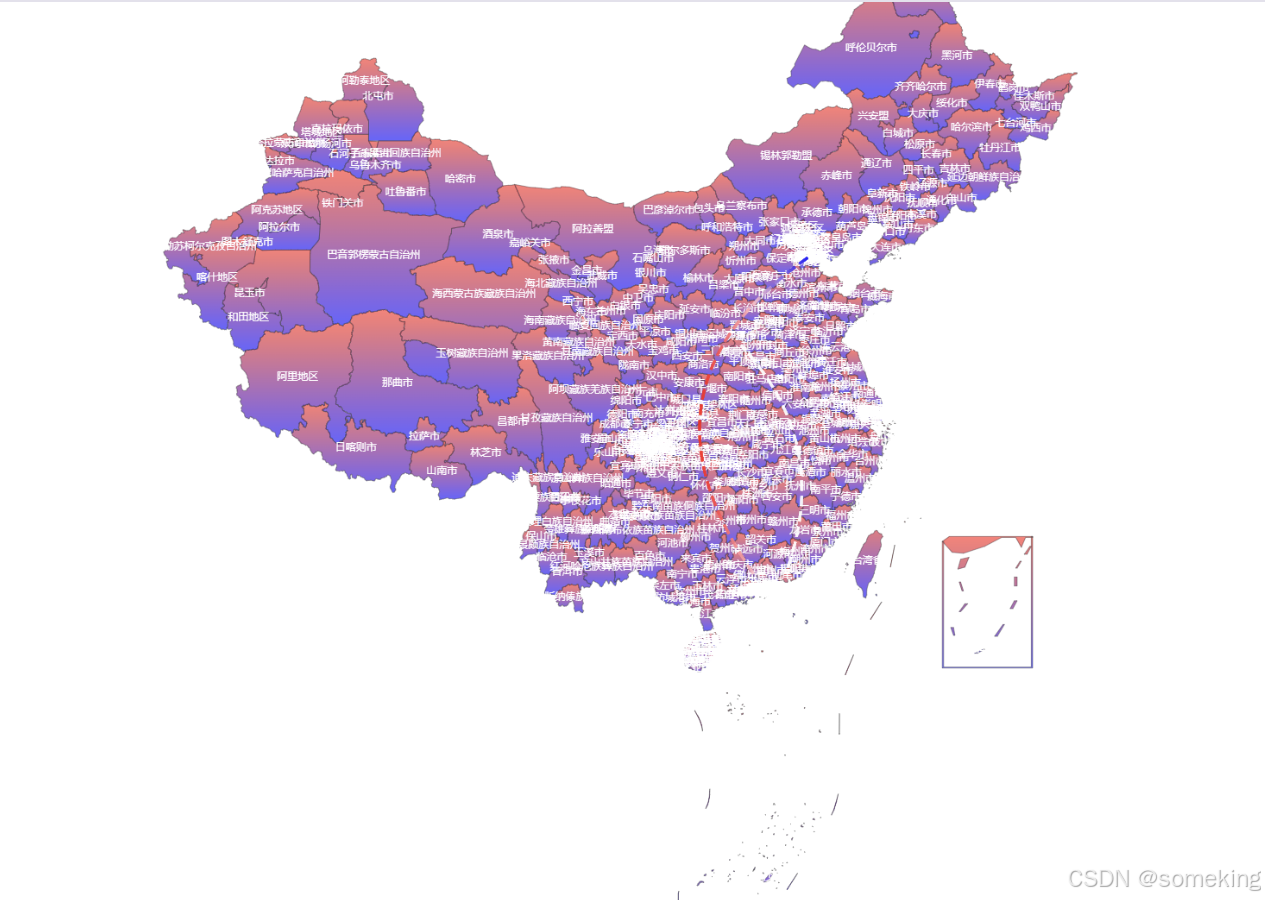
4、中国地图案例
<template>
  <div class="china" ref="china">中国地图</div>
</template>

<script setup>
import * as echarts from 'echarts'
import { ref, onMounted } from 'vue'
import ChinaJson from './chinamap.json'
const china = ref()
// 注册中国地图
echarts.registerMap('china', ChinaJson)
onMounted(() => {
  const echart = echarts.init(china.value)
  echart.setOption({
    geo: {
      map: 'china',
      show: true,
      roam: true,
      //   文字
      label: {
        show: true,
        color: 'white',
        fontSize: 8
      },
      // 多边形的颜色
      itemStyle: {
        // 线性渐变
        // color: 'red'
        color: {
          type: 'linear',
          x: 0,
          y: 0,
          x2: 0,
          y2: 1,
          colorStops: [
            {
              offset: 0, color: 'red' // 0% 处的颜色
            },
            {
              offset: 1, color: 'blue' // 100% 处的颜色
            }
          ],
          global: false // 缺省为false
        },
        opacity: 0.6
      },
      // 高亮的样式
      emphasis: {
        itemStyle: {
          color: 'red'
        },
        label: {
          fontSize: 40
        }
      }
    },
    series: [
      {
        // 航线
        type: 'lines',
        data: [
          {
            coords: [
              [115.606537, 23.471865], // 起点
              [112.434468, 34.663041] // 终点
            ],
            lineStyle: {
              color: 'white',
              width: 3,
              type: 'dashed'
            }
          },
          {
            coords: [
              [113.280637, 23.125178], // 起点
              [117.012247, 39.139446] // 终点
            ],
            lineStyle: {
              color: 'white',
              width: 3,
              type: 'dashed'
            }
          }
        ],
        // 开启特效
        effect: {
          show: true,
          symbol: 'rect',
          color: 'red',
          symbolSize: 10
        }
      }
    ]
  })
})
</script>

<style scoped>
.china{
  width: 100%;
  height: 100%;
}
</style>
5、效果展示





 扫一扫
扫一扫


 3639
3639

 被折叠的 条评论
为什么被折叠?
被折叠的 条评论
为什么被折叠?
 到【灌水乐园】发言





